

Imagine receiving an email from a company and realizing you can’t reply. No questions can be asked, and no feedback can be given; just a dead end. These are no-reply emails, a widely used tool in business communication.
From marketing campaigns to transactional notifications, these one-way messages save time but can also leave your audience feeling disconnected.
For your business, the convenience is clear: automated no-reply emails reduce inbox clutter and streamline communication. However, the drawbacks are significant. Missed feedback, lower customer trust, and decreased email engagement metrics are just a few of the issues that can quietly undermine your email strategy.
In this guide, you’ll learn what a no-reply email is, why companies use them, the main problems they create, and the best alternatives.
You’ll also learn practical tips to improve email replies and engagement, helping you create a more interactive and responsive communication strategy with your customers.
Table of Contents
What Is a No-Reply Email?
A no-reply email comes from an address that does not accept responses, such as [email protected]. Companies typically use them for automated messages like order confirmations, shipping updates, or password resets.
While efficient, no-reply emails create a one-way street. Your customers can read the message, but cannot easily respond. Even if the information is important, the lack of a response option can leave recipients feeling ignored or disconnected.
From a business perspective, using a no-reply address may save time, but it can influence email deliverability, engagement metrics, and your sender reputation over time.
Why Do Companies Use No-Reply Emails?
Many businesses rely on no-reply emails because they simplify communication and reduce the burden on support teams. These messages are often automated, which allows for high-volume sending without manually monitoring responses.
Some common reasons businesses opt for no-reply emails include:
- Automation Efficiency: You can send large volumes of messages quickly without worrying about incoming replies.
- Inbox Management: Routine notifications won’t overwhelm your support team.
- Transactional Necessity: Emails like receipts, account updates, or password resets often do not require a response.
- Consistency and Branding: Using a standardized sending format can maintain a uniform look across campaigns.
While these benefits help your business operate efficiently, relying too heavily on no-reply emails can lead to a disconnect with your audience, affecting engagement and long-term loyalty.
Stop Ignoring Your Audience with Dead-End Emails. You should clean your list, reduce bounces, and deliver messages that actually reach the right people.
What Are the Drawbacks of Using No-Reply Emails?
No-reply emails might save time for your business, but they come with serious downsides that can hurt your customer engagement, trust, and overall email strategy.
Here’s why you should reconsider using no-reply addresses.

Lower Email Deliverability and Sender Reputation
When your recipients feel frustrated by one-way emails, they’re more likely to mark them as spam or ignore them.
Over time, this can damage your email sender’s reputation, making it harder for your future emails to reach inboxes. Following best practices to improve deliverability, like using a monitored reply-to address, verifying email lists, and avoiding spam traps, can help ensure your messages land in the inbox.
Internet service providers track engagement, so repeated negative interactions with your no-reply emails can trigger spam filters and reduce visibility for all your campaigns.
For Example:
Imagine you send a promotional email about a new service launch. A customer tries to reply with a question about pricing, but discovers the address does not accept responses. Because they cannot get an answer, they mark your email as spam, which negatively affects your overall deliverability.
Reduces Customer Interaction
No-reply emails prevent your audience from engaging with you directly. Customers can’t ask questions, provide feedback, or resolve issues easily. Even important updates can feel impersonal, which may lower email engagement metrics.
For Example:
A customer receives a billing notice but notices an unexpected charge. Since the email address does not accept replies, they cannot clarify the issue directly and may unsubscribe from future communications.
Weakens Trust and Loyalty
Emails are an opportunity to build relationships. When your customers cannot respond, your business can appear distant or unapproachable. Over time, this can erode trust and affect long-term loyalty, especially if problems go unresolved.
For Example:
A loyal customer encounters a problem with a recently purchased product. They reply to an update email hoping for support, but it’s a no-reply address. With no response option, they may choose a competitor that offers more accessible communication.
Limits Feedback and Insights
No-reply emails prevent valuable feedback from reaching you. Questions, concerns, and suggestions from your audience are important for improving your products, services, and overall customer experience.
By blocking replies, you miss out on insights that could help you make better decisions.
For Example:
Your subscribers have suggestions for improving a feature in your software. If they can’t reply to your updates, you lose valuable input that could guide future improvements and keep your customers satisfied.
Compliance and Legal Risks
Email regulations like GDPR give your subscribers rights to access, modify, or delete their personal data. Using a no-reply address can make it harder for your audience to exercise these rights, potentially creating compliance issues.
Choosing monitored, reply-friendly addresses keeps both you and your customers safer.
For Example:
A subscriber wants to request deletion of their data, but your no-reply email blocks direct replies. This creates friction in meeting regulatory requirements and could lead to legal complications or loss of trust.
What Are the Best Alternatives to No-Reply Emails?
If you want your emails to get read, replied to, and appreciated, it’s time to stop relying on no-reply addresses. Using a reply-friendly approach can improve customer engagement, streamline your support process, and show your audience that you value their feedback.
Now, we will discuss how you can do it effectively:
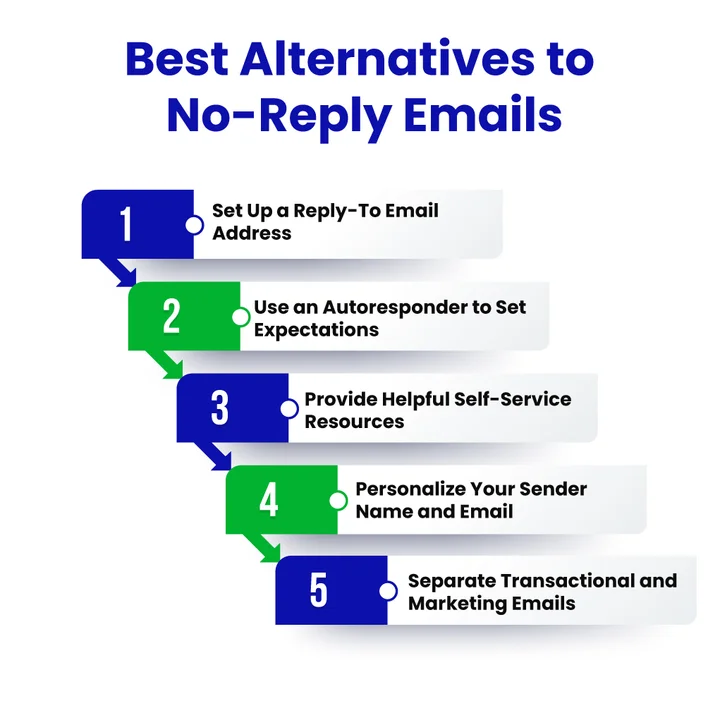
1. Set Up a Reply-To Email Address
Instead of sending messages from a no-reply address, use a dedicated mailbox like [email protected]. You can customize the reply-to address in your email campaigns so that replies go directly to a monitored inbox.
For example, even if your campaign email comes from [email protected], you can set the reply-to field to [email protected], ensuring that all responses are collected in one place.
This way, your team can efficiently manage inbound requests without juggling multiple mailboxes, keeping your communication organized and professional.
2. Use an Email Autoresponder to Set Expectations
If your support team can’t respond instantly to every reply, an autoresponder is a great solution. It lets your customers know that their message has been received, provides your average response time, and can include links to helpful resources or FAQs.
This approach helps your audience feel acknowledged and cared for, even if your team is busy. It also gives your staff the time to handle incoming requests in an orderly way without leaving them wondering about a response.
3. Provide Self-Help Resources
To reduce repetitive queries and empower your customers, create FAQs, guides, or a help center. Use insights from past support tickets or common questions to anticipate customer needs.
For example, if you notice many users asking the same question about a product feature, include the answer in a well-organized FAQ section.
These resources don’t replace direct replies but give your audience additional ways to get answers quickly, boosting satisfaction and engagement.
4. Personalize Your Sender Name and Email
Make your emails feel human. Instead of generic no-reply addresses, use a recognizable sender name and reply-to address. This small change encourages interaction and builds trust. You can rotate team members’ names for different campaigns while still managing replies centrally.
5. Segment Transactional and Marketing Emails
Not every email needs replies. Keep transactional emails, like receipts or password resets, automated, but ensure marketing emails are sent from a reply-friendly address. This separation protects email engagement metrics and ensures your audience knows which messages are interactive.
By using a monitored inbox, autoresponders, helpful resources, and personalization, you make it easier for your customers to communicate with you.
This improves email engagement, strengthens trust, and ensures your messages are effective, without losing the efficiency of automated communication.
Still Wasting Time Sending Emails That No One Receives? You can use simple verification to reduce delivery issues and improve audience response.
8 Best Tips to Improve Email Replies and Engagement
Once you move away from no-reply addresses, the next step is making sure your audience actually wants to respond. Strong engagement doesn’t happen by accident; it comes from clear messages, accessible contact paths, and communication that feels genuinely helpful.
Below are practical ways to encourage better replies, spark conversations, and build stronger relationships with your subscribers.
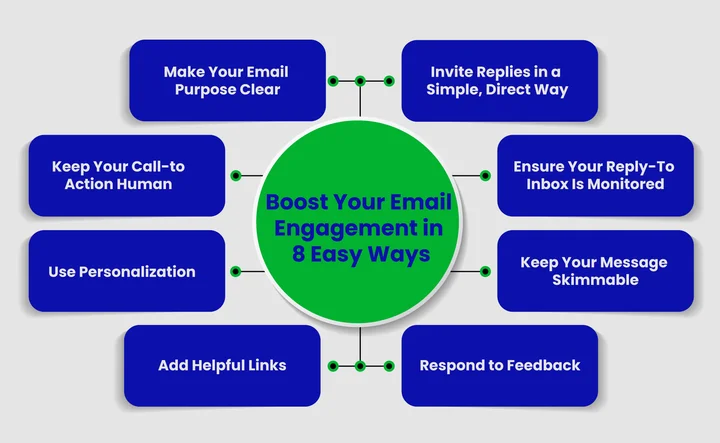
Make Your Email Purpose Clear
Whenever you send a message, your readers should immediately understand what it’s about and why it matters to them. A clear subject line and a straightforward intro help set expectations.
If your readers know the purpose from the start, they’re far more likely to reply with questions, feedback, or requests.
Instead of “Important Update,” use “Your February Billing Update, Questions Welcome.”
Invite Replies in a Simple, Direct Way
A small invitation can make a big difference. Add a friendly line that encourages your subscribers to respond if they need help or want more information.
This shows that you’re open to conversation and builds a sense of accessibility.
Try something like,
“Have a question? Just hit reply; we’re here to help.”
Keep Your Call-To-Action Human
If your email ends abruptly or only includes links, your readers may not know whether they’re allowed to respond. Add a short, human-centered CTA that makes the next step easy.
Example:
“Need help choosing the right option? Reply now, and I’ll guide you step by step.”
Ensure Your Reply-To Inbox is Monitored
Encouraging replies only work if someone is actually reading them. Make sure your reply-to inbox is checked regularly, even if you’re using autoresponders to set expectations.
When people get timely responses, they’re far more likely to stay engaged with your future emails.
Use Personalization Where Needed
You don’t need heavy personalization, just enough to make your email feel like it’s coming from a real person. A readable sender name, a warm tone, and context-based messaging can make the experience more comfortable replying.
Example:
“Hi Sarah, I noticed you recently viewed our new features. If you’d like a walkthrough, reply and let me know.”
Keep Your Message Skimmable
Most people read emails on their phone. Short paragraphs, clear spacing, and simple language make it easy for readers to understand your message and respond right away.
A cluttered or overly long message can stop people from replying simply because it feels like too much effort.
Add Helpful Links
Support articles and FAQs are great, but they shouldn’t replace your willingness to engage. Providing “self-service guidance” while reminding your reader not as a way to push them away.
Here’s a clear example you can use:
“You can check our pricing guide here, but if you’d prefer a quick explanation, just reply, and I’ll break it down for you.”
Respond to Feedback and Close the Loop
When someone takes the time to reply, acknowledge it. A quick, thoughtful response shows your audience that their message mattered. This encourages future replies and builds long-term trust.
To make sure your emails reach real subscribers and avoid sending to invalid addresses, using a reliable email verification tool can help keep your mailing list accurate and maintain stronger engagement.
How Do No-Reply Emails Affect Email Deliverability and Compliance?
No-reply emails might seem like a simple way to save time, but they can have far-reaching impacts on how your emails are delivered and how your business meets regulatory obligations.
Understanding these impacts helps you make smarter choices about your email strategy, protecting both your sender reputation and compliance in the following ways:
Lower Sender Reputation
ISPs track recipient engagement, including replies. When emails can’t be answered, recipients may ignore them or mark them as spam. Over time, this harms your sender reputation, making it harder for all future emails to reach inboxes.
Increased Spam Complaints
Subscribers who cannot reply may report your emails as spam. High complaint rates signal ISPs that you’re sending unwanted messages, decreasing overall deliverability and potentially affecting other campaigns.
Reduced Customer Interaction Signals
Engagement metrics like replies, forwards, and clicks inform ISPs about the quality of your content. No-reply emails block these interactions, lowering engagement scores and increasing the likelihood that your emails are flagged or filtered.
Compliance Challenges with Data Requests
Regulations such as GDPR and CCPA require that subscribers can access, modify, or delete their personal data. No-reply addresses make it harder for recipients to exercise these rights, putting your business at risk of regulatory issues.
Difficulty Handling Opt-Outs or Preferences
Subscribers may want to change communication preferences or unsubscribe directly via reply. No-reply emails force them to navigate alternative routes, increasing friction and potentially leading to complaints or legal exposure.
Missed Feedback and Insights
Blocking replies also blocks valuable customer feedback. Questions, concerns, or suggestions are missed opportunities to fix problems or strengthen loyalty. This results in business loses insights that could guide compliance and improve email engagement.
Conclusion
No-reply emails may seem convenient, but they can hurt engagement, reduce feedback, and burden your risk management. These messages are often automated, missing real questions, and helpful resources, you make it easy for readers to respond and interact.
Instead, adopt monitored reply-to addresses and keep them skimmable further encourages meaningful conversation and trust.
The main takeaway is to treat every email as an opportunity for dialogue. Invite replies, respond promptly, and provide guidance when needed, turning each message into a chance to strengthen relationships and boost engagement.
Start making your emails more human today, and watch your communication strategy become more effective!
Frequently Asked Questions (FAQs) on No-Reply Emails
What Are the Best Alternatives to No-Reply Emails?
The best alternatives include using a monitored reply-to email address, setting up autoresponders, and providing helpful self-service resources like FAQs or guides. These approaches let your audience interact while keeping communication manageable for your team. They improve engagement, trust, and overall customer satisfaction.
What Are the Common Mistakes Companies Make With No-Reply Emails?
Many companies use no-reply emails for every type of message, which prevents you from reaching them when you need help. They also fail to offer a clear alternative contact option, leaving you unsure of where to send questions.
What Types of Messages Should Always Allow Recipients to Reply?
Emails that involve questions, feedback, billing issues, or product updates should always allow replies. Marketing emails, surveys, and personalized offers also benefit from a reply-friendly approach. Giving recipients a way to respond encourages conversation, builds trust, and boosts engagement.
How Often Should You Check Your Reply-To Inbox?
You should check your reply-to inbox regularly, ideally multiple times a day if possible. Prompt responses show your audience that their messages are valued and encourage future interactions.
Build a Stronger Connection With Your Subscribers with Verified Email Lists.


