
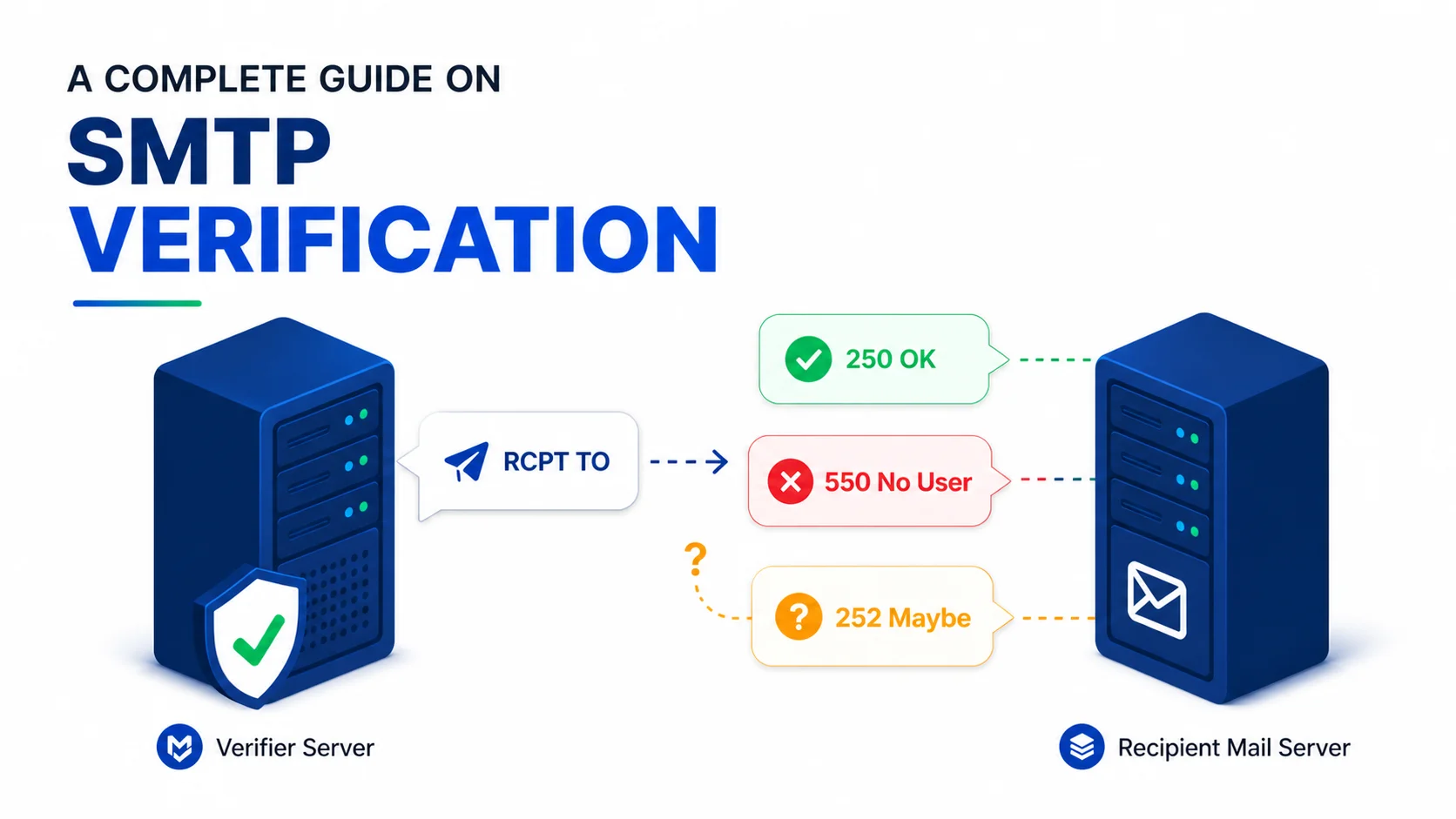

SMTP verification is a protocol-level check that determines if an email address exists by opening an SMTP connection to the recipient server and issuing an RCPT TO request.
Instead of sending a real email, the verifier stops before the message body is transmitted and relies on the server’s response, typically 250 OK for accepted mailboxes or 550 No such user for invalid ones.
This makes SMTP verification one of the most direct ways to validate mailbox existence without triggering a bounce. However, it does not behave consistently across all providers. Some servers return clear accept/reject signals, while others deliberately mask or generalize responses to prevent abuse from automated probing systems.
As a result, it is highly reliable in standard mail environments but becomes ambiguous in cases like catch-all domains, greylisted servers, and providers such as Yahoo, AOL, and parts of Microsoft’s email infrastructure.
This guide breaks down how SMTP verification actually works at the protocol level, what each response code means in practice, and where the signal becomes unreliable in real-world email systems.
SMTP verification is a process that connects to a recipient mail server and uses the RCPT TO command to check if an email address exists. The server replies with SMTP status codes such as “250 OK” for accepted mailboxes or “550 No such user” for invalid ones without sending an actual email.
Its accuracy is strong on standard mail servers, but results become less reliable on catch-all domains, greylisted systems, and providers like Yahoo, AOL, and some Microsoft email setups that restrict or generalize responses.
Because of these variations, results are typically grouped into categories like valid, risky, unknown, or invalid based on response confidence instead of a strict binary outcome.
Table of Contents
Why Does SMTP Verification Exist?
Validation can tell you if an address is structurally correct. DNS and MX lookups can tell you if a domain accepts mail at all. Neither of those checks can tell you that a specific mailbox at that domain actually exists. That gap is what SMTP verification fills.
Without an SMTP probe, you have to send a real email to discover whether a mailbox is alive, and a hard bounce is recorded against your sending domain if you intended to deliver mail or not. SMTP verification gives you the same answer with no message ever transmitted, no bounce recorded, and no impact on your sender reputation.
From the server’s perspective, the process is lightweight. The connection is opened, a recipient check is performed, and the session ends before any message content is transmitted.
How Does SMTP Verification Work? (Step-by-Step)
SMTP is a text-based protocol that defines how mail servers talk to each other. A delivery between two servers is a sequence of commands and three-digit response codes in a fixed order. Verification rides the first half of that conversation.
| Step | Command | Purpose | Response Range |
|---|---|---|---|
| 1 | Connect (TCP/25) | Open a connection to the receiving server. | 220 (greeting) |
| 2 | HELO / EHLO | Identify the sending host. | 250 |
| 3 | MAIL FROM | Define sender. | 250 |
| 4 | RCPT TO | Check recipient. | 250 / 550 / 252 / 4xx |
| 5 | DATA | Send the message body. | 354 (then content) |
| 6 | . | End of message marker. | 250 (queued) |
| 7 | QUIT | Close the connection. | 221 |
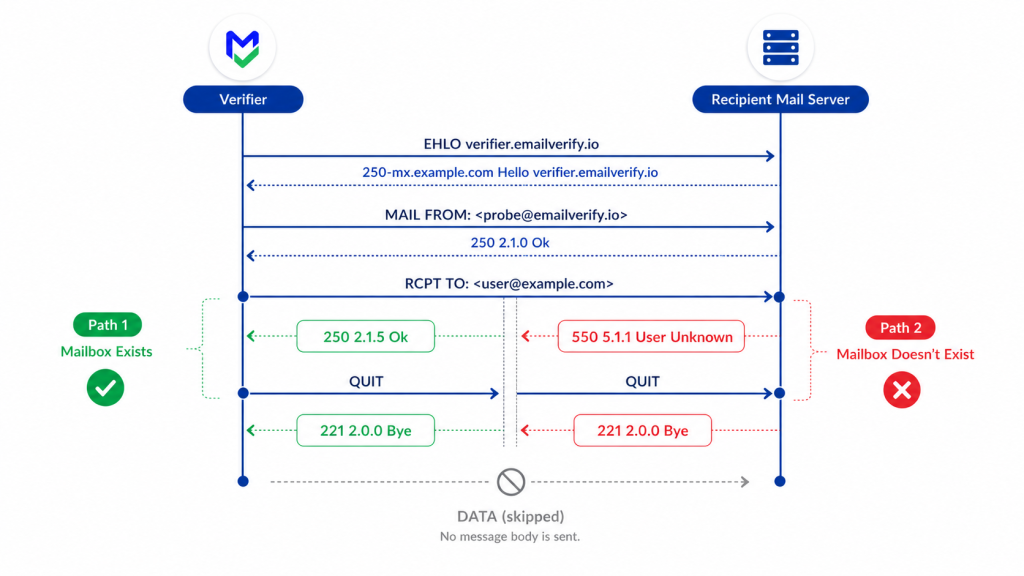
Verification stops at step 4. The verifier issues RCPT TO with the address being checked, reads the response code, and then issues QUIT. Steps 5 and 6 (DATA and the message body) are never reached.
That’s the entire reason SMTP verification doesn’t deliver mail: the protocol stage where mail would actually be transmitted is intentionally skipped.
The clean separation between RCPT TO (“Will you accept this recipient?”) and DATA (“Here is the message”) is what makes no-send verification possible at all. SMTP was designed in 1982 with a deliberate two-stage handshake so servers could reject recipients before any message body crossed the wire. That design choice, four decades old, is the foundation of every modern verification API.
RCPT TO: The Core of SMTP Verification
RCPT TO is where verification lives. Everything before it is connection and handshake; everything after it is message transmission. The verifier issues a single line that looks like this:
The recipient server’s response to that line is the entire signal. If the server says 250 OK, the mailbox exists (or, less helpfully, the domain accepts everything). If the server says 550 No such user, the mailbox does not exist. If the server says something else, the verifier has to interpret the answer with care.
This is also why SMTP probing can be gamed by the receiving side. The mailbox owner controls how the server responds. A determined provider can return ambiguous codes for every address, real or invented, and there’s nothing the verifier can do at the protocol level to force a clean answer.
The SMTP Response Codes (and What They Really Mean)
SMTP response codes are three digits long. The first digit indicates the broad class of response: 2xx is success, 3xx is intermediate, 4xx is temporary failure, 5xx is permanent failure. The second and third digits provide more specificity.
Below are the codes that show up most often in RCPT TO responses, with the practical interpretation each one supports.
| Code | Meaning | Verification Interpretation |
|---|---|---|
| 250 | OK, mailbox accepted. | Deliverable, unless the domain is a catch-all (then risky). |
| 251 | User not local; will forward. | Deliverable with forwarding. |
| 252 | Cannot verify, but will accept the message. | Ambiguous. Often a catch-all or anti-probe response. Treat it as risky. |
| 421 | Service not available; try later. | Temporary. Retry. |
| 450 | Mailbox unavailable (busy or temp issue). | Temporary. Retry. |
| 451 | Local error in processing. | Temporary. Retry. |
| 452 | Insufficient system storage. | Temporary. Retry. |
| 503 | Bad sequence of commands. | Probably anti-probe; the server expected something else first. |
| 530 | Authentication required. | Probe blocked; server is enforcing auth. |
| 550 | Mailbox unavailable / does not exist. | Undeliverable. Hard reject. |
| 551 | User not local; relay denied. | Undeliverable in this path. |
| 552 | Storage allocation exceeded. | Risky, mailbox full. |
| 553 | Mailbox name not allowed. | Undeliverable. Invalid local part. |
| 554 | Transaction failed (often blocked). | Undeliverable or blocked. Manual review. |
4xx codes are temporary; 5xx codes are permanent. A reliable verifier retries 4xx responses a few times with backoff before classifying the address as Unknown. It never marks an address as undeliverable based on a single 4xx response because greylisting servers issue 4xx specifically to filter out bots and one-shot probes.
SMTP Verification Example: Mailbox Exist
Below is a complete, annotated SMTP exchange when a verifier checks the address [email protected] against the receiving mail server, and the mailbox exists.
Notice what’s missing: there is no DATA command, no message body, no end-of-message marker. The verifier learned what it needed at the RCPT TO line and closed the connection cleanly. Total time on the wire is usually under a second. Total mail delivered: zero.
SMTP Verification Example: Mailbox Doesn’t Exist
The same probe against an address that doesn’t exist produces a different response at exactly one line:
That 550 response is the cleanest signal in all of SMTP verification. The receiving server has explicitly told the probe that no mailbox exists at that address. There’s no ambiguity, no need for retry logic, and no decision to make: the address is undeliverable and invalid, and it should be added to a permanent suppression list.
What Does SMTP Verification Cannot Confirm?
This is the section that doesn’t appear in most vendor marketing copy. SMTP verification is reliable across most of the internet, but it has well-defined limits, and pretending those limits don’t exist is how unverified addresses end up labeled “deliverable” in the wild.
1. Engagement or Activity
A 250 OK response means the mailbox accepts mail. It does not mean the mailbox owner reads it, has read it in the last twelve months, or will ever click anything you send. Engagement signals come from your ESP and your historical sending data, not from SMTP.
2. Mailbox Type or Purpose
A confirmed mailbox at [email protected] is technically deliverable, but it’s almost certainly a shared inbox staffed by no one in particular. Role-based email detection (covered separately in classification) flags these, but SMTP itself cannot distinguish a personal mailbox from a distribution list.
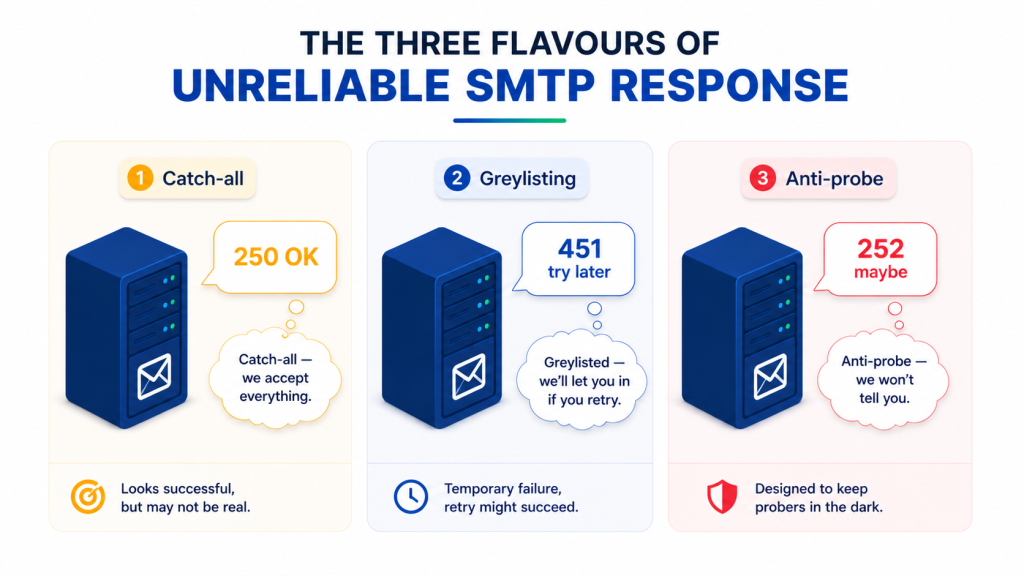
3. Catch-All Domains
On a catch-all domain, every RCPT TO returns 250. The mailbox in question might exist or might not; the SMTP protocol gives the verifier no way to find out from a single probe. Catch-all email detection (sending a second probe to a randomly generated address) is a workaround at the verifier layer, not a feature of SMTP.
4. Provider-Controlled Ambiguity
If a recipient mail server decides to return 252 (“will accept but cannot verify”) for every probe, regardless of whether the mailbox exists, the verifier has no protocol-level recourse. The truth is on the server side, and the server controls what it discloses.
The honest framing for technical readers: SMTP verification is a high-quality signal in the cooperative case and a low-quality signal in the adversarial case. Most of the internet is cooperative. A few major providers, motivated by preventing spam traps and abuse rather than malice, have moved toward the adversarial end of the spectrum, and verifiers have to fall back to other signals when probing them.
SMTP Providers with Inconsistent Behavior
SMTP verification does not behave uniformly across all email providers. While the underlying protocol (RCPT TO) is standardized, the way mail servers interpret, respond to, and restrict verification requests varies significantly based on provider-level security policies, anti-abuse systems, and infrastructure design.
In practice, this means SMTP responses cannot always be treated as direct truth signals. Some providers return clear acceptance or rejection, while others intentionally limit or generalize responses to reduce abuse from automated probing systems.
Because of this variation, SMTP verification results must always be interpreted in context rather than in isolation.
Below is a structured overview of how major email providers behave during SMTP verification:
| Provider | Probe Behaviour | What That Means in Practice |
|---|---|---|
| Gmail / Google Workspace | Honest | Returns a clean 250 / 550 for non-catch-all configurations on workspace domains. Gmail consumers (@gmail.com) generally return a clean 550 for unknown users. Workspace catch-all behavior is configurable per domain. |
| Microsoft Outlook.com / Hotmail | Inconsistent | Behavior varies. Some addresses get clean responses, others receive 250 OK regardless of validity, and rate limits trigger 4xx after several probes from the same IP. Verifiers fall back to MX-level and historical signals. |
| Microsoft Office 365 (custom domains) | Inconsistent | Per-tenant configuration. Many tenants behave like Gmail Workspace; others act as catch-alls by default. Anti-probe rate limits kick in faster than on most providers. |
| Yahoo Mail | Misleading | Routinely returns 250 OK or 252 for RCPT TO probes regardless of whether the mailbox exists. Anti-probe behavior has been documented for years. A single SMTP probe gives almost no useful signal here. |
| AOL Mail | Misleading | Inherits Yahoo's verification posture (same parent infrastructure). Treat 250 responses with low confidence. |
| Apple iCloud / me.com / mac.com | Inconsistent | Often accepts probes with 250 but applies aggressive rate limiting. Bulk runs against many iCloud addresses see throttling within a few hundred probes. |
| Custom domains on small mail servers | Honest | Standard Postfix, Exim, and Sendmail configurations return clean 250 / 550. Catch-all is common at small businesses and is detected separately. |
| Enterprise mail gateways (Proofpoint, Mimecast, etc.) | Inconsistent | Often add additional 4xx greylisting and anti-probe layers ahead of the actual mail server. First probe usually returns 4xx; legitimate retry produces a clean answer. |
| Self-hosted enterprise (Exchange, on-prem) | Inconsistent | Behavior depends on the admin's configuration. Some return clean RCPT TO responses; others enforce auth before recipient declaration. |
The single most common red flag when evaluating verification vendors: every Yahoo address you check comes back as deliverable with high confidence. That’s not accuracy; that’s the verifier accepting Yahoo’s misleading 250 OK at face value. Honest verifiers grade those addresses as risky with a reason code that names the provider behavior as the source of uncertainty.
Catch-All Domains and SMTP Ambiguity
Catch-all domains are not deceptive, but they introduce the same limitation seen in providers like Yahoo: a 250 OK response does not confirm if a mailbox exists. Instead, the domain accepts all recipients and routes or processes them internally, making SMTP responses identical for valid and invalid addresses.
To detect this, verifiers send a second probe using a randomly generated address. If it also returns 250 OK, the domain is flagged as catch-all. All results from that domain are then downgraded to risky due to ambiguity.
A catch-all is a domain-level setting, not tied to individual mailboxes. SMTP alone cannot identify it, so detection must happen outside the standard RCPT TO check.
Result: example.com is a catch-all. The original probe to [email protected] is downgraded from Valid to Risky.
How Does Greylisting Affect SMTP Verification Results?
Greylisting is an anti-spam technique where servers temporarily reject first-time senders with a 4xx response, typically 451 or 421. The assumption is that legitimate mail servers will retry, while most spam systems will not.
From an SMTP verification perspective, a single probe is not enough. If a verifier does not retry, greylisted addresses may be incorrectly marked as unknown or undeliverable, even though they are valid.
To resolve this, verifiers retry the same RCPT TO request after a short delay, usually from the same IP. A successful retry typically returns a 250 OK response.
Greylisting retries should come from the same IP that issued the original probe. A retry from a different IP is treated as a new sender by the greylisting server and gets the same 4xx response. This is one of several reasons why SMTP probing infrastructure benefits from sticky-IP routing per probe attempt, not just rotating IP pools.
Anti-Probe Throttling
The third and most adversarial form of unreliable SMTP response is anti-probe throttling. A receiving server that detects repeated RCPT TO patterns from a single IP, ten, twenty, or fifty probes in quick succession, will start to return 252, 421, or even 530 responses, regardless of the actual mailbox status. The probe is being deliberately starved of useful information.
Anti-probe throttling occurs when mail servers detect repeated RCPT TO queries and begin degrading or masking responses. This is common at large providers and enterprise gateways.
Once triggered, servers may return 252, 421, or generic 4xx responses regardless of whether the mailbox exists. The goal is to reduce the reliability of automated probing. This makes results dependent on infrastructure behavior rather than mailbox validity. Verifiers mitigate this using distributed IPs, domain-level rate limiting, and reduced probe frequency per server.
Example throttled response:
C: > RCPT TO: [email protected]
S: < 252 2.1.5 Cannot verify, but will accept \
How Do Email Verifiers Handle Uncertain SMTP Responses?
A production-grade email verifier does not treat SMTP responses as absolute truth. Instead, it interprets them as signals and runs them through layered checks such as retries, provider-aware rules, and classification logic.
This helps account for ambiguous or inconsistent SMTP behavior. The final output is a confidence-based result rather than a simple valid or invalid answer.
In practice, this means each SMTP response is evaluated in context rather than in isolation. Verifiers combine multiple technical layers to determine whether a result is reliable, uncertain, or structurally inconclusive.
| Layer | What It Does | Why It Matters |
|---|---|---|
| IP rotation | Distributes probes across multiple outbound IPs. | Reduces the risk of anti-probe throttling on a single IP. |
| Per-domain rate limiting | Controls probe frequency per recipient domain. | Prevents triggering provider-level defense systems. |
| Sticky-IP retry | Ensures greylisting retries originate from the same IP. | Greylisting decisions are tied to sender identity. |
| Catch-all detection probes | Sends random-address checks alongside real probes. | Identifies domains that accept all recipients. |
| Provider-aware logic | Adjusts handling for known restrictive providers. | Accounts for Yahoo, AOL, and select Microsoft behaviors. |
| Historical signals | Uses prior response patterns for context. | Improves accuracy when SMTP responses are inconsistent. |
| Classification overlay | Applies disposable, role-based, and domain risk data. | Detects issues SMTP cannot reveal. |
| Confidence scoring | Combines all signals into a final grade. | Converts raw signals into a usable decision. |
The key takeaway is that SMTP alone is not sufficient to determine deliverability. A reliable email verification API does not force certainty where the protocol is ambiguous. Instead, it translates mixed or incomplete signals into a graded confidence score that reflects real-world deliverability conditions more accurately than binary classification.
How Can You Test SMTP Verification Manually?
If you want to understand how SMTP verification works at the protocol level, you can test it manually using basic network tools. This is useful for learning how mail servers respond to SMTP commands, but it should not be treated as a production-ready approach. The goal is to observe real SMTP behavior, not to build a scalable verification system.
What You Need
- A network connection that allows outbound TCP on port 25 (most residential ISPs and many cloud providers block this).
- A command-line SMTP client: telnet works for one-off testing; netcat (nc) is slightly more reliable.
- DNS lookup tools (dig or nslookup) to find the recipient’s MX records.
Steps
- Run dig mx example.com to find the highest-priority MX server (lowest preference number).
- Connect with telnet that-mx-server.example.com 25 (or nc that-mx-server.example.com 25).
- Wait for the 220 greeting, then send EHLO yourdomain.com and wait for 250.
- Send MAIL FROM: <[email protected]> and wait for 250.
- Send RCPT TO: <[email protected]> and read the response.
- Send QUIT to close cleanly.
Using raw RCPT TO probes in production systems can trigger anti-abuse controls, leading to throttling or IP blocklisting that may affect legitimate email delivery. SMTP probing should be handled on dedicated infrastructure with rate limits, IP rotation, and retry logic instead of application servers.
Common Misconceptions About SMTP Verification
SMTP verification is frequently misunderstood because the protocol is simple, but real-world server behavior is not. Many assumptions come from treating SMTP responses as absolute signals when they actually vary across providers and configurations.
1. SMTP verification means sending a test email
It doesn’t. The process stops at RCPT TO before the DATA stage, where message content is transmitted. No email is delivered; the server only logs a short connection.
2. If the verifier returns 250, the mailbox definitely exists
Not always. Catch-all domains return 250 for every address, and some providers (like Yahoo, AOL, and certain Microsoft setups) may also return 250 for non-existent users. A 250 is only reliable in clearly non-catch-all, cooperative environments.
3. Greylisting failures mean the address is bad
They don’t. Greylisting is a temporary rejection that expects a retry. A proper verifier retries and often receives a valid 250 on the next attempt.
4. You can build SMTP verification into a signup form
You can build the API call to a managed verifier into a signup form, and that’s the right pattern. You should not build raw RCPT TO probes into a signup form running from your application server. The first version works; the second version gets your IP throttled.
5. SMTP verification will eventually replace email validation
They aren’t competing. Validation (syntax, DNS, and MX records) catches addresses that can’t possibly work. SMTP verification catches addresses that look fine structurally but don’t have a real mailbox behind them. Modern systems use both together for reliable results.
How Does EmailVerify.io Approach SMTP Verification?
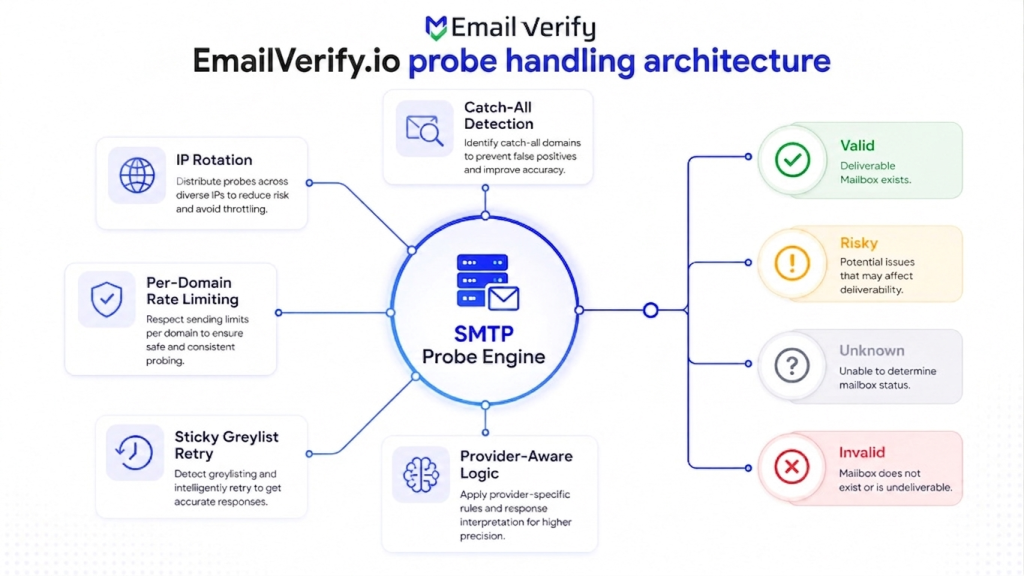
EmailVerify.io processes every email through a structured five-stage pipeline: syntax check, domain validation, MX lookup, SMTP probing, and classification. This ensures each result is evaluated across multiple layers instead of relying on SMTP alone.
Core Execution Model
- Managed IP rotation: Probes are distributed across a controlled IP pool to reduce provider-level throttling and anti-probe triggers.
- Per-domain rate limiting: Request flow is regulated per domain to avoid burst-based blocking and inconsistent responses.
- Greylisting retry handling: Retries are executed from the same IP to correctly resolve temporary SMTP deferrals.
- Catch-all detection: Parallel random-address probes identify domains that accept all recipients.
- Provider-aware logic: Adjusts handling for services like Yahoo, AOL, and certain Microsoft environments where SMTP responses are intentionally ambiguous.
Output structure
Each verification result is returned with a primary status: Valid, Invalid, Catch-all, Do not mail, Role-based, Unknown, or Skipped.
Each verification result is returned with a primary status:
- Valid
- Invalid
- Catch-all
- Do not mail
- Role-based
- Unknown
- Skipped
Along with each status, reason codes explain the underlying signal (e.g., SMTP response, catch-all detection, provider behavior, or classification match), ensuring results reflect confidence rather than a single raw SMTP outcome.
Tip: Prioritize sending to valid addresses first. Segment catch-all, role-based, and unknown results for closer monitoring or secondary validation before engagement.
Test any SMTP verifier with known edge cases: a catch-all domain, a Yahoo address, a greylisted server, and a standard Gmail account. A reliable system won’t treat all results the same. Gmail should return Valid, Yahoo should surface as uncertain or risky, and greylisted servers should resolve only after a retry.
Frequently Asked Questions (FAQs)
2. Does SMTP verification send a real email?
No. The probe stops at the RCPT TO step, before the DATA command. DATA is the SMTP step where a message body is actually transmitted, and it's never executed. From the recipient mailbox's perspective, nothing arrived; from the receiving server's logs, there's only a brief connection that ended without DATA.
3. How accurate is SMTP verification?
Accuracy depends on the recipient server. For most domains, RCPT TO returns clean 250 / 550 responses that are highly reliable. Accuracy drops at catch-all domains, greylisting servers, and providers that have hardened their RCPT TO behavior against probing (notably Yahoo, AOL, and parts of Microsoft's estate). A good verifier expresses this honestly with graded statuses rather than forcing a binary answer.
4. Can I run SMTP verification myself?
Technically yes, with telnet or netcat against the recipient's MX server on port 25, but most ISPs block outbound port 25, and major providers throttle probing IPs quickly. A manual probe gives you only the raw RCPT TO response without catch-all detection, retry logic, or classification. For anything beyond protocol learning, an email verification tool is faster and safer for your network reputation.
5. Why does my application server get blocked during RCPT TO checks?
Repeated SMTP probing from a single IP is often flagged as abuse. Major providers and gateways may throttle, block, or distort responses, which can also impact unrelated email delivery from the same server. Verification should run on dedicated infrastructure.
6. What does the 252 SMTP response mean?
Officially, 252 means "cannot verify the recipient but will accept the message and attempt delivery." In practice, it's most often a catch-all or anti-probe response: the server is telling the verifier that it won't confirm whether the mailbox exists. Honest verifiers grade 252 results as risky with a reason code, rather than treating them as confirmed valid.
7. Does SMTP verification work for every email provider?
It works for most domains, but not all behave consistently. Yahoo/AOL often return misleading results, Microsoft and iCloud may throttle or vary responses, and catch-all domains always return 250. Reliable systems combine SMTP with additional signals and classification instead of relying on it alone.
Final Thoughts
SMTP verification remains the backbone of email validation because the SMTP protocol cleanly separates recipient checking (RCPT TO) from message delivery (DATA). In most cases, that still produces clear signals like 250 (valid) or 550 (invalid).
The real complexity appears where that clarity breaks down, in catch-all domains, greylisting systems, and providers that intentionally limit RCPT TO visibility. These scenarios require interpretation beyond raw SMTP responses, using retries, parallel checks, and provider-aware logic.
If you’re evaluating a verifier, the key test is simple: it should handle ambiguity honestly. Catch-all results, Yahoo-style responses, and greylisting behavior should be clearly identified as uncertain when the signal is not reliable.
Strong verification is defined by how accurately it represents uncertainty, and that’s what separates trusted email verification services from tools that simply accept raw SMTP responses at face value.
Managing outreach for agencies, building on the API as a developer, or running email marketing campaigns at scale, graded SMTP verification adapts to your workflow.
SMTP Delivers the Core Signal for Email Verification at the Protocol Level.
EmailVerify.io converts SMTP-level mailbox responses into graded, actionable verification intelligence.


