HubSpot Email Verification Integration — Clean Contacts, Zero Bounces
EmailVerify.io's HubSpot email verification integration lets you import HubSpot contacts, validate every email address against 20+ real-time checks, and sync clean results back to HubSpot automatically — no CSV exports, no manual work. Keep your CRM free of invalid, disposable, and catch-all addresses. Reduce bounce rates by up to 98%, protect your domain sender score, and make sure every HubSpot campaign reaches a real inbox.


Quick Summary: HubSpot Email Verification Integration
- What it does: Imports HubSpot contacts, verifies email addresses using 20+ real-time checks, and syncs clean results back to HubSpot automatically.
- Who it's for: Marketing teams, sales teams, agencies, and any business using HubSpot CRM that sends email campaigns.
- Setup time: Under 5 minutes via secure OAuth2 connection — no coding required.
- Key output: Three custom HubSpot fields added per contact: EV_Status, EV_SubStatus, EV_Validation_Timestamp.
- Cost: Free credits available on sign-up. Pay-as-you-go credit pricing.See pricing.
- Notable feature: Auto-Validation flags new contacts in real time as they are added to HubSpot.
How to use the integration
To get started with the HubSpot integration, you’ll need an active HubSpot account, which you can create at https://app.hubspot.com/signup-hubspot/crm, along with an EmailVerify.io account.
Step 1: Sign in to EmailVerify.io
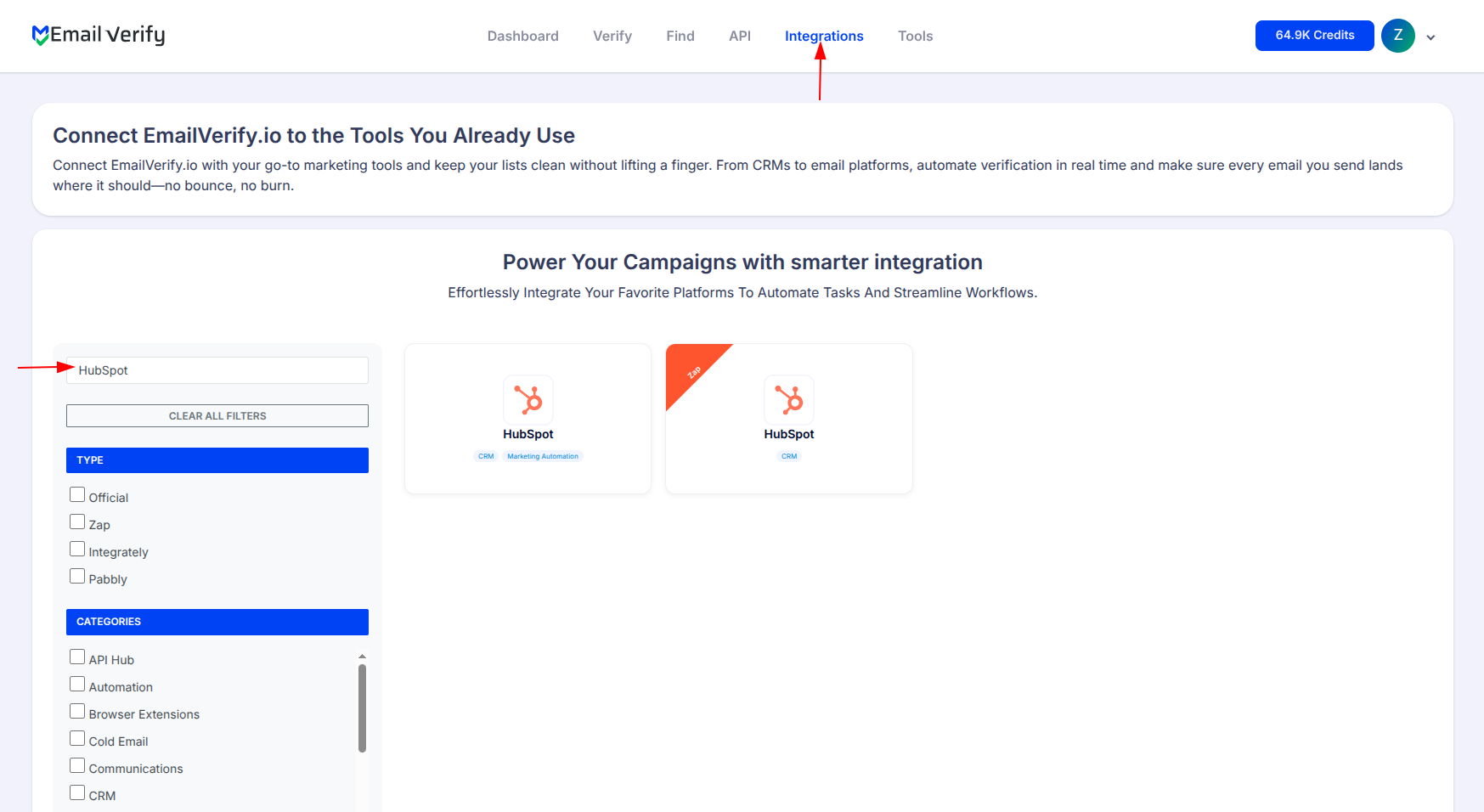
Step 2: Open the HubSpot Integration

Step 3: Select HubSpot Integration
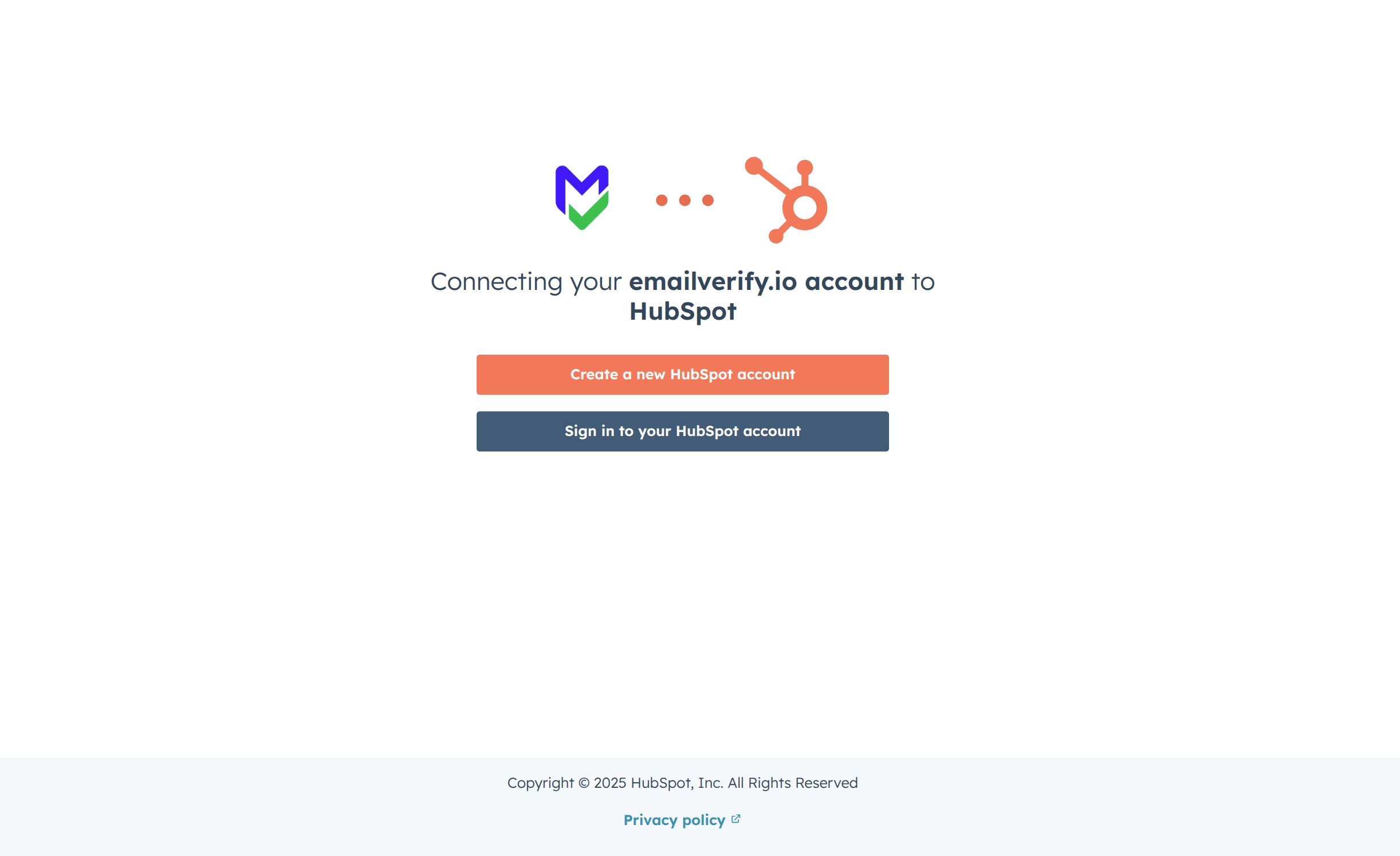
Step 4: Sign in to HubSpot

Step 5: Authorize Account Access

Step 6: View Your HubSpot Lists

Step 7: Select Lists to Validate
Note: The results of the validation are automatically exported to the integration they originated from.

Step 8: Monitor Progress

Step 9: Download Results
Note: Validation results are automatically sent to the connected integration. Three custom fields will be added to each verified contact i.e EV_Status, EV_SubStatus, and EV_Validation_Timestamp. These custom fields are essential for maintaining up-to-date and accurate contact information, allowing for better management and engagement with your contacts.

HubSpot Email Verification Integration Features
To use this integration, you'll need a valid HubSpot account. During setup, you'll be asked to connect your HubSpot account to EmailVerify.io. We use OAuth2 for secure authorization, which allows EmailVerify.io to access your HubSpot data without needing your credentials.
Import Contacts from HubSpot
Import contacts from your HubSpot account directly into EmailVerify.io for validation.
Powerful Email Verification
Validate contacts using EmailVerify.io's powerful email verification service to identify invalid addresses.
Export Results Back to HubSpot
When exporting the validation results to HubSpot, custom fields are added to each contact: EV_Status, EV_SubStatus, and EV_Validation_Timestamp.
Auto-Validation Feature
With the Auto-Validation feature, EmailVerify.io automatically verifies any new contact added through your connected integrations. Simply toggle Auto-Validation ON to ensure your lists remain accurate and your emails reach real, deliverable addresses.
Secure OAuth2 Connection
We use OAuth2 for secure authorization, which allows EmailVerify.io to access your HubSpot data without needing your credentials.
Maintain Clean Lists
Keep your contacts clean, reduce bounce rates, and improve deliverability, ensuring your messages reach the right audience.
Why HubSpot Data Goes Stale (and What It Costs You)
Email addresses decay at a rate of 22–30% every year. That means if you build a HubSpot list of 10,000 contacts today, up to 3,000 of those addresses will be invalid within 12 months — and you may not know it until your bounce rates spike. Each invalid email you send:
- ✗ Damages your domain reputation with ESPs like Gmail and Outlook
- ✗ Increases the chance of landing in spam for everyone else on your list
- ✗ Distorts your HubSpot analytics and lead scoring accuracy
- ✗ Wastes marketing spend on contacts who will never receive your message
HubSpot itself has no built-in email validation. Contacts are added from form submissions, CSV imports, manual entry, and third-party integrations — any of which can introduce invalid, misspelled, disposable, or temporary email addresses into your CRM. EmailVerify.io's HubSpot integration solves this automatically, flagging and categorising every address before your next send.
What EmailVerify.io Checks in Every HubSpot Contact Email
When you run the HubSpot integration, EmailVerify.io performs 20+ layered checks on every email address:
| Check | What It Detects |
|---|---|
| Syntax validation | Formatting errors (missing @, invalid characters) |
| Domain / DNS check | Whether the domain exists and accepts emails |
| MX record check | Whether the domain has active mail exchange records |
| SMTP verification | Confirms the mailbox actually exists on the server |
| Catch-all detection | Identifies domains that accept all emails (risky) |
| Disposable detection | Flags temporary / burner email addresses |
| Role-based detection | Flags generic addresses (info@, admin@, noreply@) |
| Free email detection | Identifies Gmail, Yahoo, Hotmail, etc. |
Each verified HubSpot contact receives three custom fields: EV_Status (Valid, Invalid, Catch-all, Disposable, Unknown), EV_SubStatus (detailed reason for the status), and EV_Validation_Timestamp (date and time of verification).
HubSpot Email Verification — What Our Users See After Cleaning
Businesses using EmailVerify.io with HubSpot typically see:
Results vary depending on the age and source of your HubSpot contacts. Lists from trade shows, form submissions, and purchased databases typically contain 10–40% invalid addresses. Organic inbound lists average 3–8%.
HubSpot Email Verification Integration vs. Manual List Cleaning
Manual list cleaning typically involves exporting contacts to CSV, running checks in a spreadsheet, removing bad records, and re-importing — a process that takes hours and introduces human error. The EmailVerify.io HubSpot integration processes the same task in minutes and writes results directly back to each contact record.
| Approach | Time Required | Accuracy | Auto-Sync | Ongoing Protection |
|---|---|---|---|---|
| EmailVerify.io | Minutes | 98%+ | Yes | Auto-Validation ON |
| Manual export / check | Hours to days | ~60% | No | None |
| HubSpot native | No built-in tool | N/A | N/A | N/A |
| Zapier workaround | Setup: 2–4 hours | ~75% | Partial | Limited |
Who Should Use the HubSpot Email Verification Integration
Marketing Teams
If your HubSpot email campaigns are seeing bounce rates above 2%, your domain reputation is already at risk. Verifying contacts before each major send protects deliverability and keeps your analytics clean.
Sales Teams Using HubSpot CRM
Invalid contact emails waste sales rep time and distort pipeline metrics. Verifying contacts at import ensures your team is always working with reachable, real prospects.
Marketing Agencies
Managing multiple HubSpot portals? Use the integration to verify client lists in bulk, maintain clean data standards, and reduce the risk of client email programs getting flagged by ESPs. See our agency solution.
E-commerce Businesses
High-volume transactional email programs (order confirmations, cart abandonment, loyalty programs) are especially sensitive to bounce rates. Automatic validation ensures your operational emails reach real inboxes.
SaaS & B2B Companies
Freemium signups and trial users frequently use disposable or role-based emails. Auto-Validation in the HubSpot integration flags these at the moment of contact creation, keeping your pipeline data accurate. See our B2B solution.
Technical Questions — HubSpot Email Verification Integration
How long does it take to verify a HubSpot list of 10,000 contacts?
Verification speed depends on the domains in your list. On average, EmailVerify.io processes 10,000 contacts in 10–20 minutes. You receive an email notification when processing is complete.
Does EmailVerify.io need my HubSpot credentials?
No. We use OAuth2 for secure authorization. You grant permission through HubSpot's own login page and we never see or store your password.
What HubSpot plan do I need to use this integration?
The integration works with all HubSpot plans including the free CRM tier. You need the ability to create custom contact properties, which is available on all plans.
Can I re-verify contacts that were already verified?
Yes. You can re-run verification on any HubSpot list at any time. EV_Validation_Timestamp records when each verification was last run, so you can identify which contacts need a refresh.
Is my HubSpot data shared with any third parties?
No. EmailVerify.io processes email addresses for verification purposes only. Contact data is not stored or shared with third parties. See our Privacy Policy for full details.
Frequently Asked Questions

How can I integrate EmailVerify.io with HubSpot?
EmailVerify.io integrates with HubSpot via OAuth2 — no API keys or manual credential entry required. Log in to your EmailVerify.io account, go to Integrations and search for HubSpot, click Connect and authorise via HubSpot's secure login page, then select the lists you want to verify. Results sync automatically back to each contact record. The entire setup takes under 5 minutes, and your HubSpot contacts will show three new custom fields — EV_Status, EV_SubStatus, and EV_Validation_Timestamp — after verification is complete.
What is auto-validation in the HubSpot integration?
Auto-Validation is a feature that automatically verifies new contacts as they are added to your connected HubSpot account, one at a time. When toggled ON, any new contact added individually to HubSpot is instantly checked by EmailVerify.io before it can affect your campaigns. Invalid, disposable, or risky email addresses are flagged the moment they enter your CRM — not after your next campaign send. Note: Auto-Validation applies to individually added contacts. For bulk imports, run a manual list verification from the Integrations page.
Why should I verify emails in HubSpot?
HubSpot has no built-in email address validation. Contacts enter your CRM from multiple sources — form fills, imports, manual entry, third-party sync — and any of these can introduce invalid addresses. Sending to invalid emails causes hard bounces. When your bounce rate exceeds 2%, email service providers like Gmail and Outlook start filtering your messages into spam for all recipients, not just the invalid ones. Verifying HubSpot emails protects your domain sender reputation, reduces bounce rates to under 0.5%, improves open and deliverability rates, and keeps your HubSpot analytics and lead scoring accurate.
Does the HubSpot integration detect disposable emails?
Yes. EmailVerify.io maintains an actively updated database of over 10,000 disposable and temporary email providers. When you verify your HubSpot contacts, disposable addresses are flagged with EV_Status: Disposable. You can then use HubSpot's filtering and list tools to exclude disposable contacts from campaign sends, set up workflows to automatically suppress them, or remove them from your contact database entirely. Disposable emails are common in B2C sign-up flows, freemium products, and any list with high form-fill volume.
Does EmailVerify.io push results back to HubSpot automatically?
Yes. Verification results are automatically written back to HubSpot upon completion — no manual export or re-import needed. Each verified contact receives three custom fields: EV_Status (Valid, Invalid, Catch-All, Disposable, or Unknown), EV_SubStatus (detailed reason such as mailbox_not_found or smtp_timeout), and EV_Validation_Timestamp (date and time of most recent verification). You can use these fields in HubSpot to create segments, build active lists, trigger workflows, or filter contacts before a campaign launch.
How much does it cost to verify HubSpot contacts?
EmailVerify.io uses a credit-based system. Credits are purchased in bundles and each email verification consumes one credit. Pricing starts from as little as $0.001 per verification at scale. New users receive free credits to test the HubSpot integration before purchasing. Visit emailverify.io/pricing for current credit bundle pricing.
Does the HubSpot integration work with HubSpot's free CRM tier?
Yes. The EmailVerify.io integration works with all HubSpot plans including the free HubSpot CRM. The only requirement is the ability to create custom contact properties, which is available on all HubSpot plans including the free tier.
Can I verify contacts from a specific HubSpot list or just all contacts?
You can choose which HubSpot lists to verify. After connecting your account, you see all available HubSpot contact lists and can select one or multiple lists to process. You do not need to verify your entire HubSpot database — you can target specific segments, campaign lists, or recently imported groups for efficient and focused verification.
What happens to contacts marked as invalid in HubSpot?
EmailVerify.io does not delete or modify your HubSpot contacts — it only adds the three EV_ custom fields with verification results. What you do with invalid contacts is entirely up to you. Common actions after verification include creating a suppression list using EV_Status = Invalid, building a workflow to unenroll invalid contacts from all active sequences, exporting and permanently deleting invalid contacts from HubSpot, or scheduling re-verification for Unknown status contacts after 30 days.
How often should I re-verify my HubSpot contacts?
Email addresses decay at approximately 22–30% per year. Industry best practice is to re-verify your HubSpot contact database every 3–6 months, and to enable Auto-Validation to catch invalid addresses at the point of entry. For active outbound sales programs, verify lists before every major campaign send. For large CRMs with infrequent sends, a quarterly verification run is typically sufficient to maintain deliverability health.
You're just one click away from clean email lists.
Start verifying your email addresses instantly and improve your campaign deliverability
* No credit card required