Google Sheets Email Verification — Verify Any Email Column Instantly
EmailVerify.io's Google Sheets add-on verifies email addresses directly inside your spreadsheet — no CSV export, no platform account, no file management required. Install the add-on from the Google Workspace Marketplace, connect your API key, select the column containing email addresses, and click Verify. Results appear as three new columns in your sheet: ev_status, ev_substatus, and ev_validation_date. Google Sheets is not an email platform — it is where raw contact data lives before it enters any system. Sales teams cleaning lead lists, recruiters validating candidate emails, data analysts preparing CRM imports, and agencies building outreach lists all start in Google Sheets. EmailVerify.io removes invalid addresses at the source — before they corrupt your CRM data, generate hard bounces in outreach sequences, or reach your email platform at all.
Quick Summary: Google Sheets Email Verification Integration
- What it does: Installs as a Google Sheets add-on, connects to EmailVerify.io via API key, validates any email column in your spreadsheet, and writes results as new status columns in-place.
- Who it's for: Sales teams, data analysts, recruiters, marketing agencies, and anyone who works with email lists in Google Sheets.
- No platform required: Works on any Google Sheets spreadsheet — no email marketing platform or CRM needed.
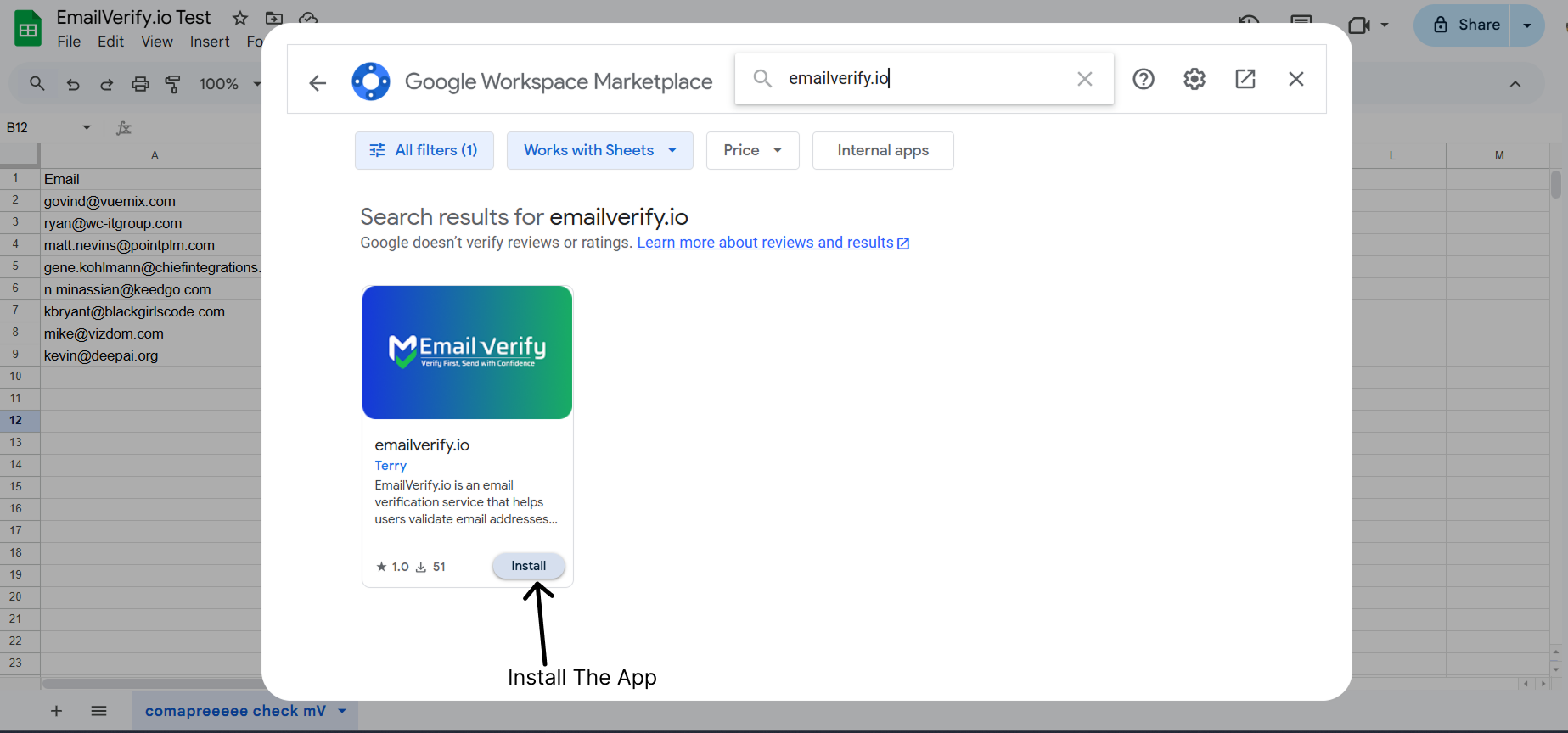
- How to install: Extensions > Add-ons > Get add-ons > Search 'EmailVerify.io' > Install.
- Result columns added: ev_status | ev_substatus | ev_validation_date written directly into your spreadsheet next to each email row.View pricing.
How to use the integration
To get started with the EmailVerify.io Google Sheets integration, you'll need a Google account and a free EmailVerify.io account.
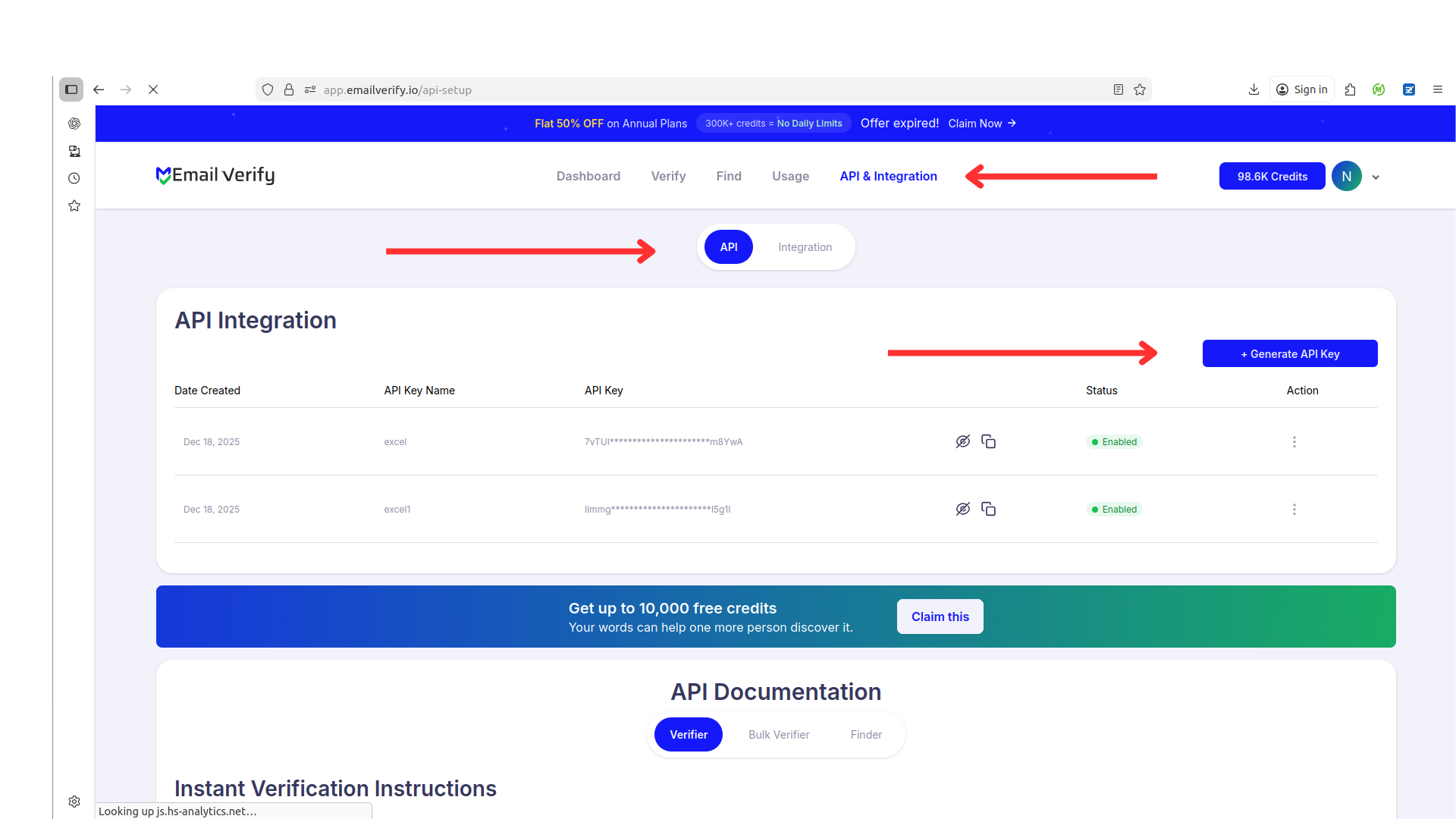
Step 1: Generate API Key
Step 2: Open Add-ons Marketplace
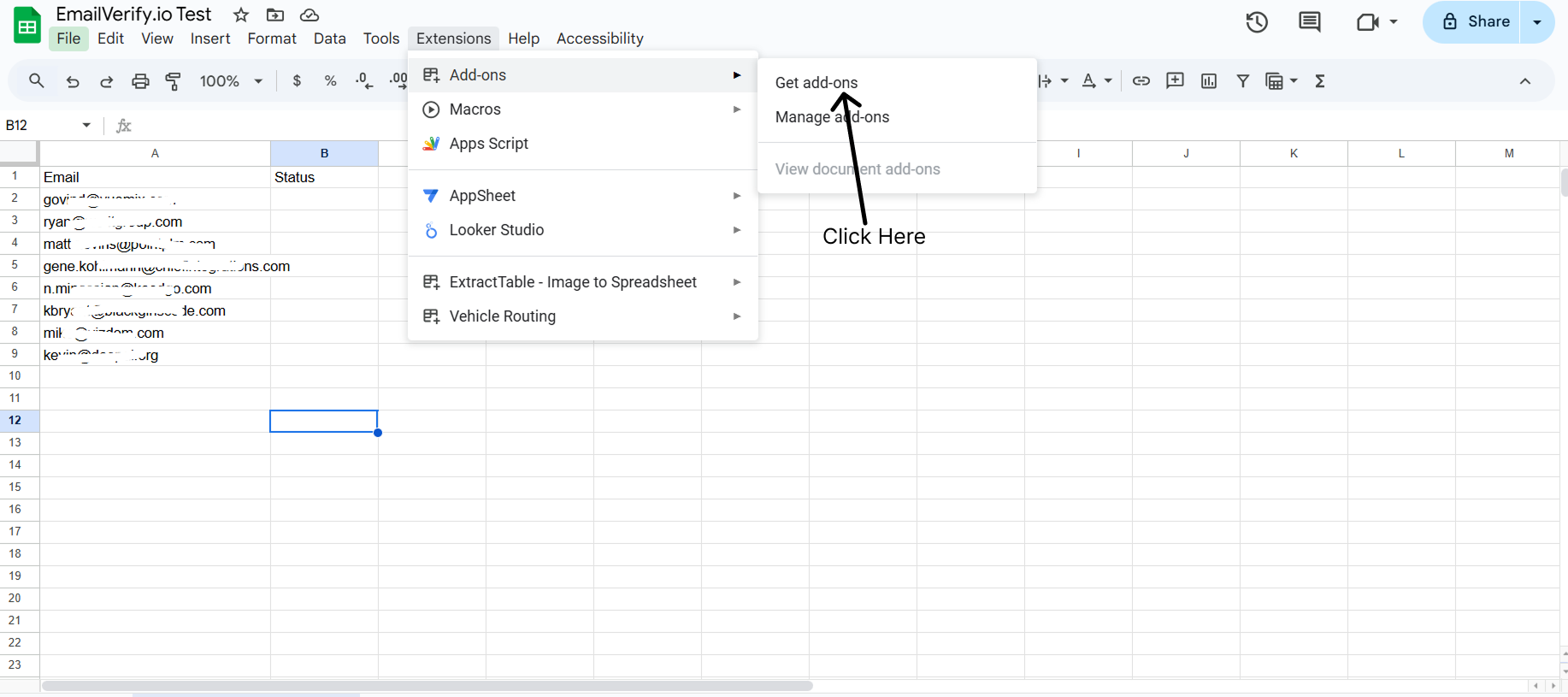
Step 3: Install EmailVerify.io
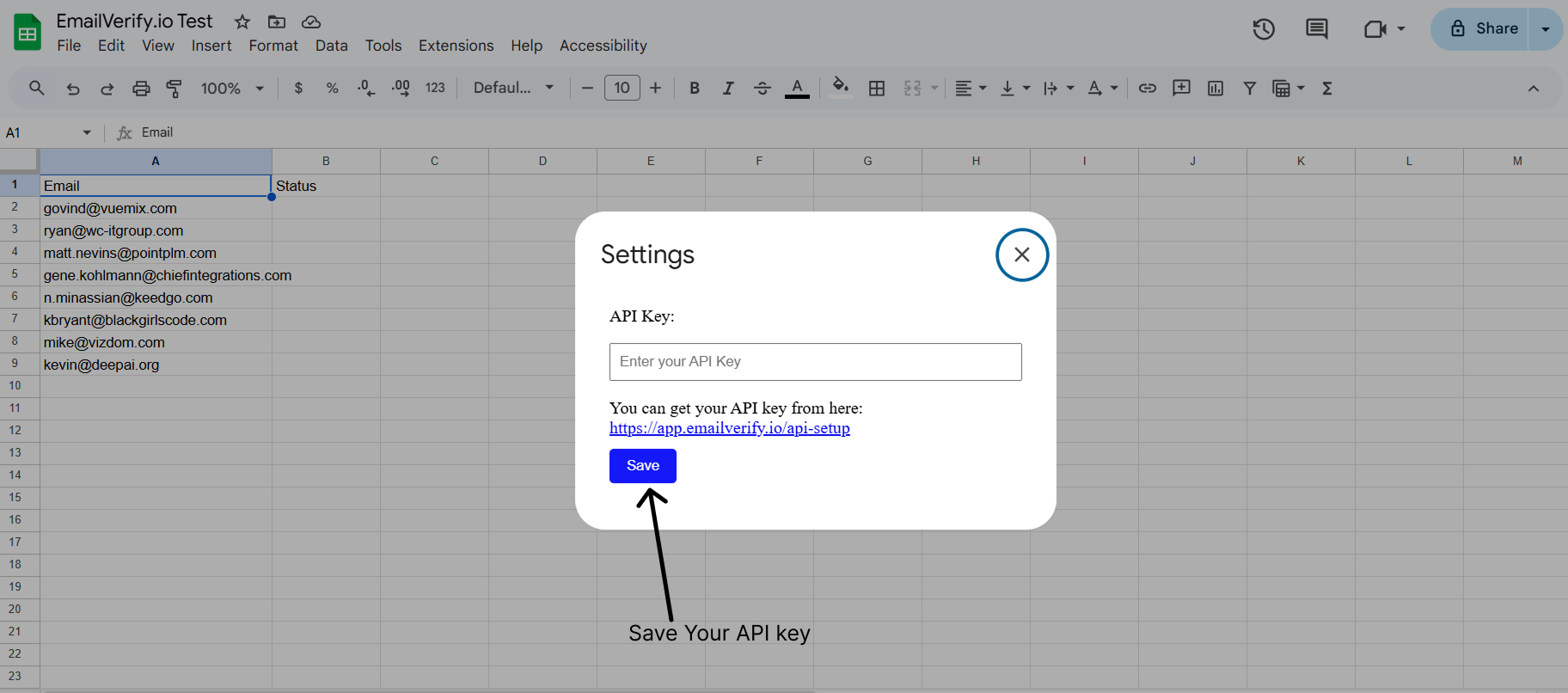
Step 4: Connect API Key
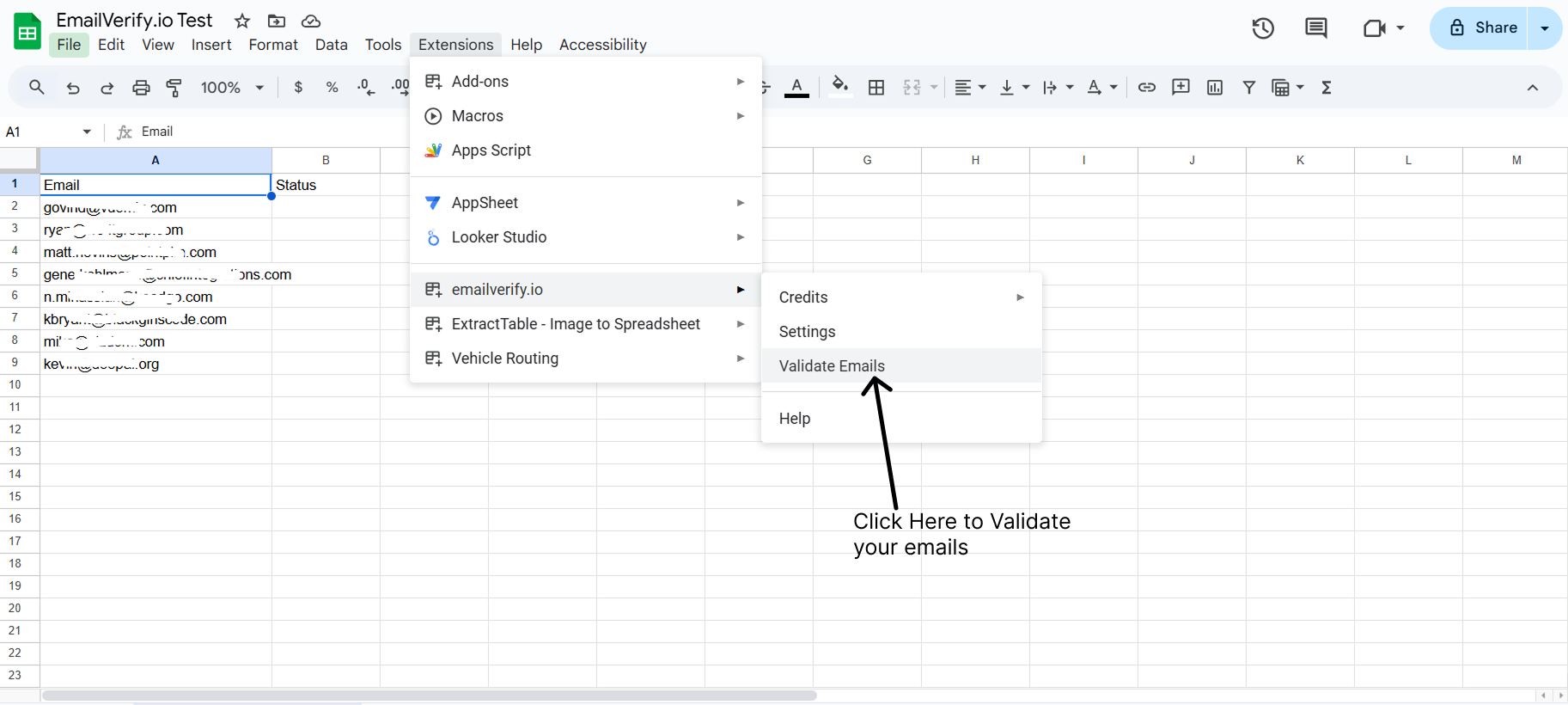
Step 5: Verify Emails
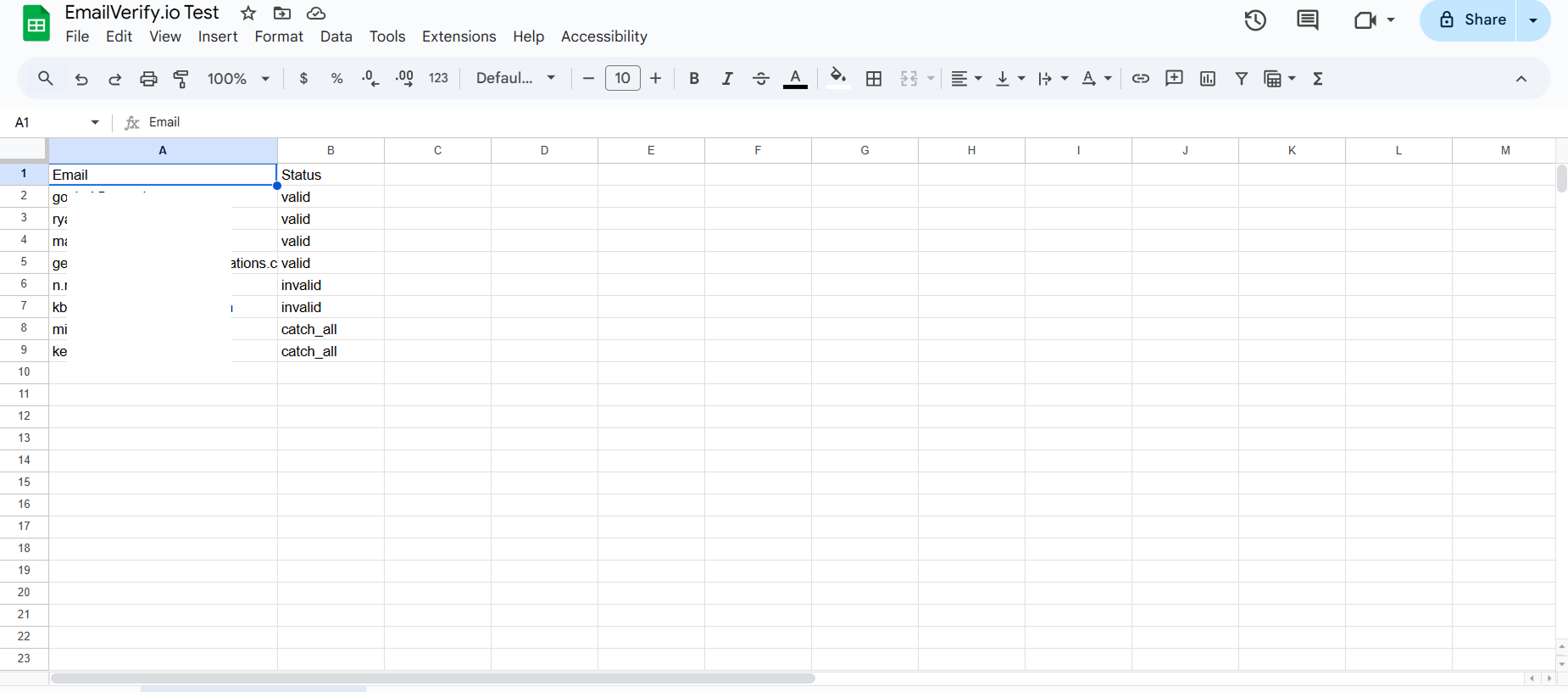
Step 6: View Results
Google Sheets Email Verification Features
To use this integration, you’ll need a valid Google account and the EmailVerify.io Add-on installed from the Google Workspace Marketplace.
Direct Add-on Integration
Verify emails directly inside Google Sheets using our official extension.
Reliable Email Verification
Verify your spreadsheet rows with EmailVerify.io’s robust verification service to quickly detect invalid email addresses.
Real-time Status Updates
Results are updated directly in your sheet columns, giving you instant feedback on email validity.
Secure API Connection
Connect securely using your personal API key without sharing your account password.
Cleaner Data, Better Insights
Clean up your databases and marketing lists stored in Sheets to ensure your analytics and campaigns are based on accurate data.
Simple Workflow
Just select your email column and click verify—no complex file exports or imports required.
Why Google Sheets Users Need Email Verification
Google Sheets is where raw contact data lives before it enters any downstream system. Invalid addresses in a spreadsheet become invalid addresses in your CRM, outreach tool, or email platform — unless you verify them at the source.
- ✗ Lead lists built for CRM import often contain invalid or misspelled addresses from web forms, LinkedIn exports, or scraped contact sources — verifying in Sheets prevents them from corrupting CRM data.
- ✗ Sales outreach sequences that start with unverified lead lists generate hard bounces from the first email — damaging sender reputation before a campaign has a chance to perform.
- ✗ Recruiter candidate lists from job boards and referral programs frequently include outdated email addresses — verifying before outreach prevents bounce events in automated follow-up sequences.
- ✗ Agency contact lists collected for outreach campaigns carry high invalid rates from mixed sources — verifying in Sheets before import to outreach tools protects sender reputation from day one.
- ✗ Email addresses decay at 22–30% per year — contact lists that were clean six months ago will contain a significant percentage of invalid addresses today.
EmailVerify.io removes invalid rows from Google Sheets before the data enters any downstream system — preventing bounces, protecting sender reputation, and ensuring downstream tools receive accurate input.
What EmailVerify.io Checks on Every Email Row in Google Sheets
Each email address in your spreadsheet passes through 20+ real-time verification checks. Results are written as new columns in your sheet.
| Check | What It Detects |
|---|---|
| Syntax validation | Formatting errors — missing @, invalid characters, malformed structure |
| Domain / DNS check | Whether the email domain exists and is active |
| MX record check | Active mail server records on the domain |
| SMTP verification | Whether the individual mailbox exists on the server |
| Catch-all detection | Domains that accept all emails regardless of whether the mailbox exists |
| Disposable email check | Temporary or burner addresses from 10,000+ known providers |
| Role-based detection | Generic addresses: info@, admin@, noreply@, support@ |
| Bounce history | Cross-reference with known hard-bounce databases |
Results written as new spreadsheet columns: ev_status | ev_substatus | ev_validation_date
What Google Sheets Users See After Verification
Results appear as three new columns in your spreadsheet — no re-import or file management required.
Google Sheets Add-on vs CSV Upload vs Platform Integration
For users who work in Google Sheets, the add-on is the simplest path — data stays in the spreadsheet and results appear as new columns without any file management.
| Approach | Time Required | Accuracy | Auto-Sync | Ongoing Protection |
|---|---|---|---|---|
| CSV upload | Export, upload, re-import | Full checks | No | Extra steps for Sheets users |
| Platform integration | Requires email platform account | Full checks | Yes — to platform | Not relevant without ESP |
| Google Sheets add-on | Under 3 min setup | 20+ checks in-sheet | Yes — columns in sheet | Clean data before any downstream system |
Who Should Use Google Sheets Email Verification
Sales and SDR teams
Before importing a lead list into your CRM or email sequence tool, verify the email column in Google Sheets. Remove invalid addresses before they corrupt your CRM data or generate hard bounces in your outreach sequences.
Data analysts and marketing operations
Spreadsheets are where raw contact data lives before it enters any platform. Verify email columns as part of your data cleaning workflow to ensure downstream tools receive accurate data.
Recruiters and HR teams
Candidate lists built in Google Sheets from job boards, LinkedIn exports, and referral programs contain invalid or outdated addresses. Verify before sending automated application update emails.
SEO and growth agencies
Agencies building contact lists for outreach campaigns often start in Google Sheets. Verify before importing to outreach tools to protect sender reputation from the first send.
Small businesses without a dedicated email platform
For businesses not yet on an email marketing platform, Google Sheets is where the customer email list lives. Verify in Sheets before any manual or bulk send campaign.
Technical Questions About Google Sheets Email Verification
Where do I find my EmailVerify.io API key?
Log in to your EmailVerify.io account at app.emailverify.io. Navigate to the API section in your dashboard. Click Generate API Key. Copy the key and paste it into the add-on when prompted (Extensions > EmailVerify.io > Settings).
What happens if my sheet has blank rows or non-email values in the column?
The add-on skips blank cells automatically. Cells containing values that are not valid email format will return ev_status: Invalid with ev_substatus: failed_syntax_check. This is expected behaviour — non-email values are flagged rather than causing errors.
Can I verify multiple email columns in the same sheet?
Yes. Run the add-on multiple times, selecting a different column each time. Results columns (ev_status, ev_substatus, ev_validation_date) are written next to the selected column for each run. Use descriptive column headers to keep results organised when verifying multiple columns.
How do I use ev_status to filter and export only valid emails?
Click the filter icon on the ev_status column header. Uncheck all values except Valid. Select all visible rows. Copy and paste to a new sheet, or use File > Download > CSV to export only the valid subset. Alternatively, use =FILTER(A:B, E:E="Valid") to create a dynamic filtered view.
Also integrate with Mailchimp Email Verification , HubSpot Email Verification , ActiveCampaign Email Verification , Bulk CSV Email Verification . Or use ourAPI for programmatic access.
Frequently Asked Questions

How do I install the EmailVerify.io Google Sheets add-on?
- Open any Google Sheet
- Click Extensions in the top menu
- Go to Add-ons > Get add-ons
- Search for EmailVerify.io
- Click Install and grant permissions
Do I need an email marketing platform to use the add-on?
How do I verify emails using the Google Sheets add-on?
- Click Extensions > EmailVerify.io in the menu
- Enter your API key
- Select the column containing email addresses
- Click Verify — results appear as new columns next to your data
What results does the add-on write to my Google Sheet?
How many rows can I verify at once in Google Sheets?
The add-on processes all rows in a selected column in batches. Practical limits depend on your credit balance — each row consumes one credit.
Is the Google Sheets add-on free?
What permissions does the add-on require?
The add-on requests access to read email addresses from your spreadsheet and write verification results back. It does not store your spreadsheet data permanently.
Can I use the add-on to verify emails from any source?
Yes. It works with any Google Sheet containing an email column, regardless of whether the data came from lead lists, CRM exports, or manual entry.
How do I filter out invalid emails after verification?
Can I re-verify emails that have already been checked?
Yes. You can re-run the add-on at any time. We recommend quarterly re-verification as email addresses decay at 22–30% per year.
You're just one click away from clean email lists.
Start verifying your email addresses instantly and improve your campaign deliverability
* No credit card required