EmailVerify.io n8n Community Node — Real-Time Email Verification in Any Workflow
The EmailVerify.io n8n community node installs the n8n-nodes-emailverify package directly into your workflow canvas — no third-party platform required. Self-hosted n8n is free to run, so your only cost is EmailVerify.io credits. Use the returned status field (valid, invalid, disposable, catch-all) with n8n's IF or Switch nodes to route contacts automatically. Because email data flows through your own infrastructure, this integration is the preferred choice for teams with data privacy or residency requirements. Start free →

Quick Summary: n8n Email Verification Integration
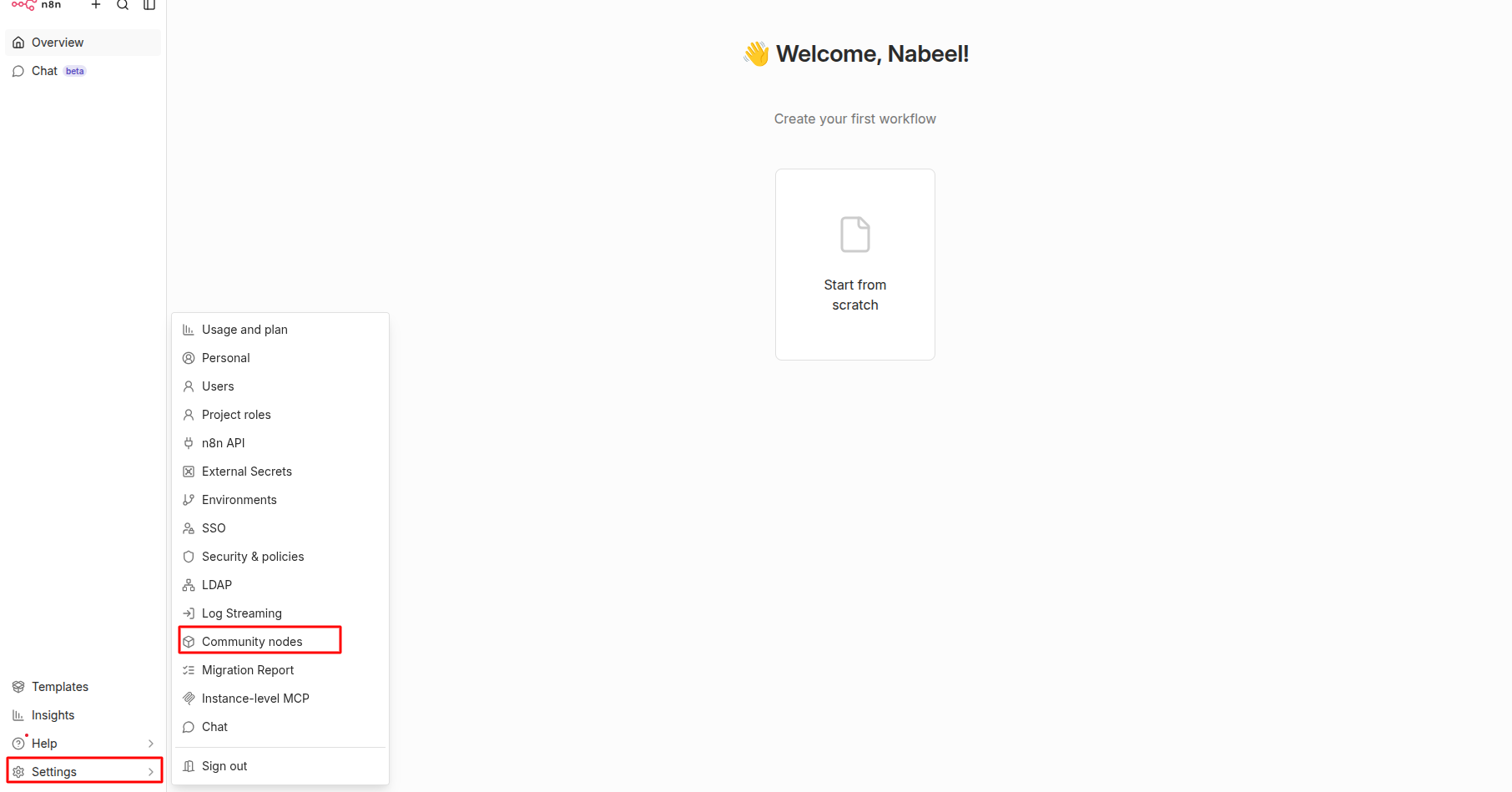
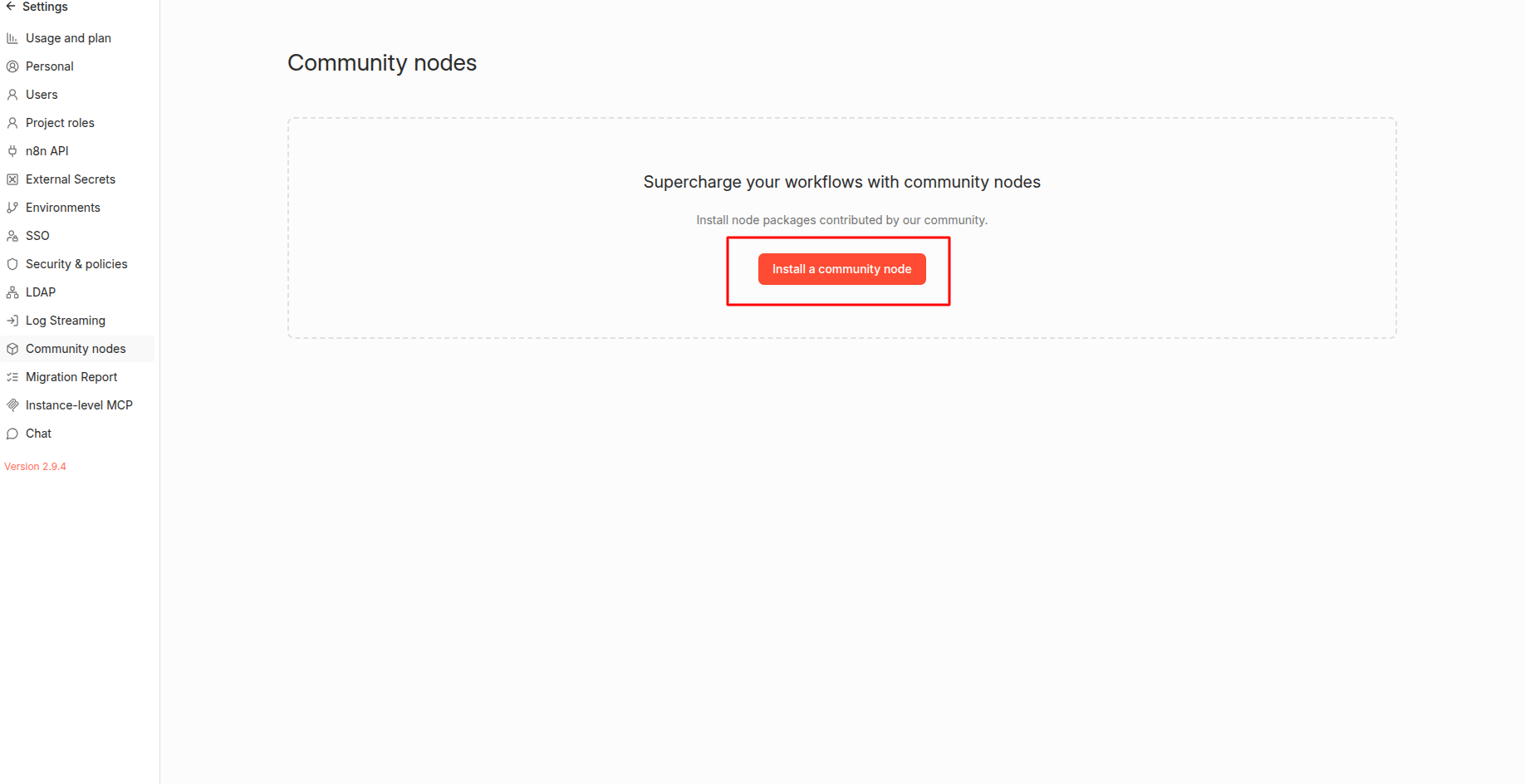
- Package name: <code>n8n-nodes-emailverify</code> — install via n8n Settings > Community Nodes > Install
- Self-hosted: Free to run on any self-hosted n8n instance (v0.195+). Unlimited workflow executions at no platform cost.
- n8n Cloud: Community nodes available on Enterprise plan only. Starter and Pro cloud plans cannot install community nodes — use the HTTP Request node instead.
- Key output: JSON fields: status (valid / invalid / disposable / catch-all / unknown), sub_status, free_email, disposable, mx_found — all accessible via <code>{{ $json.status }}</code> in downstream nodes.
- Free to start: EmailVerify.io offers a free trial — see <a href='https://emailverify.io/pricing/' target='_blank' class='text-[#1519FA] hover:underline'>pricing</a>
How to use the integration
To use this integration, you’ll need a self-hosted or cloud-hosted n8n instance and an active EmailVerify.io account.
Step 1: Open n8n Settings
Step 2: Open Installation Dialog
Step 3: Install Package
n8n-nodes-emailverify. Agree to the risks and click Install. n8n will display a risk acknowledgement dialog — this is n8n's standard warning for all third-party community nodes, as they are not officially vetted by the n8n team. The n8n-nodes-emailverify package is published by EmailVerify.io and is safe to install.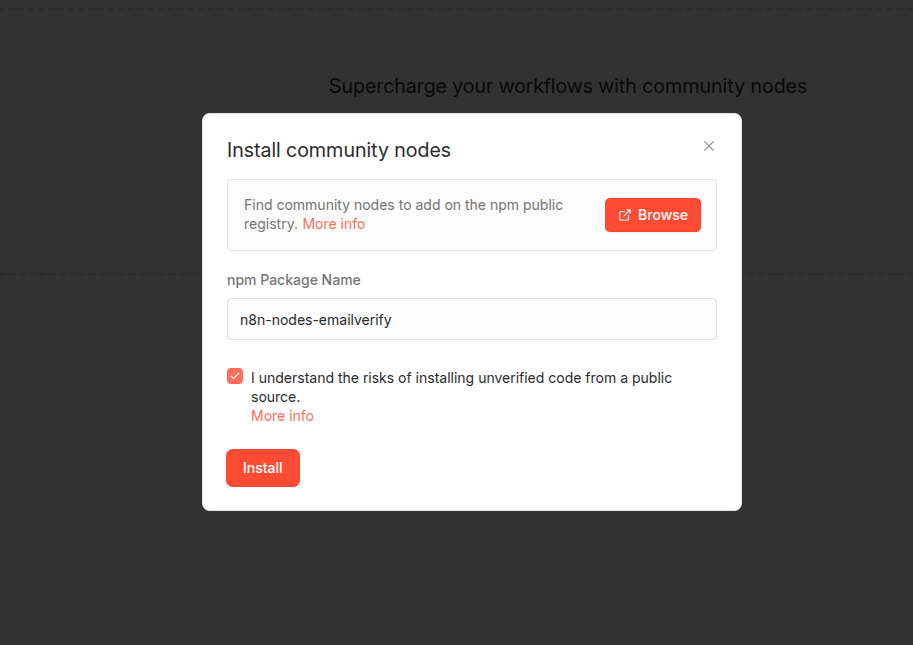
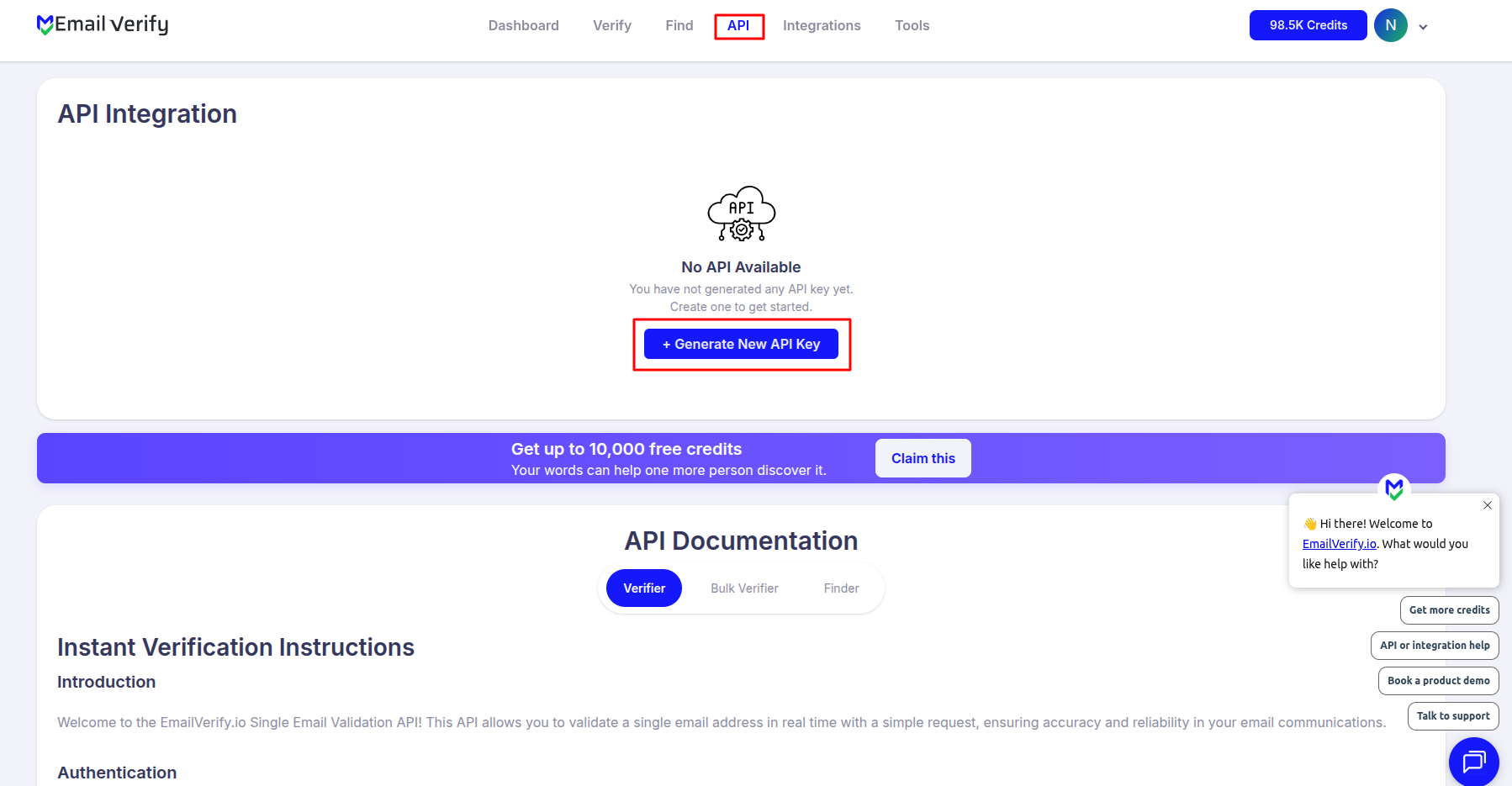
Step 4: Get Your API Key
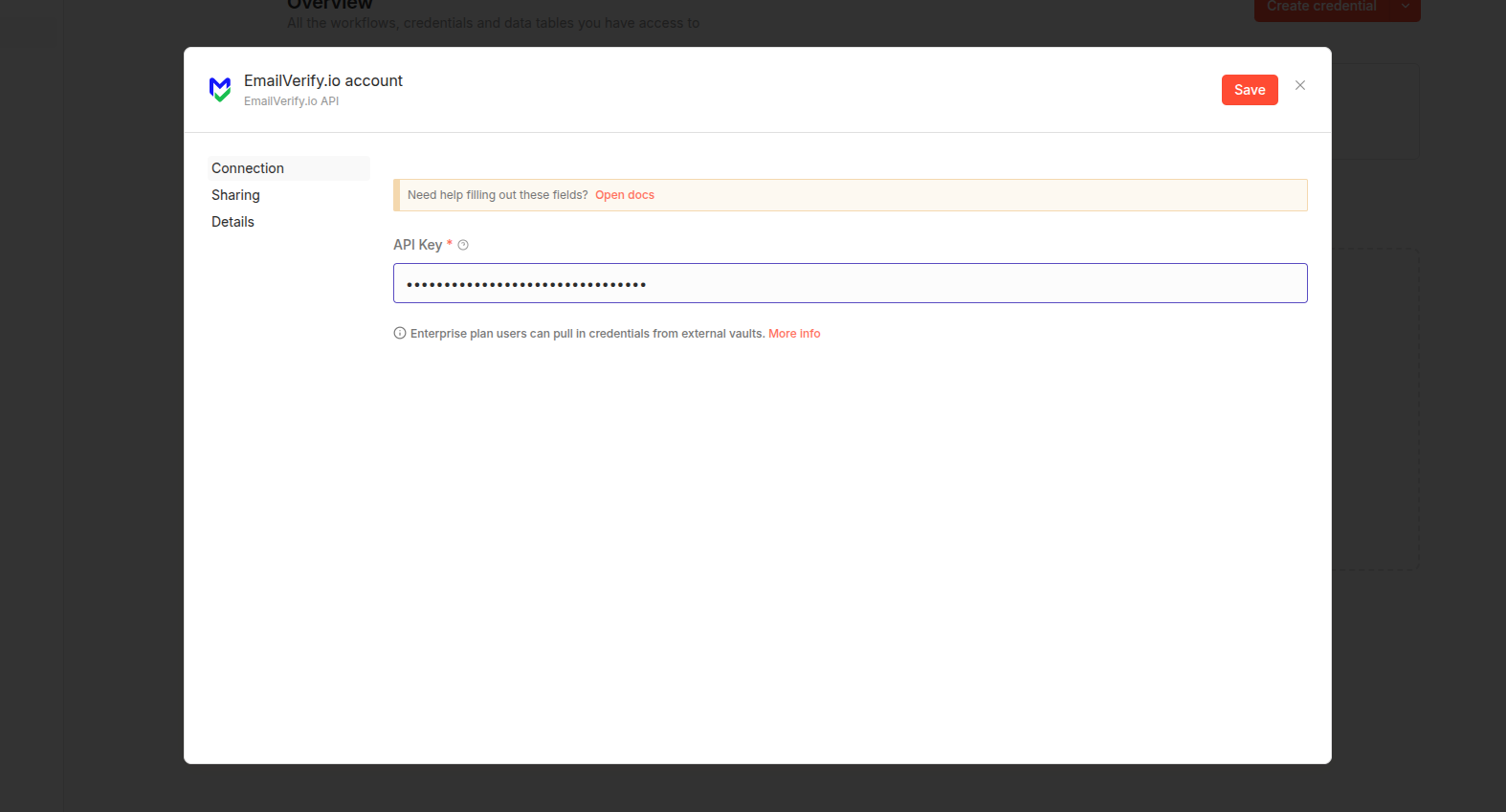
Step 5: Create n8n Credentials
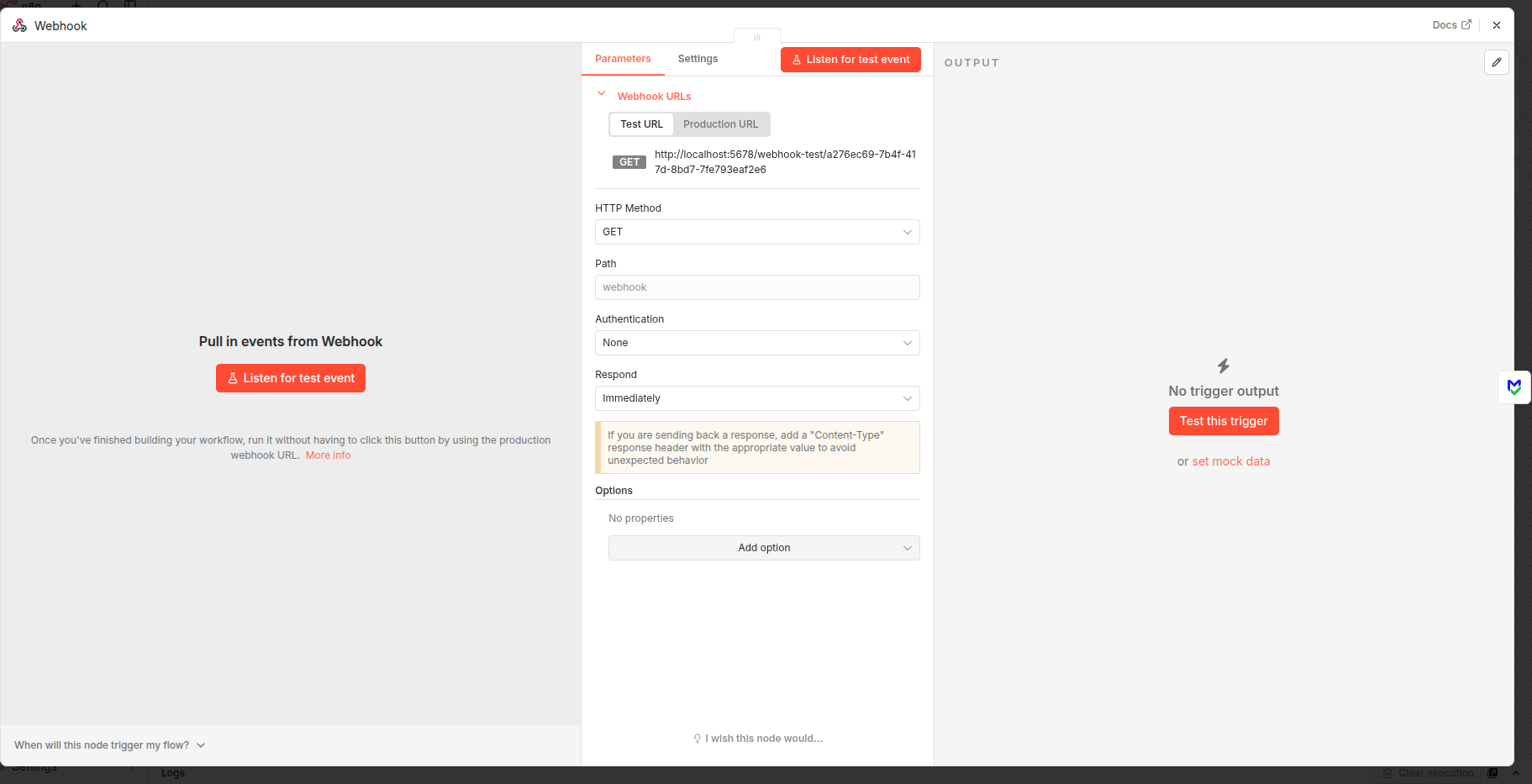
Step 6: Map Your Email Field
Step 7: Test the Node
status and sub_status.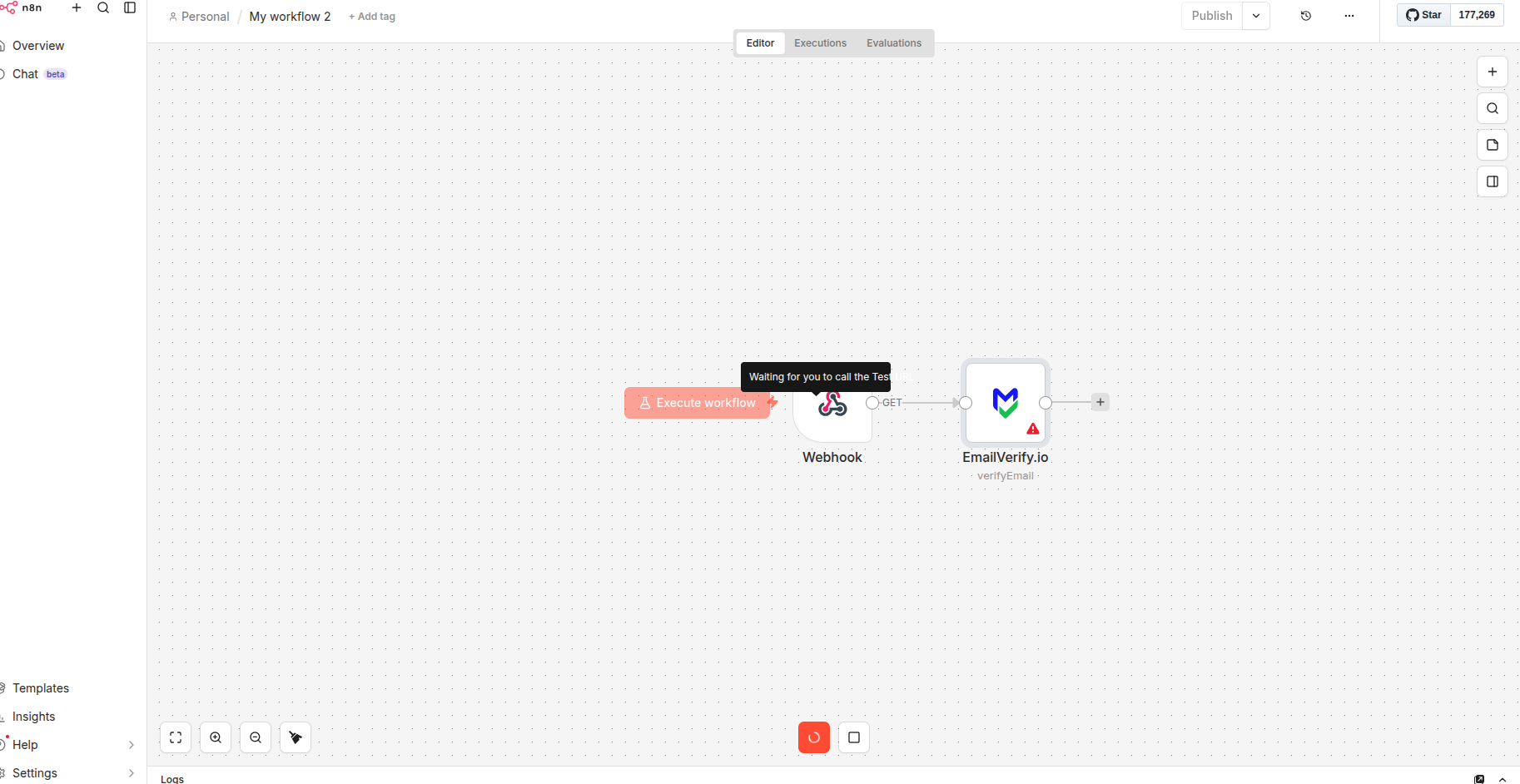
n8n Email Verification Integration Features
Our n8n community node is built to provide developers and automation experts with a seamless way to verify emails. Simply install the node, add your API key, and start validating emails within any workflow.
Native n8n Node
Install our 'n8n-nodes-emailverify' package directly into your n8n instance to use it as a native node in any workflow.
Real-Time API Validation
Trigger real-time validation checks as data passes through your workflow nodes from any trigger source.
Branching Logic Support
Use the returned verification status (Valid, Invalid, Risky) to create conditional paths using the 'IF' or 'Switch' nodes in n8n.
Detailed Response Data
Access detailed sub-statuses such as 'disposable', 'syntax_error', or 'mailbox_not_found' to make advanced automation decisions.
Secure Credential Management
Securely store your EmailVerify.io API Key within n8n's credential manager, ensuring your keys are encrypted and protected.
Universal Trigger Support
Verify emails coming from any trigger: Webhooks, Google Sheets, Typeform, CRM updates, or HTTP Requests.
Who Uses the EmailVerify.io n8n Community Node?
Backend and Full-Stack Developers
Developers who chose n8n for its open-source model prefer the native node over Zapier for data privacy and cost control. The node integrates cleanly into complex workflows with custom JavaScript expression logic.
RevOps and Data Engineering Teams
Teams building automated data pipelines use the EmailVerify node as a quality checkpoint — validating email fields before they reach CRM, data warehouse, or marketing automation destinations.
Agencies Running Self-Hosted n8n
Cost-conscious agencies running self-hosted n8n for client automations benefit from unlimited workflow runs at no platform cost. EmailVerify.io credits are the only cost per verification.
Companies with Data Residency Requirements
Teams that cannot pass contact data through third-party SaaS platforms use self-hosted n8n to keep verification workflows within their own infrastructure.
n8n Cloud Starter and Pro Users
Teams on n8n Cloud Starter or Pro can use the HTTP Request node as an alternative — call the EmailVerify.io REST API directly and map the same JSON fields in downstream IF or Switch nodes.
Technical Questions: EmailVerify.io n8n Node
What fields does the EmailVerify.io n8n node return?
The node outputs a JSON object with these key fields: status (valid, invalid, disposable, catch-all, or unknown), sub_status (reason code such as mailbox_not_found, smtp_timeout, role_based or disposable_domain), free_email (true/false), disposable (true/false), and mx_found (true/false). Access any field in downstream nodes using n8n expression syntax: {{ $json.status }}, {{ $json.sub_status }}, etc.
How do I use IF and Switch nodes with EmailVerify results?
For binary routing (valid vs not valid): add an IF node after EmailVerify, set Value 1 to {{ $json.status }}, Operation to Equals, and Value 2 to valid. True branch handles valid emails; False branch handles everything else. For multi-path routing: use a Switch node with expression {{ $json.status }} and add cases for valid, disposable, catch-all, and invalid separately.
How do I enable community nodes on Docker self-hosted n8n?
Set the environment variable N8N_COMMUNITY_PACKAGES_ENABLED=true in your Docker configuration (docker-compose.yml or .env file). Then install via Settings > Community Nodes > Install as normal. Some Docker versions may require a container restart after installation.
Also integrate with Zapier Email Verification Integration , Pabbly Connect Email Verification Integration , HubSpot Email Verification Integration , All EmailVerify.io Integrations . Or use ourAPI for programmatic access.
Frequently Asked Questions

How do I install the EmailVerify.io n8n community node?
- In your n8n instance, go to Settings > Community Nodes.
- Click Install a node.
- In the NPM Package Name field, enter:
n8n-nodes-emailverify. - Agree to the community node disclaimer and click Install.
- Log in to your EmailVerify.io account, copy your API key from the API section, and create a new credential in n8n.
What is the npm package name for the EmailVerify.io n8n node?
The npm package name is n8n-nodes-emailverify. This is the exact string to paste into the n8n Community Nodes installation dialog. The package is published by EmailVerify.io on the public npm registry.
Does the n8n EmailVerify node work with n8n Cloud?
Community nodes are available on n8n Cloud Enterprise plans only. n8n Cloud Starter and Pro plans do not support community node installation. For Starter and Pro users, use the HTTP Request node as an alternative: set the URL to the EmailVerify.io REST API, pass your API key and email as query parameters, and map the same JSON response fields in downstream IF or Switch nodes.
What does the EmailVerify.io n8n node return?
The node returns a JSON object with these key fields:
- status: valid | invalid | catch-all | disposable | unknown
- sub_status: reason code (mailbox_not_found, smtp_timeout, catch_all, disposable_domain, role_based, etc.)
- free_email: true/false (Gmail, Yahoo, Outlook, etc.)
- disposable: true/false
- mx_found: true/false
Access these in downstream n8n nodes using expressions: {{ $json.status }}, {{ $json.sub_status }}.
How do I route valid and invalid emails in an n8n workflow?
IF Node (binary — valid vs not valid):
- Add an IF node after the EmailVerify node
- Click Add Condition, set Value 1 to
{{ $json.status }}, Operation to Equals, Value 2 tovalid - True branch → action for valid emails (add to CRM, send welcome email, etc.)
- False branch → error handling (log to sheet, alert, skip)
Switch Node (multi-path routing):
- Add a Switch node, set Mode to Expression, Expression to
{{ $json.status }} - Add cases:
valid→ CRM action;disposable→ flag and skip;catch-all→ secondary queue; fallback → error log
What is the risk warning when installing the n8n node?
n8n displays a risk acknowledgement dialog for all community nodes because they are third-party npm packages not officially vetted by the n8n team. This is a standard disclaimer. The n8n-nodes-emailverify package is published by EmailVerify.io and is safe to install. Click 'I understand the risks' to proceed with installation.
Can I use the EmailVerify node with a self-hosted Docker n8n?
Yes. For Docker deployments, ensure the environment variable N8N_COMMUNITY_PACKAGES_ENABLED=true is set in your Docker configuration (docker-compose.yml or .env file). Then install via Settings > Community Nodes as normal. Some Docker versions may require a container restart after installation before the node appears in the editor.
How do I map the email field from different trigger types?
Use n8n's expression editor to map the email field from any trigger. Syntax depends on the trigger node:
- Webhook:
{{ $json.body.email }}or{{ $json.email }} - Google Sheets:
{{ $json.email_column_name }} - Typeform:
{{ $json['email_field_reference'] }} - HTTP Request:
{{ $json.email }}
In the EmailVerify node's Email field, click the expression toggle and enter the appropriate expression for your trigger.
Is the n8n integration free?
How does n8n compare to Zapier for email verification?
n8n advantages:
- Native node — no third-party platform in the data chain
- Self-hosted: free to run, email data stays in your own infrastructure
- More powerful branching logic (IF, Switch, JavaScript expressions, sub-workflows)
- No per-task cost for n8n itself
Zapier advantages:
- No server management — fully managed SaaS
- Larger app library (6,000+ apps)
- Point-and-click setup — easier for non-technical users
- Ready-made Zap templates to activate in one click
Choose n8n if you are technical, self-host for cost or privacy, or need complex workflow logic. Choose Zapier for no-code simplicity and the broadest app support.
You're just one click away from clean email lists.
Start verifying your email addresses instantly and improve your campaign deliverability
* No credit card required