

Table of Contents
TL;DR
Yes, you can delete role-based emails, but it is not that simple. If they bounce, show low engagement, or trigger spam complaints, deleting them usually protects your deliverability. However, keep only the role-based addresses that actively respond or bring real business value.
Read on to learn when deleting makes sense, what risks to avoid, and how to manage the remaining role-based emails safely.
Of course. Here is the content from your images converted into the specified WordPress blog structure, following all the rules you provided.
If your email campaigns aren’t delivering the results you expect, you’re not alone. Recent industry benchmarks show that the average inbox placement rate for marketing emails is only around 83%, meaning nearly 1 in 6 legitimate emails never reach the inbox.
One often-ignored reason is the use of role-based email addresses such as [email protected], [email protected], or [email protected].
These addresses are designed to reach teams rather than individuals. While that can be useful in some cases, it can also lead to lower engagement, higher bounce rates, and deliverability issues if not managed carefully.
This leaves many marketers with an important decision: Should role-based emails stay on your list, or is it better to remove them?
In this blog, we’ll explore the pros and cons of role-based emails, explain when deleting them makes sense, and share practical best practices to help you maintain a healthier, more effective email strategy.
So, let’s get into it!
What are Role-Based Emails: Definition & Examples
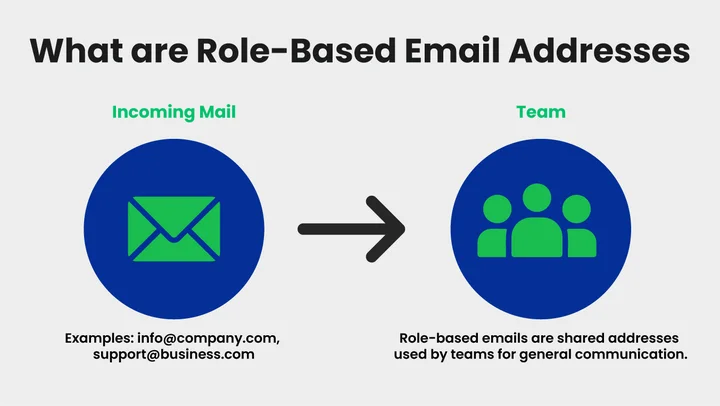
Role-based emails are addresses that don’t belong to a single person but are used to reach a team, department, or function within an organization.
Common Examples Include:
These emails are typically used for general inquiries, customer support, or sales requests. Unlike personal emails, they are monitored by multiple people and often don’t have a dedicated owner.
Marketers need to understand how role-based emails behave in email campaigns. They can affect deliverability, engagement, and response rates, which is why deciding whether to keep or delete them is essential.
Now that we have a clear understanding, it’s essential to know when it’s appropriate to delete role-based emails.
When Should You Delete Role-Based Email Addresses?
Role-based emails can be helpful, but keeping every address on your list isn’t always the best choice. Removing the right role-based emails at the right time helps protect deliverability and improve campaign performance.
Delete role-based emails when you see these concrete signals:
1. High Hard Bounce Rate
If a role-based address hard bounces more than 2% in your campaigns, it’s a strong sign to delete it. Hard bounces directly damage your sender’s reputation and increase the chance of being blocked by ESPs.
2. Spam Complaints or Complaint Risk
If the complaint rate rises above 0.1%, the address is becoming risky. Role-based inboxes are often monitored by multiple people, increasing the risk that someone will mark emails as spam.
3. No Engagement for a Long Period
If the address shows no opens or clicks for 6–12 months, it should be removed. Inactive role-based emails drag down engagement metrics and reduce deliverability.
4. Frequent Validation Failures
If the email verification service flags the address as invalid, a catch-all email, or high-risk, remove it immediately to avoid bounce issues.
5. Negative impact on campaign performance
If role-based addresses consistently reduce your overall open rate, click rate, or inbox placement, deleting them can improve results.
Cold Outbound vs. Opt-In Lists
Cold Outbound Lists: Role-based emails should be deleted faster in cold outreach. If a role-based address does not respond after 1–2 campaigns or shows bounces/complaints, remove it immediately.
Opt-In Marketing Lists: These emails can be kept longer if they still engage. But if they remain inactive for 6–12 months or show a high bounce risk, delete them to protect your sender reputation.
These deletion rules help you maintain a healthy email list, reduce deliverability issues, and focus on contacts that actually engage.
Which role-based emails are putting your sender reputation at risk? Use EmailVerify to detect high-risk addresses before you send your next campaign.
To better understand, let’s look at their differences!
What is the Difference Between Role-Based, Generic, and Personal Email Addresses?
Email address types affect engagement, deliverability, and campaign results. Each type behaves differently in email marketing, so understanding their behavior helps you decide whether to keep or delete them.
To make this clear, here’s a simple comparison table:
| Email Type | Who Uses It | Common Examples | Monitoring Level | Marketing Performance (Concrete Metric) |
|---|---|---|---|---|
| Role-Based Emails | Teams or departments | info@, support@, sales@ | Multiple people | Lower open rate and higher complaint risk |
| Generic Emails | Admin or general use | admin@, contact@, hello@ | Often inconsistent | Higher bounce rate and low response rate |
| Personal Emails | One individual | [email protected] | Clearly owned | Higher open & click rate, lower complaint rate |
As a result, personal email addresses usually perform best, while role-based and generic emails need careful segmentation, verification, and regular review to avoid damaging your deliverability.
What are the Pros of Deleting Role-Based Emails from Your Marketing List?
Removing role-based emails from your marketing list can improve campaign performance and protect your sender reputation. While these addresses may be helpful for general communication, they often cause issues in marketing campaigns because they are shared, unmonitored, or inactive. Deleting the right role-based emails helps reduce risk and improve the overall quality of your list.
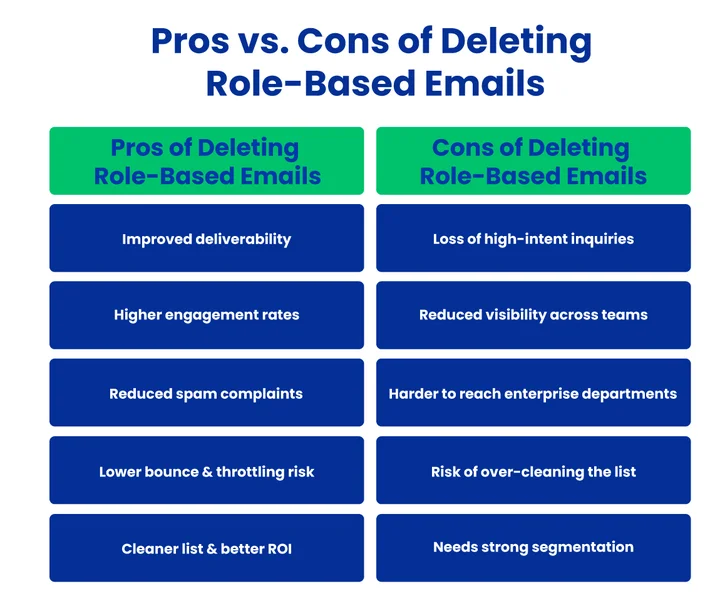
Main benefits of deleting role-based emails:
- Improved Deliverability: Deleting low-performing role-based emails reduces bounce rates and spam complaints, helping your future campaigns reach the inbox more reliably. This also aligns with best practices to boost email deliverability.
- Higher Engagement Rates: Removing role-based addresses that are rarely opened or clicked will increase your overall open and click-through rates, improving campaign effectiveness.
- Reduced Spam Complaint Risk: Role-based inboxes are often monitored by multiple people, increasing the chance of spam reports. Deleting risky addresses helps protect your sender’s reputation.
- Lower Bounce and Throttling Risk: Role-based emails often become inactive or outdated, reducing bounce and throttling risk. Removing them reduces bounce rates and prevents your ESP from throttling or blocking your campaigns.
- Cleaner List with Better ROI: A smaller, more active list saves time and budget, helping you focus on contacts that actually engage and convert.
These emails do have advantages, but they also have disadvantages that could affect your campaigns.
What Are the Cons of Deleting Role-Based Emails?
Deleting role-based emails can improve list quality and deliverability, but it also comes with trade-offs that marketers should consider before removing them entirely. In some cases, deleting these addresses too aggressively may limit reach or remove valuable touchpoints within organizations.
Major drawbacks of deleting role-based emails include:
Potential Loss of High-Intent Inquiries:
Some role-based inboxes, such as sales@ or support@, are actively monitored and used for business decisions. Deleting them may mean missing opportunities with prospects who prefer to reach out through shared inboxes.
Reduced Visibility Across Teams:
Role-based emails often grant access to multiple stakeholders simultaneously. Removing them can narrow your visibility to a single contact and reduce exposure within larger organizations.
Limited Reach in Enterprise Accounts:
In large companies, decision-makers may not use persona emails for marketing communication. Deleting role-based addresses can make it harder to reach departments that rely on shared inboxes.
Over-Cleaning the Email List:
Deleting all role-based emails without reviewing engagement data can lead to unnecessary list shrinkage. Some role-based addresses may still open, click, or convert when campaigns are relevant.
Dependency on Accurate Segmentation:
Removing role-based emails works best when segmentation and tracking are strong. Without proper data, you may delete addresses that could have remained valuable with better targeting.
Deleting role-based emails can improve deliverability, but doing so without evaluating engagement, intent, and audience type can limit reach and remove valuable contacts.
A balanced approach between removing inactive or risky addresses while retaining engaged ones supports healthier long-term campaign performance.
Following the proper best practices for role-based emails ensures your campaigns stay effective, your email list stays healthy, and your messages reach the right audience.
What are the Best Practices for Managing Role-Based Emails?
Proper handling of role-based emails protects your email list, improves deliverability, and keeps campaigns performing at their best.
The strategies below help your marketing reach the right audience and achieve results, and role-based email verification, risks, and list management cover the full approach to segmenting, verifying, and maintaining your list.
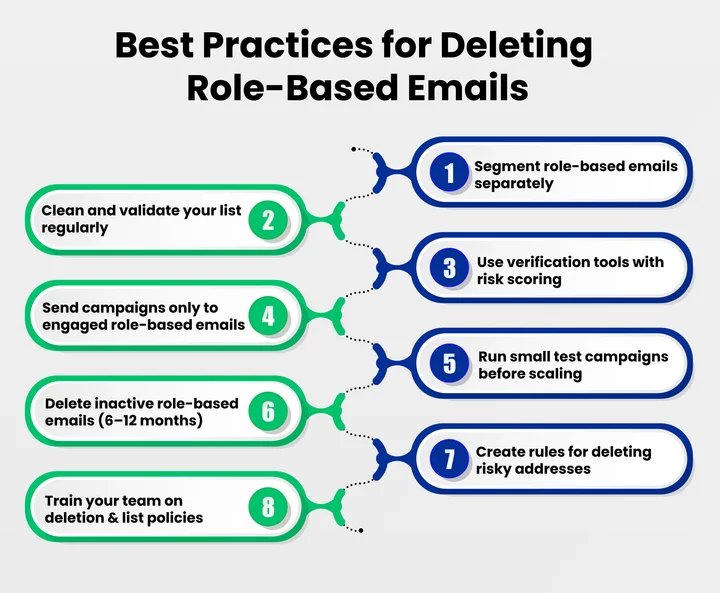
1. Segmenting & Cleaning
Segment role-based emails separately from personal addresses to track performance more accurately. Regularly clean and validate your email database to reduce bounce rates and improve engagement.
Use a verification tool that supports real-time verification and risk scoring instead of only static cleanup, so you can identify risky addresses before sending campaigns. This is where email verification use cases come in handy, showing how verification prevents bounces, spam complaints, and deliverability issues before you run a campaign.
2. Optimizing Campaigns
Avoid sending every campaign to role-based addresses unless they show engagement. Instead, prioritize personalized emails or direct contact forms for better response rates.
Monitor which role-based emails engage and which stay inactive. Run small test campaigns on role-based segments to refine messaging and improve results.
3. Team & Policy Management
Create clear rules for adding, maintaining, or deleting role-based email addresses. Train your marketing team on handling these addresses so they can follow consistent practices and protect your sender reputation.
Following these practices keeps role-based emails from hindering your campaigns while boosting deliverability, engagement, and ROI.
Frequently Asked Questions (FAQs)
2. Can Role-Based Emails be Turned Into Personal Contacts?
Yes. If you can find the decision-maker or the right person through LinkedIn, website contact forms, or direct outreach, converting them to personal contacts improves engagement and reduces complaint risk. Personal emails also help you track real intent and response behavior.
3. Should You Remove All Role-Based Emails From Your List?
No. Keep role-based emails only when they show real engagement or business value. If a role-based address opens, clicks, or replies consistently, it can stay. Remove the ones that bounce, remain inactive, or increase the risk of complaints.
4. How Often Should Role-Based Emails be Reviewed and Cleaned?
Role-based emails should be reviewed based on the list type and the rate at which they degrade.
- Opt-in marketing lists: review every 3–6 months
- Cold outbound lists: review every 1–2 months because these addresses degrade faster and pose a higher deliverability risk
Regular reviews help you catch risky addresses early and protect your sender reputation.
5. Are Role-Based Emails Useful for Small Businesses?
Yes, but only if they are actively monitored. Small businesses can benefit from shared inboxes for support or sales, but if they are not checked regularly, they become a risk rather than an asset.
6. What are the Best Practices to Reduce Risk From Role-Based Emails?
Use a structured approach to reduce deliverability risk and keep your list healthy.
- Segment role-based emails separately from personal contacts
- Test small campaigns first to measure engagement before scaling
- Remove inactive or high-risk role-based addresses based on engagement and bounce rates
- Use verification tools with risk scoring to avoid risky emails before sending campaigns
Final Thoughts
Role-based emails can be helpful, but they need careful management. While they provide shared access and consistent contact points, they can also lower engagement and affect deliverability if left unchecked.
The most effective approach is to keep addresses that actively engage and support your business goals and remove those that consistently underperform. Regular segmentation, validation, and performance reviews help maintain a healthier email list and stronger campaign results.
We at EmailVerify help teams manage role-based emails effectively by identifying inactive or low-performing addresses, validating contacts, and improving deliverability. This ensures your campaigns reach the right people, maintain high engagement, and achieve more substantial ROI.
Marketers who follow these practices can improve email deliverability, increase engagement, and see measurable results from their campaigns.
Prevent role-based emails from damaging your sender reputation. Verify and score risky addresses before your next campaign.


