

“The first step in solving a problem is knowing there is one.” – Jeff Daniels, The Newsroom
Email reverse search often starts with a simple question:
Who is behind this email address?
But in today’s inbox environment, that question quickly leads to a more important one:
Is this email safe to interact with?
Unknown email senders are no longer just a curiosity problem. Fake addresses, phishing attempts, disposable emails, and spam traps pose real risks for individuals and businesses alike.
Industry data shows that major email service providers enforce strict bounce-rate thresholds and sender reputation rules. A single campaign sent to risky or invalid addresses can hurt inbox placement or, worse, trigger account restrictions.
This is why email reverse search and email verification must work together.
Reverse email search helps you identify who an email may belong to by uncovering public associations such as names, social profiles, or business connections. However, identity alone does not tell you if an email is deliverable, active, or safe for outreach.
That’s where verification comes in.
Before engaging with an unknown sender, replying to an inbound message, or adding an address to an outreach list, verification acts as a protective layer.
In this guide, we’ll show you:
- How email reverse search works and when it’s useful.
- What information a reverse lookup can and cannot provide.
- Why verification is essential before acting on any email address.
- How to combine both approaches responsibly and effectively.
If you’ve ever asked yourself,
Can I find out who owns this email, and should I even interact with it?
You’re in the right place.
Keep reading, and we’ll show you exactly how, step by step.
Table of Contents
What Is an Email Reverse Search?
An email reverse search (also known as a reverse email lookup) is a method used to identify who may be behind an email address. Instead of starting with a name or profile, you begin with the email itself and search for publicly available information connected to it.
A reverse lookup can sometimes uncover:
- A person’s name or username
- Social media profiles
- Business or professional associations
- Mentions on websites, forums, or directories
In simple terms, email reverse search focuses on identity discovery.
It helps answer questions like
Does this email appear to belong to a real person or business?
or
Has this address been used publicly online?
Reverse Email Lookup vs. Email Verification
An email reverse search helps you identify who may be behind an email address.
Using the email itself, you can uncover publicly available information such as:
- A person’s name or username
- Social media profile
- Business or professional connections
- Mentions on websites, forums, or directories
In short, reverse search is about identity discovery. It can tell you who an email may belong to, but it has important limitations.
A reverse lookup cannot confirm:
- If the email actually exists or is deliverable.
- If the inbox is active or monitored.
- If the address is safe to email.
- Sending email to it could affect bounce rates or your sender reputation.
This is where email verification comes in. Verification checks an address for validity, deliverability, and risk factors like hard bounces, spam traps, or ESP compliance issues.
In short, a reverse search shows you who an email may belong to; verification shows if it’s safe to use.
Common Differences Between Email Reverse Search and Email Verification
| Feature | Email Reverse Search | Email Verification |
|---|---|---|
| Primary Goal | Find the possible owner of an email | Confirm if an email is valid and safe to use |
| What It Reveals | Name, username, social profiles, public mentions | Deliverability, inbox activity, risk of bounces or spam traps |
| What It Does NOT Reveal | Inbox safety, deliverability, sender risk | Owner identity or public associations |
| Use Case | Identity discovery, reconnecting, spotting suspicious emails | Protect sender reputation, prevent bounces, ensure compliance |
| Impact on Outreach | Informational only | Directly affects sending safety and list quality |
An Identified Email can Still be a Dangerous One.
Why Do People Use Email Reverse Search?
Knowing how to do an email reverse search is one thing, but understanding why people use it makes it even more valuable. Businesses and professionals rely on these searches to save time, verify contacts, and make smarter decisions.
Using the right techniques can protect you from fraud and help you connect with the right people efficiently.
There are several common reasons, and each one shows how finding someone by email address can be practical and useful in everyday situations.
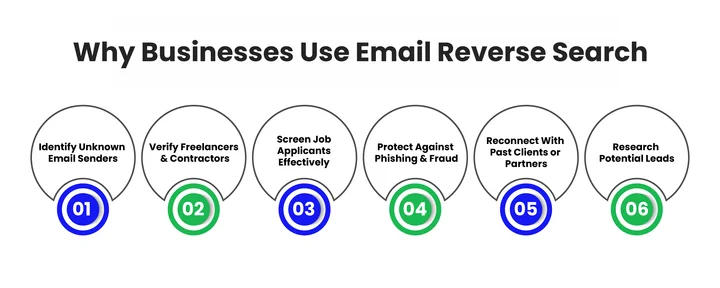
Identifying Unknown Email Senders
Sometimes you get an email from someone you don’t recognize. Reverse search can help reveal if the sender is a real person or business and flag potential scams or phishing attempts.
But simply knowing the identity isn’t enough; the email could still be inactive or a spam trap, which can harm your sender reputation if you try to engage. Verification is what ensures the email is safe to contact.
Verifying Freelancers and Contractors
When hiring remote professionals, businesses often want to confirm that an email belongs to a legitimate person. Reverse search can show social profiles or business associations, giving context about the sender.
Email verification ensures the address is active, deliverable, and free from hidden risks, preventing bounces or penalties from ESPs.
For Example: A marketing agency hiring remote content writers may first verify emails before sharing confidential project details.
Screening Job Applicants
Recruiters and HR teams use reverse email searches to validate candidate information. If an applicant provides an email that doesn’t match their professional profiles or online presence, it can raise red flags.
A reverse email lookup or email background check can save companies time and prevent potential hiring mistakes.
Protecting Against Phishing and Fraud
Financial institutions and tech companies use email verification to identify high-risk senders before they can cause damage.
A reverse email search provides a critical line of defense; according to the Anti-Phishing Working Group (APWG), phishing attacks have reached record highs, primarily targeting credential theft.
While a reverse search can reveal if an address belongs to a known scammer or a “look-alike” domain, only verification can detect spam traps, hidden addresses used by ESPs to catch and penalize careless senders.
Combining these methods ensures your outreach remains safe, protects your sender reputation, and keeps you compliant with strict industry security standards.
Reconnecting With Past Clients or Partners
Sometimes businesses want to reconnect with old clients or partners but only have an email address. Using an email address lookup, companies can find associated social profiles or updated contact information, helping revive professional relationships that might otherwise be lost.
Reverse search can uncover updated profiles or affiliations, but verification ensures the address is still active, avoiding wasted effort and delivery issues.
Researching Potential Leads
Sales and marketing teams may use reverse search to learn more about prospects. Paired with verification, they can focus on real, deliverable addresses, avoiding inactive emails that could harm campaigns.
Using email verification for business development teams ensures you focus on real prospects instead of inactive or risky addresses.
Now that you understand why verification is crucial and how reverse search can reveal identity, it’s time to see exactly how to conduct a search safely and effectively.
Step-by-Step Guide: How to Find Someone Using an Email Address
Finding someone using an email address can be straightforward if you follow the right approach. The first and most important step is verifying the email, ensuring it’s valid, deliverable, and safe to contact.
Reverse search then helps you uncover publicly available context, such as social profiles, professional associations, or mentions online.
Here’s how to approach it like a professional:
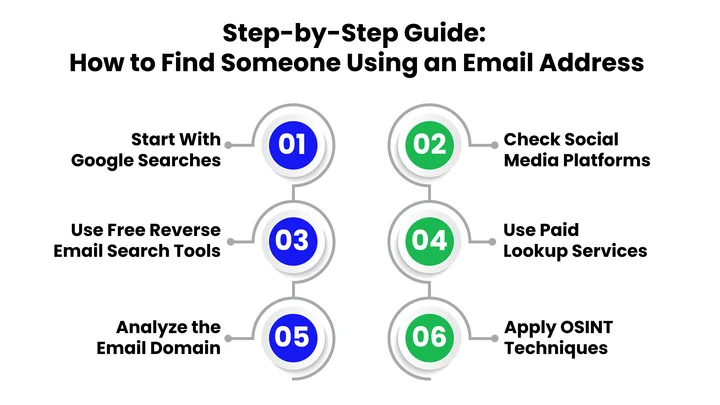
1. Verify the Email First (The Gatekeeper Step)
Before you begin any lookup, make sure the email is valid and safe to contact. Verification ensures that the address exists, avoids spam traps or hard bounces, and protects your sender reputation. Using a tool like EmailVerify.io makes your reverse searches more effective and safe, giving you actionable insights without risking deliverability or compliance issues.
2. Search On Google
Starting with Google is often the quickest way to get initial results.
- Enter the full email in quotes, for example, “[email protected],” to find exact matches.
- Look for mentions on blogs, forums, or websites where the email may have been used publicly.
- Explore tabs like News or Images to spot other references, such as photos or press mentions.
- Try variations, like just the username or the domain, to uncover additional leads.
Emails that appear publicly often yield the fastest results, and this method can quickly provide genuine clues about the email owner.
Once you’ve seen what Google surfaces, it’s time to dig deeper on social media.
3. Check Social Media Platforms
Many emails are linked to social accounts, and each platform has its own quirks. Here’s how to search effectively:
- Facebook: Enter the full email in the search bar. If it’s connected to a public profile, the account may appear. You can also check friends, groups, or posts where the email might have been used.
- LinkedIn: Paste the email in the search bar or use it when importing contacts. LinkedIn often ties emails to professional profiles, which is great for business email verification.
- X (Twitter): Direct email searches are limited due to privacy, but trying the username portion of the email or possible variations may uncover a profile or related mentions.
- Instagram: Instagram doesn’t support direct email searches, but combining the email with Google or other search engines can reveal linked profiles or public contact information.
Even partial matches across these platforms can give context about the person’s online presence, helping you verify the email or understand their digital footprint.
4. Use Reverse Email Lookup Tools
Reverse email lookup tools scan public databases to reveal information about an email address. They can show:
- Associated social profiles
- Public records or professional connections
- Mentions on websites or directories
Free tools like Social Catfish or EmailSherlock are great for quick searches and basic verification without crossing privacy boundaries.
Paid tools like TruthFinder or Clearbit provide more detailed insights, combining multiple sources to reveal professional history, verified email status, or additional social connections.
Tip: Use a combination of tools for a broader context, but remember, these searches help with identity discovery, not inbox safety or deliverability. Always follow up with the best email verification tool to ensure the email is safe to contact.
5. Look at the Domain Behind the Email
The domain part of an email, the part after the @, can tell you a lot about the person or organization. For business emails, it often points directly to a company, giving you context for professional verification or outreach.
Here’s how to dig deeper technically:
- Identify the Organization: The domain usually indicates the company the person works for. Knowing this can help you research the company’s size, industry, and structure.
- Run a WHOIS Lookup: This gives you registration details for the domain, like the organization’s name, administrative contacts, and registration dates. It’s a great way to check if the domain is legitimate or potentially fake.
- Check MX Records: MX (Mail Exchange) records show if the domain has valid email servers. This tells you if emails sent to the address are deliverable and if the domain is actively used.
- Explore the Company Website: Public information like team pages, blogs, press releases, or directories can help link the email to a specific individual.
- Cross-Reference Online Presence: Once you know the organization, you can use LinkedIn or other professional networks to confirm roles or contacts.
By analyzing the domain, you verify the email and gather context for professional communication or outreach, all while staying ethical.
6. OSINT Techniques
If needed, you can extend your search using publicly available information:
- Look at forums, niche platforms, or directories for the username or domain.
- Check if the email appears in known data breaches (legally and safely).
- Use search operators like site:linkedin.com “[email protected]” for targeted results.
Remember: OSINT can help understand context, but it does not guarantee safety, deliverability, or inbox activity.
Make Every Connection Count for Your Business Growth. Use proper email verification to target only active and legitimate leads.
Is Email Reverse Search Legal and Ethical?
Using reverse email search is generally legal when you rely on publicly available information, but it’s important to act responsibly. Misusing these tools can have serious consequences, including ESP penalties, deliverability issues, and reputational harm.
Respect Privacy and Consent
Even if an email is publicly visible, you should never use reverse searches to harass, stalk, or intimidate someone. Always ensure your outreach is consensual and professional.
Follow ESP Rules and Regulations
Email Service Providers monitor bounces, spam complaints, and engagement. Sending to unverified or risky addresses discovered through reverse search can trigger:
- Hard bounces or spam flags.
- Lower sender reputation.
- Potential account suspension or deliverability issues.
Consider Local Laws
Regulations such as GDPR in Europe or CCPA in California control how personal data can be used. Even publicly available information must be handled responsibly according to your region’s rules.
Ethical Outreach Practices
- Use reverse search to verify identity, confirm relevance, or reconnect professionally.
- Always combine reverse search with email verification to avoid sending to inactive, risky, or spam-trap addresses.
- Keep records of how you sourced and verified email addresses to demonstrate compliance and accountability.
By sticking to these principles, you can perform an email address lookup responsibly. The aim is always to verify, protect, and connect, not to intrude on someone’s privacy.
Why Should You Verify an Email Before a Reverse Search?
Before conducting any reverse email search, it’s critical to verify the email address first. Verification ensures that the address is real, active, and safe to contact, protecting your campaigns, sender reputation, and deliverability.
Skipping verification can lead to:
- Hard bounces: Sending to invalid addresses can trigger hard bounces, which negatively impact your sender reputation.
- Spam traps or risky addresses: Interacting with unsafe emails can flag your domain with ESPs and reduce inbox placement.
- ESP compliance issues: Email Service Providers like Gmail and Yahoo monitor bounce rates and engagement. High-risk or unverified emails can limit your sending privileges or trigger account penalties.
Using a reliable tool like EmailVerify.io allows you to:
- Confirm the email exists and can receive messages.
- Identify potential spam traps or high-risk addresses.
- Reduce bounce rates and protect your domain reputation.
Verification is the core step that ensures any reverse search is meaningful and that your outreach remains safe, compliant, and effective.
Once you’ve verified the email, your email reverse lookup efforts will be much more productive, letting you focus on real, actionable results rather than chasing false leads.
Common Mistakes to Avoid When Searching for an Email Address
Even if you know the right methods for email reverse search, it’s easy to make mistakes that waste time or lead to inaccurate results. Recognizing these common pitfalls helps you stay efficient and ensures your searches remain ethical and effective.
Here are some mistakes to watch out for when trying to find someone by their email address:
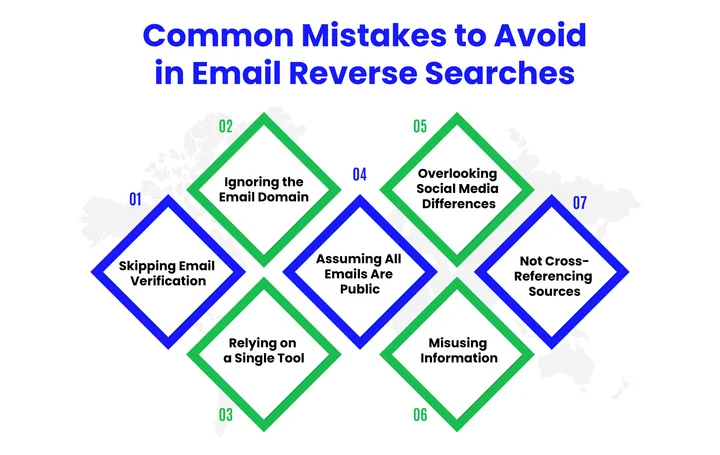
Skipping Email Verification First
Jumping straight into a reverse search without verifying the email can lead to dead ends, hard bounces, or interactions with spam traps. Always confirm deliverability and risk before any lookup.
Ignoring the Email Domain
The part after the “@” often provides context about whether an email is personal, business, or potentially fraudulent. Checking the domain helps prevent outreach to risky or inactive addresses.
Relying on a Single Tool
No tool covers everything. Combining Google, social platforms, and lookup tools gives a more complete picture, but verification is what protects inbox safety and sender reputation.
Assuming Every Email Has a Public Footprint:
Private, disposable, or inactive addresses may yield limited results. Don’t expect reverse search alone to guarantee identity or email safety.
Overlooking Deliverability Risks
Sending to unverified or high-risk emails can trigger ESP penalties, raise bounce rates, and harm your sender reputation. Verification is essential to prevent these issues.
Misusing Information
Reverse email searches are for verification and research, not harassment or stalking. Misuse can lead to legal consequences and damage your brand’s reputation.
Avoiding these mistakes makes the entire email search process more reliable and less frustrating, while also helping you stay respectful of privacy and data boundaries.
Final Thoughts
Finding someone using an email address is possible, but the results depend on your approach.
Reverse email search uncovers who an address may belong to, names, social profiles, or business associations, but it does not confirm deliverability, inbox activity, or safety.
That’s where email verification helps. Verifying an email first ensures it’s valid, identifies risks like spam traps or hard bounces, and protects your sender reputation.
Combining verification with reverse search lets you safely act on real, deliverable addresses.
From Google searches and social media checks to domain analysis and OSINT techniques, each step adds context, but verification is always the gatekeeper.
Using tools like EmailVerify.io ensures your searches start with accurate, safe data, making follow-up research more focused and trustworthy.
Always verify before searching. It saves time, protects your sender reputation, and ensures every connection counts.
Frequently Asked Questions (FAQs)
How Accurate Is an Email Reverse Search?
Your results depend on the email’s activity and type. Business emails and long-term personal addresses usually provide more useful information than disposable or inactive emails. Verifying the email first helps you avoid chasing false leads and saves you time.
Can You Use an Email Address to Find Social Media Accounts?
You can often connect an email to social media accounts if the address has been used publicly. Each platform handles email visibility differently, so results can vary. Even partial matches can help you confirm profiles and get a clearer picture of the person’s online presence.
Is Email Reverse Search Safe for Personal or Business Use?
Email reverse search is safe when you rely only on publicly available information. Issues arise when private data is accessed or information is misused. Ethical searches focus on verification, fraud prevention, and legitimate research.
What’s the Difference Between Email Verification and Email Background Checks?
Email verification tells you if the email address is real and active. An email background check shows you clues about the person’s online presence and activity linked to that email.
Accurate Email Lookups Start with Real-Time Verification.


