

Building a high-quality email list is hard and stressful for new startups. You face a tough choice every day:
Grow your list fast, but risk destroying your email reputation forever.
Grow your list safely, but it feels extremely slow and takes a lot of patience.
Most founders feel stuck between these two bad options. Here are the 5 biggest problems almost every startup faces when trying to build its email database:
The Catch-22
Investors and customers want to see fast growth. Organic ways (good content, free guides, sign-up forms) often take 6-12 months to show real numbers. So many teams buy email lists or copy contacts from the internet. Result? More than 2% of emails bounce, which triggers Gmail and Outlook to start sending all your future emails to spam, even the good ones.
Severe Data Decay
Every year, 22-30% of business email addresses stop working. People change jobs, companies close, or they stop checking old emails. If you don’t clean your list often, nearly one-fourth of your contacts become useless in 12 months. Your bounce rate also gets worse.
Legal and Compliance Risks
This is the biggest mistake of startups, you send marketing emails to people who never said YES can cost you a lot of money. The following are the violations recorded per CAN-SPAN and GDPR Law:
- In the USA, up to a $53,000 fine per wrong email (CAN-SPAN law).
- In Europe, up to €20 million or 4% of your whole company revenue (GDPR law).
Many teams hurry and forget to get real permission, and later pay heavily.
Technical & Authentication Challenges
New companies often forget to set up SPF, DKIM, and DMARC correctly, which causes emails to get blocked even when they are good. If you send hundreds or thousands of emails too fast from a new domain, email companies may flag you as spam.
Poor Engagement & Spam Traps
Even when people say yes, many still ignore your messages. Low opens and clicks make email companies lower your score. Bought lists often include secret spam trap addresses, and if you email those addresses, blacklists flag your domain instantly, and fixing it becomes very hard.
The Core Problem: Startups must choose between painfully slow but safe organic growth and fast but extremely risky shortcuts that can permanently ruin their email channel<
Let’s dive in.
Table of Contents
Why Email Is Still One of the Most Valuable Growth Channels for Startups
Email remains a growth channel for startups, with ROI often cited at $36 to $42 per $1 spent. It also gives you something other channels cannot, such as direct access to their audience, personalized communication, and 40X higher customer acquisition.
Here is a little explanation of the above statement:
- Unlike your social media followers or paid ad audiences, your email list belongs to you completely.
- Platforms change algorithms overnight and wipe out your reach.
- Ad accounts can get restricted, or costs can double in a month.
But your email list? It travels with you through rebrands, domain changes, or even if you switch tools.
The Numbers Are Hard to Ignore (ROI)
Compare that head-to-head:
| Channel | Average ROI (Per $1 Spent) | Strength Type | Risk Level | Control Level |
|---|---|---|---|---|
| Email Marketing | 36-42 (up to $45+) | Direct revenue | Low | High (owned list) |
| Paid Search | ~$2 | Immediate traffic | Medium-High | Medium |
| SEO | ~$22 (long-term) | Compounding organic | Medium | Medium |
| Social Media Ads | 5-10 | Fast reach | High (algorithm & cost volatility) | Low-Medium |
Every email you send tells you something useful:
- Who opened it.
- Who clicked.
- Who bounced.
- Who marked it as spam.
You can test subject lines, send times, offers, and CTAs with almost no extra cost.
Email Works Across Your Entire Customer Journey
You can use the same channel at every stage without starting from scratch:
- Acquisition
- Activation / Onboarding
- Retention
- Expansion
- Referrals
Most other channels force you to pick one part of the funnel. Email lets you play the full game.
Powerful in B2B (Where Most Startups Live)
Email is one of the few channels that can stay in front of the B2B purchaser during that entire journey:
- Educational content to build awareness.
- Case studies and proof to reduce risk.
- Personalized follow-ups to move deals forward.
A single closed enterprise deal or annual SaaS subscription can cover the cost of your entire email program for months.
Low Cost to Start, Easy to Scale
You don’t need a big team or fancy agency.
- Tools like Mailchimp, Brevo, Resend, or Loops start free or under $50/month for small lists.
- Basic automation (welcome series, drip campaigns, re-engagement) can be set up in days.
- As you grow from 1,000 to 100,000 contacts, the marginal cost stays low.
This scalability fits perfectly with how startups actually grow slowly and steadily at first, then fast once traction hits.
What Most Startups Get Wrong When Building Their First Email Database
Excitement leads to a rush, and mostly startups get it wrong when filling their spreadsheets with as many emails as possible. It is a good shortcut, but it damages your domain reputation, tanks deliverability, and fails to make future confident campaigns.
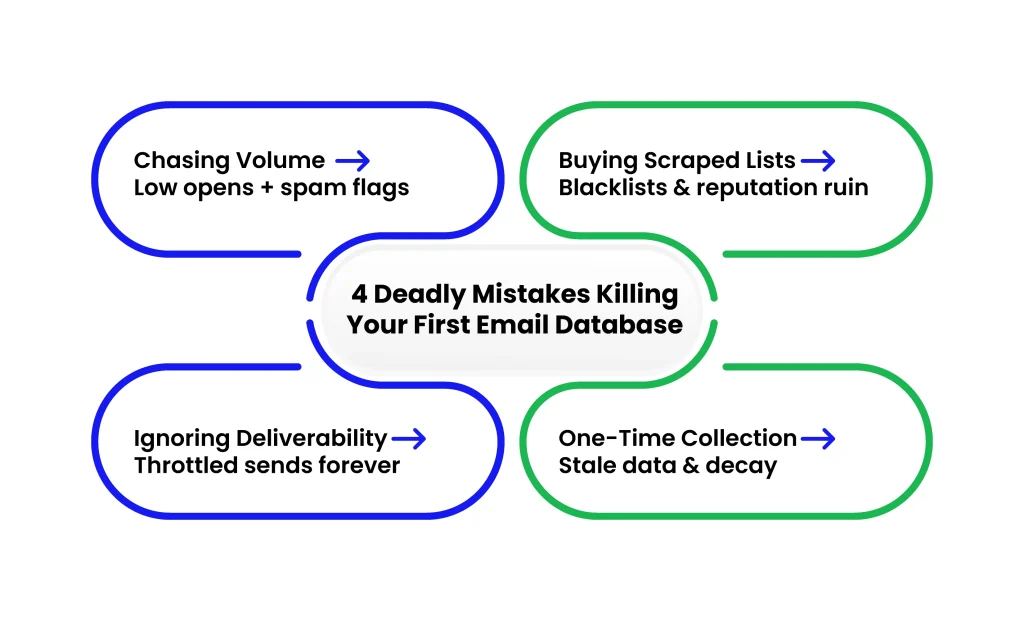
Here are some common traps startups fall into, and you can avoid them from day one:
Chase Volume Instead of Relevance
Do not chase the volume of emails, instead collect relevant data.
Why?
You ignore the core issue because most contacts have no reason to hear from you; they simply don’t fit your ideal customer profile( ICP).
Open rates drop below 10-15%, replies become rare, and spam complaints rise quickly.
Email providers (Gmail, Outlook, Yahoo) notice your pattern and start throttling your sends or sending your messages straight to spam, even to people who might actually want to hear from you later.
Buying Low-Quality or Scraped Email Databases
Startups buy low-quality databases and start sending bulk emails without checking accuracy.
What actually happens:
- Most of those emails are invalid, outdated, and never belonged to a real audience.
- Many come from (LinkedIn, Company websites, directories) without context.
- info@, support@, and spam traps are common in these low-quality databases.
- Bounce rates increase to 10 to 30%, and your sender reputation is gone forever.
Ignoring Deliverability and Sender Reputation
Many startups ignore what to deliver and how they will be represented as a sender. Normally, they don’t bother about how email providers decide to deliver your email.
This leads to:
- High bounce rates from bad data.
- Even a small percentage of spam complaints (as low as 0.1-0.3%) signals trouble.
- Not authenticating your domain with SPF, DKIM, and DMARC.
- Using the same domain for marketing and transactional emails without separation.
- Once Gmail or Microsoft marks you as low-reputation, recovery can take 6-12 months of careful sending time you don’t have as a startup.
Treating Email Collection as a One-Time Activity
Founders built the email list and think their email collection is a one-time job.
But it’s not. Why?
- Lists decay naturally, people change jobs, emails get abandoned, and interests shift.
- Without ongoing hygiene (removing hard bounces, inactives, spam reporters), your list quality drops fast.
- You miss the chance to keep adding high-intent contacts through product usage, content, events, and referrals.
- When you finally need to run a big campaign six months later, the list is stale, engagement is low, and deliverability suffers again.
These mistakes feel harmless at the moment (especially when you’re moving fast), but they create compounding problems.
What “Relevant” Email Data Actually Means for Startups
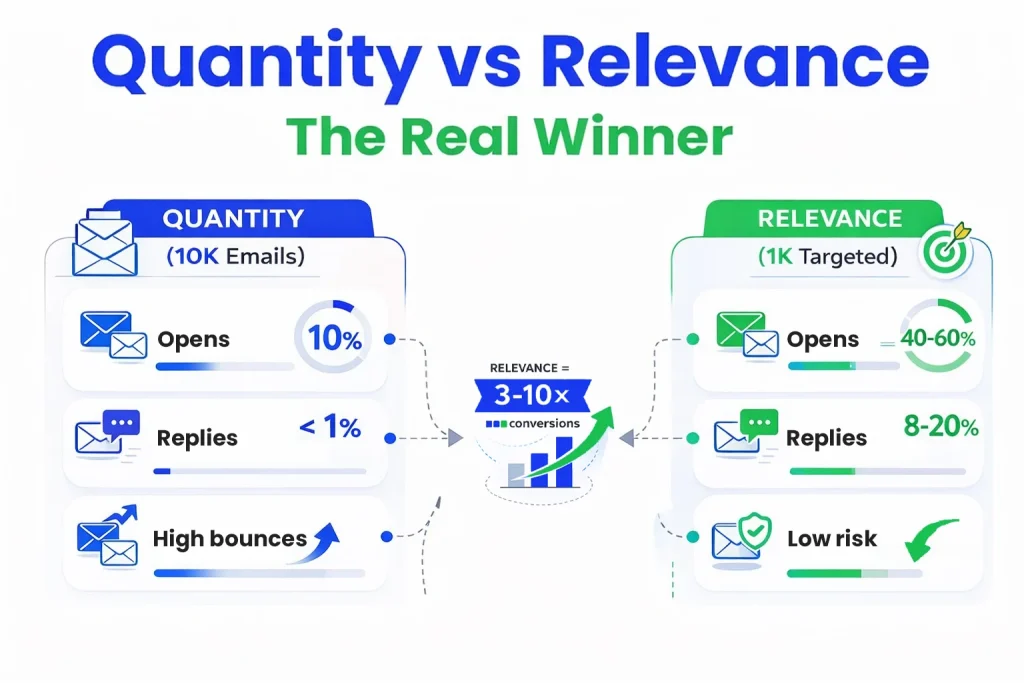
Relevance is important for startups to move beyond vanity metrics to track user-centric engagement. Relevant email data means every contact on your database has a clear, logical reason to receive your message. When your relevancy is high, your campaigns automatically perform better.
List Size vs. List Relevance: Why Bigger Isn’t Better
It’s easy to feel good about a growing number: We now have 8,000 emails! But list size is vanity. Relevance is revenue.
But list size is vanity. Relevance is revenue.
| Metric | Large Irrelevant List (10,000+) | Smaller Relevant List (500-1,000) |
|---|---|---|
| Open Rates | 8-15% | 35-60% |
| Reply Rates | <1% | 5-15% (8-20%+ in warm B2B) |
| Bounce Rates | High (10-30% possible) | Very Low |
| Spam Complaints | Higher risk (0.1-0.3%+ danger zone) | Near zero |
| Domain Reputation | Damaged over time | Strengthens over time |
| Revenue per Contact | Low | 3-10x higher |
Important: The smaller, relevant list almost always generates more meetings, trials, demos, or sales, often by 3-10x per contact because you’re talking to people who already care about the problem you solve.
Chasing volume leads to generic messaging that no one responds to. Prioritizing relevance lets you write sharper, more specific emails that feel personal and timely.
ICP Fit and User Intent: The Two Pillars of Relevance
Relevance comes down to two connected things you control:
1. Ideal Customer Profile (ICP) Fit
Does this person or company match the exact type of customer who gets the most value from your product and who can actually pay for it?
Job title, company size, industry, tech stack, funding stage, location, pain points
Example: If you sell developer tools for fast-growing SaaS teams, a solo freelancer or enterprise IT manager is not a good fit even if they have a fancy title.
2. User Intent/Context
Has this person shown any signal that they’re thinking about your category right now?
Have they:
- Downloaded your ebook on the exact problem you solve.
- Signed up for your free trial or waitlist.
- Engaged with your content multiple times.
- Visited pricing or demo pages.
- Replied positively to a previous cold email.
- Attended your webinar or meetup.
Check if your both ICP fit and intent are strong, your relevance is high.
How Relevance Directly Drives Your Key Metrics
Higher relevance isn’t a nice-to-have; it creates measurable lifts that compound over time.
Open Rates
Relevant contacts open because the subject line speaks to something they already care about.
Reply Rates
When someone sees immediate value or relevance, they’re far more likely to respond. Cold emails to scraped lists: 0.5-2% replies are typical. Emails to warm, intent-matched contacts: 8-20%+ replies common in B2B outbound.
Conversions (Trials, Demos, Meetings, Purchases)
Relevance shortens the sales cycle and increases win rates.
In short: relevance turns email from a spray-and-pray channel into a precision tool. You spend less time sending to thousands and more time closing the hundreds who are actually ready to buy or try.
The takeaway for you as a founder or growth leader: stop asking How many emails can we get?
Start asking Who would be disappointed if they didn’t hear from us right now?
Build around that question, and your list becomes an asset instead of a liability.
How Startups Can Find a Relevant Email Database Without Hurting Deliverability
You’ve seen why relevance matters more than volume and how common mistakes like buying old lists or ignoring reputation can hurt your domain early. You can build (or access) relevant email data without those risks.
The key is choosing sources that prioritize permission, context, and quality from the start. Focus on methods that align with how people actually want to hear from you. This protects your sender reputation, keeps bounces and complaints low, and sets up campaigns that actually convert.
Organic Sources vs. Third-Party Sources
Organic sources mean you collect emails through your own channels, where people voluntarily share their contact info because they see value in what you offer.
Third-party sources are external providers or aggregators that sell or supply lists they’ve compiled from various places.
| Factor | Organic / First-Party Data | Third-Party / Purchased Lists |
|---|---|---|
| Consent | Explicit opt-in | Often unclear or missing |
| Intent | High (already interested) | Low to unknown |
| Open Rates | 25-50%+ | 2-5% typical |
| Bounce Rates | Very low | 10-30% common |
| Spam Complaints | Near zero | Often above 0.3% |
| Domain Risk | Strengthens reputation | Can damage reputation fast |
| Long-Term Value | Compounding asset | Short-term shortcut, long-term risk |
For most startups, sticking to organic first is slower but safer and more effective long-term. If you need speed for outbound, use third-party only as a supplement after heavy verification and with strict compliance checks, but even then, many experts advise against it entirely in 2025 because of tightened ISP rules.
First-Party Data vs. External Lists
First-party data is information you collect directly from your own interactions and properties of your website, product, app, events, or customer touchpoints.
External lists come from outside your ecosystem (vendors, partners, public sources, or purchased databases).
| Aspect | First-Party Data | External Lists |
|---|---|---|
| Source | Collected directly from your own website, app, product, events, or touchpoints | From vendors, partners, public sources, or purchased databases |
| Accuracy & Freshness | High - fresh and contextual (you know exactly how/why they engaged) | Lower - fast decay (≈28% annual degradation; 30%+ obsolescence yearly in B2B) |
| Context / Relevance | Strong - tied to your ICP, explicit intent, and real interactions | Weak - no direct context or knowledge of source/permission |
| Consent & Privacy | Built-in compliance (GDPR, CAN-SPAM, etc.) - explicit consent | Uncertain - permission level often unknown or unclear |
| Deliverability | Excellent - high engagement gives positive ISP signals (low complaints, good opens/clicks) | Risky - can poison reputation, raise complaint rates, hurt even clean sends |
| Trust & Reliability | High - real users already in your orbit | Lower - mixing bad batches damages the overall sender reputation |
| Recommended Use | Core foundation of your database - build everything around it | Use sparingly, only if carefully vetted and verified; layer on top if needed |
Build your core database around first-party data. It’s your strongest foundation, then layer on carefully vetted external sources only if needed (and always verify first).
Why the Source of Emails Matters as Much as the Recipient
The email becomes unsolicited for recipients when a shady source sends it without permission from the sender. The ISP algorithms use permission and expectation, which they obtain from the source material.
- Permission and expectation drive inbox placement.
- Reputation is cumulative because ISPs track your domain’s history across all sends.
- Good sources give high opens/replies for positive reputation loops.
- Bad sources give low engagement and complaints.
In practice: A recipient who fits your ICP but never opted in is still likely to treat your email as cold spam. But the same person who downloaded your relevant content last week? They expect, and welcome, follow-up metrics to soar, and their reputation to strengthen.
Bottom line for you: Prioritize sources where permission and context exist. This isn’t just about avoiding blacklists; it’s about creating a flywheel where relevance happens.
How to Build a High-Quality Email List for a Startup Without Buying Risky Databases
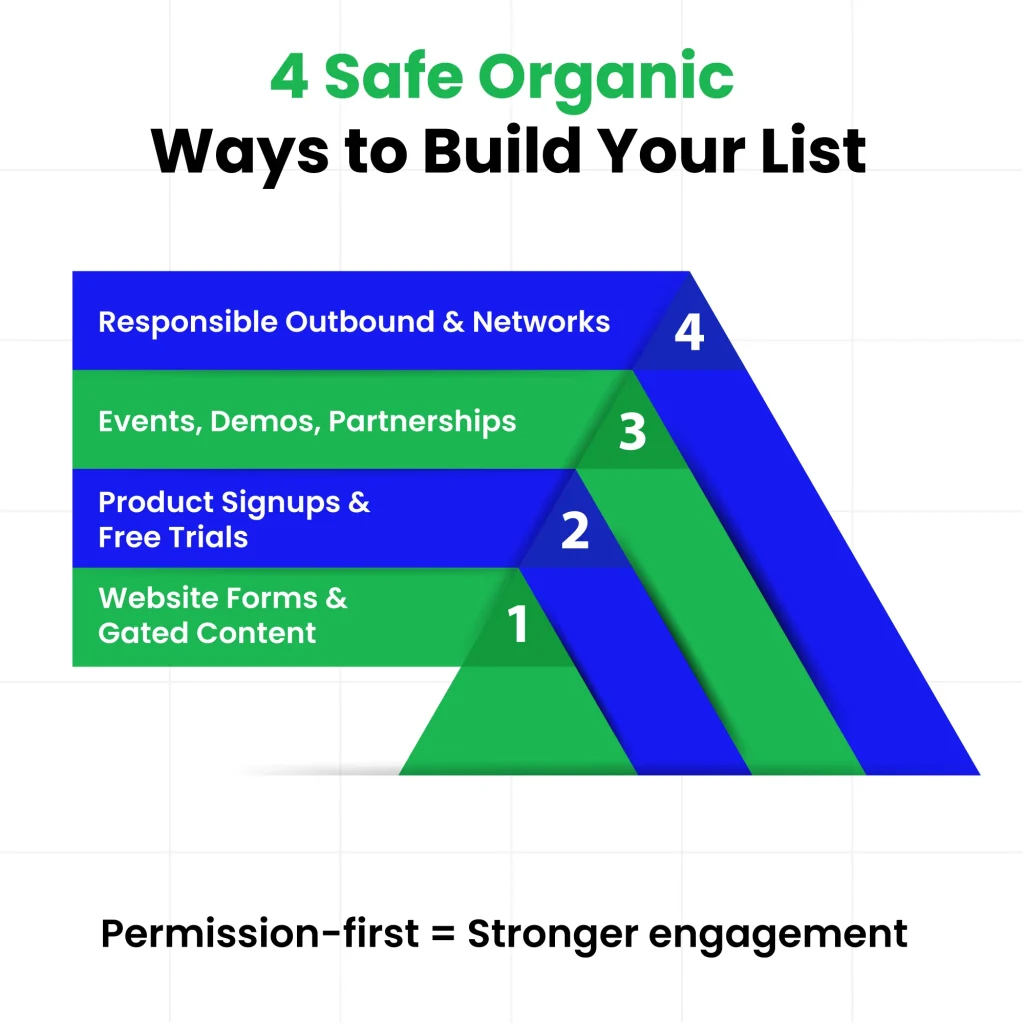
You can build your high-quality email list as a startup without big budgets and shortcuts. Some approaches keep your domain reputation strong, bounce rates low, and engage high from day one.
Here are the most practical, low-risk ways startups use to grow relevant email lists organically.
Website Forms and Gated Content
First, your website can be your channel for consistent and permission-based collection. People already landing on your website show interest in your space.
- Place embedded forms in high-traffic spots.
- Offer something useful in exchange for an email:
- Checklists or templates
- Short ebooks or guides
- Free tools like calculators or audits
- Content upgrades
Trigger popups after 30-60 seconds, on scroll depth, or when someone tries to leave. Make the offer irresistible and easy to dismiss.
These methods build first-party data with strong intent and are on your site, engaging with your content, and opting in knowingly.
Product Signups and Free Trials
If you have a product, the signup flow is one of the highest-intent moments to capture emails:
- Onboarding signups: Require email for account creation.
- Free trials or freemium access: Users who start a trial are signaling strong intent.
- Waitlists or beta access: For pre-launch, build hype with a landing page.
Product-driven collection often yields the most engaged subscribers, they’re already using (or wanting to use) what you build.
Events, Demos, and Partnerships
Offline and semi-offline touchpoints let you connect personally and collect emails in context.
- Webinars, workshops, or virtual demos.
- In-person events, meetups, or conferences.
- Partnerships and co-marketing.
These create warm, contextual connections with subscribers via QR registration or email registration, which come in with trust already partially built.
Responsible Use of Outbound and Professional Networks
Outbound works when targeted and value-first.
- On LinkedIn, engage first, then personalize messages offering help.
- Cold email narrowly (50-100 companies), personalize, value-first, no blasts; verify emails, warm up domain slowly.
- Leverage referrals: ask happy users/connections for intros.
These methods demand upfront effort but deliver higher opens, replies, reputation, and sustainable growth. Start with 1-2 that fit your stage, track engaged additions, then scale winners.
How Early-Stage Startups Should Collect Emails at Scale Safely
Startups can collect Emails as you gain traction( traffic, signups, content downloads), and your collection starts to rise. But this rise introduces risks like bot spam, fake emails, and junk form fill-ups.
Your goal is to scale safely without hurting quality or reputation. You can focus on the collection point catch before it enters your database. You can:
Scale Email Collection Without Attracting Bots
Practical ways to scale safely:
- Add lightweight protections: invisible honeypots, behavioral checks, or free tools like Cloudflare Turnstile/hCaptcha.
- Rate-limit submissions (e.g., 5/hour per IP).
- Use double opt-in for high-value flows.
- Set real-time alerts and review anomalies.
These steps let you handle 10x-100x more volume without turning your list into a bot playground.
Prevent Disposable and Fake Emails
Strategies to block them proactively:
- Block known disposable domains at signup (use open-source lists or tools; reject with a friendly message).
- Validate formats, check MX records, and flag gibberish/sequential patterns.
- Integrate lightweight APIs to detect disposable/catch-all/high-risk emails on submit.
- Layer double opt-in disposables rarely confirm.
You can have a clear list and damage-free contacts if you apply these strategies from the start.
Why Verification Should Happen at the Point of Collection
Verifying at the point of collection (real-time during signup or form submit) is proactive and far more effective for startups:
- Stops bad data (Invalid, risky, disposable, or typo emails) immediately.
- Protects sender reputation from day one.
- Improves overall list quality and engagement for only verified, deliverable emails entered
- Saves time and money in long-term cleaning
- Builds trust with ISPs via consistent low-bounce/low-complaint sends
For early-stage teams, integrate real-time verification via API into key forms (signup, lead magnet, trial). It adds minimal friction for users but massive protection for your domain.
How to Grow an Email Database Without Getting Flagged as Spam
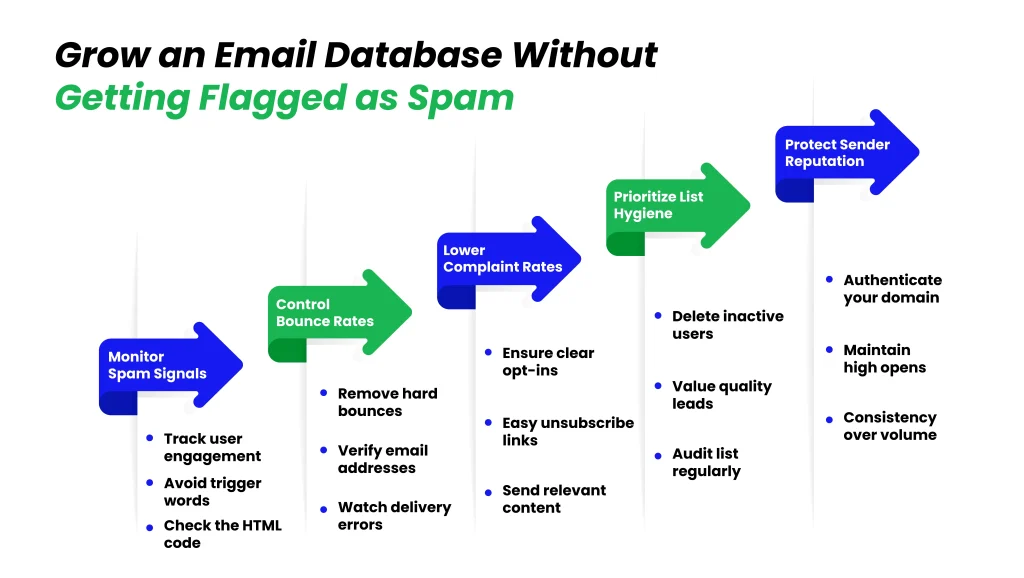
Growing your Email Database without spamming is not a hard part. AI filters detect and flag as spam if your content and behavior are not healthy. You should understand spam signals that help you stay ahead. And, you can focus on them to prevent reputation drops from starting.
Here you can look for:
Spam Signals Email Providers Look For
| Spam Signal | Why It’s Dangerous | Safe Benchmark |
|---|---|---|
| High Spam Complaints | Direct negative signal to ISPs | <0.1% ideal, <0.3% max |
| High Bounce Rates | Signals poor list quality | <2% (ideal <1.5%) |
| Sudden Volume Spikes | Looks like bot/spam behavior | Gradual increases only |
| Missing SPF/DKIM/DMARC | Fails authentication checks | Properly configured before sending |
| Low Engagement | ISPs see content as unwanted | Maintain strong open/click rates |
| No One-Click Unsubscribe | Violates Gmail/Yahoo rules | Required for bulk senders |
| Sending to Dormant Lists | Triggers complaints & filtering | Re-engage or suppress first |
These signals accumulate. One bad campaign can push your domain into the danger zone, where even future legitimate sends get throttled or spammed.
Role of Bounce Rates and Complaint Rates
| Metric | Healthy Range | Warning Zone | Danger Zone |
|---|---|---|---|
| Hard Bounce Rate | <1% | 1-3% | 3-5%+ |
| Overall Bounce Rate | <2% | 2-3% | 3%+ |
| Spam Complaint Rate | <0.1% | 0.1-0.3% | >0.3% |
| Inbox Placement Impact | Strong | Reduced | Filtered/Rejected |
Both metrics feed your sender reputation (your credit score with ISPs). Poor scores mean lower inbox placement, even for engaged subscribers.
Why List Hygiene Is More Important Than Sending Volume
One major factor that many founders think contributes more to growing faster is that, in reality, clean lists outperform high-volume dirty ones every time. Quality hygiene lets you send sustainably at scale. Prioritize removing risks over adding contacts blindly.
A smaller, engaged list drives more revenue and protects your domain long-term. Monitor these metrics weekly (via your ESP dashboard or tools like Google Postmaster Tools). If bounces or complaints rise, pause sends, clean the list, and resume gradually.
How Founders Can Find B2B Email Contacts Without Destroying Domain Reputation
B2B outreach needs cold contact for its operations, but startups lose their online presence because of bad staff performance. Follow them, and you can scale outreach without blacklists.
Difference Between Cold Outreach and Spam
Cold outreach and spam both reach people without prior contact, but the intent and execution differ sharply.
Cold outreach:
Targeted, personalized, value-first messages to specific ICP fit, legal under CAN-SPAM/GDPR if compliant
Spam:
Mass, generic blasts with no relevance or personalization
Domain Warming and Responsible Sending Patterns
New domains start with a neutral reputation blast too soon, and you’re flagged. Warming builds trust gradually.
- 10-30 emails/day per inbox/domain.
- Increase 10-20% weekly if bounces/complaints stay low.
- Send at regular times/intervals to avoid bursts or weekends-only.
- One for marketing/cold, another for transactional/product protects core reputation.
- SPF, DKIM, DMARC (p=none at minimum) before any sends.
Impact of Unverified Email Lists on Domain Trust
Sending to unverified lists is one of the fastest ways to ruin a reputation.
- High invalid/bounce rates
- Risky types increase complaints/bounces even if valid
- One bad batch poisons the domain
- Recovery takes months of careful sending time; startups can’t afford
Always verify before importing/sending.
Unverified = high risk
verified + relevant = protected trust
How to Validate Email Lists Before Running Outreach or Sales Campaigns
Your collected database is still raw and carries hidden risks. Validation before starting any campaign is non-negotiable.
Why?
Why Validation Before Sending Is Critical
Sending without validation risks immediate damage, which leads to bounces from invalids and hurts reputation fast. You get complaints from risky addresses (spam traps, role-based) trigger filters.
Even one polluted campaign can drop inbox placement for months. Validate to keep bounces <2%, complaints <0.1%, and inbox rates high. It’s cheaper and faster than recovery.
Types of Email Risks (Invalid, Role-Based, Spam Traps)
Common email risks go beyond valid/invalid:
- Invalid emails Syntax errors, non-existent domains/mailboxes (hard bounces guaranteed).
- Role-based emails (info@, sales@, support@) are often monitored by teams; higher complaint risk as not personal.
- Spam traps addresses set by ISPs to catch poor senders (pristine = new/bad lists; recycled = dormant, cleaned poorly). Hitting one can blacklist you quickly.
- Catch-all domains accept [email protected] (hides invalids until bounce).
- Disposable/temporary Short-lived, lead to bounces and low engagement.
These create valid but risky flag verification tools to score them.
Why Manual Checks Are Not Scalable
Manually testing emails (e.g., sending test or checking existence) fails at scale:
- Time-consuming for hundreds/thousands.
- Misses hidden risks (spam traps, catch-alls don’t bounce immediately).
- No bulk insight into patterns (e.g., high role-based %).
- Human error introduces more bad data.
Use automated tools/APIs for real-time or bulk validation catch issues instantly, segment risky contacts, and maintain hygiene without slowing growth.
Validate every new batch or pre-campaign. Clean and verified lists turn outreach into a reliable channel.
How to Prepare an Email Database Before a Startup’s First Sales Campaign (infographic)
You can define your ICP first, prepare your email to land well, engage right, and set a strong baseline for future campaigns.
Here are three important things you can consider before your campaign:
First: Cleaning lists or Imported Data
Cleaning data from old tools, events, and early experiments, along with imported partner and acquisition lists, leads to performance problems because hidden issues exist in these datasets.
You should run a verification scan using tools like NeverBounce, ZeroBounce, and EmailVerify
- Remove obvious duplicates, incomplete records, or clearly fake entries (e.g., [email protected]).
- Export any historical bounce data from previous tools and suppress those addresses permanently.
- Flag subscribers who haven’t opened or clicked in 6-12 months. Don’t delete them yet, but isolate them.
- Ensure no prior spam complaints or unsubscribes are present; these should be suppressed forever to avoid violations.
Clean data reduces bounces to under 2% and complaints near zero, critical for your domain’s first impression with ISPs.
Second: Segmenting Lists by Intent and Source
Segmentation turns a flat list into targeted groups that receive relevant messaging. For sales campaigns, segment by intent (how warm/hot they are) and source (how they joined).
- By intent:
- High-intent: Trial users, demo requests, pricing page visitors, multiple content downloads.
- Medium-intent: Engaged with recent content, opened the last 2-3 emails.
- Low-intent: Signed up long ago, minimal engagement.
- By source:
- Product signups/free trials have the highest conversion potential.
- Content downloads/lead magnets contextual relevance.
- Events/webinars warm from interaction.
- Outbound/professional networks are colder and need more nurturing.
Third: Market Alignment and Sales Expectations
Marketing often focuses on volume/engagement; sales want qualified meetings fast.
Startups can set sales expectations like:
| Area | Agreed Benchmark | Owner |
|---|---|---|
| Cold Reply Rate | 5-10% target | Marketing |
| Warm Reply Rate | 20%+ target | Marketing |
| Meetings Booked | Defined numeric goal | Sales |
| Follow-Up SLA | Within 24 hours | Sales |
| Feedback Review | Post-campaign analysis | Both |
| Iteration Plan | Adjust messaging/segments | Both |
Prep a clean, segmented, aligned list turns your first campaign from risky to reliable.
How to Turn Raw Lead Lists Into a Clean, Campaign-Ready Email Database
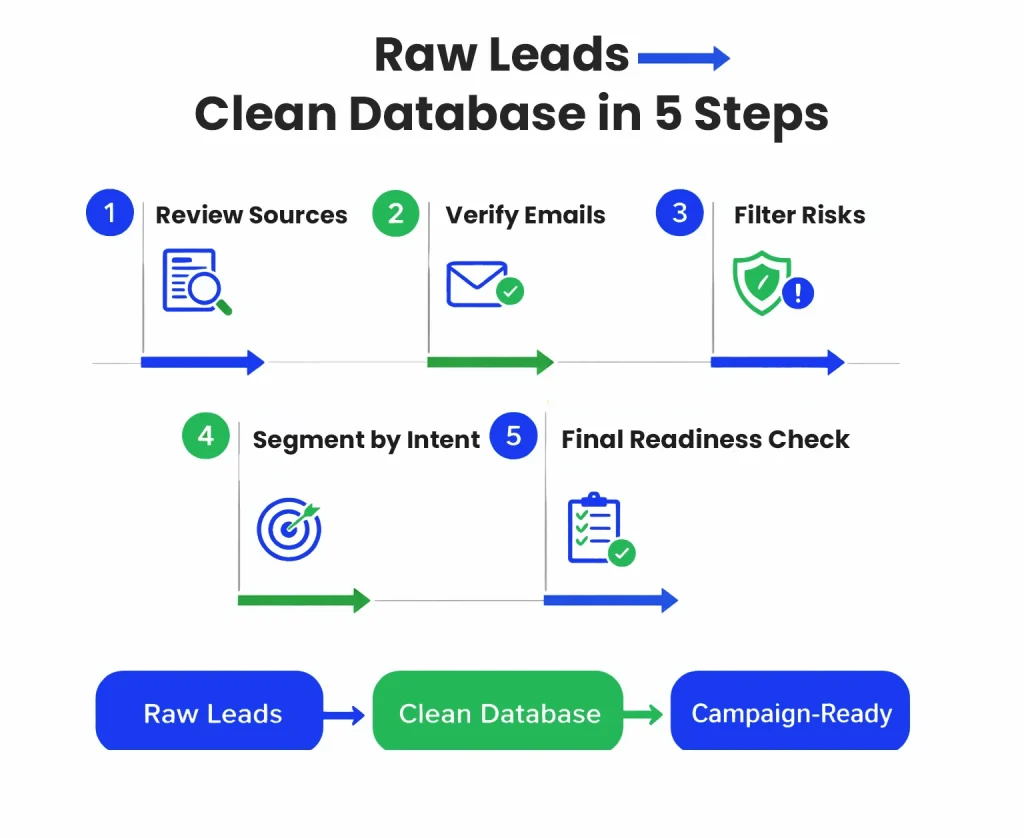
You can focus on the mechanics of cleaning, validating, and formatting the data to ensure deliverability. Follow this step-by-step process to go from raw to ready.
1. Review Data Sources
Start by auditing where every contact came from:
- List all sources: Website forms, trials, events, outbound scrapes, imports, partnerships.
- Note permission level: Explicit opt-in (strong), implied (medium), none (high risk suppress or verify heavily).
- Flag potential issues: Any bought/scraped sources? Legacy data without recent activity?
- Document decay: Estimate staleness (e.g., job changes happen ~20-30% yearly in B2B).
This step reveals risks early and helps decide what to keep, clean, or discard.
2. Verify Email Addresses
Run full verification on the entire list.
- Use a reliable tool for bulk or real-time checks: Catch syntax errors, non-existent domains, and full mailbox checks.
- Flag categories: Invalid (remove), risky (role-based, catch-all, disposable suppress or segment separately).
- Aim for <1-2% overall risk post-verification.
Verification prevents bounces and protects reputation from the first send.
3. Filter Risky and Invalid Contacts
Apply strict filters based on verification results and other red flags.
- Remove: Hard invalids, known disposables, past hard bounces.
- Suppress: Spam traps (if detected), role-based if sales campaign targets individuals, high-risk catch-alls.
- Isolate: Inactives or low-engagement for separate nurture (don’t mix with high-intent in first campaign).
Post-filter, your list should have low bounce risk and minimal complaint potential.
4. Segment by Intent
Now, organize the cleaned list into actionable groups.
- High-intent segments: Recent trials, demo requests, strong engagement signals.
- Medium-intent: Content engagers, event attendees.
- Source-based: Product vs. content vs. outbound.
- Add tags: ICP fit level, company size, industry for personalization.
Segmentation enables targeted messaging generic to all kill performance.
5. Final Campaign Readiness Check
Before hitting send, run one last review.
- Check overall metrics: Bounce risk <2%, no high complaint history.
- Test authentication: SPF/DKIM/DMARC set and passing.
- Preview sequences: Ensure personalization tokens work, and unsubscribing is easy.
- Small test send: To an internal/known group, first monitor delivery and engagement.
- Set monitoring: Track bounces, complaints, and opens in real-time during launch.
Once it passes, your database is campaign-ready, clean, segmented, and low-risk.
This process takes time upfront, but saves massively on poor results and reputation hits.
How to Build a Startup Email List That Actually Converts
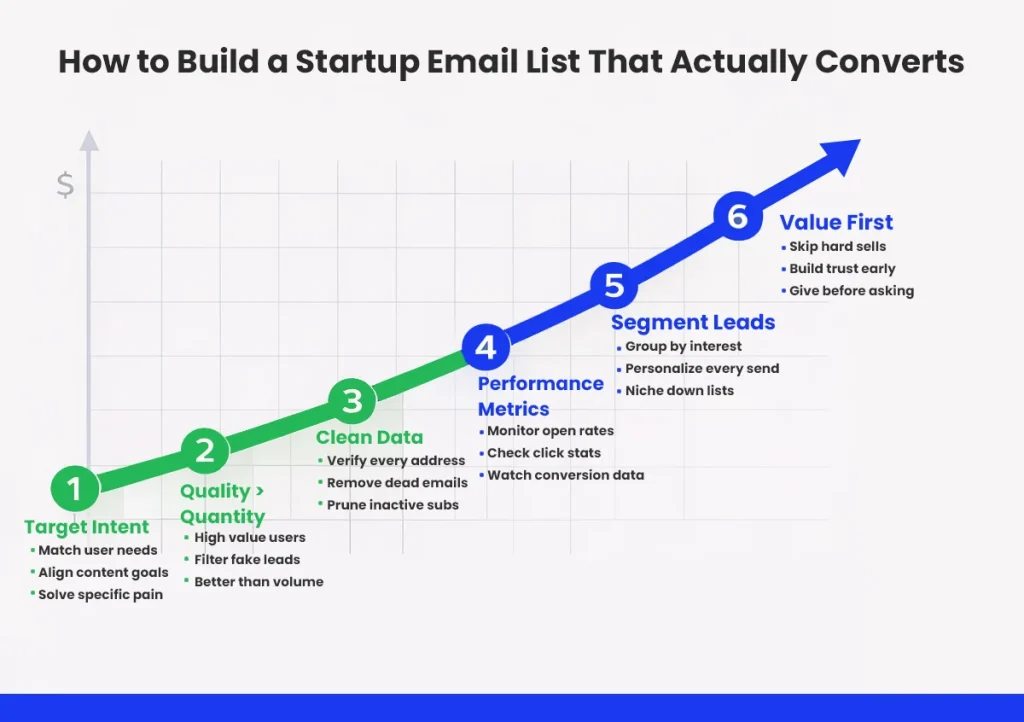
You have prepared and cleaned a list, but if it does not convert, that list is dead weight. There are three main things you can focus on if you want to build a high-quality and actually converting list:
Always Quality over Quantity
Benchmarks in 2025-2026 show clear gaps:
| Metric | Large Untargeted List | Smaller High-Quality List |
|---|---|---|
| Open Rate | 27-32% (cold avg) | 36-42%+ (warm avg) |
| Reply Rate | 3-6% | 10%+ top performers |
| Meeting Conversion | 1-2% | 5-10% (warm segments) |
| Bounce Rate | Often >2% | <2% |
| Complaint Risk | Higher | Minimal |
| Long-Term ROI | Declines over time | Compounds over time |
Quality lists create positive loops: Higher engagement signals to ISPs mean better inbox placement, which gives more opens and more replies with a stronger reputation.
Quantity without quality triggers negative loops: Low engagement, complaints, and throttling.
Smaller engaged lists also cost less to maintain and convert better per contact. One good lead often beats dozens of unqualified ones.
Match Messaging with User Intent
Relevance turns into actions. Tailor every message to the contact’s intent level and context.
- High-intent (trials, demos): Direct, benefit-focused “Ready to see how we cut your onboarding by 40%? Book here.”
- Medium-intent (content engagers): Educational nurture shares case studies or tips tied to what they downloaded.
- Low-intent/outbound: Value-first hooks reference specific pain points or recent events (e.g., funding round).
Clean Data Improves Performance Metrics
Clean, verified data is the foundation that directly lifts every key metric.
- Under 2% bounces and <0.1-0.3% complaints
- Relevant and deliverable lists push opens to 40%+ in warm flows
- Replies 5-15% in targeted outbound
Clean data means fewer dead ends; combined with segmentation, conversion rates rise as prospects feel seen.
Stronger long-term ROI
In practice: A startup with a clean 1,000-contact high-intent list often generates more pipeline than a dirty 10,000-contact one, because every send performs better and doesn’t risk the domain.
Build quality from collection through maintenance verification, segment, and personalize. That’s how email becomes a true conversion engine for your startup.
Where Email Verification Fits Into a Modern Startup Growth Stack
You’ve built lists carefully, cleaned them, segmented them, and prepared for campaigns. But one piece remains essential before any meaningful sending begins: verification.
In a modern startup growth stack, email verification isn’t an optional add-on; it’s foundational infrastructure, much like domain authentication or basic analytics.
Without it, even the best lists and strategies can fail quickly because hidden data problems only surface when you send.
Why Email Verification Is Foundation
Verification addresses the core risks that damage deliverability and waste effort:
- It catches invalid, risky, or low-quality emails before they cause bounces, complaints, or spam-trap hits.
- It protects your sender reputation from the first campaign onward. ISPs judge you based on early behavior, and high bounce/complaint rates set a negative tone that’s hard to reverse.
- It improves campaign performance metrics across the board: lower bounces lead to higher inbox placement, which leads to better opens, clicks, replies, and conversions.
- It supports compliance and trust: Clean lists reduce the chance of accidental spam violations and build credibility with subscribers.
In practice, verification acts as a quality gate. Every other part of your stack (CRM, ESP, automation tools, segmentation logic) relies on accurate, deliverable email data. Skip it, and downstream tools underperform or break. Include it early, and the entire system runs smoother and scales better.
When Verification Should Be Applied
Apply verification at multiple points to catch issues as early as possible. Prevention beats cleanup.
- At signup/point of collection: Real-time verification during form submits or product signups rejects or flags bad emails instantly (e.g., typos like “gmial.com”, disposables, non-existent domains). This keeps your database clean from day one and reduces friction for legitimate users (many tools suggest corrections automatically).
- At upload/import: When bringing in legacy data, partner lists, event signups, or outbound leads, run bulk verification before merging. This prevents importing hundreds or thousands of risky contacts that could damage reputation in one go.
- Pre-campaign / before sending: Always verify (or re-verify) the target segment right before launch, as lists decay over time (job changes, abandoned accounts). Fresh verification ensures bounce risk stays under 2% and removes newly invalid or high-risk addresses.
Best practice: Layer all three. Real-time at entry for ongoing growth, bulk at imports for one-offs, and pre-campaign checks for every send. This multi-layer approach minimizes risk while keeping your stack efficient.
How EmailVerify.io Helps Startups Build and Maintain Clean Email Databases
EmailVerify.io has an email verification service designed for businesses that rely on email outreach, marketing, or sales, including early-stage startups and scaling companies.
It offers the four main capabilities:
Bulk email verification
Upload lists in CSV or other formats for processing. The service checks for validity, deliverability risks, and common issues (invalid syntax, non-existent mailboxes, disposables, role-based, catch-alls, spam traps). Results include categorized statuses so you can remove or segment risky contacts.
Real-time email verification API
Integrate emailverify via API to validate emails during form submissions, signups, or imports. Responses come back quickly, allowing instant rejection, correction suggestions, or flagging without storing bad data.
Reduce Bounces and Improve Deliverability
By identifying and removing or flagging invalid, risky, or low-quality emails, the service helps lower bounce rates (hard bounces from non-existent addresses or soft bounces from temporary issues) and reduces the chance of spam complaints.
Supporting Startups and Scaling Businesses
EmailVerify is built to handle both small-scale testing and larger volumes as businesses grow.
Emailverify email verification improves inbox placement with real-time email verification. It verifies that are inactive or show low performance, validates contacts accurately, and helps improve deliverability overall. This means your messages are more likely to reach real people, engagement stays consistent, and your campaigns produce better outcomes.
Best Practices for Maintaining Email List Health as a Startup Scales
As your startup grows, with more users, more campaigns, and larger lists, list health requires active, ongoing attention. Neglect it, and even strong early habits erode quickly.
1. Ongoing Verification
Re-verify active segments every 3–6 months and before major campaigns. Automatically re-verify inactive contacts right before any re-engagement send. Run monthly automated hygiene checks across the full database. Apply real-time verification at every new sign-up or form so bad data never enters your system.
2. Monitoring Deliverability Metrics
Check bounce rate (<2%), complaint rate (<0.1–0.3%), opens, clicks, and spam folder placement every week. Use Google Postmaster Tools, Microsoft SNDS, or your ESP dashboard for visibility.
Watch for sudden drops in engagement or spikes in bounces/complaints, and investigate the source or segment immediately. Test inbox placement regularly (with tools like GlockApps or Mail-Tester) so you catch filtering issues early.
3. Avoiding Harmful Shortcuts
Never skip verification just to launch a campaign faster; one bad send can ruin months of reputation work. Suppress hard bounces, frequent complainers, and long-term inactives instead of re-sending without fresh consent or re-engagement. Do not buy or import unverified quick-win lists; the risks far outweigh any short-term volume. Warm up new sending domains gradually, even with clean data, to avoid triggering filters.
Treat list health as a core operational process, not a one-time task. Schedule reviews, assign ownership (marketing or growth lead), and automate where possible. Consistent hygiene turns email into a durable, compounding channel.
Why Clean Email Data Is a Startup Growth Advantage
Building and maintaining clean, verified email data isn’t glamorous, but it creates one of the strongest, most defensible advantages a startup can have.
Here are the key takeaways from this guide:
- Email remains a high-ROI channel because it gives you owned access, lifecycle coverage, and measurable results, but only when the data is relevant and deliverable.
- Most early mistakes (volume chasing, buying lists, ignoring reputation) create compounding damage that’s hard to fix later.
- Relevance (ICP fit + intent) outperforms raw size every time it drives higher opens, replies, and conversions while protecting your domain.
- Safe collection methods (organic, first-party, permission-based) combined with real-time and bulk verification keep risks low from the start.
- Preparation (cleaning, segmenting, validating) and ongoing hygiene (monitoring, re-verifying) turn lists into reliable assets.
- Quality data compounds: Better deliverability leads to better engagement, which strengthens reputation, which improves placement and results over time.
In marketing, attention is scarce, and inboxes are increasingly protected. Startups that treat email data as a strategic asset, clean, verified, relevant, and permissioned, gain a quiet edge. They reach the right people consistently, waste fewer resources on dead ends, and build trust that lasts.
Start small, prioritize quality over speed, and verify relentlessly. The payoff isn’t instant, but it scales with your business, turning email from a risky experiment into one of your most dependable growth engines.


