

Your email campaigns are struggling, and role-based emails might be the hidden culprit.
High bounce rates. Spam complaints. Dropped sender reputation. These are every marketer’s worst nightmares.
In fact, recent data shows that nearly 1 in 6 marketing emails never reach the intended recipient’s inbox. What’s worse, generic addresses like info@ , support@ , or sales@ can quietly cause this, without you even noticing.
But here is the good news.
It doesn’t have to be this way. With proper verification, detection, and list management, you can safely include the right role-based emails while avoiding the pitfalls that harm deliverability.
In this guide, we’re covering everything you need to know:
- How to identify and verify role-based emails.
- The deliverability risks and how they affect your campaigns.
- Best practices to manage them, protect your sender reputation, and maintain a healthy email list.
By the end of this blog, you’ll have a clear, actionable roadmap to manage role-based emails like a pro, keeping your emails in inboxes, not spam folders.
Table of Contents
What Are Role-Based Emails?
Role-based emails are generic addresses tied to a department, function, or team, not a specific individual.
Common examples include:
These addresses are designed for convenience. They allow messages to reach a whole team rather than relying on a single person, making them ideal for customer support, inquiries, or general communications.
From a company’s perspective, they’re efficient. From a marketer’s perspective, however, they represent a significant trade-off between reach and risk.
Understanding what role-based emails are is the first step to handling them properly.
You can’t manage what you don’t understand, and ignoring them could quietly undermine your email deliverability, list health, and overall campaign performance.
What Are the Pros and Cons of Role-Based Emails?
Role-based emails often get a bad reputation in marketing circles, but the reality is more nuanced. When used strategically, they offer clear operational benefits. When handled carelessly, they can quietly undermine deliverability, engagement, and sender reputation.
Understanding both sides is essential. It helps you decide which role-based addresses are worth keeping, which ones need extra control, and which should be excluded entirely from your campaigns.
Here’s a side-by-side look at the key advantages and drawbacks of role-based emails.
| Pros | Cons |
|---|---|
| Emails reach the whole team, so inquiries are handled even if one person is unavailable. | Many addresses are inactive, leading to hard bounces and hurting the sender's reputation. |
| Teams can share responsibility, improving department-level accountability. | Shared inboxes mean one spam complaint can affect deliverability. |
| Addresses like info@ or careers@ give a professional and credible impression. | Often generate low engagement, lowering open and click rates. |
| Generic inboxes make internal routing fast and efficient. | Repeated sends to risky addresses increase chances of blacklisting. |
| Verified and segmented role-based emails can still drive engagement and ROI. | They can skew metrics and make campaign optimization harder. |
Always verify role-based emails before including them in your campaigns. Segment or suppress risky addresses to protect your deliverability, maintain engagement, and safeguard your sender reputation.
Using email verification services for effective marketing will help identify, segment, and manage role-based addresses to protect deliverability and maintain engagement.
Don’t Let Generic Addresses Tank Your Sender Reputation.
Use EmailVerify.io to instantly identify every role-based email in your database.
How Do Role-Based Emails Affect Your Email Marketing Campaigns?
Role-based emails can impact your campaigns more than you might think. Since these addresses aren’t tied to a single person, they behave very differently from personal inboxes, and that difference shows up everywhere, from engagement metrics to your sender reputation.
Below are the ways role-based emails influence your campaigns:
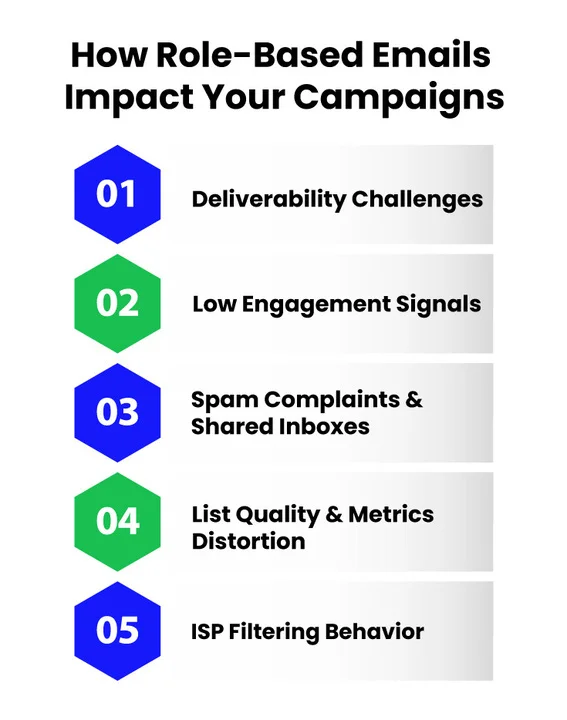
1. Deliverability Challenges
Addresses like support@, info@, and sales@ often come with strict spam filters or shared mailbox policies. If you don’t verify these emails, your messages might bounce or get filtered out entirely.
Over time, repeated bounces lower your sender reputation, and ISPs start treating all your future campaigns more cautiously.
2. Low Engagement Signals
Because no one person is responsible for reading role-based emails, open and click rates tend to be much lower. Email providers notice this, and if your messages look irrelevant, your inbox placement for the rest of your list can suffer.
This is especially important when your list includes a mix of personal and role-based addresses.
3. Spam Complaints and Shared Inboxes
Since multiple people monitor role-based emails, even one recipient marking your message as spam can affect your deliverability for the whole domain. This is why email list hygiene and email suppression list management are critical when including these addresses in campaigns.
4. List Quality and Metrics Distortion
Sending to role-based emails without a strategy can distort your campaign data. High bounce rates, low clicks, and spam complaints give a false picture of how your campaigns are performing, making it harder for you to analyze results and optimize future sends.
5. ISP Filtering Behavior
Email providers track patterns between transactional and marketing emails, and sending bulk marketing campaigns to generic addresses can appear risky. That could lead to domain blocklisting or spam folder placement.
Using email verification for role-based addresses helps reduce these technical risks and keeps your campaigns credible in the eyes of ISPs.
What Are the Best Practices for Handling Role-Based Emails in Email Marketing?
Role-based emails don’t need to be automatically blocked, but they should never be treated the same way as personal inboxes. The key is control. When you apply the right checks, filters, and sending logic, you reduce risk without sacrificing reach.
Below are the best practices experienced email marketers follow to manage role-based emails effectively.
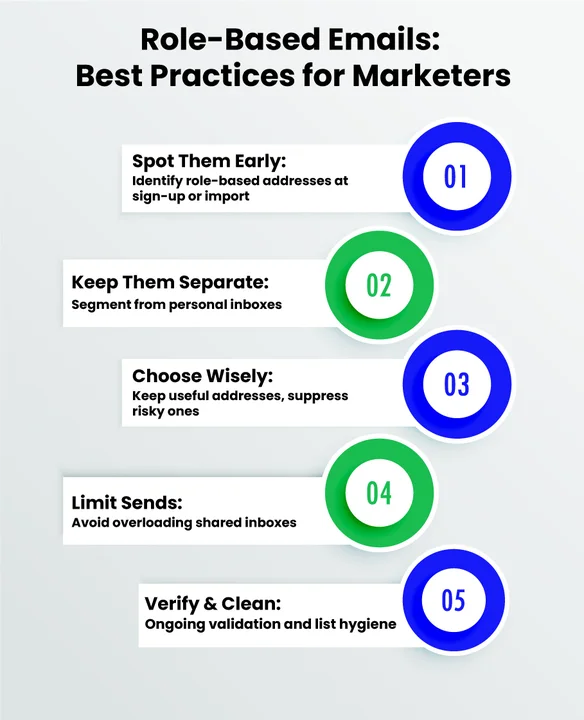
1. Identify Role-Based Emails Early in the List-Building Process
The worst time to think about role-based emails is after a campaign starts underperforming. Detection should happen as soon as an address enters your system.
Best-in-class teams identify role-based emails during:
- Lead capture (forms, sign-ups, gated content)
- Imports from third-party lists or CRMs
- Ongoing list enrichment
This allows you to classify addresses like info@, support@, admin@, or sales@ before they affect engagement metrics or sender reputation. Early identification is the foundation of clean email list management for role-based emails.
2. Separate Role-Based Emails From Personal Addresses
One of the most common mistakes is sending the same campaign to both personal and role-based inboxes.
Personal emails behave differently. They open more, click more, and reply more. Role-based inboxes often do none of that.
Best practice is to:
- Segment role-based emails into a dedicated list.
- Keep them out of standard promotional campaigns.
- Apply different sending rules, frequency, and content.
This separation protects your core audience while giving you control over how and when role-based emails are used.
3. Decide Which Role-Based Emails Are Worth Keeping
You should not delete every role-based email. Some are genuinely useful, depending on context and intent.
For example:
- support@ or help@ may be appropriate for product updates or service-related messages.
- careers@ may make sense for hiring or employer branding emails.
- sales@ can be relevant for B2B outreach but risky for bulk marketing.
At the same time, addresses like admin@, abuse@, noreply@, or postmaster@ should almost always be suppressed. These are closely monitored by ISPs and are more likely to trigger email deliverability issues or spam complaints.
The goal is not blanket removal but informed suppression.
4. Limit Frequency and Avoid Promotional Overload
Role-based inboxes are often shared mailboxes. Sending frequent promotional emails increases the chance that someone flags your message as spam simply to clean up the inbox.
Best practice is to:
- Reduce send frequency for role-based segments.
- Avoid aggressive promotional language.
- Focus on informational, relevant, or transactional-style messaging when appropriate.
This approach aligns better with ISP filtering behavior and reduces the risk of domain or IP-level penalties.
5. Never Skip Verification and Ongoing List Hygiene
Role-based emails change over time. An address that worked six months ago may now be inactive, abandoned, or repurposed.
Ongoing verification helps you:
- Catch inactive or unreachable role-based emails.
- Reduce bounce-related reputation damage.
- Maintain consistent email list hygiene.
This is especially important if you run recurring campaigns, automate sequences, or sync lists across multiple platforms.
Stop Wasting Time on Manual Checks.
Automate your role-based email detection and ensure every campaign you send is backed by clean, verified data.
How Does EmailVerify.io Help You Identify and Manage Role-Based Emails?
Best practices only work when you can apply them consistently at scale. That’s where email verification becomes operational, not theoretical. EmailVerify.io turns role-based email management into a structured, repeatable process that protects deliverability from the moment an address enters your system.
Here’s how the process works in practice.
Step 1: Real-Time Detection at the Point of Entry
The first line of defense is immediate.
EmailVerify.io acts as a gatekeeper, automatically flagging role-based patterns, like info@, support@, or sales@, the moment a user types them into your sign-up form or landing page.
By catching these addresses during the “handshake,” you prevent risky data from ever entering your CRM, keeping your lead database clean from day one.
Step 2: Validate Deliverability at the Domain and Mailbox Level
Role-based email verification goes beyond syntax checks. EmailVerify.io performs technical validation that assesses if an address is actually reachable and capable of receiving mail.
This includes:
- Domain-level checks to confirm mail server availability.
- Mailbox-level validation to detect inactive or non-existent inboxes.
- Identification of temporary, disposable, or misconfigured addresses.
These checks help eliminate addresses that are most likely to cause high bounce rates and sender reputation damage.
Step 3: Identify and Separate High-Risk Role-Based Emails
Not all role-based emails are equally valuable. Some are more likely to generate low engagement or bounce, while others can be useful for reaching teams.
EmailVerify.io helps you identify which addresses are active and valid, allowing you to separate them from the rest of your list for careful handling.
With EmailVerify.io, you can:
- Detect role-based emails that are inactive, unreachable, or misconfigured.
- Confirm an address is deliverable before including it in campaigns.
- Segment verified, high-quality role-based emails for controlled sending.
Once you’ve separated verified and risky addresses, you can decide how to handle each group, giving you full control over campaign safety and performance.
Step 4: Maintain List Health With Ongoing Verification
Email lists are not static. Role-based inboxes can become inactive, reassigned, or abandoned without warning. EmailVerify.io supports ongoing list validation, so role-based risks don’t creep back in over time.
With recurring or real-time verification, you can:
- Continuously monitor list quality.
- Catch new deliverability risks before they escalate.
- Maintain consistent email list hygiene across campaigns.
This ongoing process is critical for protecting long-term email marketing deliverability.
Step 5: Integrate Verification Into Your Existing Workflow
EmailVerify.io fits directly into your current email ecosystem. Leads from forms, CRM data, or bulk uploads can all be verified automatically in the background.
Common workflows include:
- Real-time API verification on sign-up forms.
- Bulk list cleaning before campaign launches.
- Automated suppression updates synced with your ESP.
This removes manual effort while ensuring every role-based email is handled correctly.
Examples: How Does Role-Based Email Management Improve Campaign Performance?
Now that we’ve covered what role-based emails are, their risks, and how to manage them properly, let’s look at how this plays out in real-world campaigns.
The examples below show how businesses improved deliverability, engagement, and overall campaign performance by identifying, verifying, and segmenting role-based emails instead of ignoring them.
Example 1: Reducing Bounce Rates Through Verification
A mid-sized B2B company ran a marketing campaign to a list of 50,000 contacts. Roughly 20% were role-based emails like info@, support@, and sales@.
Before Verification:
- Bounce rate: 12%
- Low engagement: Open rate 18%, click rate 2%
- Minor ISP filtering noticed
After Identifying & Verifying Role-Based Emails:
- High-risk or inactive role-based emails removed or separated
- Bounce rate dropped to 3%
- Open rate increased to 25%, click rate improved to 5%
- Campaign credibility improved; ISP filtering reduced
Takeaway:
Even a modest portion of role-based emails can disproportionately affect your deliverability. Verification lets you safely include valuable role-based contacts while minimizing risk.
Example 2: Segmenting Support@ Emails to Improve Engagement
A SaaS company included support@ emails in a product update campaign for 15,000 recipients. Because support@ is monitored by multiple team members, the campaign initially showed:
- Open rate: 10%
- Click rate: 1%
- High complaint rate from one unmonitored inbox
After Separating Role-Based Emails:
- Verified, active support@ addresses were sent a targeted service-focused message.
- Remaining high-risk addresses were excluded from mass marketing.
- Results for support@ segment: Open rate 28%, click rate 6%.
- Overall campaign metrics stabilized, and spam complaints dropped.
Key Takeaway:
Segmentation of role-based emails allows marketers to craft relevant messaging, increasing engagement without risking sender reputation.
Conclusion
Role-based emails don’t have to be a risk to your email campaigns; they just need to be managed intelligently.
By identifying them early, separating them from personal addresses, verifying deliverability, and applying best practices, you can maintain list hygiene, protect your sender reputation, and even capture engagement from valuable role-based contacts.
An authentic email verification service makes this process scalable and repeatable, ensuring your campaigns reach the inboxes that matter while minimizing bounces, complaints, and distorted metrics.
So, what you should remember from this guide is that role-based emails are not inherently bad.
When handled strategically, they can complement your marketing efforts and drive measurable results and support overall campaign success. Treat them with care, segment wisely, and verify consistently.
Frequently Asked Questions On Role-Based Emails (FAQs)
How Often Should You Verify Role-Based Emails?
Ongoing verification is essential. Email lists are dynamic; addresses can become inactive or reassigned over time. Recurring checks or real-time validation help maintain consistent list hygiene and protect deliverability.
Can role-based emails drive engagement?
Yes, when they’re verified, segmented, and targeted appropriately. For example, a support@ email might respond well to transactional updates or service-focused messages, contributing measurable ROI without harming your sender reputation.
What Tools Help Manage Role-Based Emails Effectively?
Email verification platforms like EmailVerify.io automate identification, domain and mailbox validation, and integration into your existing workflow. They help you detect, segment, and maintain high-quality role-based emails without manual effort.
Should You Delete All High-Risk Role-Based Emails?
Not always. Suppression lists allow you to keep high-risk addresses from mass campaigns while preserving potentially valuable contacts for specific use cases. This strategy balances reach with deliverability protection.
How Do Role-Based Emails Affect Open and Click Rates?
Role-based emails tend to have lower open and click rates compared to personal emails because no single person is accountable for monitoring them. Sending irrelevant campaigns to these addresses can further suppress engagement metrics, but targeting them carefully with relevant, service-focused content can still generate meaningful interactions.
Can You Use Role-Based Emails for Personalized Campaigns?
Personalization is limited with role-based emails since you’re addressing a team rather than an individual. However, you can still craft context-specific, role-relevant messages, for example, sending product updates to support@ or hiring announcements to careers@, which can feel relevant and actionable to recipients.
What’s the Impact of Ignoring Role-Based Email Verification on Long-Term Deliverability?
Skipping verification can hurt your deliverability over time. High bounces and spam complaints signal poor list hygiene to email providers. Over time, this can lower your sender reputation and make it harder for all your emails to reach inboxes.
Still Have Questions? .
The best answer is seeing your own list results
Upload your list now and see exactly how many role-based risks are hiding in your data.


