

Every day, billions of emails travel across the digital world, but not all of them reach their intended inboxes.
Many end up in spam, flagged for abuse, or bounced without a trace. For marketers, abuse emails are the invisible enemy, quietly affecting engagement, email deliverability issues, and even brand trust.
These emails can appear for many reasons: subscribers marking emails as spam, outdated contact lists, unclear consent, or overly frequent campaigns.
A Report by Statista shows that in 2023, nearly half of all emails sent worldwide, around 45.6%, were flagged as spam, highlighting how prevalent abuse emails have become.
Each complaint is monitored by ISPs and mailbox providers, and repeated issues can damage your sender reputation, lower inbox placement, and reduce campaign effectiveness. Ignoring these signals can have long-term consequences for your marketing program.
This blog will cover everything you need to know about abuse emails and how to protect your campaigns effectively. It discusses spot threats, actionable strategies to reduce complaints, safeguard your sender reputation, and keep your campaigns effective.
First, let’s discuss what abuse emails are.
Table of Contents
What Are Abuse Emails?
Abuse emails are addresses that tend to flag messages as spam regularly. These aren’t always malicious subscribers; they’re just people who react quickly when an email feels irrelevant, overwhelming, or suspicious.
Just a small number of complaints can affect email deliverability and sender reputation, which is why marketers need to pay attention to abuse emails.
Users often file abuse complaints for all kinds of reasons, such as:
- They don’t remember signing up for your emails.
- The email frequency feels too high or overwhelming.
- The content isn’t relevant or engaging.
- Subject lines or messaging feel misleading.
- The email design looks confusing or similar to phishing attempts.
- The unsubscribe option is hard to find or doesn’t work.
Small mistakes can trigger complaints, so spotting these behaviors early helps marketers reduce email abuse complaints, protect their campaigns, and improve overall deliverability.
Now that we’ve seen what abuse emails look like, it’s important to understand the different forms they take and how each can affect your campaigns.
What Are The Types of Abuse Emails for Marketers?
Abuse emails don’t all look the same. They can come in different forms, each affecting your campaigns in unique ways. Recognizing these types early helps marketers reduce email abuse complaints and protect email deliverability.
The following are the types of abuse emails that are most likely to damage your reputation:
Habitual Complainers
These are subscribers who frequently mark emails as spam, even when the content is relevant or well-crafted. They might react to frequent sends, minor design issues, or simply a personal dislike of promotional emails.
Over time, their actions generate email abuse signals that ISPs track, gradually affecting email deliverability and sender reputation.
Inactive or Unengaged Addresses
Contacts who haven’t opened or interacted with your emails for months or years fall into this category. Low engagement can trigger spam filters automatically, reducing inbox placement.
For example:
Sending a well-designed newsletter to half your inactive list can signal to ISPs that your emails aren’t wanted, creating email deliverability issues.
Spam Traps
Spam traps are special email addresses set up by ISPs or anti-spam organizations to catch marketers sending emails to outdated or purchased lists. If you email a spam trap, it can severely damage your sender’s reputation.
These traps are particularly dangerous because they flag campaigns as risky, regardless of how engaged your other subscribers are.
Misguided Subscribers
Some people hit the spam button by mistake, thinking it’s the unsubscribe option, or forgetting they signed up. While not malicious, these complaints still count and can affect your reputation.
Clear unsubscribe links and following email compliance best practices help prevent these accidental reports.
Malicious Reports
Less common but serious, malicious reports occur when someone intentionally marks your emails as abusive. Repeated incidents trigger abuse report emails and alerts from ISPs, which can impact all your campaigns if left unchecked.
Identifying these types of abuse emails is the first step toward creating strategies for email abuse protection.
Did You Know One Spam Report Can Affect Hundreds of Future Emails? Protect your campaigns with the best email verification tool, like emailverify.io.
What Is the Impact of Abuse Signals on Email Deliverability?
Abuse signals are like little warning lights on your email campaigns; they show when something isn’t working before you notice it. These signals actively affect if your emails land in the inbox or get filtered into spam.
When abuse signals start piling up, the effects can snowball.
Here are the ways these signals impact your campaigns and what that means in real-life scenarios.
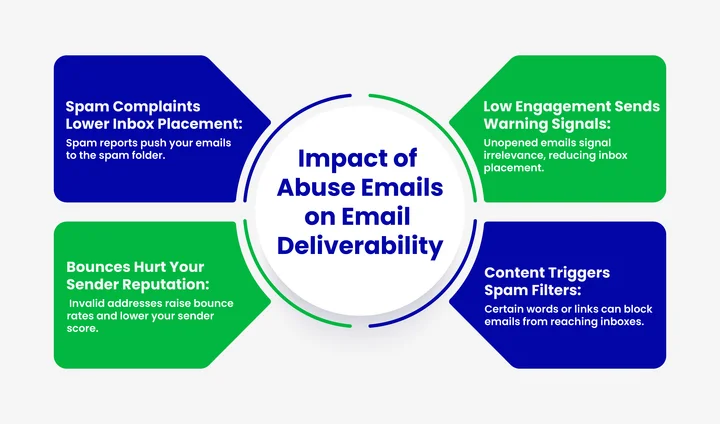
Complaint Rates Affect Inbox Placement
When subscribers mark your emails as spam, ISPs immediately take note. A small number of complaints can impact your inbox placement, meaning future campaigns may automatically land in spam for other subscribers.
For Example:
Sending a promotional offer to a cold or outdated list can trigger complaints that reduce deliverability for your next newsletter. Over time, repeated complaints can lower your sender score, causing ISPs to treat all emails from your domain as risky, even if the rest of your list is engaged.
Low Engagement Sends Warning Signals
Open rates, clicks, and overall engagement are critical signals ISPs use to evaluate whether your emails are wanted. Emails that sit unopened or are repeatedly ignored tell ISPs that your content isn’t relevant, which can lower inbox placement.
For Example:
If a weekly newsletter consistently sees 70% of recipients not opening it, ISPs may start filtering future campaigns automatically. Low engagement can also trigger “quiet filtering,” where emails land in a subscriber’s Promotions or Updates tab instead of the primary inbox, further reducing interaction and overall campaign effectiveness.
Bounced Emails Hurt Sender Reputation
Repeatedly sending emails to invalid, outdated, or inactive addresses creates bounce spikes. High bounce rates signal poor list hygiene to ISPs, which can damage your sender reputation even if you maintain placement for valid subscribers, too.
For Example:
Emailing an old purchased list may result in soft and hard bounces, causing your IP or domain to be flagged.
Maintaining a clean, verified list is essential; fixing bounce rates and improving ROI go hand in hand to protect deliverability and boost campaign performance.
Spam Filters Triggered By Email Content
Words or styles that messaging filters consider suspicious, spammy, or links can trigger automated spam filters. Subject lines that sound “too salesy,” suspicious URLs, or email templates resembling phishing attempts can land messages directly in the spam folder.
For Example:
A subject line promising “100% guaranteed results!” might excite readers but could also trigger filters, reducing inbox placement.
Consistently triggering filters can also affect your sender reputation, making it harder for future emails to reach even engaged recipients.
Cascading Effects on Campaign Performance
All of these abuse signals work together in a domino effect. Lower inbox placement leads to fewer opens and clicks, which further reduces engagement and can generate more complaints.
For Instance:
If a campaign’s emails start landing in spam, fewer subscribers interact, which signals ISPs that the list isn’t engaged; this can make future campaigns harder to deliver.
Without proactive monitoring and intervention, small issues can silently erode email marketing effectiveness over time.
A Step-by-Step Guide: Fixing High Abuse Email Rates
If your campaigns are generating high abuse complaints, it’s important to act fast. Taking a structured approach helps you regain control, protect your sender reputation, and restore inbox placement.
To turn things around effectively, follow this simple 6-step action plan:
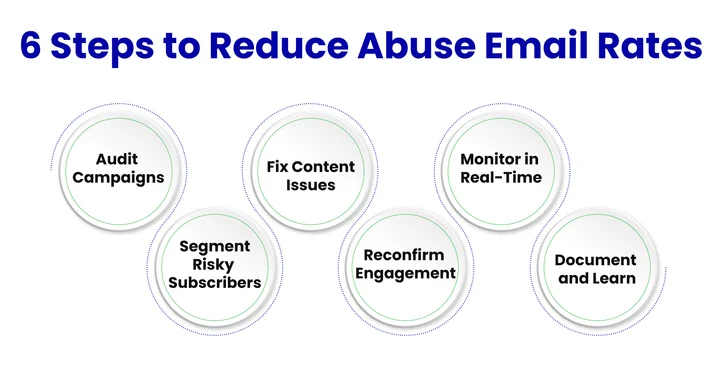
Step 1: Audit Campaigns
Review your recent campaigns to identify which emails triggered the most complaints. Look at subject lines, content, sending frequency, and audience segments. When you understand the root cause, it will be easy to address the problem directly.
Step 2: Segment High-Risk Subscribers
Identify the top risks hidden in your list by temporarily separating subscribers who frequently mark emails as spam or show low engagement. Pausing sends to these segments prevents further complaints while you investigate solutions.
Step 3: Fix Problematic Content
Analyze content that may have triggered abuse complaints, misleading subject lines, confusing layouts, or irrelevant offers, and adjust it before sending it to remaining subscribers.
Step 4: Reconfirm Engagement
Send a re-engagement or confirmation email to unresponsive or inactive subscribers. Giving them a clear choice to stay on your list helps reduce abuse reports and improves overall list quality.
Step 5: Monitor in Real-Time
Use feedback loops and complaint tracking tools to watch for new abuse signals immediately. Monitoring allows you to act before minor issues escalate into serious deliverability problems.
Step 6: Document and Learn
Keep a record of complaints, corrective actions, and results. Use these insights to refine your email strategy, improve content, and prevent high abuse rates in future campaigns.
By following these steps, you can systematically reduce complaint rates, safeguard your sender reputation, and ensure your campaigns perform effectively.
What Protective Measures Can Marketing Teams Take to Reduce Abuse Complaints?
Abuse emails and the signals they generate don’t have to derail your campaigns. By taking proactive steps, marketers can reduce complaints, protect their sender reputation, and ensure emails reach the inbox. Implementing these practices early prevents small issues from snowballing into larger deliverability problems.
Applying the right strategies can make a big difference in improving engagement and trust with your subscribers.
Practical measures marketers can implement to protect campaigns and reduce abuse complaints include:
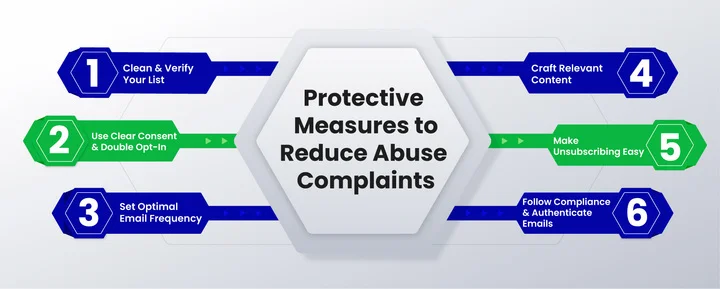
Maintain a Clean and Verified Email List
A messy email list is like sending invitations to an old, outdated party; you’ll get bounced messages and unhappy recipients. Regularly removing inactive subscribers and invalid addresses keeps your campaigns targeted and reduces spam complaints. Verification tools help spot fake or outdated emails, making sure your messages reach people who actually want to receive them.
Use Clear Consent and Double Opt-In
Subscribers should always know what they’re signing up for. Double opt-in is a simple way to confirm interest and make sure your audience genuinely wants your emails. When people actively confirm their subscription, your list becomes more engaged and less likely to generate abuse complaints.
Set the Right Email Frequency
No one likes to feel overwhelmed. Sending too many emails can frustrate subscribers and increase the chances of being marked as spam. Watching engagement metrics helps you find the sweet spot. If your audience responds best to one newsletter a week, ramping it up to three can quickly backfire.
Craft Relevant and Engaging Content
Content that actually matters to your audience keeps them opening and clicking. Personalization, clear messaging, and useful offers make a huge difference. Sending recommendations based on past behavior or purchases is far more effective than generic mass emails, and it keeps complaints down.
Make Unsubscribing Easy
A hidden or broken unsubscribe link can turn a frustrated subscriber into a spam complaint. Making it simple and accessible allows people to leave without damaging your reputation. A one-click unsubscribe protects both deliverability and your relationship with the audience.
Follow Compliance and Industry Guidelines
Being transparent and following rules isn’t just legal; it builds trust with your subscribers. Make sure your campaigns comply with regulations like CAN-SPAM, GDPR, and CASL. Provide accurate sender information, respect subscriber preferences, and honor unsubscribe requests.
Additionally, verify your email identity using SPF, DKIM, and DMARC. These authentication methods confirm your messages are coming from your domain, protect your brand from spoofing, and reduce the chance your emails are flagged as abusive.
Implementing these measures helps marketers reduce abuse complaints, maintain strong deliverability, and build lasting trust with subscribers.
Implementing these measures helps marketers reduce abuse complaints, maintain strong deliverability, and build lasting trust with subscribers.
Want to Stop Spam Complaints Before They Start?
What Are the Tools and Platforms for Monitoring Abuse Signals?
Tracking abuse signals manually can be overwhelming, almost like trying to spot every pothole on a busy highway while driving.
Fortunately, some platforms make it easier to monitor complaints, engagement, and overall email health.
These tools give marketers visibility into potential issues early, helping campaigns stay effective and inbox placement strong.
Email Feedback Loops (FBLs)
Feedback loops provide reports when subscribers mark messages as spam, acting as an early warning system. They highlight recipients who are unhappy with a campaign, allowing marketing teams to remove problematic addresses and reduce future abuse complaints.
Inbox Placement Testing
Testing tools show where emails land: the primary inbox, the Promotions tab, or the spam folder. Insights from these tests help refine subject lines, content, and layouts to avoid spam filters and improve overall deliverability.
Email Verification Tools
A reliable email verification tool thoroughly scans your email list to identify invalid, inactive, or risky addresses before you send your campaigns. This ensures that your messages reach real subscribers, reduce bounce rates, prevent potential abuse complaints, and help maintain a strong sender reputation.
Analytics Dashboards
Dashboards that combine complaints, bounces, engagement, and reputation metrics provide a complete view of email health. With clear insights, marketing teams can take action quickly and ensure campaigns remain effective.
Regularly monitoring these signals helps marketers maintain healthy campaigns, keep inbox placement high, and protect their sender reputation from abuse complaints.
Regularly monitoring these signals helps marketers maintain healthy campaigns, keep inbox placement high, and protect their sender reputation from abuse complaints.
How to Respond to Abuse Alerts and Email Complaint Notifications?
The best campaigns can also generate complaints from time to time. What really matters is how marketing teams respond to these abuse alerts. Prompt, thoughtful action can prevent a small issue from turning into serious deliverability problems or a damaged sender reputation.
Ignoring alerts is like noticing a crack in a window but doing nothing; over time, it can grow and cause bigger problems. Addressing complaints efficiently protects your inbox placement and keeps your audience’s trust intact.
Here are some essential steps to handle abuse alerts effectively:
Act Quickly on Spam Complaints
Remove or segment subscribers who report spam immediately. Fast action shows ISPs that your campaigns are managed responsibly and helps maintain sender reputation.
Segment and Analyze Problematic Lists
Look for patterns in complaints to see which campaigns or audience segments are triggering issues. Adjust email frequency, messaging, or targeting based on these insights to reduce future abuse signals.
Communicate Clearly with Your Team
Make sure your marketing or deliverability team is aware of all alerts. Coordinated responses, like list cleaning or campaign adjustments, prevent small problems from escalating.
Document and Track Actions
Keep a record of complaints and your responses. Tracking actions helps spot recurring issues and ensures lessons are applied to future campaigns.
Maintain Transparency with Subscribers
Reach out to subscribers when appropriate to clarify or resolve concerns. Clear communication and easy preference updates reduce the likelihood of spam complaints and build trust.
Review Campaigns Regularly
Regularly evaluate subject lines, content, and sending practices to identify potential triggers early. Proactive review keeps campaigns aligned with best practices and prevents unnecessary abuse alerts.
Prompt and thoughtful responses to abuse alerts keep campaigns effective, inbox placement strong, and your sender reputation protected.
Final Takeaway
Abuse emails may seem like a small part of your list, but they can shape how inbox providers judge every campaign you send. Complaints, low engagement, spam traps, and content triggers decide if your messages reach the inbox or get filtered out of sight.
The point to keep in mind is that protecting deliverability starts long before you hit send. Clean lists, clear consent, relevant content, and steady monitoring all work together to reduce complaints and keep your sender reputation strong.
When teams stay proactive, abuse emails lose their impact, and campaigns perform the way they’re meant to.
If you’re aiming to reduce complaints, strengthen your reputation, and keep your email program healthy, now is the perfect time to tighten your practices and review your subscriber experience.
Small adjustments today can save your future campaigns from major deliverability issues.
Frequently Asked Questions (FAQs) on Abuse Emails
2. How Can You Stay Compliant and Avoid Email Abuse Reports?
You can stay compliant by following regulations like CAN-SPAM, GDPR, and CASL. Make sure your subscribers clearly opt in, respect unsubscribe requests, send content that matters to them, and provide transparent sender information. Regularly clean your list and authenticate your emails to help prevent abuse reports.
3. Why Do Subscribers File Abuse Complaints?
Subscribers usually file complaints when your emails feel irrelevant, too frequent, misleading, or suspicious. Confusing layouts, broken links, hidden unsubscribe options, or subscribers forgetting they signed up can also trigger complaints. Some habitual complainers may mark your emails as spam even if your content is good.
4. How Can Marketers Prevent Abuse Emails?
You can prevent abuse emails by maintaining a clean, verified list and using double opt-in for your subscribers. Sending relevant content at the right frequency, personalizing campaigns, and making unsubscribing easy all reduce complaints.
5. How Does DMARC Help Prevent Email Abuse?
DMARC helps you verify that emails sent from your domain are genuine, reducing spoofing and keeping your domain trusted.
Put simply, DMARC prevents abuse by:
- Checking that your messages pass SPF and DKIM.
- Blocking unauthorized servers from sending email using your domain.
- Reducing phishing and spoofing attempts.
- Providing reports so you can monitor domain usage.
Are You Still Unsure Why Emails Are Being Flagged as Abusive?


