

Managing an email list comes with more challenges than most people realize. Some addresses work perfectly, but others can create hidden issues that quietly hurt your campaigns. Catch-all emails, also known as accept-all emails, are one of the trickiest types.
A catch-all email is set up to receive messages sent to any address under a domain, even addresses that don’t actually exist. This setup can give the impression that your emails are delivered successfully, but it can also hide problems.
High bounce rates, lower engagement, and damage to your sender reputation can all result from sending to these addresses without proper verification.
Without understanding how they work, your campaigns may waste time, effort, and resources.
This guide breaks down catch-all emails in simple, step-by-step terms.
You will learn:
- What catch-all emails are and how they function.
- Why businesses use them and the benefits and risks involved.
- How they affect deliverability and email list quality.
- Methods to detect and verify these addresses.
- Strategies for sending emails safely to catch-all addresses.
After reading this guide, you will have a clear understanding of catch-all emails and know how to manage them effectively to protect your campaigns and maintain high deliverability.
Let’s begin by understanding exactly what catch-all emails are.
Table of Contents
What Are Catch-All Emails?
A catch-all email is a special type of email at the domain level. It is designed to accept messages sent to any address under that domain, even if the specific email account doesn’t exist.
For Example:
If a company has a catch-all setup, emails sent to [email protected], [email protected], or even [email protected] will all be accepted, even if the mailbox actually doesn’t exist.
This makes catch-all emails a useful safety net for businesses that don’t want to miss any incoming messages. This can help customer support teams capture every inquiry and prevent lost opportunities.
However, for senders, catch-all emails can be tricky. Because the server accepts all emails, it’s impossible to know which addresses are actually valid without proper verification. Emails might appear to be delivered, but they could still go to invalid mailboxes.
Here are some important points to remember:
- In a standard setup, email verification is different from standard verification. Traditional methods may not accurately detect invalid addresses on catch-all domains.
- Risky catch-all emails often hide hidden invalid addresses and poor email deliverability.
- Maintaining email list safety with catch-all addresses is crucial for keeping campaigns effective and avoiding spam traps.
In short, catch-all emails are designed to help businesses capture every message sent to their domain.
For email senders, understanding how they work is the first step toward sending safely and maintaining strong deliverability.
Now, we’ll examine why companies use catch-all emails and what advantages and drawbacks come with them.
Why Do Businesses Use Catch-All Emails?
Businesses often set up catch-all emails to make sure they don’t miss any incoming messages. It’s like a safety net for emails sent to a domain, even if the sender mistypes the address. This setup can be especially useful for customer support teams, small businesses, and companies that handle a high volume of email inquiries.
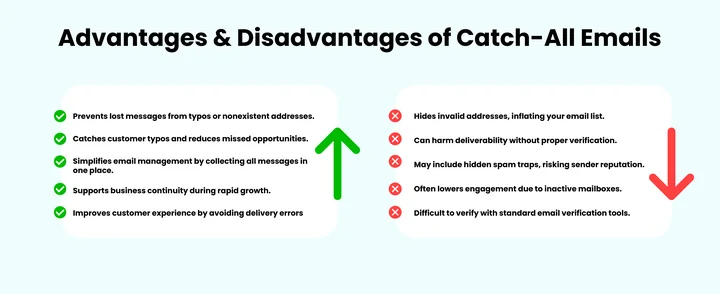
The following are the main advantages and disadvantages of catch-all emails.
Advantages of Catch-All Emails
Catch-all emails offer several benefits for businesses, such as:
1. Preventing Lost Messages
With a catch-all setup, emails sent to nonexistent addresses under the domain are still received. This ensures that a business never misses a message just because of a typo.
For example, an email sent to [email protected] might reach the catch-all inbox even if the address isn’t officially created.
2. Catching Typos and Errors
Customers often make small mistakes when typing email addresses. Catch-all emails allow businesses to capture these misdirected messages, reducing the chances of missed opportunities.
3. Simplifying Email Management
Companies don’t need to create and monitor every possible mailbox manually. Instead, the catch-all email collects all messages under the domain in one place, making it easier for support teams to respond efficiently.
4. Ensuring Business Continuity
For growing businesses, a catch-all email can serve as a buffer during rapid expansion. New email addresses don’t need to be immediately created to receive incoming messages, which helps maintain smooth communication.
5. Improving Customer Experience
Customers feel less anxious if they know their message will be received, even if they accidentally mistype an email. This prevents frustration and maintains a professional image for the company.
Disadvantages of Catch-All Emails
Catch-all emails are helpful for businesses, but they also come with significant drawbacks for senders, including:
1. Hidden Invalid Addresses
Because every email is accepted, it’s impossible for senders to know which addresses are actually valid. This can inflate your email list with invalid addresses, making it harder to maintain list hygiene.
2. Impact on Email Deliverability
Sending emails to catch-all addresses without proper verification can harm your sender’s reputation. High bounce rates and low engagement signals can lead to inbox providers marking your messages as spam.
3. Spam Traps and Security Risks
Some catch-all domains may hide spam traps, email addresses specifically created to catch spammers. Sending to these addresses can seriously damage your deliverability and trustworthiness.
4. Lower Engagement
Because catch-all addresses often include inactive mailboxes, your emails may show artificially low engagement rates. This can skew metrics and reduce the effectiveness of campaigns.
5. Challenges with Verification
Standard email verification tools may not accurately detect invalid addresses on catch-all domains, making it harder for senders to clean their lists and maintain email hygiene.
Every Unchecked Email Is a Hidden Threat To Your Campaigns.
How Do Catch-All Emails Affect Email Deliverability?
Sending emails to catch-all addresses can feel like a safe bet. After all, the messages are accepted by the server, so it seems like nothing could go wrong.
But here’s the thing: catch-all emails can quietly create problems for your deliverability, and many senders only notice when their campaigns start underperforming.
Even if your list looks clean, catch-all domains make it hard to know which addresses are real, which can impact everything from bounce rates to inbox placement.
The primary ways that catch-all emails may impact your email deliverability are as follows:
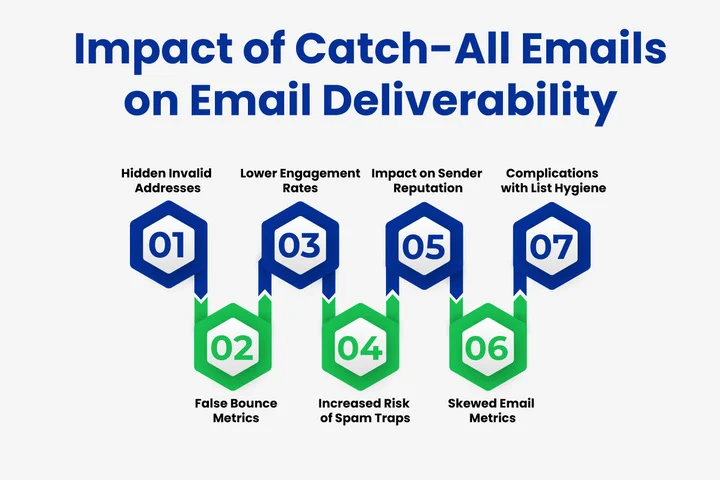
1. Hidden Invalid Addresses
Catch-all emails accept any email sent to any address under the domain, including ones that don’t actually exist. For senders, this is tricky because your email may appear delivered, even though it went to a mailbox that isn’t active.
Over time, sending too many of these addresses can inflate your list with invalid emails, which quietly drags down deliverability.
2. False Bounce Metrics
Normally, bounce rates help you see which emails didn’t reach the inbox. With catch-all domains, bounces are often hidden, giving a false sense that your list is clean.
This can make it harder to know if your campaigns are actually performing well and can mask underlying issues that hurt deliverability over time.
3. Lower Engagement Rates
Mostly catch-all addresses belong to inactive mailboxes. Even though the email is delivered, the recipient may never open or engage with your message. Low engagement sends a signal to email providers that your emails aren’t valuable, which can push your messages into the spam folder.
4. Increased Risk of Spam Traps
Some catch-all domains may hide spam traps, special email addresses designed to catch spammers. Sending to these addresses can seriously damage your sender’s reputation, even if your emails are perfectly legitimate. This is why email verification is critical before sending to catch-all lists.
5. Impact on Sender Reputation
Sender reputation is the cornerstone of email deliverability.
Catch-all addresses make it difficult to maintain a good reputation because you can’t easily tell which emails are valid. Repeatedly sending to inactive or invalid addresses, or spam traps, can signal to ISPs that your emails are less trustworthy. Over time, this can hurt inbox placement across all your campaigns.
6. Skewed Email Metrics
Metrics like open rates, click-through rates, and engagement percentages are essential for understanding campaign performance.
Catch-all emails can distort these numbers because they mask invalid addresses and inactive users. This makes it harder to optimize campaigns and identify areas for improvement.
7. Complications with List Hygiene
Maintaining a healthy email list is essential to long-term deliverability. Catch-all emails complicate list hygiene because traditional verification tools may not accurately detect invalid addresses. Without proper verification, you risk repeatedly sending to bad addresses, which can slowly degrade deliverability.
Catch-all emails can make your email campaigns look healthy on the surface, but they hide invalid addresses, lower engagement, and pose risks to your sender reputation.
The good news is that with proper verification, segmentation, and list hygiene, you can send to catch-all domains safely and keep your emails reaching real recipients.
Now, let’s explore how to detect catch-all email addresses and identify which ones are safe to send to.
How Can You Detect Catch-All Emails to Protect Your List?
Alright, let’s be honest.
Catch-all emails can be sneaky. On the surface, they seem harmless because your email gets delivered, but behind the scenes, they can hide invalid addresses that quietly hurt your campaigns.
That’s why learning how to spot them before sending is so important.
It’s like checking a mailbox that might be accepting mail for anyone, not just real people. If you can figure out which domains are set up this way, you’ll save yourself a lot of headaches later.
So, how do you do it?
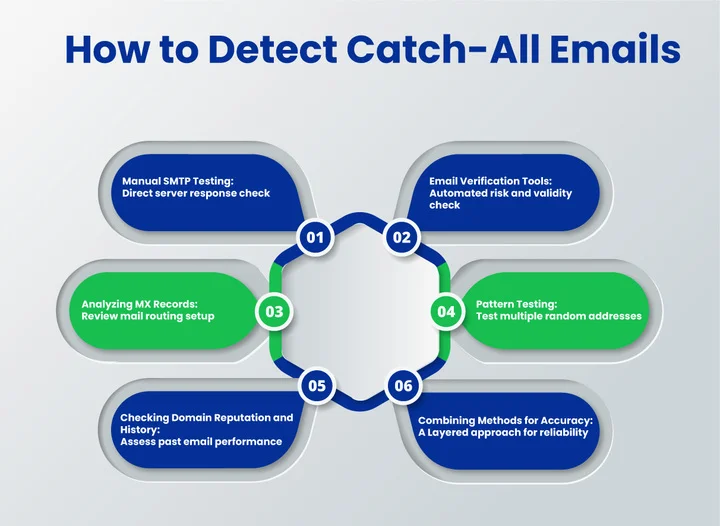
Let’s break it down into easy steps.
1. Manual SMTP Testing
One way to check if an email domain is a catch-all is by doing SMTP testing. This just means connecting directly to the email server and seeing how it responds.
- If the server accepts emails for addresses that don’t exist, it means you’ve probably got a catch-all domain.
- It’s a bit technical, but it gives you a direct look at what the server is doing.
Example: Try sending a test email to something random like [email protected]. If it’s accepted, that’s your first clue.
Manual SMTP testing is precise, but for large lists, it can become time-consuming, which is why many senders combine it with automated tools.
2. Email Verification Tools
One of the easiest ways to detect catch-all emails is by using a reliable email verification tool. These tools simplify the process and give you clear insights into which addresses are risky.
- Identifying catch-all domains helps flag addresses that may be risky.
- Catch-all detection ensures your campaign emails reach valid inboxes and domains can actually receive emails.
- Automatic processing saves time on large lists, handling hundreds or thousands of emails quickly.
- Maintaining list hygiene keeps your database clean and protects your sender reputation.
Example: A tool might flag [email protected] as a catch-all, letting you decide whether to keep your list clean or take a risk.
Email verification tools make it easier to detect catch-all addresses, maintain a healthy list, and avoid unnecessary deliverability issues.
3. Analyzing MX Records
MX records determine how emails are routed for a domain. By reviewing them, you can sometimes spot domains likely to be catch-alls.
- Tools like MXToolbox can reveal whether a server accepts emails indiscriminately.
- This method is more technical, but it’s useful when combined with other detection approaches.
MX record analysis doesn’t confirm individual addresses but helps identify potentially risky domains early.
4. Pattern Testing
Pattern testing involves sending emails to multiple randomly generated addresses under the same domain to see how the server responds.
- If all test emails are accepted, it’s a strong sign of a catch-all setup.
- Example: Sending emails to [email protected], [email protected], and [email protected]. If all are accepted, the domain likely uses a catch-all configuration.
Pattern testing is a simple way to validate domains before sending bulk campaigns.
5. Checking Domain Reputation and History
Some domains are known to use catch-all setups frequently. Checking a domain’s reputation can provide insights into risk levels.
- Tools like Google Postmaster Tools or reputation databases can show if a domain has high bounce rates or spam complaints.
- Combining reputation checks with verification and testing gives a more accurate picture of a domain’s risk.
Example: A domain with a history of high bounce rates may indicate frequent catch-all use, signaling caution before sending.
6. Combining Methods for Accuracy
The most reliable way to detect catch-all emails is by using multiple approaches together.
- Combining SMTP testing, verification tools, MX record analysis, pattern testing, and reputation checks ensures higher accuracy.
- A layered detection approach reduces the chance of false positives and helps maintain a healthy, effective email list.
Detecting catch-all emails requires a careful approach. Using multiple detection methods allows you to identify risky domains, verify addresses effectively, and maintain better email deliverability.
Are Your Emails Really Safe from Bounces and Spam Traps?
Now that you know how to detect catch-all addresses, the next step is learning how to verify them properly so your emails reach real recipients safely.
What’s the Best Way to Verify Catch-All Email Addresses?
One of the best ways to manage catch-all emails is by identifying catch-all domains and verifying individual addresses under those domains. Without proper verification, sending emails to catch-all addresses can quickly harm your sender reputation.
The most effective way to handle this is by using a reliable email verification tool. Verification tools scan your contact lists and provide clear insights into which addresses are safe to send to, giving your campaigns a strong foundation for success.
Use a Professional Verification Service
Modern tools leverage advanced algorithms to flag catch-all addresses and distinguish valid addresses that may not be valid.
- Real-time verification: Validate using SMTP responses, MX records, and domain validity to confirm deliverability.
- Risk analysis: Helps you prioritize which addresses to send to, avoiding wasted emails.
- Improved ROI: Skipping risky emails saves your sender reputation, reduces bounces, and ensures engagement metrics remain strong.
- Automation makes it very easy to handle large email lists, eliminating the need for manual checks.
Example:
Using emailverify, you can scan your list and detect catch-all domains efficiently. The tool provides actionable insights, so you can confidently decide which addresses to include in your campaigns.
After verifying catch-all addresses, the next step is learning strategies for sending emails safely to these domains so your campaigns remain effective and your reputation intact.
How Do You Send Emails Safely to Catch-All Addresses?
Even after detecting and verifying catch-all addresses, sending to them requires a careful strategy. These addresses can hide risks, so you need to approach them thoughtfully. The goal is to minimize risks and maintain engagement without harming your sender reputation.
Here are proven strategies to do this effectively:
1. Segment Catch-All Addresses
You can detect catch-all email addresses by using a combination of methods. The simplest is by segmenting them into their own dedicated group. This allows you to send more cautiously, monitor engagement separately, and treat them differently from standard email addresses.
When catch-all addresses live in a separate segment, you can test them first, adjust sending frequency, and quickly spot patterns, good or bad, without affecting your primary subscriber list.
Example: A marketing team can separate 500 catch-all addresses into a dedicated segment and monitor their open rates before scaling full campaigns.
2. Use Verified Lists Only
Verified data always performs better. Before sending to catch-all addresses, make sure they’re screened through an authentic verification tool.
A good verifier will tell you if an address is safe to send to, risky, or should be skipped entirely. This prevents your list from being filled with invalid addresses or spam traps that can damage strong sender reputation.
Even for catch-all domains, which can’t always be fully confirmed, verification provides essential risk scoring so you can make informed decisions.
3. Limit Sending Frequency
Since catch-all emails can represent risky or unpredictable mailboxes, it’s safer to send to them less often than you do to your main list. Starting with occasional sends or test batches helps protect your deliverability.
Once you see consistent engagement, like opens, clicks, or replies, you can slowly increase the frequency. Gradual sending gives inbox providers time to understand your patterns and reduces the chances of being flagged.
Example: A B2B company can send one email per month to catch-all addresses and can observe engagement levels before including them in larger campaigns.
4. Personalize Content
Sending to catch-all addresses works far better when your content feels personal rather than generic. Since these addresses may represent companies with multiple recipients or unknown inbox activity, personalization helps boost engagement and signals to inbox providers that your message is relevant.
Simply using a name, referencing a company, or customizing the message based on verified data creates a stronger connection.
Example: Instead of “Hello,” use “Hi John, here’s an update for your account” for addresses verified under a catch-all domain.
5. Monitor Engagement Closely
Catch-all addresses tend to hide low-engagement subscribers, which is why ongoing monitoring is essential. Tracking metrics such as opens, clicks, replies, and even inactivity helps you decide which addresses should remain on your list and which may need to be removed or slowed down.
When you keep a close eye on engagement, you protect your sender’s reputation and prevent silent damage from risky or inactive mailboxes.
6. Apply Gradual Warm-Up
If you’re emailing catch-all addresses for the first time or if you haven’t contacted them in a long while, a warm-up process is important.
Starting in small, controlled batches lets you test deliverability safely. As long as the first few rounds show healthy engagement and low bounces, you can gradually increase volume.
This strategy ensures that inbox providers view your sending behavior as responsible and trustworthy.
Example: A SaaS company sends 50 emails initially to catch-all addresses and doubles the batch only after seeing low bounce rates and good open rates.
Sending to catch-all addresses is possible, but it requires strategy, monitoring, and patience. Engagement helps ensure your campaigns remain effective and safe. Segmenting lists, verifying addresses, limiting frequency, personalizing content, and monitoring.
Summary
Catch-all emails can seem harmless at first glance, but as we’ve explored, they carry hidden risks that can quietly harm your email campaigns. They accept messages to any address under a domain, even ones that don’t exist, which can inflate your list with invalid addresses, hide spam traps, and impact engagement. That’s why detection and verification are crucial steps.
Here’s what to take away from this guide:
- Understand catch-all emails, and remember that these addresses can be risky, so treat them differently from standard email addresses.
- Detect and verify accept-all domains carefully using methods like SMTP checks, MX record analysis, and professional email verification tools.
- Send emails to catch-all addresses with a strategy by segmenting them, limiting sending frequency, personalizing content, and monitoring engagement.
- Monitor sender reputation continuously to build trust with inbox providers and protect your deliverability.
- Keep your email list clean by removing or handling risky addresses cautiously to maintain a strong sender reputation.
The main point is simple: catch-all emails are not safe by default.
Handling them thoughtfully with verification, segmentation, and careful sending ensures your campaigns stay effective and your emails reach real recipients.
Frequently Asked Questions (FAQs) About Catch-All Emails
2. Are Accept-All Emails Safe to Send To?
Accept-all emails might look safe because they won’t bounce, but they’re actually risky. You can’t be sure which addresses are valid, and sending to them can hide spam traps, inflate your list with inactive addresses, and hurt your sender reputation. Treat them cautiously and always verify before sending.
3. How Do Catch-All Emails Affect Bounce Rates?
Catch-all emails can give you a false sense of security because messages rarely bounce, even if the mailbox doesn’t exist. This can inflate your email list with invalid addresses without obvious bounces. Over time, this hidden risk can affect your overall deliverability and campaign performance.
4. Should You Send Emails to Catch-All Domains?
You can email catch-all domains, but only if you approach them carefully. Verify the addresses first, segment them into their own group, send slowly at first, and monitor engagement closely. Sending without these precautions can quietly damage your deliverability.
5. How Do Catch-All Emails Impact Sender Reputation?
Catch-all emails can silently lower your sender reputation because you’re often sending to inactive or invalid addresses. If you repeatedly send to risky addresses or hidden spam traps, ISPs may see your emails as less trustworthy, which can hurt your inbox placement for all campaigns.
6. Are Catch-All Emails Risky in 2026 and Beyond?
Yes, catch-all emails will remain risky in 2026 and beyond because email providers are getting stricter about engagement and sender reputation. The best way to stay safe is to verify addresses, segment your list, and send thoughtfully to protect your deliverability long-term.
Manual Checks Take Forever and Still Put Your Deliverability at Risk.


