


If you’re not keeping your email lists clean, email deliverability issues can quietly drain thousands of dollars. Validity’s Email Deliverability Benchmark Report states that it can cost up to $15,000 per million emails sent…
Most teams watch out for hard bounce emails.
But what about the quieter threat, the soft bounce?
A soft bounce email might seem harmless. After all, it’s just a temporary delivery failure, right?
Not exactly. Repeated soft-bounced emails can slowly damage your sender’s reputation and affect inbox placement. Sometimes it’s a full inbox. Other times, it’s a temporary undeliverable email caused by the recipient’s mail server.
So how do you stop these minor issues from turning into big problems?
This guide has all the answers. You’ll learn about email soft bounces, the common soft bounce causes, why they matter for email deliverability, and exactly how to fix them. Moreover, we’ll share practical ways to prevent soft bounces before they ever happen.
Let’s go through this guide together and make sure your campaigns keep running smoothly.
Table of Contents
What Is A Soft Bounce And How Does It Impact Email Deliverability?
A soft bounce is a temporary email failure that occurs when your message reaches the recipient’s server but can’t make it into the inbox. This happens due to some short-lived issue on the other side.
Selzy’s 2024 Email Marketing Performance research found that these quiet hiccups appear more often than hard bounces, which sounds trivial at first. But repeated soft bounces can nudge your sender reputation in the wrong direction and quietly disrupt deliverability before you even see the warning signs.
Impact Of Soft Bounce On Email Deliverability
| Deliverability Impact | Business Risk |
|---|---|
| Inconsistent inbox placement once soft bounces creep past ~2% | Fewer emails reach the primary inbox, leading to lower open rates and weaker campaign visibility. |
| Increased spam or low-priority filtering after repeated soft bounces | Engagement drops, inflating cost per lead as more sends are needed to get the same response. |
| Gradual sender reputation decline across multiple campaigns | Future campaigns underperform, even when content improves, slowing pipeline momentum. |
| Temporary blocks when bounce spikes persist | Campaign pauses and delayed outreach can result in missed sales opportunities and stalled pipeline emails. |
| Long-term deliverability throttling, if ignored | ISPs deprioritize your sends, reducing overall reach and impacting revenue forecasting. |
But what causes soft email bounces in the first place?
What Are the Causes of Soft Bounce?
Soft bounces usually trace back to short-lived issues that block an email for the moment, but not forever. Even then, they can stack up if ignored. Most email teams aim to keep soft bounce rates below 1%, since anything higher often points to problems with email list hygiene or sending practices.
In fact, Gmail’s Email Sender Guidelines highlight that even small bounce rates should be monitored carefully, reducing sending volume and testing messages to pinpoint issues.
To make this easier to diagnose, soft-bounce reasons generally fall into three categories.
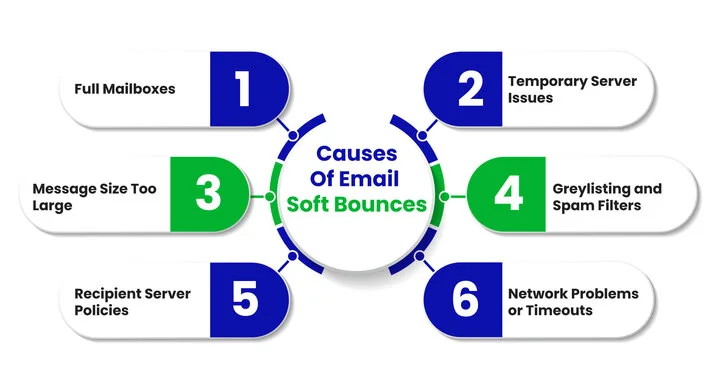
1. Recipient-Side Issues
These are issues originating from the recipient’s environment that temporarily prevent your email from landing in the inbox.
Full Mailboxes
Sometimes, a recipient’s inbox is simply full. When storage limits are reached, the server can’t accept new messages, resulting in a temporary failure. This often shows up as an SMTP 452 “Mailbox full” error.
Recipient Server Policies
Every email service provider (ESP) enforces its own rules. Temporary security blocks, antivirus checks, or strict inbound limits can make the mailbox temporarily unavailable. Google and Microsoft both flag repeated soft bounces as a sign of poor list quality over time.
2. Sender-Side Issues
These issues arise from how your emails are sent or formatted, which can trigger temporary rejections.
Message Size Too Large
Heavy emails with large attachments or oversized images can trigger a soft bounce email error. If the recipient’s server rejects the message due to size limits, delivery is delayed even though the address itself is valid.
Greylisting and Spam Filters
Some servers intentionally delay delivery from unfamiliar senders. Greylisting often responds with an SMTP 451 or similar temporary rejection, asking your server to retry later. Spam filters may also pause delivery if the content looks suspicious.
3. Technical and Network Issues
Problems along the route or on the server side can frustratingly block delivery even if everything else is correct.
Temporary Server Issues
Short bursts of server downtime or overload can stop delivery momentarily. These issues are common during traffic spikes and usually resolve on their own, but repeated attempts can still hurt deliverability signals.
Network Problems or Timeouts
Emails can fail mid-route due to server timeouts, routing delays, or other temporary technical issues. These typically surface as SMTP 4xx errors, indicating the email retry mechanism should attempt delivery again.
Don’t worry if your email has been soft-bounced. With a few straightforward steps, you can address these issues and get your messages back on track.
How To Fix A Soft Bounce Email?
Soft bounces can feel frustrating because your emails aren’t failing permanently, yet they’re not landing where they should. Fixing them isn’t complicated, but it does require a careful look at what’s happening behind the scenes and taking timely action.
Here’s how you can tackle them effectively, ranked by impact level and split into immediate fixes and long-term controls:
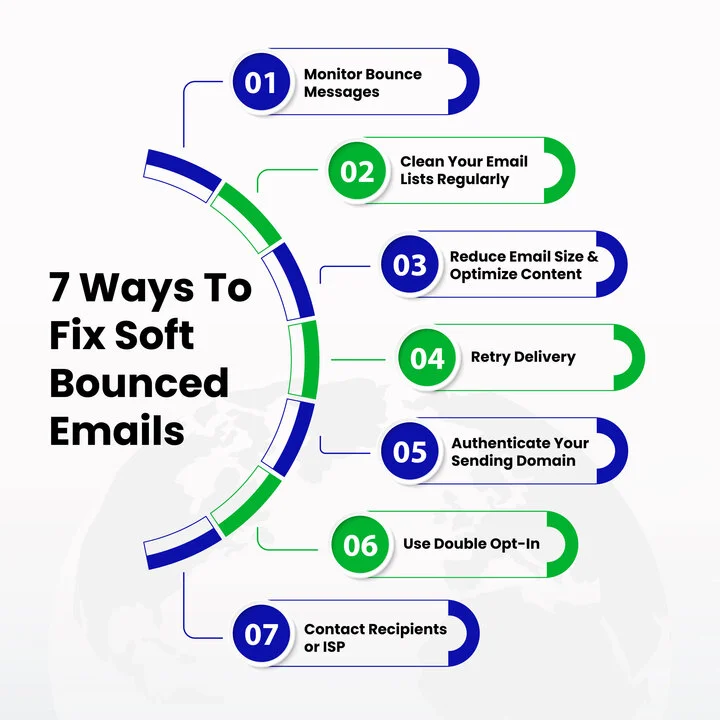
Immediate Fixes
1. Monitor Bounce Messages & Analyze Error Codes (High Impact)
Checking your bounce reports is the first step. Each soft bounce includes an SMTP error code or message explaining why the email couldn’t be delivered. Understanding these codes helps you separate temporary issues from those that need more attention.
2. Clean Email Lists Regularly (High Impact)
Keeping your mailing list clean is essential. One of the reasons why your cold email campaigns fail is because of unhygienic email lists. Make sure to:
- Remove inactive addresses
- Delete outdated contacts
- Suppress recipients with a full inbox after 3–5 retry attempts
Regular maintenance improves email deliverability and reduces repeated soft bounce occurrences.
3. Reduce Email Size & Optimize Content (Medium Impact)
Large attachments or overly heavy emails can trigger a soft bounce email error.
To avoid server rejection:
- Compress images
- Trim unnecessary files
- Host bigger assets externally
Clear, lightweight content increases the chance your email reaches the inbox.
4. Retrying Delivery (Medium Impact)
Many email service providers automatically retry sending soft-bounced emails. Adjusting the retry frequency and timing can improve delivery success. Ensure your email retry mechanism is configured correctly to avoid unnecessary delays.
Long-Term Controls
5. Authenticate Sending Domain (High Impact)
Sometimes soft bounces happen because the recipient’s server isn’t sure your email is legitimate. Authenticating your domain builds trust with recipient servers, reducing temporary delivery failures and improving inbox placement. Proper authentication ensures your emails aren’t mistaken for spam or blocked due to email authentication failure.
There are three main protocols to set up:
- SPF (Sender Policy Framework)
- DKIM (DomainKeys Identified Mail)
- DMARC (Domain-based Message Authentication, Reporting & Conformance).
| Protocol | What It Does | Benefits |
|---|---|---|
| SPF | Specifies which servers are allowed to send emails on behalf of your domain | Prevents spoofing Reduces soft bounces |
| DKIM | Adds a cryptographic signature to your email headers, proving the email hasn’t been altered in transit | Increases trust with the recipient’s server Improves email deliverability |
| DMARC | Tells receiving servers how to handle emails that fail SPF or DKIM checks. It has three policy modes to control how failing emails are treated: None: monitor and collect reports without affecting delivery Quarantine: suspect emails are sent to spam/junk Reject: emails failing checks are blocked outright | Protects your domain Ensures valid emails are delivered reliably Provides reporting for continuous improvement |
6. Use Double Opt-In (High Impact)
Implementing a double opt-in assures subscribers confirm their interest, filtering out mistyped or fake addresses. This step directly reduces the number of soft-bounced emails and protects your email sender’s reputation.
7. Contact Recipients or ISP (Medium Impact)
Sometimes, soft bounces persist despite all precautions. Reaching out to the recipient or their ISP can clarify temporary restrictions or server issues. This human touch can resolve stubborn delivery problems that automation alone can’t fix.
Now, you know how to fix a soft bounce. Wouldn’t it be helpful to see how to prevent these in the first place next time?
Instantly identify which emails are at risk and boost your inbox reach with EmailVerify.io.
How To Reduce Email Soft Bounces?
Preventing soft bounces is all about making your emails more likely to reach the inbox on the first try. By taking a few smart steps before sending, you can avoid delivery hiccups and keep your campaigns performing at their best.
Here’s how to stay ahead of soft bounces:
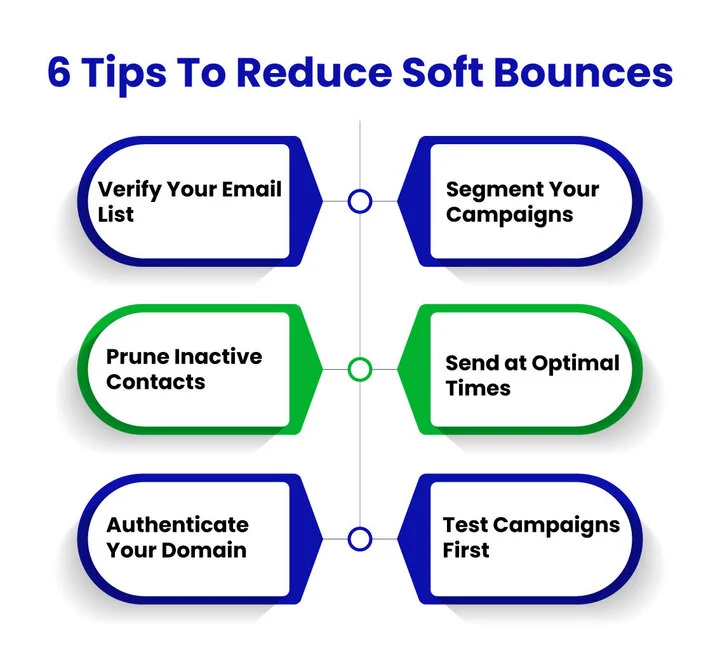
1. Verify Your Email List
Ensuring your list only contains valid, reachable contacts reduces errors caused by inactive accounts or mistyped addresses.
- Run your list through an email verification tool
- Remove disposable or outdated addresses
- Confirm proper formatting and domains
As we discussed in the earlier section, keeping your list clean is a key step for reducing repeated soft bounces.
Pro Tip: Even high-quality lists can degrade over time, so verify periodically, not just once.
2. Segment Your Campaigns
Smaller, focused groups help prevent server overload and improve engagement.
- Group contacts by interest, activity, or location
- Limit batch sizes based on your ESP recommendations
- Prioritize engaged subscribers first
Proper segmentation also supports retry strategies, increasing delivery success for soft-bounced emails.
Pro Tip: Experiment with different segment sizes to find what works best for your audience.
3. Prune Inactive Contacts
Inactive users silently increase bounce rates and harm sender reputation.
- Track opens and clicks to spot unresponsive users
- Remove addresses that trigger repeated soft bounce errors
- Encourage re-opt-in for inactive users
As highlighted earlier, this works hand-in-hand with double opt-in measures to reduce invalid addresses.
Pro Tip: Combine pruning with targeted re-engagement campaigns to retain genuinely interested subscribers.
4. Send at Optimal Times
Timing can make a difference between successful delivery and soft bounces. Avoid common server downtime and busy periods.
- Identify peak engagement windows
- Use your ESP’s scheduling tools to plan sends
Sending at the right time also maximizes the effectiveness of your retry attempts.
Pro Tip: Observe bounce patterns by time to fine-tune sending schedules.
5. Authenticate Your Domain
Proper authentication builds trust with recipient servers, reducing temporary delivery failures.
- Set up SPF, DKIM, and DMARC correctly
- Warm up new IPs gradually
- Maintain consistent sending patterns
Pro Tip: Double-check SPF, DKIM, and DMARC whenever you change domains or add a new email service.
6. Test Campaigns First
Small test batches help catch content or attachment issues before a full send.
- Send to a subset before the main campaign
- Analyze bounce reports for recurring errors
- Adjust content, attachments, or methods accordingly
Testing also reinforces optimal send timing and list segmentation strategies.
Pro Tip: Keep a running log of bounce patterns to identify trends and tweak future campaigns.
Bonus Tip: Enterprise-Level Consideration
For high-volume campaigns or larger sending domains, keeping an eye on your sending reputation and traffic pacing is key.
- Volume Throttling: Gradually ramp up sending volumes to avoid triggering ISP filters.
- IP Reputation: Monitor sending IPs for complaints, bounces, or blacklisting issues.
Pro Tip: Even if your main list is clean and well-segmented, maintaining consistent sending patterns protects deliverability across large-scale campaigns.
Conclusion
By now, you’ve seen how soft bounces quietly disrupt email campaigns, what causes them, and the steps to fix and prevent them. Mastering these steps helps safeguard your sender reputation, maintain trust with ISPs, and keep your email programs scalable as your audience grows.
Repeated soft bounces don’t just affect open rates. They can quietly erode engagement, reduce conversions, and impact revenue. Protecting your deliverability ensures your campaigns reach the inbox consistently and maintain the trust you’ve built with subscribers.
Take action today: review your bounce reports, maintain email list hygiene, and choose the right email verification service to reduce SMTP soft-bounce errors and keep your campaigns performing reliably.
Frequently Asked Questions (FAQs)
2. How Can I Reduce Email Soft Bounces Without Changing My Email List?
You can reduce email soft bounces by optimizing email size, sending during off-peak hours, and ensuring proper authentication (SPF, DKIM, DMARC). These practices improve deliverability without modifying your contact list.
3. What Email Verification Tool Should I Choose?
Choosing the right email verification service is key to reducing soft bounces and protecting your sender reputation. It’s better to compare email verification tools' pricing to find the one that fits your needs and budget. Tools like EmailVerify.io provide bulk verification, real-time checks, and spam trap detection features to make managing email deliverability easier.
4. How Often Should I Verify My Email List To Prevent Soft Bounces?
Regular verification is crucial. Running your email list through a verification service every few months or before major campaigns helps remove inactive or invalid addresses, reducing soft bounces and improving sender reputation.
5. Can Soft Bounces Affect My Campaign Metrics Even If They Don’t Permanently Fail?
Yes, repeated soft bounces can lower open rates, click-through rates, and overall engagement. Monitoring bounce reports and taking preventive actions ensures your campaigns maintain consistent performance and protect your email deliverability.
Frustrated That Some Emails Never Reach Your Subscribers?


