
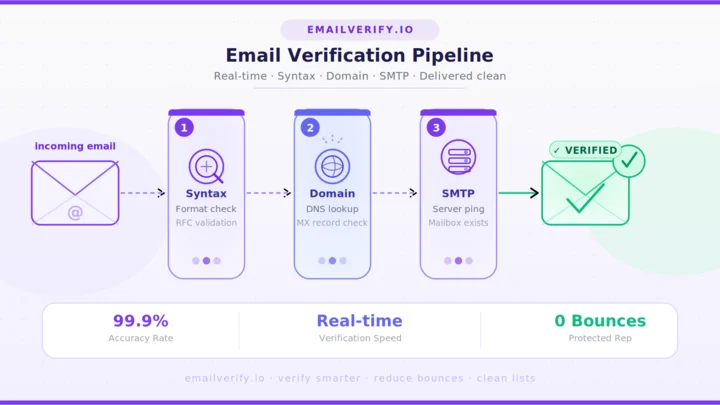

Email is still the highest-ROI channel in digital marketing, and in 2026, it’s also one of the hardest to get right. Mailbox providers have spent the last two years tightening sender requirements; AI-powered filters at Gmail, Outlook, and Yahoo are smarter than ever, and a single bad sending session can drag a healthy domain into the spam folder for weeks.
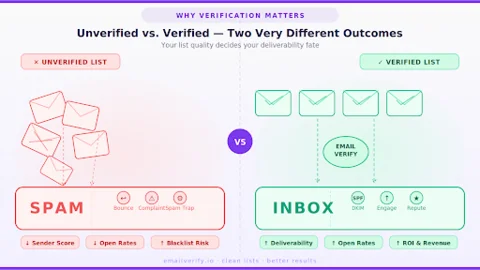
The single biggest predictor of where your mail lands is the quality of the addresses on your list. Format-perfect addresses can still bounce.
Bots routinely fill signup forms with disposable inboxes. Old contacts go stale faster than most teams realize. Email verification is the layer that catches all of this before a campaign goes out.
This guide walks through what email verification actually is, how it works under the hood, why it matters more in 2026 than ever, and how to use it across the most common business workflows.
By the end, you’ll have a clear, system-level view of the topic, plus a practical playbook you can apply this week.
Bulk email verification is the process of checking a list of email addresses in a batch instead of one by one. Each address goes through validation steps like syntax check, domain and MX lookup, and an SMTP probe and then gets classified into categories such as Deliverable, Risky, Unknown, or Undeliverable.
The output is a structured file you can act on: send to deliverable contacts, handle risky ones cautiously, retry unknowns, and suppress undeliverables. Processing time varies by list size, but most runs complete within minutes to a few hours.
Table of Contents
What Is Email Verification?
Email verification is the process of confirming that an email address is real, active, and able to receive mail. It combines several checks, ranging from basic format inspection all the way to a live conversation with the recipient mail server, to produce a confidence-graded answer about whether a message will actually be delivered.
A useful way to think about it: validation looks at the shape of the address, while verification looks at the behavior of the mailbox behind it. A regex can tell you that “[email protected]” is structurally correct.
Only a verification check can tell you that Anna’s mailbox is currently active, accepting messages, and not a disposable address that will be deleted in an hour.
The difference between both concepts becomes clearer when comparing email verification vs. email validation, where validation focuses on syntax and structure, while verification goes deeper into mailbox activity and deliverability signals. The output of a verification check is rarely a simple yes or no.
Modern systems return a status like deliverable, undeliverable, risky, or unknown, along with reason codes that tell you why. That gradient matters because it lets you decide how aggressively to act on each segment of your list.
Here’s a snapshot of what each result status typically means:
| Status | What It Means | Suggested Action |
|---|---|---|
| Deliverable | Mailbox confirmed active and accepting mail. | Send confidently. |
| Undeliverable | Address failures, syntax, DNS, MX, or SMTP at the mailbox level. | Suppress permanently. |
| Risky | Catch-all, role-based, or low-confidence response. | Send cautiously or segment it. |
| Unknown | Server temporarily unreachable, greylisting, or timed out. | Retry later, monitor. |
| Disposable | The address belongs to a temporary mailbox provider. | Reject at signup, suppress. |
Treat verification as a four-tier signal, not a binary. Teams that segment on the four statuses above consistently outperform teams that simply split lists into “good” and “bad,” because risky and unknown addresses behave very differently from each other in real campaigns.
Why Does Email Verification Matter in 2026?
The cost of sending to bad addresses has never been higher. Three forces have converged to make list quality a make-or-break factor for any team that sends email at scale.
1. Bounce Rate Impact
Hard bounces are the loudest signal of a low-quality list. Every time you hit an address that no longer exists, the receiving server records the failure, and your sending platform logs it against your domain. Once your hard bounce rate climbs past the thresholds Gmail, Yahoo, and Outlook publish in their bulk sender guidelines, providers begin throttling your mail or routing it directly to spam. Verification removes the dead addresses before they ever produce a bounce.
2. Sender Reputation
Sender reputation is a score that mailbox providers calculate continuously based on bounce rates, spam complaints, engagement, authentication, and sending volume patterns. It’s also fragile.
A reputation built over months of careful sending can collapse in a single afternoon if a freshly imported list contains thousands of dead or trap addresses. Verification protects that score by ensuring every send goes to addresses that are likely to engage.
3. The Cost of Bad Data
Bad addresses don’t just hurt deliverability. They distort every metric downstream. Open rates look lower than they really are. Sales reps waste hours emailing inboxes that no one reads.
CRMs balloon with records that will never convert. Marketing automation platforms charge by contact, so every dead address is also a line item on the bill. List hygiene is one of the cheapest ways to improve nearly every email-related KPI at once.
The table below summarizes where bad data hurts and where verification helps:
| Area Affected | Cost of Skipping Verification | Outcome with Verification |
|---|---|---|
| Deliverability | Higher bounce rates, throttling, spam folder placement. | Bounce rates stay below provider thresholds. |
| Sender reputation | Score drops after every messy campaign. | Reputation holds steady over time. |
| Reporting accuracy | Open and engagement metrics distorted by dead inboxes. | Metrics reflect real audience behaviour. |
| Sales productivity | Reps emailing addresses that never reply. | Reps focus on reachable contacts. |
| Platform spend | Paying for dead and disposable contacts in CRM/ESP. | Lean, accurate contact base. |
| Compliance posture | Higher exposure to spam traps and complaint risk. | Cleaner sending profile. |
The 2026 Layer: AI-Driven Filters
What’s genuinely new in 2026 is the sophistication of inbox-side AI. Filters now consider engagement patterns, content style, sender behavior over time, and the perceived intent of a campaign.
Lists with a high proportion of dead, disposable, or role-based addresses produce engagement signatures that AI filters classify as low-quality outreach. The mail can still technically arrive, but it ends up in Promotions, Updates, or spam folders that recipients rarely check.
Email verification is the cleanest, most reliable lever a sender controls. Content, design, and timing all matter, but they can’t compensate for a list full of addresses that should never have been mailed in the first place. This becomes especially important when working with a verified email list without damaging reputation.
How Does Email Verification Work?
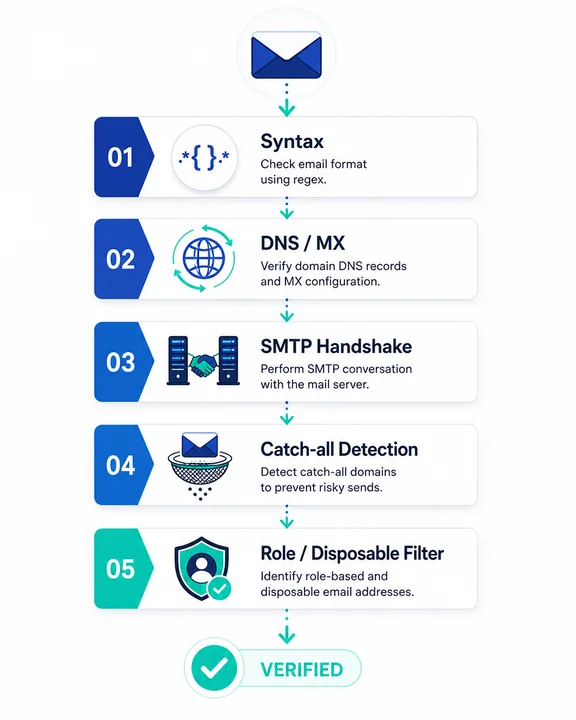
A complete email verification service runs an address through several checks, in a specific order, with each layer designed to catch a different class of problem. Understanding what happens at each step makes it much easier to interpret results and pick the right tool.
1. Syntax Check
The first step is the cheapest. The system parses the address against the rules defined in RFC 5322, the standard that defines what a valid email address looks like.
This catches obvious problems like missing @ symbols, double dots, illegal characters, and length violations. Syntax checks run locally in milliseconds and require no network calls.
2. Domain and MX Lookup
The next step asks whether the domain part of the address can actually receive email. The system performs a DNS query to confirm the domain exists, then a second query for the domain’s MX records.
MX (Mail Exchanger) records tell the world which servers are responsible for receiving mail on behalf of a domain. If a domain has no MX records, no message sent to any address can be delivered, regardless of how the local part is spelled.
3. SMTP Handshake
This is where verification goes beyond what a regex or DNS check can do. The verifier opens a connection to the recipient’s mail server using SMTP, the protocol that mail servers use to talk to each other. It performs the same opening steps a real sending server would: HELO, MAIL FROM, and finally RCPT TO, with the address being checked.
The receiving server’s response to RCPT TO reveals whether the mailbox exists, with response codes like 250 indicating acceptance and 550 indicating an unknown user. The verifier never actually sends a message. It closes the connection immediately after receiving the response.
4. Catch-All Detection
Some domains are configured to accept mail for any address at the domain, even ones that don’t exist. These are called catch-all (or accept-all) domains.
The SMTP handshake on a catch-all domain returns a positive response for every address, including made-up ones, which makes mailbox-level verification ambiguous.
A good verifier detects catch-all configurations by probing with a randomly generated address that almost certainly doesn’t exist. If the server accepts it, the domain is flagged as a catch-all, and the original address is reported as risky rather than confirmed deliverable.
5. Role-Based and Disposable Detection
The final layer classifies addresses by type. Role-based addresses (info@, support@, admin@, and sales@) usually go to shared inboxes or distribution lists, where engagement is low, and complaint rates are higher.
Disposable addresses come from temporary mailbox services designed to expire quickly. Both categories are technically valid but carry significantly more risk for marketing and outbound sends, so verification platforms maintain regularly updated databases to flag them.
At a glance, here is what each layer catches and why it exists:
| Layer | What It Checks | What It Catches | Speed |
|---|---|---|---|
| Syntax | RFC 5322 formatting rules. | Typos, illegal characters, missing @. | Instant |
| DNS / MX | Domain exists and accepts mail. | Dead domains, parked domains, no-mail domains. | <100ms |
| SMTP handshake | Mailbox-level accept/reject. | Closed mailboxes, abandoned addresses. | <1s typical |
| Catch-all probe | Whether server accepts everything. | Ambiguous accept-all domains. | <1s |
| Role / disposable | Address category lookup. | info@, admin@, mailinator-style addresses. | Instant |
What is the Step-by-Step Process of Emailverify?
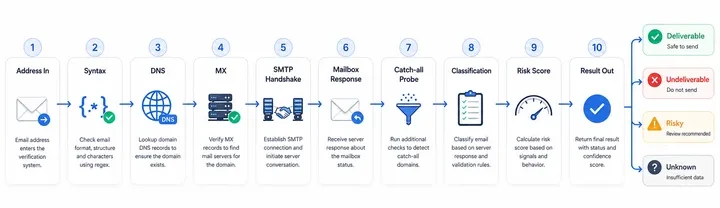
Putting all the layers together, here’s what happens when an address is run through a modern verification pipeline:
- Address received. The user submits an email through a form, an API call, or a bulk file.
- Syntax parsing. The system checks formatting against RFC standards and rejects obvious malformed entries.
- DNS resolution. The verifier queries DNS to confirm the domain exists and resolves correctly.
- MX record lookup. It pulls the domain’s MX records to identify the responsible mail servers.
- SMTP handshake. It opens a connection to the mail server and issues an RCPT TO probe.
- Mailbox response captured. The server replies with a code indicating whether the mailbox exists.
- Catch-all probe. If needed, the verifier tests with a random address to detect accept-all configurations.
- Classification checks. Role-based and disposable databases are consulted in parallel.
- Risk scoring. Signals from all previous steps are combined into a final verdict.
- Result returned. The address is labeled deliverable, undeliverable, risky, or unknown, with reason codes attached.
The whole sequence usually finishes in well under a second per address, which is why real-time verification at signup is now standard practice for any product handling user-submitted email.
What are the Real-World Use Cases Of Email Verify?
Email verification isn’t a single feature with a single use case. Different teams use it in different ways, and the right deployment depends on what kind of risk you’re trying to manage.
1. Email Marketers
For marketing teams, verification is mostly about list hygiene before campaigns and ongoing maintenance between them. The standard pattern is a full bulk verification of any new list before the first send, periodic re-verification of older segments every few months, and a real-time check on any signup form that feeds the database.
The payoff is straightforward. Bounce rates stay below provider thresholds, sender reputation holds steady, open rates reflect actual engagement rather than dead inboxes, and major sends don’t trigger the kind of inbox placement collapse that can take weeks to recover from.
2. SaaS Onboarding Systems
For SaaS products, verification at signup is now table stakes. A user who signs up with a typo in their email address never receives the confirmation message, never activates the account, and either churns silently or contacts support.
A user who signs up with a disposable address bypasses the trial limits that the team carefully designed. Real-time verification on the signup form catches both.
Typos get a friendly correction prompt. Disposable addresses get rejected with a clear message asking for a permanent inbox. The user experience improves and so does activation, because more accounts make it through the email-confirmation step.
3. Lead Generation and Outbound Teams
Cold outbound is the highest-stakes use case. Bounce rates above a few percent on cold sends will damage a domain’s reputation quickly, and once that happens, even your warm contacts start landing in spam.
Lead lists from data providers, scraped sources, or research vendors almost always contain a meaningful percentage of bad addresses, regardless of what the vendor claims.
Verification before any outbound campaign is non-negotiable. Most experienced sales teams now verify lists twice: once on import and again immediately before sending, since addresses can decay between the two events.
4. CRM Hygiene
CRMs accumulate stale data over time. Contacts change jobs, companies are acquired, mailboxes are decommissioned, and records that were good two years ago quietly become liabilities. Periodic CRM-wide verification, usually quarterly or twice a year, removes records that will never deliver and lets sales reps focus on contacts who can actually be reached.
The secondary benefit is reporting accuracy. When the contact database reflects reality, the metrics that come out of it are trustworthy, which makes pipeline forecasting and territory planning much more reliable.
Use case quick reference for stakeholders:
| Team | Primary Goal | Recommended Approach | Cadence |
|---|---|---|---|
| Email marketing | Protect deliverability on broadcasts. | Bulk verify before sending the signup form API. | Per campaign + every 3–6 months. |
| SaaS product | Reduce bot/disposable signups, lift activation. | Real-time API on signup form. | Continuous (every signup). |
| Outbound sales | Protect your domain on cold outreach. | Bulk verify on import + re-verify before send. | Every list, every send. |
| CRM / RevOps | Keep the contact database accurate. | Scheduled CRM-wide verification. | Quarterly to bi-annual. |
| Lifecycle/lifecycle ops | Keep re-engagement clean. | Verify dormant segments before win-back. | Before each win-back campaign. |
Use-case readiness check:
- ✓
Every public-facing form runs a real-time verification API call. - ✓
Every imported list is bulk-verified before its first send. - ✓
Every dormant segment is re-verified before re-engagement. - ✓
CRM-wide verification is on a recurring calendar, not ad hoc. - ✓
Each team has a documented action plan for risky and unknown results.
Email Verification vs. Email Validation
The terms “verification” and “validation” are often used interchangeably, but they answer different questions. Email validation checks whether an address is structurally correct. It runs syntax, domain, and MX checks, and it tells you that an address could plausibly exist.
Email verification goes further by performing a live SMTP check against the recipient’s mail server to confirm the specific mailbox actually accepts mail.
Validation is fast and cheap and works well as a first-line filter. Verification is what gives you confidence that an address belongs in your sending pipeline. Most production workflows use both in sequence, which is what modern email verification services deliver in a single API call.
| Aspect | Email Validation | Email Verification |
|---|---|---|
| Question answered | Could this address exist? | Does this mailbox actually accept mail? |
| Method | Static checks (regex, DNS, MX). | Live SMTP conversation. |
| Network call | Minimal. | Required. |
| Catches dead mailboxes | No. | Yes. |
| Catch-all detection | No. | Yes. |
What are the Common Mistakes Businesses Make?
After watching teams use verification well and badly, the same handful of mistakes keep showing up. Each one has a clear fix.
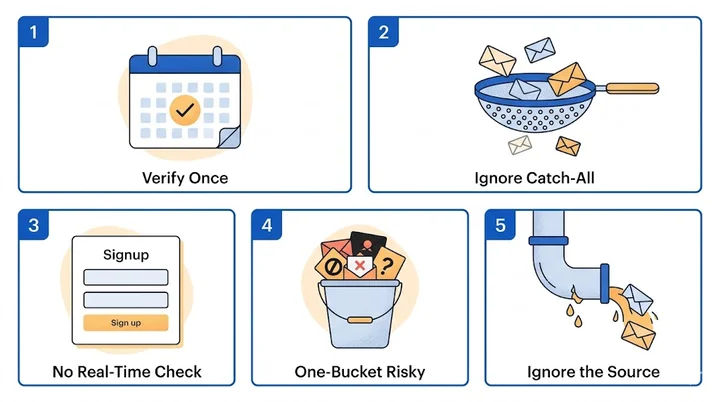
1. Verifying Once and Forgetting
The most common mistake is treating verification as a one-time cleanup project. A list that was clean in January is rarely clean by July. People change jobs, companies fold, mailboxes are decommissioned, and a steady percentage of any list goes stale every quarter. Verification should be a recurring practice, not a single event.
2. Ignoring Catch-All Domains
Catch-all results sit in an awkward middle ground. The mailbox might exist, or the domain might just be configured to accept everything.
Many teams treat all catch-all results as deliverables and send them anyway, which inflates bounce rates over time. The better approach is to segment catch-all addresses, send cautiously with a strong warm-up, and watch engagement closely before scaling volume.
3. Skipping Real-Time Verification at Signup
Cleaning a list after the fact is more expensive than preventing bad addresses from entering it in the first place. Without real-time verification on signup forms, every typo, bot submission, and disposable address ends up in the database, where it has to be cleaned out later.
A single API call at the moment of signup costs almost nothing and pays for itself many times over.
4. Treating All Risky Addresses the Same
Not every “risky” result means the same thing. A role-based address at a known company is different from a freshly created disposable address with no engagement history. Sophisticated teams build segmentation logic that uses risk reasons, not just risk labels, to decide what to do with each address.
5. Verifying Without Improving the Source
Verification surfaces problems, but it doesn’t fix the inputs that produced them. If a particular signup form keeps generating disposable addresses, the form needs better friction. If a particular list vendor keeps delivering high bounce rates, the procurement process needs to change. Verification is the diagnostic. The cure is upstream.
How Does EmailVerify.io Help?
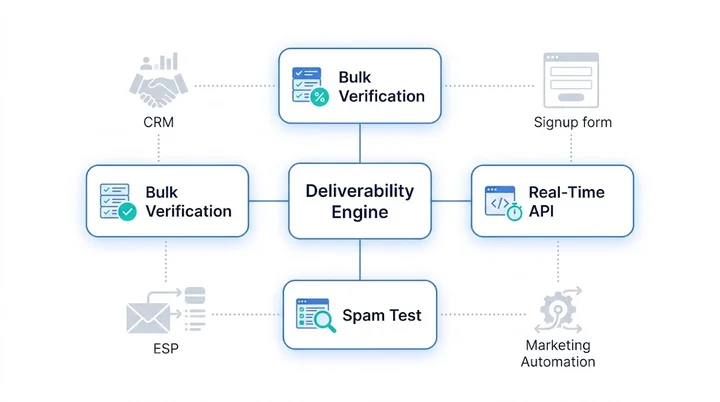
EmailVerify.io is built around the idea that verification should fit cleanly into the workflows teams already have, rather than forcing them to build new ones. The platform combines bulk verification, real-time API checks, and integration paths for the most common email and CRM tools, with a single underlying engine that runs the full verification stack on every address.
For teams cleaning existing lists, the bulk email verification service handles imports of any size with deduplication, segmentation by risk level, and clear export options. For product and engineering teams, the email verification API returns results in well under a second per address, which is fast enough for any signup form, lead capture page, or sync job that needs real-time feedback.
The output is structured to be useful, not just informative. Each result includes a primary status, a set of reason codes, and the underlying signals (catch-all detection, role-based flag, disposable flag, and MX record presence) so teams can build whatever business logic suits their risk tolerance.
Cold outbound teams might suppress everything that isn’t clearly deliverable. Engagement-rich nurture programs might tolerate more risky results because their historical engagement data is strong enough to compensate.
If you also want visibility into how your messages render and score against inbox filters, the spam test tool is a useful complement. List quality and message quality are the two main levers behind inbox placement, and addressing both at once produces noticeably better results than either alone.
Where each EmailVerify.io tool fits in your stack:
| Tool | Best For | Where It Lives in the Stack |
|---|---|---|
| Bulk verification | Cleaning existing lists and CRM imports. | Pre-campaign, pre-sync, recurring hygiene. |
| Real-time API | Signup forms, lead capture, in-app flows. | Front-end and onboarding pipelines. |
| Spam test tool | Auditing message quality before launch. | QA stage of campaign development. |
| Reason-code outputs | Building custom risk logic per use case. | Marketing automation and CRM rules. |
Frequently Asked Questions FAQs
Is Email Verification Necessary?
For any team sending more than a small volume of email, yes. Mailbox providers in 2026 will enforce stricter sender requirements than ever, and bounce rates above provider thresholds quickly damage sender reputation.
Verification removes the addresses most likely to bounce before they cause problems, which protects deliverability across every campaign that follows.
How Accurate is Email Verification?
Accuracy depends on the verifier and the type of address being checked. For most non-catch-all domains, modern verification services correctly classify addresses as deliverable or undeliverable with very high reliability.
Catch-all domains are inherently ambiguous because the receiving server accepts all addresses, which is why they're flagged as risky rather than confirmed.
Reputable verifiers are transparent about this and explain why each result was assigned.
What is the Difference Between Email Validation and Email Verification?
Email validation checks an address against structural rules: syntax, domain existence, and MX records. It tells you the address could exist.
Email verification goes further by contacting the recipient's mail server directly and confirming the specific mailbox accepts mail. Validation is fast and useful as a first filter. Verification is what protects sender reputation and deliverability, and most production workflows use both together.
Can email verification reduce bounce rate?
Yes, and it's the most effective way to do so. Verification identifies addresses that no longer exist before they're added to a campaign, which means hard bounces never happen in the first place. Teams that introduce verification to a previously unverified workflow typically see bounce rates drop significantly on the very next send.
How often should I verify my email list?
A reasonable cadence is full verification before any major campaign, before warming a new sending domain, after importing records from any external source, and as a routine refresh every three to six months. High-volume senders often verify more frequently. Real-time verification at signup is also recommended so new addresses are checked at the moment they enter the database.
Will email verification slow down my signup form?
No, not noticeably. A well-designed email verification API returns a result in well under a second, which is faster than the time most users take to click submit and read a confirmation page. Real-time verification has become the default on signup forms precisely because the user-experience cost is so low and the data-quality benefit is so high.
Does email verification guarantee inbox placement?
No tool can guarantee inbox placement, because placement also depends on content, sending domain reputation, authentication setup (SPF, DKIM, DMARC), engagement signals, and recipient-side filtering.
Verification removes one of the largest deliverability risk factors, which is sending to invalid or risky addresses, but it works best as part of a broader deliverability strategy that also covers authentication, content quality, and engagement.
Conclusion
Email verification has moved from a nice-to-have to a baseline requirement for any team that sends email at scale. The combination of stricter sender rules, AI-driven inbox filtering, and the relentless decay of every email list means that list quality is now the single most controllable factor in deliverability.
The good news is that the playbook is clear. Verify new addresses in real time at signup to stop bad data before it enters your system. For your existing database, using a professional email validation service allows you to clean lists in bulk before major campaigns.
Treat these results with nuance, segmenting by risk reason rather than a single deliverable-or-not flag. Fix the upstream sources that produce bad data, instead of just cleaning the same problems repeatedly.
Understanding the deep connection between a clean email list and your sender reputation is essential for long-term growth. Combine this data hygiene with other deliverability fundamentals: authentication, content, and engagement.
Teams that take this seriously consistently see lower bounce rates, stronger sender reputation, and better inbox placement. Whether you’re cleaning a years-old CRM or scaling outbound, the highest-leverage move is the same: make verification a permanent part of how email moves through your business.
Start with a sample of your current list, see what the results actually look like, and build the workflow from there.


