


Validity’s latest research on DMARC adoption says 84% of domains that appear as senders in people’s inboxes don’t even have a DMARC record.
In plain terms, this leads to:
- Email spoofing
- Phishing attacks
- Unauthorized use of your domain
- Emails landing in spam or being rejected
- High bounce rates from invalid emails
- Brand reputation damage
- Lost customer trust
You might not have set up DMARC. But even when you have it, it can be misconfigured.
SPF and DKIM might be in place, but not aligned. Third-party tools could be sending emails without proper authorization. Forwarding and subdomains can make things even more complicated.
What happens as a result?
Failure… Legitimate emails are treated as suspicious, sent to spam, or rejected outright.
In this guide, we’ll cover what a DMARC failure means, what causes it, ways to detect it, and lastly, how to fix it without breaking legitimate email flows.
If email is a critical channel for your business, these are the details that determine if your messages get delivered or silently disappear.
First, let’s start with the basics of DMARC, so you have a clear foundation before we dig into failures and fixes.
Table of Contents
What Is DMARC?
DMARC (Domain-based Message Authentication, Reporting & Conformance) is a protocol that helps protect your domain from spoofing. It works with SPF and DKIM to make sure only authorized senders can use your email address.
It’s like a gatekeeper for your inbox. It checks that emails claiming to be from your domain are really from you. It helps keep phishing and unauthorized messages out.
Without DMARC, your legitimate emails might be flagged as spam, which can hurt inbox placement, reduce campaign effectiveness, and even impact revenue.
How Does DMARC Work?
DMARC works in three layers, each building on SPF and DKIM to ensure emails claiming to come from your domain are legitimate.
Authentication problems arise when you’re missing or using incorrect records, which is why your emails fail to send.
- SPF (Sender Policy Framework): Checks if the server sending the email is allowed to send on behalf of your domain.
- DKIM (DomainKeys Identified Mail): Attaches a digital signature to your email so receivers can verify it hasn’t been altered and is from your domain.
- DMARC Alignment: Confirms the From address matches the domains validated by SPF or DKIM. This can be a relaxed alignment (subdomains accepted) or a strict alignment (exact match only).

Step-by-Step Flow Of DMARC Processing
When an email arrives at a recipient’s server, here’s what happens:
- The server looks up your DMARC record in DNS.
- It checks the sending IP against your SPF list.
- It verifies the DKIM signature, if present, to ensure the message hasn’t been tampered with.
- It checks if SPF or DKIM aligns with the From address.
- The server applies your DMARC policy to determine how to handle the email.
What Is a DMARC Policy?
A DMARC policy specifies how receiving servers should handle emails that fail DMARC authentication. It protects your domain from email spoofing and unauthorized emails while helping legitimate messages reach the inbox.
The following are the DMARC policies you should know about:
p=none
This is the monitoring mode. Emails that fail DMARC checks are still delivered, but you receive DMARC aggregate reports showing which messages passed or failed.
It is ideal when you’re starting email authentication or testing new email sending platforms.
p=quarantine
Emails that fail DMARC authentication are sent to the spam folder or quarantined. It protects against phishing and domain spoofing without immediately rejecting messages.
It’s useful when using third-party email senders or transactional email services.
p=reject
This is the strictest mode. Emails failing DMARC authentication are blocked or bounced. It’s highly effective at stopping spoofing and protecting email deliverability. But it’s only recommended once SPF, DKIM, and subdomain policies are correctly configured.
Subdomain Policies
Subdomain policies let you assign different DMARC policies to each subdomain. This helps prevent legitimate messages sent from secondary domains, such as newsletters, order confirmations, or tools used by external vendors, from causing DMARC failures on your primary domain.
Example
newsletter.yourcompany.com for campaigns and shop.yourcompany.com for purchase notifications. Each subdomain can have its own rules, so issues there do not impact your primary domain’s email authentication or inbox placement.
DMARC Policy: Risk vs Readiness
| Policy | Risk | Readiness / When to Use |
|---|---|---|
| p=none | No blocking; spoofing is not prevented. | Good for testing SPF/DKIM and identifying all senders. Safe for new domains. |
| p=quarantine | Legitimate emails may go to spam if SPF/DKIM is misconfigured. | Use when most senders are authenticated. Provides partial protection. |
| p=reject | High risk of blocking legitimate emails if SPF/DKIM or alignment is wrong. | Use only when all senders are fully configured and passing DMARC. Stops spoofing and protects brand trust. |
| Subdomain policies (sp=, asp=) | Misconfigured subdomains can break their own email delivery. | Use for newsletters, transactional emails, or vendor tools while keeping the main domain policy strict. |
DMARC Result And Policy Actions
The following table shows what happens when an email passes or fails DMARC authentication based on your DMARC policy:
| DMARC Result | Policy Action |
|---|---|
| Pass | Email delivered normally |
| Fail + p = none | Email delivered, DMARC aggregate reports sent |
| Fail + p = quarantine | Email sent to spam folder |
| Fail + p = reject | Email bounced or rejected |
What Is a DMARC Failure?
A DMARC failure occurs when an email from your domain cannot be verified as legitimate. This can happen if authentication is incomplete, a third-party service is sending emails without proper authorization, or forwarding and subdomains interfere with validation.
When an email fails DMARC, it may be flagged as suspicious, sent to the spam folder, or rejected entirely. These failures can affect inbox placement, campaign performance, and overall brand reputation.
Valimail reviewed the top 10 million domains and found that, in February 2024, after Google’s Sender Guidelines and Yahoo’s Sender Best Practices began requiring valid DMARC records, over half a million domains finally published one. Clearly, getting DMARC authentication right is no longer optional.
Knowing where failures occur helps you pinpoint issues and take action. The following sections will explain the common causes of DMARC failures, how to detect them, and practical ways to fix them without disrupting legitimate emails.
What Are The Common Causes Of DMARC Failure?
DMARC failures can happen for a variety of reasons, and understanding them is the first step to protecting your email security and ensuring smooth email deliverability.
Let’s break down the most frequent causes of DMARC failure:
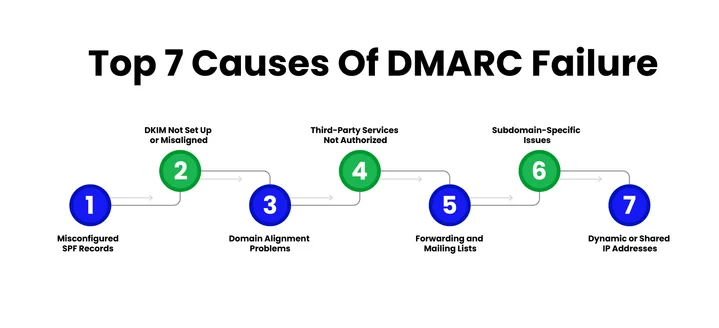
Cause #1: Misconfigured SPF Records
SPF is your first line of defense. Failures happen when:
- There’s no SPF record or syntax errors in your DNS TXT records.
- You exceed the 10 DNS lookup limit.
- Third-party platforms, such as CRMs or marketing tools, aren’t included.
Impact: Emails may fail DMARC and land in spam or be rejected, reducing deliverability and affecting campaign performance.
When this is combined with frequent bounces from unverified recipients, mailbox providers see even stronger negative signals. Running bulk email verification before large sends helps reduce these risks and keeps authentication signals clean.
Cause #2: DKIM Not Set Up or Misaligned
A missing or misaligned DKIM signature can cause a DMARC fail.
Common issues include:
- Using the provider’s domain instead of your own.
- Expired or rotated DKIM keys.
- Alignment issues where the DKIM domain doesn’t match the From address.
Impact: Emails appear suspicious to recipients, lowering trust, engagement, and brand credibility.
Cause #3: Domain Alignment Problems
DMARC alignment is critical. Problems occur when:
- SPF and DKIM alignment don’t match the visible sender domain.
- Subdomains send emails without proper configuration.
- Relaxed and strict mode settings cause unexpected failures.
Impact: Legitimate emails may fail authentication, affecting transactional emails, marketing campaigns, and customer trust.
Cause #4: Third-Party Services Not Authorized
Emails sent from email service providers, transactional platforms, or third-party senders can fail if not properly configured. Examples include:
- Marketing platforms like Mailchimp or SendGrid.
- CRM platforms are sending emails without correct DKIM keys or SPF entries.
Impact: Messages from these services may be blocked or marked as spam. It hurts campaign ROI and user experience.
Cause #5: Forwarding and Mailing Lists
Email forwarding can break authentication:
- Auto-forwarding can cause SPF failures.
- Mailing lists often rewrite headers, breaking alignment.
- Implementing ARC (Authenticated Received Chain) can help preserve DMARC authentication.
Impact: Forwarded or group emails may fail DMARC, leading to reduced email deliverability and missed communications.
Cause #6: Subdomain-Specific Issues
Subdomains need their own records. Problems arise when:
- SPF, DKIM, or DMARC policy isn’t set for subdomains.
- Strict policies on unprepared subdomains trigger DMARC fail.
Impact: Emails from subdomains like newsletters or order notifications, may fail, causing delivery issues without affecting the main domain.
Cause #7: Dynamic or Shared IP Addresses
Shared IPs often carry poor reputations and missing reverse DNS records, which can cause SPF alignment and DMARC failures.
Impact: Emails may fail DMARC checks, be filtered as spam, and reduce overall email deliverability.
Are Invalid Emails Sabotaging Your DMARC Setup? EmailVerify.io helps you clean and verify your sending lists to keep your authentication intact.
How To Detect DMARC Failures?
You can’t fix a DMARC fail if you don’t know it’s happening. Detecting issues early keeps messages out of spam folders and ensures your emails reach the right inboxes.
In this section, we’ll cover the main ways to identify DMARC issues so you can take action quickly.
1. Check Email Headers
Email headers hold clues about why a message might fail DMARC. They show results for SPF, DKIM, and domain alignment.
How to check headers
- Gmail: Open the email → click the three dots → Show original → find Authentication-Results
- Outlook: Open the email → click the three dots → View message details → look for SPF lines
- Yahoo: Open the email → Click More → View raw message
- Apple Mail: Open the email → View Source
These headers reveal failing IPs, misaligned domains, and broken DKIM keys.
Authentication-Results Headers Reference Table
| Provider | Pass Example | Fail Example | What Failed | Quick Fix |
|---|---|---|---|---|
| Gmail | spf=pass; dkim=pass; dmarc=pass (p=QUARANTINE) | spf=fail; dkim=none; dmarc=fail | SPF + no DKIM | Add sender to SPF, enable DKIM |
| Yahoo | spf=pass; dkim=pass; dmarc=pass(p=REJECT) | dmarc=fail(p=QUARANTINE) | Alignment fail | Match From domain in SPF/DKIM |
| Outlook | spf=pass; dkim=pass; dmarc=pass action=none | dmarc=fail action=quarantine | Third-party sender | Add ESP to SPF include |
| iCloud Mail | spf=pass; dkim=pass (1024-bit); dmarc=pass | dkim=fail; dmarc=fail | DKIM signature broken | Fix the DKIM key or forwarding |
2. DMARC Aggregate and Forensic Reports
RUA (aggregate) reports show overall trends of DMARC failures across all emails. At the same time, RUF (forensic) reports provide detailed information about individual failed messages.
These reports help you identify:
- Which IP addresses or third-party senders are failing
- Misaligned internal email or mail forwarding issues
- Patterns that could impact email deliverability
Reading these reports regularly gives a clear picture of authentication problems before they affect your inbox.
At higher sending volumes, small pockets of invalid addresses can distort DMARC reports and make real alignment issues harder to spot. Therefore, many teams pair monitoring with large-scale email verification to keep failure data clean and actionable.
3. Use DMARC Monitoring Tools
Monitoring tools make it easy to spot DMARC failures and provide visibility across all sending sources.
We have mentioned some of the best ones below:
| Tool | Free Tier | Paid Starts | Best For | Key Features |
|---|---|---|---|---|
| dmarcian | Basic parser | $199/mo | Enterprises | Dashboards, alerts, API, up to 2 domains |
| MX Toolbox | 1 monitor | $129/mo | Quick checks | Header analysis, blocklist checks |
| Postmark DMARC | No | $14/mo per domain | Developers | XML → charts, integrates with Postmark |
| EasyDMARC | 1 domain, 14-day history | $36/mo | SMBs | Auto-fixes, global monitoring |
| Valimail | Free monitor | Custom enterprise | Large orgs | Enterprise-grade, unlimited domains |
We have mentioned some of the best ones below:
These tools simplify ongoing monitoring of policy, alert you to failing DKIM keys, and track domain alignment, helping you maintain strong deliverability and authentication across all emails.
A Step-by-Step Guide To Fixing DMARC Failures
Fixing a DMARC failure doesn’t have to be complicated, but it does need a clear plan. Verizon’s 2025 Data Breach Investigations Report shows email-based threats account for 44% of data breaches.
You want to ensure legitimate emails continue to flow while you tighten authentication.
The following DMARC troubleshooting steps will help you resolve failures and improve your email deliverability.
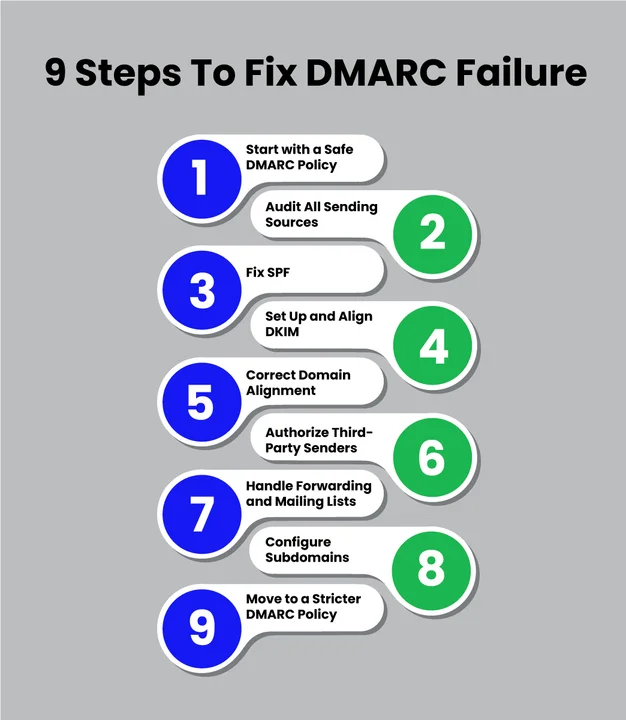
Step 1: Start with a Safe DMARC Policy
Begin with p=none so you can monitor without blocking emails. This helps you gather data without impacting legitimate messages.
Step 2: Audit All Sending Sources
Make a complete list of all senders: internal servers, email service providers (ESPs), CRMs, and transactional platforms. Knowing every source is key before you make changes. And don’t forget to clean your email lists, as bounces hurt DMARC compliance.
Before tightening DMARC policies, make sure every sender and address is accounted for. Even a few invalid emails can throw off alignment and reduce deliverability, so running email verification for small businesses keeps your sending list clean without adding extra complexity.
Step 3: Fix SPF
Include all sending services in a single, valid SPF record. Check syntax carefully. Decide between soft fail (~all) and hard fail (-all) depending on how strict you want to be.
Step 4: Set Up and Align DKIM
Enable DKIM for all sending sources. Ensure the signatures use your domain, not the provider’s. Rotate DKIM keys regularly to maintain signature integrity.
Step 5: Correct Domain Alignment
Check that SPF and DKIM align with the visible From address. Handle subdomains and third-party senders carefully to avoid misalignment.
Step 6: Authorize Third-Party Senders
Add SPF include statements for all platforms. Set up DKIM for your domain where possible. Test with sample messages and confirm in DMARC aggregate reports.
Step 7: Handle Forwarding and Mailing Lists
Enable ARC or relaxed alignment if auto-forwarding is needed. Separate subdomains can help prevent failures from mailing list complications.
Step 8: Configure Subdomains
Each subdomain should have its own SPF, DKIM, and DMARC record. Start in monitoring mode and gradually move to stricter policies.
Step 9: Move to a Stricter DMARC Policy
Transition gradually: p=none → p=quarantine → p=reject. Keep checking reports to avoid accidental blocking of legitimate messages.
The Bottom Line
Throughout this guide, we explored why DMARC failures happen and how to tackle them. You’ve learned how SPF and DKIM alignment, subdomain policies, and proper monitoring all work together to keep your emails authenticated and reaching inboxes reliably.
So, how confident are you that all your emails will pass authentication?
If any of your sending sources are misconfigured or your lists aren’t clean, legitimate messages could still fail. Therefore, tools like EmailVerify.io are absolutely crucial to help ensure your recipient lists are verified, supporting full DMARC compliance and reducing the risk of bounces or failures.
Frequently Asked Questions (FAQs)
2. How Often Should I Review My DMARC Setup?
Regularly. Ideally, review reports at least once a month. Frequent checks help spot new sending sources, subdomain changes, or third-party services that could trigger DMARC failures.
3. Do Subdomains Need Their Own DMARC Records?
Yes. Each subdomain that sends emails should have its own SPF, DKIM, and DMARC records. Otherwise, strict DMARC policies on the main domain can cause legitimate messages from subdomains to fail.
4. How Do Forwarding Servers Affect DMARC Compliance?
Forwarding can break SPF alignment, leading to DMARC failures. Implementing ARC (Authenticated Received Chain) or relaxed alignment can help maintain authentication when emails are forwarded.
5. Can Mailing List Emails Fail DMARC Checks?
Yes. Many mailing lists modify headers, which can disrupt SPF and DKIM alignment. Using separate subdomains for campaign emails or ARC helps prevent failures and preserves deliverability.
6. How Can I Identify Which Service Is Causing DMARC Failures?
Check your DMARC aggregate and forensic reports. Look for failing IP addresses or misaligned sender domains. Monitoring tools can also visualize failures and help pinpoint problematic email service providers.
Verify that all sending sources are authorized and aligned before moving to strict policies to protect deliverability and reputation.


