

Ever sent an important email only to find it never reached the recipient?
Many organizations face this issue without realizing that misconfigured DNS records are often the culprit. These hidden gaps can lead to lost messages and damaged credibility.
Emails can be intercepted, spoofed, or flagged as spam if the correct authentication records are missing. This creates confusion, erodes trust, and wastes time resolving delivery problems. Understanding how these records work is key to protecting your domain.
In this blog, we’ll explore MX, SPF, DKIM, and DMARC records, how they function, and why they are essential for secure and reliable email delivery. Clear insights will help you prevent email issues and maintain smooth communication.
Table of Contents
What are DNS Records, and Why are they Important for Sending Emails?
DNS (Domain Name System) records are the instructions that tell the internet how to handle your domain’s traffic, including emails. Think of them as the roadmap for your domain: they indicate where your emails should be delivered, which servers are allowed to send emails on your behalf, and how to verify that messages are legitimate.
Without properly configured DNS records, emails may bounce, land in spam, or even be spoofed by attackers pretending to be your domain.
Proper DNS records ensure:
- Emails reliably reach the intended inbox.
- Your domain is protected from phishing and spoofing attacks.
- Your domain maintains a strong sender reputation, improving overall deliverability.
Even with the correct DNS setup, issues can arise from hidden risks within your email list, which may affect how messages are delivered and received. Addressing both DNS records and email list integrity is essential for secure and reliable email communication.
With the basics of DNS records in place, it is time to explore the players behind safe and reliable email delivery, MX, SPF, DKIM, and DMARC, and see how each one helps keep your messages secure and reaching the right inbox.
Are your emails reaching the right inbox every time?
MX (Mail Exchange) Records: How to Ensure Your Emails Always Reach the Inbox?
MX (Mail Exchange) email setups are DNS records that specify which mail servers are responsible for receiving emails sent to your domain. Think of MX records as the digital “mailbox address” for your domain, and without them, emails have nowhere to go.
To set up MX records in Google Workspace, follow the instructions in the Google Workspace MX records setup guide.

What is the Purpose of MX Records?
The primary purpose of MX records is to direct incoming emails to the correct mail server for your domain. They ensure that emails reach your inbox rather than bouncing back or getting lost.
MX records can designate backup servers by assigning priorities, ensuring that your email is delivered even if your primary server is unavailable. Using a reliable email verification service can further reduce the risk of sending to invalid addresses and improve deliverability.
How Do MX Records Work?
Each MX record points to a mail server and has a priority value. The server with the lowest number is tried first to ensure reliable email delivery. This is an essential part of DNS email security protocols, ensuring reliable email delivery.
Example of an MX Record
Priority: 10
Mail Server: mail.yourdomain.com
In this example, emails sent to your domain are first directed to “mail.yourdomain.com.” If this server is down, the next MX record with a higher priority will handle the email.
Real-World Impact of MX Records on Emails
MX errors can directly impact customer-facing teams. Support and sales teams may miss critical messages, leading to delayed responses, frustrated customers, and lost opportunities.
Properly configured MX records ensure your emails always reach the intended inbox, maintain professional communication, and prevent lost messages.
SPF Records: Protect Your Domain from Email Spoofing
SPF (Sender Policy Framework) records are DNS records that specify which mail servers are authorized to send emails on behalf of your domain. They help prevent email spoofing, in which attackers send fake emails that appear to come from your domain.
To set up SPF records in Google Workspace, follow the instructions in the Google Workspace SPF setup guide.
What is the Primary Purpose of SPF Records?
The primary purpose of SPF records is to verify that emails sent from your domain are legitimate. By doing this, SPF protects your recipients from phishing attacks, maintains your domain’s reputation, and improves email deliverability.
How Do SPF Records Work?
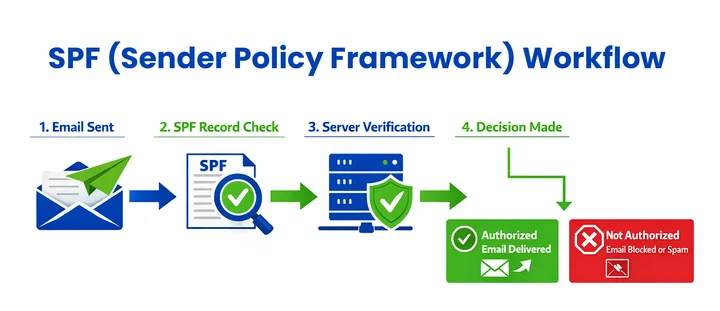
SPF records follow a specific process to verify that emails sent from your domain are legitimate:
- SPF records are stored in DNS TXT records for email.
- They list the IP addresses or servers allowed to send emails on behalf of your domain.
- When an email is received, the recipient’s mail server checks the SPF record to confirm if the sending server is authorized.
- Emails sent from unauthorized servers can be marked as spam or rejected.
- Proper SPF records reduce email fraud and ensure legitimate emails reach inboxes.
This process helps maintain your domain’s email security and ensures that legitimate messages are delivered successfully.
Example of an SPF Record:
v=spf1 ip4:192.168.1.1 include:_spf.google.com ~all
In this example, the domain allows the IP address
192.168.1.1
and any servers listed in Google’s SPF record to send emails. The
~all
indicates that emails from unauthorized servers are treated as suspicious but not automatically rejected.
Real-World Scenario:
Imagine your marketing team adds a new email tool but forgets to update your SPF record. Emails sent from this tool may fail SPF checks, causing messages to land in spam or be rejected.
SPF failures like this can also open the door for brand impersonation, where attackers send fraudulent emails appearing to come from your domain.
Correctly configured SPF records help protect your domain from spoofing and ensure that your legitimate emails are reliably delivered to recipients’ inboxes.
DKIM Records Explained: Verify Your Emails and Prevent Tampering
DKIM (DomainKeys Identified Mail) records are DNS records that attach a digital signature to your outgoing emails. This signature allows the recipient’s email server to verify that your domain actually sent the email and it has not been altered in transit.
To set up DKIM records in Google Workspace, follow the instructions in the Google Workspace DKIM setup guide.
What is the Purpose of DKIM Records?
The primary purpose of DKIM records is to ensure email integrity and authenticity. By signing emails with DKIM, you protect your recipients from tampered or forged emails, maintain trust in your domain, and improve email deliverability.
How Do DKIM Records Work?
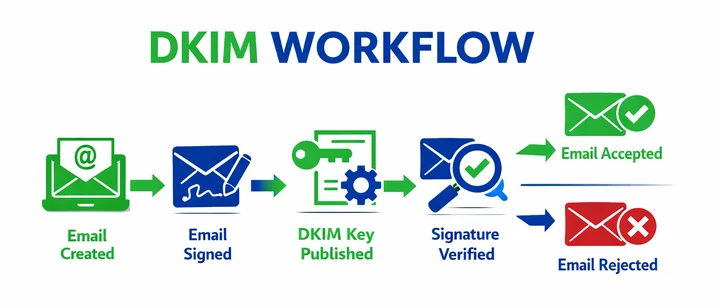
DKIM records use cryptographic keys to authenticate emails:
- Each outgoing email is signed with a private key stored on your mail server.
- The corresponding public key is published in your domain’s DNS as a TXT record.
- When an email is received, the recipient’s server uses the public key to check the signature.
- If the signature matches, the email is considered authentic and unaltered.
- Emails with invalid or missing signatures may be marked as spam or rejected.
Example of a DKIM Record:
v=DKIM1; k=rsa; p=MIIBIjANBgkqhkiG9w0BAQEFAAOCAQ8AMIIBCgKCAQ...
In this example,
p=
contains the public key used to verify the email’s signature. This allows recipient servers to authenticate any email sent from your domain.
DKIM vs. SPF: How They Protect Your Emails and Why Rotation is Important?
SPF validates which servers are allowed to send emails for your domain, while DKIM ensures that the content of the email has not been tampered with and truly comes from your domain. Together, they strengthen email authentication and help maintain trust in your domain.
A key best practice for DKIM is regular key rotation, updating your private/public key pair periodically. This prevents attackers from using an old key to forge emails and ensures your domain remains secure and trustworthy over time.
Properly configured DKIM records help verify email integrity, protect your domain from forgery, and ensure that your messages reach recipients safely and securely.
DMARC Records: Protect Your Domain and Monitor Email Traffic
DMARC (Domain-based Message Authentication, Reporting & Conformance) records are DNS records that work alongside SPF and DKIM to protect your domain from email fraud. DMARC tells receiving mail servers how to handle emails that fail SPF or DKIM checks and provides reports on email activity.
To set up DMARC records in Google Workspace, follow the instructions in the Google Workspace DMARC setup guide.
What is the Primary Purpose of DMARC Records?
The primary purpose of DMARC is to monitor and enforce email authentication policies. It helps you:
- Prevent email spoofing and phishing attacks.
- Protect your domain’s reputation.
- Gain visibility into who is sending emails on behalf of your domain.
How Do DMARC Records Work?
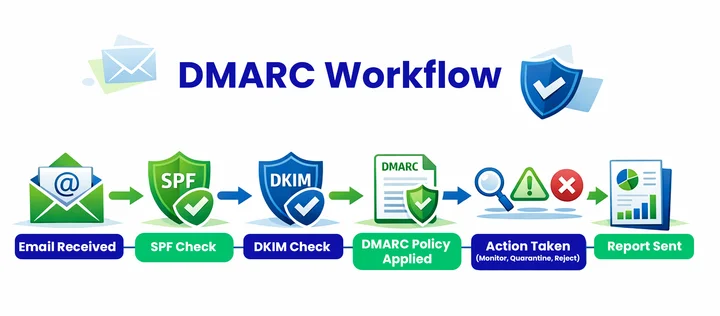
DMARC works by combining SPF and DKIM results:
- The domain owner publishes a DMARC record in DNS as a TXT record.
- When an email is received, the recipient’s server checks SPF and DKIM for that domain.
- DMARC instructs the server how to handle emails that fail authentication:
none:
monitor only, no action.
quarantine:
mark email as spam.
reject:
block the email entirely.
- Reports are sent back to the domain owner, providing insight into email traffic and possible abuse.
Example of a DMARC Record:
v=DMARC1; p=reject; rua=mailto:[email protected];
 ruf=mailto:[email protected]; fo=1
In this example, the policy
p=reject
instructs receiving servers to reject emails failing authentication. The
rua
and
ruf
tags specify where aggregate and failure reports should be sent, helping you monitor email activity.
Best Practice: Start with a monitoring policy
none
to understand your email flow before moving to stricter enforcement, such as
quarantine
or
reject.
DMARC is not just about blocking fraudulent emails. It is a visibility and control layer that helps you maintain secure and trustworthy email communications.
Implementing DMARC policy best practices improves email deliverability, enhances DNS records, and provides insight into email traffic.
How Do MX, SPF, DKIM, and DMARC Records Work Together?
Emails may seem simple to send, but behind the scenes, multiple systems work together to ensure they reach the right inbox safely. MX, SPF, DKIM, and DMARC records form a coordinated network that protects your domain, verifies messages, and prevents unauthorized use.
Understanding how they interact helps maintain trust, prevent fraud, and improve email deliverability.
How the Records Work Together in Practice:
- Email Delivery: MX records guide the email to the correct mail server.
- SPF Verification: The server confirms that the email comes from an authorized sender. Emails from unauthorized servers may be marked as spam or rejected.
- DKIM Validation: The digital signature of the email is verified to ensure the content hasn’t been altered in transit.
- DMARC Enforcement: DMARC reviews SPF and DKIM results and instructs the receiving server to accept, quarantine, or reject the email. It also provides reports to help monitor for threats or misconfigurations.
Why This Combination Matters?
Together, these records create a layered protection system that:
- Protects your domain from spoofing and phishing attacks.
- Ensures legitimate emails consistently reach the inbox.
- email verification platformMaintains your sender reputation and builds trust with recipients.
- Provides visibility into who is sending emails on behalf of your domain, helping detect misuse.
For businesses that want to take email protection a step further, combining DNS record best practices with an email verification API ensures that every address in your email list is active and deliverable, reducing bounce rates and improving overall campaign performance.
Real-World Scenario:
Imagine a customer service email sent from your domain. MX ensures it reaches the correct server, SPF verifies it’s sent from an authorized system, DKIM confirms the message hasn’t been altered, and DMARC instructs the recipient server to reject any spoofed copies.
This layered approach safeguards your communication and preserves your brand’s credibility.
What are the Common DNS Email Misconfigurations to Avoid?
Even with MX, SPF, DKIM, and DMARC set up, minor errors can disrupt email delivery. Here are some common misconfigurations:
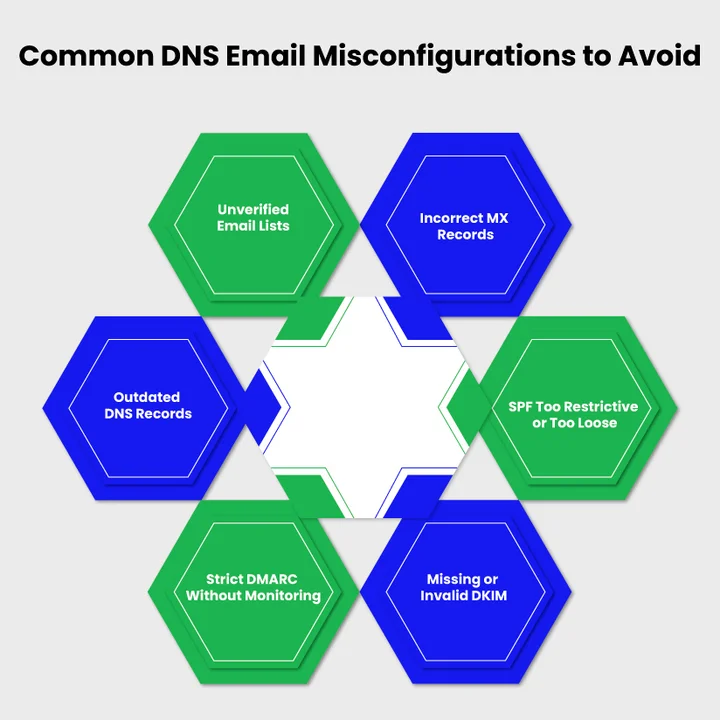
- Incorrect MX Records: Emails may bounce or fail to reach your inbox if MX records point to the wrong server.
- SPF Too Restrictive or Too Loose: Legitimate emails can be rejected, or unauthorized emails may slip through.
- Missing or Invalid DKIM: Emails without proper DKIM verification risk being flagged as spam.
- Strict DMARC Without Monitoring: Setting DMARC to quarantine or reject too early can block legitimate emails; start with a monitoring policy first.
- Outdated DNS Records: Adding new email tools or servers without updating DNS can cause delivery failures.
- Unverified Email Lists: Even correct DNS records can’t fix invalid email addresses. Using an email verification API ensures your list is clean and deliverable.
Quick Tip: Regularly reviewing DNS records and verifying your email list helps prevent misconfigurations and ensures your emails reach the right inbox.
Frequently Asked Questions (FAQs)
2. Can You Use the Same SPF and DKIM Records for Multiple Domains?
Yes, but each domain should have its unique DKIM key. SPF can reference shared mail servers, yet individual domain records ensure proper authentication.
3. How Often Should You Update My DNS Email Records?
Regular updates are crucial, especially when:
- Adding new email servers
- Changing email hosting providers
- Experiencing delivery failures
Checking records periodically helps maintain inbox reliability.
4. Will Setting Up DMARC Prevent All Spam And Phishing?
No, DMARC alone cannot stop all spam. However, when combined with SPF and DKIM, it:
- Reduces spoofed emails from your domain
- Ensures recipients receive authentic messages
- Helps maintain domain reputation
5. Are There Tools To Check If Your MX, SPF, DKIM, and DMARC Records are Correct?
Yes, several reliable tools make verification easy:
- MXToolbox
- DMARC Analyzer
- Google Admin Toolbox
These tools highlight misconfigurations and suggest corrections.
6. What is the Difference Between SPF, DKIM, and DMARC?
- SPF lists authorized email servers for your domain
- DKIM signs outgoing emails to verify authenticity
- DMARC monitors and enforces SPF and DKIM results
Together, these records create a secure and trustworthy email environment.
Summary: Ensuring Reliable Email Delivery
Emails slipping into spam or getting lost are more common than you think, but they do not have to be a constant headache. By maintaining properly configured MX, SPF, DKIM, and DMARC records, you can keep your messages secure, reliable, and consistently reaching the intended inbox.
Moreover, using an email verification platform alongside these records further ensures your emails reach the correct recipients, reduces the risk of fraud, and maintains trust in your communications.
From a business perspective, leadership should care because email reliability directly impacts customer experience, sales, and brand reputation. In addition, maintaining DNS hygiene today safeguards long-term communication reliability, preventing costly errors and future disruptions.
The Takeaway: Understanding and applying these records prevent delivery issues, reduce fraud, and strengthen trust. Each record plays a clear role, and minor adjustments can significantly impact professional communication.
Reduce email risks caused by weak DNS and invalid email addresses.


