


You send an email. It’s important, legitimate, and meant for real people. But instead of landing in the inbox, it quietly slips into the spam folder.
Frustrating, right?
If you’ve been asking yourself, “Why are my emails going to spam?”, it’s a question that comes up more often than you might think.
The truth is, email providers are far more cautious than they used to be. Gmail, Outlook, and others now use advanced filtering systems that look at everything, from your sender reputation to how people interact with your emails.
Even well-intentioned businesses can get caught in the crossfire. So if your emails are being flagged as spam, it doesn’t automatically mean you’re doing something wrong, but it does mean something needs attention.
Here’s the good news:
Most email deliverability issues are fixable. Once you understand what triggers spam filters and how email providers evaluate trust, you can take clear steps to correct the problem and prevent it from happening again.
In this blog, we’ll break down exactly why your emails are being flagged as spam, how major providers make these decisions, and, most importantly, what you can do to fix it.
So, how can you get your emails back in the inbox?
Let’s start with the basics!
Table of Contents
What Does It Mean When Emails Are Flagged as Spam?
When an email is flagged as spam, it means the email provider has determined that the message may be unwanted, risky, or untrustworthy based on a combination of technical signals and user behavior. This does not automatically mean the email itself is malicious or misleading.
For example:
Consider a legitimate SaaS company sending a product update or onboarding campaign to its subscriber list. The content is accurate, the branding is consistent, and the sender believes the audience expects the message.
However, a portion of the list contains inactive addresses and a few invalid or recycled emails. Engagement drops, bounce rates increase, and some recipients ignore or delete the email without opening it.
From the mailbox provider’s perspective, these signals suggest poor sender quality. As a result, future campaigns from the same domain may begin landing in spam, even for active, interested users.
This is where spam flagging becomes a business problem, not just a technical one. Using email verification services for your business can proactively reduce invalid addresses and risky contacts, helping protect your sender reputation and ensuring your messages reach real, active recipients.
When emails are filtered as spam:
- Qualified leads never see time-sensitive offers or onboarding messages.
- Marketing spend is wasted on undeliverable or low-quality contacts.
- Sales follow-ups fail silently, reducing conversion opportunities.
- Domain reputation weakens, making future inbox placement harder and more expensive to recover.
Spam filters evaluate trust continuously. Once negative signals accumulate, recovery takes time and effort, and in some cases, it can affect all outbound email, including transactional and support messages.
By understanding what “spam flagged” actually means, you can pinpoint where the problem lies and take the right steps to ensure your messages reach the people who need to see them.
Once you recognize the warning signs, you can start addressing the underlying issues to make sure your emails reach the people who need to see them.
What Are the Common Reasons Your Emails Get Flagged as Spam?
You might be following all the best practices, but some emails still end up in the spam folder.
Why does this happen?
Email providers look at a combination of technical signals, content, and recipient behavior before deciding where your message should land.
Here are the main reasons your emails might be flagged:
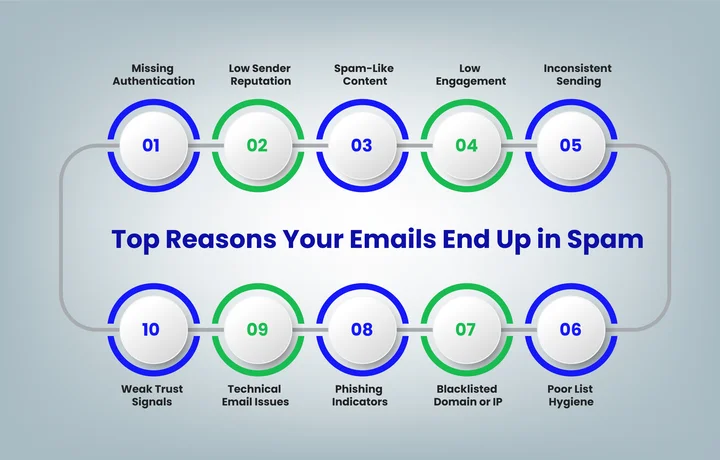
1. Missing or Incorrect Email Authentication (SPF, DKIM, DMARC)
Email authentication is the foundation of trust for mailbox providers. Without it, even legitimate campaigns can be flagged as spam. Here’s how the three main protocols work:
- SPF (Sender Policy Framework): Defines which servers are authorized to send emails on behalf of your domain. If your sending service isn’t included in your SPF record, emails may fail verification.
- DKIM (DomainKeys Identified Mail): Adds a digital signature to each email, allowing providers to verify that the content hasn’t been altered in transit.
- DMARC (Domain-based Message Authentication, Reporting, and Conformance): Builds on SPF and DKIM, instructing providers how to handle emails that fail authentication, such as quarantining or rejecting them.
Even when authentication is configured correctly, list quality plays a critical role. Emails sent to invalid addresses, role accounts, or spam traps increase bounces and complaints. These negative signals can cause providers to treat future messages as suspicious, potentially triggering DMARC failures.
Maintaining clean, verified lists ensures that your authentication records are supported by healthy sending behavior, protecting your domain’s reputation, improving inbox placement, and ultimately safeguarding revenue.
Authentication Alone Won’t Get You Delivered.
Eliminate the risky addresses that bypass filters and drain your budget.
2. Reputation Signals
Your sender reputation is like your email credit score. Providers monitor it based on engagement, complaints, and bounce rates. Low reputation often results from:
- High volumes of invalid or role-based addresses.
- Spam traps triggered by purchased or outdated lists.
- Low engagement or repeated complaints.
Email verification protects this layer by identifying invalid addresses, disposable emails, and potential spam traps before they can harm your sender score.
3. Content Triggers
Spam filters scan your emails for suspicious content patterns. Common triggers include:
- Overly promotional phrases like “Free,” “Act Now,” or “Limited Time.”
- Excessive links, images, or tracking URLs.
- Misleading subject lines or mismatched sender names.
Clear, concise, and transparent content lowers the risk of being flagged. Verification doesn’t fix content, but ensuring emails reach real recipients means your carefully crafted messages are more likely to perform as intended.
4. Low Engagement
Mailbox providers track how recipients interact with your emails. Low open rates, ignored links, or deleted messages send negative signals, increasing the chance your emails will be flagged as spam.
Pro tip: ESPs like Gmail and Outlook often use engagement thresholds to weigh inbox placement. Even small improvements in opens and clicks can protect your sender reputation over time.
4. List Hygiene
Poor-quality lists are a major driver of spam flagging. Sending to inactive, outdated, or purchased contacts increases bounce rates and engagement drops. Email verification serves as a first line of defense, detecting:
- Hard bounces before campaigns are sent.
- Disposable or temporary email addresses.
- Hidden spam traps are designed to penalize careless senders.
By proactively cleaning your list, you protect both deliverability and your marketing ROI.
5. Trust Signals
Providers consider that if recipients recognize and trust the sender. Missing unsubscribe links, inconsistent branding, or unfamiliar email addresses can trigger spam warnings.
The key takeaway from this is simple: spam flagging is a combination of authentication, reputation, content, list quality, and trust signals. Email verification works across several of these layers, proactively preventing spam traps, reducing hard bounces, and safeguarding long-term deliverability and revenue.
In the next section, we’ll look at how major email providers specifically flag spam so you know what to focus on.
How Do Major Email Providers Flag Spam Emails?
So, how do Gmail, Outlook, and other major email providers decide if your email lands in the inbox or the spam folder?
Each provider uses a combination of authentication checks, engagement signals, and content analysis to protect users. Understanding their focus helps you prioritize improvements.
Let’s break it down:
| Email Provider | How Spam Is Detected | Key Factors | What Triggers Spam Flags |
|---|---|---|---|
| Gmail | Automated filters and machine learning ( Gmail Postmaster Tools ) | SPF, DKIM, DMARC, sender reputation, engagement metrics | Missing authentication, low opens/clicks, spammy content, or links |
| Outlook | Focuses on domain trust and historical behavior (Microsoft SNDS) | Domain/IP reputation, phishing detection, and user reports | Poorly recognized sender, misleading links, messages marked as junk |
| Yahoo | Automated filtering and reputation scoring (Yahoo Mail Guidelines) | Authentication, sender reputation, engagement metrics | Missing/incorrect SPF/DKIM/DMARC, low engagement, spam-like content |
| Apple Mail | Uses similar filters to Gmail & Outlook | Authentication, engagement, and content analysis | Low engagement, suspicious content, inconsistent sender info |
| Enterprise Email Systems | Often enforce stricter internal policies | Authentication, internal spam rules, and user feedback | Inconsistent sender info, low engagement, policy violations |
Prioritize authentication, engagement, and list quality first. Verified lists ensure your emails reach active recipients, and consistent sending with clear content strengthens trust signals across providers, giving you the best chance for inbox placement.
Major email providers prioritize verified addresses.
Use EmailVerify.io to ensure every email reaches the inbox.
Step-by-Step Guide To Fixing Emails That Are Being Flagged as Spam
If your emails are landing in spam folders, don’t panic. Most deliverability issues can be corrected with a few targeted steps.
Here’s a clear, step-by-step approach to help your messages reach the inbox consistently:
These six steps can help you restore inbox placement and improve email deliverability.
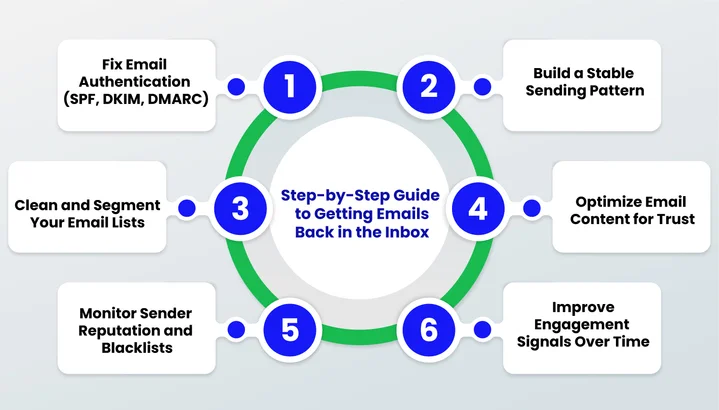
Step 1: Set Up SPF, DKIM, and DMARC Correctly
Email authentication tells mailbox providers that your emails are genuinely coming from you. When these records are missing or misconfigured, spam filters treat your messages with caution, even if the content is legitimate.
Here’s how to set up each one properly:
- SPF (Sender Policy Framework)
SPF defines which mail servers are allowed to send emails on behalf of your domain. Make sure your SPF record includes every service you use for sending emails, such as your email marketing platform, CRM, or transactional email provider.
- DKIM (DomainKeys Identified Mail)
DKIM adds a digital signature to your emails. This signature allows email providers to confirm that the message hasn’t been altered after it was sent, which helps establish trust.
- DMARC (Domain-based Message Authentication, Reporting, and Conformance)
DMARC builds on SPF and DKIM by telling email providers how to handle messages that fail authentication.
The “p” value in DMARC stands for policy, and it controls what action providers should take:
- p=none collects reports without affecting delivery.
- p=quarantine sends failing emails to the spam folder.
- p=reject blocks failing emails entirely.
A properly configured authentication setup reassures email providers that your messages are legitimate, which significantly lowers the chances of spam filtering. Developers can run this process using email verification APIs to automatically validate addresses before sending campaigns.
Step 2: Strengthen Email Deliverability Foundations
A stable sending pattern helps mailbox providers recognize your domain as reliable and predictable.
- Increase sending volume gradually when using a new domain or IP address to avoid sudden spikes.
- Keep a consistent sending schedule so providers can anticipate your campaigns.
- Use domain warming practices to build trust over time rather than all at once.
Steady behavior reduces suspicion and lowers the chances of spam filtering.
Step 3: Clean and Verify Your Email Lists
Poor list hygiene is one of the biggest threats to inbox placement. Sending to invalid addresses, disposable emails, or hidden spam traps can damage sender reputation and waste marketing spend.
This is where EmailVerify comes in as a preventive control layer:
- Detects invalid, disposable, or role-based emails before sending.
- Identifies potential spam traps that could harm your domain.
- Reduces hard bounces and complaints, protecting the sender’s reputation.
- Helps maintain ROI by ensuring your campaigns reach real, active recipients.
Using EmailVerify.io at this stage safeguards your domain, improves authentication effectiveness, and prevents long-term reputation decay.
Step 4: Optimize Email Content for Trust
Ensure your emails are clearly structured and trustworthy:
- Use a consistent sender name.
- Balance text and images.
- Include visible unsubscribe links.
This reassures providers and recipients that your emails are legitimate, helping prevent spam flagging.
Step 5: Monitor Sender Reputation and Blacklists
Sender reputation changes over time and needs regular attention.
- Track domain and IP reputation using tools like Google Postmaster, Microsoft SNDS, and MXToolbox.
- Watch for sudden drops in reputation scores or warning signals.
- Act quickly if your domain or IP appears on a blacklist.
Early action prevents long-term inbox placement problems.
Step 6: Encourage Engagement Strategically
Focus on sending relevant, expected content that resonates with your audience. Segment your recipients based on interests and past behavior, and design emails that encourage opens, clicks, and replies.
Clean, verified lists ensure your messages reach real, active recipients, boosting engagement signals that providers use to decide inbox placement. Higher engagement not only protects your sender reputation but also maximizes the impact of every campaign.
Implementing these six steps will significantly improve inbox placement.
A Complete Checklist Before Your Next Big Campaign
Before sending your next campaign, take these preventive actions to safeguard deliverability, protect your sender reputation, and maximize ROI:
- Verify your emails with EmailVerify.io to catch invalid, disposable, or risky addresses and avoid spam traps that could harm your sender reputation.
- Always use proper authentication with SPF, DKIM, and DMARC.
- Send only to opted-in subscribers.
- Keep your sender reputation strong by removing inactive or unengaged contacts.
- Segment your audience based on engagement and interests.
- Use a clear and recognizable sender name and email address.
- Write honest and straightforward subject lines; avoid misleading or clickbait phrasing.
- Balance text and images to prevent spam triggers.
- Include a visible and easy-to-use unsubscribe link.
- Send emails consistently without sudden spikes in volume.
- Track engagement through opens, clicks, and replies.
- Check that your domain and IP are not listed on any blacklists.
Marketing, growth, and email teams should keep this checklist close and revisit it regularly to catch issues early and maintain consistent inbox placement.
Treat it as a practical reference rather than a one-time task, especially when launching new campaigns or adjusting sending strategies.
Final Thoughts: Protect Your Deliverability, Reputation, and Revenue
Emails landing in spam can silently erode engagement, waste marketing spend, and damage your sender reputation, impacting every campaign you run. The good news is that most deliverability issues can be prevented before they ever happen.
By combining proper authentication, clean and verified lists, engagement-focused content, and consistent sending practices, you can significantly reduce spam flags and safeguard your domain.
EmailVerify.io acts as a preventive control layer, catching invalid, disposable, or risky addresses and potential spam traps before they hurt your reputation or ROI.
Investing in verification is actually about protecting revenue, reducing campaign waste, and maintaining long-term trust with your audience.
With verified lists, every email has a better chance of improving opens, clicks, and conversions while keeping your sender score healthy.
Frequently Asked Questions (FAQs)
2. How Does Email Verification Affect Spam Complaints and Sender Score?
Verified lists reduce hard bounces, invalid addresses, and spam trap hits, which are major factors in lowering your sender reputation. By sending only to legitimate, active contacts, EmailVerify helps decrease spam complaints, boost engagement, and maintain a healthy sender score over time.
3. Will Verification Slow Down Your Campaign Launches?
No. Verification is a quick, automated step that can be integrated into your pre-campaign workflow, ensuring your lists are clean before sending without delaying your schedule. It’s preventive, not disruptive.
4. What’s the Difference Between a Spam Warning and a Phishing Warning?
Spam warnings indicate emails that appear unwanted or low-quality, whereas phishing warnings are triggered when messages seem deceptive or attempt to steal sensitive information. Both affect deliverability, but phishing warnings are treated more strictly by providers.
5. Why Does Gmail Sometimes Flag Emails as Spam Even If Authentication Is Correct?
Gmail uses multiple signals beyond SPF, DKIM, and DMARC. Factors like low engagement, suspicious content patterns, or a history of complaints from recipients can still trigger spam flags, even if authentication passes.
6. Can Poor HTML or Email Formatting Cause Your Emails to Go to Spam?
Absolutely. Broken HTML, missing plain-text versions, or overly complex templates can trigger filters. Clean coding and well-structured templates that render correctly across devices improve trust signals and reduce spam risk.
7. Are Marketing Emails More Likely to Be Flagged as Spam?
Marketing emails are often monitored more strictly because they are sent in bulk. Using opt-in lists, personalized content, and consistent engagement strategies reduces the likelihood of spam flags.
8. How Long Does It Take for Spam Fixes to Work?
Changes like updating authentication records, improving sender reputation, or cleaning email lists can take a few days to several weeks to fully impact inbox placement. Consistency and monitoring during this period are important.
Maximized ROI Starts with a Verified List.
Stop wasting money on undeliverable leads and reach the inbox instead.


