

Imagine a restaurant drive-thru with multiple windows. One is for order pickup. Another handles returns. A third is for special requests.
Now picture pulling up to the returns window and asking for your burger. You won’t get it…
Not because the kitchen failed or the order wasn’t good.
But because you’re standing at the wrong window.
The path is wrong. And once the path is incorrect, effort doesn’t matter.
That’s how email sending works behind the scenes. And with over 90% of cyber attacks starting with an email, every message you send needs the right path to reach its destination safely.
In email marketing, email deliverability is everything. You can write flawless copy, obsess over timing, and fine-tune segments for weeks. But if the message doesn’t reach the inbox, none of it counts.
Emails don’t just “go out.” They pass through a specific door inside the Simple Mail Transfer Protocol (SMTP). That door is the SMTP port. Choose the wrong one, and your message can be blocked, delayed, or filtered.
In this guide, we’ll explain SMTP ports,how they affect email sending, and why choosing the right one makes all the difference.
Let’s get started!
Table of Contents
What Are SMTP Ports?
SMTP ports are the specific channels on an SMTP server. They handle secure, reliable communication between email clients (Gmail, Yahoo, Apple Mail, etc.) and servers via the SMTP protocol. They specify which service or connection to use on the server.
How Do SMTP Ports Work?
Every time an email is sent, SMTP ports control how that message moves through the system. They define the rules for email submission, security, and delivery before an email ever reaches an inbox.

Step 1: Your Email Connects To An SMTP Server
Every email starts at the source. Your sending system (email client, a website, or a platform using WordPress’s wp_mail()) connects to an SMTP provider via one of the ports. This first connection decides how the message enters the email ecosystem.
A quick SMTP check can ensure your messages are taking the right path before they leave your system.
Remember, if this connection fails or uses the wrong port, the email never gets a real chance to move forward.
Step 2: The SMTP Port Sets The Rules
Once connected, the chosen port tells the SMTP server how to handle the message. This includes if SMTP authentication is required and how email encryption should work during email submission.
Note: You can now see why SMTP port usage is critical. Different ports exist for various purposes, not as backups for each other.
Step 3: Encryption Is Applied During Transmission
Depending on the port, the connection may use STARTTLS, explicit TLS (Transport Layer Security), or implicit SSL (Secure Sockets Layer)/TLS. Secure ports (such as Port 587 and Port 465) encrypt email data in transit, ensuring secure email transmission. Therefore, it’s recommended to use both of these ports for client submissions.
Older options (such as Port 25) are mostly for server-to-server traffic and may allow encryption (if explicitly negotiated).
Step 4: The Message Is Relayed Between Servers
After authentication, the SMTP server forwards the message using TCP (Transmission Control Protocol) for server-to-server relay. This step handles the actual transfer between sending and receiving mail servers.
At this stage, the email leaves your control and enters the broader network of email service providers.
Step 5: Inbox Providers Make the Final Call
Inbox providers analyze the message for authentication, encryption, sender trust, and past behavior. Here, email delivery is approved, filtered, or blocked by spam filters.
If the SMTP setup looks risky or misconfigured, even legitimate transactional emails can fail to reach the inbox.
Ports Control Delivery, But Clean Lists Protect It.
What Are The Different Types Of SMTP Ports & Their Uses?
You’re ready to start sending emails. Then comes the port field in your email client settings or plugin, and suddenly it gets confusing.
Port 25? Port 587? Port 465? Which one should you pick?
Each serves a purpose and shapes how your email communication flows. When you pick the right one, your messages sail through the system as they’re meant to.
To choose the correct port, you need to understand each one.
In this section, we’ll break down each SMTP port, what it does, its pros and cons, and its best use cases.
Port 25 (Original SMTP Port)
Port 25 is the original SMTP port designed for server-to-server email relay. It was never intended to be used to send emails directly from email clients or websites.
Background
Port 25 dates back to the first SMTP specification in 1982 (RFC 821). It was created for server-to-server transfers, where one Mail Transfer Agent (MTA) forwards messages to another across the Internet.
In the early days, Port 25 handled both:
- Relay (MTA → MTA)
- Submission (clients sending directly)
Though submission was never its primary purpose. Back then, it lacked built-in SMTP authentication and email encryption. This made it a favorite of spammers.
Over time, ISPs and hosting providers began blocking Port 25 for end-users. These changes limited its use for direct email submissions. Therefore, Port 25 is now mostly reserved for server-to-server transfers.
Pros And Cons Of Port 25
Below, we’ve summarized the pros and cons of port 25 so you know what to expect:
| Pros | Cons |
|---|---|
| Works for server-to-server email transmissions | Often blocked by ISPs for outgoing mail |
| Compatible with legacy systems | No encryption by default |
| Standard SMTP port for relays | High risk of emails being flagged as spam |
Security & Encryption Level
Port 25 typically carries unencrypted SMTP traffic for server-to-server email transfers. By default, it runs in plain text (no TLS/SSL) with no TLS or SSL. Though STARTTLS encryption is possible if both servers support it.
Compatibility
Most ISPs and hosting providers block outbound Port 25 to prevent spam. That makes it unreliable for sending emails from websites, platforms, or marketing campaigns.
Best Use Cases
- Server-to-server relay between trusted email servers
- Testing mail relay in legacy systems
- Internal mail system transfers
Recommendation
Port 25 remains in use for internal mail relays and MTA-to-MTA transfers. But it’s not recommended for marketing or transactional emails due to security and reliability concerns.
Port 465 (SMTP Implicit TLS Port)
Port 465 was introduced for SMTPS, or secure email submission using implicit SSL/TLS. It immediately encrypts the connection before sending authentication details.
Background
Spammers were finding ways to exploit unencrypted connections. Something had to be done.
Port 465 was introduced to handle secure email submission using implicit SSL/TLS. From the very first packet, the connection is encrypted. Authentication details and messages stay protected.
IANA registered it in 1997 as “smtps,” meant to replace the insecure Port 25. Later, the standard shifted to Port 587 with STARTTLS. For a while, Port 465 lost its official status.
Still, many email clients and providers continued to support it. In 2018, RFC 8314 officially re-endorsed Port 465 for Implicit TLS. Today, it’s reliable and widely supported, often used as an alternative to Port 587.
Pros And Cons Of Port 465
We’ve outlined the pros and cons in the table for clarity:
| Pros | Cons |
|---|---|
| Immediate encryption with implicit SSL/TLS | Some old servers may not support it |
| Widely supported by SMTP providers | Less flexible than STARTTLS |
| Ensures secure email submission | Can conflict with conventional platforms |
Security & Encryption Level
Uses implicit SSL/TLS for secure email transmission. All communication is encrypted from the moment the connection starts.
Compatibility
Port 465 is secure with implicit TLS, but not all email clients or SMTP providers support it. Many modern setups prefer Port 587 with STARTTLS.
Best Use Cases
- Sending transactional emails securely
- Use when explicit TLS (STARTTLS) is unavailable
- Configuring SMTP settings for email clients on SMTPS-approved platforms
Recommendation
Use Port 465 only if your system or legacy setup requires it. Otherwise, stick with Port 587 for smoother, more reliable email delivery.
Port 587 (SMTP Explicit TLS Port)
Port 587 is the modern standard for SMTP port usage in sending email from email clients or websites. It uses STARTTLS to upgrade connections to encrypted sessions.
Background
Email sending needed a clear separation of roles. Port 25 handled server-to-server relay, but client submissions needed their own path. Port 587 was set up to fill that gap.
Introduced in RFC 2476 (1998), it became the dedicated submission port for messages sent from mail clients and apps to SMTP servers. Since these messages originate outside the mail server itself, identity and trust matter.
Authentication is required, usually through a username and password or an API key. The connection starts in plain text, then upgrades to TLS using STARTTLS. It secures the message without breaking compatibility with different systems.
Pros And Cons Of Port 587
Here’s a quick table of pros and cons of port 587:
| Pros | Cons |
|---|---|
| Officially recommended standard SMTP port | Requires STARTTLS support |
| Flexible with encrypted or unencrypted connections | Slightly more setup than Port 465 |
| Compatible with almost all SMTP providers | Misconfiguration can block messages |
Security & Encryption Level
This port uses STARTTLS for explicit TLS. Hence, securing email transmissions while allowing compatibility with older systems, if needed.
Compatibility
This is the modern, widely accepted SMTP submission port. Almost all email clients, SMTP vendors, and inbox systems support Port 587.
Best Use Cases
- Daily email submission from email clients or websites
- Sending both transactional emails and small-scale marketing campaigns
Recommendation
Make Port 587 your default. It offers secure email transmission and reliable delivery and works well for both marketing and transactional emails.
Port 2525 (The Unofficial Fallback)
Port 2525 is an alternate SMTP port supported by many SMTP servers when other ports are blocked. It behaves like Port 587 but is mainly a fallback.
Background
Sometimes the problem isn’t configuration. It’s the network itself.
As spam exploded, many ISPs and hosting providers began blocking common SMTP Ports like Port 25, Port 465, and even Port 587. That left senders stuck, even when everything else was set up correctly.
Port 2525 emerged as a practical workaround. It is not an official IANA or IETF standard, but many providers adopted it to help customers send email when standard ports were blocked. Think of it as an alternate entrance when the main doors are closed.
Compatibility
Port 2525 isn’t an official SMTP port. But as mentioned earlier, many SMTP service providers accept it when Port 587 is blocked. Most modern email clients handle it without issues.
Pros And Cons Of Port 2525
The following table shows the pros and cons of port 2525:
shows the pros and cons of port 2525
Security & Encryption Level
This port supports explicit TLS via STARTTLS, enabling secure email communication even when the primary ports are unavailable.
Best Use Cases
- Websites or apps blocked from using Port 587 or Port 465
- Transactional emails when ISPs enforce strict firewall settings
Recommendation
Keep Port 2525 as a fallback option. It’s flexible, works reliably with secure setups, and ensures your emails get through when standard ports are restricted.
Now that we know what each port does, let’s see what can go wrong if you pick the wrong one… Knowing this helps you choose the correct port.
What Happens When You Choose The Wrong SMTP Port?
You already know what happens when you pick the wrong port. First, let’s see the consequences of selecting the wrong port.
Below are the most common ones:
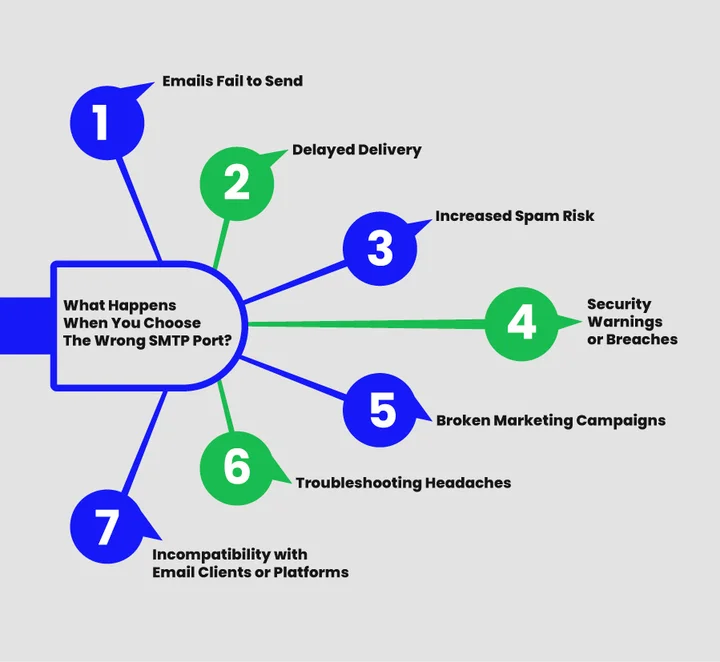
1. Emails Fail to Send
When a port is blocked, filtered, or unsupported, the SMTP connection never completes. The email does not reach the SMTP server, so it cannot be queued or relayed. In many setups, this results in immediate send failures or bounced emails at the application level.
Example
You may see problematic bounce errors, or worse, nothing at all, making it seem like the system is working when it isn’t. In blocked port scenarios, bounce rates can rise sharply, often exceeding acceptable thresholds used by ESPs to flag sending issues.
2. Delayed Delivery
An incorrect port can cause SMTP servers to retry delivery multiple times instead of rejecting the message outright. This leads to email throttling, where messages are temporarily deferred even though they are technically accepted.
Example
A campaign goes out on time, but subscribers receive it hours later. Reports show soft bounce activity even though the recipient addresses are valid.
3. Increased Spam Risk
Using ports without proper authentication or encryption weakens sender signals. Inbox providers view this as risky behavior, which increases the likelihood of filtering and exposure to spam traps.
Example
Emails start landing in spam folders even though the content hasn’t changed. Engagement drops, and inbox placement becomes inconsistent across providers, especially after repeated unauthenticated or unencrypted submissions trigger filtering patterns that affect future sends.
4. Security Warnings or Breaches
Older or misused ports may allow unencrypted SMTP traffic. This exposes login credentials and message content during transmission and can trigger security alerts from hosting providers.
Example
Your hosting provider flags outgoing email traffic, or logs show warnings about unencrypted connections during SMTP authentication.
5. Broken Marketing Campaigns
When delivery is inconsistent, automation workflows break. Emails fail at different stages, reporting becomes unreliable, and performance data no longer reflects reality.
Example
Welcome emails and time-sensitive offers don’t reach users. Bounce rates rise into territory that inbox providers start flagging, and conversions drop without an apparent cause, as failed or delayed sends break automation timing and reduce the number of users who ever reach key touchpoints.
6. Troubleshooting Headaches
Port-related issues often surface as vague SMTP errors with little context. This makes troubleshooting harder and pushes teams to investigate the wrong areas first.
Example
You spend hours reviewing credentials and DNS records, only to realize the port is blocked by the ISP or hosting firewall.
7. Incompatibility with Email Clients or Platforms
Not all email clients, plugins, or platforms support every port or encryption method. A mismatched setup can cause connection failures even when credentials are correct.
Example
Email sends work on one server but fails on another. One platform logs repeated soft bounces, while another refuses the connection entirely.
Note: Even if the SMTP ports are misconfigured, EmailVerify.io makes sure you get less bounces through verified email lists.
Stop Port-Related Bounces By Verifying Email Lists From EmailVerify.io
How To Choose The Right SMTP Port?
By now, you know what each SMTP port does. Choosing the correct SMTP port number is about matching the port to how your email is actually being sent and where it’s coming from.
Keep in mind the following when you’re doing the port selection:

1. Start With How You’re Sending Email
This is where most mistakes happen. Different SMTP ports exist because email doesn’t move in one single way.
Server-To-Server Email Relay
Port 25 belongs only here.
It’s designed for MTA-to-MTA communication between trusted mail servers. Using this SMTP port number for client or website sending usually leads to blocked connections or spam filtering.
Email Clients, Websites, And Applications
Port 587 is the standard choice here.
It’s built for authenticated client submission and works reliably across modern email clients, CMS plugins, and SMTP providers.
Secure Or Legacy-Based Sending
Port 465 fits when implicit TLS is required.
Some systems expect encryption from the first connection. In those cases, this SMTP port works. Otherwise, Port 587 remains the better default.
2. Factor In Network And Hosting Restrictions
Sometimes your SMTP configuration is fine. The network isn’t.
Many ISPs and hosting providers restrict outbound SMTP port numbers to control spam. Cloud platforms often block Port 25 by default, regardless of setup.
If email fails before authentication even happens, this is usually why.
3. Know When A Fallback Port Is The Right Call
Port 2525 exists for blocked environments.
It’s not an official SMTP port number, but many providers support it to keep email flowing when standard ports are filtered. Use it when 587 or 465 are unreachable, not as a primary choice.
4. Don’t Compromise On Security And Authentication
The SMTP port you choose directly affects trust.
Secure SMTP ports require authentication and support encryption during transmission. That’s why Port 587, Port 465, and Port 2525 perform better for deliverability and reputation.
Port 25 usually lacks both. That’s where problems start.
Pairing the right port with email verification helps keep your sending list clean and ensures your campaigns reach the ideal contacts. For agencies and enterprise teams managing multiple client lists, this approach also ensures high-volume campaigns run smoothly, each list stays verified, and client deliverability remains intact.
A Practical Rule For Choosing The Right SMTP Port Number
If you want to simplify the decision. Bear it in mind:
- Sending from an email client, website, or app? Use Port 587.
- Required to encrypt from the first handshake? Use Port 465.
- Blocked by ISP or firewall? Try Port 2525.
- Relaying between mail servers only? Port 25 fits there and nowhere else.
If none of these work, the issue isn’t the SMTP port. It’s the sending environment.
How Do SMTP Ports Influence Email Sending?
You already know each SMTP port works differently. But what does that actually mean for your email campaigns? The port you pick affects whether messages get through, how secure they are, and how inbox providers judge your sending reputation.
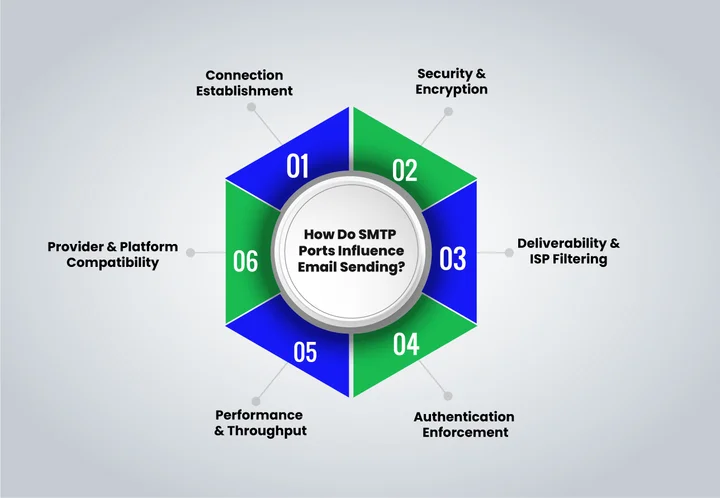
1. Connection Establishment
The first hurdle for any email is making it through to the SMTP server. Choosing the wrong port can prevent your message from leaving your system. Connections fail immediately if the port is blocked, leaving marketers scratching their heads over undelivered campaigns.
2. Security & Encryption
Ports control how your emails are protected in transit. Unencrypted ports expose messages to interception, spam traps, or tampering. Secure ports encrypt data, helping prevent leaks and ensuring your audience sees exactly what you send.
3. Deliverability & ISP Filtering
Email deliverability hinges on the port you use. Some ports are flagged by ISPs as risky, increasing the likelihood that your campaigns will be throttled or blocked. Choosing the right port with verified contacts not only lowers this risk and maximizes inbox placement but also improves engagement and helps campaigns achieve higher ROI.
| Port | ISP/Provider Response | Notes |
|---|---|---|
| 25 | High block rate | Often soft/hard bounces, spam risk |
| 465 | Low block rate | Secure submission, supported by many ESPs |
| 587 | Low block rate | Preferred by Gmail, Outlook, and most clients |
| 2525 | Low block rate | Fallback if 587/465 are blocked |
4. Authentication Enforcement
Submission ports enforce identity. Ports like 587 and 465 require SMTP authentication, preventing open relay abuse. This reduces blocklisting and keeps your sending reputation healthy.
5. Performance & Throughput
Secure connections add a little overhead, but they improve reliability. Fallback ports like 2525 keep email flowing when firewalls or ISP restrictions block standard options.
6. Provider & Platform Compatibility
Not every port works everywhere. Gmail, Outlook, and most ESPs favor Port 587 for TLS-encrypted submissions. Many hosting providers block Port 25, forcing marketers to adapt.
For developers, EmailVerify.io’s API works easily with multiple SMTP ports, letting you integrate verification checks directly into applications without worrying about which port is in use.
Conclusion
Getting your SMTP port right isn’t just a checkbox. It determines whether your emails reach their destination and avoid ISP blocks or spam filters. We’ve covered each port, why some fail silently, how encryption and authentication protect your messages, and the consequences of picking the wrong port. Every choice matters for email deliverability, security, and campaign performance.
Using the correct SMTP port is especially important for transactional emails and when running an email verification tool to keep your lists clean and reduce bounce rates.
Now it’s time to act. Check which SMTP port your system is using, ensure it matches your sending method, test for blocked ports, and stick to secure options like 587, 465, or 2525 when needed. Doing this keeps your emails out of spam, protects sensitive data, improves deliverability, and ensures your campaigns and email verification processes reach recipients reliably.
Frequently Asked Questions (FAQs)
2. How Do I Know If My ISP Is Blocking a Port?
You can test using command-line tools like telnet or openssl s_client. If the connection fails, your ISP or hosting provider may be blocking that port, and switching to 587, 465, or 2525 is recommended.
3. Does Using a Fallback Port Affect Email Reputation?
Fallback ports like 2525 don’t inherently harm your reputation, but consistent use of blocked or insecure ports can trigger spam filters. Always ensure authentication and encryption are in place.
4. How Do SMTP Ports Affect Transactional Emails?
Transactional emails, such as order confirmations or password resets, rely on secure ports (587 or 465). Using the wrong port increases the risk of bounces, delays, and spam filter triggers, impacting email deliverability and user experience.
5. Can Changing SMTP Ports Improve Inbox Placement?
Yes. Using secure and authenticated ports improves sender reputation, reduces the risk of ISP blocks, and helps campaigns reach the inbox rather than landing in a spam folder, boosting overall deliverability.
6. Should I Pair SMTP Port Choice With an Email Verification Tool?
Absolutely. Combining verified contacts with the correct SMTP port reduces bounce rates, avoids ISP blocks, and ensures transactional emails and marketing campaigns consistently reach their intended recipients.
7. Can EmailVerify Help Manage Multiple Client Lists Across Different SMTP Setups?
Yes. EmailVerify lets agencies handle multiple client lists seamlessly, even if each uses a different SMTP setup. It ensures every contact is verified, your sending reputation stays healthy, and campaigns reach the right audience reliably.
Get Your SMTP Ports Right and Keep Every Email in the Inbox


