

Search the phrase “email verification vs. validation,” and you’ll find ten different definitions across the first ten results. Some say the two are identical. Others insist they’re worlds apart. A few use them interchangeably in the same paragraph and hope no one notices.
That confusion is a problem because the wrong understanding leads to the wrong tools, the wrong workflows, and ultimately, the wrong inbox placement results.
Email remains one of the highest-performing marketing channels, with studies showing an average return of $36 for every $1 spent on email marketing, according to Litmus research, which makes deliverability errors surprisingly costly over time.
A signup form that only validates format will still let typos and disposable addresses slip through.
A bulk list that’s only verified at the SMTP level might still contain syntactically broken records that should never have been collected in the first place.
This guide settles the debate. We’ll define each term in plain English, explain how developers and marketers use them differently, and walk through the real-world scenarios where each one matters.
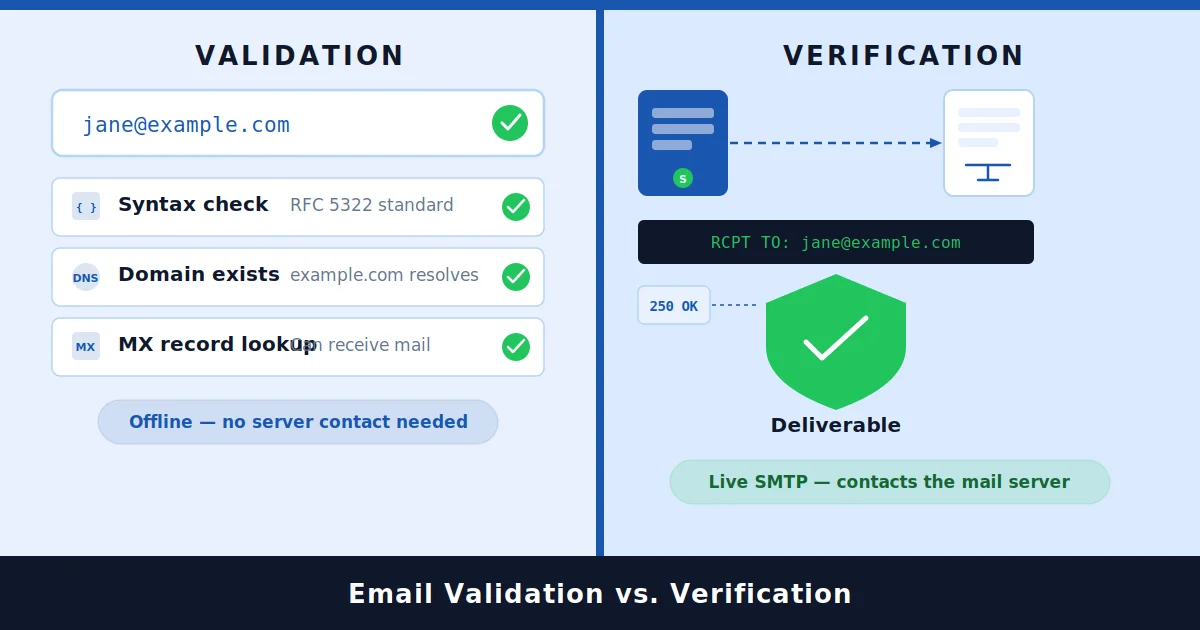
Email validation checks whether an email address is correctly structured and theoretically deliverable. It looks at syntax, domain, and MX records.
Email verification goes further. It confirms the mailbox actually exists and is willing to accept mail by performing a live SMTP check.
In short, validation asks, “Could this email exist?” Verification asks, “Does this mailbox actually receive mail?”
You usually want both. Most modern platforms run them together, even when they’re marketed under a single name like “email checker” or “email verifier.”
Table of Contents
What is Email Validation?
Email validation Service is the structural and technical assessment of an email address. Think of it as the first checkpoint, the part that decides whether an address is even worth investigating further.
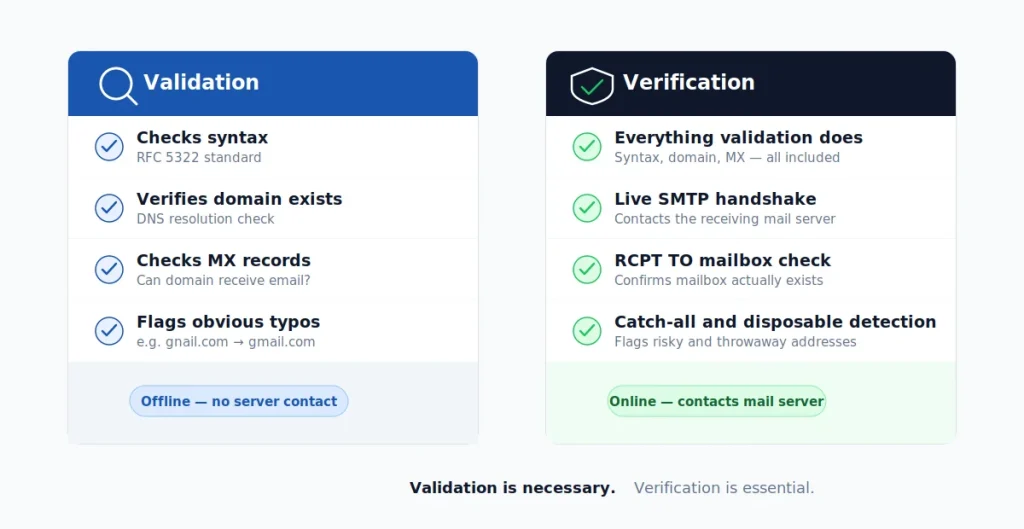
A standard validation routine typically includes the following checks:
- Syntax check against RFC 5322 standards (so “john@@example..com” gets rejected immediately).
- Domain existence (does example.com actually resolve?).
- MX record lookup (can the domain receive email at all?).
- Basic typo detection (catching “gnail.com” and suggesting “gmail.com”).
- Disposable domain detection in some implementations.
Notice what validation does not do: it does not contact the receiving server, and it does not confirm whether the specific mailbox exists. It tells you the address is plausible.
Expert Tip
If a tool only validates emails, treat its results as a “filter” rather than a “verdict.” A validated address has cleared the easiest checks. It has not been confirmed as real.
What Is Email Verification?
Email verification picks up where validation ends. It performs a live conversation with the recipient’s mail server to determine whether the specific mailbox will accept a message.
A complete verification process usually includes:
- Everything validation does (syntax, domain, MX).
- An SMTP handshake with the receiving mail server.
- An RCPT TO command to ask whether the mailbox exists.
- Catch-all detection to identify domains that accept everything.
- Role-based detection (info@, support@, admin@).
- Greylisting and temporary failure handling.
- Disposable and free-provider classification.
- Risk scoring based on signals across multiple layers.
Verification produces a confidence-graded answer. Instead of a simple “valid format,” you get a result like “deliverable,” “undeliverable,” “risky,” or “unknown,” along with the reasoning behind it.
This is the layer that protects your sender’s reputation. Sending mail to addresses that have never been verified is one of the fastest ways to push your bounce rate above acceptable thresholds, and once that happens, even your good contacts start landing in spam.
What are the Core Difference Between Email Validation and Verification?
Here’s the cleanest way to remember it.
- Validation is about the address.
- Verification is about the mailbox.
An address can be perfectly structured, point to a real domain, and still belong to a mailbox that was deleted three years ago. Validation cannot detect that. Only verification can.
Treating “validate vs. verify email” as a stylistic choice. They sound similar, but they answer fundamentally different questions. A team that only validates is essentially trusting that every well-formed address is a working one, which is rarely true in practice.
Another way to frame it: validation is offline. Verification is online. Validation reads what’s in front of it. Verification asks the receiving server what it actually thinks.
Comparison Table: Email Validation vs. Email Verification
If you remember only one piece of this article, make it this table.
| Aspect | Email Validation | Email Verification |
|---|---|---|
| Primary question | Is this email correctly structured? | Does this mailbox actually exist and accept mail? |
| Method | Static checks (regex, DNS, MX) | Live SMTP conversation with the mail server |
| Network call required | Minimal | Required (active connection to the recipient server) |
| Speed | Milliseconds | Slightly slower per address (still real-time-capable) |
| Catches typos | Yes | Yes |
| Catches dead mailboxes | No | Yes |
| Detects catch-all domains | No | Yes |
| Detects disposable emails | Sometimes | Yes (with up-to-date databases) |
| Provides risk scoring | Rarely | Yes |
| Best for | First-line filtering | Deliverability and list hygiene |
| Use a stage. | Front of the funnel | Anywhere mail will actually be sent |
The takeaway is straightforward. Validation is necessary but not sufficient. Verification is what gives you confidence that an address belongs in your sending pipeline.
Why are the Terms “Validation” and “Verification” Often Confused?
The confusion is not accidental. It’s a side effect of how the email tooling industry evolved.
Early email tools mostly performed format checks and called themselves “validators.” When SMTP-level checks became practical, vendors started layering them in but kept the same product names.
Meanwhile, newer entrants used “verifier” to differentiate themselves, even when they did the same thing under the hood.
Today, the result is messy. Some platforms call their full deliverability product an “email validation API.” Others call a basic regex script an “email verifier.” Documentation, blog posts, and support articles often blur the two without realizing it.
Expert Tip
When evaluating a tool, ignore the marketing label. Look at the actual checks performed: syntax, MX, SMTP handshake, catch-all detection, disposable detection, and role detection. The depth of those checks tells you what you’re actually buying.
How do Developers vs. Marketers Define These Email Terms?
This is where the two camps quietly disagree and where most internal team confusion starts.
How do developers use the Terms?
For most developers, “validation” is a code-level concern. It means “Does this string look like a valid email address?”
That usually translates to a regex pattern, a library function like Python’s email-validator, or a built-in check in a form library.
“Verification” to a developer almost always means an external API call. It implies a network round trip, an SMTP probe, or a third-party service that returns a deliverability verdict.
So when a developer says “we validate emails on the form,” they typically mean format-only checks. When they say “we verify emails,” they usually mean the form is calling a real-time email checker API.
How Marketers Use the Terms?
Marketers tend to use the terms interchangeably. Both words boil down to “clean my list so my campaigns don’t bounce.” The distinction between offline and online checks is rarely top of mind, because the goal is outcome-driven, not technical.
This is fine in casual conversation, but it causes friction in cross-functional projects. A marketer asking the dev team to “validate” a list might really want full verification. The dev team, taking the request literally, may only ship a syntax check, and the campaign still bounces.
Cross-team requests that say “validate this list” without specifying what “validate” includes. Always clarify whether you want format-only checks or full mailbox verification. The two produce very different results.
Real-World Examples: Validation and Verification in Action
Let’s run a few addresses through both lenses to make this tangible.
| Address | Validation Result | Verification Result |
|---|---|---|
| jane.doe@@gmail.com | Invalid (double @ sign). | Never reached. The address fails at the validation stage. |
| [email protected] | Technically valid syntax; MX records may exist if the domain is parked. | Likely undeliverable; the mailbox does not exist. A good email checker also flags it as a probable typo of “gmail.com.” |
| ceo@enterprisecompany. com | Valid. The address is properly structured. | Risky. It's a role-based address. It may exist, but engagement is typically low, and complaint rates are higher. |
| [email protected] | Valid syntax, real domain, MX records present. | Disposable. Engagement is essentially zero, and these inflate bounce rates over time. |
| [email protected] (mailbox no longer exists) | Valid. Nothing structurally wrong. | Undeliverable. The SMTP server returns a 550 response indicating the mailbox does not exist. |
The pattern is clear. Validation correctly catches addresses that can’t possibly work. Verification catches the addresses that look fine but quietly damage your sender’s reputation.
When is Basic Email Validation Alone Sufficient?
There are situations where lightweight validation is genuinely sufficient.
1. Internal Tooling and Admin Forms
If a form is used only by your own team, full verification may be overkill. Format checks are enough to prevent obvious mistakes, and your colleagues will notice if their address fails to receive a confirmation email.
2. Quick Sanity Checks
When you’re parsing a CSV and just want to flag obviously broken records before deeper processing, validation is the right tool. It’s fast, cheap, and runs locally.
3. First-Pass Filtering at Scale
If you’re cleaning a list of millions of records, running validation first is sensible. It removes the easy junk before you spend resources on full verification, which is more network-intensive.
Checklist
Validation alone is acceptable when:
- ✓You’re not actually sending an email to the address yet.
- ✓The risk of a bad send is low (internal tools, admin systems).
- ✓You’re filtering noise before a deeper verification pass.
- ✓You need ultra-fast feedback in a UI flow that does not require deliverability accuracy.
Outside of those cases, validation by itself is rarely enough.
When Does Full Email Verification Become Essential?
Verification becomes essential the moment your reputation is on the line. That includes almost every outbound email scenario.
You need full verification when:
- You’re running marketing campaigns to a list you didn’t fully vet.
- You’re sending cold outbound, and bounce rates directly affect your domain reputation.
- You’re collecting signups on a public form where bots, typos, and disposable addresses are common.
- You’re onboarding users and need their email to be reachable for password resets and confirmations.
- You’re running re-engagement campaigns on an older list where mailboxes may have died.
- You’re feeding a CRM where every bad record causes downstream problems for sales reps.
In each of these cases, validation will catch a tiny fraction of the problems. Verification catches the rest.
Expert Tip
The economics almost always favor verification. The cost per address checked is small. The cost of a single deliverability incident, where your domain gets flagged and your inbox placement collapses across all campaigns, is enormous and often takes weeks to recover from.
How Do Validation and Verification Secure Real-Time Signup Forms?
The signup form is where validation and verification work hardest together, because the user is right there waiting.
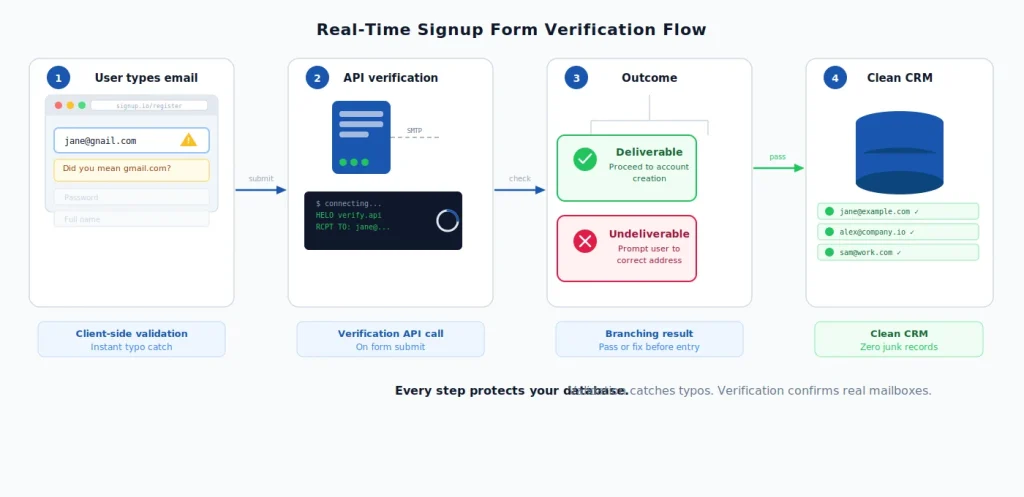
A well-designed flow looks like this:
- The user types their email.
- Client-side validation runs instantly, catching obvious typos and format errors.
- On submission, a real-time verification call confirms the mailbox is real and not disposable.
- If the address is risky or undeliverable, the form asks the user to correct it before account creation.
This sequence accomplishes two things. It prevents fake or throwaway emails from polluting your database, and it gently guides real users past honest mistakes like “yahooo.com” or “outlook.cm.”
Without verification, your CRM gradually fills with addresses that look fine but never deliver. Some of those records sit in your database for years, inflating list size and quietly dragging down engagement metrics.
For teams building this kind of flow into their product, an email-checker API handles the verification step in milliseconds, with the kind of accuracy you can’t achieve with a regex.
Why is Bulk List Cleaning Essential for Hygiene?
Bulk verification is the other big use case, and it’s almost entirely about list hygiene.
Most lists, even well-maintained ones, decay over time. Estimates from major email service providers consistently suggest that a meaningful percentage of B2B addresses go stale every year, as people change jobs, companies shut down, and mailboxes are decommissioned.
Without periodic cleaning, your list becomes a slow-burning deliverability problem.
The standard bulk cleaning workflow looks like this:
- Export your list from your ESP, CRM, or marketing platform.
- Run validation to remove malformed and obviously broken records.
- Run verification to identify undeliverable, risky, and disposable addresses.
- Segment by risk level. Send only to deliverable contacts. Suppress undeliverables. Decide case by case on risky ones.
- Re-import the cleaned list before your next major send.
A good rule of thumb is to clean any list before a major campaign, before warming a new sending domain, and any time you’ve imported records from outside source.
Checklist
Before you send a campaign to a list, check:
- ✓When was this list last verified?
- ✓Have new addresses been added without verification at signup?
- ✓Are there suspicious patterns (lots of role-based, lots of free providers, lots of identical domains)?
- ✓Has the list been merged from multiple sources without cleaning?
If any answer raises a flag, run a full verification pass before you hit send.
The Deliverability Impact: How Does Verification Save Your Reputation?
Deliverability is where the abstract distinction between validation and verification becomes painfully concrete.
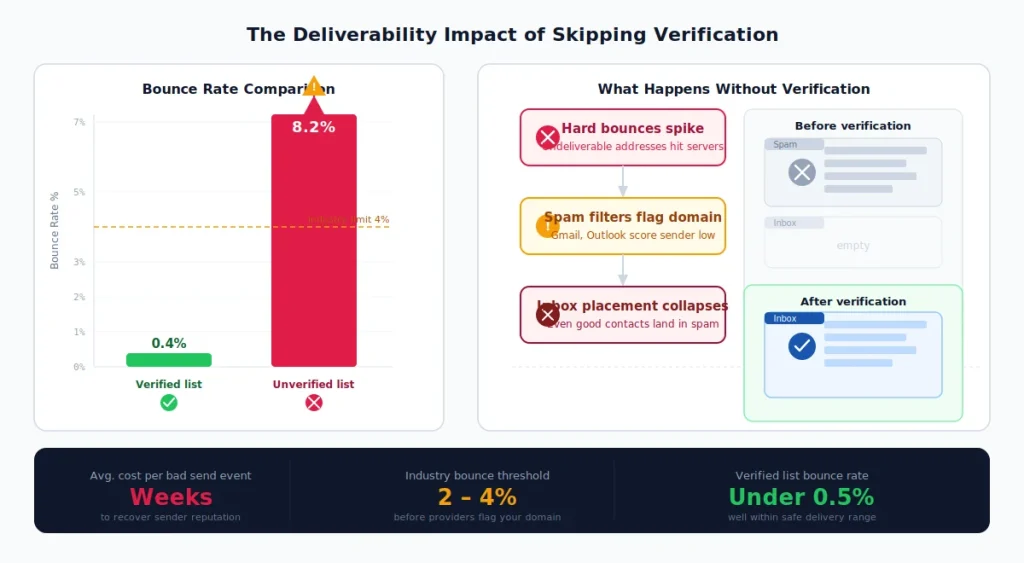
Mailbox providers like Gmail, Outlook, and Yahoo monitor your bounce rates closely. A list that’s only been validated, not verified, often produces bounce rates that exceed industry tolerance thresholds.
Once that happens, providers begin filtering more of your mail to spam, even for engaged subscribers who would otherwise read it.
The damage compounds in three ways:
- Direct Bounce Rate Damage: Sending to unverified lists leads to a high volume of hard vs. soft email bounces, which signals to providers that you are a low-quality sender.
- Spam Trap Hits: Very old, abandoned addresses get reactivated as traps.
- Engagement Decay: As your mail lands in spam, you lose open and click signals that providers use to score future sends.
Verification cuts off the damage at the source. It removes the addresses that produce hard bounces, identifies the disposable and risky addresses that drag engagement down, and flags catch-all domains where deliverability is uncertain.
If you also want to test how your actual messages render and score in inbox filters, our spam test tool is a useful complement to verification. The two together cover both list quality and message quality, which are the two main levers behind inbox placement.
Top 6 Common Myths About Email Verification
Let’s clear up a handful of beliefs that keep showing up.
Myth 1: Validation and Verification are the Same Thing.
They’re not, and this article is essentially one long argument for that. Validation is structural. Verification is behavioral. Different methods, different outputs, different use cases.
Myth 2: If An Email Is Well-Formatted, It’s Deliverable.
Plenty of well-formatted addresses are completely dead. Format is necessary but says nothing about whether the mailbox exists today.
Myth 3: Verification Is Too Slow For Real-Time Use.
Modern verification APIs return results in well under a second per address, fast enough for any production signup form.
Myth 4: Cleaning A List Once Is Enough.
Lists decay continuously. A clean list six months ago is not a clean list today. Periodic re-verification is part of healthy list hygiene.
Myth 5: If You Use Double Opt-In, You Don’t Need Verification.
Double opt-in catches some bad addresses, but it doesn’t help with typos that bounce before the confirmation email arrives, nor with bulk list imports. Verification still adds value.
Myth 6: Verification Will Hurt Your Conversion Rate.
Done well, verification reduces friction by catching typos before users finish signing up. The drop in junk records far outweighs the small cost of asking someone to retype “gnail.com.”
How Modern Platforms Simplify the Process (Combining Both)
Today, the best email checker platforms blur the line between validation and verification by design. They run both in a single call and in a defined sequence and are optimized for speed and accuracy.
A typical modern pipeline looks like this:
- Local syntax check (instant, no network).
- Domain and MX lookup (cached, very fast).
- Disposable and role-based classification (lookup against current databases).
- SMTP probe with safe-handling for greylisting and catch-all (the actual verification).
- Risk scoring that combines all the above into a final verdict.
When you call this kind of service, you don’t think about which step is “validation” and which is “verification.” You think in terms of the final answer: deliverable, risky, undeliverable, or unknown.
That unified approach is what real teams need. The terminology debate matters because it sharpens your thinking. The pipeline itself should feel seamless.
How EmailVerify.io Unifies Validation and Verification for Better Deliverability
EmailVerify.io was built around the principle that validation and verification belong in the same workflow, not in separate tools you have to stitch together.
That means every check we run, whether through bulk list cleaning, a real-time API call, or an integration with your signup form, includes the full sequence: syntax, domain, MX, disposable detection, role-based flagging, SMTP probe, catch-all handling, and a confidence score on the final result.
The output isn’t just a binary verdict. You get the reasoning behind it, so you can decide how aggressively to act on risky addresses based on your own risk tolerance. A cold outbound team might suppress everything that isn’t clearly deliverable.
A nurture campaign to engage subscribers might tolerate more “risky” results because the historical engagement signal is stronger.
If you’re not sure where your current list stands, the easiest first step is to run a sample through our email verification service and see what it surfaces. Most teams are surprised at how much hidden bounce risk they’re carrying.
Expert Tip
Before your next major campaign, check a sample list of around 1,000 addresses. The percentage of risky and undeliverable results gives you a quick read on how clean your full list actually is and whether full verification before send is worth it. (Spoiler: it almost always is.)
Frequently Asked Questions
Is Email Verification the Same as Email Validation?
No. Validation looks at the structure and DNS. Verification confirms with the receiving mail server that the specific mailbox is real and accepting mail. Most production workflows use both.
Which One Should You Use For Your Signup Form?
Both. Run lightweight validation on the client side for instant feedback, then run real-time verification on submit to catch addresses that look fine but won't actually deliver.
How Often Should You Verify Your Email List?
A reasonable cadence is before any major campaign, before warming a new sending domain, after importing records from an external source, and at least every few months as a baseline list-hygiene practice.
Will Verification Slow Down Your Signup Flow?
Not noticeably. Modern verification APIs respond in well under a second, which is far faster than typical form submission round-trip times users already accept.
Can You Just Validate Emails With a Regex and Skip Verification?
Only if you don't actually plan to send mail to those addresses. As soon as deliverability matters, regex alone leaves too many bad records in your list.
Does Email Verification Guarantee Inbox Placement?
No tool can guarantee inbox placement, because that depends on content, sending reputation, authentication, and recipient engagement, too. Verification removes one of the biggest risk factors, which is sending to invalid or risky addresses, but it works best as part of a broader deliverability strategy.
What's The Difference Between an Email Checker and an Email Verifier?
In practice, very little. Both terms usually refer to tools that combine validation and verification in a single workflow. Always look at the underlying checks performed rather than the product name.
Final Thoughts
The “email verification vs. validation” debate gets messy because the industry has been sloppy with naming for over a decade. Strip that away, and the distinction is clean.
Validation looks at the address. Verification looks at the mailbox. Validation tells you what could be true. Verification tells you what is current. One belongs at the front of every signup flow as a fast filter. The other belongs anywhere mail will actually be sent.
Teams that internalize this distinction stop having unproductive debates about terminology and start building better email infrastructure. Consistently using an email verification tool for deliverability ensures that lists stay healthy, bounce rates stay low, and inbox placement stays where it belongs.
If your current setup leans heavily on validation, or if you’ve never been entirely sure what your tools are actually checking, the next move is simple. Run a sample list through full verification and let the results speak.
If you are new to list hygiene, you can start with email verification 101 to understand how these concepts build the foundation for successful campaigns.
The gap between “validated” and “verified” is usually larger than people expect, and closing it is one of the highest-leverage changes you can make to your email program. Cleaner lists. Better deliverability. Real conversations with real inboxes. That’s the goal, and the path to it starts with knowing exactly which check you’re running and why.
Ready to See the Difference for Yourself?
Check a sample list before your next campaign, or explore real-time verification for your signup form.


