
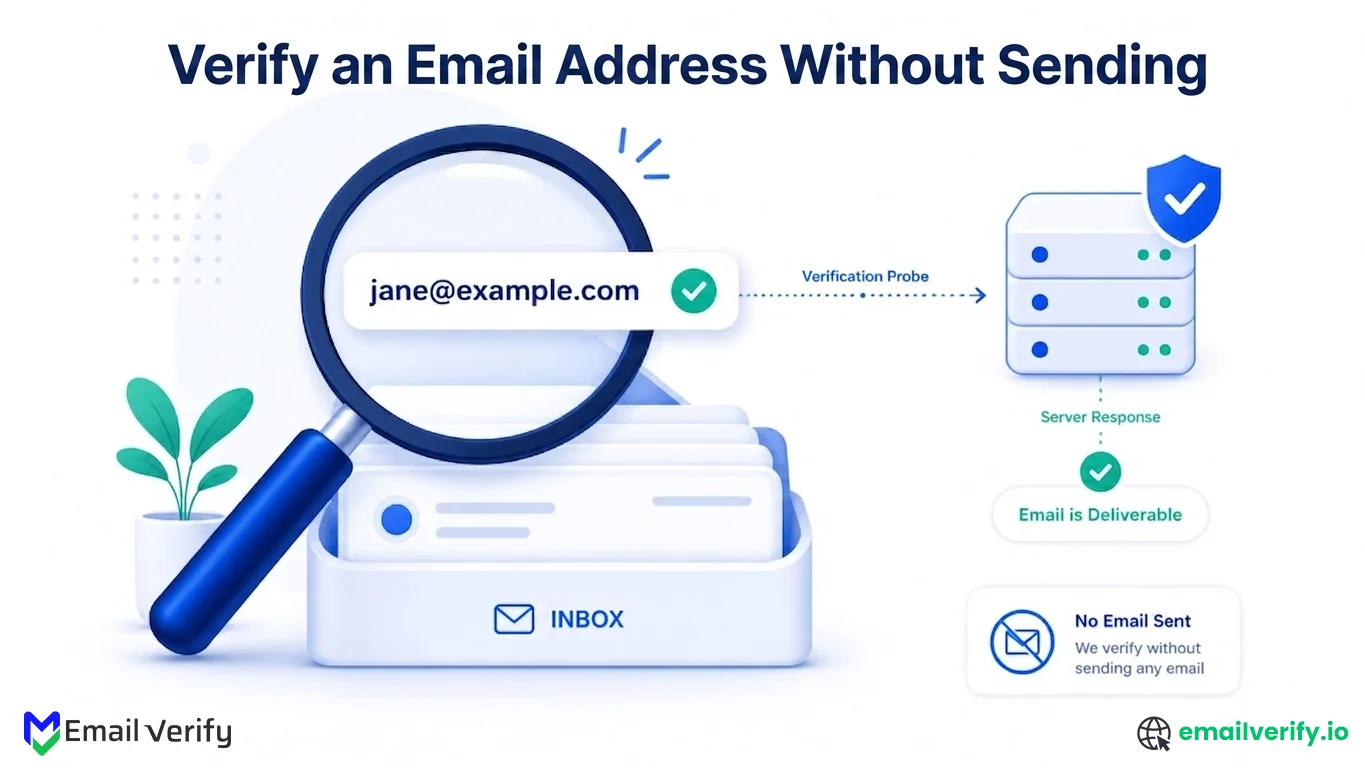

You can verify an email address without sending email by using SMTP probing, a silent technical check that asks the recipient mail server whether a mailbox exists, then closes the connection before any message is delivered. The recipient sees nothing. The receiving server logs nothing more than a brief connection. You get a clean answer in under a second.
This approach works because email systems are built to separate recipient validation from message delivery. During the SMTP handshake, the server confirms whether it will accept a specific mailbox before the content of an email is transmitted. That single step allows verification tools to determine whether an address is valid without triggering a send, a bounce, or any user-facing activity.
This guide explains how to check email validity without sending a real message, the five-stage process behind every modern email verification tool, and the situations where this approach can’t produce a clean answer (catch-all domains, greylisting, and providers like Yahoo and AOL).
Marketers cleaning lists, developers building signup flows, and sales teams validating leads all rely on the same underlying technique.
To verify an email address without sending email, you connect to the recipient’s mail server and run an SMTP check using HELO, MAIL FROM, and RCPT TO. The server responds to RCPT TO with a status code that indicates whether the mailbox exists.
If the response is:
- 250 → mailbox exists (deliverable)
- 550 → mailbox does not exist (undeliverable)
The connection is then closed before the DATA command, meaning no email is ever sent or delivered.
For most people, the easiest way to verify an email address without sending an email is a browser-based email checker. The tool runs the full pipeline in seconds. For developers, an API call from an application server is the right pattern. Manual command-line probing is possible but rarely practical.
Table of Contents
How Can You Verify an Email Address Without Sending?
You can confirm if an email address is valid by connecting directly to the recipient’s mail server and running an SMTP handshake up to the recipient-check stage. The server responds before any message is sent, allowing validation at the protocol level.
SMTP ports are designed for server-to-server communication. Before a message is delivered, the receiving server must decide whether it will accept the recipient. That decision happens during the RCPT TO stage.
Three things make this possible:
- SMTP separates recipient validation (RCPT TO) from message delivery (DATA)
- Mail servers respond with status codes indicating mailbox existence
- The connection can be closed before any message is sent
That’s the whole technique. Email verification without sending email is the standard approach used by every major commercial email checker, and it works because of a forty-year-old protocol design choice that intentionally separated “will you accept this recipient” from “here’s the message.”
Most people assume verifying an email address requires sending one and watching for a bounce. It doesn’t. The SMTP protocol explicitly supports asking “is this mailbox real?” without ever transmitting a message. That’s the foundation of every modern email verification service.
Why Should You Verify the Emails First?
Verifying an email address before sending one protects your sender reputation, avoids alerting the recipient, and lets you check addresses at scale without producing bounces that damage your domain.
Sending real test messages to verify addresses creates four problems:
- Every undeliverable address produces a hard bounce that’s logged against your sending domain, degrading your reputation with mailbox providers.
- The recipient, if the address is real, sees a confusing test message in their inbox.
- Sending at scale to verify lists is operationally expensive.
- In most modern email infrastructure, repeated bounces above 1–2% trigger filtering against your future mail.
This is why most modern systems rely on verification instead of actual message delivery.
Common scenarios where you’d want to verify email without sending email:
| Scenario | Why no-send verification fits |
|---|---|
| Cleaning an imported list before a campaign | Sending real tests to thousands of addresses would damage the reputation. |
| Confirming a lead address before sales outreach | Avoids burning a personalized first message on a dead inbox. |
| Checking a suspicious address (typo or scraping artifact) | You want a quick yes/no answer without alerting the address owner. |
| Verifying signups in real time on a form | User is waiting; sending a confirmation just to test isn’t viable. |
| Auditing a CRM for stale contacts | Tens of thousands of records; only no-send verification scales. |
How Does the Process Work Without Sending Email?
The process works by opening an SMTP connection to the recipient’s mail server, walking through the handshake up to RCPT TO, reading the server’s response, and then disconnecting before any message is transmitted. The whole exchange takes well under a second.
Step by step, here’s what happens when a verifier checks an email address without sending email:
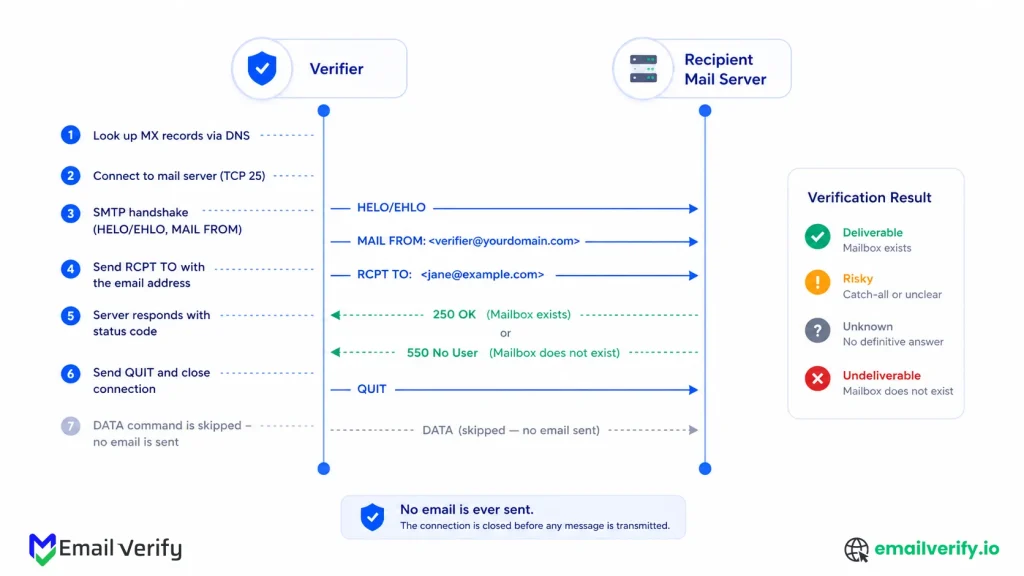
- The verifier looks up the recipient domain’s MX records via DNS, identifying the server that receives mail for that domain.
- It opens a TCP connection to that server on port 25 (the SMTP port).
- It exchanges the standard SMTP greetings (HELO/EHLO, MAIL FROM).
- It issues RCPT TO with the address being checked.
- The receiving server responds with a status code (250, 550, or something else).
- The verifier issues QUIT and closes the connection without ever sending DATA.
The result is a structured answer about whether the mailbox exists, classified as Deliverable, Undeliverable, Risky, or Unknown depending on the response. No message is ever delivered. The recipient sees nothing in their inbox.
What Are the Five Stages of an Email Verification Check?
Every email verification check runs through five stages: syntax parsing, domain DNS lookup, MX record retrieval, SMTP check (RCPT TO), and classification against catch-all, role-based, and disposable databases.
Each stage filters out a different category of bad address before the next one runs.
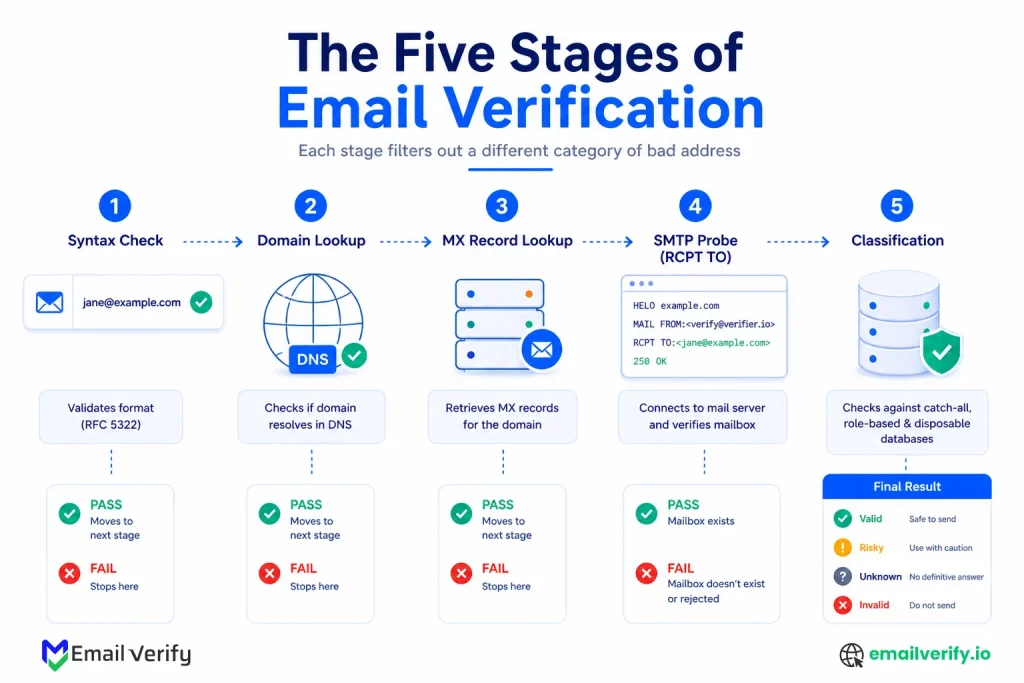
| Stage | What it does | What it catches |
|---|---|---|
| 1. Syntax | Parses the address against RFC 5322. | Malformed addresses, missing @, illegal characters. |
| 2. Domain | DNS lookup confirms the domain resolves. | Addresses on dead or unregistered domains. |
| 3. MX | Retrieves mail exchange records for the domain. | Domains that can’t receive mail at all. |
| 4. SMTP probe | Connects to MX server and issues RCPT TO. | Specific mailboxes that don’t exist. |
| 5. Classification | Lookup against catch-all, role, disposable databases. | Risky address categories. |
Stage 1: Syntax Check
The first stage is a fast structural check against RFC 5322, the email format specification. Addresses without an @ symbol, with illegal characters, or with invalid domain syntax fail here. This stage takes microseconds and filters out garbage before any network call is made.
Stage 2: Domain DNS Lookup
If the syntax passes, the verifier looks up the domain in DNS. Domains that don’t resolve aren’t real domains, and addresses there can’t receive mail. This is a fast network call, usually under 100 milliseconds.
Stage 3: MX Record Lookup
The verifier then retrieves the domain’s MX records, which list the servers that handle mail for the domain. A domain with no MX records can’t receive email at all, so any address there is undeliverable. This stage gives the verifier the address of the mail server it will probe in the next stage.
Stage 4: SMTP Probe
The verifier opens an SMTP connection to the highest-priority MX server, walks through the handshake to RCPT TO, and reads the response. This is the stage that determines whether the specific mailbox exists. It’s also the most variable stage, because mail servers respond differently and some providers obscure their answers.
Stage 5: Classification
In parallel with the SMTP probe, the verifier checks the address against databases of disposable emails, role-based prefixes (info@, admin@, support@), and free webmail providers. These checks add context to the SMTP result; an address that returns 250 OK but is on a disposable domain is graded Risky, not Deliverable.
What Does the SMTP Server Actually Send Back?
SMTP servers respond with standardized three-digit codes that indicate mailbox status. The first digit indicates the broad outcome class: 2xx is success, 4xx is temporary failure, and 5xx is permanent failure. The second and third digits provide more specificity.
Below are the codes that show up most often when verifying email addresses without sending.
| Code | Meaning | What it tells the verifier |
|---|---|---|
| 250 | Mailbox accepted. | Deliverable (unless the domain is catch-all). |
| 251 | User not local; will forward. | Deliverable with forwarding. |
| 252 | Cannot verify, but will accept the message. | Ambiguous. Often a catch-all or anti-probe response. Risky. |
| 421 | Service not available; try later. | Temporary. Verifier should retry. |
| 450 | Mailbox unavailable (busy). | Temporary. Retry. |
| 451 | Local error in processing. | Temporary. Retry. |
| 503 | Bad sequence of commands. | Probably anti-probe protection. |
| 550 | Mailbox unavailable / does not exist. | Undeliverable. Hard reject. |
| 552 | Storage allocation exceeded. | Risky, mailbox full. |
| 553 | Mailbox name not allowed. | Undeliverable. Invalid local part. |
A 250 response is typically strong evidence of validity, while 550 indicates non-existence. Other responses require interpretation rather than absolute classification. A good email verifier handles each of these cases differently rather than forcing a binary answer.
In What Situations You Can’t Verify First
Email verification without sending email works for most domains, but the SMTP probe doesn’t produce a clean answer in three specific situations. Knowing the limits is what separates experienced practitioners from amateurs; a verifier that pretends to give clean answers in these cases is hiding ambiguity rather than handling it.
These are the situations where the response becomes unreliable or intentionally masked. Here’s a closer look at each one:
Catch-All Domains
A catch-all domain is configured to accept email for every address at the domain, including addresses that don’t correspond to real mailboxes. Common at small businesses and many enterprise environments, catch-all is a perfectly valid setup. The problem for verification is that the SMTP probe returns 250 OK regardless of whether the mailbox exists.
Verifiers detect this by sending a second probe to a randomly generated address; if the server accepts that too, the domain is flagged as a catch-all, and the original result is graded as risky rather than deliverable.
Greylisting Servers
Greylisting is an anti-spam technique that deliberately returns a 4xx temporary failure on first contact from any unknown sender. Real mail servers retry; spammers usually don’t. From the SMTP probe’s perspective, the first attempt looks like a temporary failure that should be retried.
A naive verifier marks it as Unknown; a competent one retries from the same IP after a short delay and gets the clean answer on the second or third attempt.
Hardened Providers (Yahoo, AOL, parts of Microsoft)
Some major providers have moved their RCPT TO behavior toward intentional ambiguity. Yahoo and AOL, in particular, often return 250 OK or 252 to RCPT TO probes regardless of whether the mailbox exists. The motivation is abuse prevention; spammers used to harvest valid addresses by probing en masse, but the side effect is that single-probe verification can’t produce a clean answer for these providers. A good verifier surfaces this honestly with a risky status and a reason code naming the provider; a bad one returns “Deliverable” for everything.
Treating every 250 OK response as a confirmed deliverable address. On catch-all domains and at hardened providers like Yahoo and AOL, 250 OK doesn’t actually mean the mailbox exists. Verifiers that don’t handle these cases produce inflated bounce rates in production. Always grade ambiguous responses as Risky.
How Accurate Is Email Verification Without Sending?
For the bulk of the internet, standard Postfix, Exim, Sendmail, and most hosted providers, the SMTP probe produces a reliably accurate answer. Most lists run through a competent email checker will see 95–99% precision on the Deliverable class, meaning that addresses labeled Deliverable actually deliver in production at that rate. Accuracy varies by the kinds of addresses in the list.
| List composition | Expected verification accuracy |
|---|---|
| Standard B2C list (mostly Gmail, Outlook) | 98–99% on the Deliverable class. |
| B2B list with custom domains | 97–99% (catch-all density depresses confidence). |
| Cold outbound list from data vendors | 90–95% (high catch-all density, mixed quality). |
| Yahoo/AOL-heavy consumer list | 85–93% (anti-probe responses limit signal). |
| List with many disposable providers | Variable; verifier classification more important than SMTP. |
How to Verify an Email Address Manually?
You can verify an email address without sending email manually using telnet or netcat against the recipient’s mail server on port 25. In practice, most ISPs block outbound port 25, and major providers throttle probing IPs quickly, so manual probing works for learning the protocol but not for routine verification.
Here’s the manual command-line process for those who want to see the SMTP exchange firsthand:
- Find the recipient domain’s MX server: dig mx example.com (or nslookup -type=mx example.com on Windows).
- Connect via telnet or netcat: telnet mail.example.com 25
- Wait for the 220 greeting from the server.
- Send EHLO yourdomain.com and wait for the 250 response.
- Send MAIL FROM: <[email protected]> and wait for 250.
- Send RCPT TO: <[email protected]> and read the response.
- Send QUIT to close the connection cleanly.
Sample manual SMTP probe:
Manual probing is useful for learning the protocol and confirming what’s happening under the hood. For real-world use, three obstacles make it impractical:
- Most ISPs block outbound port 25 to prevent residential machines from being used as spam sources. The probe never reaches the destination.
- Major providers detect probing patterns and throttle the source IP within a few attempts. After the throttling kicks in, you get ambiguous responses regardless of the actual mailbox status.
- There’s no catch-all detection, no retry logic for greylisting, and no classification; you’re reading raw SMTP responses without the layers a real email verifier adds on top.
Building production verification logic on top of raw SMTP probes from your application server. The application server’s IP gets added to anti-abuse blocklists within a week, breaking unrelated outbound mail from the same machine. Manual probing belongs in a learning environment. Production belongs on a managed verifier.
What’s the Easiest Way to Verify for Non-Developers?
If you’re not a developer, you don’t need to touch a terminal or write code. Modern email verification tools handle every stage of the pipeline in the background and return a clean, structured answer in seconds.
They use exactly the same SMTP probe described in this article; there’s no shortcut or alternative method that produces better results without the protocol-level work.
A good free email verifier returns the following for any address you paste in:
- Primary status: Valid, invalid, catch-all, role-based, unknown
- Underlying signals: syntax check passed, MX present, SMTP response received.
This is the right method for one-off checks: confirming a single lead before outreach, double-checking a contact your team handed you, or troubleshooting why a confirmation email never arrived.
A email verification service runs the full pipeline and surfaces reason codes alongside the status, so you can see exactly which layer produced the result. For verifying many addresses at once, the bulk email verification uses the same engine on uploaded CSVs.
If you’re going to use a free email verifier regularly, run a calibration test the first time. Try three addresses you know the answer to: one definitely real, one definitely fake (a clearly invented local part at a real domain), and one ambiguous (an address like [email protected]). The verifier’s answers tell you whether the underlying pipeline is genuinely doing its work.
How Does This Compare to Just Sending a Test Email?
A common approach to checking whether an email address is real is simply sending a test message and waiting for a bounce. While this can technically reveal invalid addresses, it is a reactive method, meaning you only find out after sending an email. That creates unnecessary risks for reputation, deliverability, and scalability.
Verifying the email first avoids those issues entirely by confirming mailbox validity before any message is delivered. Instead of triggering a real email event, the system checks the recipient server through SMTP and returns a structured result instantly.
The difference between both approaches becomes clear when you compare them side by side.
| Aspect | Send a test email | Verify without sending |
|---|---|---|
| Recipient sees the message | Yes, if the address is real. | No. Recipient sees nothing. |
| Bounce on bad address | Hard bounce logged against your domain. | No bounce. No reputation impact. |
| Speed | Seconds to minutes (waiting for bounce). | Sub-second. |
| Operational cost | ESP fees plus risk of reputation damage. | Per-check fee, no reputation risk. |
| Suitable at scale | No; bounces above 1–2% trigger filtering. | Yes; verifier infrastructure handles scale. |
| Catch-all detection | Indeterminate (catch-all accepts every address). | Built into modern verifiers. |
There’s no situation in which sending a test message is the better answer. For one-off checks, a browser-based email checker is faster and cleaner. For programmatic checks at scale, an EmailVerify.io API call is the right pattern. Sending real test messages just to verify deliverability is an artifact of how email worked thirty years ago, not a current best practice.
Common Mistakes When Verifying Without Sending Emails
Even though this approach is widely used and reliable, it’s often misapplied in real-world systems. Most issues don’t come from the SMTP process itself but from misinterpreting server responses or assuming every result has a fixed meaning.
Below are the most common mistakes teams make when working with email verification workflows and why they can lead to incorrect classification or poor deliverability outcomes.
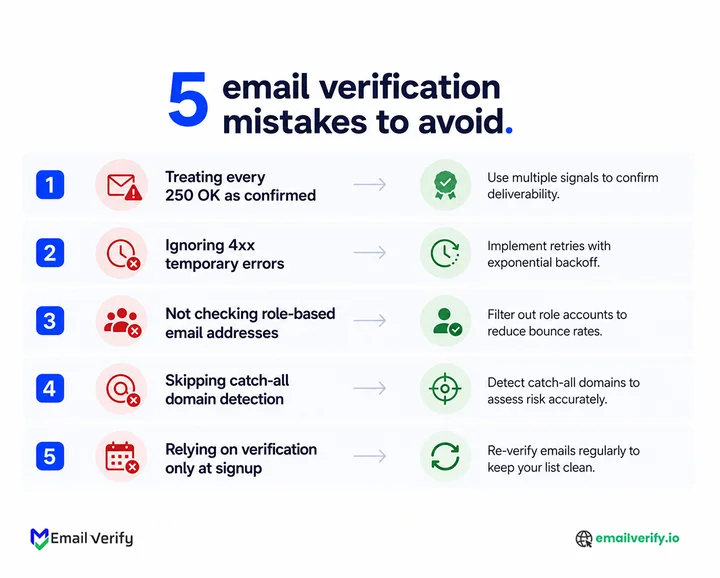
Treating every 250 responses as a confirmed mailbox
On catch-all domains and at hardened providers like Yahoo and AOL, 250 OK doesn’t actually mean the mailbox exists.
Skipping retries on 4xx responses.
4xx responses are temporary failures. A naive verifier marks them Undeliverable; a competent one retries from the same IP after a short delay and usually gets a clean answer on the second or third attempt.
Probing from a production application server.
Anti-abuse infrastructure flags repeated RCPT TO patterns from a single IP within a few dozen probes. Once the IP is flagged, every subsequent probe gets ambiguous responses, and unrelated outbound mail from the same machine starts getting blocked.
Building verification logic that ignores the four-tier output.
Every modern email verifier returns Deliverable, Risky, Unknown, or Undeliverable, with reason codes attached. Treating only Deliverable as “good” and everything else as “bad” loses too much real engagement; most catch-all and risky-tier addresses are real and should be addressed with appropriate handling.
Confusing email verification without sending with bouncing emails.
They’re opposites. Verification without sending email checks an address while producing zero bounces. Discovering bad addresses through bouncing emails is the failure mode that verification specifically prevents.
How Does EmailVerify.io Handle the Hard Cases?
EmailVerify.io runs the same five-stage pipeline (syntax, DNS, MX, SMTP probe, classification) on every check, regardless of whether the request comes through the API or a bulk upload. The SMTP layer is where the engineering effort lives, because that’s where the unreliable cases need honest handling.
In practice, that means:
- IP rotation across a managed pool, with per-domain rate limiting to avoid triggering anti-probe behavior.
- Catch-all detection probes running in parallel with the main probe; results are downgraded to Risky when the catch-all email addresses accepts random addresses.
- Sticky-IP retries for greylisting, so the retry comes from the same IP that issued the original probe (which is what greylisting servers expect).
- Structured output: every result includes a primary status, reason codes, and underlying signals (catch-all, role, disposable, free provider, anti-probe).
If you want to verify an email address without sending email right now, run it through our free email verifier. For programmatic access, see the EmailVerify.io API, and for related context, our deep dive on catch-all email addresses covers the most common reason verification produces a Risky result.
Frequently Asked Questions
How do I check if an email exists without sending an email?
Use a browser-based email checker, an email verification API, or a manual SMTP probe via telnet. The browser tool is easiest for one-off checks, the API is right for programmatic use; manual probing is useful for learning but rarely practical because most ISPs block outbound port 25 and major providers throttle probing IPs.
Will the recipient know I checked their email?
No. Email verification never delivers a message. The recipient mailbox is not written to, no inbox notification is sent, and nothing appears in the user’s mail. The receiving server’s logs show only a brief connection that ended without DATA, but that’s not visible to the user.
How long does it take to verify an email address without sending?
A typical verification check completes in well under a second. The bottleneck is the SMTP probe to the recipient mail server, which depends on the server’s response time, but managed verifiers handle this with connection pooling and short timeouts. From the user’s perspective, the result is essentially instant.
What’s the difference between email verification and email validation?
Email validation checks whether an address is structurally correct (right format, valid domain, valid syntax). Email verification goes further by checking whether the specific mailbox accepts mail, which requires the SMTP probe described in this article. “Validation” and “verification” are sometimes used interchangeably, but verification is the deeper check.
Is it legal to verify email addresses without sending email?
In most jurisdictions, yes, when you have a legitimate reason to check addresses you already have access to. Verification is the same first half of an email exchange that real sending servers perform; it doesn’t deliver mail and doesn’t access mailbox contents. Bulk harvesting of verified addresses for unsolicited contact has its own legal and ethical considerations that are outside the scope of this article.
Can I verify thousands of email addresses without sending?
Yes, through bulk verification. The same SMTP probing technique scales to millions of addresses when run on dedicated infrastructure with parallelism, IP rotation, and proper retry logic. Manual command-line probing doesn’t scale (you’ll get throttled within hours), but a managed bulk verifier handles the volume cleanly.
How do I verify email addresses without sending email in Excel or Google Sheets?
You don’t verify directly in Excel or Sheets; those tools can’t open SMTP connections. The standard pattern is to export the email column as CSV, upload it to a bulk email verifier, and import the results back into your spreadsheet. The verifier handles the SMTP probing; the spreadsheet just holds the input and output.
Final Thoughts
At its core, verifying an email address without sending email works because of how SMTP was designed. Mail servers decide whether a recipient exists before accepting a message, and that single step is what makes silent checks possible.
For most use cases, the choice is simple. Use a browser-based tool for quick checks, an API for integrations, and bulk processing when you’re dealing with large lists. The method doesn’t change; only the scale does.
Where it gets more interesting is in the edge cases. Catch-all domains, greylisting, and provider-level protections mean you won’t always get a clean yes or no. That’s not a flaw; it’s how modern email systems are built. What matters is how those cases are handled and classified.
Pick the right method. Read the result honestly. Move on with cleaner data than you had a minute ago.
Don’t let one bad list hurt your entire domain
Use EmailVerify.io to validate addresses at the SMTP level without triggering a single email


