
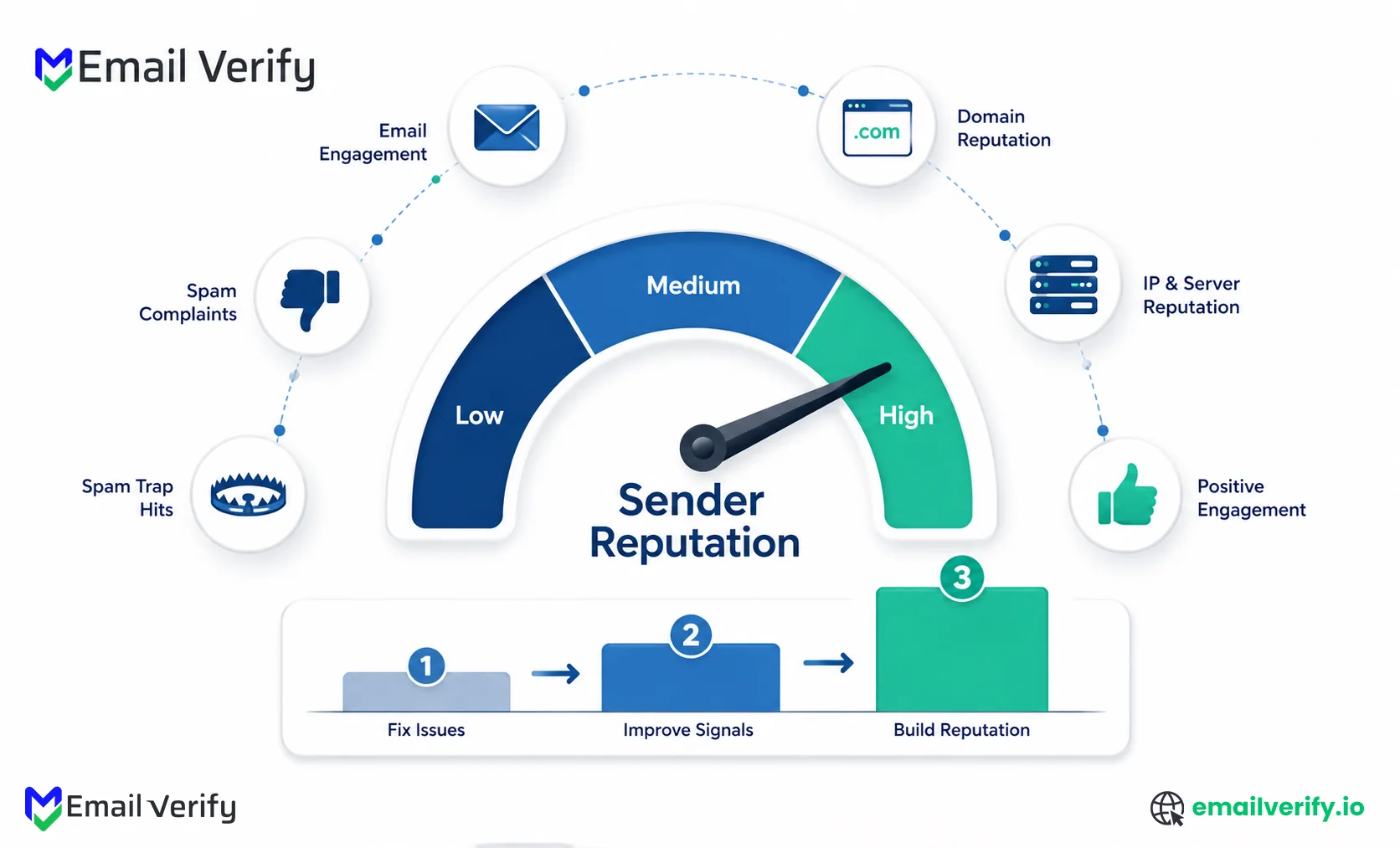

Sender reputation sits at the center of email deliverability. It is the invisible system that determines whether your emails reach the inbox, get filtered into spam, or fail to deliver at all.
Every message you send contributes to this reputation. Positive engagement, such as opens, clicks, replies, and recipients moving emails out of spam, strengthens it over time. On the other hand, spam complaints, high bounce rates, and poor list quality quickly reduce it.
What makes sender reputation particularly important is that it is not universal. Each major mailbox provider evaluates it differently. Gmail relies heavily on engagement and domain trust signals, Microsoft places more weight on IP reputation and complaint behavior, and Yahoo is highly sensitive to spam complaints and authentication alignment.
Because of this, sender reputation directly affects revenue, campaign performance, and long-term deliverability stability.
In this guide, you’ll learn exactly how sender reputation is calculated, how domain and IP reputation differ, how each major provider evaluates trust, and how to diagnose and fix reputation issues using real recovery strategies.
Sender reputation is a score email providers like Gmail, Microsoft, and Yahoo assign to your domain and IP address to decide whether your emails go to the inbox, spam, or get blocked.
It is calculated from real sending behavior, including spam complaints, bounce rates, email engagement, authentication (SPF, DKIM, DMARC), and sending consistency.
A strong sender reputation improves inbox placement. A poor one leads to spam filtering or delivery failure.
Table of Contents
What Is Sender Reputation in Email Deliverability?
Sender reputation is a behavioral trust score that email providers use to evaluate how safe and reliable your sending activity is. It is built over time based on how recipients interact with your emails and how consistently you follow proper sending practices.
Unlike a static metric, sender reputation changes with every campaign you send. Positive signals like opens, clicks, replies, and emails moved out of spam strengthen it over time. Negative signals like spam complaints, high bounce rates, and sending to inactive or invalid addresses weaken it.
Key signals that influence sender reputation:
- Engagement (opens, clicks, replies) improves trust
- Spam complaints reduce trust quickly
- Hard bounces signal poor list quality
- Spam trap hits indicate serious list hygiene issues
- Consistent sending supports stable-reputation growth
It is also important to understand what sender reputation is not. It is not a single universal score shared across all providers, and it is not controlled by your email service provider. Gmail, Microsoft, and Yahoo each maintain their own independent reputation systems, meaning performance can vary across inbox providers.
In practical terms, sender reputation determines if your emails consistently reach the inbox, get filtered into spam, or are blocked entirely, regardless of how well-written the email content is.
What sender reputation actually controls: every routing decision a mailbox provider makes about your future mail.
Inbox vs. spam? Reputation.
Throttling vs. full delivery speed? Reputation.
The spike that gets you flagged for monitoring? Reputation.
Even when you have perfect content, perfect authentication, and a clean list, reputation alone can override all of it. It’s the foundational layer under everything else.
Domain Reputation vs. IP Reputation: Key Differences
Sender reputation is split into two core components: domain reputation and IP reputation. While both influence deliverability, they are not the same, and modern mailbox providers weigh them differently when deciding inbox placement.
Domain Reputation
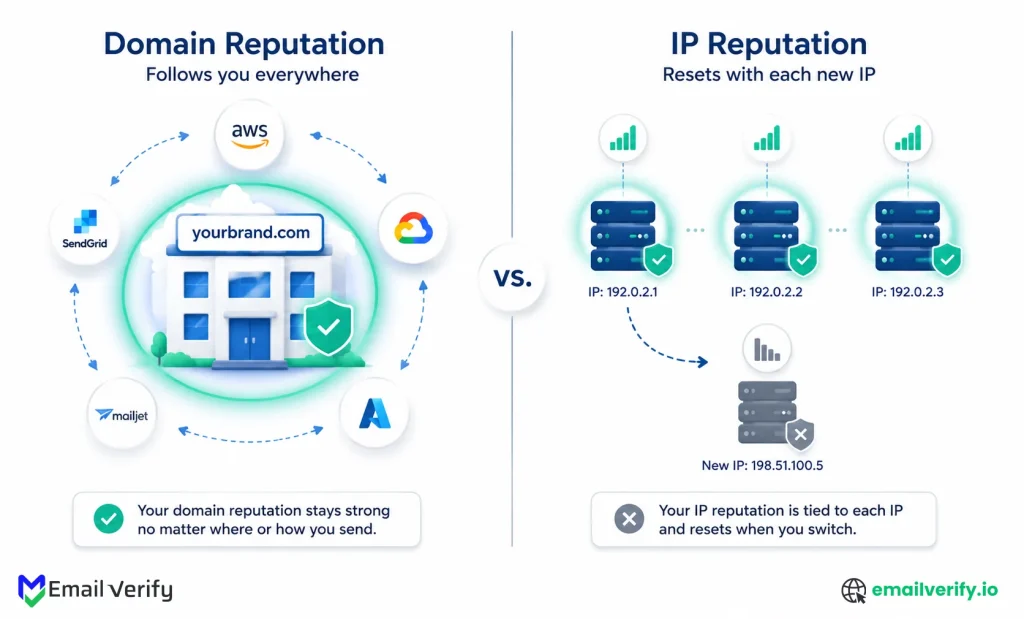
Domain reputation is tied to your sending domain (the part after “@” in your email address). It reflects how trustworthy your brand or domain appears based on long-term sending behavior. It follows you across all email service providers and cannot be reset by switching platforms or sending infrastructure.
Key characteristics of domain reputation:
- Follows your domain across all ESPs and IPs
- Builds slowly over time based on long-term behavior
- Strongly influenced by engagement and complaint rates
- Heavily weighted by Gmail and Microsoft in 2026 filtering systems
- Hard to rebuild once damaged
IP Reputation
IP reputation is tied to the specific IP address used to send your emails. It reflects how that IP has behaved historically in terms of spam complaints, bounce rates, and sending patterns. Unlike domain reputation, IP reputation can change when you switch sending infrastructure or move to a new email service provider.
Key characteristics of IP reputation:
- Tied to a specific sending IP address
- Can reset when switching ESPs or IPs
- More important during initial warm-up phases
- Often shared on shared IP pools (unless using dedicated IPs)
- Still used as a filtering signal, but less dominant than domain reputation
Key Differences at a Glance
| Dimension | Domain reputation | IP reputation |
|---|---|---|
| What it’s tied to | Your sending domain (the part after the @ in your From: header). | Specific IP addresses sending your mail. |
| Portability | It follows you everywhere, across ESPs, across IP changes. | Resets when you switch to a new IP. |
| Time to build | Months to years of consistent sending. | Weeks (during IP warm-up). |
| Time to recover | 2–12+ weeks depending on damage severity. | 2–4 weeks of clean sending. |
| Provider weighting (2026) | Heavy. Gmail and Microsoft now prioritize this. | Less than it used to be, but still relevant for first-pass filtering. |
| Shared vs dedicated | Always tied to your specific domain. | Shared IPs mean shared reputation; dedicated IPs isolate yours. |
Modern mailbox providers, especially Gmail and Microsoft, increasingly prioritize domain-based signals over IP reputation when making filtering decisions. Twilio SendGrid noted a “sharp move toward domain reputation” in ESP filtering decisions. The shift accelerated after Gmail and Yahoo’s February 2024 bulk-sender requirements, with Microsoft enforcement following in May 2025. Reason: domains are harder to swap than IPs, more tightly tied to brand identity, and a more reliable signal of sender intent.
Why this matters for recovery
Most deliverability issues are incorrectly diagnosed as IP problems when they are actually domain reputation issues. This leads to ineffective fixes, such as switching email service providers without addressing underlying list quality or engagement problems.
Modern providers like Gmail and Microsoft now prioritize domain reputation as the primary trust signal, meaning your domain history follows you regardless of infrastructure changes.
Don’t switch ESPs hoping to escape reputation damage. ESP migration changes your IP, not your domain. Your domain reputation, which is what Gmail, Microsoft, and Yahoo now weigh most heavily, follows you to the new ESP intact. The same problems will reappear within 1–2 weeks. Fix the underlying reputation issue first; then the migration question becomes optional, not necessary.
The 5 Categories That Determine Sender Reputation
Mailbox providers calculate sender reputation from five core signal categories, engagement metrics, negative feedback, authentication results, sending behavior, and list quality signals. Each category contributes weighted signals that vary by provider and are not publicly disclosed.
While exact algorithms remain proprietary, these categories are consistently referenced in provider documentation and observed deliverability behavior.
1. Engagement metrics
Engagement is one of the strongest positive signals in sender reputation systems, especially at Gmail and Microsoft. Mailbox providers track how recipients interact with your emails, including:
- Open rates (with limitations due to privacy features like Apple MPP)
- Click-through rates
- Replies (especially strong in B2B environments)
- Moving emails from spam to inbox
- Marking emails as important or starring them
- Time-to-open after delivery
Recent engagement carries more weight than historical activity, meaning stale positive performance has limited influence over current reputation.
2. Negative feedback signals
Negative feedback is one of the fastest ways to damage sender reputation because it signals direct user dissatisfaction. Key signals include:
- Spam complaint rate (primary negative indicator)
- Hard bounces from invalid addresses
- Spam trap hits (pristine and recycled)
- Blocked or rejected messages from receiving servers
Spam complaints are particularly impactful. Even a small increase can significantly reduce inbox placement if sustained over time.
3. Authentication results
Authentication confirms if your email is legitimately authorized to send from your domain. Mailbox providers evaluate the following:
- SPF pass/fail status
- DKIM signature validity
- DMARC alignment between SPF/DKIM and From domain
- DMARC policy strength (none, quarantine, reject)
- TLS encryption on message transmission
Consistent authentication builds baseline trust. Failures reduce deliverability regardless of content quality.
4. Sending volume and consistency
Mailbox providers monitor how predictable your sending patterns are over time. They evaluate:
- Sudden spikes in sending volume
- Consistency of sending cadence
- Volume relative to list size
- Irregular or abnormal sending patterns
Large or unpredictable spikes often trigger filtering because they resemble compromised accounts or purchased list activity.
5. List quality signals
List quality is an indirect but critical factor in reputation scoring. Key indicators include:
- Unknown user rate (non-existent email addresses)
- Unsubscribe rate trends
- Engagement decay over time
- Activity level of new subscribers
- Frequency of inactive contacts being emailed
Poor list hygiene leads to compounding negative signals across all other categories, especially bounce rate and complaint rate.
How Does Gmail Calculate Sender Reputation?
Gmail evaluates sender reputation by combining multiple behavioral and technical signals to decide whether your emails belong in the inbox, spam folder, or should be filtered entirely. Domain reputation carries the most weight, supported primarily by engagement signals such as opens, clicks, replies, and user actions like moving emails out of spam.
Gmail handles approximately 1.8 billion mailboxes globally and is typically the dominant recipient domain in both consumer and B2B email lists. Understanding Gmail’s reputation model is essential because it is often the largest and most impactful filtering system.
What Gmail prioritizes
Gmail’s internal reputation system weighs signals in roughly this order (based on observed behavior and Postmaster Tools data):
- Engagement quality: Opens, clicks, replies, and recipients moving messages out of spam are the strongest positive signals. Highly engaged small lists often outperform large low-engagement lists.
- Spam complaint rate: The most damaging negative signal. Gmail’s threshold is 0.3%; best practice is below 0.1%.
- Authentication compliance: SPF, DKIM, and DMARC pass rates, with strong weight on DMARC alignment.
- Domain reputation history: Long-term sending behavior influences baseline trust.
- Volume consistency: Sudden spikes are flagged; consistent sending is rewarded.
- List quality signals: Hard bounces (unknown users), unsubscribe behavior, and engagement decay.
What you can see in Gmail Postmaster Tools v2
Gmail surfaces several views that map directly to its reputation calculation:
| Postmaster Tools view | What it shows | What it tells you |
|---|---|---|
| Domain reputation | Tiered as Bad / Low / Medium / High. | Gmail’s overall trust level for your domain. |
| IP reputation | Same tier scale, applied to IP. | Per-IP trust level. Less weighted than the domain in v2. |
| Spam rate | Percent of mail recipients reported as spam. | The most actionable single metric. Aim below 0.1%. |
| Authentication | SPF/DKIM/DMARC pass rates. | Pass rates should approach 100% for healthy senders. |
| Encryption | Percent of inbound mail accepted over TLS. | Should be near 100% for any modern sending setup. |
| Delivery errors | 4xx temporary and 5xx permanent error trends. | A spike in either is a leading indicator of reputation issues. |
| Compliance status | Pass/fail against Gmail bulk-sender requirements (added March 2024). | The most actionable view tells you in plain language what to fix. |
Of all Postmaster Tools views, the Compliance Status dashboard is the most important to monitor first. It clearly shows whether you are passing Gmail’s bulk sender requirements (DMARC, one-click unsubscribe, spam rate under 0.3%, etc.). Anything marked “Needs work” is a strong early warning that filtering pressure will increase within 1–2 weeks.
How Does Microsoft Calculate Sender Reputation?
Microsoft evaluates sender reputation using a combination of IP-level behavior, complaint signals, and user engagement patterns across Outlook, Hotmail, and Live.com. Unlike Gmail, which leans heavily on domain reputation, Microsoft still places significant weight on IP reputation and real-time user feedback signals.
In simple terms, Microsoft decides whether your email belongs in the inbox, junk folder, or is throttled based on how your sending IP behaves over time and how recipients interact with your messages.
Microsoft inbox placement collapse (2025)
Office 365 inbox placement dropped 26.7 percentage points year over year in Q1 2025. Outlook/Hotmail dropped 22.6 pp. Validity’s 2025 data shows Microsoft’s average inbox placement at 75.6%, with spam rates exceeding 14%, the highest among major mailbox providers. Microsoft’s Sweep and Focused Inbox features automatically redirect messages from low-engagement senders to secondary folders, mimicking spam placement even when messages are technically delivered.
How Microsoft’s scoring works
Microsoft uses two named internal scores:
- SCL (Spam Confidence Level): A score from -1 to 9 indicating how likely Microsoft thinks a message is spam. -1 means “safe sender”; 9 means “almost certainly spam.”
- BCL (Bulk Complaint Level): A score from 0 to 9 indicating how often recipients complain about mail from this sender. 0 means no complaints; 9 means a very high complaint rate.
These scores feed into routing decisions for every incoming message. SCL above a threshold (configurable per organization but typically 5+) routes to spam. High BCL routes to junk regardless of SCL.
What Microsoft SNDS shows you
Microsoft’s Smart Network Data Services covers Outlook.com, Hotmail, and Live.com. Despite being less polished than Gmail Postmaster, it surfaces data nothing else does:
| SNDS column | What it shows | What it tells you |
|---|---|---|
| Filter Result | IP reputation as Red / Yellow / Green. | Direct indicator of how Outlook spam filters see your IP. |
| Complaint Rate | Percentage of recipients reporting your mail. | Microsoft’s view of your complaint rate. Often higher than your ESP’s. |
| Spam Trap Hits | Whether you hit Microsoft-maintained spam traps. | Impossible to see anywhere else. Critical signal. |
| Sample Volume | Sample of message volume by IP. | Volume context for the other metrics. |
| Mail with Junk | Volume of your mail flagged as junk. | Direct measurement of filter action. |
Treating Microsoft as a secondary deliverability channel is one of the most expensive mistakes in email marketing. If even 30–70% of your audience sits in Outlook or Office 365 environments (which is common in B2B), Microsoft effectively becomes your primary deliverability gatekeeper. Ignoring SNDS data or focusing only on Gmail Postmaster Tools creates a blind spot, because Microsoft often filters mail even when Gmail performance looks healthy.
How Does Yahoo Calculate Sender Reputation?
Yahoo evaluates sender reputation primarily through user behavior signals, complaint rates, and authentication compliance. Since merging with AOL, its filtering system has become more aligned with Gmail and Microsoft standards, especially after adopting bulk-sender requirements in 2024.
However, Yahoo still places unusually strong weight on spam complaints and direct user feedback, making it highly sensitive to audience engagement quality and list hygiene. In practical terms, Yahoo decides inbox placement based on how recipients interact with your emails and whether your sending behavior appears consistent and trustworthy over time.
Yahoo Sender Hub Insights launched October 23, 2025. The notable methodology difference: Yahoo calculates the spam complaint rate from inbox-delivered mail only, not total sent. That means Yahoo’s complaint numbers will look different (and arguably more accurate) than what your ESP reports. Reasoning: Users can only complain about mail that actually reaches the inbox, so calculating against inbox-delivered makes the rate reflect actual recipient sentiment.
What Yahoo prioritizes
Yahoo’s reputation model emphasizes:
- Complaint rate, calculated from inbox-delivered mail. Sustained rates above 0.3% trigger filtering.
- DMARC alignment. Yahoo was an early DMARC enforcer and continues to weight it heavily.
- Engagement signals on inbox-delivered mail.
- List hygiene as inferred from bounce patterns.
- Authentication completeness (SPF, DKIM, and DMARC at minimum p=none for bulk senders since 2024).
Yahoo Complaint Feedback Loop (CFL)
Yahoo also provides a Complaint Feedback Loop (CFL), which delivers near real-time spam complaint signals directly to senders. Key benefits include the following:
- Immediate visibility into user spam complaints
- Faster suppression of problematic recipients
- Free setup for verified DKIM domains
- More timely feedback compared to dashboard reporting
Compared to other providers, Yahoo CFL remains one of the most actionable complaint-tracking systems still available.
Third-Party Sender Reputation Systems (Sender Score, Talos, Barracuda)
Beyond Gmail, Microsoft, and Yahoo, third-party reputation systems provide supporting signals about sender behavior. They don’t control inbox placement at major providers but are still used by smaller ISPs, enterprise filters, and blacklist systems.
These tools are mainly used to detect risk patterns, track IP/domain health, and flag potential abuse signals during deliverability checks.
Below are the most commonly used third-party reputation systems and what each one tracks.
| System | What it scores | Scale |
|---|---|---|
| Sender Score | Sending IP reputation. | 0–100 (above 80 is good). |
| Cisco Talos | IP and domain reputation. | Good / Neutral / Poor. |
| Barracuda Central | IP reputation. | Good / Poor. |
| McAfee TrustedSource | Domain and IP reputation. | Categorized (Trusted / Unverified / High Risk). |
| Spamhaus | Blacklist (binary listed/not). | Listed or not listed. |
| MultiRBL | Aggregated blacklist check. | Per-list status. |
These systems should be treated as supporting diagnostics, not primary inbox decision engines.
They are most useful for:
- Spotting early reputation decline trends
- Identifying IP or domain-level anomalies
- Checking blacklist exposure
- Supporting deliverability troubleshooting when provider data is unclear
However, they should never override first-party data from Gmail Postmaster Tools, Microsoft SNDS, or Yahoo Sender Hub Insights.
A drop in sender score or a “poor” Talos rating often signals an underlying issue, but the real cause is always confirmed in mailbox provider dashboards.
When checking your sender reputation, prioritize first-party signals from the providers themselves, Gmail Postmaster Tools, Microsoft SNDS, and Yahoo Sender Hub Insights. Third-party systems like Sender Score and Barracuda are useful supplements but not authoritative. The hierarchy of authority: provider tools > third-party reputation systems > sender-side ESP metrics. Your ESP’s 99% delivery rate is the least reliable indicator of actual reputation health.
How to Check Your Sender Reputation
Short answer: Check sender reputation in this order: (1) Gmail Postmaster Tools for Gmail domain and IP reputation, (2) Microsoft SNDS for Outlook IP health, (3) Yahoo Sender Hub Insights for Yahoo signals, (4) Sender Score from Validity for benchmark IP score, (5) Spamhaus and MultiRBL for blacklist checks, (6) seed-list testing tools like GlockApps for placement-level confirmation. No single tool gives you the full picture; the right approach is layering.
Step 1: Set up first-party signals
This is the most important step and the one most teams skip. The three free first-party tools are the foundation:
- Gmail Postmaster Tools: Verify your sending domain at postmaster.google.com. Data starts populating within 24–48 hours.
- Microsoft SNDS: Register your sending IPs at sendersupport.olc.protection.outlook.com/snds. Data populates within a few days.
- Yahoo Sender Hub Insights: Verify your DKIM domain at sender.yahooinc.com. Data populates within 24–48 hours after meeting volume thresholds.
Setup time for all three: roughly 30–60 minutes total, mostly DNS verification. The data they produce is impossible to get anywhere else.
Step 2: Check third-party scores
Once first-party tools are flowing, check your third-party scores monthly:
- Sender Score (Validity): your IP’s 30-day rolling reputation score from 0–100. Above 80 is healthy; below 70 indicates problems.
- Cisco Talos: categorical reputation (Good / Neutral / Poor) for both IP and domain. Quick to check, no signup.
Step 3: Check blacklists
Blacklist listings are a separate problem from reputation degradation, but they often signal underlying reputation issues. Run a blacklist check using:
- Spamhaus (check.spamhaus.org): listings on Spamhaus DBL or SBL trigger immediate filtering at most major providers.
- MultiRBL (multirbl.valli.org): aggregates ~100 blacklist checks in a single query.
Sender reputation check (the 30-minute version)
- Verify your domain in Gmail Postmaster Tools and check the Compliance Status dashboard.
- Register sending IPs in Microsoft SNDS; check the Filter Result column for Red/Yellow/Green.
- Verify your DKIM domain in Yahoo Sender Hub Insights; check the Insights tab.
- Look up your Sender Score at senderscore.org; a score below 70 is a warning sign.
- Run a blacklist check at check.spamhaus.org and multirbl.valli.org.
- Document everything. Reputation work always benefits from a baseline.
What Damages Email Sender Reputation (Ranked by Severity and Impact)
Reputation damage usually doesn’t come from a single mistake; it builds up from a mix of signals that mailbox providers interpret as risk. Here are the common damage causes, ranked by typical severity:
| Damage cause | Severity | How it manifests |
|---|---|---|
| Pristine spam trap hits | Critical | Triggers immediate Spamhaus or other blacklist listings. Hardest to recover from. |
| Sustained complaint rate >0.3% | Severe | Triggers active filtering at Gmail, Microsoft, Yahoo within days. |
| Recycled spam trap hits | High | Indicates poor list hygiene. Slower listing impact than pristine traps but accumulates. |
| Hard bounce rate >2% | High | Triggers ISP throttling. Above 5% can trigger blacklisting. |
| Authentication failures | Medium-High | Mail treated with skepticism, often routed to spam. Easy to fix once identified. |
| Sudden volume spikes | Medium | Looks like compromised account or list acquisition. Triggers temporary throttling. |
| Engagement decay | Medium | Slow but cumulative. Mailbox providers gradually lower trust. |
| Sending to dormant subscribers | Low-Medium | Drives complaint rate up over time as recipients forget signing up. |
| Inconsistent sending cadence | Low | Predictable senders are rewarded; erratic ones penalized. |
Sender Reputation Recovery Plan: Step-by-Step Playbook
Reputation recovery is not a single fix; it is a controlled rebuild process. What matters most is consistency: mailbox providers are essentially watching whether negative signals stop first and whether positive engagement stabilizes afterward.
In practice, recovery always follows a structured three-phase model: stop the damage, rebuild trust, then safely return to normal sending.
Recovery Severity & Timeline Overview
| Severity | Recovery time | What it looks like and what to do |
|---|---|---|
| Minor | 2–3 weeks | Postmaster Tools at Medium. Slight complaint elevation. Inbox placement still mostly fine. Action: tighten engagement-based suppression, run list verification, monitor weekly. Recovery is largely a matter of clean sending and continuing. |
| Moderate | 4–8 weeks | Postmaster Tools at Low. Complaint rate 0.1–0.3% for several weeks. Some spam placement on test sends. Bounce rate elevated. Action: full Phase 1 stop the bleeding (covered in Section 12), then Phase 2 rebuild trust through reduced-volume sending to engaged subscribers only. |
| Severe | 8–12+ weeks | Postmaster Tools at Bad. Sustained complaint rate above 0.3%. Significant spam placement. Some blacklist listings. Volume reductions of 70%+ from baseline. Action: aggressive list pruning, blacklist removal requests, low-volume sending to highly engaged subscribers only. Each Postmaster tier improvement typically takes 2–3 weeks of clean sending. |
| Critical | 3–6 months | Domain blacklisted on Spamhaus or major networks. Inbox placement collapsed. Volume reductions of 90%+. Action: full sending pause except smallest engaged segment. Consider whether domain rehabilitation is feasible or whether new-domain migration is more practical. Most senders should never reach this stage; recovery from here is genuinely difficult. |
| Catastrophic | 6+ months / new domain | Domain on multiple persistent blacklists. Authentication compromised. Reputation damage history extends over months. Most providers actively reject mail. Action: typically requires new-domain migration with full warm-up, ESP migration, and authentication reconfiguration. Treat this as starting over, not recovering. |
Recovery is not linear. Progress depends on whether negative signals fully stop before scaling volume back up
Recovery Phase 1: Stop the Bleeding
The goal of Phase 1 is not to recover yet. It’s to stop the accumulation of negative signals that are driving reputation downward.
Key Actions:
- Pause all non-essential email sending immediately.
- Keep only transactional or critical system emails active.
- Fix authentication issues (SPF, DKIM, DMARC must fully pass).
- Clean the entire list using bulk email verification tools.
- Remove hard bounces and suppress inactive users.
When checking your list with bulk verification during Phase 1, segment results into three buckets: confirmed valid, risky (catch-all density usually drives this), and invalid. Suppress Undeliverable immediately. Hold Risky in a separate stream and verify it again in 60–90 days before reusing. Rebuild your active sending list from confirmed valid only.
Recovery Phase 2: Rebuild Trust
Once damage stops, the focus shifts to generating controlled positive engagement signals.
Core Execution Strategy:
- Send only to your most engaged users (recent 30–60 day openers/clickers).
- Start at ~25% of normal volume.
- Increase gradually (weekly ramp if metrics stay clean).
- Maintain strict bounce (<1%) and complaint (<0.1%) thresholds.
- Monitor Gmail Postmaster, Microsoft SNDS, and Yahoo Sender Hub weekly.
Recovery Phase 3: Resume Normal Operations
This phase confirms stability and safely restores full sending capacity. Recovery is only complete when monitoring and prevention become part of normal operations.
Scaling Back to Full Volume:
- Reintroduce audience segments gradually.
- Prioritize engaged users first and dormant last.
- Maintain suppression of historically risky segments.
- Avoid sudden volume jumps.
Phase 3 is the most underrated part of recovery. Most teams declare victory when their reputation looks good and immediately return to the practices that caused the damage. The teams that don’t recur are the ones that build monitoring rhythms and preventive controls during Phase 3, turning the recovery experience into a permanent improvement.
Common Email Reputation Recovery Mistakes That Delay Inbox Placement
Most recovery efforts fail because small operational mistakes undo weeks of progress.
- Resuming Full Volume Too Early: Once Postmaster Tools moves from “Bad” to “Low,” teams often restart normal sending too quickly. That spike resets trust signals.
- Switching ESPs for a “Fresh Start”: Changing your ESP does not reset your reputation. Your domain reputation stays the same, and providers continue evaluating you on historical behavior.
- Skipping List Verification: Sending without cleaning your list reintroduces hard bounces. Bulk verification is not optional during recovery.
- Ignoring Authentication Gaps: SPF, DKIM, and DMARC must pass consistently across all sending sources.
- Treating Recovery as a One-Time Fix: Reputation issues come from deeper system problems. If those aren’t corrected, reputation damage will repeat.
How Does Email Verification Protect Sender Reputation?
Email verification is one of the most effective ways to protect sender reputation because most damage starts with hard bounces from invalid or risky addresses. Verification prevents this by keeping bad data out of your sending system from the start.
Here’s how verification helps in practice:
- real-time verification at signup blocks invalid, disposable email, and mistyped emails.
- bulk verification removes risky or outdated addresses from imported lists.
- Ongoing re-verification manages natural data decay and inactive contacts.
- Bounce control keeps hard bounces below ISP limits.
- Spam trap reduction lowers risk from scraped or purchased data sources.
Verification is the preventive control that makes deliverability tests meaningful. Skipping verification produces hard bounces no test can prevent; running both layers in parallel is the foundation of a sustainable reputation program.
Frequently Asked Questions
How Is Sender Reputation Calculated?
Mailbox providers evaluate five core signal groups: engagement (opens, clicks, replies), negative feedback (complaints, bounces, spam traps), authentication (SPF, DKIM, DMARC), sending consistency, and list quality. Each provider applies its own weighting, but these inputs collectively determine your reputation.
What’s the Difference Between Domain Reputation and IP Reputation?
Domain reputation is tied to your sending domain and follows you across all platforms. IP reputation is tied to your sending IP and resets when you switch infrastructure. Today, providers prioritize domain reputation more heavily, making it harder to recover simply by changing ESPs.
How Do You Check Your Email Sender Reputation?
Start with first-party tools: Gmail Postmaster Tools, Microsoft SNDS, and Yahoo Sender Hub Insights. Then check Sender Score (Validity), Spamhaus, and MultiRBL for blacklist status. Finally, use seed-list testing tools to confirm actual inbox placement.
What Is a Good Sender Reputation Score?
A Sender Score above 80 is considered healthy. In Gmail Postmaster Tools, aim for “High” domain reputation. Microsoft SNDS should show a green status. There’s no universal score, each provider evaluates reputation independently.
How Long Does It Take To Fix Sender Reputation?
Recovery depends on severity: minor issues take 2–3 weeks, moderate issues 4–8 weeks, severe cases 8–12+ weeks, and critical damage can take 3–6 months. The biggest mistake is increasing volume too quickly during recovery.
Will Switching Email Service Providers Fix Your Reputation?
No. Switching ESPs may reset IP reputation, but your domain reputation remains unchanged. Mailbox providers track your domain history, so underlying issues will resurface unless you fix them first.
How Do You Recover From a Damaged Sender Reputation?
Follow a three-phase approach: stop negative signals (pause sends, fix authentication, clean your list), rebuild trust (send to engaged users only and gradually increase volume), then resume normal sending with monitoring and safeguards in place.
What’s the Most Damaging Factor for Sender Reputation?
Pristine spam trap hits are the most severe; they can trigger immediate blacklisting. The next major risk is a sustained spam complaint rate above 0.3%, which quickly leads to filtering.
How Do Spam Traps Damage Your Reputation?
Spam traps are addresses that should never receive email. Hitting them signals poor list hygiene or acquisition practices. Pristine traps can cause instant blacklist listings, while recycled traps gradually degrade your reputation.
How Does Authentication Affect Sender Reputation?
SPF, DKIM, and DMARC directly impact trust. Proper authentication improves deliverability, while failures lead to filtering. Modern bulk-sender requirements make authentication mandatory for consistent inbox placement.
What’s a Healthy Spam Complaint Rate?
Keep complaint rates below 0.1% for safety. Rates above 0.3% trigger filtering across major providers. Monitoring anything above 0.05% helps you catch issues early.
What’s a Healthy Bounce Rate?
For marketing emails, keep bounce rates below 2%; for cold outreach, below 1%. Rates above 5% risk blacklist listings. Pre-send verification is the most effective way to control bounce rates.
How Does Sender Reputation Differ Between B2B And B2C?
The core mechanics are the same, but context differs. B2B relies heavily on Microsoft ecosystems, has longer engagement cycles, and experiences faster list decay. B2C is more influenced by Gmail and Yahoo and is more sensitive to large-scale complaint spikes.
Final Thoughts
Sender reputation is the core system behind email deliverability. Everything else, authentication, list quality, cadence, and content, only matters in how it influences this underlying trust score. If the foundation is weak, even well-optimized campaigns will struggle to reach the inbox.
Three points matter most from this guide.
First, domain reputation now carries the most weight across Gmail, Microsoft, and Yahoo. Since the 2024–2025 bulk sender updates, mailbox providers rely far more on domain history than IP behavior, which means switching ESPs no longer resets deliverability performance.
Second, recovery always follows the same structure: stop negative signals, rebuild engagement, then gradually return to scale. The timeline changes with severity, but the pattern doesn’t. Most failed recoveries come from increasing volume too early, not from technical limitations.
Third, prevention consistently outperforms recovery. Practices like real-time verification, bulk list cleaning, proper authentication, and engagement-based suppression reduce almost every major reputation risk before it escalates into a deliverability issue, especially when using an authentic email verification service.
In simple terms, verification protects the input, authentication validates identity, and engagement shapes trust over time. When these three stay aligned, sender reputation stabilizes naturally, and inbox placement follows.
Protect the foundation; start with verification
List verification is the highest-impact step for stabilizing sender reputation. It removes invalid and risky addresses before they create bounces or trigger deliverability issues.
Run a sample through EmailVerify.io bulk verification or integrate the verification API into your signup flow. Cleaner data reduces risk and strengthens long-term inbox placement.


