

You probably send dozens, maybe even hundreds, of emails every week, expecting them to reach the right inboxes without delay. Yet sometimes, messages arrive late, in small batches, or don’t appear at all.
This isn’t always a glitch on your end; ESPs (Email Service Providers) often use email throttling to control how many emails are sent at once. It helps them manage traffic, prevent spam, and protect the reputation of senders and recipients alike.
Even if you’ve heard the term before, email throttling can feel confusing.
Not knowing how it works can lead to delayed campaigns, frustrated recipients, and lower deliverability rates. The good news is that once you understand what’s happening behind the scenes, you can adjust your email strategy and keep your messages flowing smoothly.
In this blog, you will find out:
- What email throttling is and how it works.
- Why ESPs throttle emails and the reasons behind it.
- Signs that your emails might be throttled.
- The impact of throttling on your deliverability and sender reputation.
- Practical ways to fix or avoid email throttling.
Let’s start by breaking down exactly what email throttling is.
Table of Contents
What Is Email Throttling?
Email throttling simply means your emails are being slowed down on purpose, not blocked.
When you send a large number of emails in a short time, ESPs don’t always accept all of them at once. Instead, they ask your system to pause and try again later. This keeps inboxes safe and prevents sudden traffic spikes.
Behind the scenes, this happens during the email “handshake” between servers. If an ESP like Gmail or Outlook isn’t ready to accept more messages, it sends back a temporary response, often called a 4xx SMTP response.
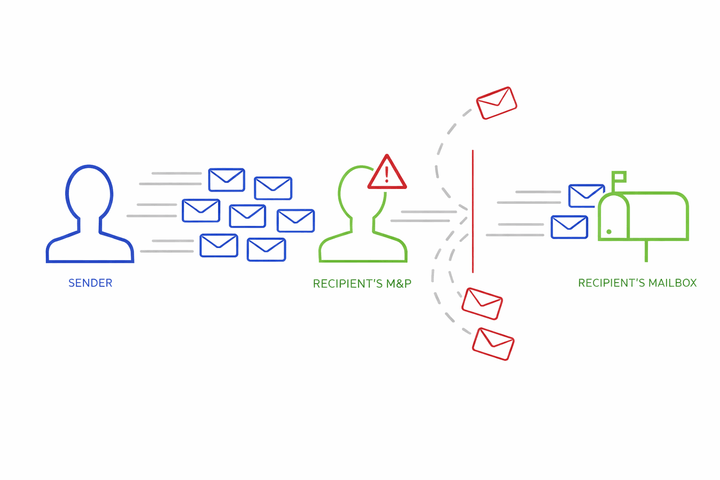
In plain terms, it’s the email version of saying, “Not right now; please retry in a moment.”
At this point, your email doesn’t fail. It goes into a deferred state, meaning it waits in a queue and is delivered gradually over time. Most email platforms retry automatically until the message is accepted.
Different ESPs handle throttling in their own way:
- Gmail and Outlook slow delivery when sending volume increases suddenly or engagement drops.
- SendGrid adjusts sending speed when rate limits are reached or when bounce and complaint rates rise.
- Amazon SES enforces hourly send limits and temporarily queues emails once those limits are hit.
In email marketing, throttling isn’t a penalty. It’s a pacing system. ESPs use it to watch how recipients respond before allowing more emails through. When sending is steady and engagement is healthy, throttling usually eases on its own.
Once you understand this, delayed delivery feels less confusing. It also becomes easier to plan campaigns that move smoothly through inboxes instead of getting stuck in email queues.
Why Is Understanding Email Throttling Important in 2026?
As we move through 2026, the email landscape has become more competitive. As a marketer, you now face stricter inbox rules, smarter filtering algorithms, and the rise of AI-driven prioritization, all of which make understanding email throttling essential for keeping your emails reaching the right people.
Here’s how real trends and data affect your campaigns this year:
Inbox Competition Is Intensifying
According to Validity, roughly 1 in 6 marketing emails never reach the inbox. That means a significant portion of your emails may be filtered out or delayed. Every throttled delay could reduce your engagement if messages don’t arrive when your audience expects them.
Spam Filters Are Getting Stricter
As per recent email marketing statistics, spam complaint rates are on the rise, meaning more subscribers are marking messages as spam. Major mailbox providers like Gmail, Outlook, and Yahoo now rely on sophisticated filtering that combines traditional rules with engagement signals and machine learning.
Because of this, your emails may be delayed or diverted, especially if throttling interacts with low engagement or sudden spikes in sending.
AI’s Growing Role in Email Delivery
In the future, AI will play an even bigger role in determining which emails reach the inbox and in what order. Already, 69.1% of marketers have integrated AI into their marketing operations, showing how widely it’s being adopted.
This makes understanding email throttling in 2026 more important than ever, because AI-driven inbox sorting can interact with throttled sends, affecting when and how quickly your emails are delivered and seen by recipients.
Compliance Is Required
As per recent reports, authentication and compliance (through standards like SPF, DKIM, and DMARC) are becoming increasingly important for inbox placement.
In today’s email ecosystem, ESPs are enforcing these rules more strictly, and email throttling can happen sooner when compliance isn’t fully in place. Keeping your authentication up to date helps reduce delivery delays and keeps your campaigns running smoothly.
In short, understanding email throttling is more important than ever. Staying aware of competition, AI-driven sorting, stricter filters, and compliance rules helps your emails reach inboxes on time and perform better.
Your 2026 campaigns shouldn’t get stuck in email queues. They deserve an email verification tool that keeps your messages flowing smoothly.
What Are the Signs That Your Emails Are Being Throttled?
Even if you follow all the best practices for your email campaigns, sometimes your emails just don’t reach inboxes as quickly as you expect. That’s often because ESPs (Email Service Providers) are applying email throttling.
The tricky part is that this can affect how quickly your audience sees your messages, your engagement rates, and even your sender reputation.
Here are some common signs that your emails might be throttled:
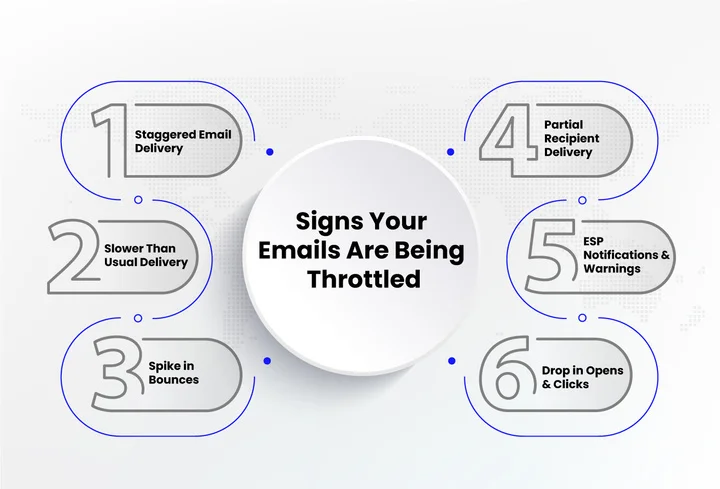
1. Emails Arrive in Small Batches
Have you noticed that your emails don’t reach everyone at once?
Some recipients may get your emails immediately, while others receive them hours or even days later. Behind the scenes, ESPs may be placing excess messages in a queue.
You might also notice SMTP 4xx deferral codes in your logs, indicating that the server asked your emails to retry later.
2. Delayed Email Delivery
If your messages usually arrive quickly but are suddenly slower, throttling could be the reason. ESP dashboards or delivery logs can show queued or deferred emails, providing a clear technical signal that throttling is in effect.
This delay can affect engagement if recipients don’t see your emails at the right time.
3. Unexpected Bounce Rates
A spike in bounce emails can be a sign of throttling. Soft bounces often happen when you send more emails than your ESP allows in a set timeframe. Watching your bounce rates closely helps you spot throttling before it impacts your sender reputation.
4. Partial Recipient Delivery
Sometimes only part of your list receives your email right away, while the rest gets it later. ESPs do this to pace deliveries and avoid overwhelming their servers, helping keep your sending reputation intact.
5. Alerts from Your ESP
Some ESPs will actually notify you when throttling kicks in or when you’re hitting sending limits. These alerts are helpful; they tell you your emails are being paced and give you a chance to adjust before it affects your campaigns.
6. Unusual Engagement Patterns
If you notice sudden drops in opens or clicks right after sending, throttling could be slowing down delivery. Being aware of this helps you read your metrics more accurately and understand when delays are due to ESP rules rather than content performance.
Now that you know the signs to watch for, let’s look at why ESPs throttle emails and how understanding their reasons can help you plan campaigns that reach inboxes reliably.
Why Do ESPs Throttle Emails?
When your emails are slowed down, it can feel like something has gone wrong. In reality, throttling is a control mechanism ESPs use to protect inboxes, users, and sending systems. Instead of blocking emails outright, they slow things down to observe sending behavior and reduce risk.
Here’s a closer look at why ESPs rely on throttling and what it means for you.
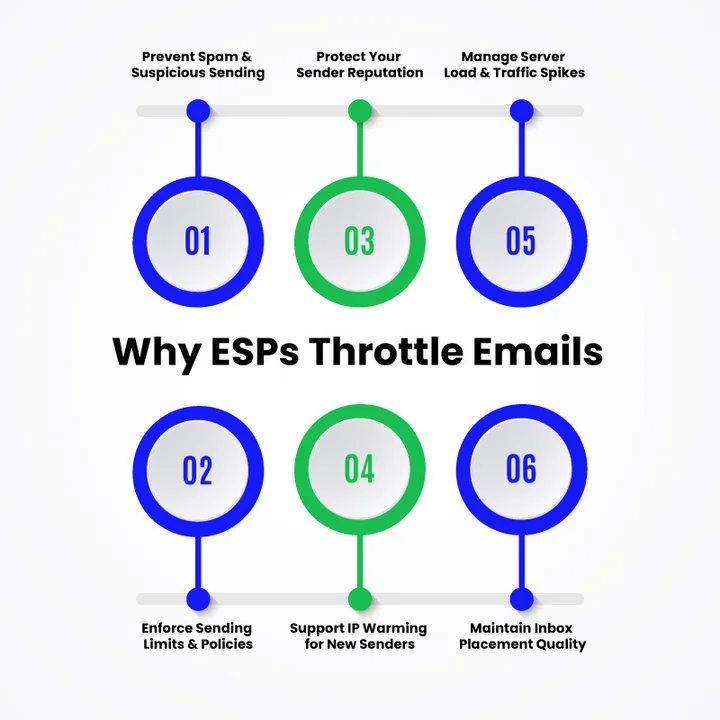
To Prevent Spam and Suspicious Sending Patterns
Large or sudden increases in email volume can look suspicious, even when your list is clean. Email service providers monitor for unusual spikes and potential spam traps to prevent emails from being flagged as spam.
For Example:
Imagine you normally send 5,000 emails per week, but a big promotion requires sending 50,000 at once. Rather than deliver all immediately, ESPs stagger the emails to see how recipients engage and prevent spam complaints.
To Protect Your Sender Reputation
Your reputation as a sender determines how many emails land in inboxes versus spam folders. Sending too many messages too quickly can harm that reputation.
For Example:
Gmail monitors bulk sender behavior closely. If you suddenly send a large campaign with low engagement, Gmail may throttle delivery, spreading messages over several hours to protect inbox quality.
To Control Server Load and Traffic Spikes
Email systems handle massive volumes of traffic every day. Throttling helps manage that traffic and prevents sudden surges that could affect delivery performance.
For Example:
A large holiday campaign sent all at once via Amazon SES may be queued and paced to maintain system stability.
To Enforce Email Sending Limits and Policies
Every ESP sets email sending limits based on account history, engagement, and compliance. Throttling is applied when those limits are reached or approached.
For Example:
If your Mailchimp account allows 10,000 emails per hour, sending 15,000 will queue the extra 5,000 rather than drop them.
To Support IP Warming for New Senders
For new domains or IP addresses, throttling plays an important role in IP warming. Sending too much too fast can cause long-term deliverability problems.
For Example:
A new sending IP that starts with high-volume campaigns may get throttled immediately. Gradual sending allows ESPs to monitor behavior and build trust before allowing higher volumes.
To Maintain Inbox Placement Quality
Inbox space is limited, and ESPs prioritize messages from trusted senders with consistent engagement. Throttling helps assess which emails deserve immediate placement.
For Example:
If recipients rarely open or interact with your emails, delivery may be slowed. Throttling gives ESPs time to assess whether your messages deserve consistent inbox placement.
As we’ve learned, ESPs throttle emails to protect inboxes, maintain sending reputation, and manage traffic.
Don’t let ESP rules block your success. Use a tool like emailverify.io to ensure steady, reliable delivery.
Next, we’ll look at how this throttling affects your email deliverability and what it means for your campaigns.
What Is the Impact of Email Throttling on Email Deliverability?
As we’ve learned, ESPs throttle emails to protect inboxes, maintain sending reputation, and manage traffic. What often gets overlooked is how much this pacing can influence your overall email deliverability.
Even when your emails are compliant and permission-based, throttling can shape how, when, and where your messages land.
Here’s how email throttling affects deliverability in real-world campaigns:
Slower Reach Can Affect Time-Sensitive Campaigns
When emails are throttled, delivery is spread out over a longer period instead of happening all at once. This can be challenging for campaigns that depend on timing, such as promotions, announcements, or event reminders. If part of your audience receives the message much later than intended, engagement may drop simply because the moment has passed.
Over time, this delayed reach can also affect how you plan campaigns, forcing you to send earlier than planned or adjust expectations around response times.
Engagement Metrics May Look Inconsistent
Throttling can cause emails to arrive in inboxes at different times throughout the day or even across multiple days. As a result, open rates, click rates, and reply activity may appear uneven in your reports.
This doesn’t always mean your content is underperforming; it often reflects staggered delivery rather than a lack of interest.
If you’re not aware that throttling is happening, it’s easy to misread these metrics and make unnecessary changes to subject lines, copy, or sending schedules.
Sender Reputation Is Protected Over the Long Term
While throttling may slow down delivery in the short term, it plays an important role in protecting your sender’s reputation. Sudden spikes in email volume can trigger spam filtering or complaints, which can cause lasting deliverability issues.
By pacing your emails, ESPs help reduce negative signals tied to sending behavior. This makes it easier to maintain a stable reputation and avoid more serious problems like inbox blocking or spam folder placement.
IP Warming Happens More Naturally
For newer domains or sending IPs, throttling supports gradual volume increases that align with IP warming best practices. Instead of pushing too many emails too quickly, paced delivery allows trust to build steadily with receiving servers.
This gradual approach improves long-term deliverability and reduces the risk of early blocks that can be difficult to recover from later.
Inbox Placement Becomes More Predictable
Consistent sending patterns help ESPs determine where your emails belong. Throttling encourages steadier delivery, which supports better inbox placement over time. Emails that arrive at a controlled pace are less likely to trigger spam filtering and more likely to reach the primary inbox.
As a result, your campaigns benefit from greater consistency, even if delivery isn’t instant.
With a clearer picture of how throttling affects deliverability, the next step is learning how to fix email throttling and reduce its impact on future campaigns.
How Can You Fix or Avoid Email Throttling?
Knowing why emails get throttled is one thing, but taking practical steps to prevent it can save your campaigns from delays and keep your leads engaged. With some thoughtful adjustments to how you send emails and maintain your sending setup, you can reduce throttling and improve delivery consistency.
Here are practical ways to fix email throttling and keep your campaigns running smoothly:
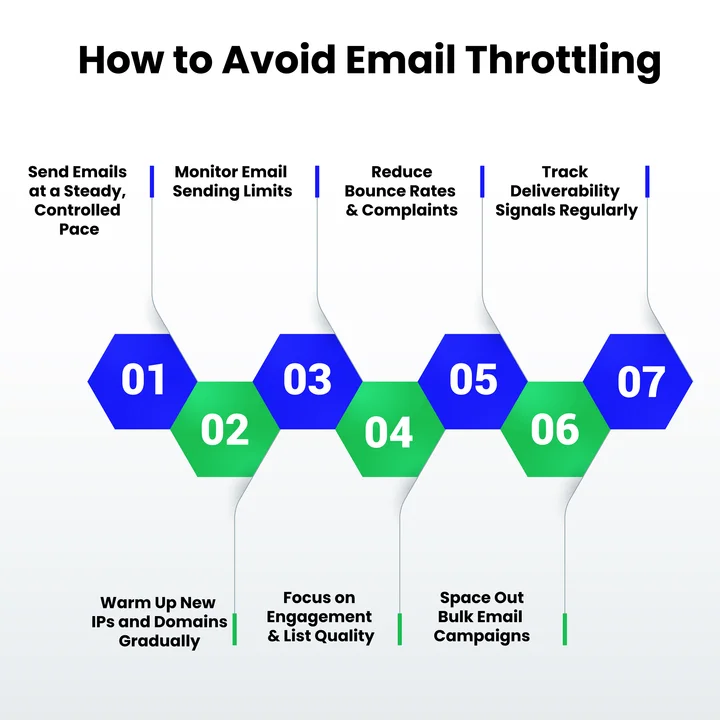
Send Emails at a Steady, Controlled Pace
Large spikes in sending often trigger throttling. By spreading your emails out over time, you make your campaigns more predictable, ensuring messages reach your audience when they’re expected.
This also helps your leads receive timely messages, which is important for promotions, follow-ups, or any time-sensitive campaigns.
Warm Up New IPs and Domains Gradually
New domains or sending IPs are treated cautiously by ESPs. Starting small and gradually increasing volume allows providers to trust your sending behavior, reducing throttling risks.
This approach improves deliverability over the long term, ensuring that important campaigns aren’t delayed or blocked.
Monitor Email Sending Limits Closely
Every ESP sets thresholds based on account history and engagement. Staying within these limits helps keep delivery steady and protects your reputation as a sender.
High engagement and responsible sending patterns mean your emails are more likely to land in inboxes, rather than getting delayed by throttling.
Focus on List Quality
Low-quality or inactive addresses are a common reason emails get throttled. Regularly cleaning your list and focusing on verified, engaged recipients reduces bounces and complaints.
This infrastructure hygiene helps your campaigns stay on schedule, keeps your sender reputation strong, and ensures your messages reach the right people on time.
Using an email validation tool to clean your list and verify addresses can prevent delivery slowdowns and maintain a healthy sending reputation.
Space Out Bulk Campaigns
Sending multiple large campaigns close together can overwhelm ESP systems and trigger throttling.
Spacing your campaigns strategically helps maintain predictable delivery and ensures that high-priority promotions or lead nurturing emails reach your audience without delays.
Monitor Delivery Patterns
Tracking delivery times, bounce rates, and inbox placement gives you insight into throttling behavior. Spotting patterns early allows you to adjust your sending habits before they impact campaign performance or lead timing.
This proactive approach keeps your email strategy reliable and consistent, rather than reactive.
Regular monitoring makes it easier to understand how email throttling works in your specific setup and respond before it affects results.
Final Thoughts
Email throttling is a normal part of modern email marketing, not a technical failure or a sign that something is wrong with your campaigns. ESPs use it to control traffic, protect inboxes, and maintain healthy sending environments. Once you understand how it works, the delays and pacing start to make sense.
How you send emails matters just as much as what you send. Consistent volume, clean lists, steady engagement, and respect for sending limits all play a role in keeping your emails moving smoothly into inboxes.
Using an API for bulk email verification can help ensure your email list is accurate and reduce the risk of bounces, making throttling far less disruptive.
If you’re seeing delays or uneven delivery, use the signs and fixes covered in this guide to review your sending habits and make small adjustments.
Over time, these changes help protect your sender reputation and improve overall email deliverability. Keep monitoring your campaigns, stay aware of sending patterns, and treat throttling as a signal, not a setback.
When you do, your email strategy becomes easier to manage and more reliable in the long run!
Frequently Asked Questions (FAQs) About Email Throttling
Can Email Throttling Be Avoided Completely?
Completely avoiding email throttling is usually not possible, especially with large campaigns or new sending IPs. You can reduce its impact by sending at a consistent pace, maintaining engagement, and following your ESP’s email sending limits.
How Do SMTP Rate Limits Influence Email Throttling?
SMTP rate limits set the maximum number of emails you can send per hour or day. Exceeding these limits can trigger email delivery throttling, delaying your messages. Staying within these limits protects your sender reputation and ensures consistent inbox placement.
Why Do Emails Get Throttled Even When Engagement Is High?
High-engagement emails can still be throttled to manage server traffic, prevent spam, and enforce email throttling rules. ESPs regulate the flow of messages to maintain consistent email deliverability and protect your sender reputation. Knowing this helps you adjust your sending patterns and plan campaigns more effectively.
Is Email Throttling Applied at the IP Level, Domain Level, or Both?
Email throttling can affect both your sending IP and domain. New IPs are throttled as part of IP warming, while domains with high or inconsistent volumes may also experience pacing. Monitoring both helps maintain your sender reputation and consistent inbox placement.
Does Throttling Affect Transactional Emails?
Transactional emails, like order confirmations or password resets, are usually treated differently by ESPs and are less likely to be throttled. However, if your sending patterns are unusual or your IP/domain is new, even transactional messages may be temporarily paced.
How Long Does Throttling Typically Last?
The duration of throttling varies by ESP, account history, and sending behavior. Some emails may be deferred for minutes, others for hours, and occasionally longer during large-volume campaigns or new IP warming.
Confidently send your bulk emails without delays, throttling, or bounce worries, and ensure every message reaches its inbox.


