
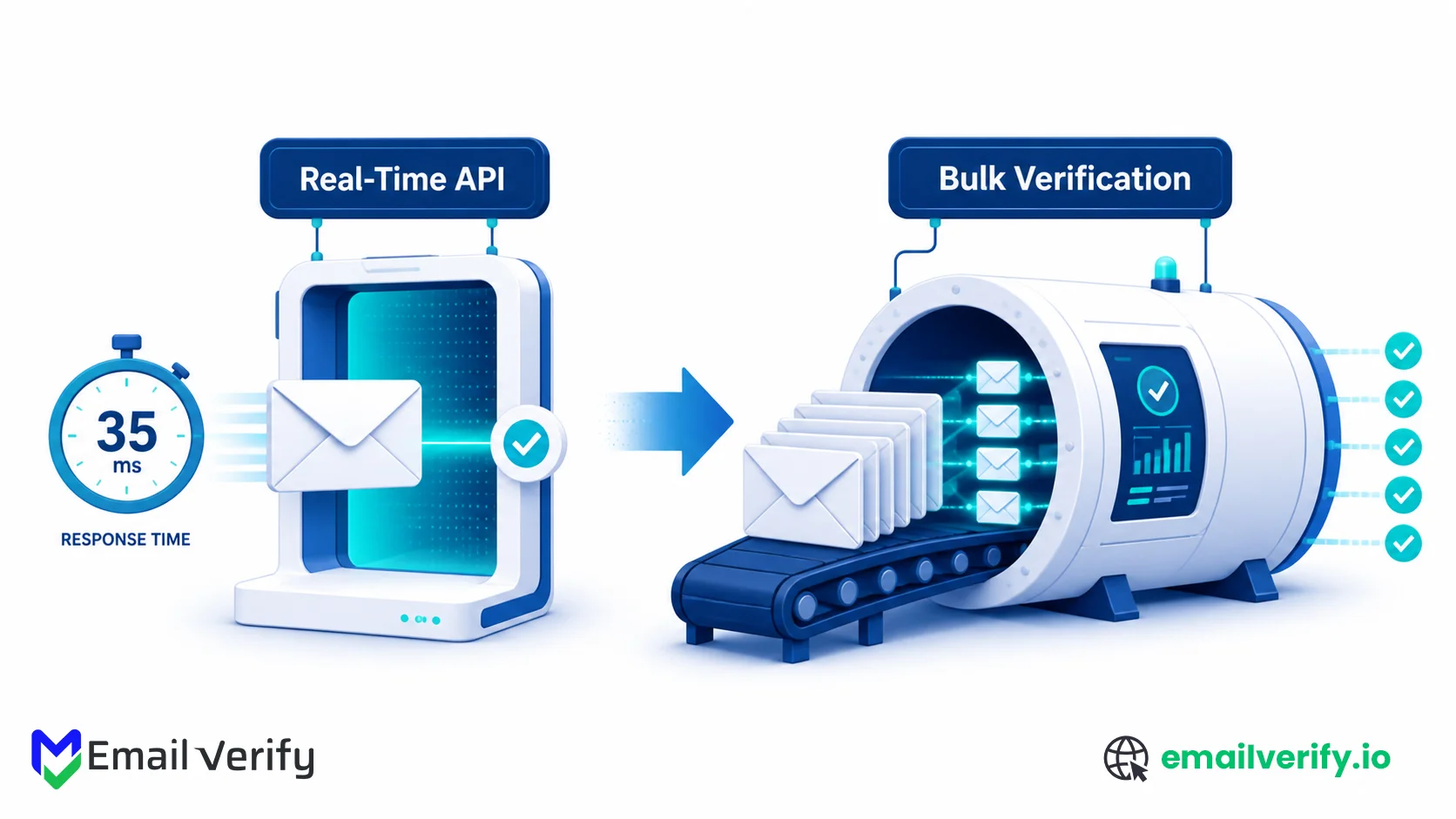

If you’re evaluating email verification for the first time, the choice between real-time and bulk usually shows up early. You see two products, two pricing pages, and two sets of API docs, and the question “which one do I actually need?” rarely gets a clean answer in the marketing copy.
The honest answer is that they’re not competing options. They solve different problems, they live in different parts of your stack, and most mature email programs use both. The decision isn’t real-time versus bulk; it’s where each one belongs in your workflow and how to wire them in so they reinforce each other.
This guide is a decision matrix. We’ll cover what each mode actually does, the six most common workflows that drive the choice, the latency and cost trade-offs that matter, and the operational pattern that combines both modes cleanly.
By the end, you’ll know which mode fits each part of your stack, and you’ll have the wiring diagram to deploy them together.
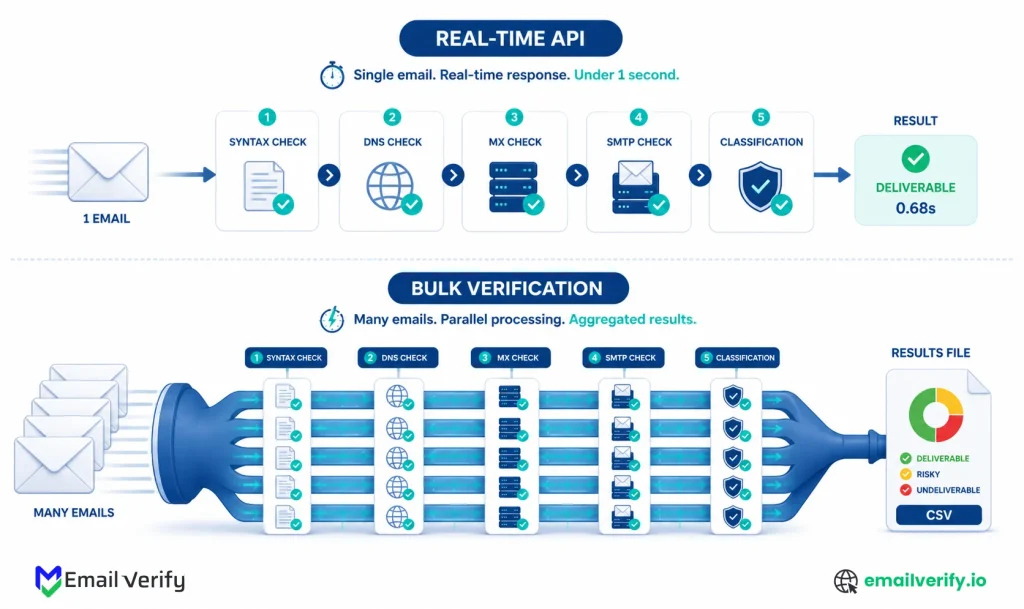
Real-time email verification checks one address at a time through an API call, returning a result in well under a second. It belongs at any point where addresses arrive live: signup forms, onboarding flows, lead capture, and in-app verification.
Bulk email verification processes a list of addresses in batch, usually as a CSV upload or a scheduled job. It belongs anywhere you already have the addresses: list cleaning before campaigns, CRM hygiene sweeps, cold outbound list scrubbing, and re-engagement preparation.
Most teams use both. Real-time keeps bad data out at the moment of entry; bulk catches addresses that go stale over time. The two together protect deliverability across the full lifecycle of an email program.
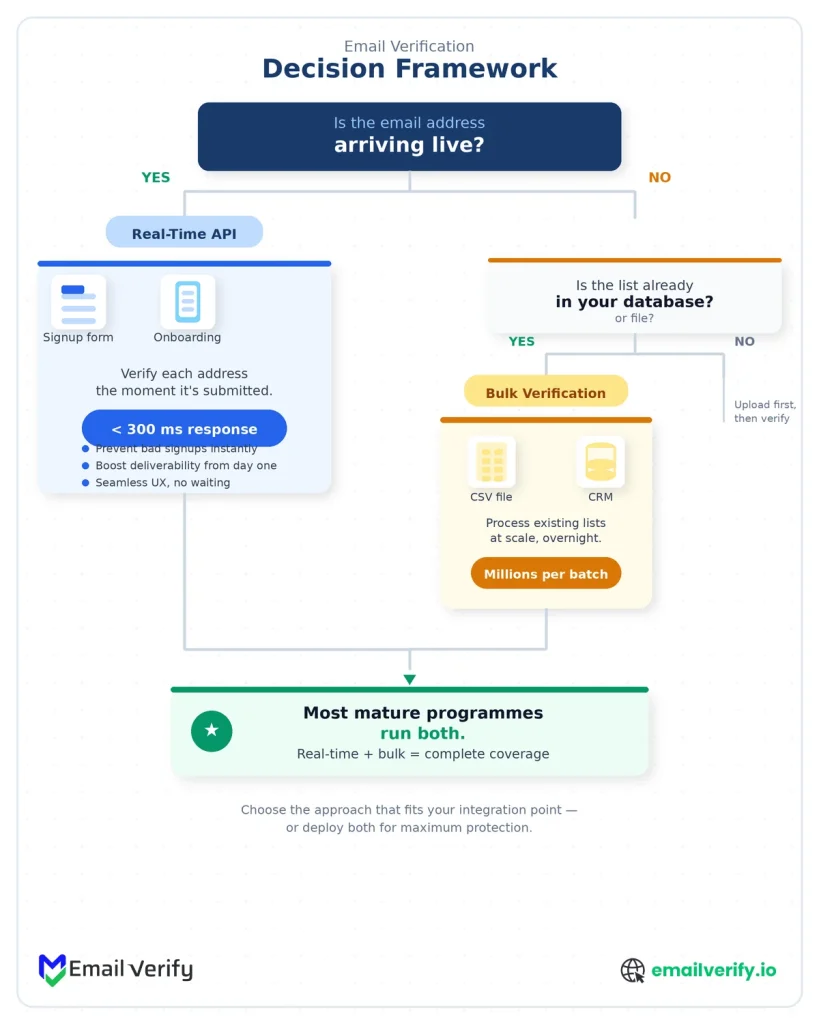
If you remember nothing else from this article, remember the timing test:
- If the address is arriving live and someone is waiting on the result, it’s a real-time job.
- If the address is already in your database and the result can wait minutes or hours, it’s a bulk job.
Almost every workflow falls cleanly on one side of that line.
Table of Contents
How Does Real-Time Verification Work?
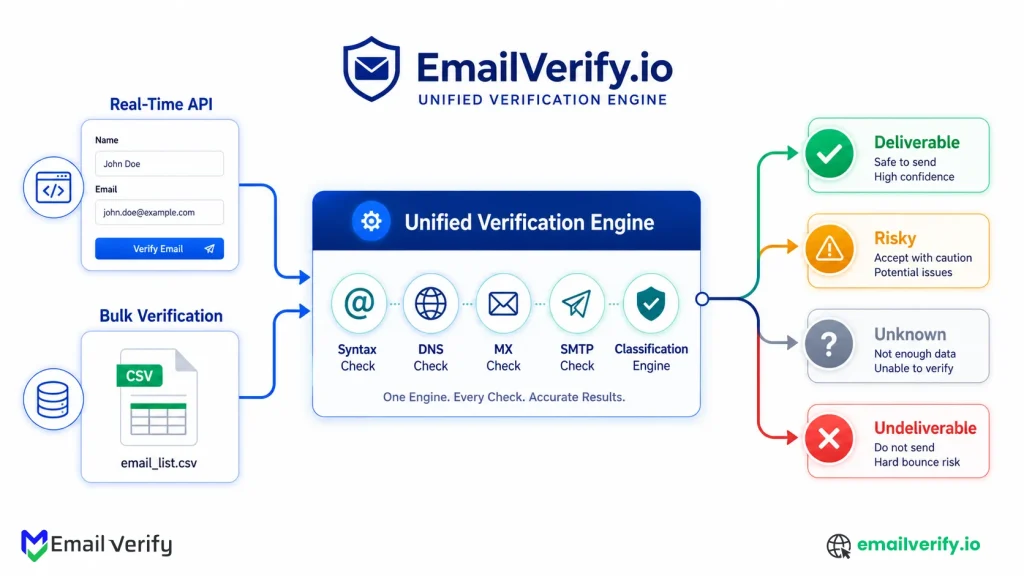
Real-time verification runs as a single API call per address. Your application sends the address, the verifier runs the full five-stage pipeline (syntax, domain, MX, SMTP probe, classification), and a structured response comes back in well under a second. The whole exchange feels instant from the user’s perspective.
Under the hood, the verifier handles all the operational work: connection pooling to recipient mail servers, retry logic for transient failures, IP rotation, catch-all detection probes, and database lookups for disposable and role-based classification.
Your application receives a clean result with a status (Deliverable, Risky, Unknown, or Undeliverable) and a set of reason codes, and decides what to do next based on that.
The typical integration pattern looks like this:
- User submits an email through a form, an in-app field, or an integration.
- Your application sends a verification request to the API.
- The API returns a structured response in well under a second.
- Your application acts on the result: accept, reject, prompt for correction, or route to a different segment.
Fire the verification call when the email field loses focus, not on form submit. That way the verifier has a head start while the user finishes the rest of the form, and the submit button feels instant. Most signup-flow latency complaints are really focus-event timing issues, not API speed problems.
How Does Bulk Verification Work?
Bulk verification runs the same pipeline but is applied to a whole list at once. You upload a CSV (or submit one programmatically); the verifier breaks the list into chunks, runs many probes in parallel with retry logic and IP rotation, and produces a structured output file with every row tagged by status and reason code.
The work behind the scenes is heavier than real-time, because the system has to manage thousands or millions of probes in parallel without overwhelming individual mail servers, deduplicate along the way, and recover gracefully if a chunk fails midway.
Throughput typically ranges from a few thousand addresses per minute on small jobs to hundreds of thousands per hour on large ones, depending on the mix of domains in the list.
The typical integration pattern looks like this:
- Upload a CSV (or submit a list through the API).
- The system runs a preflight pass: deduplication, column detection, and syntax filter.
- Probes run in parallel chunks; partial results often stream as the job progresses.
- A final output file is downloadable, with each row tagged by status and reason code.
- You segment the output and feed it back into your sending platform.
Real-Time vs. Bulk Verification: A Workflow Decision Matrix for 2026
Here is the practical decision matrix for the most common email-related workflows. The recommendation column is color-coded: blue for real-time, amber for bulk, and green where you should run both.
| Scenario | Best Mode | Why |
|---|---|---|
| Public signup form | Real-Time | User is waiting; bad addresses must not enter the database. |
| Lead capture form / gated content | Real-Time | Same logic; salvage typos at the moment of entry. |
| SaaS onboarding email confirmation | Real-Time | Bad address breaks activation; catch instantly. |
| In-product email field updates | Real-Time | Single record at a time, user-initiated. |
| CRM list before a campaign | Bulk | List already exists; latency is irrelevant. |
| Cold outbound prospect list | Bulk | Imported once, used many times; pre-send hygiene critical. |
| Scenario | Best Mode | Why |
|---|---|---|
| Quarterly CRM sweep | Bulk | Tens of thousands of records; runs as a scheduled job. |
| Re-engagement / win-back list | Bulk | Verify before send; old addresses decay quickly. |
| Marketing automation triggered emails | Real-Time | New addresses enter via API; verify on entry, not at send. |
| Newsletter subscriber list, six months old | Bulk | Decay since last verification; clean before next send. |
| B2B SaaS at scale (signups + outbound) | Both | Real-time on signup, bulk on imported lists and CRM. |
| Lifecycle marketing programme | Both | Real-time on form submissions, bulk on dormant cohorts. |
| E-commerce with steady acquisition | Both | Real-time at checkout/account creation, bulk for re-engagement. |
| Event registration form | Real-Time | Addresses arrive live; reminder deliverability matters. |
| Lead vendor list import | Bulk | The entire batch arrives at once; verify before any campaign. |
If you find yourself in the “Both” category, that’s expected. The pattern is real-time at every entry point and bulk on every list that exists in your database. The two modes don’t compete; they cover different parts of the address lifecycle.
How Does Real-Time Verification Optimize Signup Forms and User Conversion Rates?
Signup forms are the canonical real-time use case. When you understand why to use a real-time email checker, it becomes clear that catching errors while the user is still on screen is vital.
You have a one- to two-second window to verify the address before the submit button is pressed, ensuring that no “dirty data” ever hits your database.
The Strategic Advantage of Real-Time Verification
Bulk simply cannot work at this stage. The user is waiting, the address is brand new, and there’s no list to upload. A single API call returns a result fast enough to feel instant and gives you four useful actions to take depending on the response: accept, reject, prompt for correction (“Did you mean …@gmail.com?”), or quietly route to a softer onboarding flow.
Implementation Excellence
A well-designed signup integration fires the verification call when the email field loses focus (so the request has already completed by the time the user hits submit), shows a friendly correction prompt for typos, blocks disposable addresses with a clear message, and quietly accepts catch-all results without making the user repeat themselves.
The bar is low enough that any modern verifier API will hit it; what matters is the integration.
Signup form integration checklist:
- API call fires on email field blur, not on form submit.
- Friendly correction message for likely typos (gmail.com, yahoo.com).
- Disposable addresses blocked with a clear, non-judgmental message.
- Catch-all results are accepted silently; flagged in the database for monitoring.
- Real-time call has a sensible timeout fallback (1–2 seconds, then accept).
Why Is Bulk Email Verification Essential Before Launching a Campaign?
List cleaning is the canonical bulk use case. You are going to start a campaign with a list that you may have obtained from an export or a lead vendor. Performing a deep email list cleaning allows you to remove addresses that will bounce or land in spam before they have a chance to damage your sender reputation.
Why Bulk Processing Wins for Pre-Campaign Audits?
Latency doesn’t matter. The list already exists; nobody is waiting on screen. What you want is throughput, parallelism, and a clean, segmentable output.
A real-time API would technically work, but you’d burn unnecessary infrastructure on calls you could have batched. Bulk is purpose-built for this.
Optimal Frequency: Strategic Cadence Recommendations
A reasonable rhythm is to bulk-verify any list before its first campaign, before warming a new sending domain, after any external import, and as a routine refresh every three to six months for active lists.
High-volume senders run it more frequently. The cost is small relative to the deliverability protection it provides.
How Do You Manage Email Verification for Lifecycle and Re-Engagement?
Lifecycle marketing sits between the two extremes. Some addresses arrive live (new signups for product updates), some are pulled from cohorts (“users who haven’t engaged in 90 days”), and some are imported in batches (re-engagement campaigns to dormant subscribers).
To manage these complex flows effectively, most teams implement comprehensive email marketing solutions that adapt based on the specific trigger. The right mode depends on whether you are catching a fresh signup or cleaning an old list.
Real-Time Validation for Fresh Subscriptions
Any subscription that arrives via a form undergoes real-time verification using the same logic as a signup form. Catch typos and disposables at the moment of entry.
Bulk Verification for High-Risk Dormant Cohorts
When you build a re-engagement campaign for users who haven’t opened mail in three months, you’re working with a list that’s already in your database.
Bulk verification makes sense here because the addresses may have decayed since they were last validated. The catch-all and undeliverable results in that bulk pass are usually higher than they were originally, which itself is a useful diagnostic about how much your dormant cohort has aged out.
The Hybrid Approach: Triggered Flows and Periodic Sweeps
For triggered flows (onboarding sequences, abandoned-cart follow-ups, post-purchase reminders), the pattern is real-time when each new contact enters the flow, plus a bulk re-verification of the full lifecycle audience every quarter or so.
New addresses are clean at entry; older ones get refreshed before they decay.
If you can only afford one bulk run per quarter, target your dormant cohort. Active subscribers are mostly self-cleaning through engagement — they bounce themselves out of your active list, or they keep engaging. Dormant addresses are the ones quietly going stale without any signal back to your platform, and they’re the highest-yield list to clean.
Why Is Bulk Verification Mandatory for Cold Email Outbound?
Cold outbound is the highest-stakes use case in the entire decision matrix. Bounce rates above a few percent on cold sends will damage your domain reputation quickly, and once that happens, even your warm contacts start landing in spam.
Lead lists from data providers, scraped sources, or research vendors almost always contain a meaningful share of bad addresses, regardless of what the vendor claims.
The Role of Real-Time API in Lead Enrichment
Every cold list goes through bulk verification before any sending. No exceptions. Most experienced sales teams verify lists twice: once on import and again immediately before sending, since addresses can decay between the two events.
The cost of a single bulk run is trivial compared to the cost of a domain reputation collapse.
The Double-Verification Strategy for Sales Teams
Real-time verification has limited value in pure cold outbound, since you’re not capturing addresses live.
It does come into play if you’re enriching prospect data from internal forms (whitepaper downloads and demo requests) and pushing those leads into outbound sequences, in which case the real-time call belongs at the form, not in the outbound tool itself.
Importing a freshly purchased list straight into a sending tool and pressing send. Even one large send to an unverified list can collapse a domain’s reputation for weeks, and the recovery costs more than every list and every verification credit you’d have used in a year.
How Does Email Verification Secure the SaaS Onboarding Funnel?
For SaaS products, real-time verification on the signup form is now table stakes. A user who signs up with a typo in their email never receives the confirmation message, never activates the account, and either churns silently or contacts support.
A user who signs up with a disposable address bypasses the trial limits that the team carefully designed.
Maximizing Product Activation with Real-Time Validation
The integration is identical to the public signup form pattern: API call on email field blur, friendly correction prompt for typos, disposable rejection, and catch-all acceptance with database flagging.
What’s different in SaaS is the downstream impact: every bad address represents a failed activation, which is one of the most expensive metrics in a freemium funnel.
Auditing User Databases with Periodic Bulk Sweeps
If your product has been running without verification for a while, a one-time bulk pass on the existing user database is worth doing.
The output usually surfaces a meaningful share of dormant accounts attached to dead mailboxes, which can be deactivated, suppressed from product emails, or excluded from churn reporting.
Why Is Email Verification Critical for CRM and RevOps Hygiene?
CRMs accumulate stale data over time. Contacts change jobs, companies are acquired, mailboxes are decommissioned, and records that were good two years ago quietly become liabilities.
The right verification mode depends on whether you’re cleaning the existing database or controlling what enters it.
Enhancing Forecasting Precision with Bulk CRM Sweeps
A scheduled bulk run on the full CRM, typically quarterly or twice a year, removes records that will never deliver and lets sales reps focus on contacts who can actually be reached.
The secondary benefit is reporting accuracy: when the contact database reflects reality, the metrics that come out of it are trustworthy, which makes pipeline forecasting and territory planning much more reliable.
Proactive Data Governance via Real-Time API Entry
Every form that feeds the CRM (contact us, demo request, content downloads, partner referrals) should run real-time verification on submission. Otherwise, every quarterly bulk run cleans up problems that real-time would have prevented at no marginal cost.
Wire the API call into the form layer, and the bulk runs become smaller and cheaper over time.
Quick reference for the six core use cases:
| Use Case | Real-Time Role | Bulk Role |
|---|---|---|
| Signup forms | Primary — every submission. | Optional one-time pass on existing users. |
| List cleaning before campaigns | None. | Primary — every list, every campaign. |
| Lifecycle marketing | On every new entry to a flow. | On dormant cohorts before win-back. |
| Cold outbound | Limited to inbound forms feeding outbound. | Mandatory — every list, every send. |
| SaaS onboarding | Primary — at signup. | Optional sweep of existing users. |
| CRM hygiene | On every form that feeds CRM. | Quarterly to bi-annual full sweep. |
| --- | --- | --- |
| Scenario | Best Mode | Why |
| Quarterly CRM sweep | Bulk | Tens of thousands of records; runs as a scheduled job. |
| Re-engagement / win-back list | Bulk | Verify before send; old addresses decay quickly. |
| Marketing automation triggered emails | Real-Time | New addresses enter via API; verify on entry, not at send. |
| Newsletter subscriber list, six months old | Bulk | Decay since last verification; clean before next send. |
| B2B SaaS at scale (signups + outbound) | Both | Real-time on signup, bulk on imported lists and CRM. |
| Lead vendor list import | Bulk | The entire batch arrives at once; verify before any campaign. |
The cost gap between real-time and bulk is real, but rarely the deciding factor. Real-time is more expensive per call because of the infrastructure required to deliver sub-second responses reliably. Bulk is cheaper per address because the infrastructure cost amortizes across the run. Use the mode that fits the workflow, not the one that’s cheaper per address — the wrong-mode tax (manual cleanup, missed signups, broken activation) is always larger than the per-address cost difference.
Why Mature Email Programs Rely on Both Real-Time and Bulk Verification
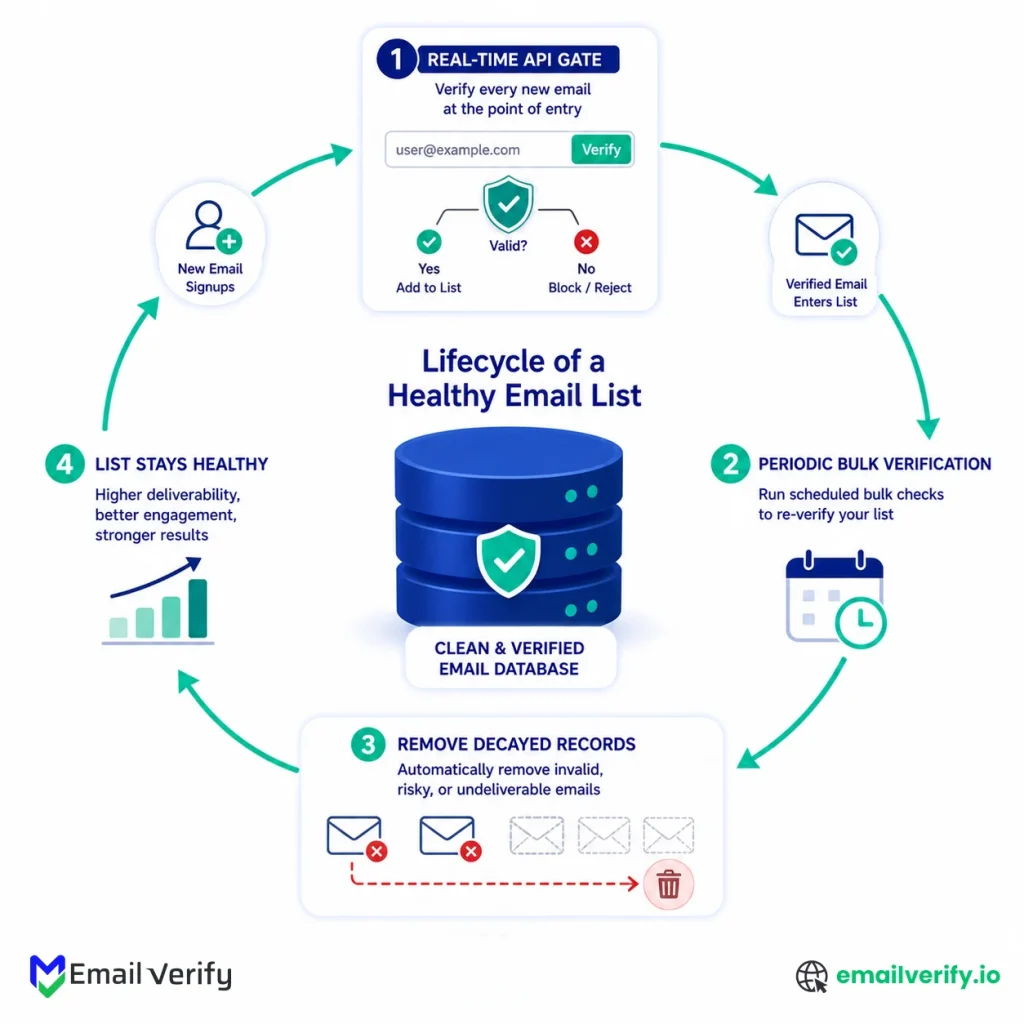
Every entry point to your database (signup forms, lead capture, in-product fields, integrations) gets a real-time API call. That keeps typos, disposables, and bots from entering the database in the first place.
Without this layer, every quarterly bulk run is doing cleanup that should have been prevented up front.
Real-Time Verification: Protecting Data Quality at the Point of Entry
Every entry point to your database (signup forms, lead capture, in-product fields, integrations) gets a real-time API call. That keeps typos, disposables, and bots from entering the database in the first place.
Without this layer, every quarterly bulk run is doing cleanup that should have been prevented for free.
Bulk Verification: Maintaining List Health as Data Ages
Even with perfect real-time verification at entry, addresses still go bad. People change jobs, mailboxes get deactivated, and companies fold.
Bulk verification on a recurring schedule catches decay that real-time can’t, because real-time only sees an address when it enters—not while it ages.
The Combined Approach: Sustained Deliverability and Reliable Performance Metrics
A team running both ends up with a list whose entry quality is high (because real-time filters out the obvious junk) and whose ongoing quality is high (because bulk re-verification catches the slow drift).
The result is a list that consistently stays within provider thresholds, with metrics that reflect real audience behavior rather than dead inboxes inflating the denominator.
What Common Mistakes Do Teams Make with Email Verification?
Three mistakes show up over and over when teams choose between real-time and bulk. Each one has a clear fix.
1. Using Real-Time for List Cleaning
Some teams build a script that loops through their existing list and calls the real-time API for each row. It works, but it burns infrastructure and money on a job purpose-built for bulk.
The fix is straightforward: any list of more than a few hundred addresses should go through bulk verification, not a real-time loop.
2. Using Bulk Where Real-Time Belongs
Other teams skip real-time integration on signup forms and rely on a weekly bulk run to clean up the bad addresses that came in. By the time the bulk run finishes, the bad addresses have already triggered failed welcome emails, broken activation flows, and an inflated contact count for the week. The fix is to add a real-time API call at every form, even if you’re already running bulk on the database.
3. Not Using Either
The most expensive mistake is to skip verification entirely, send to the unverified list, and then debug the deliverability problems that follow. Verification is one of the cheapest deliverability levers available, and it pays for itself many times over on the first campaign that doesn’t end up in spam.
4. Picking a Vendor That Only Does One Mode
Some verification vendors only offer real-time APIs, while others only offer bulk uploads. Mature email programs need both, and switching providers later is more painful than picking one that supports both modes from the start.
The standard expectation today is that real-time and bulk run on the same engine, with consistent result schemas, so you can build segmentation logic once and apply it everywhere.
Wiring real-time verification into your application as a hard blocker without a timeout fallback. If the API ever responds slowly (or your network has a hiccup), every signup attempt fails until the issue clears. Always set a 1–2 second timeout that accepts the address with a flag for later bulk re-check. Verification should never be the reason a user can’t sign up.
How Does EmailVerify.io Enable Real-Time and Bulk Verification in One Platform?
EmailVerify.io was designed around the assumption that real-time and bulk are complementary, not competing. Both modes run on the same underlying engine, with consistent result schemas, so the segmentation rules you build for one work cleanly for the other.
For real-time integration, the EmailVerify.io API returns sub-second responses with full reason codes, ready to drop into signup forms, in-app fields, or integration layers. The same API also handles bulk jobs through job-based endpoints, so a single integration covers both modes.
For interactive bulk runs, the bulk verification service accepts CSV uploads of any size, with automatic deduplication, column auto-detection, and structured output ready for segmentation. Both flows produce results in the same four-tier confidence model (Deliverable, Risky, Unknown, Undeliverable), with the same reason codes attached.
The platform is honest about uncertainty. Catch-all responses, anti-probe blocks, and greylisting are all surfaced as graded results with explanatory reason codes, so you can build business logic that fits your risk tolerance rather than working around vendor opacity.
Frequently Asked Questions
Which One Should You Use For Your Signup Form?
Real-time. Signup forms have a user waiting on screen, the address is brand new, and you need a result fast enough that the submit button feels instant. Bulk simply cannot work at this stage because there's no list to upload. A single API call on the email field blur returns a result in well under a second and lets you accept, reject, or prompt for correction before the form submits.
Can You Use Real-Time Verification To Clean A Large List?
Technically, yes, by looping through the list and calling the real-time API for each row. In practice, it's wasteful: you burn infrastructure and money on a job purpose-built for bulk. Lists of more than a few hundred addresses should go through bulk verification, which is faster, cheaper per address, and produces a structured output file ready for segmentation.
Can You Use Bulk Verification At Signup?
No. Bulk verification runs in batches over minutes or hours; signup forms need a result in under a second while the user is on screen. Use real-time for signup; use bulk for the existing database.
Is Real-Time Email Verification Accurate?
As accurate as bulk for most addresses. Both modes run the same five-stage pipeline (syntax, domain, MX, SMTP probe, classification). The differences are in throughput and integration shape, not in accuracy. The same caveats apply to both: catch-all domains return ambiguous results, greylisting requires retries, and strict anti-probe providers can return unknown. A good verifier handles all of these the same way in both modes.
How fast is real-time verification?
A typical real-time API call returns in well under a second, fast enough for any signup form or onboarding flow. The bottleneck is the receiving server's response time, which the verifier manages with connection pooling and short timeouts. If you fire the call when the email field loses focus rather than on form submit, the perceived latency is effectively zero.
How long does bulk verification take?
It depends on the list size and the mix of domains. Small lists (under 5,000 addresses) finish in minutes. Medium lists (around 50,000) take roughly 10 minutes to an hour. Large lists (a few hundred thousand) take a few hours. Million-row lists take half a day to a full day. Catch-all density and greylisting are the biggest variables.
Should You Run Both Modes: Real-time and Bulk Verification?
If your email program involves both live address capture and existing lists, yes. Most do. Real-time keeps bad data out of the database at the moment of entry. Bulk catches address that decay over time. The two together cover the full lifecycle of an email list, and they reinforce each other rather than overlapping.
Will Real-Time Verification Slow Down Your Signup Form?
Not noticeably. A well-designed integration fires the API call when the email field loses focus, which means the request is already complete by the time the user clicks submit. The submit-button experience feels instant. Set a 1–2 second timeout fallback so the form always proceeds even if the verifier is briefly slow.
Does The Same Engine Power Both Modes At Emailverify.Io?
Yes. Both real-time API calls and bulk jobs run on the same verification engine, with identical result schemas (Deliverable, Risky, Unknown, Undeliverable, plus reason codes). That means the segmentation logic you build for one mode works cleanly for the other, and you don't have to maintain two parallel sets of rules.
Final Thoughts
Real-time and bulk verification aren’t a choice between two options. They’re two halves of a single discipline: keeping the addresses in your sending pipeline accurate, current, and safe to mail. Real-time stops bad data at the point of entry.
Bulk catches the addresses that go stale after they’ve been there for a while. Together, they cover the full lifecycle of an email list, with each mode doing what the other can’t.
The decision matrix in this guide isn’t really a matrix. It’s a routing rule: live addresses go through real-time, existing lists go through bulk, and mature programs use comprehensive email verification services to wire both into the same workflow.
Once you see the underlying logic, the question “which one do I need?” answers itself for almost every scenario you’ll encounter.
If you’re starting fresh, the right move is to wire real-time into every entry point first, then schedule bulk runs against the database as it grows. If you’ve been running one mode for a while, the highest-leverage next step is to add the other.
Programs that run both consistently see lower bounce rates, stronger sender reputation, and more accurate engagement metrics across every campaign that follows.
Cleaner lists. Stronger reputation. More mail in the inbox. That’s what real-time and bulk verification deliver when they work together.


