

If you’re reading this, there’s a good chance a CSV is sitting on your desktop right now. Maybe it’s a list a teammate exported from the CRM, maybe it’s a fresh batch from a data vendor, or maybe it’s the result of a lead-research project that took weeks. Either way, the file is large, the column headers are inconsistent, and you’re about to send a campaign to it.
That moment, somewhere between download and upload, is where bulk email verification belongs. Without it, you’re betting your sender reputation on data you haven’t checked. With it, you’re sending to a clean, segmented list with a known quality profile. The difference is usually visible in the very first campaign.
This guide is designed for the moment you’re about to run a list through verification and want to get it right.
We’ll cover what to do before the upload, what happens during the run, what to expect on throughput, how to handle catch-all domains, how to read the output, and where the most common operational mistakes live. It’s the playbook we wish every team had on day one.
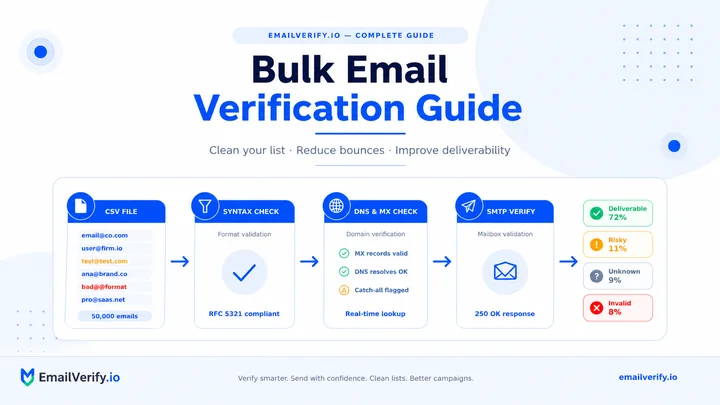
Bulk email verification is the process of checking a list of email addresses in a batch instead of one by one. Each address goes through validation steps like syntax check, domain and MX lookup, and an SMTP probe and then gets classified into categories such as Deliverable, Risky, Unknown, or Undeliverable. The output is a structured file you can act on: send to deliverable contacts, handle risky ones cautiously, retry unknowns, and suppress undeliverables. Processing time varies by list size, but most runs complete within minutes to a few hours.
Table of Contents
The 500K-Row CSV Moment
Anyone who has run a serious email program knows the feeling. The list is finally compiled, the spreadsheet weighs in at hundreds of megabytes, and the upload screen of the verifier is asking how you’d like to proceed. The questions running through your head usually sound like this:
- How long is this actually going to take?
- Will the verifier choke on the file size, or do I need to split it?
- What happens to duplicates?
- How much is this going to cost?
- What do I do with the results when they come back?
- Will any of this damage my domain reputation?
None of these is a silly question. They’re the right ones. Most marketing platforms and cold email tools expect you to come to the verification step having already answered them, but the answers aren’t always obvious if you haven’t run a large bulk job before.
The rest of this guide is essentially the answers, in the order you’ll need them.
Key Insight
If you only take one thing away from this article, take this: bulk verification is most useful as a workflow, not just a tool. The upload itself is the easy part. The work that produces real ROI is the preparation before upload and the segmentation after, both of which most teams skim through and then wonder why their first campaign still bounces.
What Is Bulk Email Verification (and How Does It Work)?
Bulk verification runs the same five-stage pipeline as a single-address check, applied to a list at scale. Each address is parsed for syntax, its domain is resolved in DNS, its MX records are pulled, an SMTP probe is sent to the recipient mail server, and the response is classified against catch-all, role-based, and disposable databases. The end result is a structured output that helps protect your sender reputation while improving overall campaign performance.
What changes in bulk is the surrounding infrastructure. A single-address check runs as one quick API call. A bulk job has to manage thousands or millions of probes in parallel without overwhelming individual mail servers, retrying transient failures gracefully, deduplicating along the way, and recovering cleanly if a batch is interrupted.
If you want a refresher on the underlying pipeline, our companion guides on how email verification works and verifying without sending cover the mechanics in detail. This article assumes you already know what each stage does and focuses on running them at scale.
When Should You Use Bulk Email Verification vs. Real-Time Verification?
Bulk and real-time verification solve different problems. Bulk is for cleaning lists you already have. Real-time is for filtering addresses as they arrive. Most healthy email programs use both, but they’re chosen for different moments.
| Scenario | Best Approach | Why |
|---|---|---|
| Cleaning a CSV before a campaign | Bulk verification | The list already exists; latency doesn’t matter. |
| Verifying signups as users register | Real-time API | Seconds matter; the user is waiting on screen. |
| Cold outbound list from a vendor | Bulk verification | Imported once, sent many times. |
| strong>Onboarding flow with email confirmation | Real-time API | A bad address means no activation; catch it instantly. |
| Quarterly CRM hygiene sweep | Bulk verification | Tens of thousands of records, scheduled job. |
| Marketing automation enrichment | Real-time API | Single records flow in over time, not as a batch. |
| Re-engagement of dormant subscribers | Bulk verification | Re-verify before win-back; latency is fine. |
Key Insight
If you only take one thing away from this article, take this: bulk verification is most useful as a workflow, not just a tool. The upload itself is the easy part. The work that produces real ROI is the preparation before upload and the segmentation after, both of which most teams skim through and then wonder why their first campaign still bounces.
Preparing Your List Before Upload
The biggest single lever on the cost and quality of a bulk run is what you do before you click upload. Five minutes of preparation usually saves an hour of cleanup later, and it stops you from paying to verify thousands of records that should never have been in the file in the first place.
Here are the essential preparation steps to follow before uploading your file.
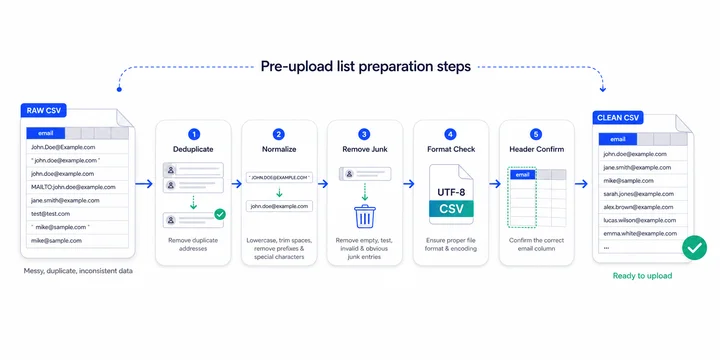
Step 1: Deduplicate
Most lists have duplicates. Records merged from multiple sources, exports across overlapping segments, and uppercase/lowercase variants of the same address all add up. Deduplicating before upload reduces your verification cost directly, since most providers charge per address, and it makes the result easier to act on. A simple spreadsheet sort or a pandas drop_duplicates call is enough; what matters is that you do it.
Step 2: Normalize the Format
Addresses in real lists arrive with a surprising amount of garbage attached: trailing whitespace, mailto: prefixes, surrounding angle brackets, comments in parentheses, and mixed case. Most verifiers tolerate most of this, but you’ll get a cleaner output (and avoid edge-case rejections) if you normalize to lowercase, strip whitespace, and remove any decorative wrappers before upload.
Step 3: Remove Obvious Junk
Quick filters before upload pay off. Strip rows where the email field is empty. Remove obvious test entries (“[email protected]”, “[email protected]”, anything containing “asdf”). Drop addresses with no @ symbol. None of this requires a verifier; it just trims the list of records that would waste a check.
Step 4: Choose the Right File Format
CSV is the standard for bulk verification, and it’s what almost every provider expects. If your list is in XLSX, export to CSV first to avoid encoding surprises. UTF-8 encoding handles international characters (and email addresses with non-ASCII local parts) cleanly. Avoid TSV, semicolon-separated files, and unusual encodings unless your provider explicitly supports them.
Step 5: Verify Your Column Headers
Most bulk uploaders need to identify which column contains the email address. If your file has a clearly named column (“email” or “email_address”), the system will detect it automatically. If not, name the column manually before upload. While you’re at it, make sure no email addresses have ended up in the wrong column due to a parsing error during export.
Post-bulk-run action checklist:
- ✓
The filtered deliverable segment is loaded into the ESP. - ✓
Risky segment is sub-split by reason code. - ✓
Unknown rows are scheduled for re-verification. - ✓
Undeliverable rows are added to permanent suppression. - ✓
The original output file is archived with the run date.
What Happens After You Upload a List?
Once your file is in the system, several things happen in sequence, often invisibly to the user. Knowing the rough shape of the work helps you set expectations and troubleshoot when something looks off.
After upload, the system processes your file through a series of the following automated steps:
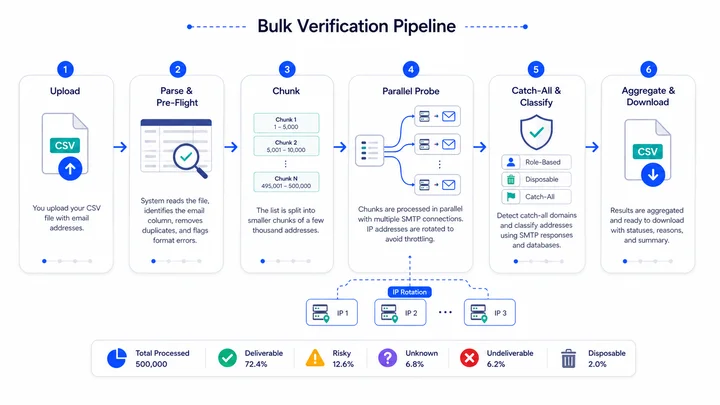
Parsing and Pre-Flight
The system reads the file, identifies the email column, and runs a quick pre-flight pass. Empty rows are skipped, exact-match duplicates within the file are flagged or removed (depending on the provider’s settings), and obvious format errors are recorded for the final output. This step is fast: a 500,000-row file is usually parsed in under a minute.
Chunking
The list is broken into chunks of a few thousand addresses each. Chunks are the unit of work the system schedules in parallel. Smaller chunks make for finer-grained progress reporting and easier recovery from interruptions; larger chunks reduce overhead but increase the cost of restarting a failed batch. Most providers tune this internally, so you don’t have to think about it.
Parallel Probing
Many chunks run in parallel, each with its own pool of SMTP connections. The system also rotates outbound IP addresses to avoid being throttled by any single recipient mail server. Inside each chunk, addresses are validated using a standard SMTP check, where the verifier communicates with the recipient’s mail server without sending an actual message.
Retry Logic
Transient failures (4xx responses, timeouts, dropped connections) are retried automatically with exponential backoff. A typical configuration retries each transient failure three to five times before classifying the address as Unknown. This is one of the most important pieces of the system: it’s the difference between a clean run and one full of noise.
Catch-All and Classification
As probes return results, the system also detects catch-all domains by sending a randomly generated address to each new domain encountered. If the server accepts the random address, every result from that domain is downgraded to Risky. Classification against role-based and disposable databases happens in parallel, since those don’t depend on SMTP responses.
Aggregation and Output
Results stream into a final output file, which is usually downloadable as a CSV with the original columns plus a few new ones: status, reason code, and provider category (free, business, role-based, disposable, catch-all). Most providers also surface a summary view: total count, percentage in each category, top reasons for undeliverables, and any errors worth flagging.
Throughput Expectations by List Size
Throughput is one of the most-asked questions, and it’s also one of the trickiest to answer precisely. Real-world processing time depends on the mix of domains in the list, how many of them require retries, how aggressively the provider rotates IPs, and how busy their infrastructure is at the moment of the run. The ranges below reflect typical performance from a managed bulk verifier and are intended as planning guidance, not promises.
| List Size | Typical Time Range | What Drives the Variance |
|---|---|---|
| Under 5,000 | A few minutes. | Mostly file parsing time. |
| 5,000 – 50,000 | 10 – 60 minutes. | Number of unique domains; retry rate. |
| 50,000 – 250,000 | 1 – 4 hours. | Catch-all density; greylisting. |
| 250,000 – 1 million | 3 – 12 hours. | Sheer volume; concurrent jobs on the platform. |
| Over 1 million | Half a day to a day. | Same factors, plus rate-limiting on major providers. |
Two practical implications follow from these numbers. First, plan ahead for large jobs: if you need a 500,000-row list cleaned for a Tuesday morning campaign, don’t start the upload Monday at 5pm. Second, monitor partial results if the platform supports it; many bulk verifiers stream completed batches into a downloadable file as the run progresses, which lets you start preparing your campaign segments before the whole job is finished.
Treating verification as the last step before sending. Plan it as the first step of campaign preparation, not the last. The smaller your buffer between verification and send, the more pressure there is to ignore the Risky and Unknown buckets, which is exactly the worst time to skip nuance.
Handling Catch-All Domains in Bulk
Catch-all emails are the single biggest source of complexity in bulk verification and the place where most teams either get the workflow right or quietly introduce risk. A catch-all domain is configured to accept mail for every address, including ones that don’t exist, which means the SMTP probe returns 250 OK no matter what address is being checked.
Verifiers detect this by sending a probe to a randomly generated address that almost certainly doesn’t exist. If the server accepts it, the domain is flagged as catch-all, and every address at that domain is graded risky rather than deliverable.
Why Catch-Alls Matter More in Bulk
In a real-time check, you might see one or two catch-alls per session and decide what to do with each in context. In a bulk run, especially on a B2B list, you can routinely find that ten to forty percent of the list is flagged as risky because of catch-all domains. That’s a meaningful share, and the way you treat it affects both deliverability and pipeline.
Three Strategies for Catch-All Addresses
Different teams handle catch-alls differently, and there’s no single right answer. The three common approaches are the following:
| Strategy | Approach | Best For |
|---|---|---|
| Aggressive suppress | Treat catch-alls as undeliverable; don’t send to them. | New domains, fragile reputation, first-time outbound. |
| Cautious send | Send to catch-alls in small warm-up batches; monitor engagement closely. | Established domain, mid-volume sending, list with strong intent signals. |
| Send normally | Send to catch-alls alongside deliverables. | Mature program with strong reputation and content engagement. |
If you’re not sure which strategy fits, default to the cautious-send middle path. Aggressive suppression often loses real prospects at companies whose mail servers happen to be configured as catch-alls; aggressive sending often produces enough soft signals to start affecting reputation. The middle path warms up to catch-alls while keeping a hand on the brake.
Catch-all density is a useful diagnostic in its own right. If a freshly purchased B2B list shows over fifty percent catch-all results, that’s a strong signal about the source of the data: it was likely scraped from web pages or compiled from public directories, both of which over-index on small businesses with simple mail server setups. The catch-all rate is, in effect, a quality score for the source.
Reading the Output: Categories and Actions
A bulk run typically produces six to ten distinct result categories, but they all roll up into the same four-tier confidence model: Deliverable, Risky, Unknown, Undeliverable. Within those tiers, reason codes give you the color you need to make decisions.
| Category | Tier | Action |
|---|---|---|
| Deliverable | Deliverable | Send to campaign segment. |
| Catch-all | Risky | Segment by strategy (suppress, warm-up, or send). |
| Role-based (info@, etc.) | Risky | Segment: Consider lower send volume. |
| Full mailbox / over quota | Risky | Segment; revisit on next bulk run. |
| Disposable | Risky/Suppress | Suppress in most contexts. |
| Greylisted (after retries) | Unknown | Park for re-verification. |
| Server timeout / no response | Unknown | Retry on next bulk run. |
| Anti-probe block | Unknown | Park; rely on engagement signals to decide. |
| Mailbox does not exist | Undeliverable | Suppress permanently. |
| Invalid syntax / no MX | Undeliverable | Suppress permanently. |
In practice, your action plan after a bulk run looks something like this:
- Filter to Deliverable. This is your primary send segment.
- Split risky emails by reason code. Catch-all and role-based usually go to a cautious warm-up segment. Disposable and full mailboxes typically get suppressed.
- Hold Unknown for re-verification. Don’t send it on this campaign; revisit in a few days or on the next scheduled run.
- Suppress undeliverables permanently. Add them to your suppression list in your ESP or CRM so they never re-enter sends.
- Save the full output file. Keep it for at least 90 days as audit history; you’ll thank yourself when investigating a future deliverability anomaly.
CHECKLIST
Post-bulk-run action checklist:
- The filtered deliverable segment is loaded into the ESP.
- Risky segment is sub-split by reason code.
- Unknown rows are scheduled for re-verification.
- Undeliverable rows are added to permanent suppression.
- The original output file is archived with the run date.
Re-Verification Cadence
Lists decay continuously. A bulk run cleans your list as of the moment you ran it, but addresses change status all the time as people leave jobs, mailboxes are decommissioned, and domains shut down. A reasonable re-verification cadence keeps your list aligned with reality without spending unnecessarily on checks that won’t have changed.
| List Type | Suggested Cadence |
|---|---|
| Active marketing list (regular sends) | Before each major campaign + every 3 months. |
| Cold outbound source list | On import, immediately before any campaign. |
| CRM contact database | Quarterly to biannual sweep. |
| Re-engagement / win-back lists | Right before the win-back send. |
| Lists from data providers | On every import, regardless of vendor claims. |
| Newly built lists | After collection ends, before the first send. |
If the list is high-velocity (hundreds of new signups per day) and you’re already running real-time verification on the form, you can stretch the bulk cadence longer because new bad addresses aren’t entering the database. If the list is mostly imported from outside sources, you’ll want to verify more often.
Cost and Pricing Considerations
Bulk verification is priced per address, almost universally. The cost per address typically drops with volume: a few thousand addresses cost more per record than a few hundred thousand. That makes the economics straightforward but also creates two practical decisions worth thinking through.
Pay-As-You-Go vs. Subscription
Pay-as-you-go (credit packs) suits teams with infrequent, episodic verification needs. Buy credits, run a job, and pay for what you used. Subscription suits teams with predictable monthly volume, especially when the volume includes ongoing real-time API calls on signup forms. Most providers offer both, and switching between them is usually painless once you know your steady-state volume.
What “Cost” Really Means
The headline price per address is part of the total cost, but two other factors matter in practice. Catch-all detection: if a vendor charges full price for catch-all results without flagging them clearly, you’re paying real money for ambiguous data. Refunds for syntactically invalid records: some providers don’t charge for addresses that fail syntax (since the check is essentially free); others do. Both questions are worth asking before you buy a large credit pack.
Our current pricing, including bulk credit packs and subscription tiers, is on the EmailVerify.io pricing page.
Run the math on the cost of a single deliverability incident before you optimize too aggressively for verification cost. The cost of bulk verification on a typical list is small. The cost of recovering from a domain reputation collapse is large, takes weeks, and slows down every campaign in the meantime. Verification almost always wins on expected value.
Bulk Verification Through the API
For teams that run verification regularly, programmatic bulk is the path. Most providers expose two API patterns for bulk: a job-based pattern where you upload a file (or stream rows) and poll for completion and a batch-call pattern where you submit a chunk of addresses and receive results inline. Job-based is the right choice for large lists; batch is useful for medium lists embedded in automation pipelines.
A typical programmatic bulk workflow looks like this:
- Submit the list (file or stream) to the bulk endpoint.
- Receive a job ID.
- Poll the status endpoint until the job is complete (or subscribe to a webhook callback).
- Download the result file or stream rows out of the result endpoint.
- Pipe the structured results directly into your ESP/CRM with the right segment tags.
Full endpoint references and code examples are in the EmailVerify.io API documentation. Most teams build the integration once and then schedule recurring runs against it.
The important advantage in API-driven bulk is automation around the segmentation step. If you write the integration so that deliverable rows automatically flow into your campaign segment, Risky rows into a warm-up segment, Undeliverable rows into permanent suppression, and unknown rows into a re-verification queue; you remove the manual step where most teams introduce errors. The verifier becomes a quiet, recurring part of the pipeline rather than a project.
What Are the Most Common Bulk Email Verification Mistakes?
After watching teams run bulk verification at every scale, the same operational mistakes show up repeatedly. None of them are catastrophic on their own, but each one quietly costs deliverability or money.
These are the most common mistakes to avoid when running bulk email verification.
Skipping Pre-Upload Cleaning
Uploading a raw, undeduplicated, mixed-case CSV is wasteful, especially when it comes from scraped or purchased sources that may contain hidden spam traps.
Treating Risky as Undeliverable
Catch-all and role-based email addresses contain real customers. Suppressing them all by default loses revenue. Treating them as a separate segment with a warm-up plan keeps deliverability safe while preserving reach.
Treating Undeliverable as a Maybe
Hard 5xx responses are the most reliable signal in the entire pipeline. If a mail server explicitly says the mailbox doesn’t exist, it doesn’t exist. Sending anyway in the hope that the result was wrong is how avoidable bounces happen.
Not Suppressing After the Run
If you don’t add undeliverable addresses to a permanent suppression list, they re-enter your sending pool the next time someone exports from the same source. The bulk run is wasted work.
Verifying Once and Calling It Done
Lists decay. A clean list six months ago is not a clean list today. Verification belongs on a schedule, not as a one-time project.
Verifying Right Before Sending
Verification is a campaign-prep step, not a launch step. If you verify with no buffer before sending, you’ll be tempted to skip the careful segmentation that produces the actual deliverability gain.
Ignoring the Reason Codes
Reason codes are the most underused part of the output. They tell you why an address landed in its bucket. Building rules off the reason (catch-all, role-based, full mailbox, or anti-probe block) instead of just the tier produces noticeably better results than treating all risky addresses the same.
The most expensive mistake we see in cold outbound: importing a fresh purchased list straight into a sending tool and sending the first campaign without bulk verification. One large send to an unverified list can collapse a domain’s reputation for weeks, and the recovery costs more than every list and every verification credit you’d have used in a year.
How EmailVerify.io Handles Bulk Verification
EmailVerify.io was built around the idea that bulk verification should fit a real operational workflow, not just a vendor demo. That shows up in three specific ways: the upload experience, the result format, and the integration paths.
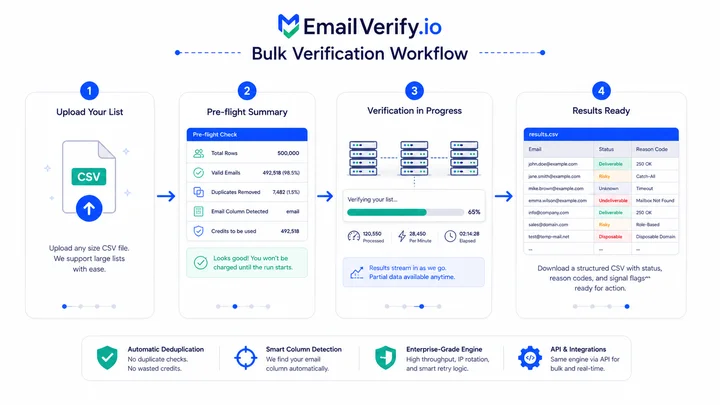
Uploads accept CSV files of any size, with automatic deduplication, column auto-detection, and a clear pre-flight summary so you know what’s about to be checked before any credits are consumed. While the run is in progress, partial results stream into the output, so large jobs can start producing usable data well before the whole list is finished.
The result format is structured for action. Every row carries a primary status (Deliverable, Risky, Unknown, Undeliverable, Disposable), a reason code, and a flag for the underlying signals (catch-all, role-based, free provider, full mailbox). That means you can build segmentation rules off the reasons rather than just the tiers, which is where the real gains in send strategy come from.
For teams that integrate verification into ongoing workflows, the same engine is available through the EmailVerify.io API for both bulk jobs and real-time checks, with consistent result schemas across the two. And if you’re still deciding whether the bulk pass is worth running on a particular list, our broader guide on email list cleaning walks through the diagnostic signals worth looking at first.
Frequently Asked Questions
How Long Does Bulk Email Verification Take?
It depends on the size of the list and the mix of domains in it. Small lists (under 5,000 addresses) usually finish in minutes. Medium lists (50,000) take roughly 10 minutes to an hour. Large lists (a few hundred thousand) typically take a few hours. Very large lists (over a million) can take half a day to a full day. Catch-all density and greylisting are the biggest variables.
How Accurate is Bulk Email Verification?
For standard mailboxes at non-catch-all domains, accuracy is high: the SMTP probe gives a clean signal that's reliable in practice. Accuracy drops at catch-all domains (where the server accepts every address regardless of validity), at greylisting servers (which need retry logic), and at strict providers like Outlook and Yahoo (which sometimes return ambiguous responses). A good verifier expresses this honestly with graded statuses (Deliverable, Risky, Unknown, Undeliverable) instead of forcing a binary answer.
How Much Does Bulk Email Verification Cost?
Almost all bulk verifiers price per address, with the per-record cost dropping as volume increases. Most teams either buy credit packs (pay-as-you-go) or subscribe to a monthly plan. Specific pricing varies by provider; for current EmailVerify.io rates and credit-pack tiers, see our pricing page.
Can You Verify a 1 Million-Row List in One Upload?
Yes. Modern bulk verifiers handle million-row uploads as a single job. The system chunks the file internally and runs many batches in parallel; you just watch progress and download results when complete. The upload itself is fast; the run takes longer because of the SMTP probing required for each unique mailbox.
What File Formats are Accepted in Bulk Verification?
CSV is the standard and is universally accepted. Most providers also accept XLSX. UTF-8 encoding is recommended to handle international characters. If your data is in another format (TSV, semicolon-separated, JSON), export to CSV before upload to avoid edge-case parsing issues.
Does Bulk Verification Trigger Any Notification to Recipients?
No. Bulk verification uses no-send SMTP probing under the hood, which means the verifier asks the recipient mail server whether a mailbox exists and then closes the connection before any message is delivered. Recipients see nothing. The check is invisible from their end.
Will Bulk Verification Damage Your Sender Reputation?
No. The probing is performed by the verifier's infrastructure and IPs, not yours. Your sending domain is never used during the verification process. If anything, bulk verification protects your reputation by removing the addresses that would otherwise produce hard bounces from your real campaigns.
How Often Should You Run Bulk Verification?
Before any major campaign on a list that hasn't been recently checked, before warming a new sending domain, on every import from an outside source, and as a routine refresh every three to six months for active lists. CRMs typically benefit from a quarterly- to biannual sweep. High-volume senders run it more often.
What Should You Do with Catch-All Results?
Don't treat them all as deliverable, and don't suppress them all by default. The middle path is to segment catch-alls separately, send to them in a cautious warm-up batch, and watch engagement signals before scaling volume. Over time, your engagement data tells you which catch-all addresses are real and which aren't, which is more reliable than the SMTP probe in those cases.
Final Thoughts
Bulk email verification is a deceptively simple-looking step that hides a lot of operational depth. The upload screen is easy. The output file is easy.
The work that produces real ROI is in the preparation before upload and the segmentation after, both of which most teams skim through and then wonder why their campaigns still bounce.
The teams that get the most out of bulk verification treat it as a recurring workflow, not a one-time project. They prepare lists carefully, run verification on a schedule, segment the output by reason code, and feed the results back into their sending platform automatically.
They use catch-all data as a diagnostic, not just a filter. They suppress undeliverable addresses permanently, retry unknown ones on a schedule, and warm up to risky ones cautiously.
Whether you’re cleaning a 5,000-row CSV or a million-row CRM export, the playbook is the same. Prepare, upload, run, segment, send. Save the output file. Schedule the next run. The list is never permanently clean, but with verification in place, it stays clean enough that deliverability stops being the variable that breaks every campaign.
Cleaner lists. Stronger reputation. More mail in the inbox.
That’s what bulk verification delivers when it’s wired into the workflow properly, especially when you rely on a trusted email verification service built for accuracy at scale.
Run Your Next List Through Bulk Verification
Upload a sample (or your full list) to EmailVerify.io bulk verification, or build it into your stack with the API. Either way, you’ll see the four-tier breakdown for your data within minutes.


