AWeber Email Verification Integration — Verify Lists, Download Clean Results
EmailVerify.io's AWeber integration imports your subscriber lists automatically, validates every email address against 20+ real-time checks, and produces a clean verified CSV ready to re-import into AWeber. Unlike CRM-based integrations, AWeber does not support automatic result sync — after verification completes you download the results as a CSV and update your AWeber lists directly. This gives you full control over which contacts to keep, remove, or segment before your next send. No Auto-Validation is available for AWeber. Perfect for bloggers, podcasters, content creators, and solopreneurs who want clean lists without complexity.


Quick Summary: AWeber Email Verification Integration
- Integration type: Direct OAuth connection — no Zapier or API keys needed
- Result delivery: Downloadable CSV — results are NOT auto-synced back to AWeber (manual re-import required)
- Verification checks: 20+ real-time checks per email address
- Auto-Validation: Not available for AWeber due to no live sync API
- Best for: Bloggers, podcasters, content creators, solopreneurs, and small businesses using AWeber
How to use the integration
To get started with the AWeber integration, you’ll need an active AWeber account, which you can create at https://www.aweber.com/free.htm along with an EmailVerify.io account.
Step 1: Sign in to EmailVerify.io
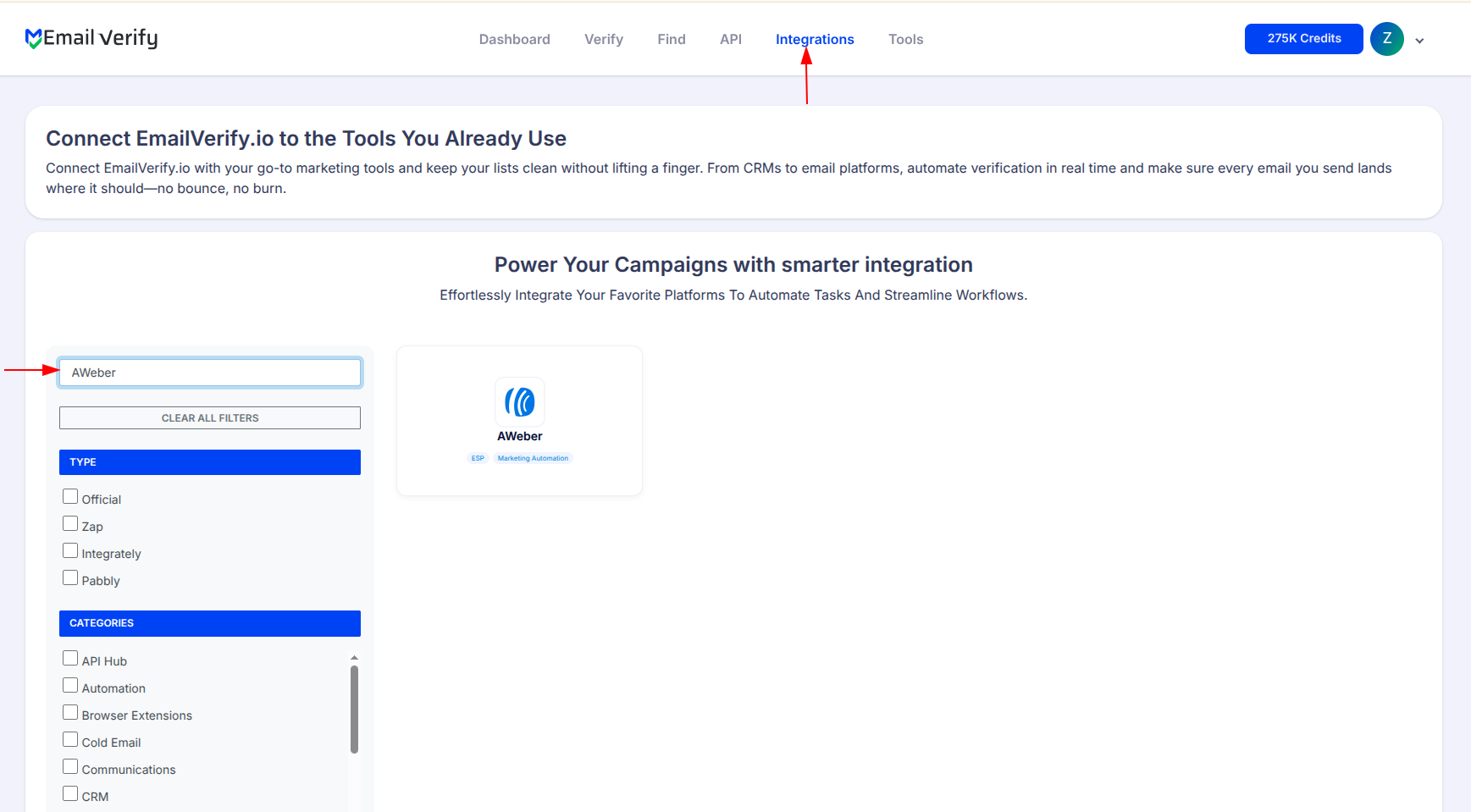
Step 2: Open the AWeber Integration

Step 3: Select AWeber from Integration List

Step 4: View Your AWeber Lists

Step 5: Select Lists to Verify
Note: The results of the validation are not automatically exported to the integration.

Step 6: Monitor Progress

Step 7: Download Results
Note: The results of the validation are not automatically exported to the integration. You have to manually download the CSV and re-import it into AWeber to update your contacts.

AWeber Email Verification Integration Features
To use this integration, you must have an active AWeber account. You will be prompted to enter your AWeber Login Name and Password during the setup process.
Import Email Addresses from AWeber
Import email addresses from your AWeber lists directly into EmailVerify.io for validation.
Validate Email Addresses
Validate imported emails using EmailVerify.io's powerful email verification service to identify invalid addresses.
Secure OAuth Connection
We have integrated our platform with AWeber using OAuth for secure authorization. OAuth allows our application to access AWeber without sharing your credentials. Your AWeber Login Name and Password are never stored by EmailVerify.io.
Manual CSV Export
After validation, you'll need to manually download the CSV and import it back into AWeber to update your contacts with validation results.
Clean Campaign Lists
This integration ensures your campaigns remain clean, reduces bounces, and improves deliverability with real-time verification.
Protect Deliverability
Identify invalid email addresses before sending campaigns to protect deliverability and improve campaign performance.
Why AWeber Lists Go Stale
AWeber is popular with bloggers, content creators, and solopreneurs who grow their lists over months and years. Unlike enterprise CRMs with strict form validation, AWeber subscriber forms accept any email address at sign-up — meaning invalid, fake, and abandoned addresses accumulate silently over time.
- ✗ Blog sign-up forms accept typo emails and fake addresses without any validation
- ✗ Subscribers abandon old email addresses when switching jobs or providers
- ✗ Free email accounts get deactivated after long periods of inactivity
- ✗ Lead magnet and freebie campaigns attract one-time disposable email sign-ups
- ✗ Purchased or imported lists contain high rates of invalid and outdated addresses
- ✗ Role addresses like info@, hello@, and contact@ rarely belong to real individuals
EmailVerify.io runs 20+ real-time checks per address including SMTP verification, disposable email detection, MX record validation, and catch-all domain flagging — and delivers a clean CSV showing exactly which contacts to keep or remove.
What EmailVerify.io Checks on Every AWeber Subscriber
Every email address imported from AWeber is run through a multi-layer verification pipeline before your results CSV is ready to download.
| Check | What It Detects |
|---|---|
| MX Record Validation | Confirms the domain has working mail servers capable of receiving email |
| SMTP Mailbox Verification | Checks whether the specific mailbox exists on the receiving mail server |
| Disposable Email Detection | Flags addresses from 10,000+ known temporary and throwaway providers |
| Role Address Detection | Identifies generic addresses like info@, hello@, support@ that rarely belong to individuals |
| Syntax Validation | Catches malformed addresses and common typos before deeper checks run |
| Catch-All Domain Detection | Flags domains that accept all incoming mail regardless of whether the mailbox exists |
| Free Provider Tagging | Labels Gmail, Yahoo, Hotmail for segmentation decisions |
Results are delivered as a downloadable CSV with verification status and sub-status columns for each subscriber.
What AWeber Users Achieve with EmailVerify.io
Creators and small businesses who clean their AWeber lists before sending see measurable improvements in deliverability and campaign performance.
AWeber results are delivered as a downloadable CSV. There is no automatic sync back to AWeber — re-import the CSV manually to update your subscriber records.
AWeber + EmailVerify.io vs Other Cleaning Methods
Several approaches exist for cleaning an AWeber list. Here is how they compare.
| Approach | Time Required | Accuracy | Auto-Sync | Ongoing Protection |
|---|---|---|---|---|
| Send without verifying | None | No verification | N/A | None |
| Export CSV → third-party tool → re-import | Hours | Low–Medium | No | Limited |
| EmailVerify.io AWeber Integration | Minutes to verify | High — 20+ checks | Manual CSV re-import | Full (disposables, catch-alls) |
Who Should Use the AWeber Email Verification Integration
Bloggers & Content Creators
Your list has grown through years of blog posts, opt-ins, and lead magnets. Readers use old or temporary emails to grab freebies and then never engage. Verify your AWeber list before a major campaign or product launch to ensure your messages reach real inboxes that can actually convert.
Podcasters & Newsletter Publishers
You depend on email to distribute new episodes and issues to your audience. Hard bounces damage your sending domain over time. Clean your AWeber subscriber list regularly to protect your domain reputation and maintain consistent inbox delivery for your most loyal listeners. Learn how email verification works.
Solopreneurs & Small Businesses
You manage your own AWeber account and can't afford deliverability issues hurting your revenue campaigns. EmailVerify.io connects to AWeber in minutes, verifies your list, and gives you a clean CSV — no technical skills required, no ongoing maintenance.
Course Creators & Coaches
Launches and promotional sequences sent to a dirty list waste effort and hurt sender reputation. Verify your AWeber audience before every launch to maximise reach and ensure your most important emails — welcome sequences, offer emails, cart-close emails — land in the inbox. See all email verification checks.
Technical Questions — AWeber Email Verification Integration
What columns are in the verification results CSV?
The downloaded CSV includes the original email address, verification status (Valid, Invalid, Catch-All, Disposable, or Unknown), sub-status (the specific technical reason such as mailbox_not_found or smtp_timeout). Use these columns to filter your AWeber list — keep Valid contacts, remove Invalid and Disposable, and decide on Catch-All and Unknown based on your risk tolerance.
How do I re-import verification results into AWeber?
After downloading the results CSV from EmailVerify.io, log in to AWeber and use the Subscriber Import feature to import the CSV. You can use the status column to segment subscribers — for example, import only Valid contacts into your active list, or create a separate AWeber list for Invalid addresses to archive or remove. AWeber supports CSV import with standard column mapping.
Why is Auto-Validation not available for AWeber?
Auto-Validation requires a live API connection that allows EmailVerify.io to verify new contacts the moment they are added and immediately write the result back to the platform. AWeber's integration does not currently support this live bidirectional sync. Results must be downloaded as a CSV and re-imported manually. For real-time verification at the point of sign-up, consider adding an API validation step to your AWeber form using the EmailVerify.io API directly.
Which AWeber subscribers are imported for verification?
Only the email addresses from your selected AWeber lists are imported into EmailVerify.io for verification. Subscriber names and other contact fields are not imported. The verification process checks each imported email address and returns a status result in the downloadable CSV. You control which lists to verify — you can select one list or multiple lists in a single verification run.
Also integrate with Mailchimp , HubSpot , ActiveCampaign , Klaviyo . Or use ourAPI for programmatic access.
Frequently Asked Questions

How do I connect EmailVerify.io with AWeber?
Log in to your EmailVerify.io account, go to the Integrations section, and search for AWeber. Click Connect and a popup will prompt you to sign in to AWeber and authorise access via OAuth. Your AWeber lists appear in the integrations page once authorised. Select the lists you want to verify and click Verify. No API keys or CSV exports are needed to import your lists — only the final results require a manual download.
Can I verify AWeber lists in bulk with EmailVerify.io?
Yes. EmailVerify.io verifies entire AWeber subscriber lists in bulk. After connecting your account, select one or more lists and EmailVerify.io processes every email address through 20+ real-time checks — including SMTP verification, disposable email detection, MX record validation, and spam trap identification. When processing is complete, you download the results as a CSV and re-import clean contacts back into AWeber.
Does EmailVerify.io filter disposable email addresses from AWeber?
Yes. EmailVerify.io checks every AWeber subscriber against a database of over 10,000 known disposable and temporary email providers. Addresses flagged as Disposable appear in the results CSV with a Disposable status. You can then filter them out in AWeber by importing only Valid-status contacts, reducing your active list to genuine, engaged subscribers who can receive and respond to campaigns.
Will EmailVerify.io automatically update my AWeber contacts after verification?
No. AWeber does not support automatic result sync back from EmailVerify.io. After verification completes, you download a CSV of results from EmailVerify.io and manually re-import it into AWeber. This is different from HubSpot and Mailchimp integrations where results sync automatically. The CSV includes status and sub-status columns so you can decide exactly which contacts to keep, remove, or segment.
How does email verification improve my AWeber campaigns?
Invalid emails in your AWeber list cause hard bounces. When bounce rates exceed 2%, inbox providers like Gmail and Outlook begin routing your emails to spam — for all recipients, not just the invalid addresses. EmailVerify.io removes invalid, disposable, and risky addresses before you send, which reduces bounce rates by up to 98%, protects your sender reputation, and improves open rates and inbox placement across your campaigns.
What columns are in the AWeber verification results CSV?
The downloaded CSV contains the email address, verification status (Valid, Invalid, Catch-All, Disposable, or Unknown), and sub-status (specific technical reason such as mailbox_not_found, smtp_timeout, or disposable_domain). Use the status column to filter your AWeber list — import only Valid contacts into your active list, archive or delete Invalid and Disposable contacts, and assess Catch-All and Unknown addresses based on your bounce risk tolerance.
How do I re-import verification results into AWeber?
After downloading the results CSV from EmailVerify.io, log in to AWeber and use the Subscriber Import feature. Filter the CSV to the contacts you want to keep — typically Valid status — and import that filtered file back into your AWeber list. You can also create a separate AWeber list for Invalid contacts to archive them without deleting permanently. AWeber's import tool supports standard CSV column mapping.
Why is Auto-Validation not available for AWeber?
Auto-Validation requires a live bidirectional API connection that lets EmailVerify.io verify a new contact the moment they are added and immediately write the result back to the platform. AWeber's current integration does not support this live sync. As a result, AWeber list cleaning must be done manually in batches — connect, verify, download CSV, re-import. For real-time verification at point of sign-up, use the EmailVerify.io single-email API directly in your form handler.
Which AWeber subscribers are imported for verification?
Only email addresses from the AWeber lists you select are imported into EmailVerify.io. Subscriber names and other contact fields are not imported — only the email address is sent for verification. You choose which lists to verify individually; lists you do not select are not imported. Results are returned per email address in the downloadable CSV, which you then re-import to update the relevant AWeber list.
How often should I verify my AWeber list?
Email addresses decay at approximately 22–30% per year. For AWeber users, best practice is to verify your full list every 3–6 months and always before major campaign sends — launches, promotions, or seasonal campaigns. Since AWeber has no Auto-Validation, invalid sign-ups accumulate between verification runs. Frequent senders with high list growth should verify quarterly; lower-volume senders can manage with twice-yearly verification runs.
You're just one click away from clean email lists.
Start verifying your email addresses instantly and improve your campaign deliverability
* No credit card required