Benchmark Email Verification Integration — Verify Lists, Download Clean Results
EmailVerify.io's Benchmark Email integration imports your subscriber lists automatically via API key, validates every contact against 20+ real-time checks, and delivers results you can download and use to clean your campaigns. Important: Verification results are delivered as a downloadable report in your EmailVerify.io dashboard — they are not automatically written back to Benchmark Email. You use the results to manually remove invalid contacts before your next send. This gives you full control: see exactly which contacts are invalid, disposable, or risky before deciding how to handle them in Benchmark Email.


Quick Summary: Benchmark Email Verification Integration
- Integration type: API key — obtained from Benchmark Email (Integrations > API Key)
- Result delivery: Downloadable report in EmailVerify.io dashboard — NOT auto-synced back to Benchmark Email
- Verification checks: 20+ real-time checks per email address
- Auto-Validation: Not available for Benchmark Email
- Best for: SMBs, non-profits, and e-commerce businesses using Benchmark Email for campaigns
How to use the integration
To get started with the Benchmark Email integration , you'll need an active Benchmark Email account which you can create at https://ui.benchmarkemail.com/register and a free EmailVerify.io account.
Step 1: Sign in to EmailVerify.io
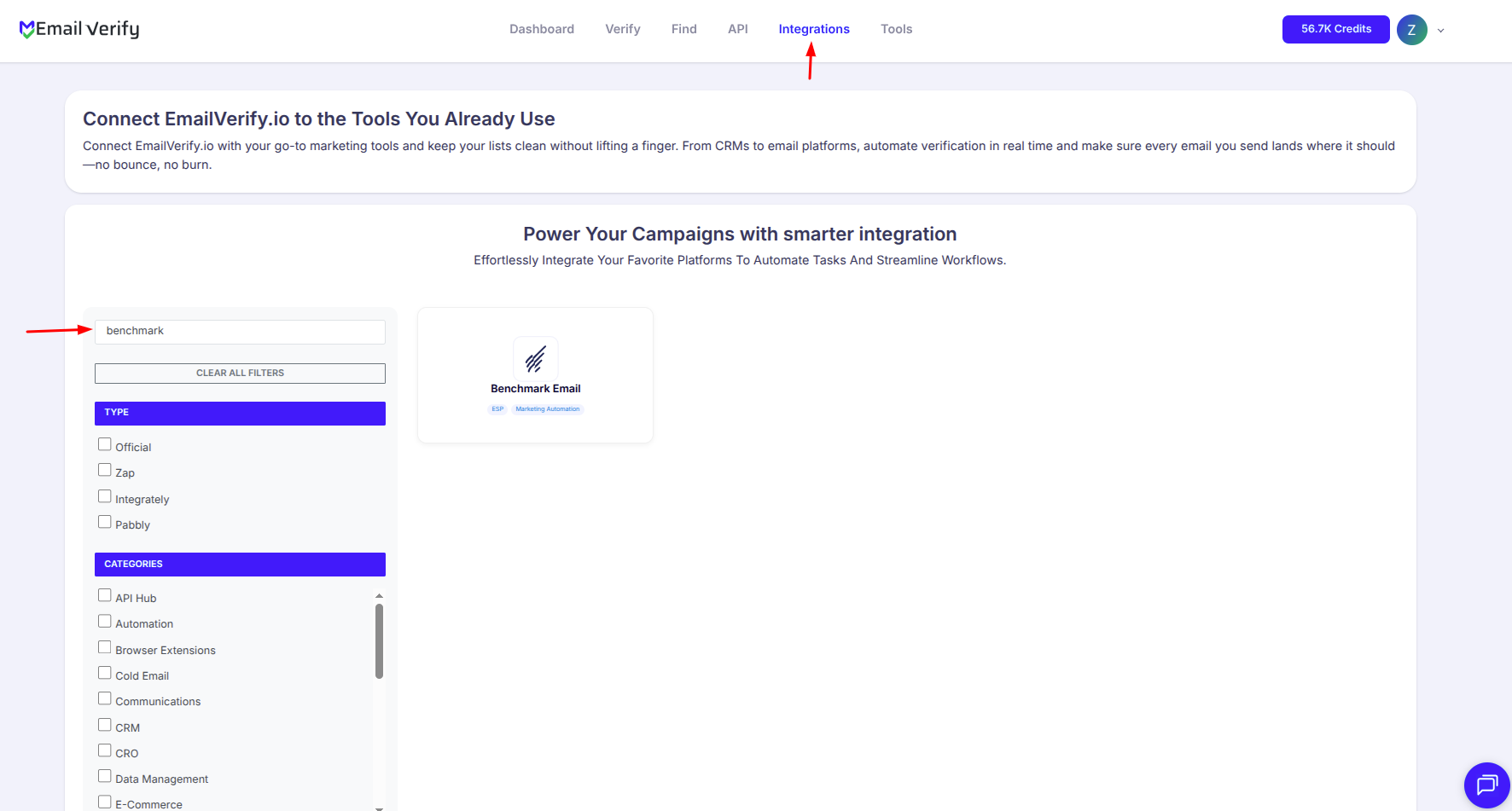
Step 2: Select Benchmark Email
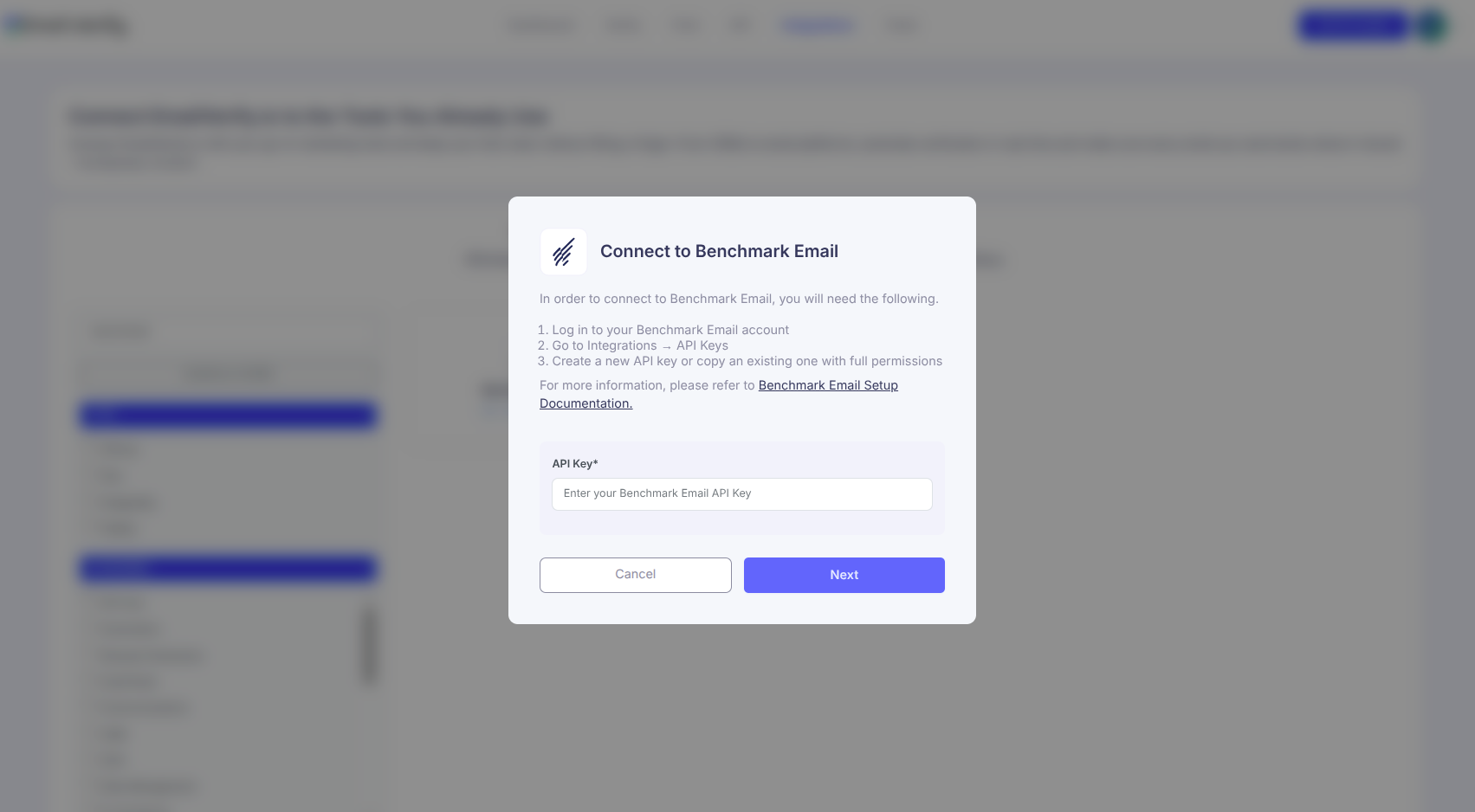
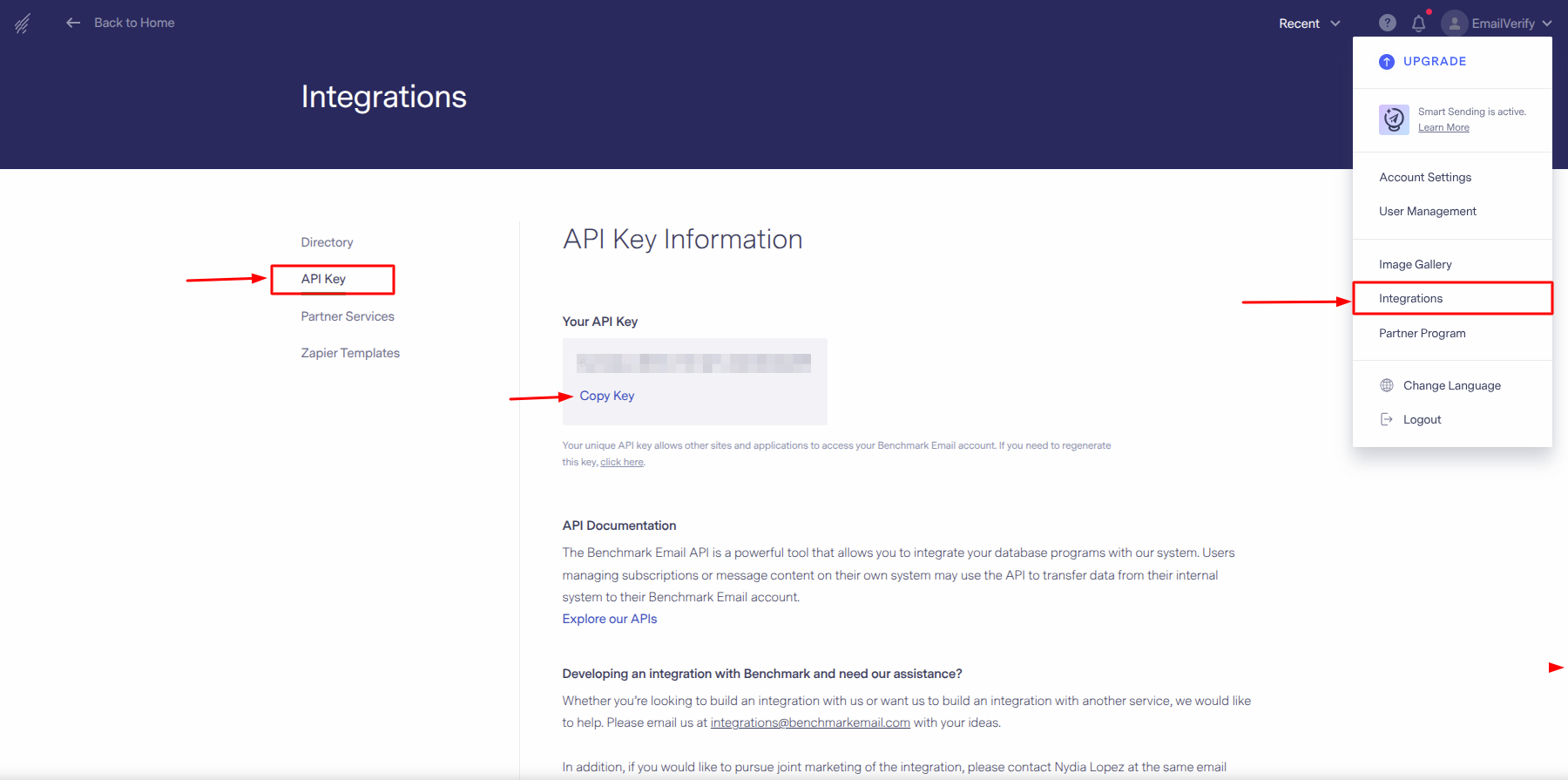
Step 3: Get Benchmark Email API KEY
Step 4: View Your Lists
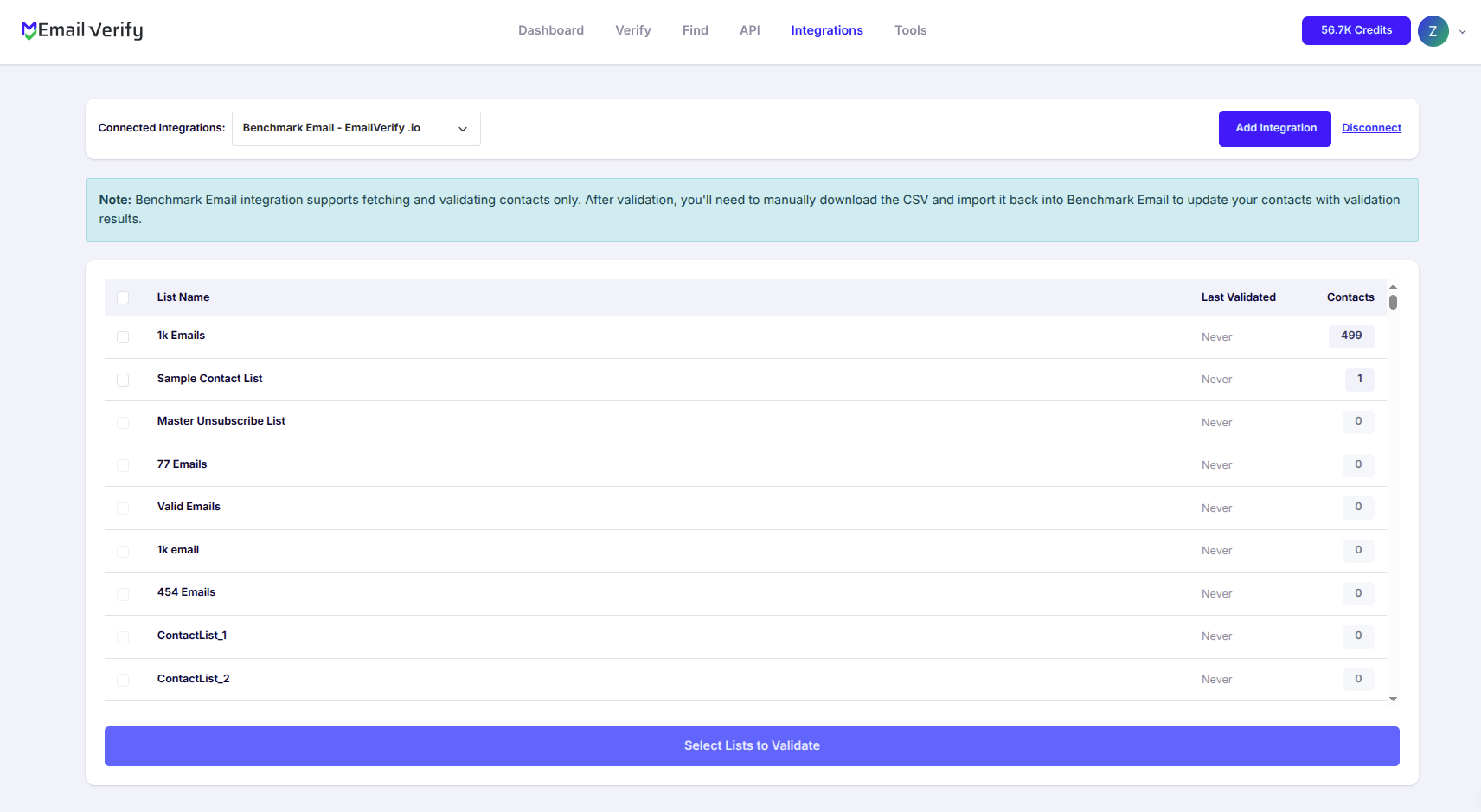
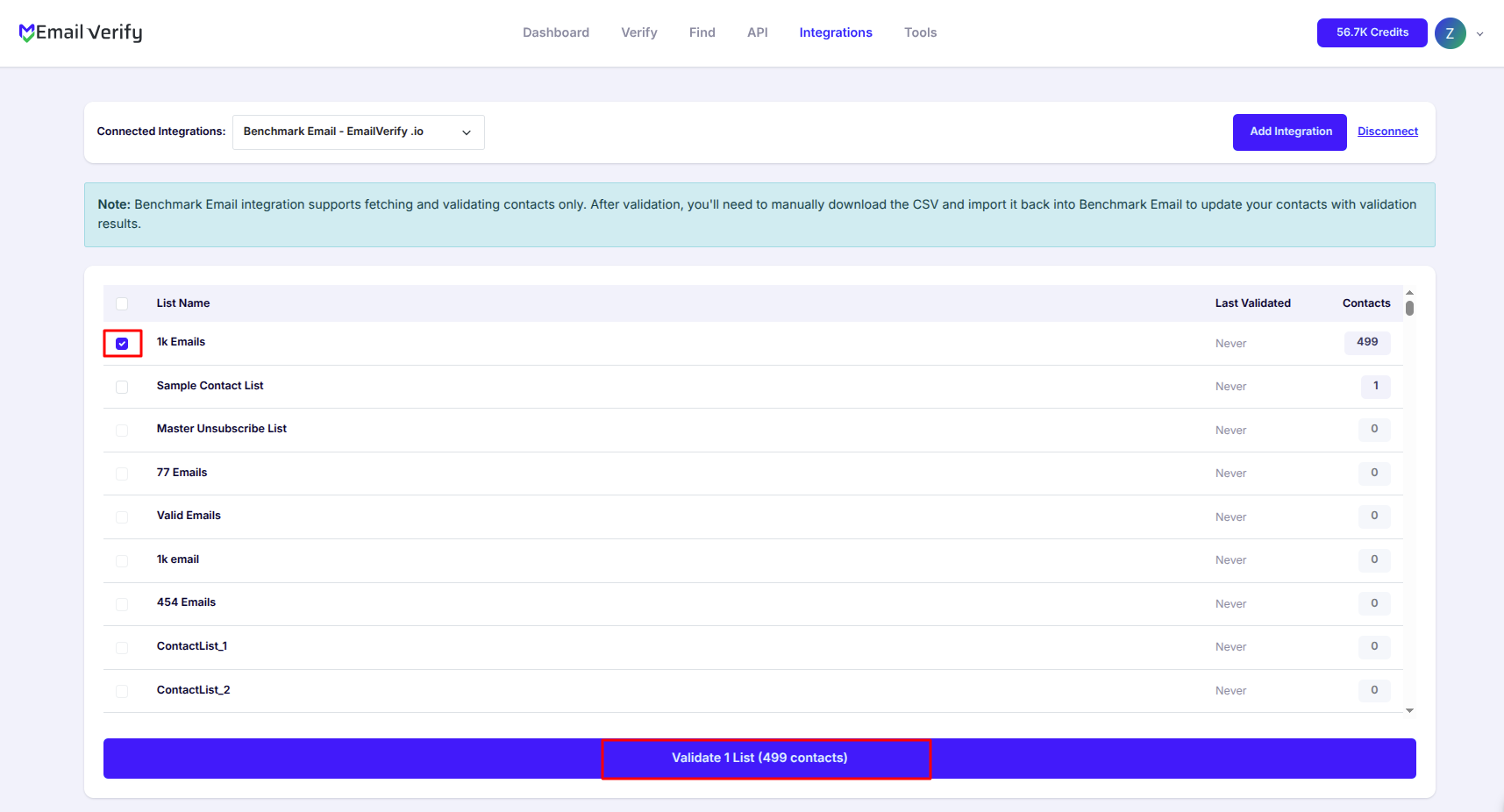
Step 5: Select Lists to Verify
Note: The results of the validation are not automatically exported to the integration.
Step 6: Monitor Progress
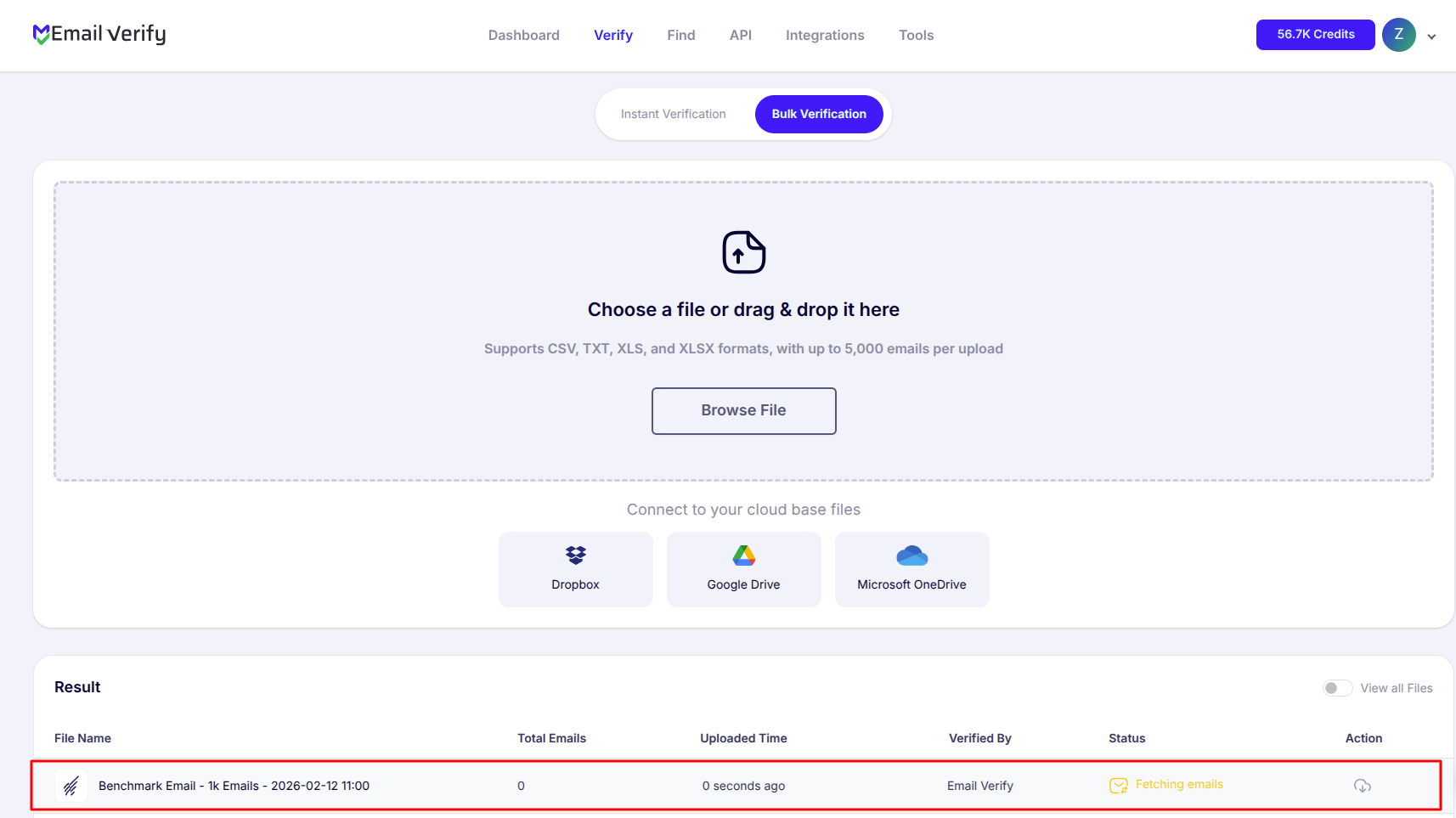
Step 7: Download Results
Note: Results are not automatically synced back to Benchmark Email. Download the results CSV from your EmailVerify.io dashboard and use it to manually remove invalid contacts from your Benchmark Email lists.

Benchmark Email Verification Integration Features
EmailVerify.io integrates effortlessly with Benchmark Email to safeguard your sender reputation, boost inbox placement, and ensure your marketing campaigns run with fully verified, accurate contact data.
Import Emails from Benchmark Email
Easily import your Benchmark Email contact lists into EmailVerify.io for fast and reliable email verification.
Reliable Email Verification
Use EmailVerify.io’s robust verification engine to detect invalid, disposable, and catch-all email addresses in real time, keeping your campaigns safe and effective.
Secure API Key Access
Connect your Benchmark Email account using a secure API key. EmailVerify.io accesses your data safely without requiring your password.
Maintain Clean Contact Lists
Verify and manage your Benchmark Email contacts to keep lists accurate, organized, and optimized for maximum engagement.
Reduce Bounce Rates and Improve Deliverability
Identify invalid email addresses before sending campaigns to minimize bounces, protect your sender reputation, and increase inbox placement.
Enhance Campaign Performance
Ensure your email campaigns reach real, active subscribers by validating contacts ahead of time, helping you achieve higher engagement, click-through rates, and overall campaign ROI.
Why Benchmark Email Lists Go Stale
Benchmark Email is popular with small businesses, non-profits, and e-commerce stores that grow subscriber lists through web forms, events, and promotions. These acquisition channels frequently introduce invalid, abandoned, and role-based email addresses that accumulate silently — especially on lists that haven’t been verified before.
- ✗ Web sign-up forms accept typo emails and fake addresses without validation
- ✗ Subscribers abandon old email addresses when switching jobs or closing accounts
- ✗ Event and trade show contacts often use temporary or role-based addresses
- ✗ Non-profit donor lists age quickly as personal email addresses become inactive
- ✗ E-commerce customers use throwaway addresses for one-time discount redemptions
- ✗ Imported or purchased contact lists carry high rates of pre-existing invalid addresses
EmailVerify.io checks every Benchmark Email contact through 20+ real-time verification layers and delivers a results CSV showing exactly which contacts are safe to send to and which should be removed.
What EmailVerify.io Checks on Every Benchmark Email Contact
Every contact imported from Benchmark Email is run through a multi-layer verification pipeline before results are available for download.
| Check | What It Detects |
|---|---|
| Syntax Validation | Formatting errors — missing @, invalid characters, malformed structure |
| Domain / DNS Check | Confirms whether the email domain exists and is active |
| MX Record Check | Verifies active mail server records are present on the domain |
| SMTP Verification | Checks whether the individual mailbox exists on the receiving server |
| Catch-All Detection | Flags domains that accept all emails regardless of whether the mailbox exists |
| Disposable Email Detection | Identifies temporary or throwaway addresses from 10,000+ known providers |
| Role Address Detection | Flags generic addresses like info@, admin@, noreply@ unlikely to belong to individuals |
Results are delivered as a downloadable CSV with ev_status, ev_substatus columns for each contact.
What Benchmark Email Users Achieve with EmailVerify.io
SMBs, non-profits, and e-commerce teams that clean their Benchmark Email lists before sending see measurable improvements in deliverability and campaign performance.
Results are delivered as a downloadable CSV — not auto-synced to Benchmark Email. Use the ev_status column to filter and remove invalid contacts from your lists.
Benchmark Email Cleaning Methods Compared
Here is how the EmailVerify.io integration compares against common alternatives for cleaning Benchmark Email contact lists.
| Approach | Time Required | Accuracy | Auto-Sync | Ongoing Protection |
|---|---|---|---|---|
| Send without verifying | None | No verification | N/A | None |
| Manual CSV export to third-party tool | Hours | Low–Medium | No | Limited |
| EmailVerify.io Benchmark Integration | Minutes to verify | High — 20+ checks | Manual CSV download | Full (disposables, catch-alls) |
Who Should Use the Benchmark Email Verification Integration
Small Businesses Running Regular Campaigns
SMBs using Benchmark Email for newsletters and promotional campaigns benefit from quarterly list verification. Cleaning your list before major sends protects your sender reputation, ensures analytics reflect genuine engagement, and prevents your domain from being flagged by inbox providers.
Non-Profits Sending Donor & Member Communications
Non-profit contact lists often contain older data with higher decay rates — donors and members who have changed email addresses over years of engagement. Verify donor and member lists before fundraising campaigns or annual renewal drives to maximise genuine reach and protect deliverability for your most critical sends. Learn how email verification works.
E-Commerce Businesses on Benchmark Email
Online stores using Benchmark Email for order updates, promotional emails, and loyalty campaigns should verify customer lists before key promotional periods — Black Friday, seasonal sales, product launches. A clean list when send frequency increases protects deliverability at the moment it matters most.
Agencies Managing Benchmark Email Accounts
Marketing agencies handling Benchmark Email for multiple clients can verify any client list in minutes and deliver clean contact data backed by a full per-contact verification report — giving clients visibility into list health before every campaign. See all verification checks.
Technical Questions — Benchmark Email Verification Integration
Where do I find my Benchmark Email API key?
Log in to your Benchmark Email account and go to Integrations from the account menu, then select API Key. Copy the API key shown and paste it into the EmailVerify.io Benchmark Email connection prompt. EmailVerify.io uses the API key only to import your subscriber lists — your Benchmark Email password is never requested or stored.
What does the Benchmark Email verification results CSV include?
The downloadable CSV contains the email address, ev_status (Valid, Invalid, Catch-All, Disposable, or Unknown), ev_substatus (specific reason such as mailbox_not_found, smtp_timeout, or disposable_domain), and ev_validation_date. Filter for ev_status = Invalid to get the list of contacts to remove from Benchmark Email. Keep Valid contacts and assess Catch-All and Unknown addresses based on your bounce risk tolerance.
Why does Benchmark Email not auto-sync results back?
Benchmark Email’s current integration with EmailVerify.io does not support automatic result sync. Verification results are stored in your EmailVerify.io dashboard and delivered via downloadable CSV. To clean your Benchmark Email lists, download the results CSV, filter for invalid contacts, and remove them from your Benchmark Email lists manually. There is no Auto-Validation available for Benchmark Email.
Can I verify one Benchmark Email list without processing others?
Yes. After connecting via API key, all your Benchmark Email subscriber lists appear individually in EmailVerify.io. You select exactly which list or lists to verify — you are not required to process your entire database. Results are returned only for the contacts in the lists you selected.
Also integrate with Mailchimp , AWeber , HubSpot , ActiveCampaign . Or use ourAPI for programmatic access.
Frequently Asked Questions

How do I connect EmailVerify.io to Benchmark Email?
Sign in at app.emailverify.io and go to Integrations. Select Benchmark Email and enter your API key — find it in Benchmark Email under Integrations > API Key. Your Benchmark Email lists appear automatically. Select the lists you want to verify and start the process.
Does EmailVerify.io sync results back to Benchmark Email automatically?
No. Verification results are delivered as a downloadable report in your EmailVerify.io dashboard — not written back to Benchmark Email. To use the results, download the CSV from EmailVerify.io, then manually remove invalid contacts from your Benchmark Email lists.
What does the Benchmark Email verification results CSV include?
The downloadable CSV contains your original contact data plus: ev_status (Valid / Invalid / Catch-All / Disposable / Unknown), ev_substatus (reason code for the result). Filter for ev_status = Invalid to identify which contacts to remove from your Benchmark Email lists.
Is the Benchmark Email integration free?
Connecting your Benchmark Email account is completely free. Verification uses credits — one per contact verified. New users receive free credits to start. Visit emailverify.io/pricing for current pricing.
Why should I verify my Benchmark Email contacts?
Invalid contacts in Benchmark Email generate hard bounces that damage your sender reputation — reducing deliverability for all your genuine subscribers. High bounce rates can lead to Benchmark Email restricting your sending or your domain being flagged by ISPs. Verification removes invalid contacts before they generate bounces, protecting your account standing and campaign performance.
Does EmailVerify.io detect disposable emails in Benchmark Email?
Yes. Disposable and temporary addresses are flagged as ev_status: Disposable in the results CSV. These appear in Benchmark Email lists from lead magnets, gated content downloads, and contest sign-ups.
What Benchmark Email plan do I need for this integration?
The integration works with all Benchmark Email plans. It uses Benchmark Email’s standard API, which is available on all account tiers.
Can I verify a specific Benchmark Email list rather than all lists?
Yes. After connecting, all your Benchmark Email subscriber lists appear in EmailVerify.io. Select exactly which list to verify rather than processing your entire database.
How often should I re-verify my Benchmark Email contacts?
Email addresses decay at 22–30% per year. For Benchmark Email users: re-verify every 3 months if you send regularly, verify before every major campaign if you send infrequently, always verify after large imports before first send, and verify before high-frequency promotional periods.
How long does it take to verify a Benchmark Email list of 10,000 contacts?
For 10,000 contacts, processing typically completes in 10–20 minutes. You receive an email notification when done. Download the results CSV from your EmailVerify.io dashboard to review and use the results.
You're just one click away from clean email lists.
Start verifying your email addresses instantly and improve your campaign deliverability
* No credit card required