EmailVerify.io Chrome Extension — Instant Email Verification in Any Browser
Verify email addresses instantly as you browse the web. The EmailVerify.io Chrome Extension allows you to check email validity directly within your browser, making it perfect for sales prospecting, recruitment, and data entry.

Quick Summary: Chrome Extension Email Verification Integration
- What it does: Adds a browser popup that verifies any email address in real time — without leaving the page you're on. Also includes an Email Finder tab to find and verify professional email addresses from a name and company domain.
- Who it's for: Sales reps on LinkedIn, SDRs building prospect lists, recruiters checking candidate emails, and anyone who verifies emails manually one at a time.
- How to set up: Install from the Chrome Web Store → generate an API key from your EmailVerify.io dashboard → paste the key into the extension settings. Takes under 3 minutes.
- Pro tip: Use the Email Finder tab on LinkedIn: enter a prospect's name and company domain to find and verify their email in one step — without leaving the LinkedIn profile.
- Free to install: The extension is free to install. Each verification uses one credit from your EmailVerify.io account. New users receive free credits to start.View pricing.
How to use the extension
Get started in minutes. You will need an EmailVerify.io account and the Chrome browser.
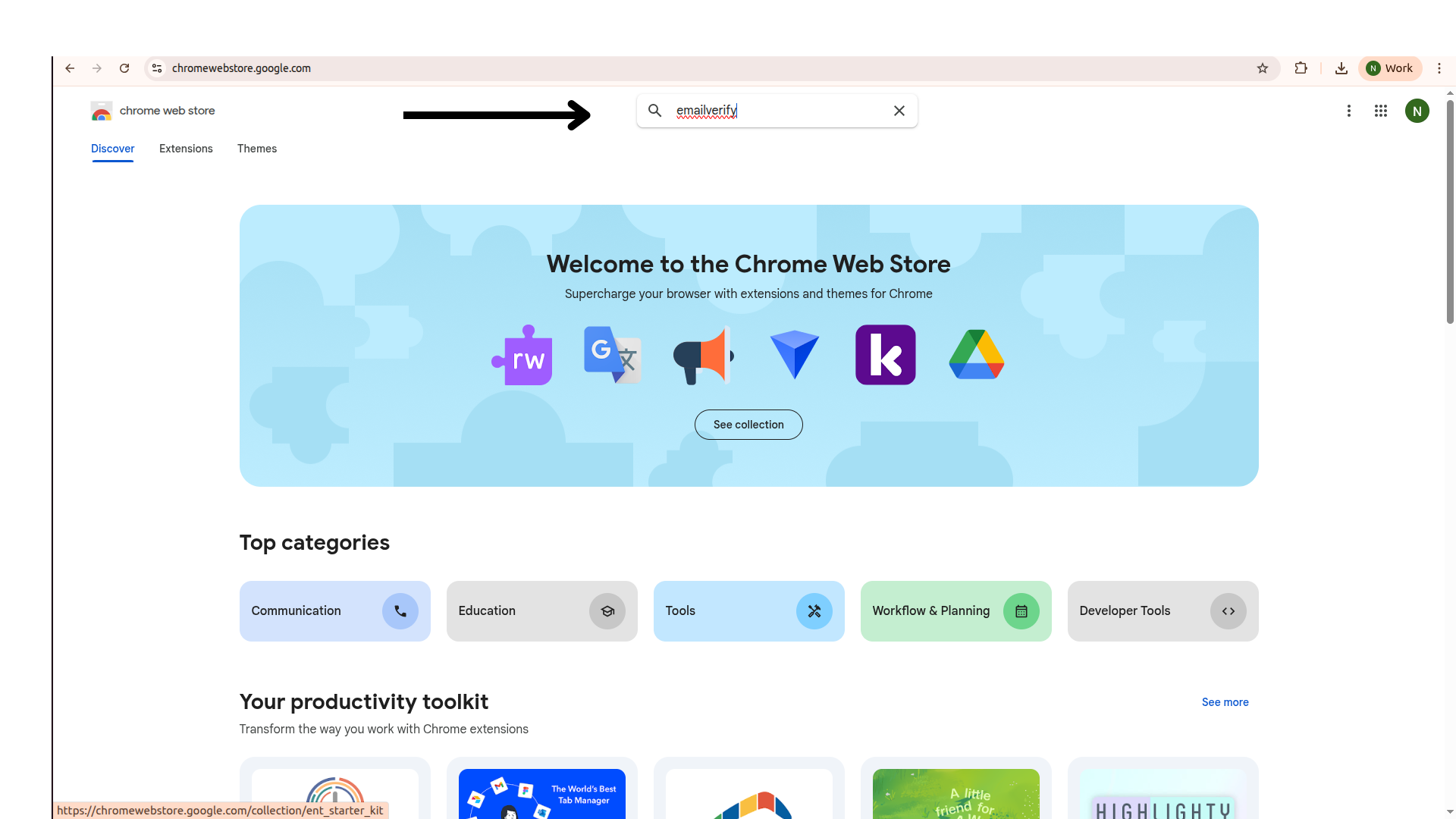
Step 1: Visit the Chrome Web Store
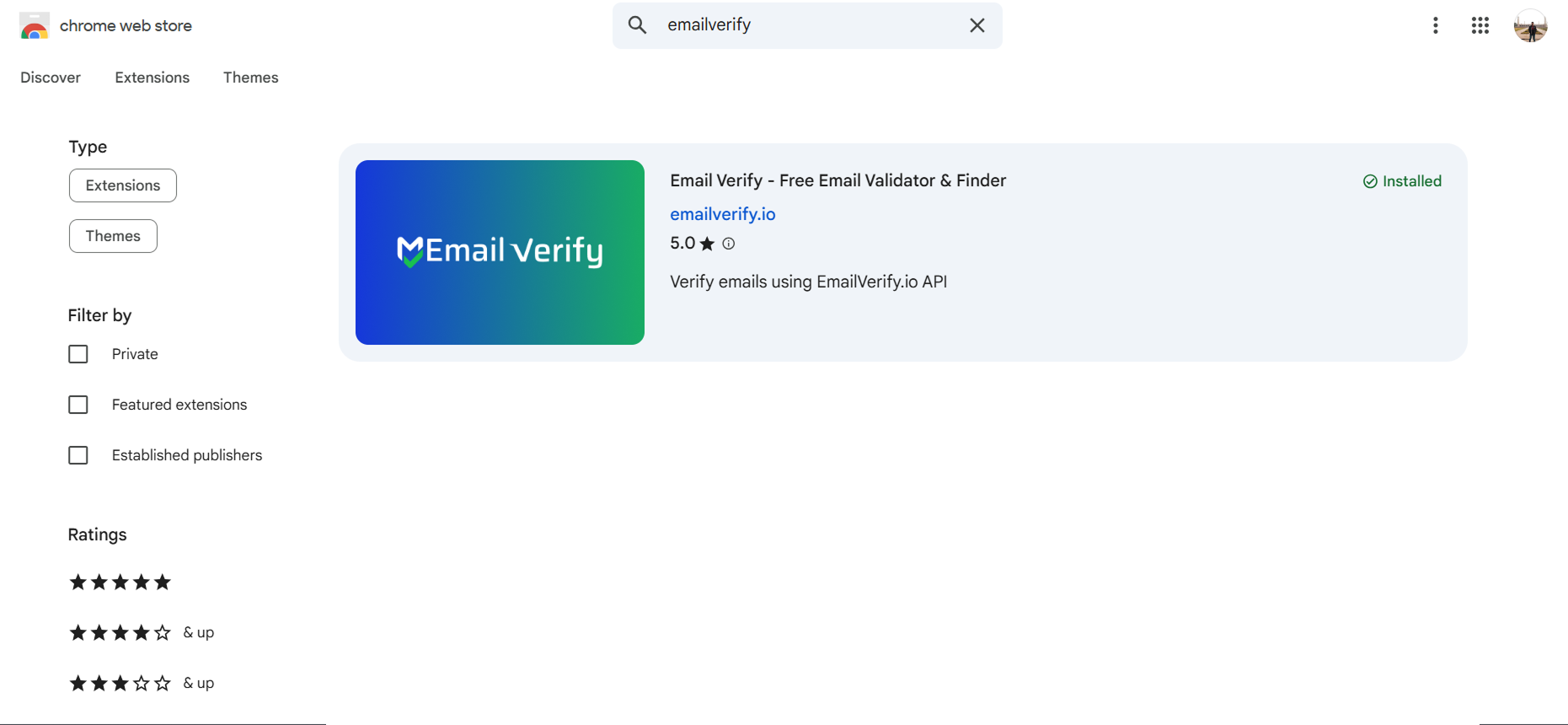
Step 2: Install the Extension
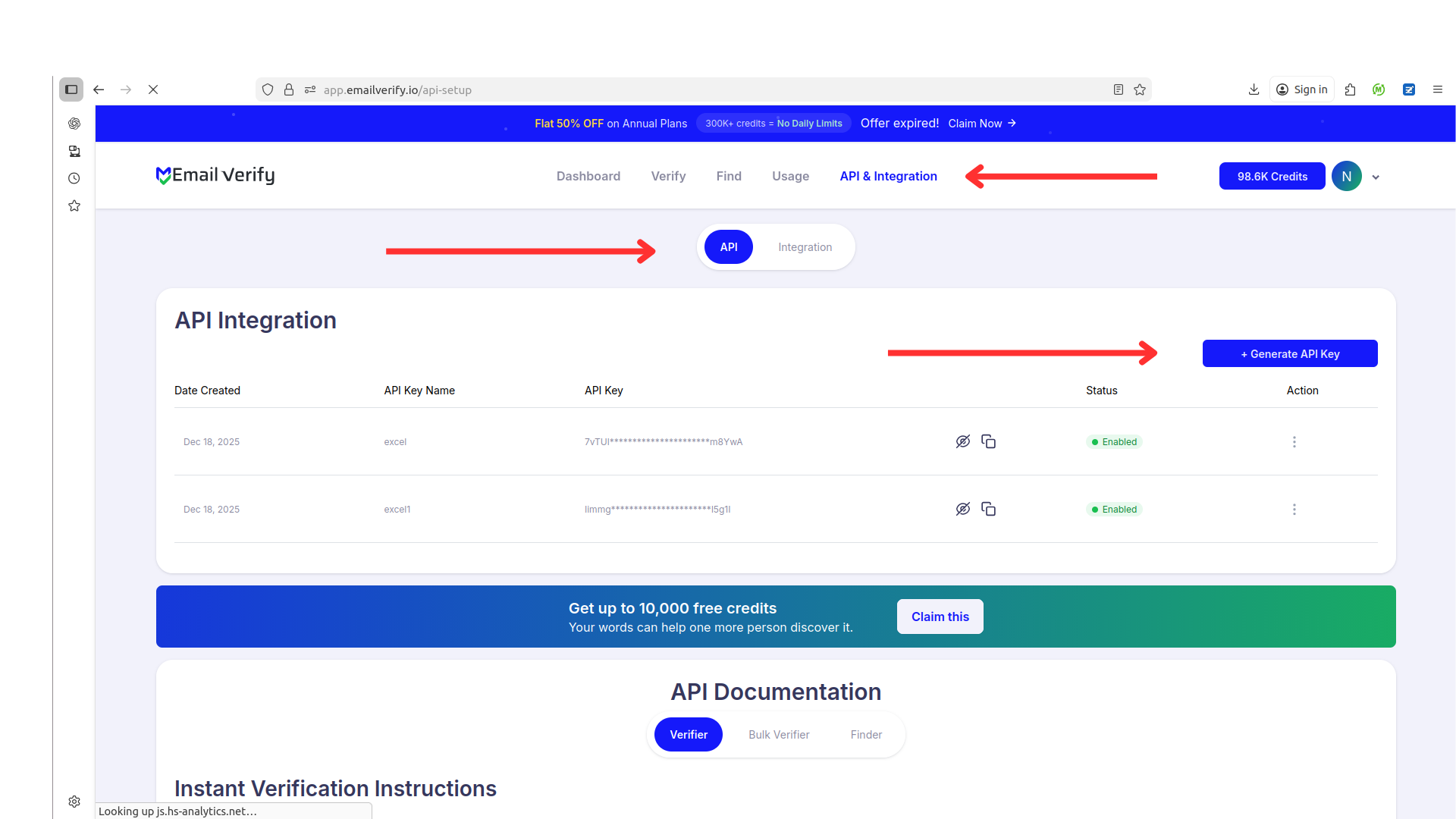
Step 3: Generate Your API Key
Step 4: Connect Your Account
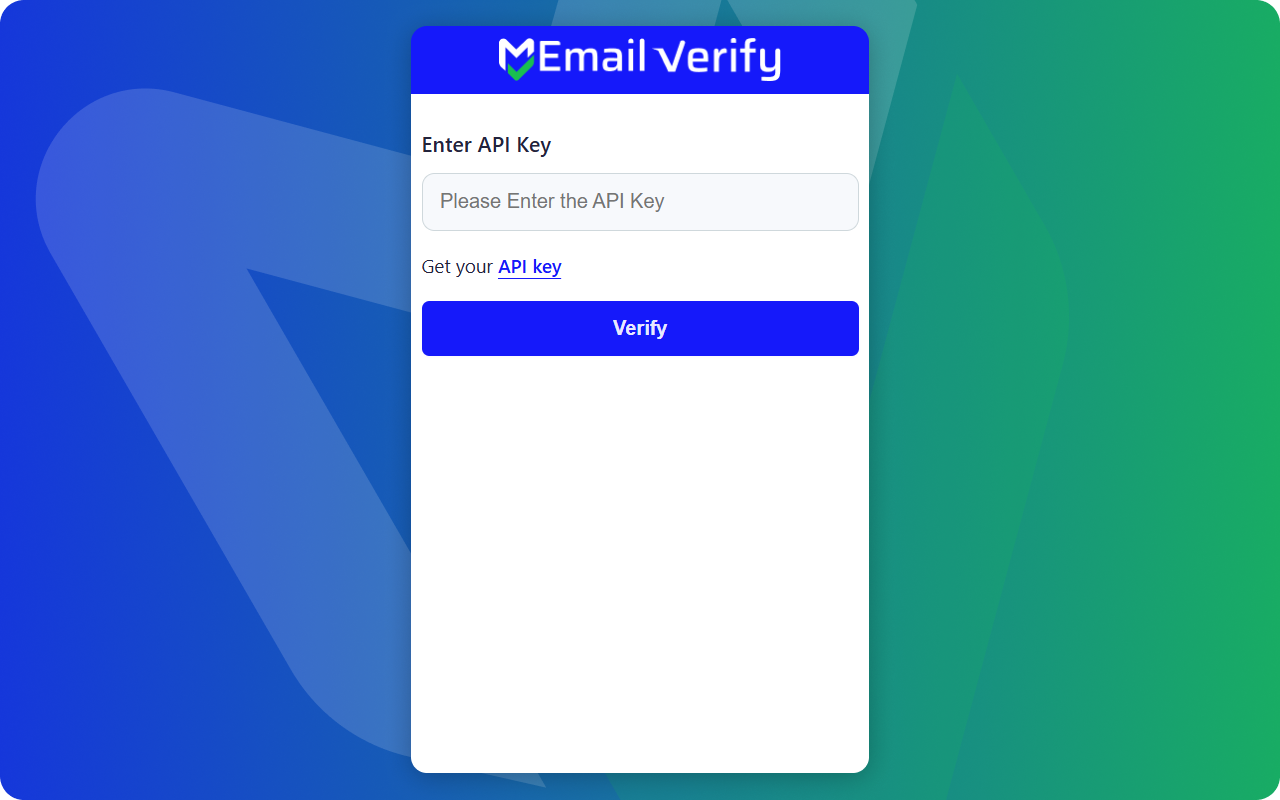
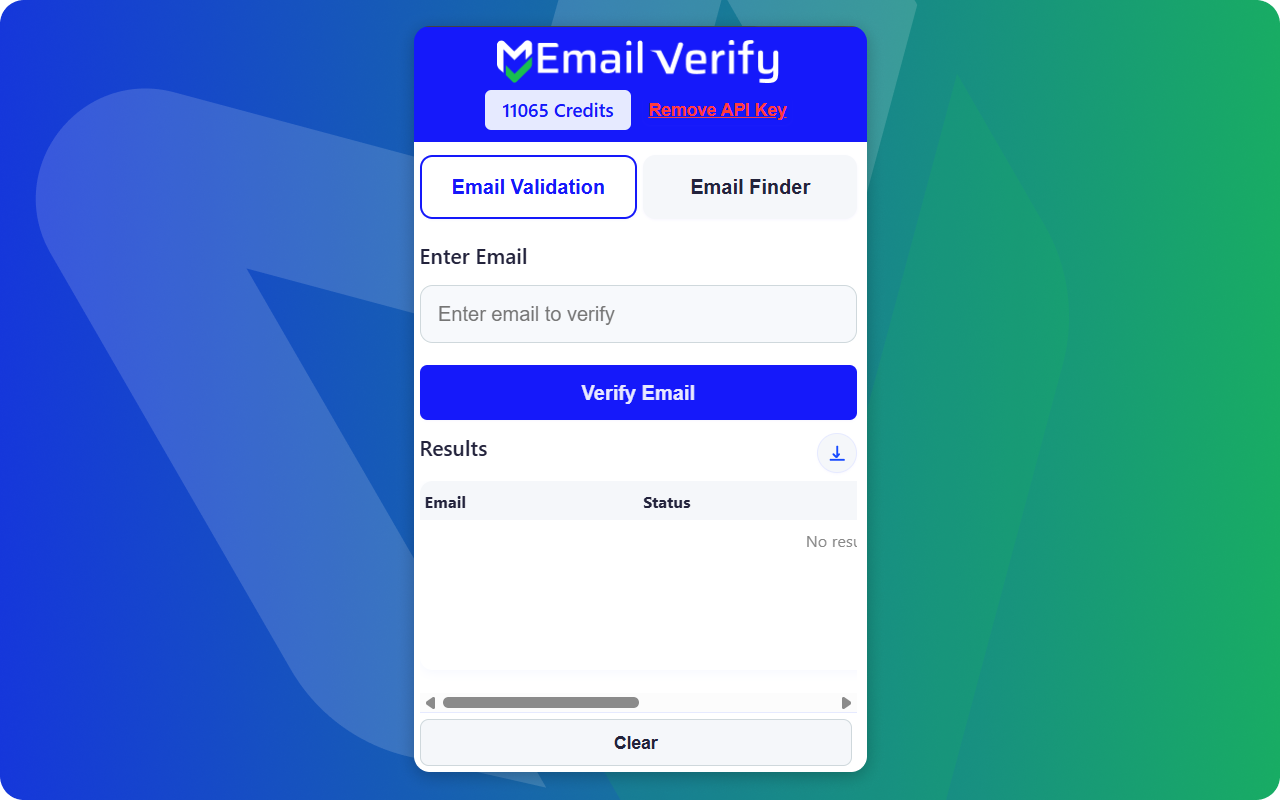
Step 5: Verify Any Email
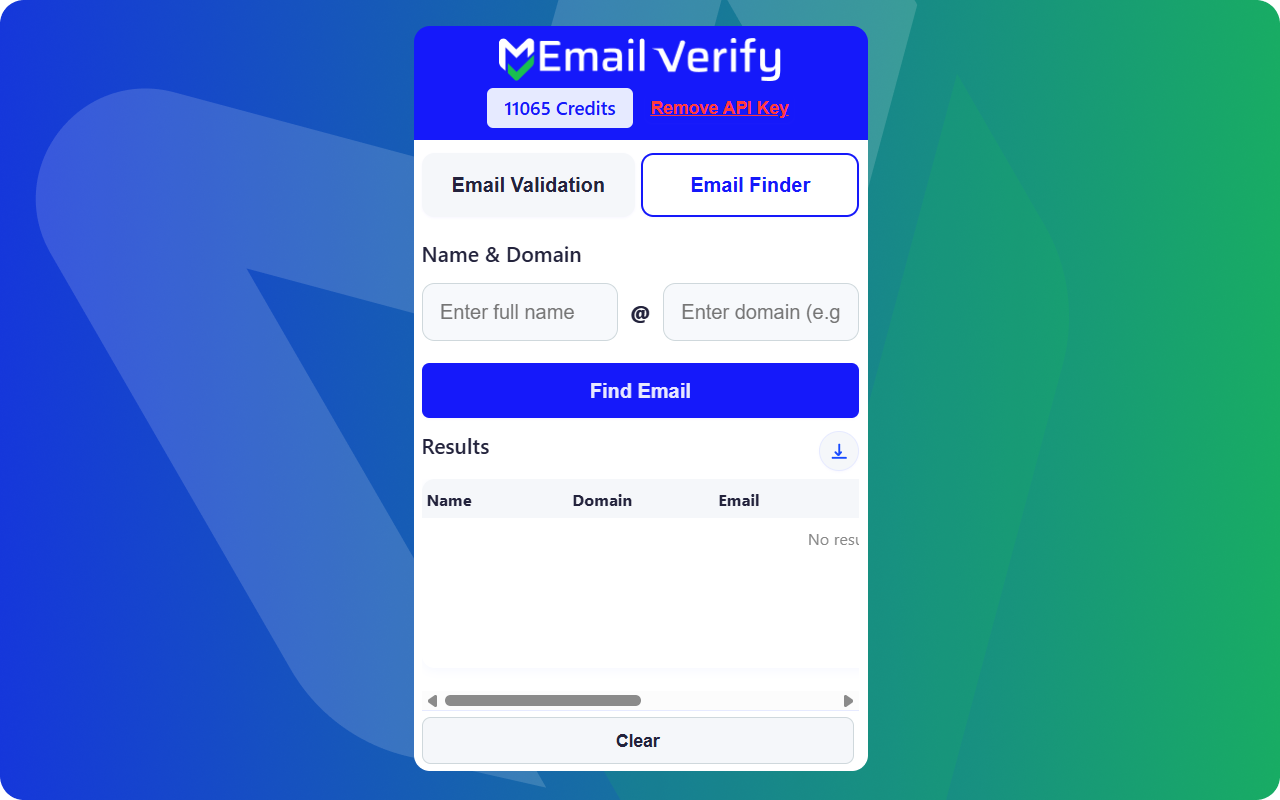
Step 6: Use Email Finder
Chrome Extension Features
Verify emails on the fly without switching tabs. Requires a valid EmailVerify.io account.
Instant Browser Verification
Verify any email address instantly by clicking the extension icon in your browser toolbar.
Works on Any Website
Open the extension popup on any webpage. Copy an email address you find on LinkedIn, Salesforce, HubSpot, or any site and paste it into the extension for instant verification — without opening a new tab.
Real-time Status
Get immediate results (Valid, Invalid, Disposable, etc.) directly in the extension popup.
Secure API Connection
Connects securely to your EmailVerify.io account using your personal API key.
Lightweight & Fast
Designed to be lightweight with zero impact on your browsing speed.
Copy Results
Easily copy the verification status or the clean email address to your clipboard.
Why Manual Prospectors Need a Browser Email Verification Extension
Bulk verification tools clean lists — but sales reps, recruiters, and SDRs need to verify emails one at a time while actively prospecting. The Chrome Extension solves this without leaving the page.
- ✗ LinkedIn prospecting accuracy — Sales reps and SDRs find emails through LinkedIn profiles, Sales Navigator exports, and Apollo. Without immediate verification, invalid addresses enter outreach sequences and generate hard bounces.
- ✗ Recruiter candidate outreach — Recruiters pull contact details from LinkedIn, job boards, and candidate portals. Unverified candidate emails waste personalised outreach effort when they fail to deliver.
- ✗ CRM data entry quality — When contacts are manually added to HubSpot, Salesforce, or other CRMs, there is no real-time check at point of entry. The extension adds that check without disrupting the workflow.
- ✗ Individual verification speed — Running a bulk verification job to check a single email is impractical. The extension is built for one-at-a-time checks during active prospecting sessions.
- ✗ Email Finder combined with verification — Finding a professional email pattern and separately verifying it involves multiple tools. The extension's Email Finder tab combines both actions in a single popup.
The Chrome Extension brings email verification directly into the browser — so every manually sourced email address is verified before it enters a CRM, sequence, or outreach tool.
What EmailVerify.io Checks on Every Email Verified in the Extension
Each email verified through the extension runs through the same full check suite as bulk and API verification — results appear instantly in the popup.
| Check | What It Detects |
|---|---|
| Syntax validation | Formatting errors — missing @, invalid characters, malformed structure |
| Domain / DNS check | Whether the email domain exists and has active DNS records |
| MX record check | Active mail server records configured on the domain |
| SMTP verification | Whether the individual mailbox exists on the mail server |
| Catch-all detection | Domains that accept all incoming email regardless of whether the mailbox exists |
| Disposable email check | Temporary or burner addresses from 10,000+ known disposable email providers |
| Role-based detection | Generic addresses: info@, admin@, noreply@, support@, contact@ |
| Invalid address cross-reference | Cross-reference with known invalid address databases to flag permanently undeliverable addresses |
Results display in the extension popup: Status (Valid, Invalid, Disposable, Unknown) and Sub-Status (reason code)
What You See After Verifying an Email in the Extension
The extension returns a full verification result in the popup — no export, no dashboard visit needed.
Chrome Extension vs Other EmailVerify.io Methods
The Chrome Extension is one of several ways to verify emails with EmailVerify.io. Each method suits a different use case and workflow.
| Approach | Time Required | Accuracy | Auto-Sync | Ongoing Protection |
|---|---|---|---|---|
| Chrome Extension | Under 3 min setup | Full 8+ checks | Manual | Best for individual manual prospecting — 1 email at a time |
| Bulk Platform Integrations | 5–10 min setup | Full 20+ checks | Yes — syncs to CRM fields | Best for cleaning existing contact databases of 1,000+ records |
| Real-time API | Developer setup | Full 20+ checks | Yes — real-time on form submit | Best for validating emails at form submission or during signup flows |
| Zapier / n8n / Pabbly | No-code setup | Full 20+ checks | Yes — across app stacks | Best for automating verification across multiple connected tools |
Who Uses the EmailVerify.io Chrome Extension
Sales Development Representatives (SDRs)
SDRs building prospect lists from LinkedIn Sales Navigator, Apollo, and company websites use the extension to verify one-off contact emails instantly before adding them to outreach sequences — eliminating hard bounces without running bulk jobs.
Recruiters
Recruiters checking candidate contact details found on LinkedIn or job boards verify candidate emails directly in the browser before sending personalised outreach messages — ensuring effort is not wasted on undeliverable addresses.
Sales Managers and Account Executives
Sales team members who manually look up contacts in HubSpot, Salesforce, or LinkedIn can verify email accuracy without leaving their workflow or running a bulk verification job — keeping CRM data clean at the point of entry.
Freelancers and Solo Operators
Individuals who verify emails occasionally — for client outreach, contractor contact, or partnership research — benefit from the no-setup simplicity of the extension. No CSV export, no bulk job — just paste and verify.
Technical Questions About the EmailVerify.io Chrome Extension
Where do I find my EmailVerify.io API key?
Log in to your dashboard at app.emailverify.io. Click API in the left menu, generate a new key, copy it, and paste it into the extension's settings field after clicking the EmailVerify.io icon in your toolbar.
Can I use the extension in Incognito mode?
By default, Chrome extensions are not active in Incognito windows. To enable: right-click the extension icon, select Manage Extension, and toggle on Allow in Incognito. Once enabled, the extension works in Incognito using the same API key and account.
Does the extension work on all operating systems?
Yes — on any operating system that runs Google Chrome (Windows, macOS, Linux, ChromeOS). The extension is a Chrome browser extension, not a desktop application, so it runs inside Chrome regardless of the underlying OS.
Does the Email Finder tab consume credits?
Yes. When the Email Finder generates and verifies an email address from a name and company domain, it consumes one credit — the same as a standard single email verification. The credit is used when the verification result is returned.
Also integrate with HubSpot Email Verification , Mailchimp Email Verification , Zapier Email Verification , Real-time Email Verification API . Or use ourAPI for programmatic access.
Frequently Asked Questions

How do I install the EmailVerify.io Chrome Extension?
Can I use the extension to verify emails on LinkedIn?
Yes. Open a LinkedIn profile, click the extension icon, and use the Email Finder tab. Enter the name and domain to find and verify the email without leaving the page.
Does the extension work on any website?
Yes. The extension works as a popup on any webpage (Salesforce, HubSpot, etc.). You can manually paste or type an email into the verification field for an instant result.
Do I need an API key to use the extension?
Does each verification use a credit?
Yes. Each email verified through the extension or found via the Email Finder consumes one credit from your account balance.
What verification checks does the extension perform?
The extension performs a full check: syntax validation, domain/DNS lookup, MX record check, and SMTP mailbox existence verification. It also detects disposable and role-based addresses.
How does the Email Finder tab work?
Enter a person's first name, last name, and company domain. The extension tests common email patterns and verifies them to find the valid one.
Is the extension free to install?
Does the extension affect my browsing speed?
No. It is lightweight and only activates when you click the icon. It does not run background scripts, monitor activity, or inject content into pages.
Can I use the extension in Incognito mode?
Yes. Right-click the extension icon, select 'Manage Extension', and toggle on 'Allow in Incognito'.
You're just one click away from clean email lists.
Start verifying your email addresses instantly and improve your campaign deliverability
* No credit card required