Moosend Email Verification Integration — Cleaner Lists for Better Campaigns
EmailVerify.io's Moosend email verification integration validates every contact in your Moosend mailing lists before your campaigns send. Connect via your Moosend API key and Account Name in minutes, select the lists to verify, and get results synced back as custom fields — EV_Status, EV_SubStatus, and EV_Validation_Timestamp — on each contact. Moosend is built for teams that need powerful email marketing at an affordable price. EmailVerify.io ensures that budget is never wasted on campaigns sent to invalid, disposable, or undeliverable addresses.


Quick Summary: Moosend Email Verification Integration
- What it does: Imports Moosend mailing lists, validates every email with 20+ checks, and syncs results back as custom fields — EV_Status, EV_SubStatus, EV_Validation_Timestamp — on each contact.
- Who it's for: SMBs, startups, agencies, and Mailchimp migrants using Moosend for cost-effective email marketing.
- Connection: API Key + Account Name (More > Settings > Developer). Account Name is for display only — not used for authentication.
- Setup time: Under 5 minutes.
- Key output: EV_Status | EV_SubStatus | EV_Validation_TimestampView pricing.
How to use the integration
To get started with the Moosend integration, you’ll need an active Moosend account, which you can create at https://identity.moosend.com/register/, along with an EmailVerify.io account
Step 1: Sign in to EmailVerify.io
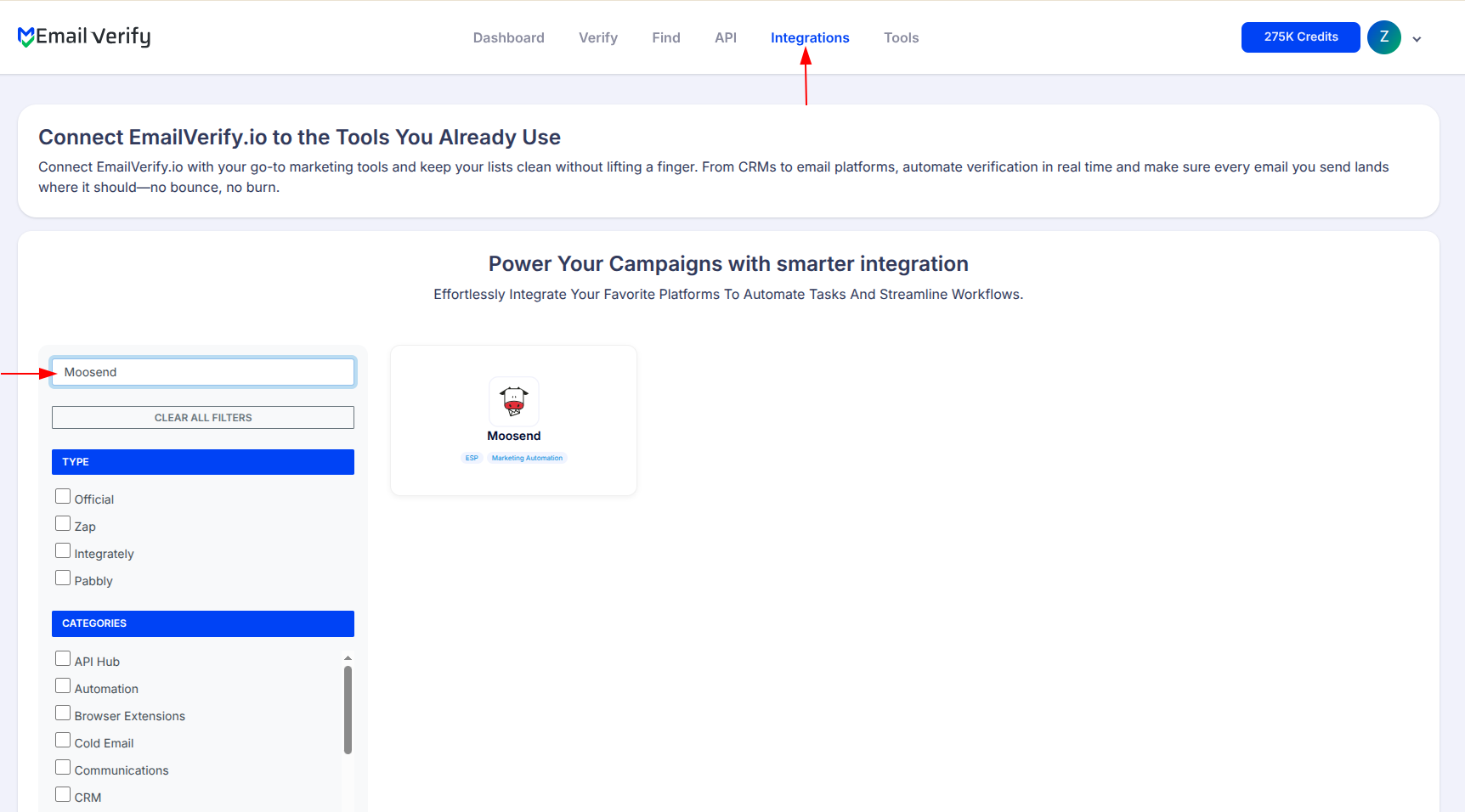
Step 2: Select Moosend from Integration List
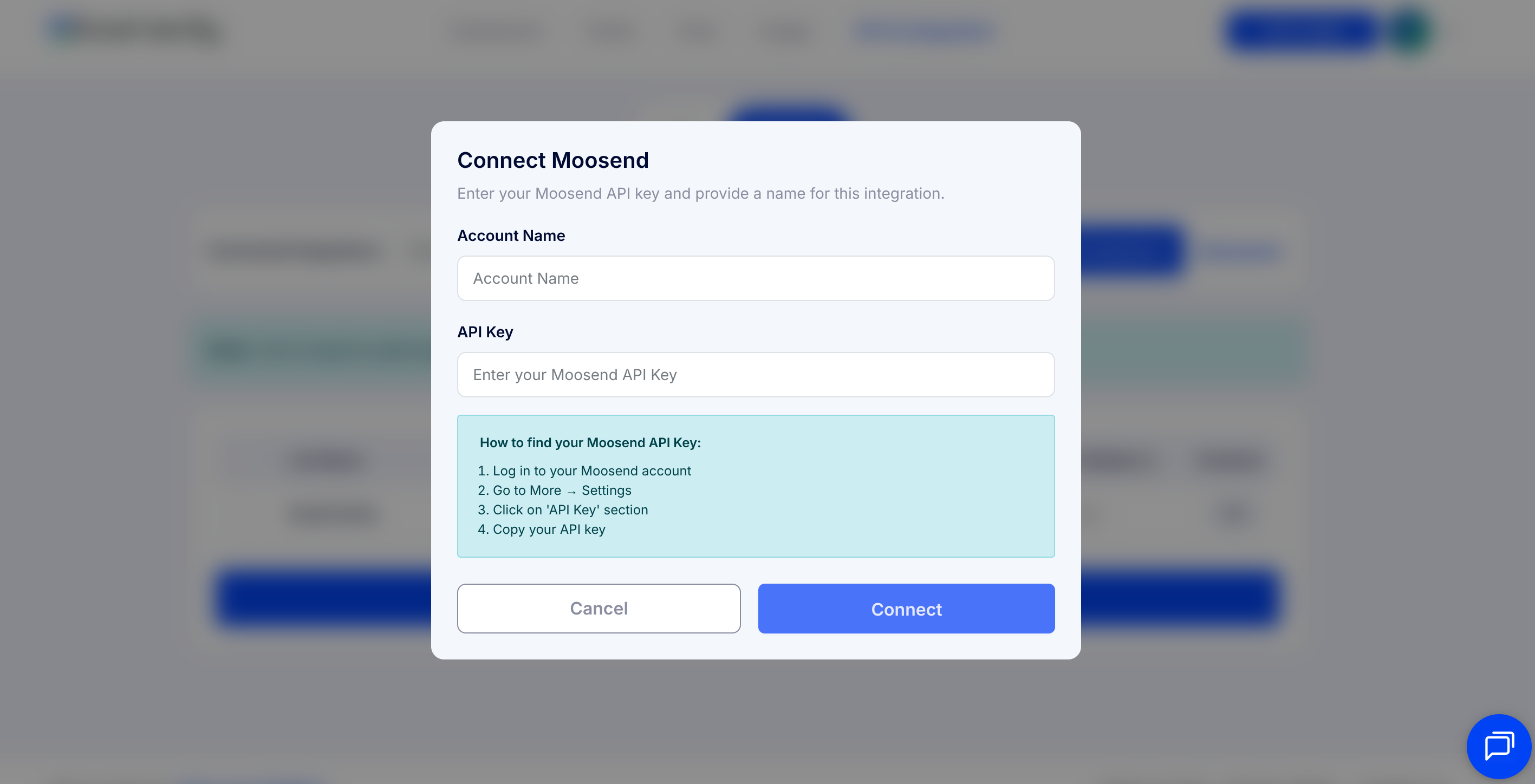
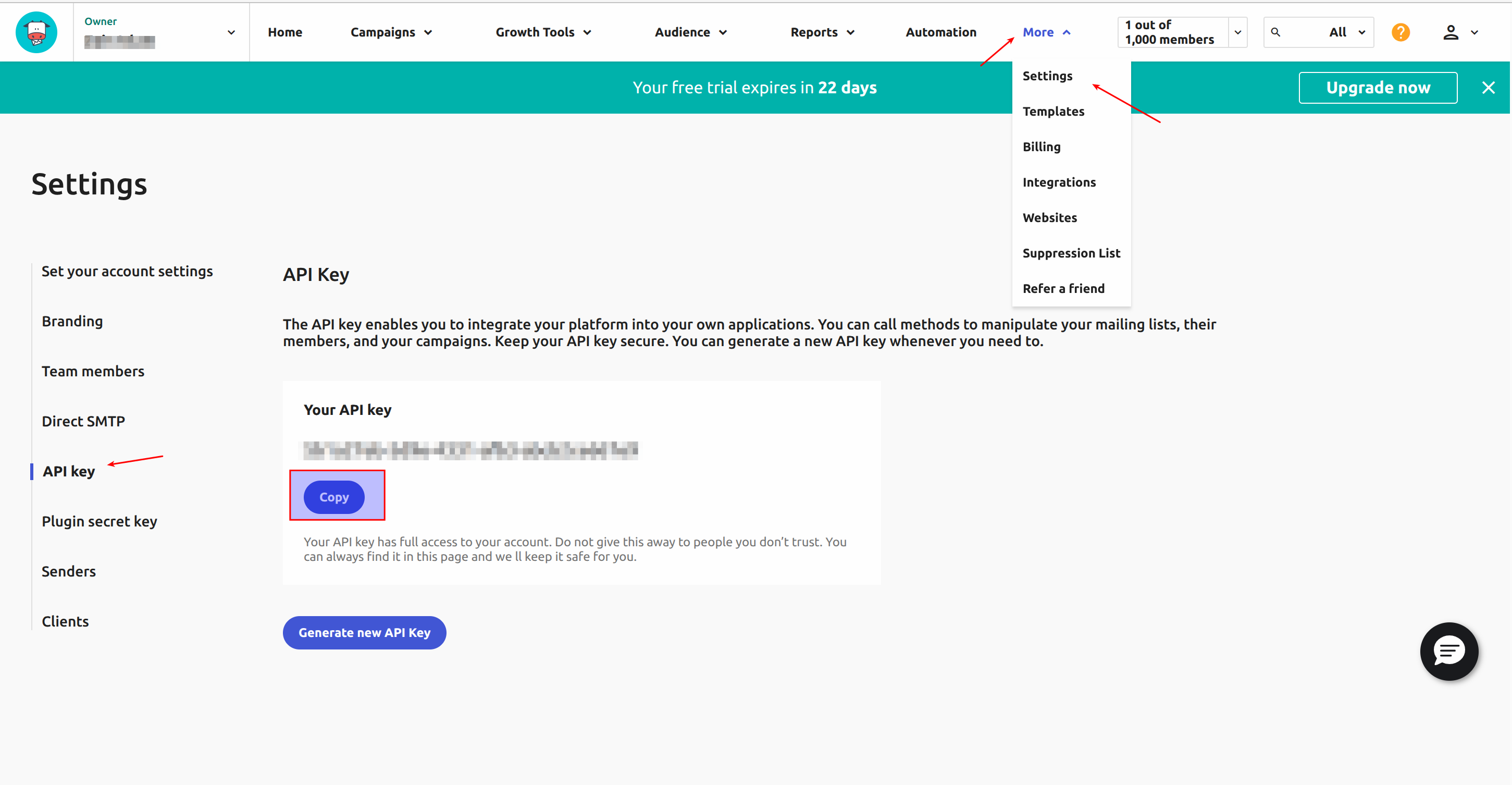
Step 3: Get Your Moosend API Key
Step 4: View Your Moosend Lists
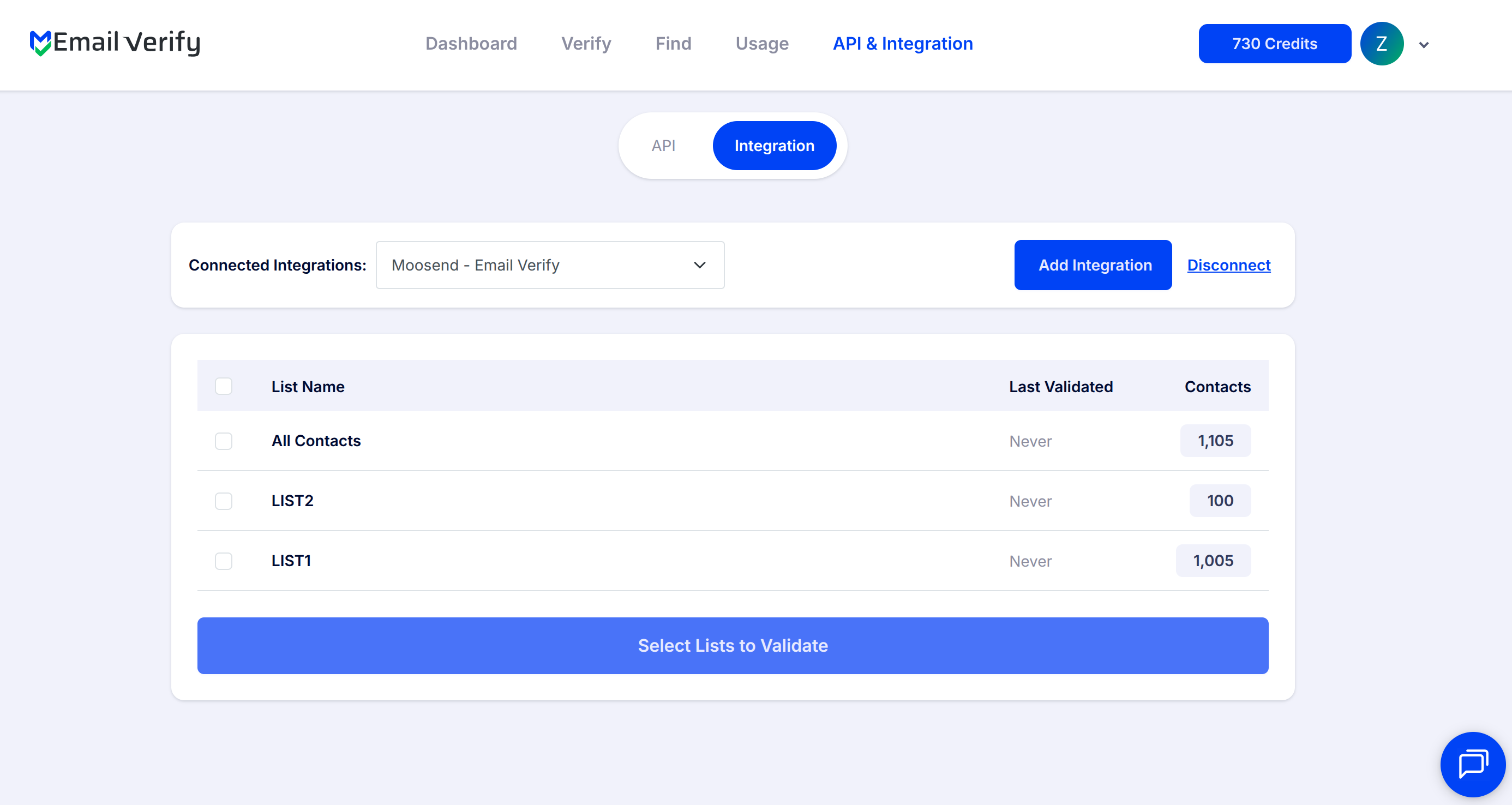
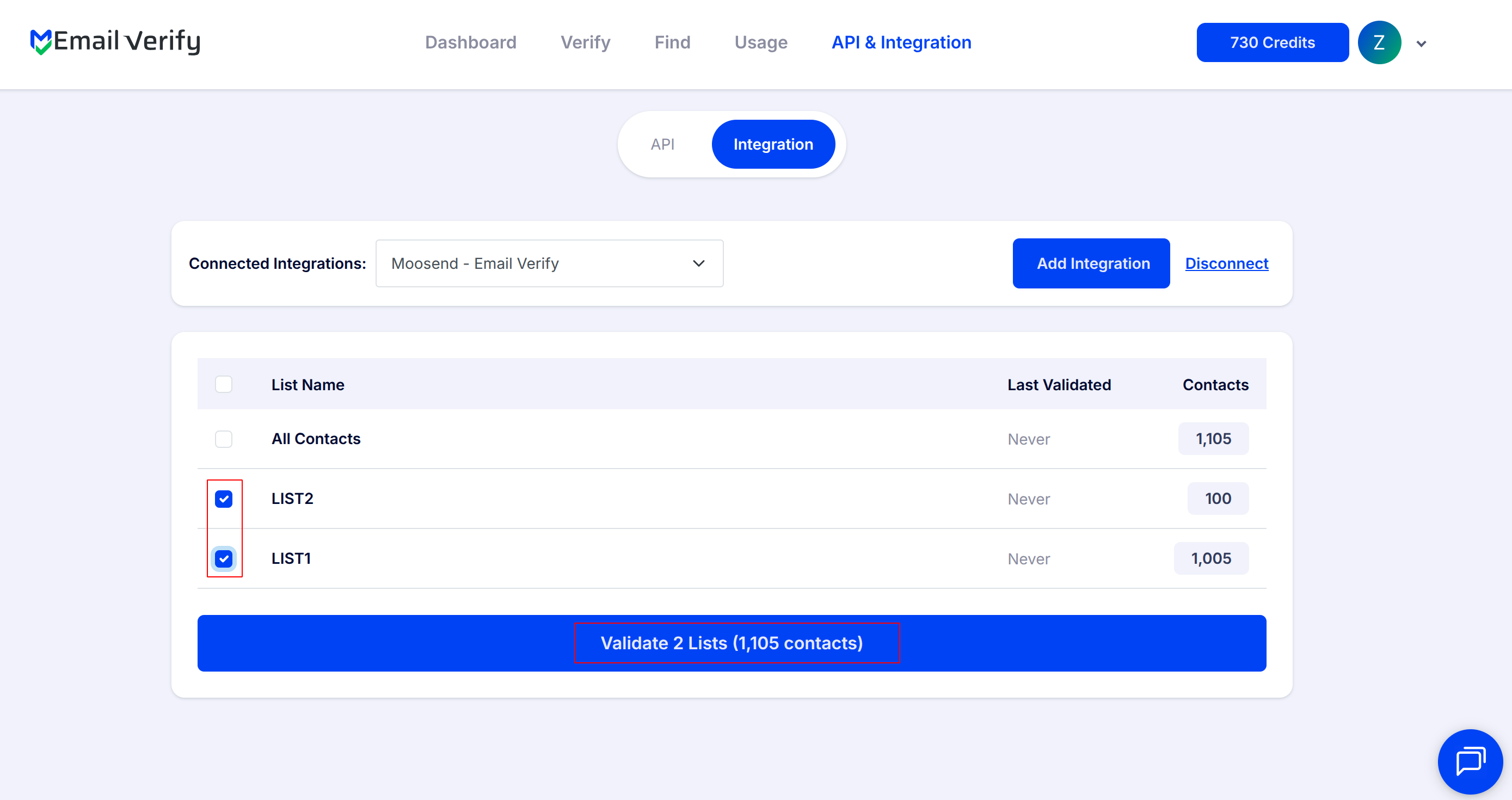
Step 5: Select Lists to Verify
Note: The results of the validation are automatically exported to the integration they originated from.
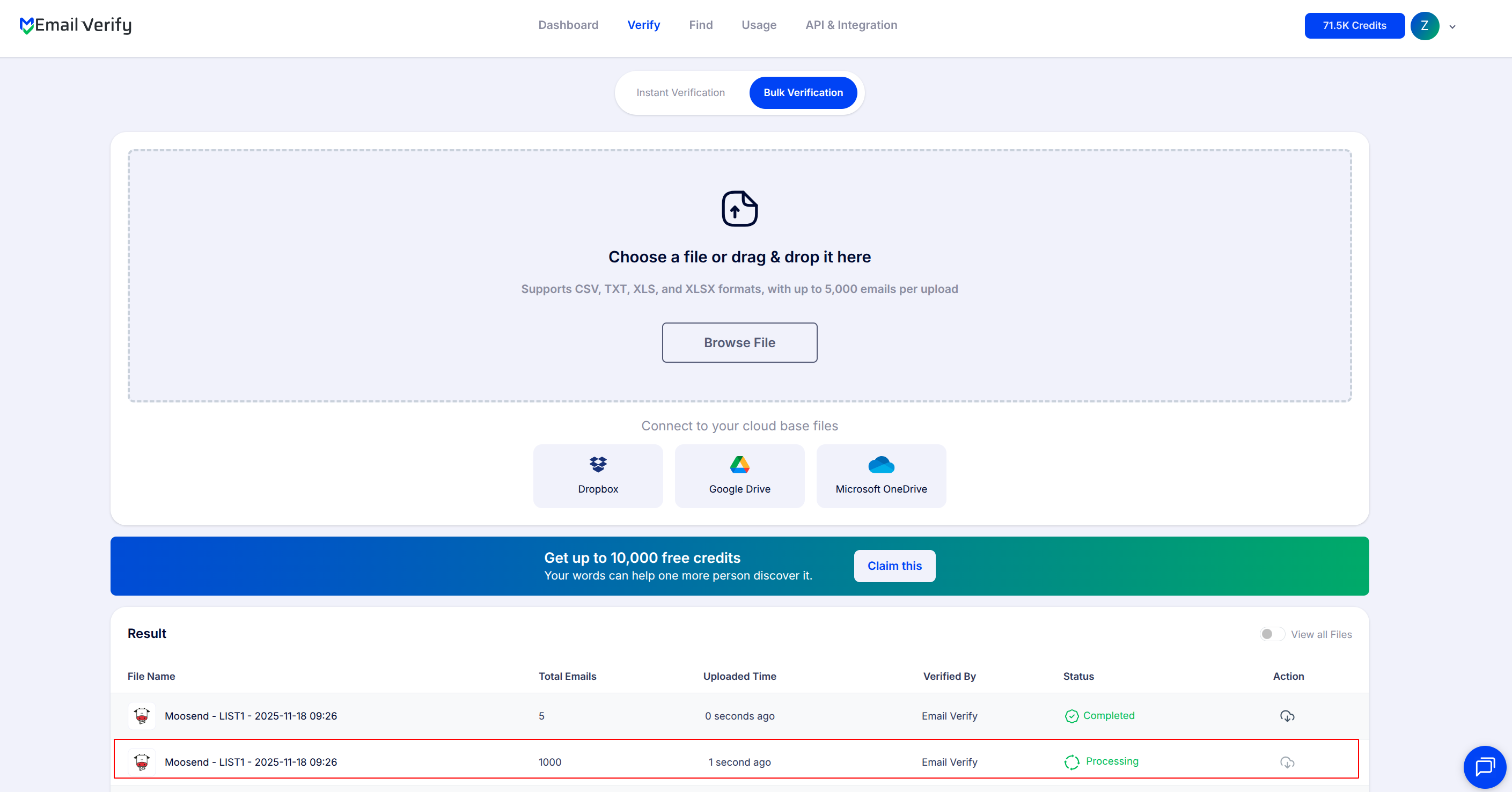
Step 6: Monitor Progress
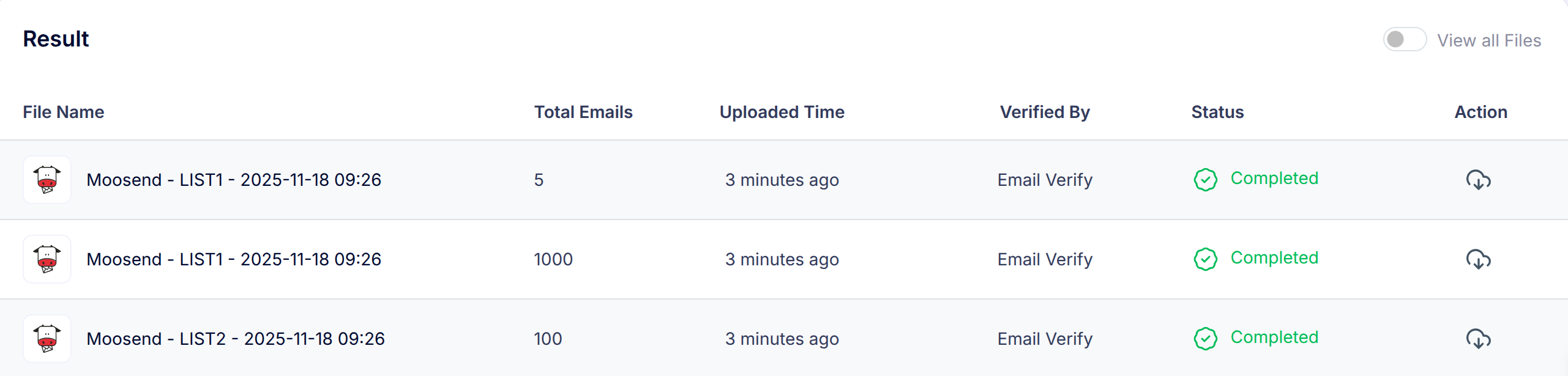
Step 7: Download Results
Note: Validation results are automatically sent to the connected integration. Three custom fields will be added in each email i.e. EV_Status, EV_SubStatus, and EV_Validation_Timestamp. These fields play a key role in maintaining accurate, up-to-date contact information and improving how you manage and interact with your emails.
Moosend Email Verification Integration Features
When using the integration to import a list from Moosend into EmailVerify.io, only the subscribed members from your Moosend email list will be retrieved. Emails with statuses such as archived, bounced, or unsubscribed will not be imported.
Import Email Addresses from Moosend
Import email addresses from your Moosend lists directly into EmailVerify.io for validation.
Validate Email Addresses
Validate imported emails using EmailVerify.io's powerful verification service to identify invalid addresses.
Export Results Back to Moosend
When exporting the validation results to Moosend, we add custom fields to the email inside the list: EV_Status, EV_SubStatus, and EV_Validation_Timestamp.
Secure API Key Connection
To use this integration, you'll need an active Moosend account. During setup, you'll be asked to provide your Moosend API Key to securely connect your account with EmailVerify.io. These credentials allow EmailVerify.io to access your Moosend data safely without storing your login details.
Maintain High-Quality Lists
Identify invalid, disposable, and catch-all email addresses in your Moosend lists before campaigns send — so every credit goes to real, deliverable contacts.
Reduce Bounce Rates
Keep your campaigns clean, reduce bounces, and improve deliverability with real-time email verification.
Why Moosend Users Need Email Verification
Moosend is built for cost-conscious businesses — SMBs, agencies, startups, and teams migrating from Mailchimp. Its pricing is based on subscriber count, making list quality directly tied to platform cost. Every invalid contact in a Moosend list inflates the subscriber count, increases the plan tier, and sends campaigns to addresses that will never deliver.
- ✗ Moosend does not validate email addresses when subscribers are added from forms, imports, or integrations. Invalid contacts enter the list silently.
- ✗ Moosend pricing is subscriber-count based. Invalid contacts inflate your count and increase plan costs without delivering any value.
- ✗ Email addresses decay at 22–30% per year. Lists imported from other platforms or built over time contain a growing proportion of stale, invalid addresses.
- ✗ Hard bounces from invalid addresses harm sender reputation, reducing deliverability for the remaining valid subscribers in your list.
- ✗ Disposable emails from sign-up forms, discount pop-ups, and landing pages are common in Moosend lists. These addresses are never genuinely engaged subscribers.
EmailVerify.io's Moosend integration removes invalid contacts before they cost you plan capacity, corrupt campaign results, or damage your sender reputation.
What EmailVerify.io Checks on Every Moosend Subscriber
Each email address in your Moosend lists passes through 20+ real-time verification checks before results sync back as custom fields.
| Check | What It Detects |
|---|---|
| Syntax validation | Formatting errors — missing @, invalid characters, malformed structure |
| Domain / DNS check | Whether the email domain exists and is active |
| MX record check | Active mail server records on the domain |
| SMTP verification | Whether the individual mailbox exists on the server |
| Catch-all detection | Domains that accept all emails regardless of whether the mailbox exists |
| Disposable email check | Temporary or burner addresses from 10,000+ known providers |
| Role-based detection | Generic addresses: info@, admin@, noreply@, support@ |
| Free email provider flag | Gmail, Yahoo, Hotmail and 500+ providers |
Results written as custom fields: EV_Status | EV_SubStatus | EV_Validation_Timestamp
What Moosend Users See After Verification
EmailVerify.io writes results directly to Moosend contact custom fields — visible and usable for segmentation inside your account without any re-import.
Moosend List Quality With vs Without Email Verification
Invalid contacts inflate your subscriber count, waste plan budget, and corrupt campaign results. Here is what changes with EmailVerify.io.
| Approach | Time Required | Accuracy | Auto-Sync | Ongoing Protection |
|---|---|---|---|---|
| No verification | 0 min setup | Unknown | No | All invalid contacts inflate subscriber count and plan cost |
| Manual CSV export | Hours of manual work | Basic | No | Partial — misses catch-all and disposable addresses |
| EmailVerify.io + Moosend | Under 5 min setup | 20+ checks per contact | Yes — EV fields on every contact | Full — subscriber count, plan cost, and deliverability all protected |
Who Should Use Moosend Email Verification
SMBs migrating from Mailchimp
Migrated lists carry invalid addresses from the previous platform. Verify immediately after migrating to start Moosend with clean data and avoid inflating your new subscriber count with inherited invalid contacts.
Startups building their first email list
Sign-ups from pre-launch pages and beta forms carry higher invalid rates. Verify early to establish good list hygiene from the start and avoid paying for contacts that will never deliver.
Agencies using Moosend for clients
Verify client lists quarterly — maintaining deliverability standards and protecting sender reputations across all client accounts. A defensible, billable service for agency retainers.
E-commerce teams on a budget
For e-commerce stores that chose Moosend for cost-efficiency, verification ensures every credit is spent reaching real, deliverable customers — not wasted on invalid addresses that inflate the subscriber count.
Technical Questions About Moosend Email Verification
What is the Account Name field and where do I find it?
The Account Name is a display label used within EmailVerify.io to identify your Moosend connection. It does not need to match any setting in your Moosend account and is not sent to Moosend. Use your company name, brand name, or any identifier you prefer. It is entered during the initial connection setup alongside your API key.
Can I segment my Moosend subscribers using EV_Status after verification?
Yes. After verification, EV_Status is available as a custom field on each contact in your Moosend lists. Use Moosend's segments feature to filter by EV_Status. For example, create a segment where EV_Status equals 'Valid' to send campaigns only to verified contacts, or a segment where EV_Status equals 'Invalid' to identify contacts for removal.
Does EmailVerify.io import all Moosend subscribers or only subscribed ones?
EmailVerify.io imports only active, subscribed contacts from your Moosend lists. Contacts with statuses such as unsubscribed, bounced, or archived are not imported. This ensures verification is run on the relevant, active portion of your list.
How do I verify a Moosend list if I have thousands of subscribers?
Select the list in EmailVerify.io after connecting. The system processes all subscribers automatically in the background. For large lists, a list of 10,000 subscribers typically completes in 10–20 minutes. You will receive an email notification when verification is complete.
Also integrate with MailerLite Email Verification , Klaviyo Email Verification , ActiveCampaign Email Verification , GetResponse Email Verification . Or use ourAPI for programmatic access.
Frequently Asked Questions

How do I connect EmailVerify.io to Moosend?
- Sign in at app.emailverify.io
- Go to Integrations and select Moosend
- Enter your Moosend API Key (More > Settings > Developer)
- Enter an Account Name
- Click Connect — your Moosend lists appear automatically
Where do I find my Moosend API key?
- Log in to Moosend
- Click More in the bottom left navigation
- Go to Settings > Developer
- Copy your API Key from the credentials section
Can EmailVerify.io verify entire Moosend mailing lists in bulk?
Yes. After connecting, select one or more mailing lists in EmailVerify.io. The system automatically imports your subscribers, runs 20+ verification checks, and syncs results back to Moosend as custom fields — no CSV export or manual re-import required.
What custom fields are added to Moosend contacts after verification?
- EV_Status: Valid / Invalid / Catch-All / Disposable / Unknown
- EV_SubStatus: Reason — mailbox_not_found, smtp_timeout, etc.
- EV_Validation_Timestamp: Date and time of last verification
Does EmailVerify.io detect disposable emails in Moosend?
Yes. EmailVerify.io identifies disposable and temporary email addresses (like Mailinator or TempMail) and flags them with EV_Status: Disposable. This is common in lists from contests and discount pop-ups.
Will verification results automatically sync back to Moosend?
Yes. After verification, results are automatically written back to each contact in Moosend as custom fields. No manual download or re-import is required.
Can invalid contacts inflate my Moosend plan cost?
Yes. Moosend pricing is based on subscriber count. Invalid contacts count toward your total. Verifying and removing them can lower your plan cost if it moves you to a lower tier.
What Moosend plan do I need for this integration?
How often should I re-verify my Moosend mailing lists?
We recommend re-verifying every 3 months for regular senders and always before major campaign launches or after importing new external lists.
How does email verification benefit my Moosend campaigns?
It drops bounce rates to under 0.5%, improves open rates by 15–30%, protects your sender reputation, and ensures your analytics reflect genuine subscriber behaviour.
You're just one click away from clean email lists.
Start verifying your email addresses instantly and improve your campaign deliverability
* No credit card required