Drip Email Verification Integration — Cleaner E-Commerce Lists, Reliable Campaigns
EmailVerify.io's Drip email verification integration validates every contact in your Drip lists before they reach your e-commerce automation sequences. Connect via your Drip API key, select contacts to verify, and get results synced back as custom fields — EV_Status, EV_SubStatus, and EV_Validation_Timestamp — directly on each contact record. Invalid emails corrupt Drip's revenue attribution, break abandoned cart sequences, and inflate customer counts. EmailVerify.io removes them before they cause damage. Setup takes under 5 minutes — no CSV exports, no manual re-imports. Results sync automatically after verification completes.

Quick Summary: Drip Email Verification Integration
- What it does: Imports Drip contact lists, validates every email with 20+ checks, and syncs EV_Status, EV_SubStatus, and EV_Validation_Timestamp back as custom fields on each contact.
- Who it's for: E-commerce brands, Shopify, WooCommerce, and BigCommerce stores, and DTC companies using Drip for behavioural email and automation.
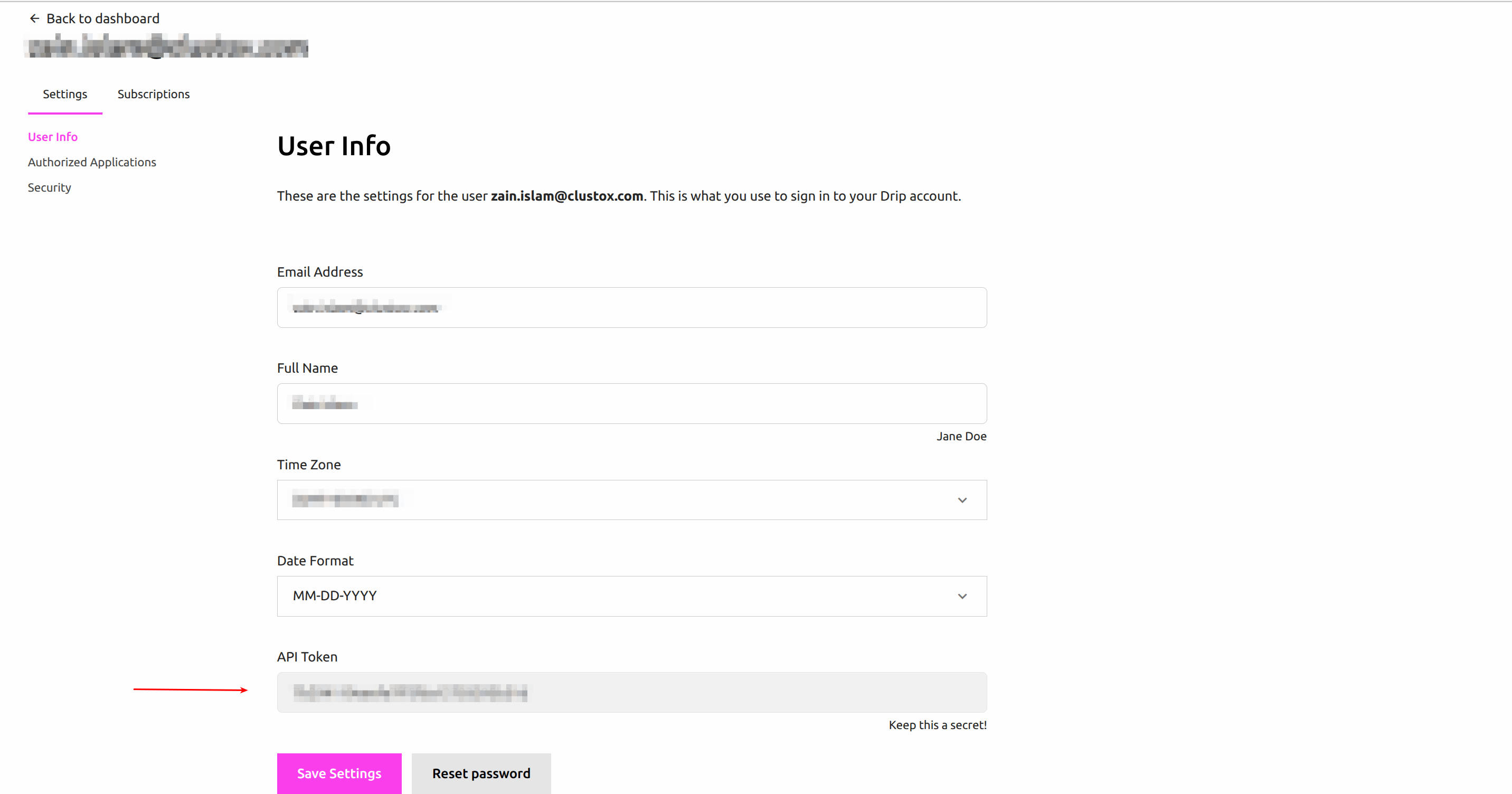
- Connection method: Drip API Key — found at Profile (top right) > User Settings > API Token. Paste into EmailVerify.io during setup.
- Setup time: Under 5 minutes. No CSV exports or manual re-imports required.
- Free to start: Connecting Drip is free. Verification uses credits — new users receive free credits to test before purchasing.View pricing.
How to use the integration
To get started with the Drip integration, you’ll need an active Drip account, which you can create at https://www.drip.com/signup/ along with an EmailVerify.io account.
Step 1: Sign in to EmailVerify.io
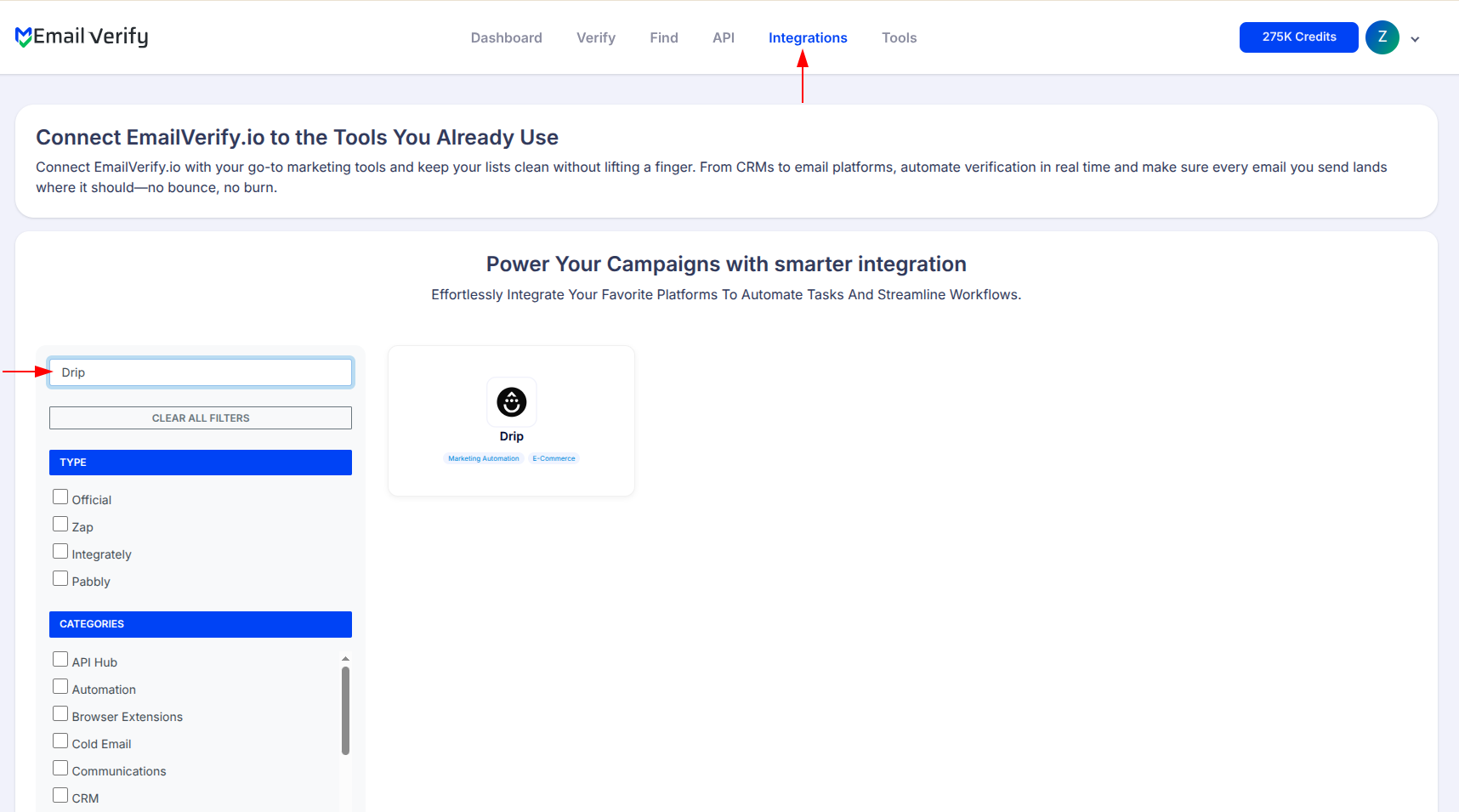
Step 2: Select Drip from Integration List
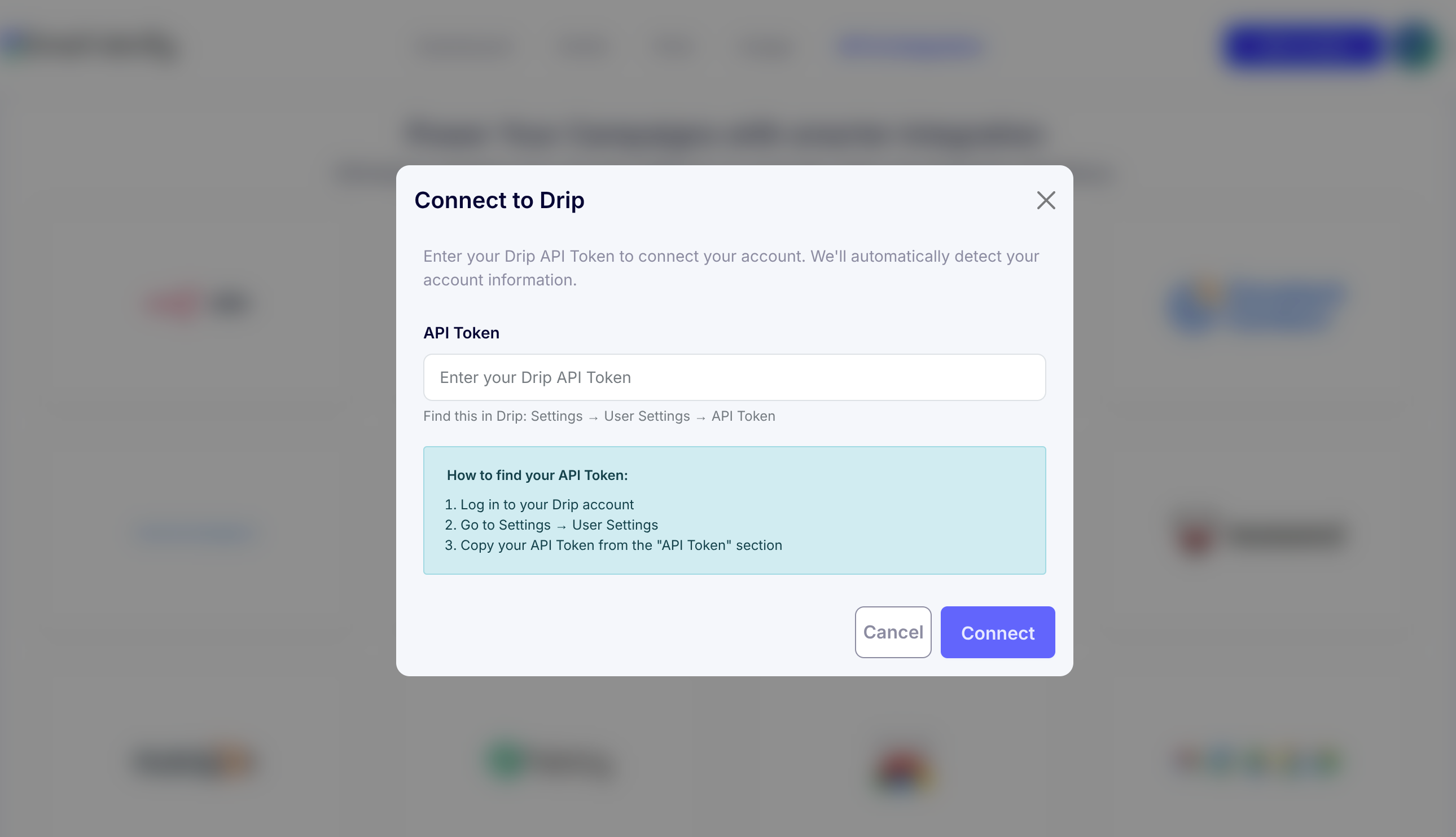
Step 3: Get Your Drip API Key
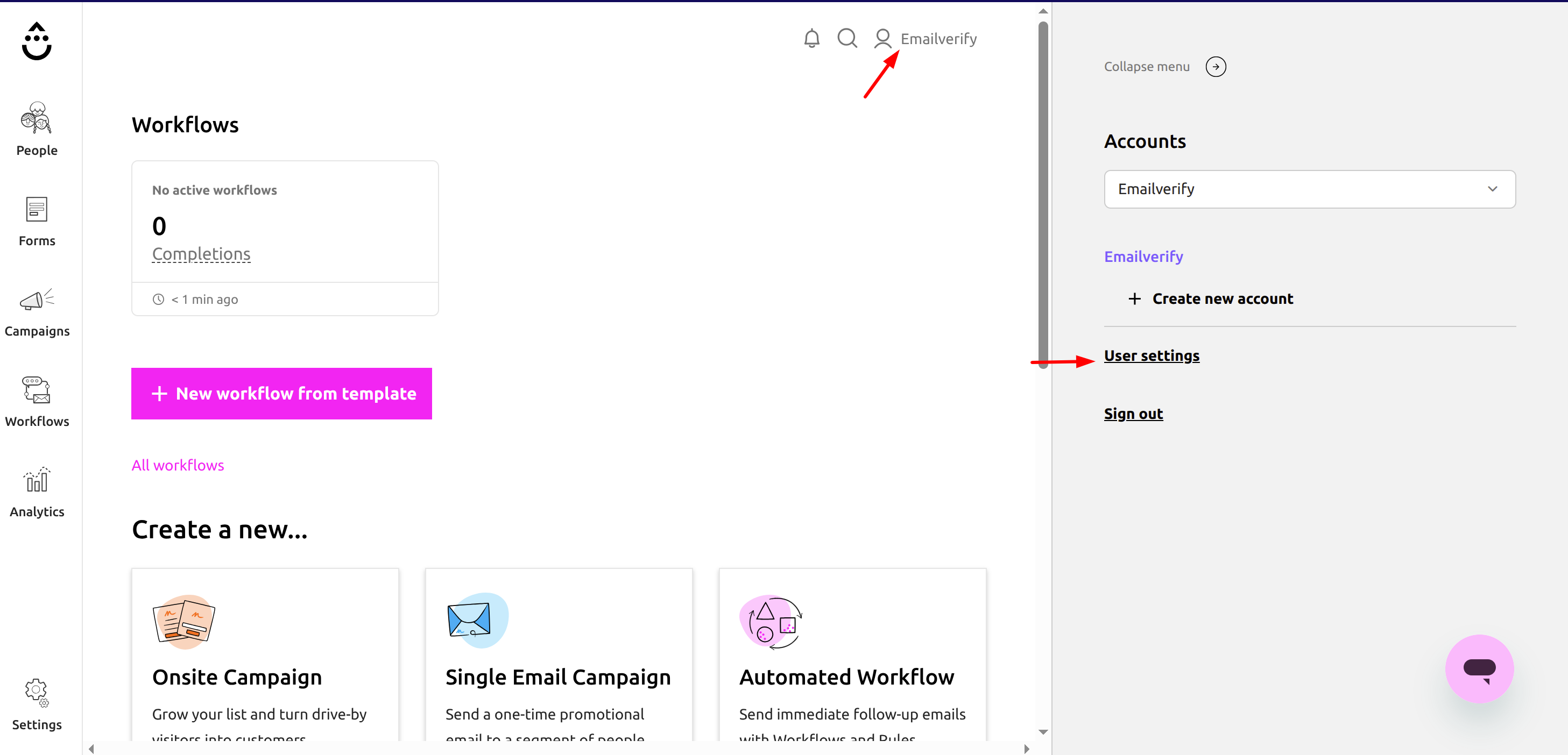
Step 4: Copy your API token.
Step 5: View Your Drip Contacts
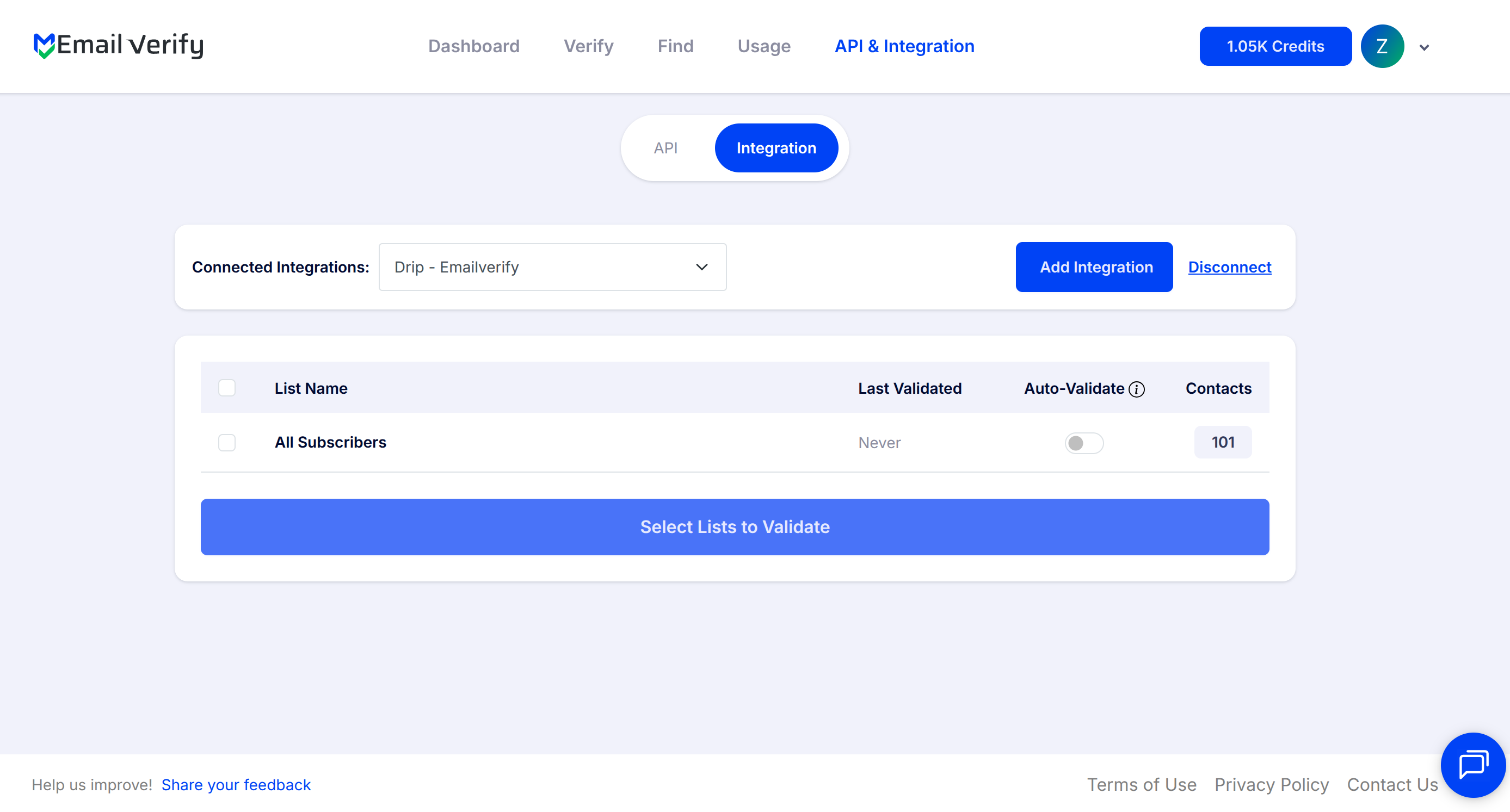
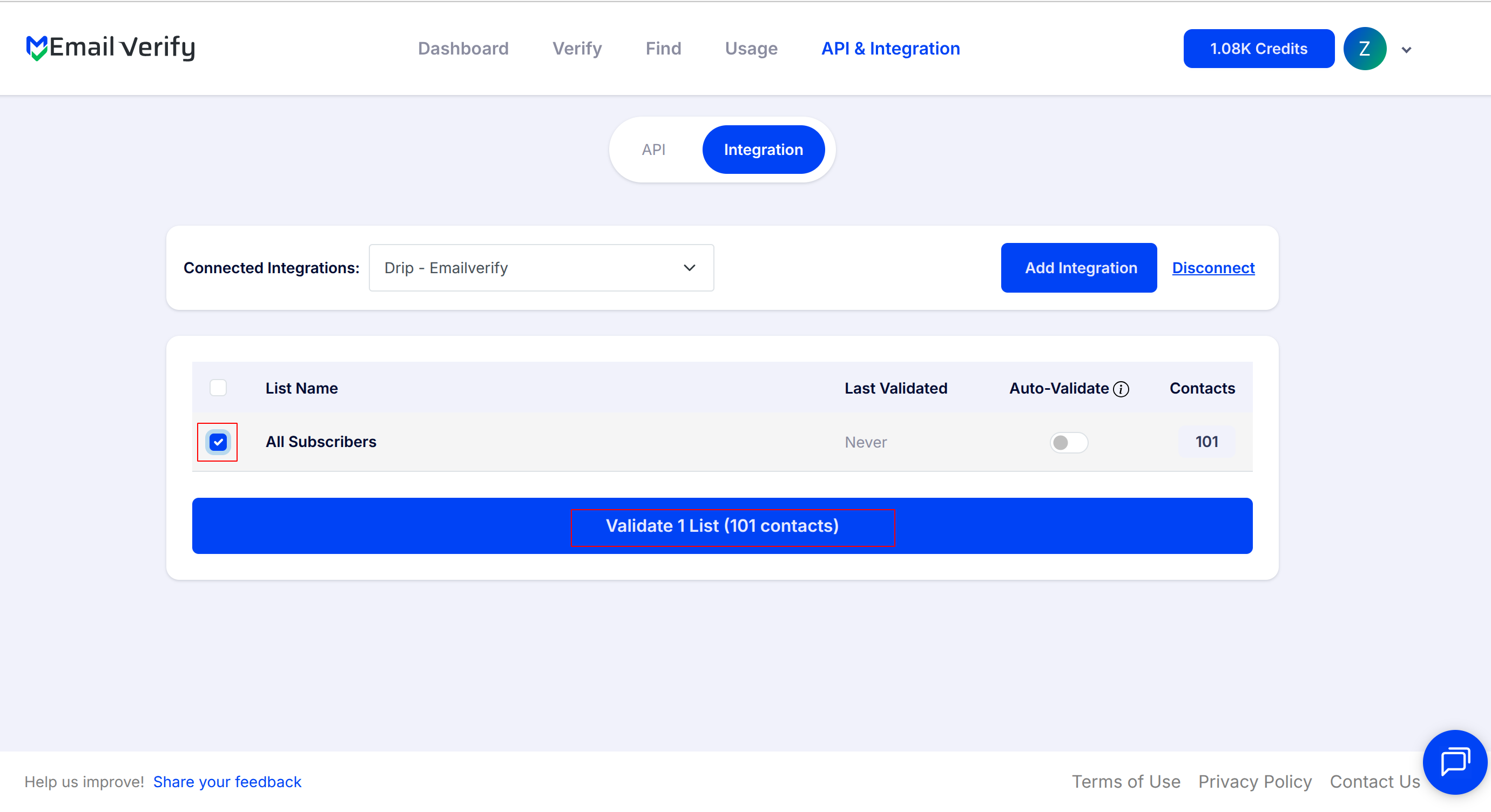
Step 6: Select Lists to Verify
Note: The results of the validation are automatically exported to the integration they originated from.
Step 7: Monitor Progress
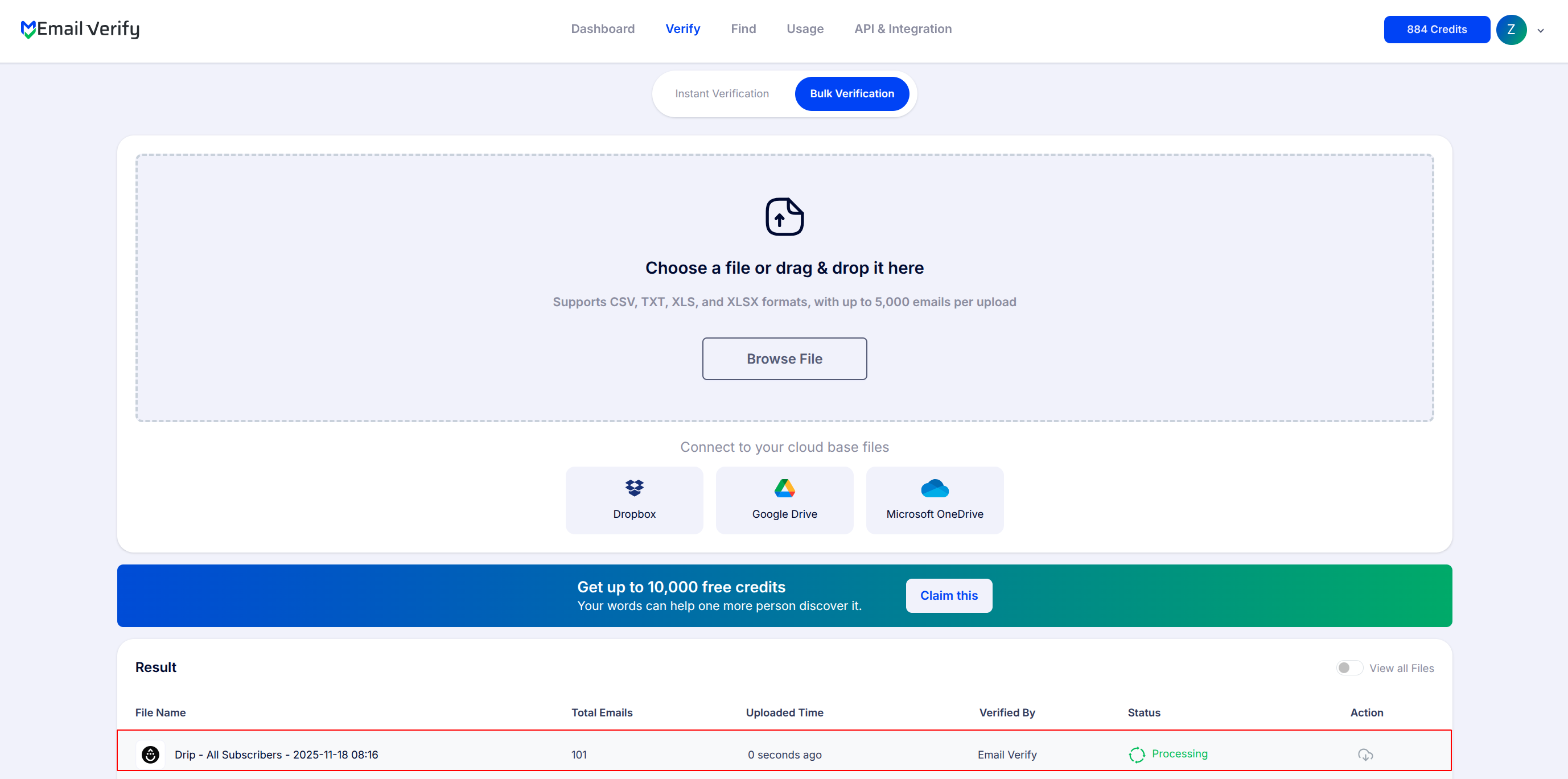
Step 8: Download Results
Note: Validation results are automatically sent to the connected integration. Three custom fields will be added in each verified email as EV_Status, EV_SubStatus, and EV_Validation_Timestamp. These fields play a key role in maintaining accurate, up-to-date contact information and improving how you manage and interact with your emails.

Drip Email Verification Integration Features
To use this integration, you'll need an active Drip account. During setup, you'll be asked to provide your Drip API key to connect your account with EmailVerify.io. This key allows EmailVerify.io to securely access your Drip data without storing your login details.
Import Email Addresses from Drip
Import email addresses from your Drip lists directly into EmailVerify.io for validation.
Validate Email Addresses
Validate imported emails using EmailVerify.io's powerful email verification service to identify invalid addresses.
Export Results Back to Drip
When exporting the validation results to Drip, custom fields are added to the email inside the list: EV_Status, EV_SubStatus, and EV_Validation_Timestamp.
Secure API Key Connection
This key allows EmailVerify.io to securely access your Drip data without storing your login details.
Maintain Accurate Lists
Help maintain accurate lists and improve deliverability by removing invalid email addresses from your campaigns.
Reduce Bounce Rates
Keep your campaigns clean, reduce bounces, and improve deliverability with real-time verification.
Why Drip E-Commerce Users Need Email Verification
Drip is built for e-commerce — abandoned cart recovery, post-purchase upsells, customer win-back, and browse abandonment flows. Every automation depends on the email address being real and deliverable.
- ✗ Revenue attribution errors — Drip tracks revenue from email-driven purchases. Invalid contacts inflate conversion metrics and distort the actual ROI of your automations.
- ✗ Broken automation sequences — Hard bounces in automation flows disrupt sequence logic. Subsequent steps fail and contact data becomes meaningless for analytics.
- ✗ Sender reputation damage — High-frequency e-commerce campaigns (flash sales, restock alerts, seasonal promotions) accelerate sender reputation damage when invalid contacts are present.
- ✗ Customer count inflation — Invalid contacts inflate Drip subscriber counts, affecting plan pricing and making audience metrics unreliable.
- ✗ Checkout opt-in lists: 5–12% invalid due to typos and guest checkout errors. Pop-up and lead magnet lists: 8–18% invalid due to disposable emails from discount code sign-ups.
EmailVerify.io removes invalid contacts before they reach your automation sequences — protecting revenue attribution, sender reputation, and campaign analytics.
What EmailVerify.io Checks on Every Drip Contact
Each contact in your Drip list passes through 20+ real-time verification checks before results sync back as custom fields.
| Check | What It Detects |
|---|---|
| Syntax validation | Formatting errors — missing @, invalid characters, malformed structure |
| Domain / DNS check | Whether the email domain exists and is active |
| MX record check | Active mail server records on the domain |
| SMTP verification | Whether the individual mailbox exists on the server |
| Catch-all detection | Domains that accept all emails regardless of whether the mailbox exists |
| Disposable email check | Temporary or burner addresses from 10,000+ known providers |
| Role-based detection | Generic addresses: info@, admin@, noreply@, support@ |
| Hard bounce history | Cross-reference with known invalid address databases |
Results sync back to Drip as custom fields: EV_Status | EV_SubStatus | EV_Validation_Timestamp
What Drip Users See After Verification
EmailVerify.io writes results directly to your Drip contact records as custom fields — no manual export or re-import required.
Drip Campaigns With vs Without Email Verification
Invalid emails corrupt automation sequences, revenue attribution, and sender reputation. Here is what changes with EmailVerify.io.
| Approach | Time Required | Accuracy | Auto-Sync | Ongoing Protection |
|---|---|---|---|---|
| No verification | 0 min setup | Unknown | No | All invalids enter automation sequences |
| Manual CSV clean | Hours of manual work | Basic | No | Partial — misses catch-all and role-based |
| EmailVerify.io + Drip | Under 5 min setup | 20+ checks pre-send | Yes — EV fields on every contact | Full — revenue attribution and flows protected |
Who Should Use Drip Email Verification
Shopify and WooCommerce store owners
E-commerce stores collecting emails through checkout, pop-ups, and loyalty programs accumulate invalid addresses quickly. Verify before major promotional sends including Black Friday and seasonal campaigns.
DTC (direct-to-consumer) brands
DTC brands running post-purchase and re-engagement sequences rely on accurate contact data for revenue attribution. Verification ensures automation performance metrics reflect real customer behaviour.
E-commerce agencies managing Drip accounts
Bulk-verify client contact lists quarterly, protecting sender reputations and keeping automation performance data accurate across multiple Drip accounts.
Subscription box and recurring revenue businesses
For subscription businesses, email deliverability is directly tied to retention. Invalid renewal reminder emails mean lost subscribers. Verify renewal and re-engagement lists regularly.
Technical Questions About Drip Email Verification
Where do I find my Drip API key?
Your Drip API key is at Profile (top right icon) > User Settings > API Token. Copy this token and paste it into the EmailVerify.io Drip connection screen. The token grants read and write access to your Drip contacts for verification purposes only.
Does EmailVerify.io store my Drip API key?
No. Your API key is used only for the integration connection and is not permanently stored. You can regenerate your Drip API token in User Settings at any time to revoke access.
Can I use EV_Status in Drip segments and automation triggers?
Yes. EV_Status is a custom field you can use in Drip's segment builder and automation conditions. Create a suppression segment where EV_Status equals 'Invalid' and exclude it from campaign sends. For abandoned cart automations, add an entry condition: EV_Status is 'Valid'.
How long does it take to verify 10,000 Drip contacts?
For 10,000 contacts, verification typically completes in 10 to 20 minutes. You receive an email notification when complete. Results sync back to Drip contact custom fields automatically — no further action required.
Also integrate with ActiveCampaign Email Verification , Klaviyo Email Verification , Mailchimp Email Verification , GetResponse Email Verification . Or use ourAPI for programmatic access.
Frequently Asked Questions

Does Drip verify email addresses automatically?
No. Drip does not validate email addresses when contacts are added. EmailVerify.io's integration adds this validation layer — verifying each contact with 20+ real-time checks and syncing results back as custom fields (EV_Status, EV_SubStatus, EV_Validation_Timestamp) on each Drip contact record.
How do I find my Drip API key?
Click your profile icon (top right) in Drip, go to User Settings, and find and copy your API Token. Paste this token into EmailVerify.io during setup. It grants read and write access to your Drip contacts for verification purposes only.
Can EmailVerify.io verify all my Drip contacts in bulk?
Yes. After connecting via API key, select one or more Drip contact lists and start bulk verification. The system automatically imports contacts, processes them, and syncs results back as custom fields when complete. For 10,000 contacts, processing typically takes 10 to 20 minutes.
What custom fields does EmailVerify.io add to Drip contacts?
EmailVerify.io adds three custom fields to each verified Drip contact: EV_Status (Valid, Invalid, Catch-All, Disposable, or Unknown), EV_SubStatus (reason code such as mailbox_not_found, smtp_timeout, catch_all, disposable_domain, or role_based), and EV_Validation_Timestamp (date and time of last verification). Use these in Drip segments, automation triggers, and campaign filters.
How does email verification improve my Drip e-commerce automations?
Invalid emails corrupt automation sequences by generating hard bounces that disrupt flow logic, producing meaningless engagement data, and inflating revenue attribution metrics. Verifying contacts before automation enrolment ensures every sequence step reaches a real customer. Open rates, click data, and revenue tracking all become more accurate.
Can I filter disposable emails from my Drip lists?
Yes. Disposable addresses from Mailinator, TempMail, and 10,000+ other providers are flagged with EV_Status: Disposable. These are especially common in e-commerce lists from pop-up sign-ups where users provide throwaway emails for discount codes.
Will my Drip API key be stored by EmailVerify.io?
No. Your API key is used only for the integration connection and is not permanently stored. You can regenerate your Drip API token in User Settings at any time to revoke access without affecting your primary Drip account.
What Drip plan do I need for this integration?
The integration works with all Drip plans. Drip's developer API — used to import contacts and write custom fields — is available on all account tiers including entry-level plans.
How often should I re-verify my Drip contacts?
Verify after major subscriber growth events before sending to new additions. Re-verify your full active contact list quarterly. Before high-volume e-commerce sends such as Black Friday or seasonal promotions, verify first. After importing external lists, always verify before the first send.
Is connecting Drip to EmailVerify.io free?
You're just one click away from clean email lists.
Start verifying your email addresses instantly and improve your campaign deliverability
* No credit card required