Brevo Email Verification Integration — Clean Contacts, Better Campaign Delivery
EmailVerify.io's Brevo email verification integration (formerly Sendinblue) validates every contact in your Brevo lists before your campaigns send. Connect via your Brevo API key in minutes, select the lists to verify, and get results synced back as custom attributes — EV_Status, EV_SubStatus, and EV_Validation_Timestamp — directly on each Brevo contact record. Brevo's all-in-one platform handles email, SMS, transactional messaging, and CRM. EmailVerify.io ensures the contact data powering all of these channels is accurate — so every campaign, workflow, and transactional message reaches a real, active inbox.

Quick Summary: Brevo Email Verification Integration
- Integration type: Native API Key — connect Brevo in minutes, no CSV exports needed
- Also known as: Brevo was formerly Sendinblue (rebranded May 2023). Works with all current Brevo accounts
- Verification checks: 20+ real-time checks per contact email address
- Results sync: EV_Status, EV_SubStatus, and EV_Validation_Timestamp written as custom attributes on each Brevo contact
- Free plan support: Works with all Brevo plans including free tier (300 sends/day)
How to use the integration
To get started with the Brevo integration, you'll need an active Brevo account, which you can create at https://onboarding.brevo.com/account/register along with an EmailVerify.io account.
Step 1: Sign in to EmailVerify.io
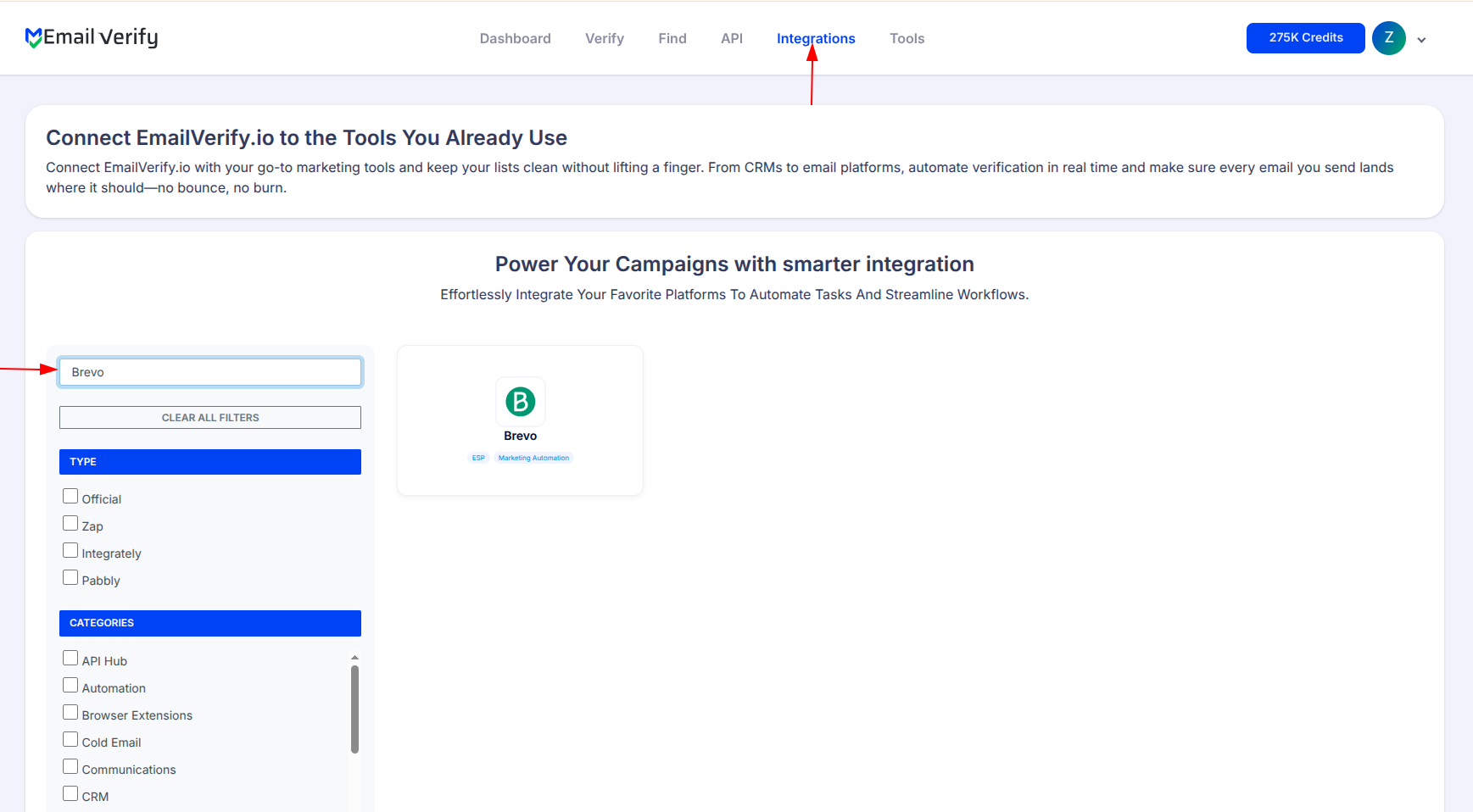
Step 2: Select Brevo
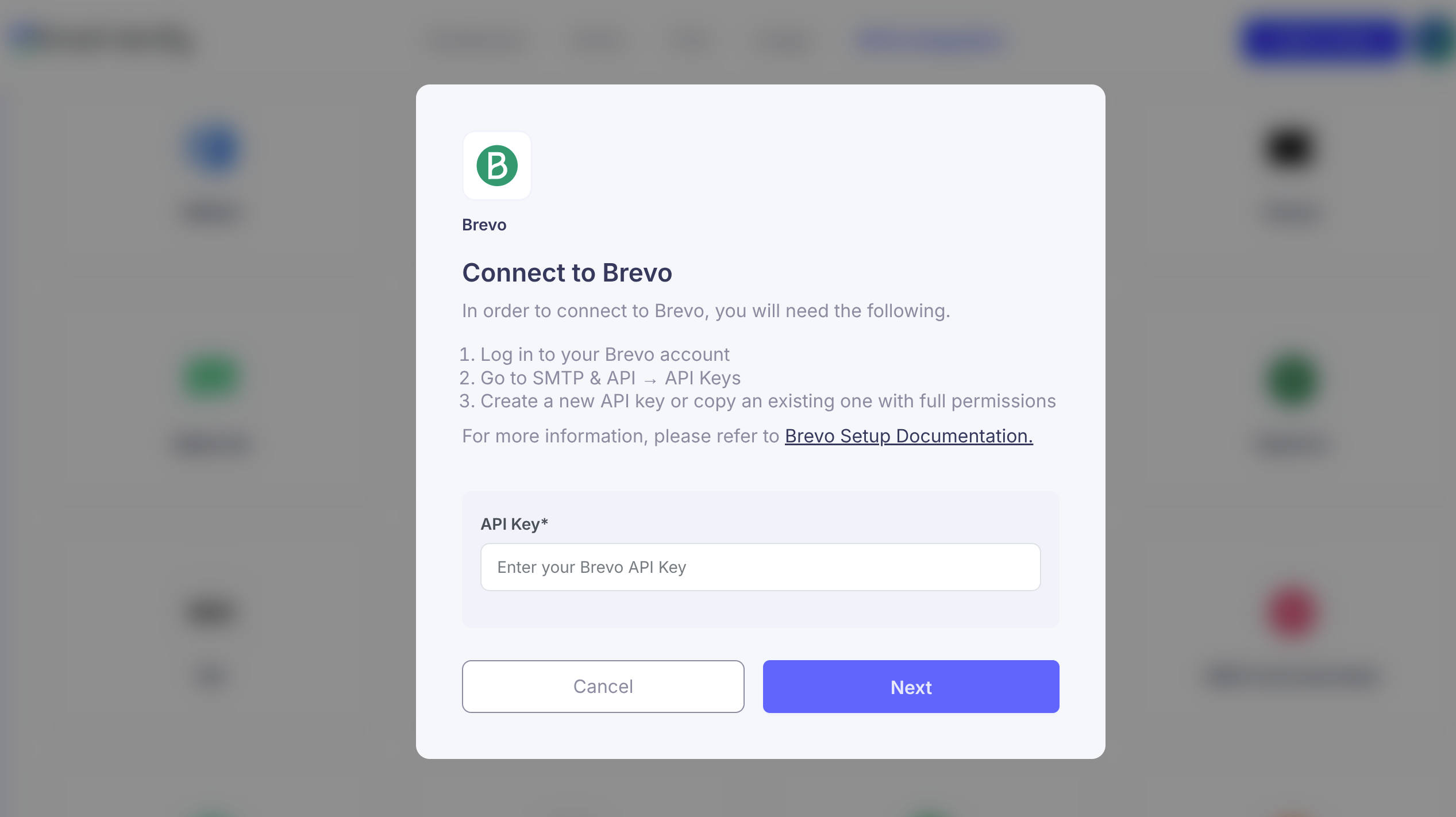
Step 3: Get API KEY
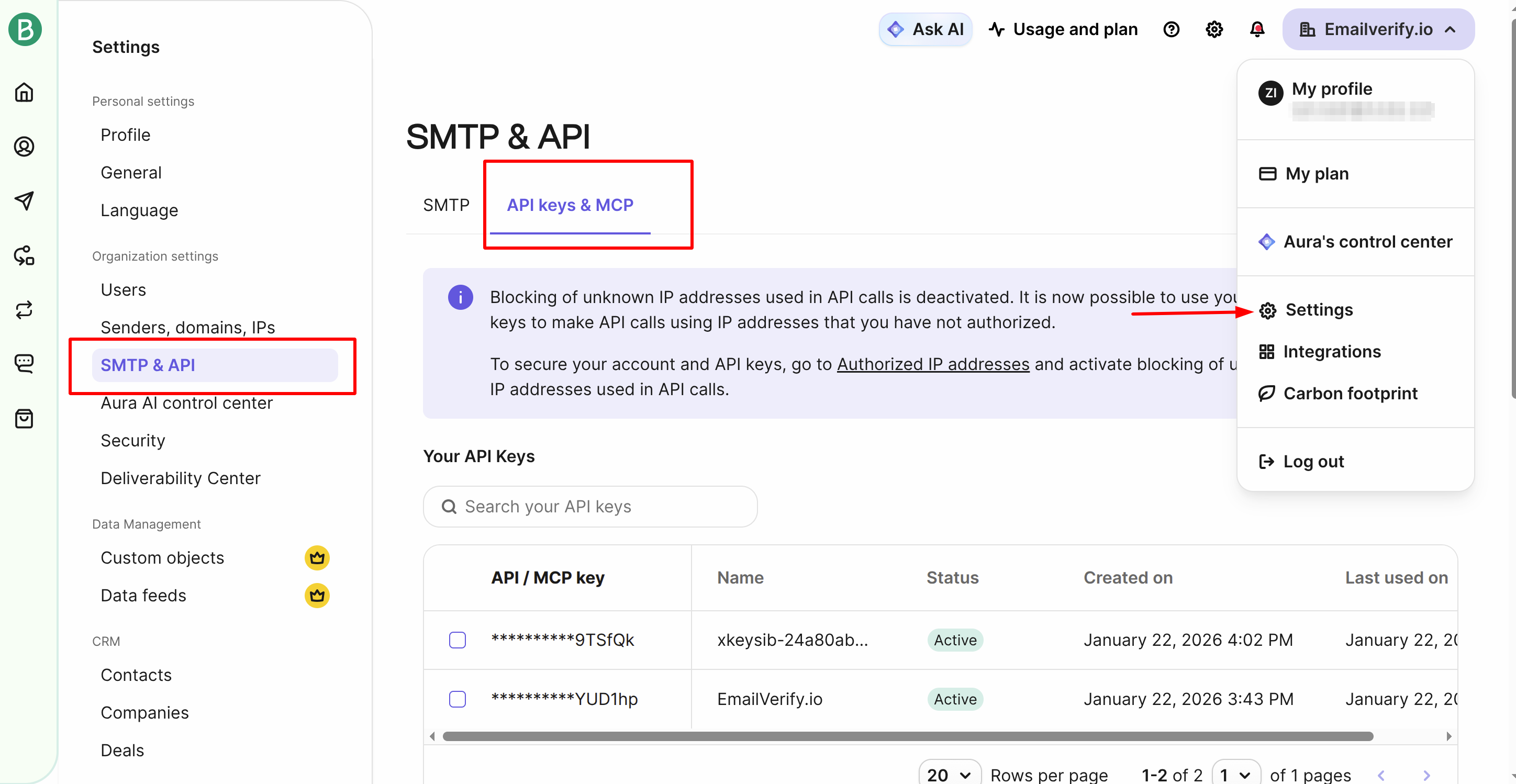
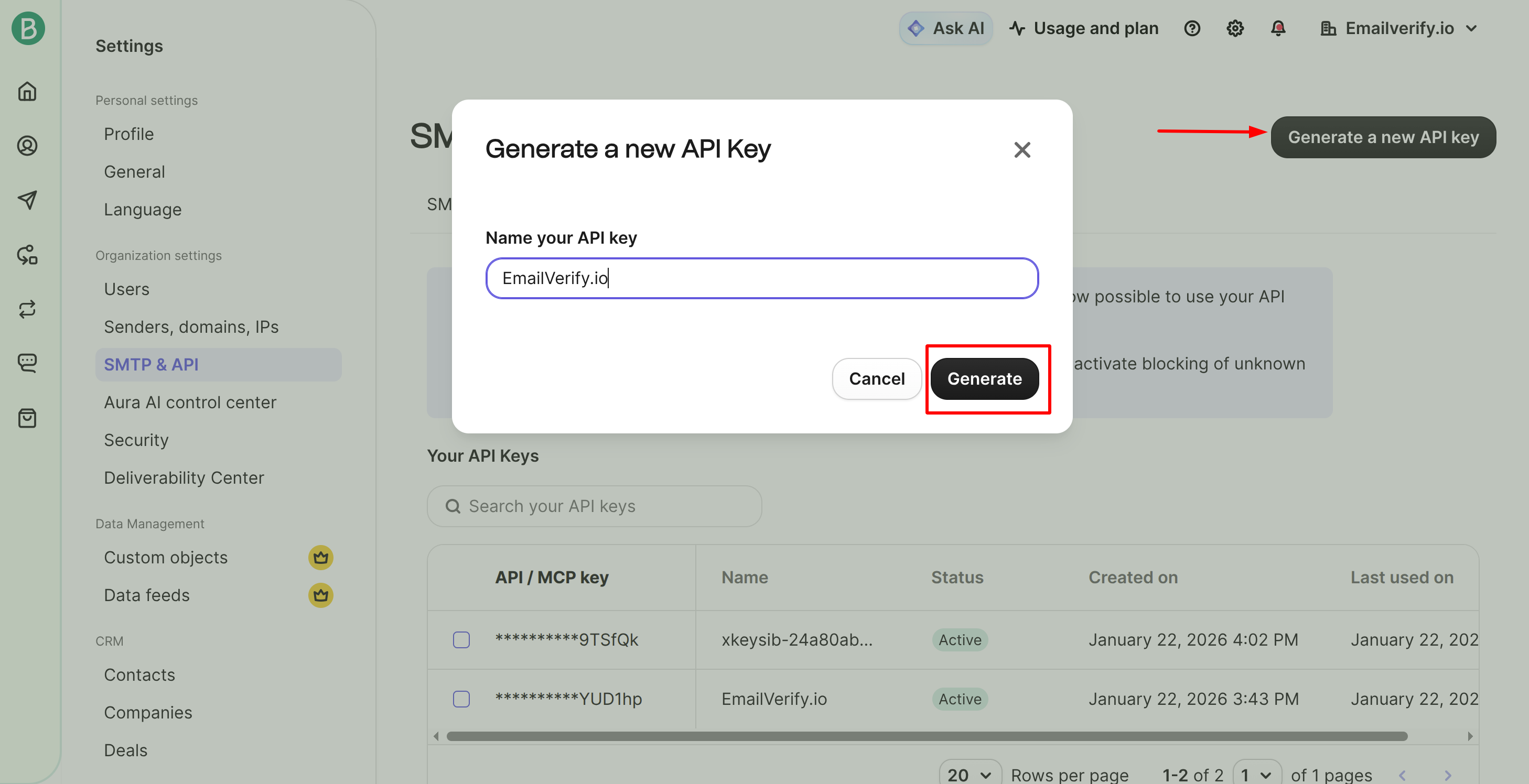
Step 4: Generate API KEY
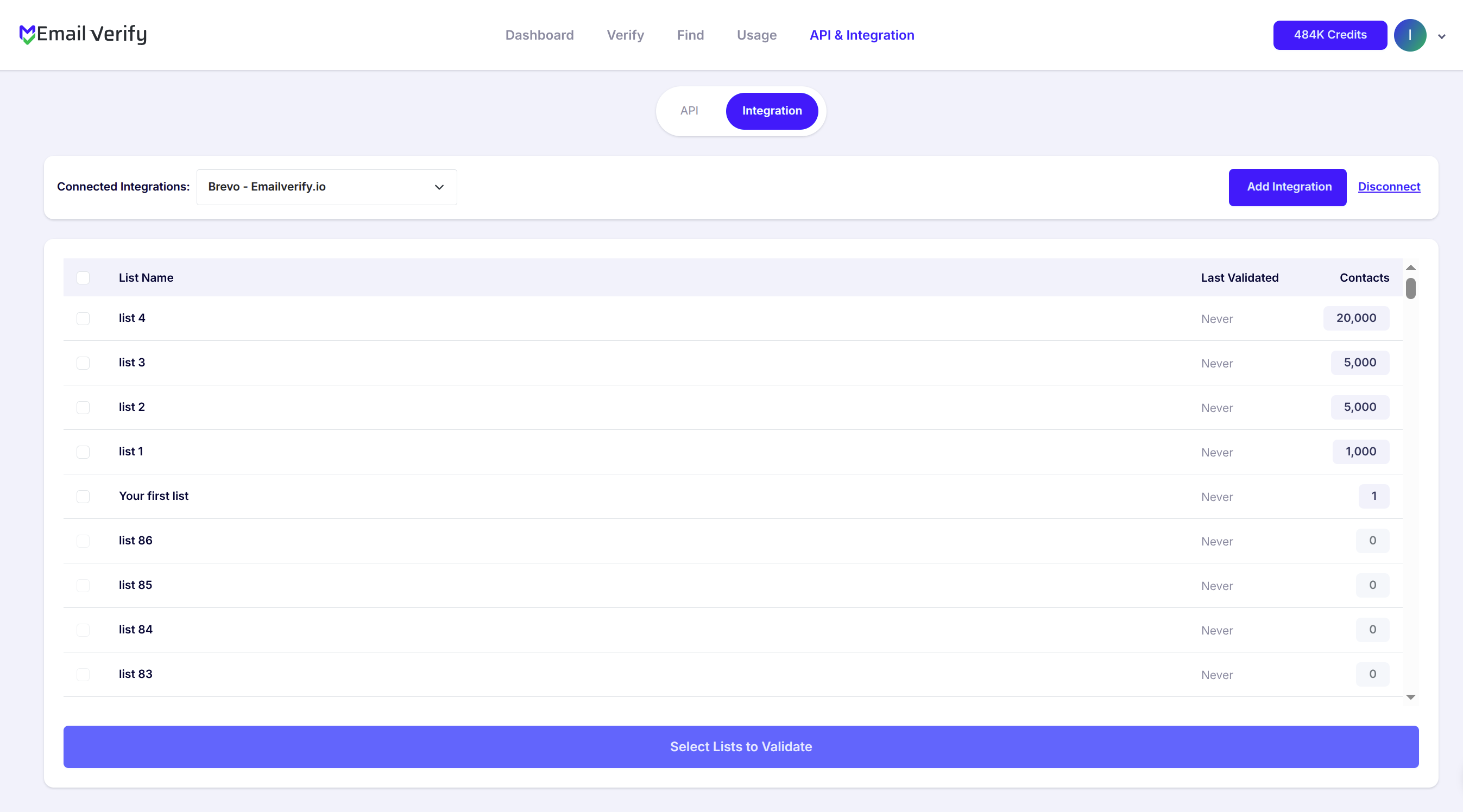
Step 5: View Your Lists
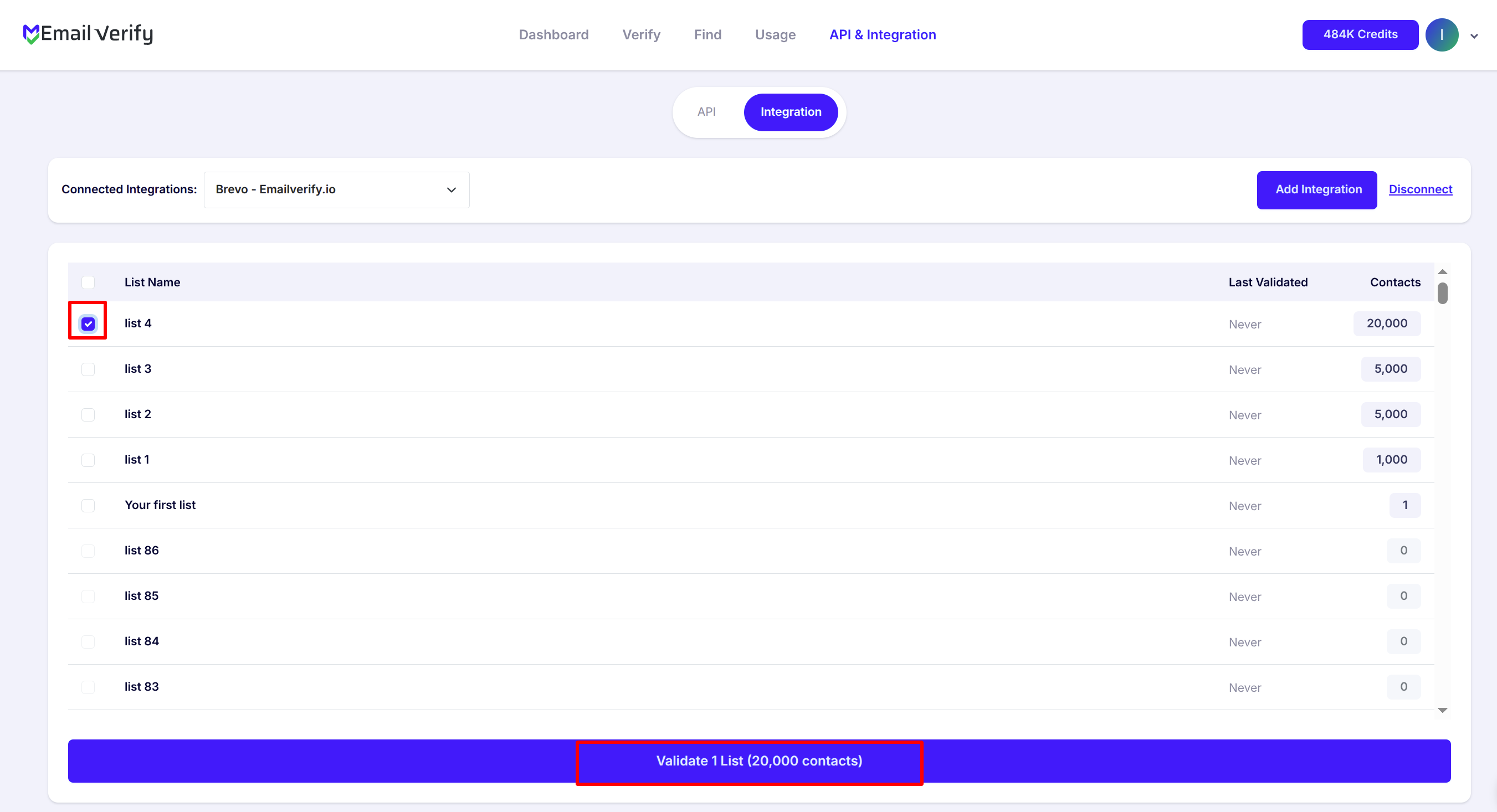
Step 6: Select Lists to Verify
Note: The results of the validation are automatically exported to the integration they originated from.
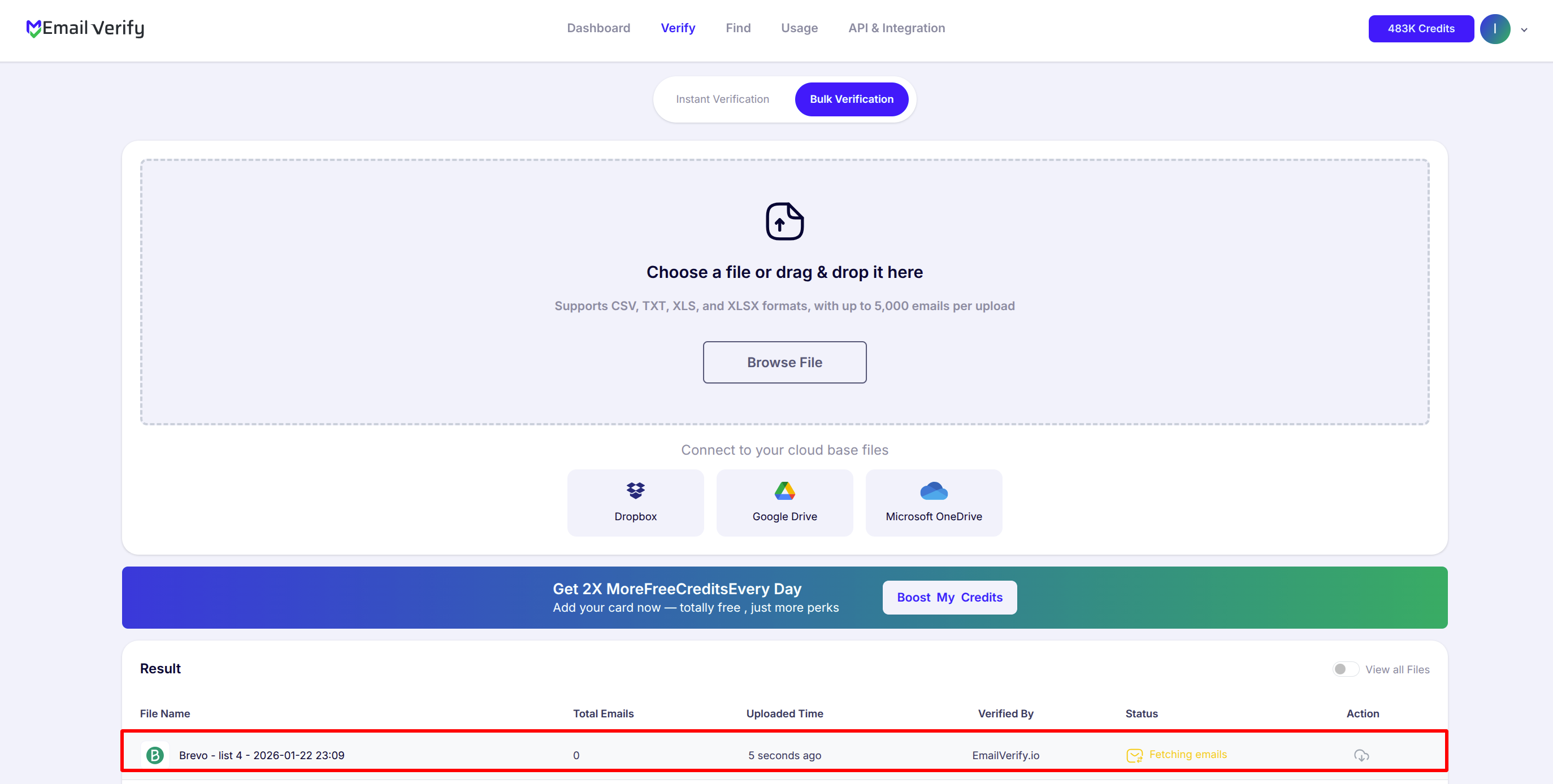
Step 7: Monitor Progress
Step 8: Download Results
Note: Validation results are automatically sent to Brevo. Three custom attributes will be added: EV_Status, EV_SubStatus, and EV_Validation_Timestamp.

Brevo Email Verification Integration Features
EmailVerify.io integrates seamlessly with Brevo to protect your sender reputation, maximize your inbox placement, and ensure your marketing automation workflows are powered by 100% valid contact data.
Import Emails from Brevo
Import email addresses from your Brevo lists directly into EmailVerify.io for validation.
Reliable Email Verification
Verify your contacts with EmailVerify.io's robust verification service to quickly detect invalid email addresses.
Export Validation Results
Automatically update contacts with validation data (EV_Status, EV_SubStatus, and EV_Validation_Timestamp) to keep your email list clean and up-to-date.
Secure API Key Access
Connect your Brevo account using an API key for safe, direct access to your data without sharing your password.
Keep Your Lists Clean
With a secure connection to Brevo, EmailVerify.io helps you maintain accurate email lists and improve deliverability.
Bounce Rate Reduction
Reduce bounces and spam complaints by removing invalid addresses from your campaigns.
Why Brevo Contact Lists Go Stale
Brevo does not validate email addresses at the point of contact entry. Contacts from sign-up forms, imports, CRM syncs, and API integrations are accepted without checking whether addresses are real or deliverable.
- ✗ Contacts imported from other platforms or not cleaned since the Sendinblue era accumulate significant list decay
- ✗ Email addresses decay at 22–30% per year — a list that was clean 12 months ago may now contain hundreds of undeliverable addresses
- ✗ Typos and fake addresses pass Brevo's sign-up forms without any validation layer
- ✗ Role addresses like info@, admin@, and noreply@ fill lists from B2B sign-ups and rarely belong to real individuals
- ✗ For Brevo's transactional channel, invalid addresses in your transactional contact database affect your delivery score — tracked separately from marketing
EmailVerify.io runs 20+ real-time checks per address — including SMTP verification, disposable email detection, and catch-all domain flagging — so invalid addresses are identified before they damage your Brevo account standing.
What EmailVerify.io Checks on Every Brevo Contact
Each contact email in your Brevo list is run through a multi-layer verification pipeline before results are synced back as custom attributes.
| Check | What It Detects |
|---|---|
| Syntax Validation | Formatting errors — missing @, invalid characters, malformed domain part |
| Domain / DNS Check | Whether the email domain exists and has valid DNS records |
| MX Record Check | Active mail server records configured on the domain |
| SMTP Mailbox Verification | Whether the individual mailbox exists on the mail server |
| Catch-All Domain Detection | Domains that accept all emails regardless of individual mailbox validity |
| Disposable Email Detection | Temporary or one-time-use addresses from 10,000+ known providers |
| Role Address Detection | Generic addresses: info@, admin@, noreply@, support@ |
| Bounce History Cross-Reference | Addresses known to have persistent delivery failures across the network |
Results are written back to Brevo as EV_Status, EV_SubStatus, and EV_Validation_Timestamp custom attributes on each contact record.
What Brevo Users Achieve with EmailVerify.io
Teams that verify their Brevo contact lists before sending see measurable improvements in deliverability, engagement, and account standing.
Results vary by list age and acquisition source. Lists not cleaned since the Sendinblue era or sourced from third-party imports typically show the highest invalid rates.
EmailVerify.io vs Other Brevo List Cleaning Methods
There are several ways to clean a Brevo contact list. Here is how they compare on speed, accuracy, and automation.
| Approach | Time Required | Accuracy | Auto-Sync | Ongoing Protection |
|---|---|---|---|---|
| No Verification | None | Unknown — bounces accumulate | No | None |
| Manual CSV Export & Re-import | Hours of manual work | Low — no real validation | No | None |
| EmailVerify.io Native | Minutes | High — 20+ checks per contact | Yes — custom attributes | Disposables, catch-alls, invalid addresses |
Who Should Use Brevo Email Verification
Email Marketers Sending Regular Campaigns
Protect your Brevo bounce rate and sender reputation with quarterly list verification. Keep your account in good standing and ensure every campaign reaches real, active inboxes.
E-Commerce Businesses on Brevo
Verify both your marketing campaign contacts and transactional email database. Invalid addresses in either list affect your overall Brevo delivery score and account standing.
Agencies Managing Multiple Brevo Accounts
Verify client Brevo lists quarterly across all managed accounts. Maintain list hygiene and protect sender reputations for every client without manual effort per account.
SMBs on Brevo's Free Plan
Brevo's free plan sends 300 emails per day. Invalid contacts waste those daily sends and generate bounces that hurt your account. Verify to maximise the value of every free plan send.
Technical Questions — Brevo Email Verification
How do I find my Brevo API key?
In your Brevo account, click your name in the top right and go to Profile > SMTP & API > API Keys. Or navigate directly to Settings > SMTP & API > API Keys. Click Generate a new API key, name it (e.g. 'EmailVerify.io'), and click Generate. Copy the key immediately — it is only shown once. Paste it into EmailVerify.io's Brevo integration setup screen.
What custom attributes does EmailVerify.io add to Brevo contacts?
Three custom attributes are added: EV_Status (Valid / Invalid / Catch-All / Disposable / Unknown), EV_SubStatus (detailed reason code such as mailbox_not_found, smtp_timeout, disposable_domain, or role_based), and EV_Validation_Timestamp (date and time of verification). Use these in Brevo to create segments, filter campaign recipients, and build automation triggers.
Does EmailVerify.io work with Brevo's free plan?
Yes. The integration works with all Brevo plans including the free tier. Brevo's free plan allows up to 300 email sends per day with unlimited contacts. Verification is especially valuable for free plan users — removing invalid contacts ensures your 300 daily sends are not wasted on addresses that will generate bounces.
I used Sendinblue — does this integration work for my account?
Yes. Brevo is the same platform as Sendinblue, rebranded in May 2023. All your Sendinblue contacts, lists, and API key location are unchanged. Go to Settings > SMTP & API > API Keys to generate a Brevo API key and connect to EmailVerify.io. The integration works identically to how it worked under the Sendinblue name.
Also integrate with Mailchimp , HubSpot , ActiveCampaign , GetResponse . Or use ourAPI for programmatic access.
Frequently Asked Questions

Does Brevo (formerly Sendinblue) verify email addresses automatically?
No. Brevo does not validate email addresses when contacts are added to your lists. Contacts are accepted from any source — forms, imports, CRM syncs, API integrations — without checking deliverability. EmailVerify.io's Brevo integration adds this validation layer, verifying each contact and syncing results back as custom attributes (EV_Status, EV_SubStatus, EV_Validation_Timestamp) on each record.
How do I find my Brevo API key?
Log in to your Brevo account and click your name or avatar in the top right. Go to Profile > SMTP & API > API Keys (or navigate directly to Settings > SMTP & API > API Keys). Click Generate a new API key, name it (e.g. 'EmailVerify.io'), and click Generate. Copy the key immediately — it is only shown once. Paste this key into EmailVerify.io's Brevo integration setup screen.
What custom attributes does EmailVerify.io add to Brevo contacts?
EmailVerify.io adds three custom attributes to each verified contact: EV_Status (Valid / Invalid / Catch-All / Disposable / Unknown), EV_SubStatus (detailed reason code — mailbox_not_found, smtp_timeout, catch_all, disposable_domain, role_based, etc.), and EV_Validation_Timestamp (date and time of last verification). Use these attributes in Brevo to create segments, filter campaigns, and build marketing automation triggers.
Is the Brevo integration free?
Connecting your Brevo account to EmailVerify.io is completely free. Email verification uses credits — one credit per contact email verified. New users receive free credits to test the integration before purchasing. Visit emailverify.io/pricing for current credit pricing.
Does EmailVerify.io work with Brevo's free plan?
Yes. The EmailVerify.io integration works with all Brevo plans, including the free tier. Brevo's free plan sends up to 300 emails per day with unlimited contacts. Verification is especially valuable for free plan users — removing invalid contacts ensures your 300 daily sends reach valid, active inboxes rather than addresses that will bounce.
I used Sendinblue — does this integration still work for me?
Yes. Brevo is the same platform as Sendinblue, rebranded in May 2023. All your Sendinblue contacts, lists, and API key location are unchanged in Brevo. Go to Settings > SMTP & API > API Keys to generate a Brevo API key and connect. If you previously set up EmailVerify.io with Sendinblue, reconnect using your current Brevo API key if the old key no longer works.
How is my contact data handled securely?
EmailVerify.io processes your Brevo contact email addresses for verification purposes only using your API key. We do not permanently store your contact data after verification is complete, and we never share contact data with third parties. Your Brevo API key is used only for the active integration session. You can revoke API key access at any time from Brevo's Settings > SMTP & API > API Keys by deleting or regenerating the key.
Does EmailVerify.io detect disposable emails in Brevo?
Yes. EmailVerify.io identifies disposable and temporary email addresses from 10,000+ known providers and flags them as EV_Status: Disposable. These are common in Brevo lists built from lead magnets, gated content, and free resource sign-ups where users provide throwaway addresses.
Can I verify a specific Brevo list rather than all contacts?
Yes. After connecting your Brevo account, you see all your existing Brevo lists and can select exactly which list to verify. You can prioritise your most active campaign list, a recently imported list, or a specific segment before a major send.
How often should I re-verify my Brevo contacts?
Email addresses decay at 22–30% per year. For Brevo users: re-verify every 3 months if you send regular campaigns, verify before each major send if you send infrequently, verify immediately after migrating from Sendinblue or any platform import, and verify new additions after a large form submission influx before first send. Use EV_Validation_Timestamp to identify contacts overdue for re-verification.
You're just one click away from clean email lists.
Start verifying your email addresses instantly and improve your campaign deliverability
* No credit card required