Customer.io Email Verification Integration — Clean People, Reliable Lifecycle Messaging
EmailVerify.io's Customer.io integration lets you import People segments, validate every email address against 20+ real-time checks, and sync EV_Status back as custom attributes on each Person record automatically. Customer.io does not validate email addresses when People are added from sign-ups, API integrations, or data imports. Invalid People in onboarding sequences, activation flows, and retention campaigns generate bounces that damage your sending infrastructure and distort your analytics. Connect via API keys — your Customer.io Data Center (US or EU), Workspace URL, APP API Key, and Pipeline API Key. Results sync back to each Person as EV_Status, EV_SubStatus, and EV_Validation_Timestamp, ready for use in Customer.io segments, campaigns, and lifecycle flow entry conditions.


Quick Summary: Customer.io Email Verification Integration
- Integration Type: API Key Connection (Data Center + Workspace URL + APP API Key + Pipeline API Key)
- Connection Method: 4 credentials — all found in Customer.io Settings > Account Settings
- Setup Time: Approximately 10 minutes (first-time setup)
- Results Sync: Automatic — EV_Status, EV_SubStatus, EV_Validation_Timestamp as custom attributes on each Person
- Best For: SaaS companies, mobile app teams, lifecycle marketing teams, and RevOps teams using Customer.io
How to use the integration
To get started with the Customer.io integration, you’ll need an active Customer.io account, which you can create at https://fly.customer.io/signup along with an EmailVerify.io account.
Step 1: Sign in to EmailVerify.io
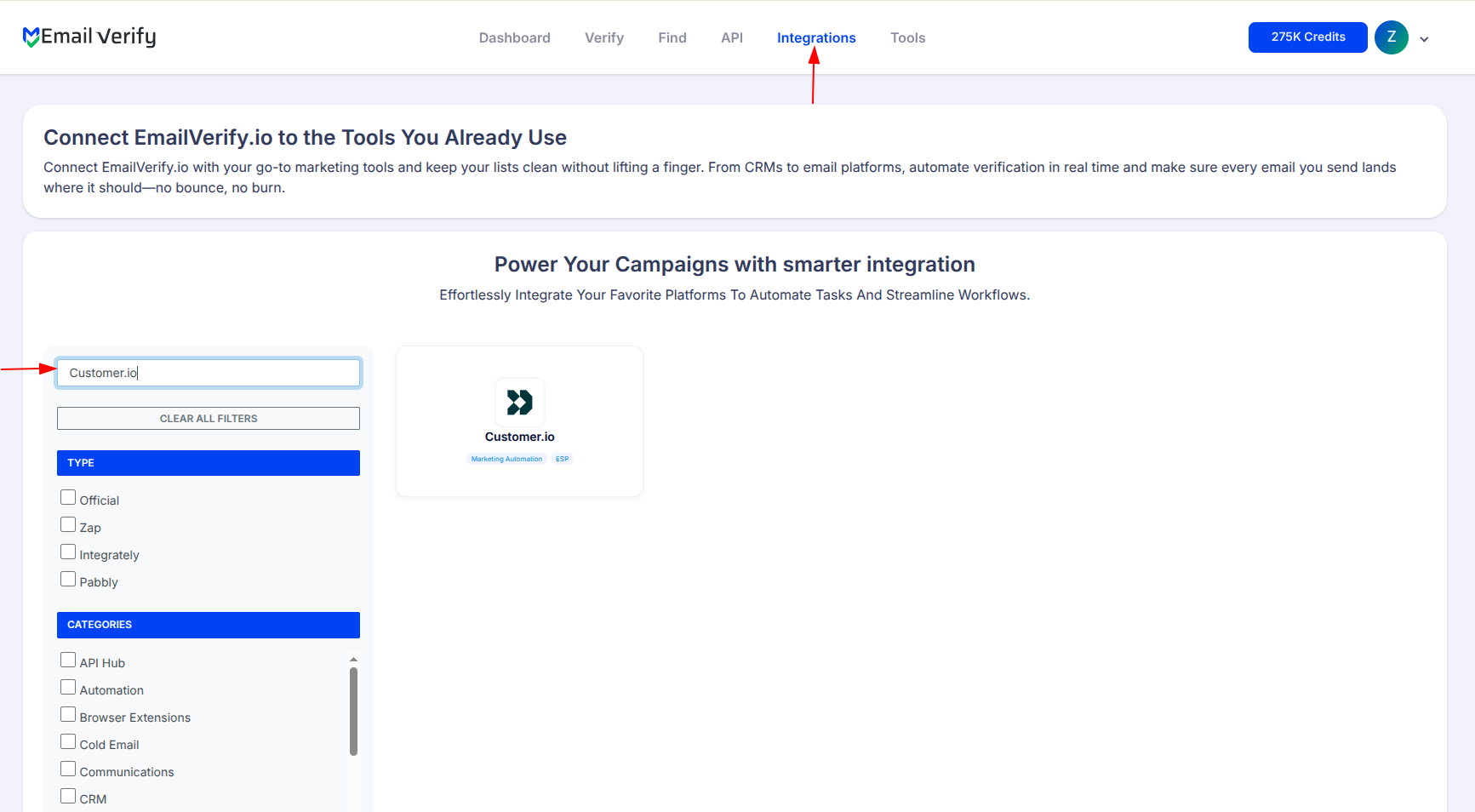
Step 2: Select Customer.io
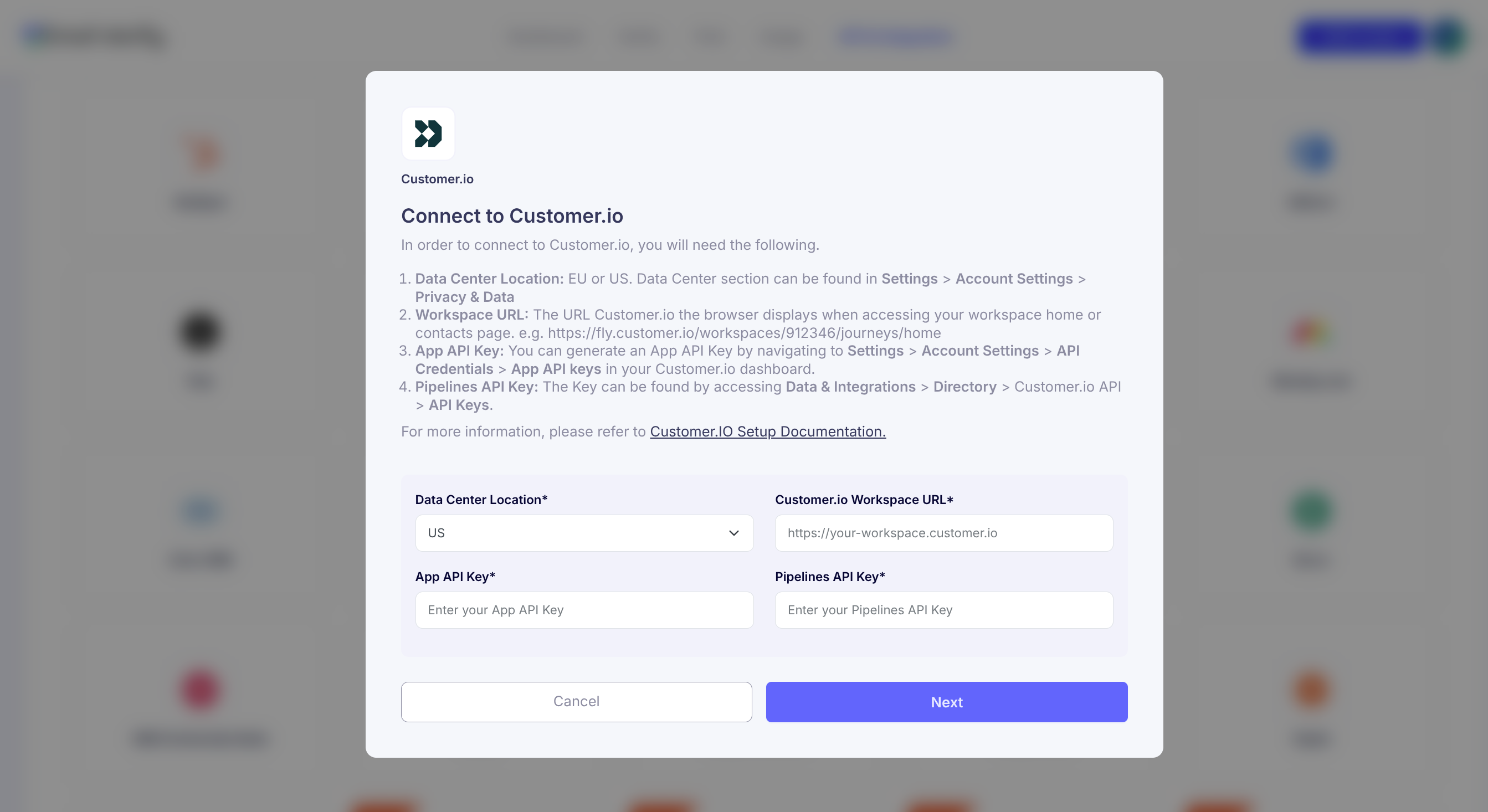
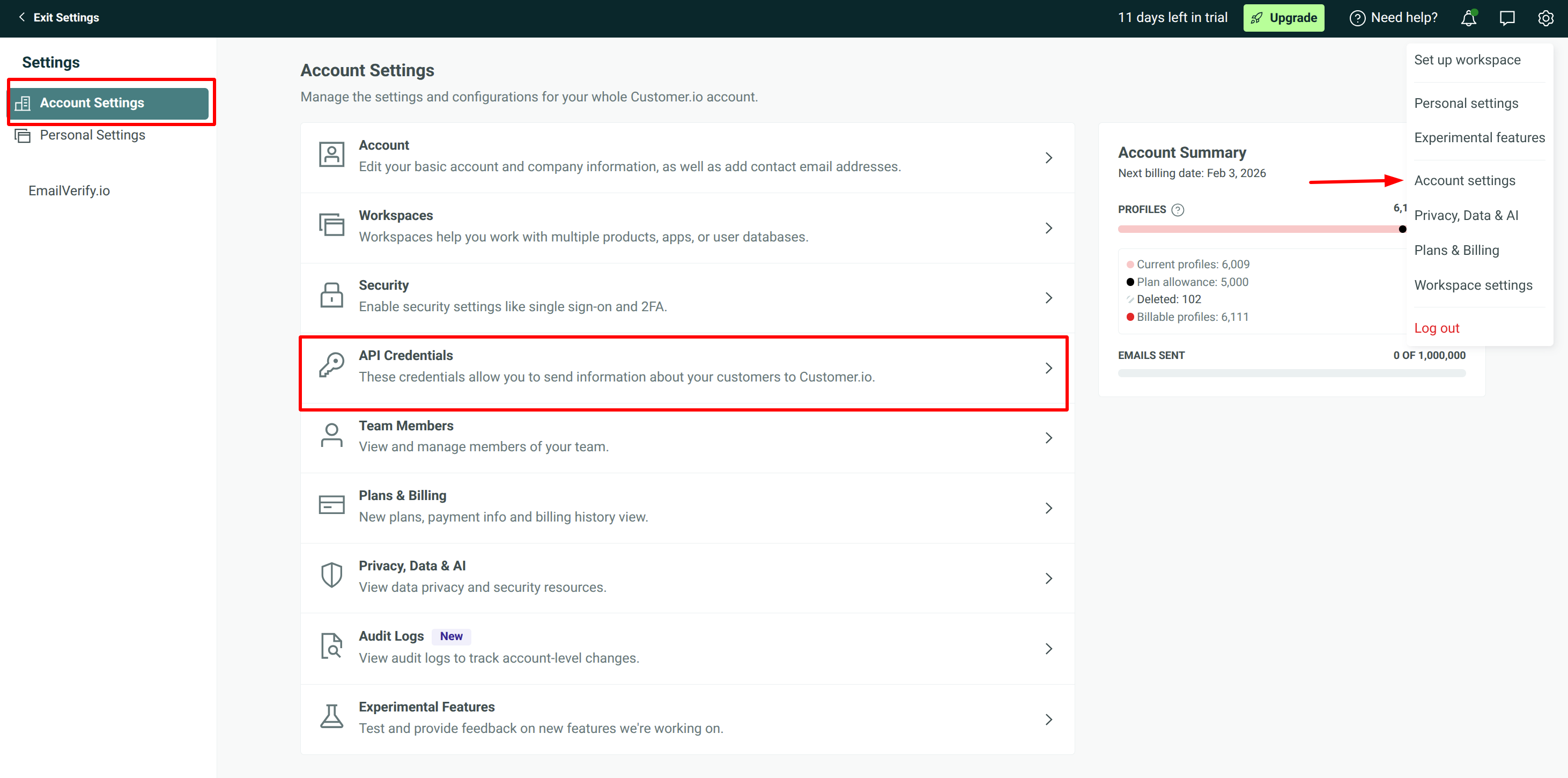
Step 3: Get Data Center
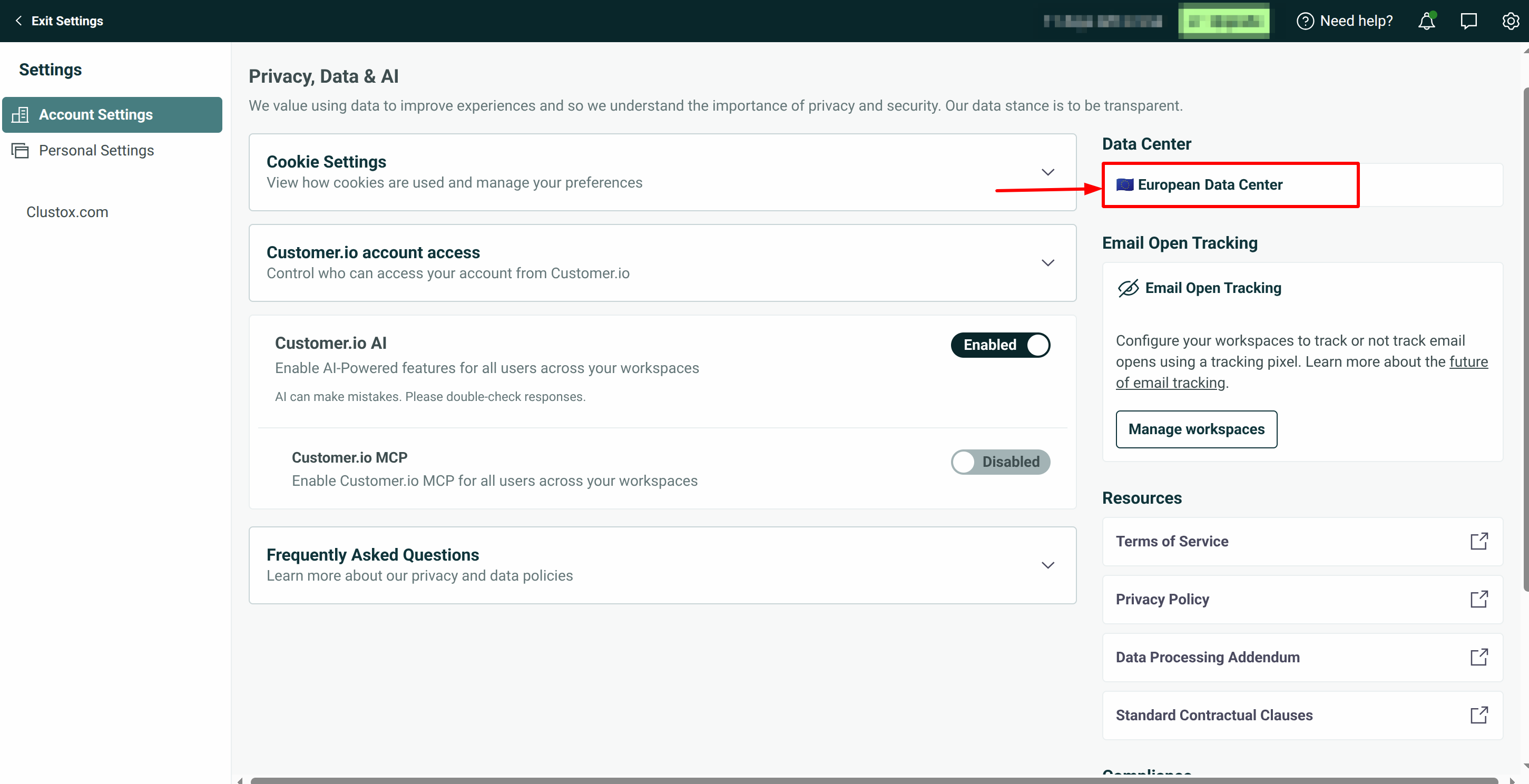
Step 4: Get Workspace URL
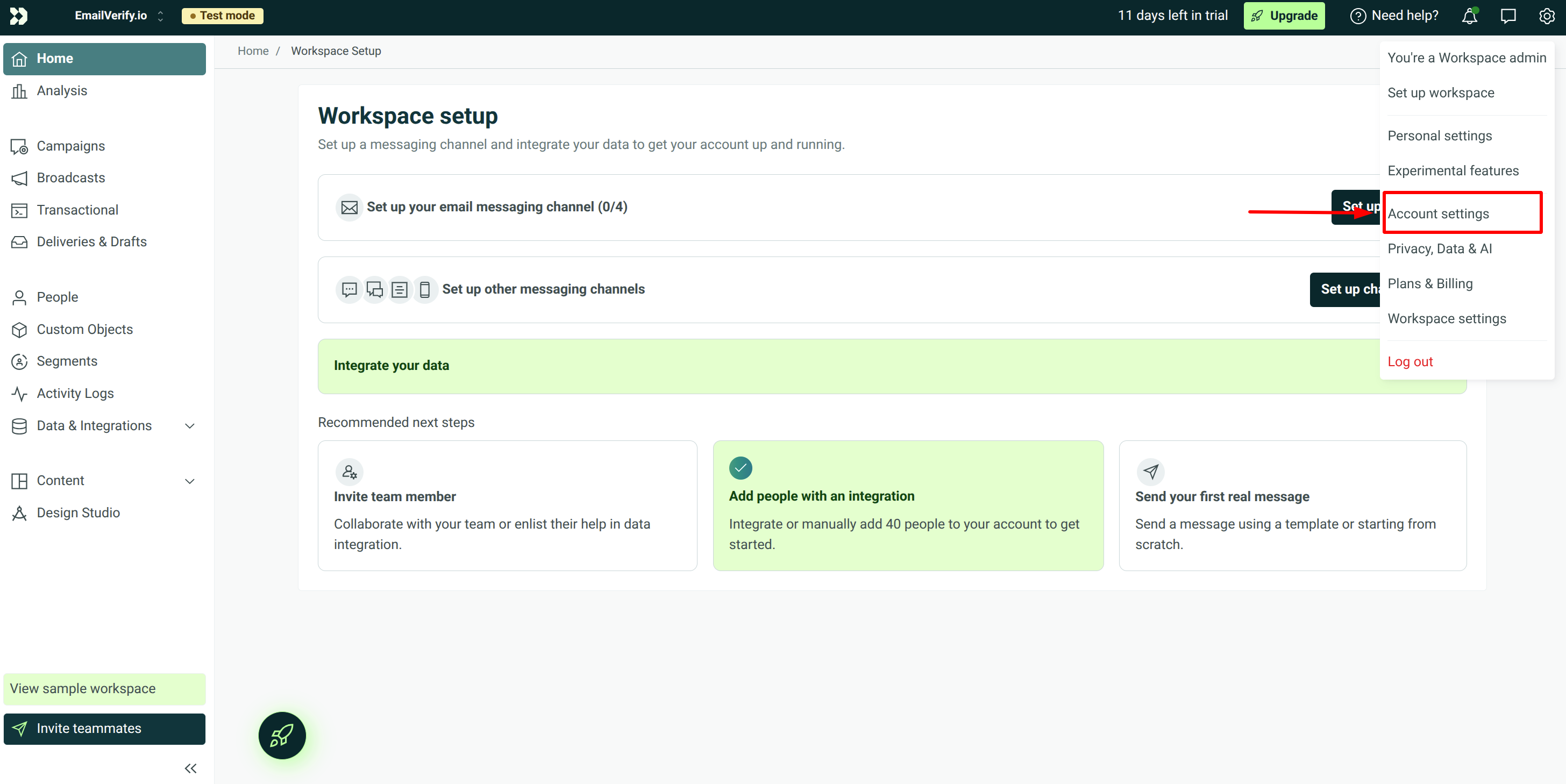
Step 5: Get APP API Key
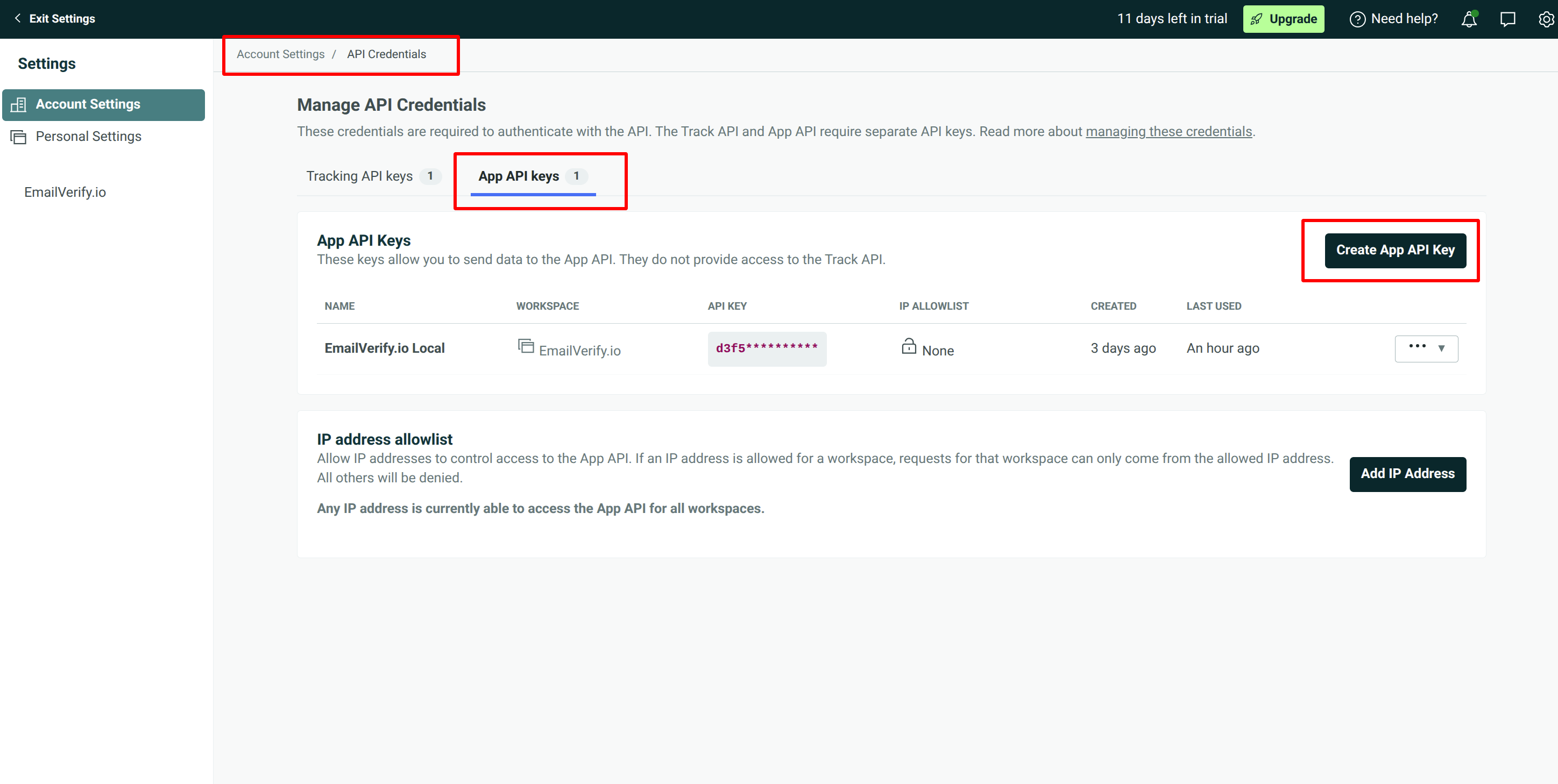
Step 6: Generate APP API Key
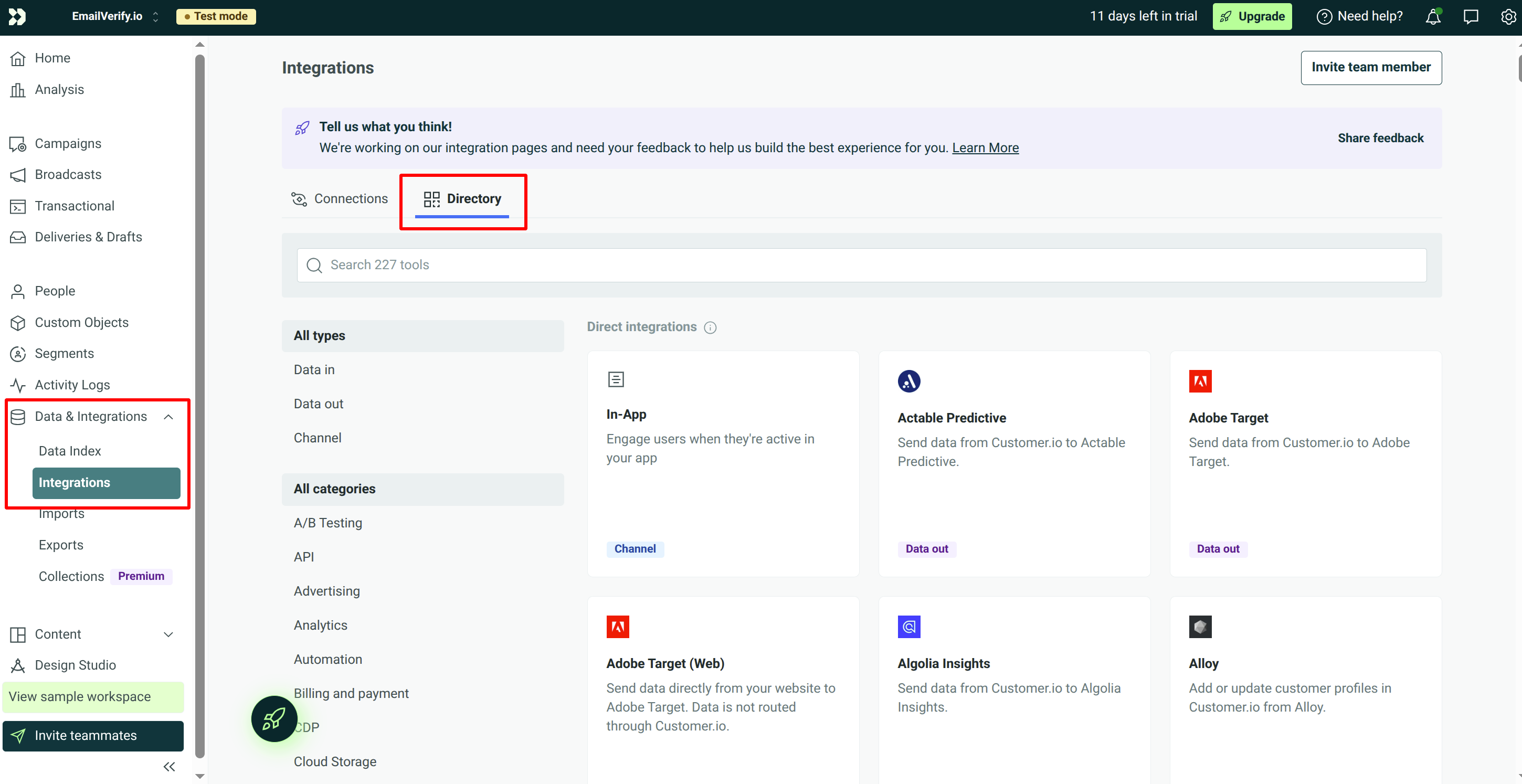
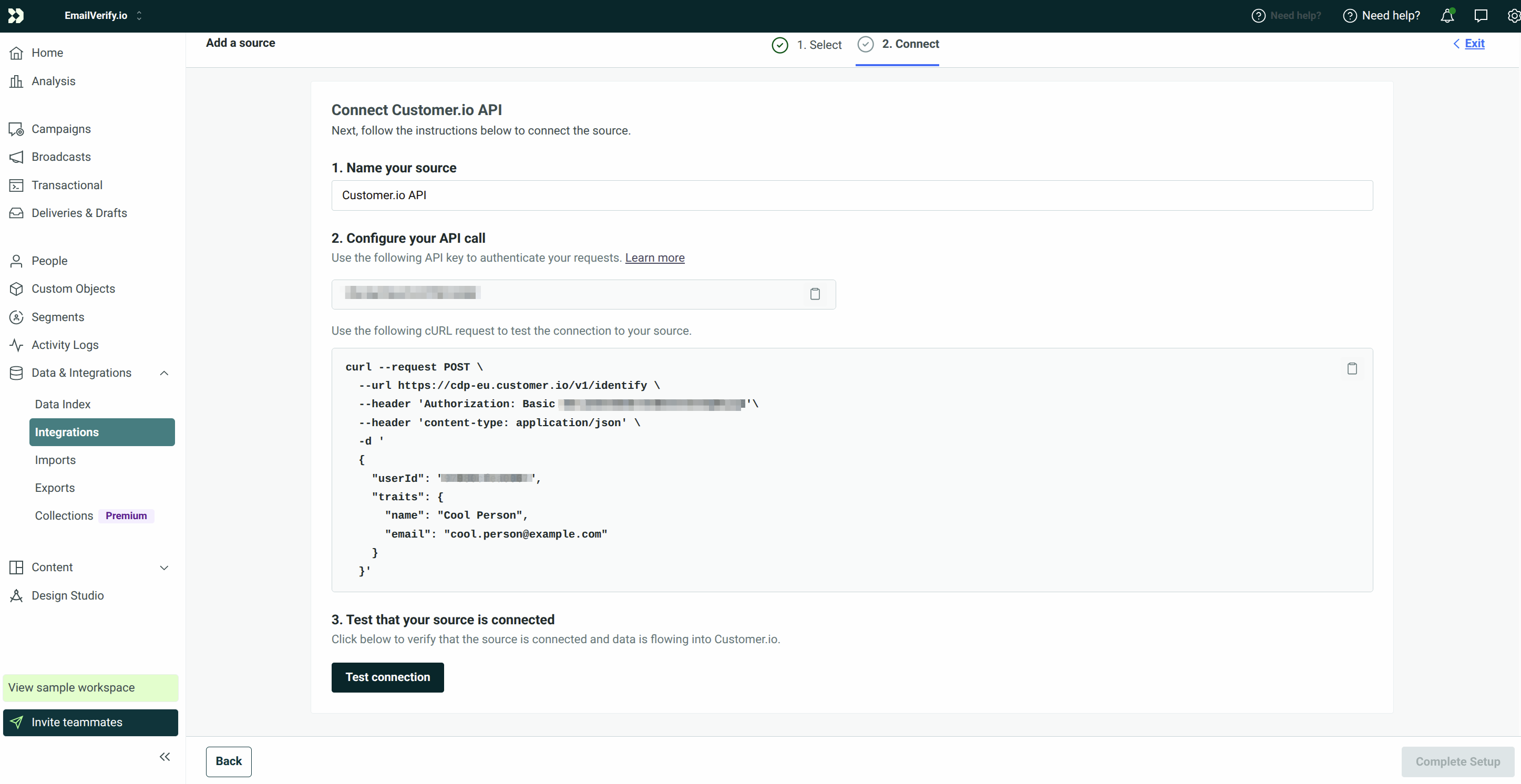
Step 7: Get Pipeline API Key
Step 8: Select Customer.io API
Step 9: View Your Lists
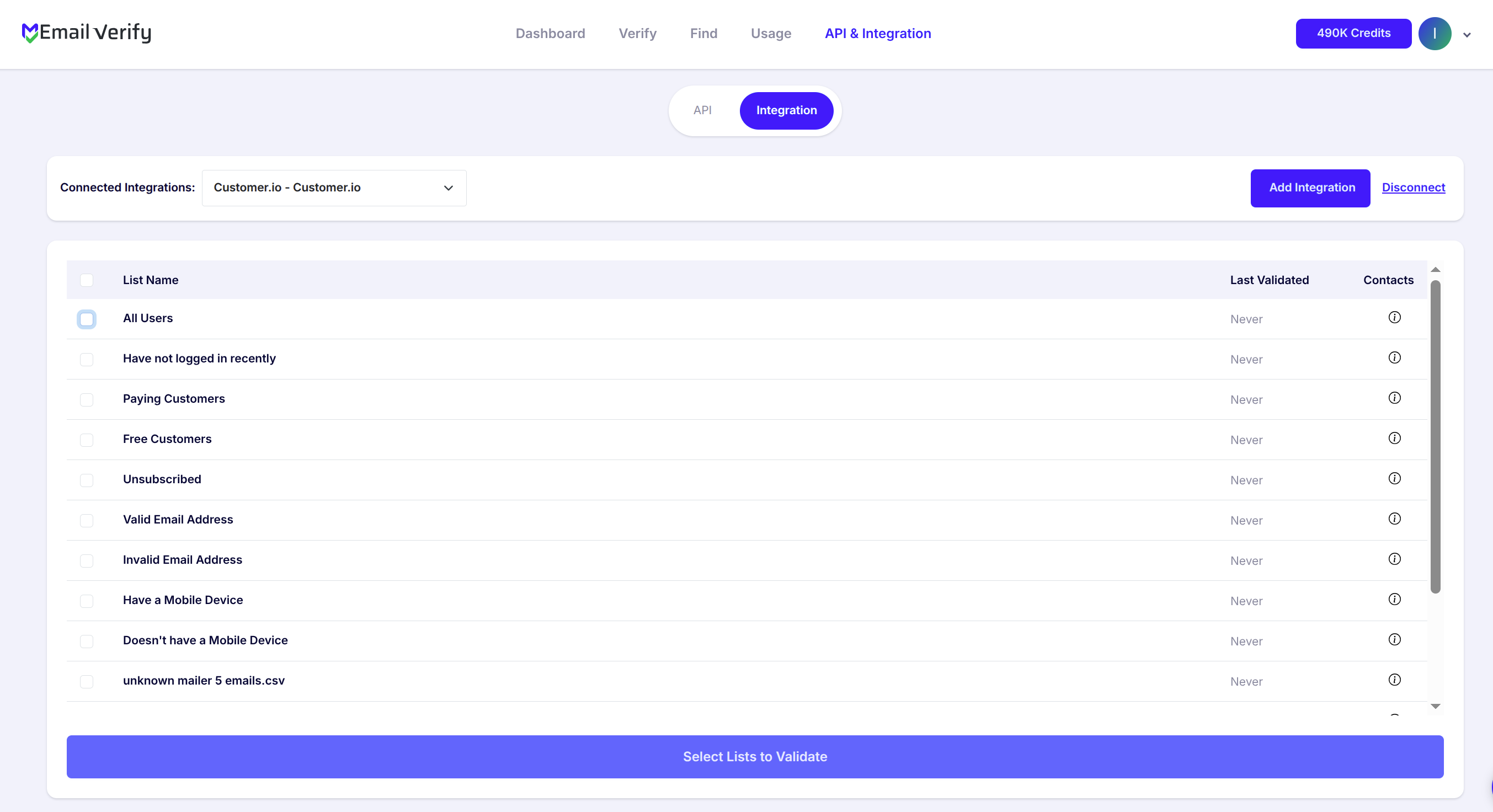
Step 10: Select Lists to Verify
Note: The results of the validation are automatically exported to the integration they originated from.
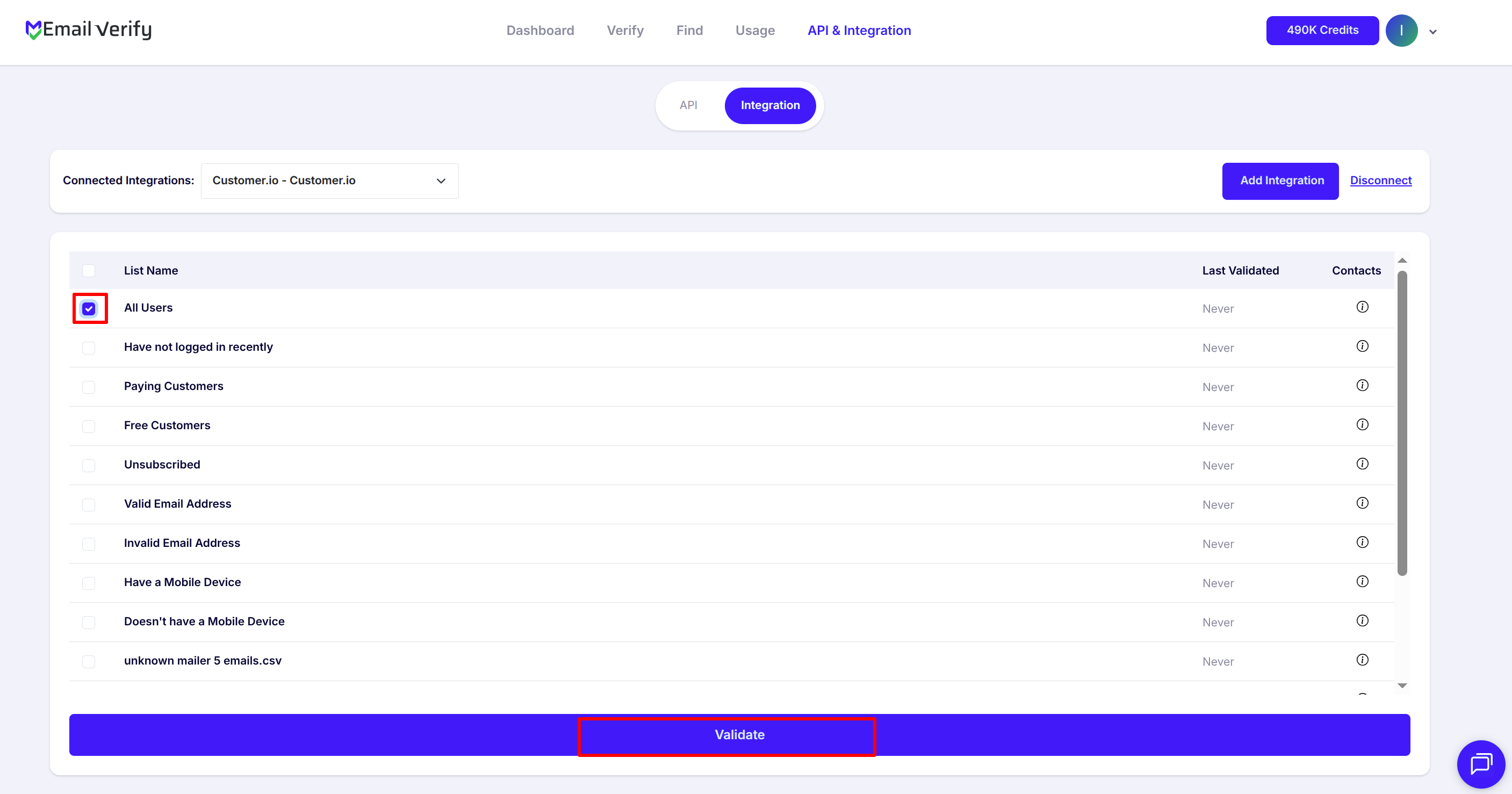
Step 11: Monitor Progress
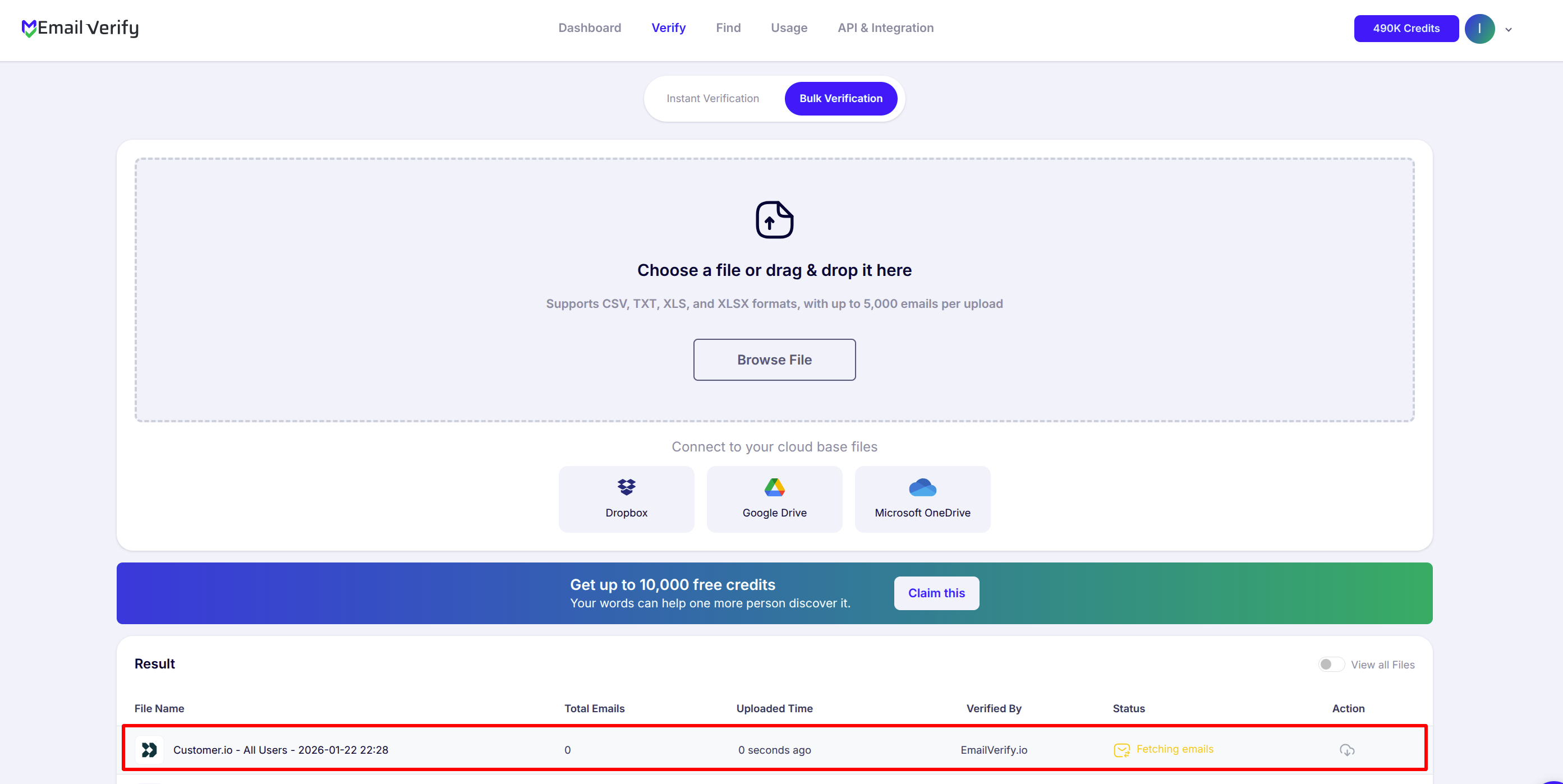
Step 12: Download Results
Note: Validation results are automatically sent to Customer.io. Three custom attributes will be added to each email: EV_Status, EV_SubStatus, and EV_Validation_Timestamp.

Customer.io Email Verification Integration Features
EmailVerify.io integrates seamlessly with Customer.io to help you build highly accurate, data-driven customer journeys by ensuring every triggered message reaches a real, active inbox.
Import Emails from Customer.io
Import email addresses from your Customer.io segments directly into EmailVerify.io for verification.
Reliable Email Verification
Verify your contacts using EmailVerify.io’s robust verification service to quickly identify invalid, catch-all, or disposable email addresses.
Export Validation Results back to Customer.io
Automatically update contacts with validation data such as EV_Status, EV_SubStatus, and EV_Validation_Timestamp, ensuring your segments stay clean and accurate.
Secure API Key Access
Connect your Customer.io account using API keys for safe, direct access to your data—no password sharing required.
Keep your lists clean
With a secure connection to Customer.io, EmailVerify.io helps you maintain accurate contact data and improve campaign deliverability.
Reduce Bounce Rate
Lower bounce and spam complaints by keeping your Customer.io contact lists clean and verified.
Why Customer.io Users Need Email Verification
Customer.io is the lifecycle messaging platform for SaaS companies and product teams. Every onboarding email, activation reminder, retention campaign, and win-back flow depends on email addresses in Customer.io People records being accurate. Customer.io does not validate emails when People are added — they enter from product sign-ups, API integrations, and data imports. SaaS sign-up forms — especially freemium products — have some of the highest invalid and disposable email rates of any source:
- ✗ Freemium sign-ups: Users testing a product for free often use disposable or secondary email addresses
- ✗ Activation impact: When an activation email bounces, the new user never completes setup and your activation rate metrics are distorted
- ✗ Monthly Active People (MAP) pricing: Invalid People can count toward your MAP limit if they receive automated messages, inflating plan costs
- ✗ Behavioural analytics: Event tracking tied to invalid People produces meaningless data in Customer.io reports and segment analytics
Verifying People before triggering sequences prevents bounces from ever occurring, keeps MAP counts accurate, and ensures lifecycle analytics reflect real users — not invalid entries.
What EmailVerify.io Checks on Every Customer.io Person
Every Person in your Customer.io segments is validated against real-time checks before your lifecycle campaigns trigger:
| Check | What It Detects |
|---|---|
| Syntax validation | Formatting errors — missing @, extra spaces, invalid characters |
| Domain / DNS check | Whether the email domain exists and is reachable |
| MX record check | Active mail server records on the domain |
| SMTP verification | Whether the individual mailbox exists and can receive mail |
| Catch-all detection | Domains that accept all emails regardless of whether the specific mailbox exists |
| Disposable email check | Temporary and burner addresses — common in freemium SaaS sign-ups |
| Role-based detection | Generic addresses: info@, admin@, noreply@, support@ |
| Hard bounce history | Cross-reference with known invalid address databases |
Results sync back as EV_Status, EV_SubStatus, and EV_Validation_Timestamp custom attributes on each Customer.io Person record.
What to Expect After Cleaning Your Customer.io People
Typical results after verifying and filtering invalid People from Customer.io segments:
Accurate MAP counts and cleaner onboarding analytics are additional benefits beyond deliverability improvements.
EmailVerify.io vs No Verification in Customer.io
Customer.io does not validate People at point of entry. Here is how verification changes your lifecycle program outcomes:
| Approach | Time Required | Accuracy | Auto-Sync | Ongoing Protection |
|---|---|---|---|---|
| No verification — send to all People | — | Unknown — invalid People included | — | None |
| Manual segment exclusion only | Manual, time-intensive | Partial — misses catch-all and disposable | Manual | Low |
| EmailVerify.io integration | Proactive (before sequences trigger) | 20+ verification checks per Person | Automatic (3 custom attributes) | High |
Who Should Use Customer.io Email Verification
SaaS Product and Growth Teams
Freemium sign-ups and trial users frequently use disposable or secondary emails. Verify People before running onboarding sequences and activation campaigns to ensure new users actually receive critical setup and activation emails.
Lifecycle Marketing Teams
Retention and win-back campaigns depend on reachable People. Invalid People in re-engagement segments generate bounces, distort re-activation metrics, and waste campaign budget on addresses that will never receive your messages.
Mobile App Teams
Mobile app users registered with invalid or temporary emails will never receive push notification fallback emails or account-related messages. Verify People imported from mobile app registration systems before triggering any sequences.
RevOps and Data Teams
Customer.io People data feeds into analytics, dashboards, and revenue models. Invalid People distort all downstream metrics. Verification keeps Monthly Active People counts accurate and ensures People-level analytics reflect real users.
Technical Questions — Customer.io Integration
What is the difference between the APP API Key and Pipeline API Key?
The APP API Key grants read access to your Customer.io workspace data — used by EmailVerify.io to import People segments for verification. The Pipeline (Data Pipelines) API Key grants write access — used to sync EV_Status, EV_SubStatus, and EV_Validation_Timestamp back to each Person record as custom attributes after verification. Both keys are required for the full integration to function.
What is the EU data center option and when should I select it?
Customer.io offers US and EU hosting. If your Customer.io account is on the EU data center, your People data is processed and stored in Europe — relevant for GDPR compliance. Find your data center at Settings > Account Settings > Privacy, data & AI. Selecting the correct region ensures EmailVerify.io connects to the correct regional API endpoint for your account.
How do invalid People affect Customer.io Monthly Active People (MAP) pricing?
Customer.io charges based on Monthly Active People — the number of People who receive at least one message per month. Invalid People can count toward your MAP limit if they receive automated messages, inflating your plan cost. Removing invalid People from active segments and lifecycle flows can reduce your effective MAP count and potentially move you to a lower plan tier.
Can I use EV_Status in Customer.io segments and campaign conditions?
Yes. EV_Status is a custom attribute on each Person record and can be used as a segment condition. Create a segment where EV_Status equals Valid and use it as your campaign recipient list to automatically exclude invalid People from every send. You can also add EV_Status is not Invalid as an entry condition on your onboarding or activation flow to prevent invalid People from entering the sequence.
Also integrate with HubSpot Integration , Mailchimp Integration , ActiveCampaign Integration , Brevo Integration . Or use ourAPI for programmatic access.
Frequently Asked Questions

How do I connect EmailVerify.io to Customer.io?
Customer.io requires 4 credentials. In order: 1) Sign in to EmailVerify.io and go to Integrations > Customer.io. 2) Select your Data Center (US or EU) — found in Customer.io at Settings > Account Settings > Privacy, data & AI. 3) Copy your Workspace URL from your browser when logged in to your Customer.io workspace. 4) Generate and copy your APP API Key at Settings > API Credentials > App API Keys. 5) Generate and copy your Pipeline API Key at Settings > API Credentials > Data Pipelines API. 6) Enter all credentials in EmailVerify.io and click Connect.
Why does Customer.io need 4 credentials to connect?
Customer.io's API architecture separates read access (APP API Key) from write access (Pipeline API Key). EmailVerify.io needs both to import People for verification AND write results back as custom attributes. The Workspace URL and Data Center identify your specific Customer.io account and ensure connections route to the correct regional API endpoint — US or EU.
Who should use the Customer.io email verification integration?
This integration is ideal for SaaS companies and product teams using Customer.io for onboarding, activation, retention, and win-back messaging. Also valuable for mobile app teams, lifecycle marketing teams, and RevOps teams where People data quality affects downstream analytics and Monthly Active People plan costs.
What custom attributes does EmailVerify.io add to Customer.io People?
Three custom attributes are added to each verified Person: EV_Status (Valid, Invalid, Catch-All, Disposable, or Unknown), EV_SubStatus (specific reason code — mailbox_not_found, smtp_timeout, catch_all, disposable_domain, role_based, and others), and EV_Validation_Timestamp (date and time of last verification). Use these attributes in Customer.io segments, campaign conditions, and lifecycle flow entry rules.
Is the Customer.io integration free?
How does verification affect Customer.io Monthly Active People (MAP) pricing?
Customer.io charges based on Monthly Active People — the number of People who receive at least one message per month. Invalid People can count toward your MAP limit if they receive automated messages, inflating your plan cost. Removing invalid People from active segments and lifecycle flows reduces your effective MAP count, potentially moving you to a lower plan tier.
What is the difference between the APP API Key and Pipeline API Key?
The APP API Key grants read access to your Customer.io workspace data — used by EmailVerify.io to import People segments for verification. The Pipeline (Data Pipelines) API Key grants write access — used to sync EV_Status, EV_SubStatus, and EV_Validation_Timestamp back to each Person record as custom attributes after verification. Both keys are required for the integration to function fully.
What is the EU data center and when should I select it?
Customer.io offers US and EU hosting. If your Customer.io account is on the EU data center, your People data is processed and stored in Europe — relevant for GDPR compliance. Select EU if your Customer.io account settings show EU as the data center under Settings > Account Settings > Privacy, data & AI. This ensures EmailVerify.io connects to the correct regional API endpoint for your account.
How often should I re-verify Customer.io People?
For SaaS lifecycle programs: verify new sign-ups before the first onboarding sequence; re-verify your active People database quarterly; verify target segments before major retention or win-back campaigns; and always verify after large People imports before the first send. Use the EV_Validation_Timestamp custom attribute to identify People overdue for re-verification.
Can I use EV_Status in Customer.io segments and campaign conditions?
Yes. EV_Status is a custom attribute on each Person record and can be used as a segment condition. Example segment: People where EV_Status equals Valid — use this as your campaign recipient list to exclude invalid People from every send. Example lifecycle flow condition: add an entry rule of EV_Status is not Invalid to prevent invalid People from entering your onboarding or activation sequence.
You're just one click away from clean email lists.
Start verifying your email addresses instantly and improve your campaign deliverability
* No credit card required