Dotdigital Email Verification Integration — Clean Contacts, Reliable Campaigns
EmailVerify.io's Dotdigital email verification integration lets you import contact lists from your Dotdigital Engagement Cloud account, validate every email address against 20+ real-time checks, and sync clean results back to Dotdigital automatically — as contact attributes on each record. Dotdigital flags hard bounces after they happen. EmailVerify.io prevents those bounces from occurring in the first place, protecting your sender reputation before high-volume retail, fashion, or travel campaigns reach the inbox. Connect using your Dotdigital API user credentials — a dedicated account you create under Settings > Access > API users. The auto-generated API user email is unique to your account and must be used exactly as Dotdigital generates it. Once connected, select the lists you want to verify. Results sync back as three contact attributes: EV_Status, EV_SubStatus, and EV_Validation_Timestamp.


Quick Summary: Dotdigital Email Verification Integration
- What it does: Imports Dotdigital contact lists, validates every email with 20+ real-time checks, and syncs EV_Status, EV_SubStatus, and EV_Validation_Timestamp back as contact attributes.
- Who it’s for: Retail, fashion, travel, and enterprise marketing teams using Dotdigital Engagement Cloud for high-volume email campaigns.
- Connection method: Dotdigital API user credentials — a dedicated account created under Settings > Access > API users. Use the system-generated email exactly as shown.
- Key output fields: EV_Status | EV_SubStatus | EV_Validation_Timestamp — written as contact attributes on each Dotdigital record.
- Free to start: Connecting Dotdigital is free. Verification uses credits — new users receive free credits to test before purchasing.View pricing.
How to use the integration
To get started with the Dotdigital integration, you’ll need an active Dotdigital account, which you can create at https://dotdigital.com/trial-setup/ along with a EmailVerify.io account
Step 1: Sign in to EmailVerify.io
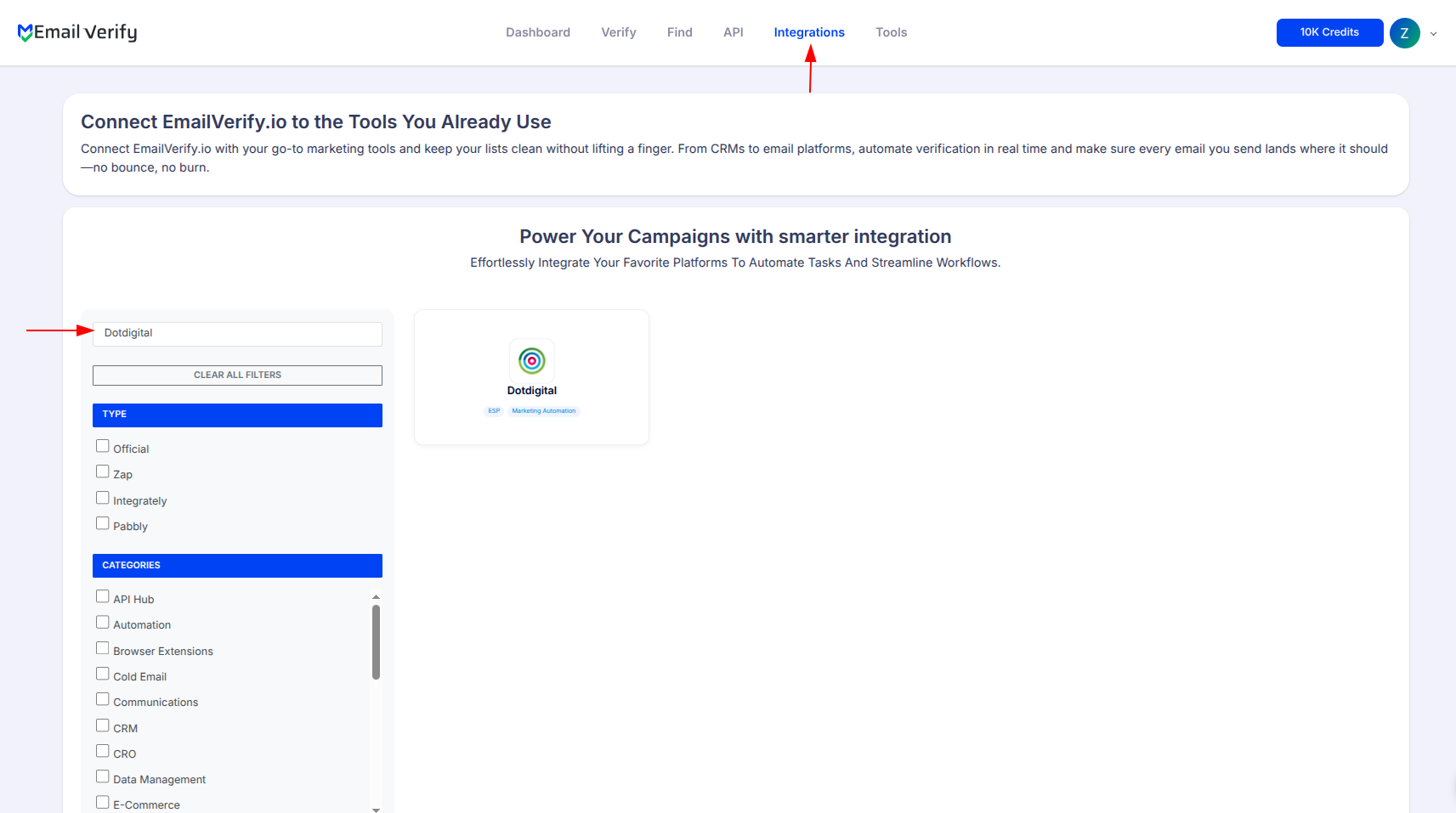
Step 2: Select Dotdigital
Note: We do not request or store your primary Dotdigital login credentials. Please use your dedicated Dotdigital API user credentials to establish a secure connection.
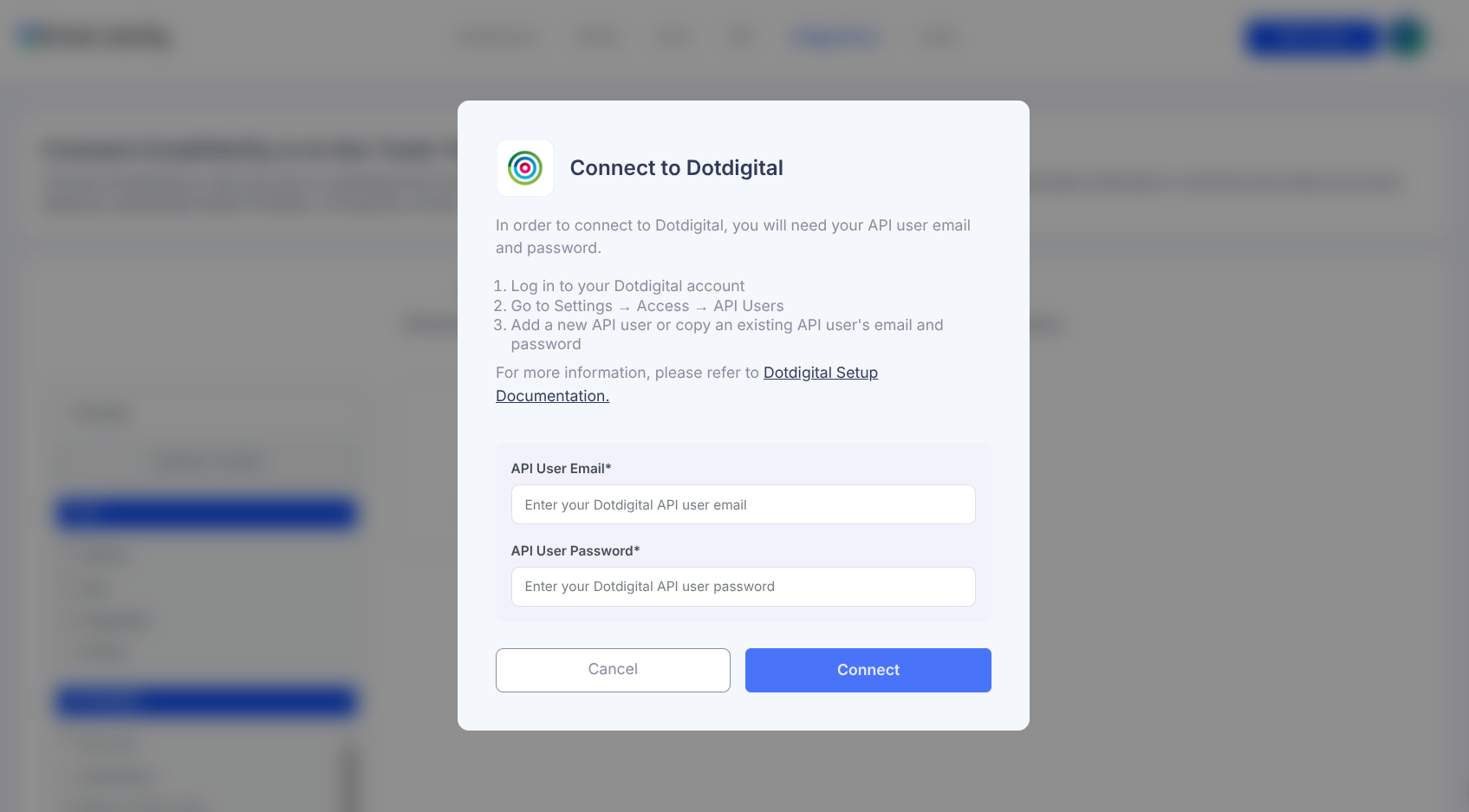
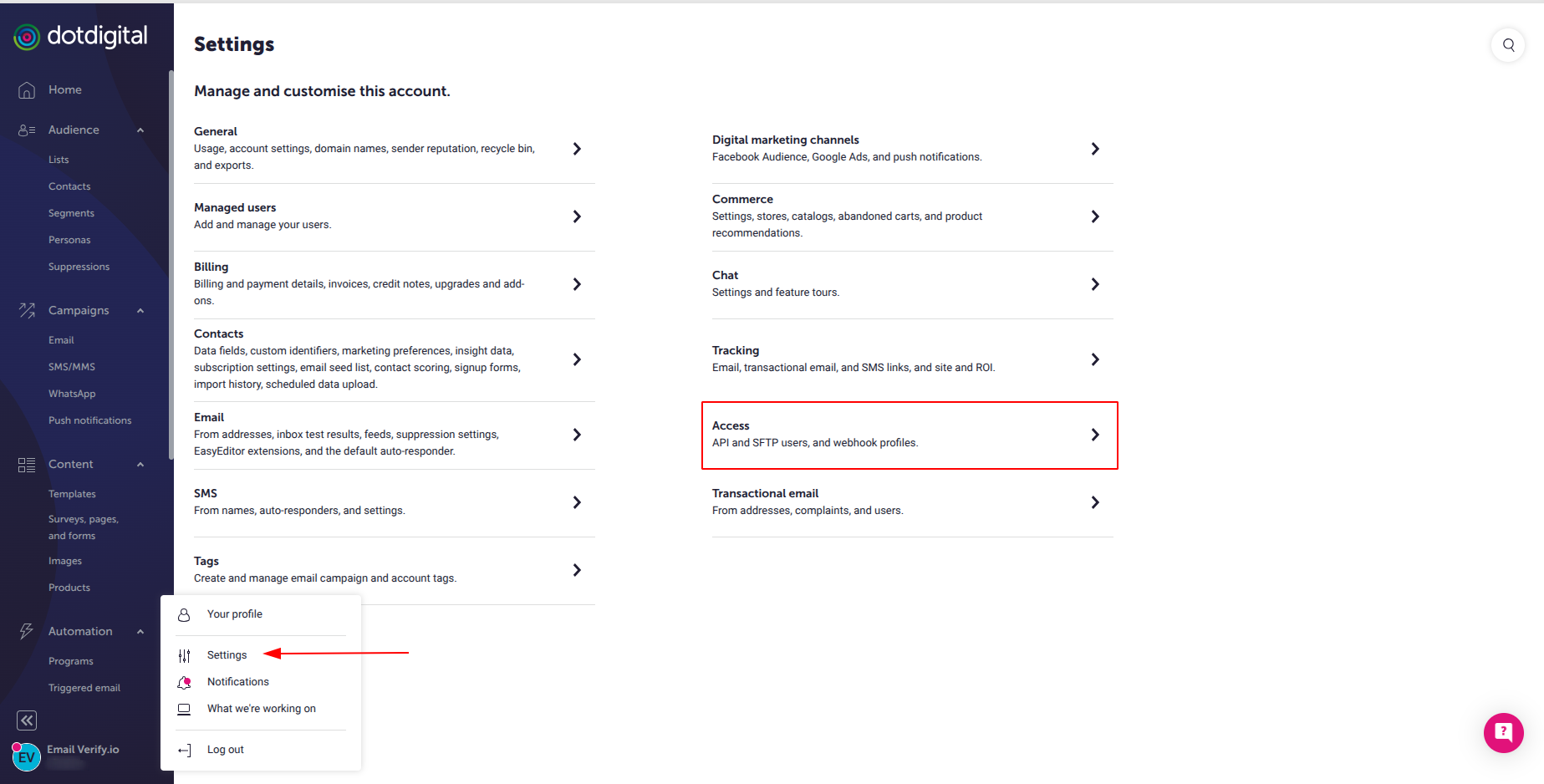
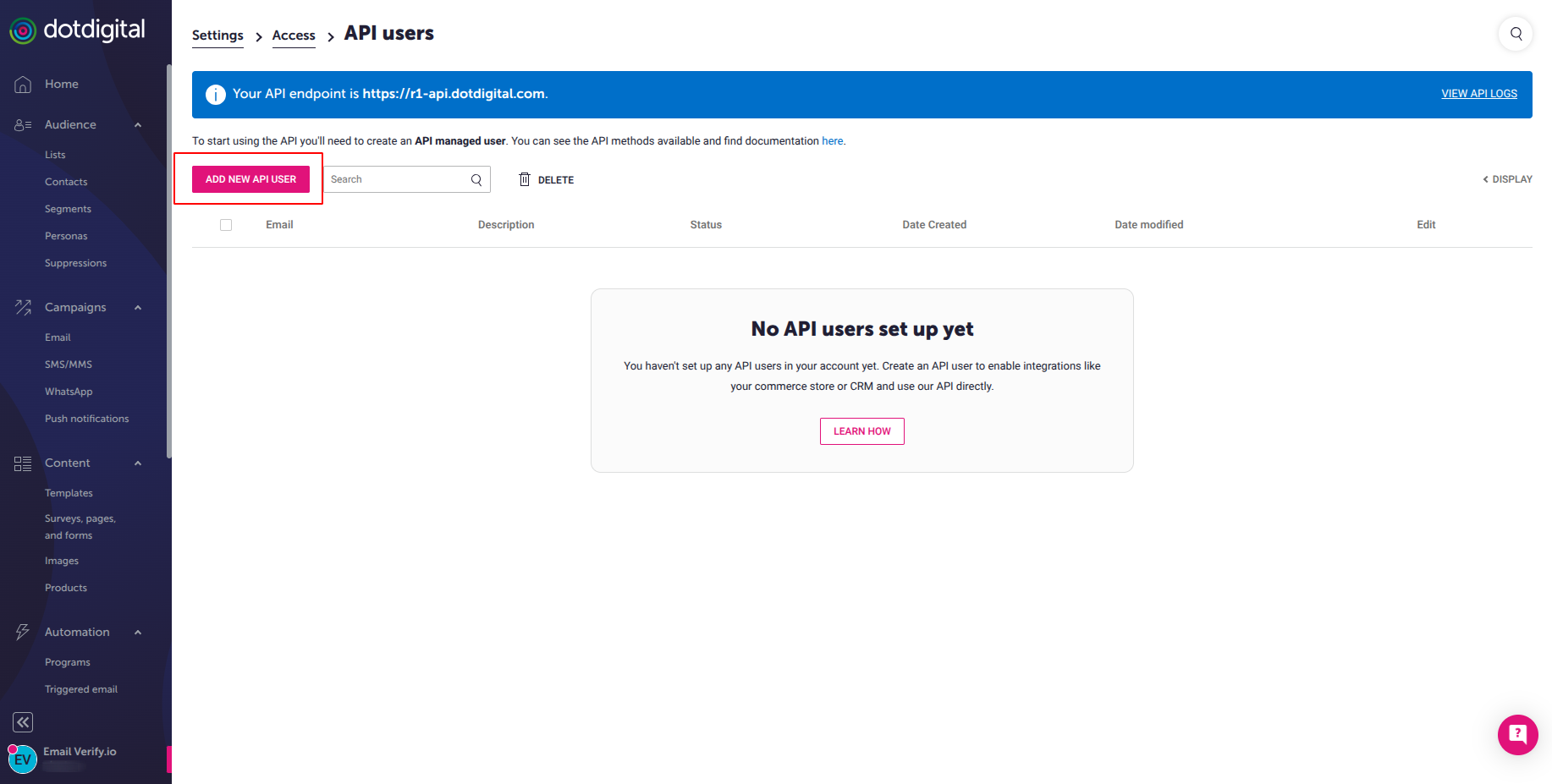
Step 3: Get Your API Credentials
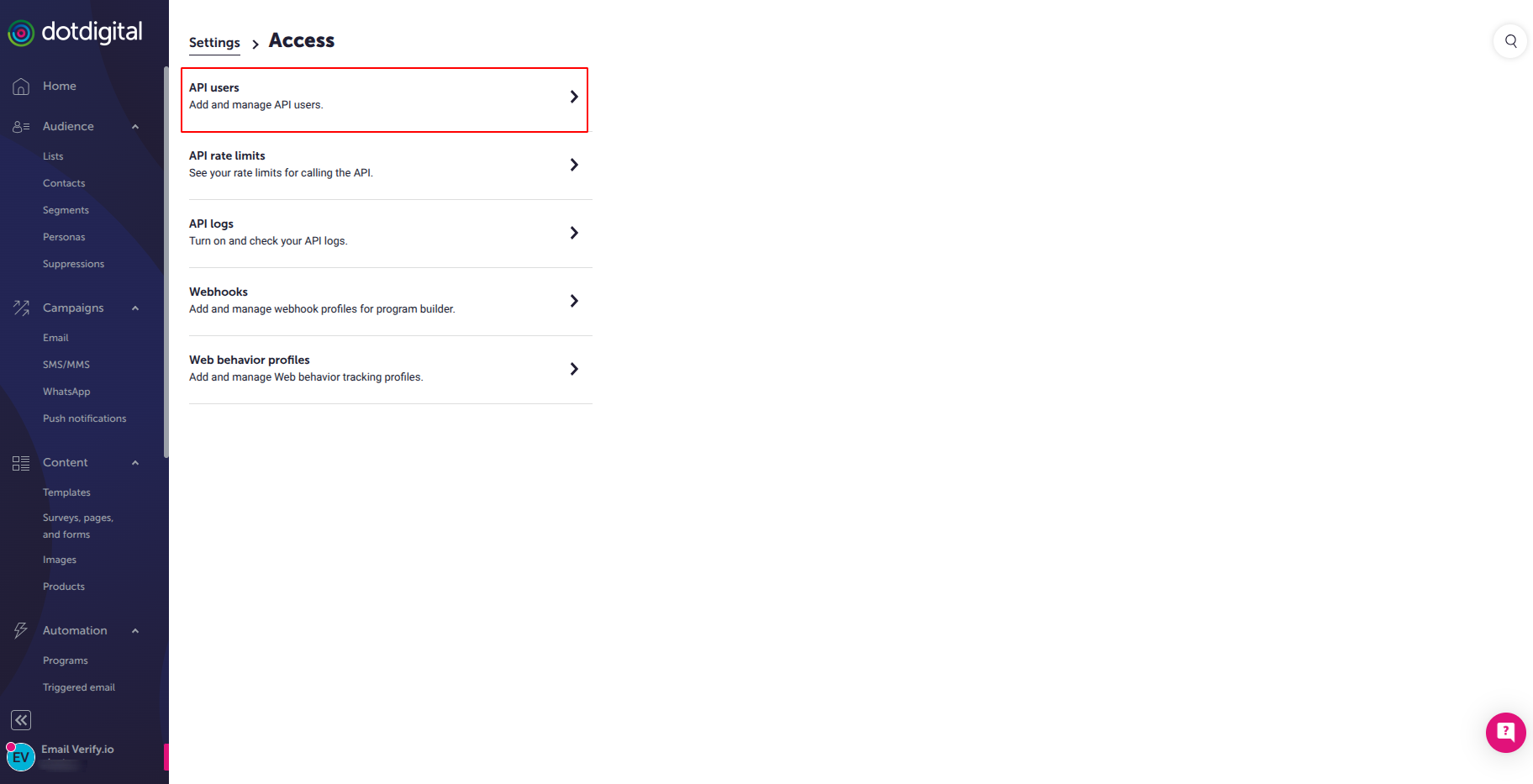
Step 4: Click API Users
Step 5: Create new API user
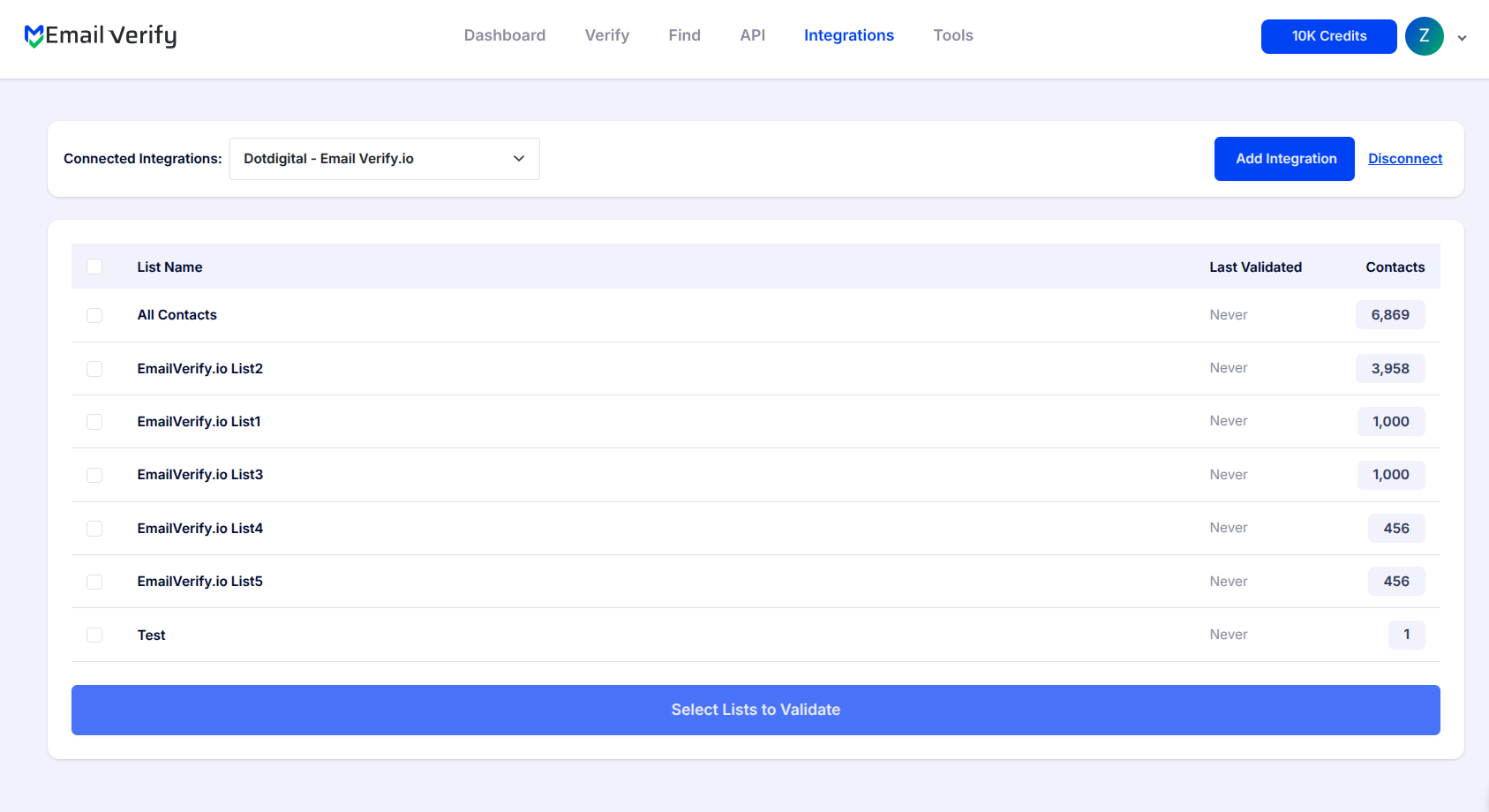
Step 6: View Your Lists
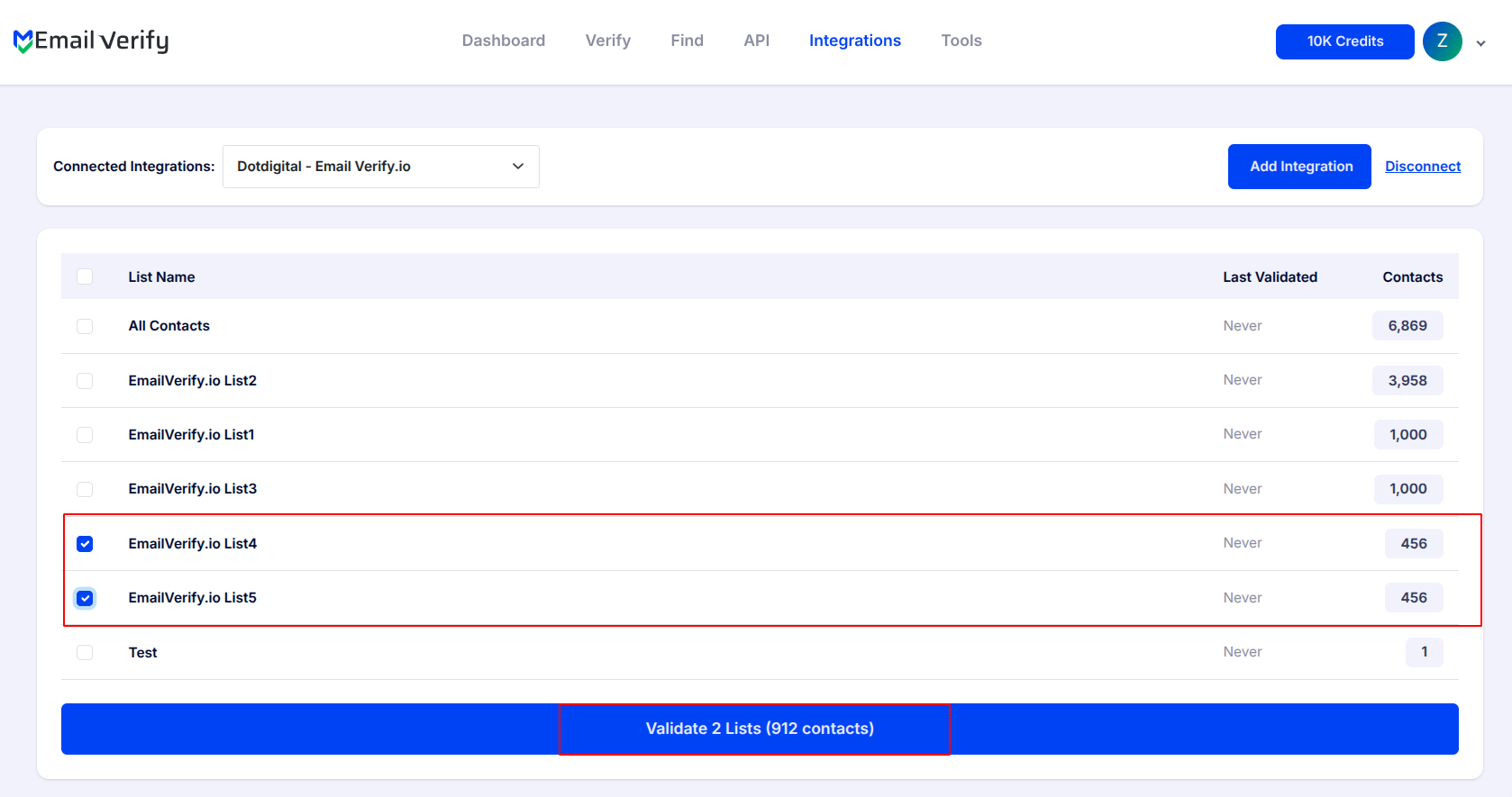
Step 7: Select Lists to Verify
Note: The results of the validation are automatically exported to the integration they originated from.
Step 8: Monitor Progress
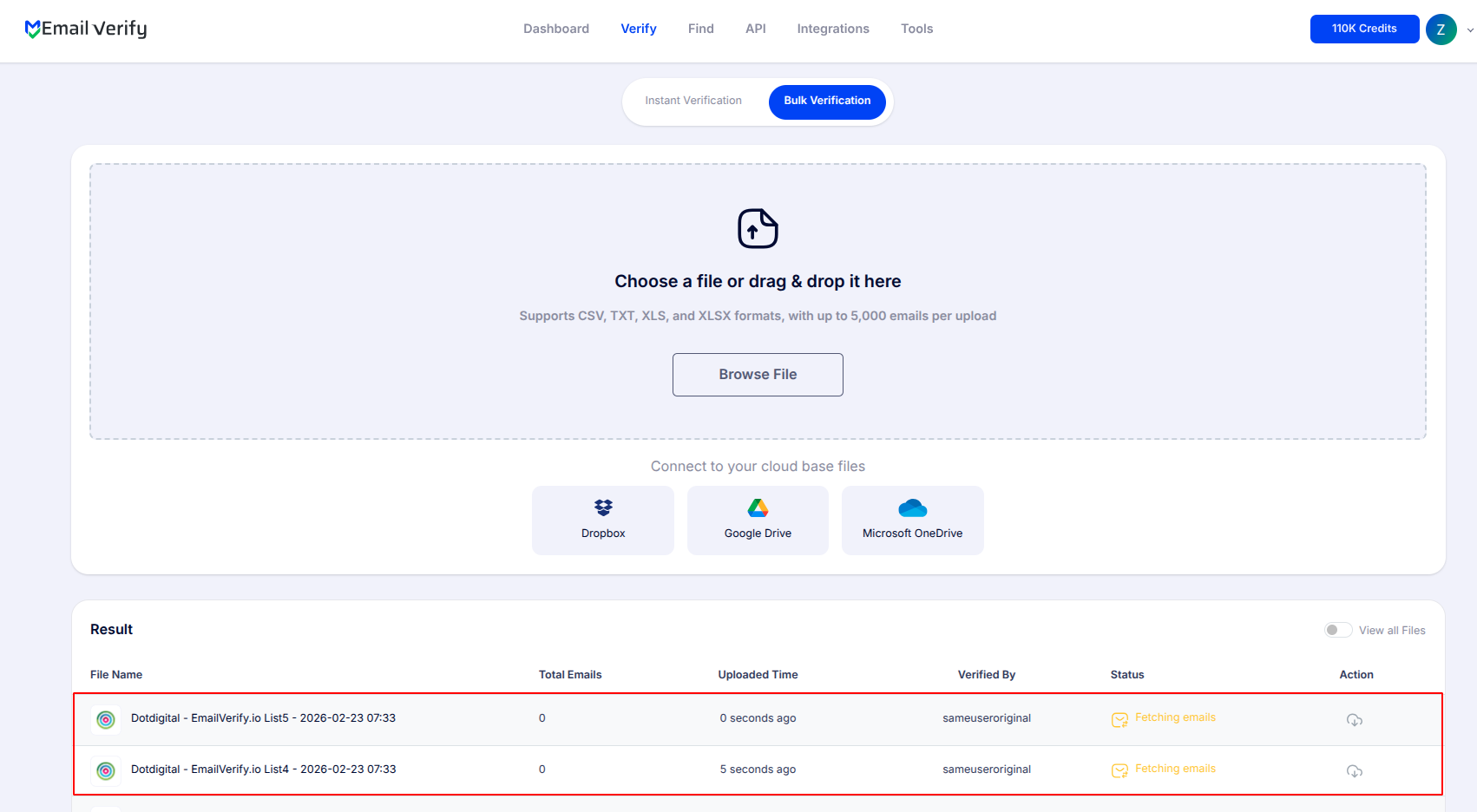
Step 9: Download Results
Note: Validation results are automatically sent to the connected integration. Three contact attributes will be added to each record: EV_Status, EV_SubStatus, and EV_Validation_Timestamp. These attributes play a key role in maintaining accurate, up-to-date contact information and improving how you segment and manage your Dotdigital campaigns.

Dotdigital Email Verification Integration Features
EmailVerify.io connects directly with Dotdigital to ensure your email marketing campaigns are powered by valid contact data, protecting your sender reputation and maximizing inbox placement.
Import Contacts from Dotdigital
Easily import email addresses from your Dotdigital contact lists into EmailVerify.io for email verification.
Accurate Email Verification
Quickly identify invalid, disposable, or risky email addresses with EmailVerify.io’s robust email verification service.
Export Validation Results
Automatically sync validation results (EV_Status, EV_SubStatus, EV_Validation_Timestamp) back to Dotdigital, keeping your lists clean and up-to-date.
Secure API User Access
Connect your Dotdigital account using a dedicated API user email and password, ensuring safe, direct access without exposing your primary login credentials.
Maintain Clean Email Lists
With verified contacts, your Dotdigital email lists stay accurate, improving deliverability and engagement.
Reduce Bounces and Spam Complaints
Eliminate invalid email addresses before sending campaigns, reducing bounce rates and protecting your sender reputation.
Why Dotdigital Enterprise Teams Need Email Verification
Dotdigital serves mid-market and enterprise companies sending millions of emails per month. At high sending volumes, the impact of invalid email addresses is amplified across every campaign you send.
- ✗ ISP reputation at scale — Major ISPs apply stricter spam filtering to high-volume senders. A 2% bounce rate at 100,000 sends means 2,000 bounces, enough to trigger ISP reputation flags and inbox placement degradation.
- ✗ Dotdigital deliverability dashboard — Dotdigital’s own platform monitors bounce rates. Lists with high invalid percentages surface in your deliverability reports. Proactive verification keeps these metrics clean before campaigns send.
- ✗ Enterprise data decay — Contact databases built over years contain significantly higher invalid percentages than recent organic lists, particularly in B2B where job changes and domain migrations are frequent.
- ✗ Retail and seasonal campaigns — High-frequency promotional senders in retail and fashion face the highest risk. One major campaign with a stale list can cause lasting sender reputation damage.
- ✗ GDPR data quality — For Dotdigital users under UK and EU GDPR, maintaining accurate and current contact data is a data hygiene requirement, not just a deliverability best practice.
EmailVerify.io’s Dotdigital integration verifies contacts before campaigns send — not after bounces have already damaged your sender score.
What EmailVerify.io Checks on Every Dotdigital Contact
Each contact in your Dotdigital list passes through 20+ verification checks before results are written back as contact attributes.
| Check | What It Detects |
|---|---|
| Syntax validation | Formatting errors — missing @, invalid characters, malformed structure |
| Domain / DNS check | Whether the email domain exists and is active |
| MX record check | Active mail server records on the domain |
| SMTP verification | Whether the individual mailbox exists on the server |
| Catch-all detection | Domains that accept all emails regardless of whether the mailbox exists |
| Disposable email check | Temporary or burner addresses from 10,000+ known providers |
| Role-based detection | Generic addresses: info@, admin@, noreply@, support@ |
| Hard bounce history | Cross-reference with known invalid address databases |
Results sync back to Dotdigital as contact attributes: EV_Status | EV_SubStatus | EV_Validation_Timestamp
What Dotdigital Users See After Verification
EmailVerify.io writes results directly to your Dotdigital contact records — no manual export or re-import required.
Dotdigital Bounce Management: Reactive vs Proactive
Dotdigital provides deliverability monitoring and suppression — but only after bounces occur. EmailVerify.io prevents them.
| Approach | Time Required | Accuracy | Auto-Sync | Ongoing Protection |
|---|---|---|---|---|
| No verification | 0 min setup | Unknown | No | None — all invalids reach send queue |
| Dotdigital built-in bounce handling | Post-send only | Reactive | Partial | Suppresses after first bounce — reputation already affected |
| EmailVerify.io + Dotdigital | ~10 min setup | 20+ checks pre-send | Yes — EV attributes on every contact | Full pre-send protection, enterprise-scale |
Who Should Use Dotdigital Email Verification
Retail and fashion brands
High-volume promotional senders using Dotdigital for seasonal campaigns, product launches, and loyalty programs. Verify customer lists before major promotional periods to protect deliverability when send frequency is highest.
Travel and hospitality companies
Travel brands relying on Dotdigital for booking confirmations and promotional offers need highly accurate contact data. Invalid transactional emails mean missed bookings. Verify contact databases quarterly.
B2B marketing teams
B2B contact databases decay faster than consumer lists due to job changes, company restructures, and domain migrations. Verify B2B Dotdigital lists before every major campaign cycle.
E-commerce brands using Dotdigital CDP
Dotdigital’s CDP capabilities mean contact data flows in from checkout, CRM, and third-party data sources. Verify imported contact segments before they enter active campaign lists.
Technical Questions About Dotdigital Email Verification
What is a Dotdigital API user and why does it auto-generate an email?
A Dotdigital API user is a dedicated account created specifically for integrations, separate from your main login. Dotdigital auto-generates the API user email in a specific format (e.g., [email protected]) so their system recognises it as an API user. Standard login email addresses cannot authenticate as API users. Use the auto-generated email exactly as shown — do not modify it.
Can I use EV_Status to filter contacts in Dotdigital segments?
Yes. EV_Status is a contact attribute you can use in Dotdigital’s segment builder. Create a suppression segment where EV_Status equals ‘invalid’ and exclude it from all campaign sends. For active sends, filter to EV_Status equals ‘valid’ to ensure only verified contacts receive your campaigns.
Does verification work for all Dotdigital Engagement Cloud account tiers?
Yes. The EmailVerify.io integration uses Dotdigital’s standard API, available on all Dotdigital Engagement Cloud account tiers. No upgraded plan is required.
How often should enterprise Dotdigital users re-verify contacts?
Email addresses decay at 22–30% per year. For enterprise Dotdigital users: re-verify weekly campaign lists every 3 months, verify seasonal lists before every major campaign period, re-verify B2B lists quarterly, and always verify large imports before first send. Use EV_Validation_Timestamp to identify contacts overdue for re-verification.
Also integrate with Mailchimp Email Verification , HubSpot Email Verification , ActiveCampaign Email Verification , Campaign Monitor Email Verification . Or use ourAPI for programmatic access.
Frequently Asked Questions

How do I connect Dotdigital to EmailVerify.io?
Dotdigital uses a dedicated API user for integration — not your main Dotdigital login. Here is the setup process: In Dotdigital, go to Settings > Access > API users. Click Create New API User, set a description (e.g., 'EmailVerify.io') and a password. Dotdigital auto-generates a unique API user email address (e.g., [email protected]). Enter this auto-generated email and your chosen password into EmailVerify.io's Dotdigital connection screen. Critical: use the system-generated email exactly as shown — do not modify it. Only the auto-generated format authenticates as an API user in Dotdigital.
Why does Dotdigital generate its own API user email address?
Dotdigital auto-generates the API user email as a security measure. The format ([email protected]) identifies the account as an API user in Dotdigital's authentication system — standard login email addresses will not authenticate as API users. This is Dotdigital's recommended approach for granting integration access while keeping your primary account credentials private.
What happens to my Dotdigital contacts during verification?
EmailVerify.io does not delete or modify your Dotdigital contacts. Verification only adds three new contact attributes to each record: EV_Status (Valid, Invalid, Catch-All, Disposable, or Unknown), EV_SubStatus (reason code such as mailbox_not_found or smtp_timeout), and EV_Validation_Timestamp (date and time of last verification). Your original contact data remains intact. Use the EV_attributes to segment, filter, or suppress contacts in Dotdigital campaigns.
Is the Dotdigital integration free?
Can I verify specific Dotdigital lists?
Yes. After connecting your Dotdigital account, all your contact lists appear in EmailVerify.io. You can select specific lists to verify — prioritise your most active campaign lists, recently imported contacts, or segments before a major send.
What Dotdigital plan do I need for this integration?
The EmailVerify.io integration works with all Dotdigital Engagement Cloud plans. The integration uses Dotdigital's standard API, which is available on all account tiers. No upgraded plan is required.
Does EmailVerify.io detect disposable emails in Dotdigital?
Yes. Disposable and temporary email addresses from 10,000+ known providers are flagged as EV_Status: Disposable. These are common in Dotdigital lists sourced from competition entries, gated content downloads, or consumer-facing web forms where temporary emails are frequently used.
How do I use EV_Status in Dotdigital segments and campaigns?
EV_Status is a contact attribute you can use in Dotdigital's segment builder and campaign filtering. To create a suppression segment, go to Contacts > Segment and set the condition EV_Status equals 'invalid', then exclude that segment from all campaign sends. To filter campaign recipients, add an address book filter when building a campaign: EV_Status is 'valid'. This ensures only verified, deliverable contacts receive your campaigns.
How often should I re-verify Dotdigital contacts?
Email addresses decay at 22 to 30% per year. For Dotdigital enterprise users: re-verify high-volume weekly campaign lists every 3 months, verify seasonal lists before every major campaign period, re-verify B2B lists quarterly due to their higher decay rate, and always verify large imports before the first campaign send. Use EV_Validation_Timestamp to identify contacts that are overdue for re-verification.
How long does it take to verify a Dotdigital list of 50,000 contacts?
For 50,000 contacts, verification typically completes in 30 to 60 minutes. You receive an email notification when the process is complete. Results sync back to Dotdigital contact attributes automatically — no further action is needed.
You're just one click away from clean email lists.
Start verifying your email addresses instantly and improve your campaign deliverability
* No credit card required