MailerLite Email Verification Integration — Clean Subscribers, Better Campaigns
EmailVerify.io’s MailerLite email verification integration validates every subscriber in your MailerLite lists before your campaigns reach the inbox. Connect via your MailerLite API key in minutes, select the lists to verify, and get results synced back as custom fields — EV_Status, EV_SubStatus, and EV_Validation_Timestamp — directly on each subscriber record. For bloggers, creators, and small businesses on MailerLite’s free plan, every subscriber slot is valuable. EmailVerify.io ensures those slots are used by real, active inboxes — not invalid addresses that waste your sends, damage your sender reputation, and push you toward a higher-cost plan tier.

Quick Summary: MailerLite Email Verification Integration
- What it does: Imports MailerLite subscriber lists, validates every email with 20+ real-time checks, and syncs EV_Status results back as custom fields automatically.
- Who it’s for: Bloggers, content creators, small businesses, NGOs, and anyone using MailerLite for email campaigns or newsletters.
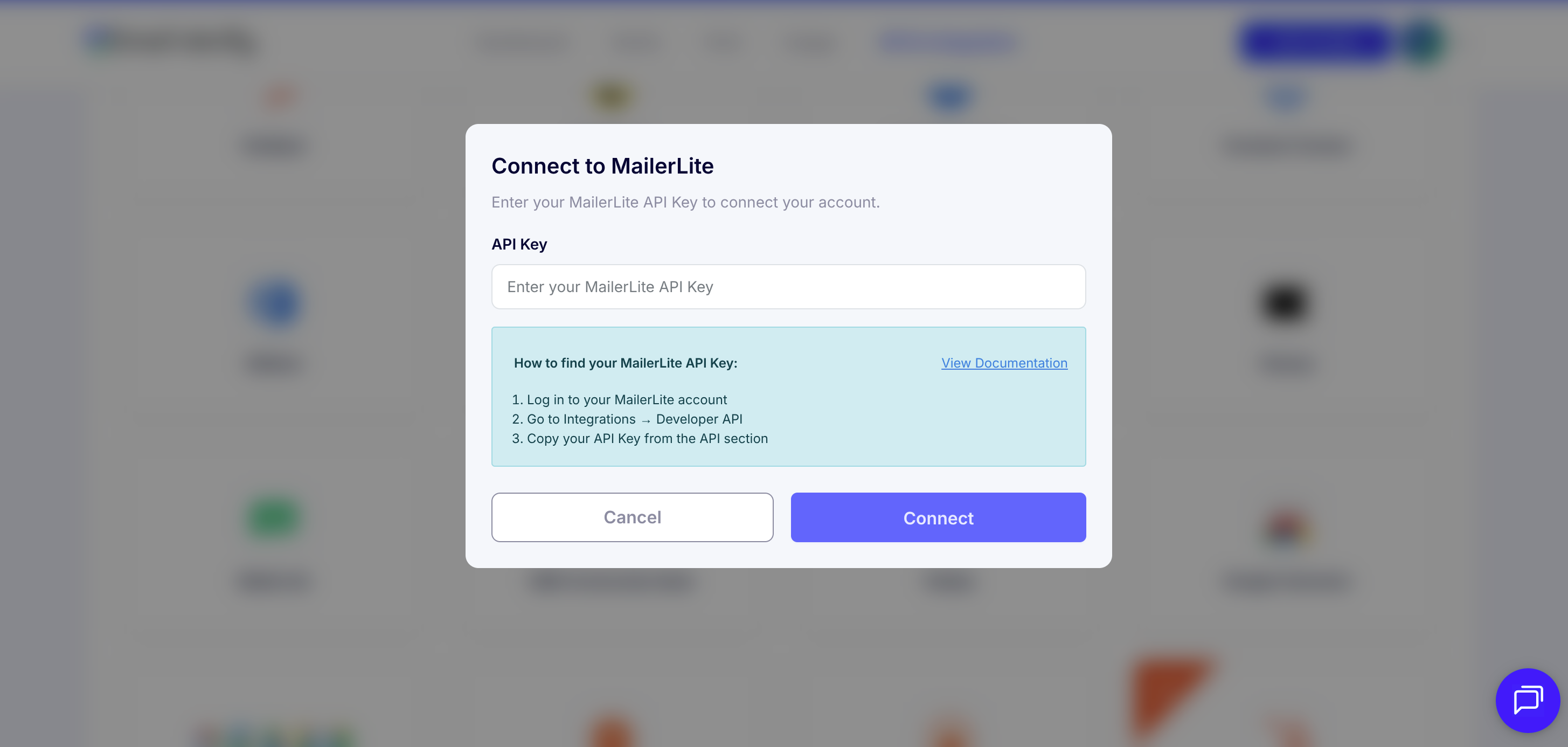
- Connection: MailerLite API key — Dashboard > Integrations > MailerLite API > Generate new token.
- Free plan note: MailerLite’s free plan limits sends to 12,000/month. Verification maximises those sends by removing invalid addresses that waste your allocation.View pricing.
- Key output: EV_Status | EV_SubStatus | EV_Validation_Timestamp added as custom fields on each subscriber record.
How to use the integration
To get started with the MailerLite integration, you’ll need an active MailerLite account, which you can create at https://accounts.mailerlite.com/signup, along with an EmailVerify.io account.
Step 1: Sign in to EmailVerify.io
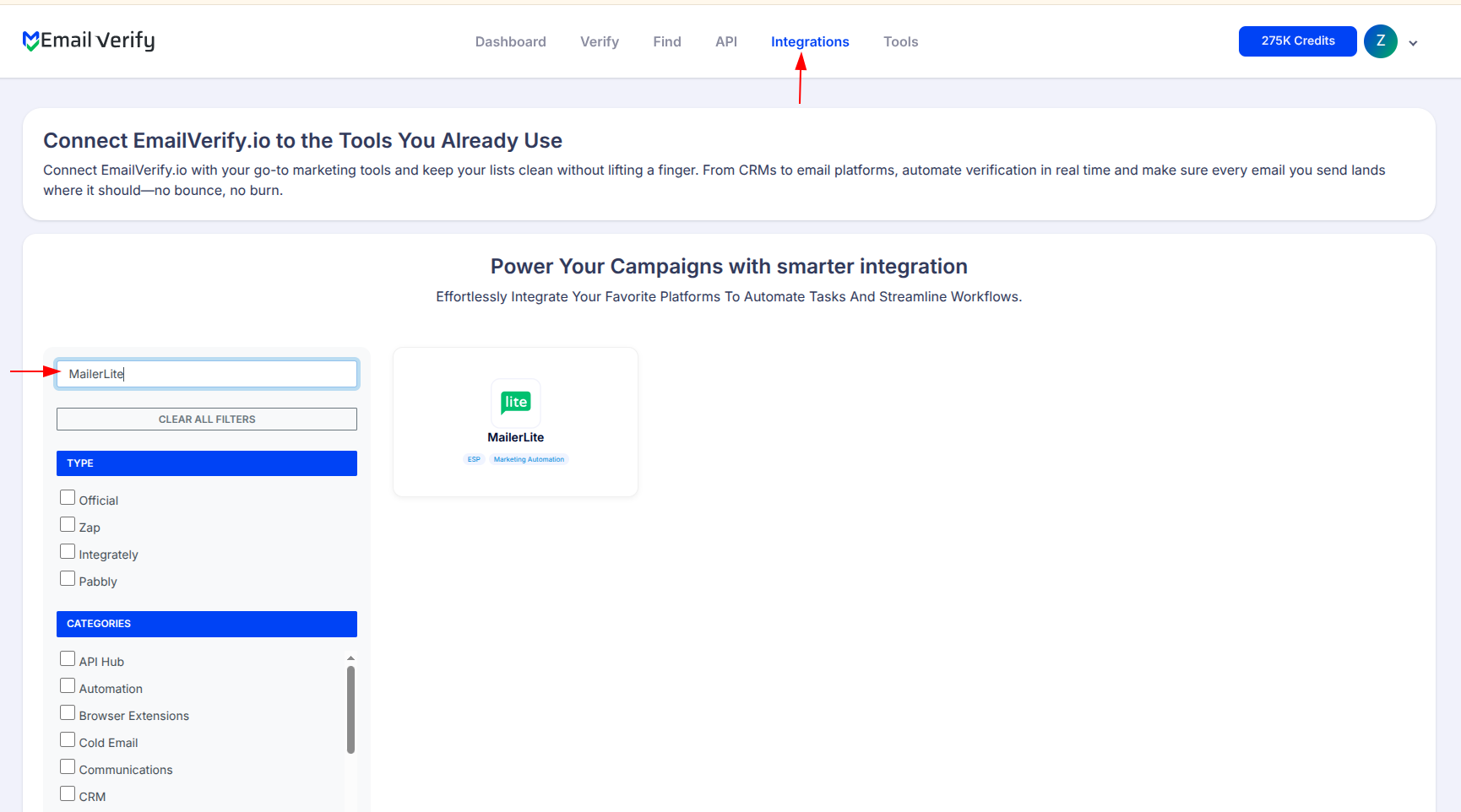
Step 2: Select MailerLite
Step 3: MailerLite Dashboard
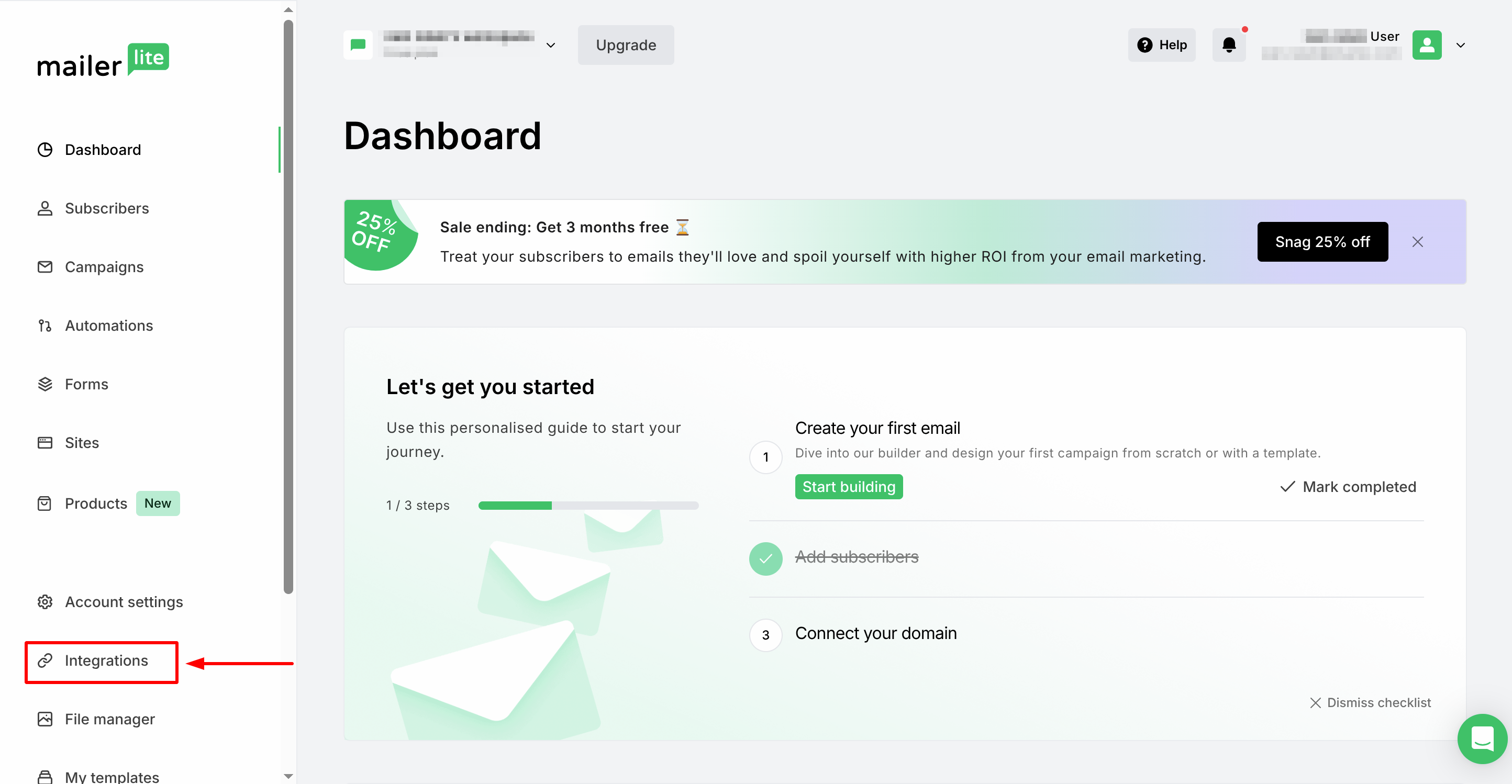
Step 4: MailerLite Integration page
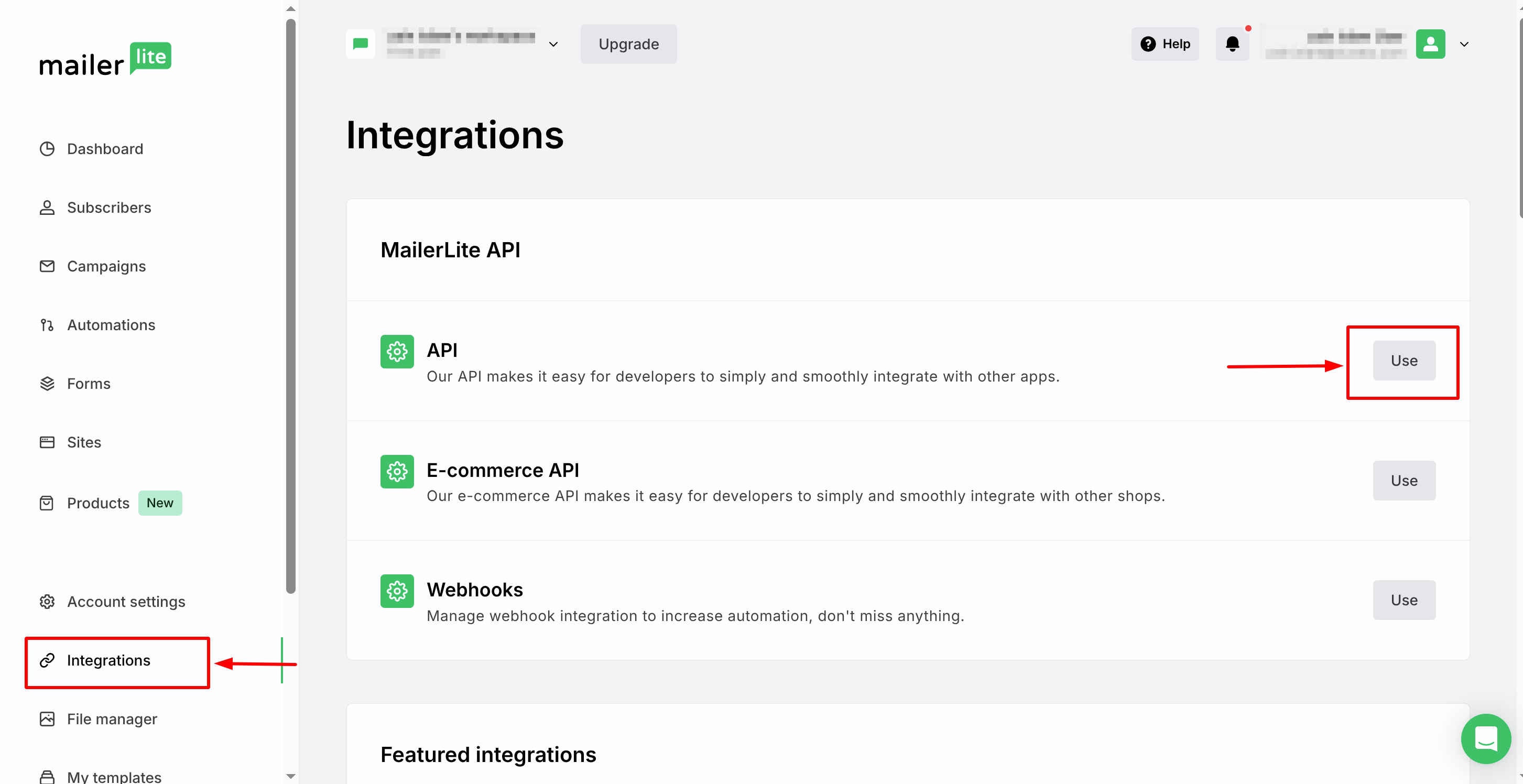
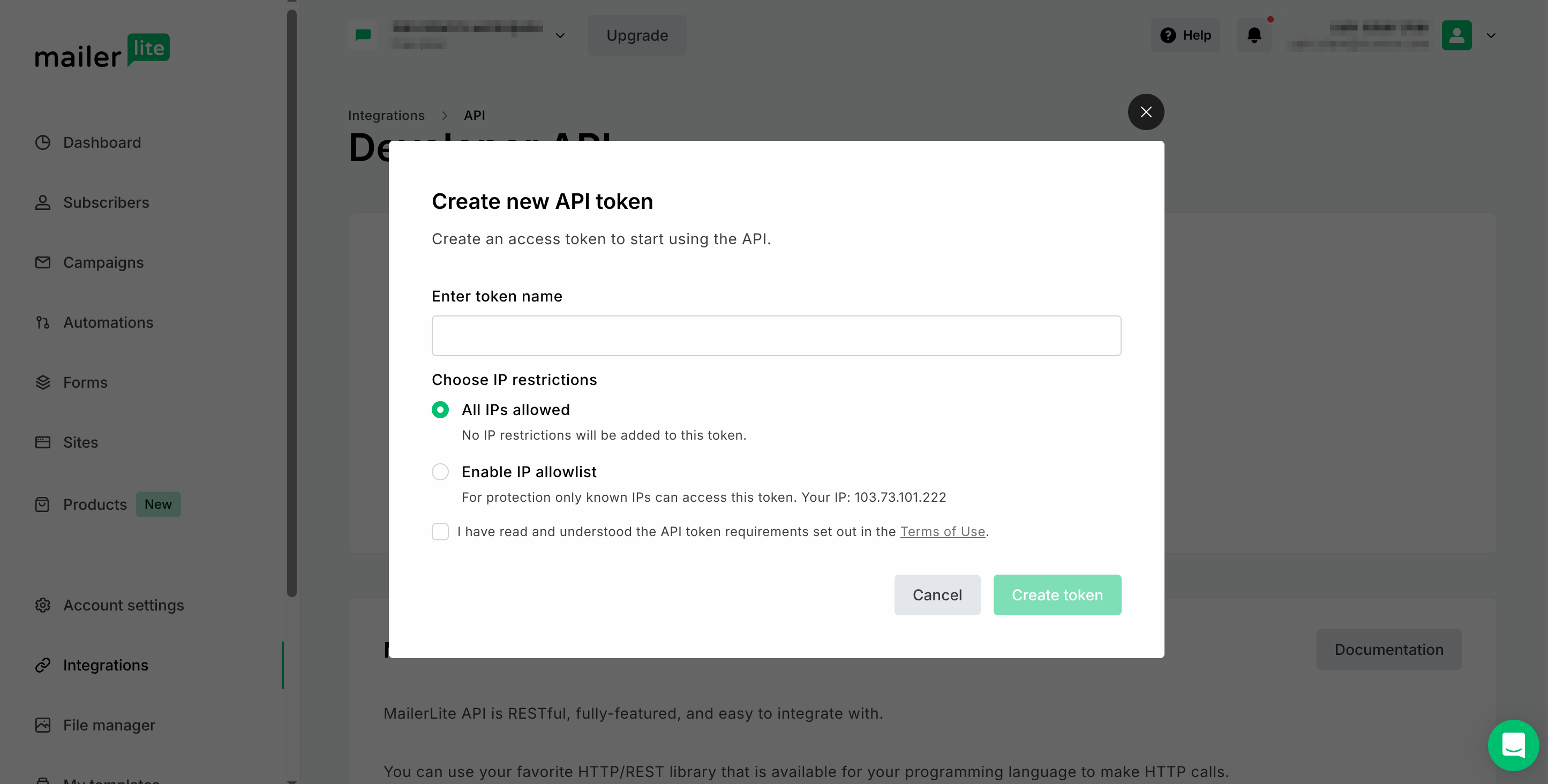
Step 5: Generate API token

Step 6: Get Your API Credentials
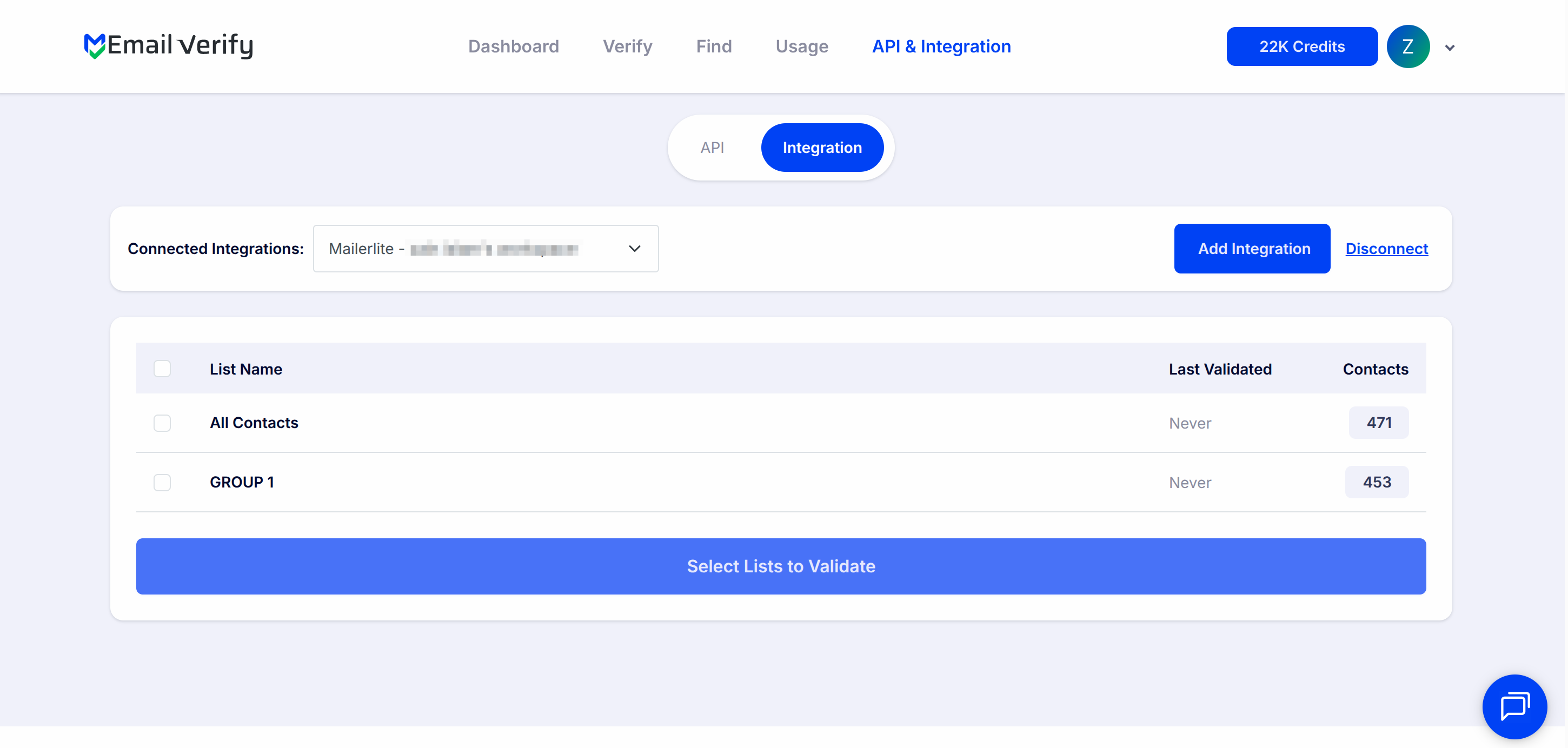
Step 7: View Your Lists
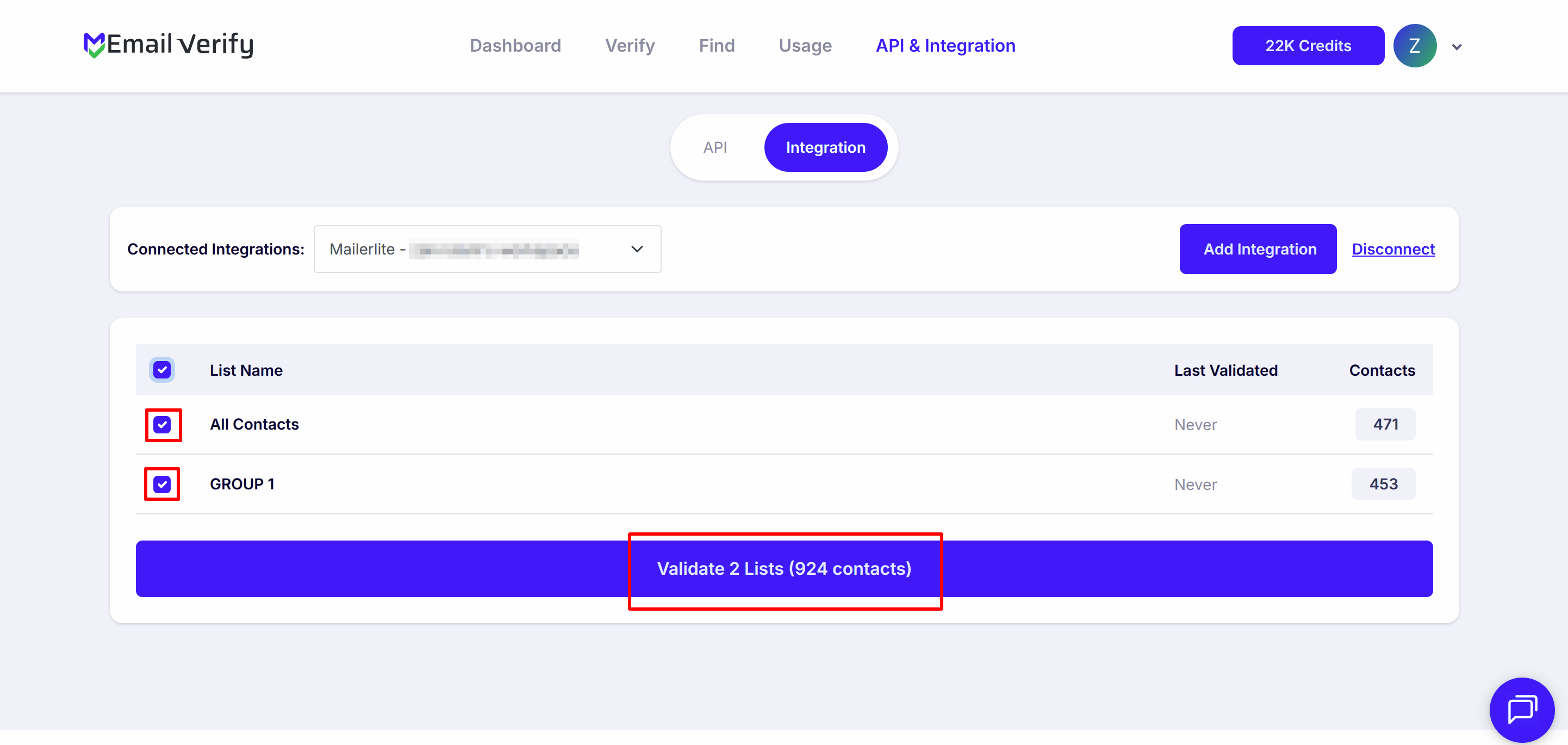
Step 8: Select Lists to Verify
Note: The results of the validation are automatically exported to the integration they originated from.
Step 9: Monitor Progress
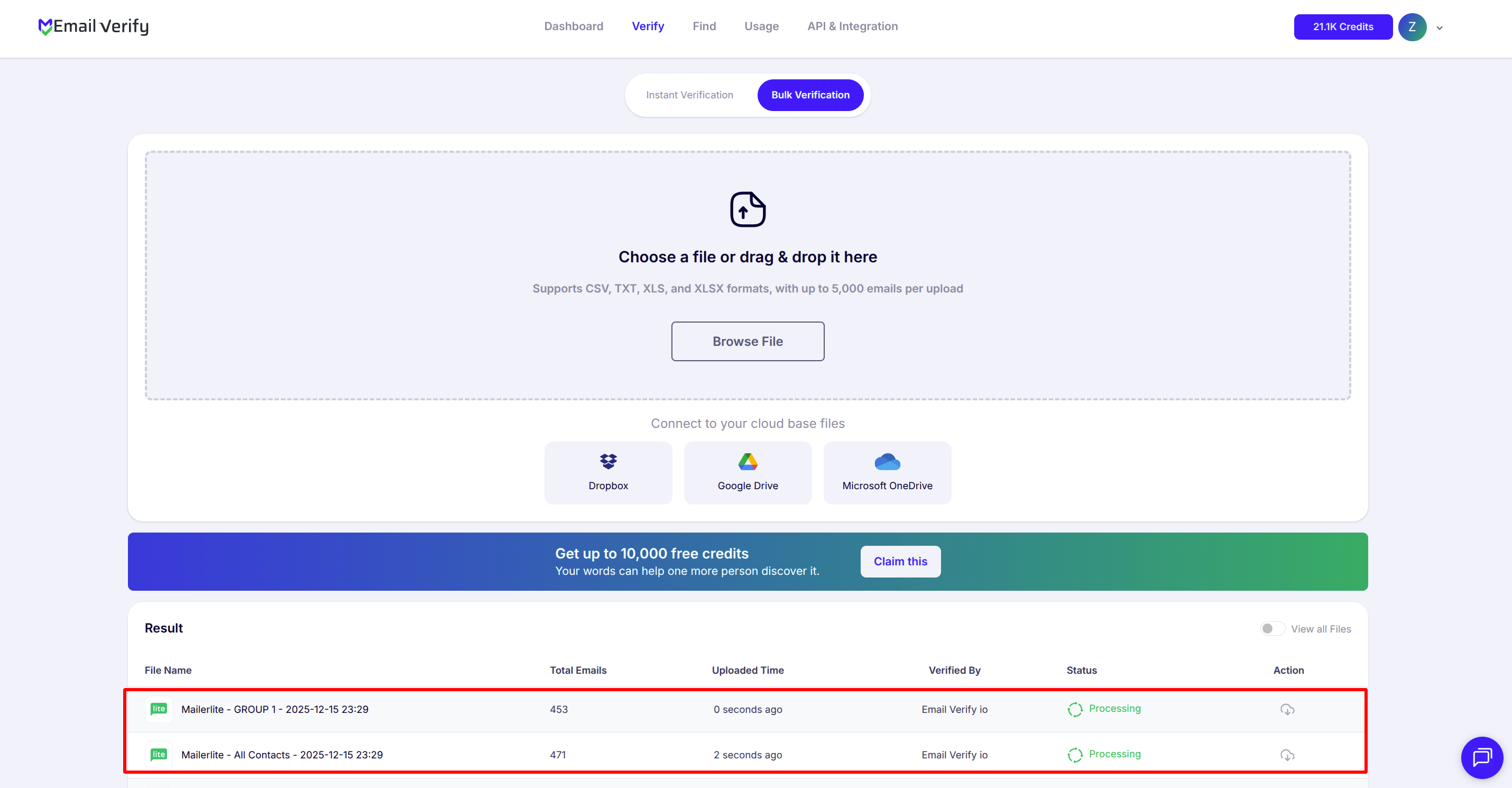
Step 10: Download Results
Note: Validation results are automatically sent to your MailerLite account. Three custom fields are added to each verified subscriber: EV_Status, EV_SubStatus, and EV_Validation_Timestamp. Use these custom fields in MailerLite segments and campaign filters to suppress invalid subscribers and improve send efficiency.

MailerLite Email Verification Integration Features
To use this integration, connect your MailerLite account to EmailVerify.io via API key. This secure connection lets EmailVerify.io access your MailerLite data without requiring your login credentials.
Import Emails from MailerLite
Import email addresses from your MailerLite lists directly into EmailVerify.io for validation.
Reliable Email Verification
Verify your contacts with EmailVerify.io’s robust verification service to quickly detect invalid email addresses.
Export Validation Results
Automatically update contacts with validation data: EV_Status, EV_SubStatus, and EV_Validation_Timestamp to keep your email list clean and up-to-date.
Secure API Key Access
Connect your MailerLite account using an API key for safe, direct access to your data without sharing your password.
Keep your lists clean
With a secure connection to MailerLite, EmailVerify.io helps you maintain accurate email lists and improve deliverability.
Bounce Rate Reduction
Reduce bounce and spam complaints by keeping your lists clean.
Why MailerLite Users Need Email Verification
MailerLite does not validate email addresses when subscribers are added to your lists. Every address entered through a signup form, imported from a CSV, or synced from another tool enters your account unchecked. For free plan users, this creates a direct efficiency problem.
- ✗ MailerLite’s free plan allows 12,000 email sends per month. Invalid addresses consume those sends without delivering any value — and the bounces they generate damage your sender reputation with both MailerLite and inbox providers like Gmail and Outlook.
- ✗ Email addresses decay at 22–30% per year. A subscriber list that was clean 12 months ago may now contain hundreds of invalid addresses silently degrading your open rates and campaign results.
- ✗ Lead magnet and content download opt-ins have high disposable email rates — users provide throwaway addresses to access free resources with no intent to receive further email.
- ✗ Imported or migrated lists from previous platforms, CRM exports, or event sign-ups carry significant invalid rates — lists older than 12 months can contain 15–25% invalid addresses.
- ✗ Invalid subscribers inflate your subscriber count — potentially pushing free plan users past the 1,000-subscriber threshold into a paid tier unnecessarily.
EmailVerify.io removes invalid subscribers before they waste your send allocation, damage your sender reputation, or push you into a higher-cost plan tier.
What EmailVerify.io Checks on Every MailerLite Subscriber
Each MailerLite subscriber email passes through 20+ real-time verification checks before results sync back as custom fields.
| Check | What It Detects |
|---|---|
| Syntax validation | Formatting errors — missing @, invalid characters, malformed structure |
| Domain / DNS check | Whether the email domain exists and is active |
| MX record check | Active mail server records on the domain |
| SMTP verification | Whether the individual mailbox exists on the server |
| Catch-all detection | Dominios that accept all emails regardless of whether the mailbox exists |
| Disposable email check | Temporary or burner addresses from 10,000+ known providers |
| Role-based detection | Generic addresses: info@, admin@, noreply@, support@ |
| Free email provider flag | Gmail, Yahoo, Hotmail and 500+ consumer providers |
Results sync back to MailerLite as custom fields: EV_Status | EV_SubStatus | EV_Validation_Timestamp
What MailerLite Users See After Verification
EmailVerify.io writes results directly to MailerLite subscriber records as custom fields — no manual re-import required.
MailerLite Campaign Deliverability With vs Without Email Verification
Invalid subscribers waste send allocation, damage sender reputation, and inflate subscriber counts. Here is what changes with EmailVerify.io.
| Approach | Time Required | Accuracy | Auto-Sync | Ongoing Protection |
|---|---|---|---|---|
| No verification | 0 min setup | Unknown | No | All invalids consume sends and inflate count |
| Manual CSV clean | Hours of manual work | Basic | No | Partial — misses catch-all and disposable |
| EmailVerify.io + MailerLite | Under 5 min setup | 20+ checks pre-send | Yes — EV custom fields on every subscriber | Full — send allocation, reputation, and plan costs protected |
Who Should Use MailerLite Email Verification
Bloggers and newsletter writers
Newsletter audiences built through content marketing and lead magnets often include throwaway emails from users who wanted free access without sharing their real inbox. Quarterly verification identifies these and keeps your engaged reader count accurate.
Content creators and course sellers
Course sign-up lists and webinar registrations frequently include disposable or work emails that get abandoned. Verify before each major launch to ensure your promotional emails reach genuine prospects.
Small businesses and startups
For small businesses on MailerLite’s free or entry-level plan, every subscriber slot and send counts. Verification maximises the value of your plan by ensuring sends reach real, active inboxes.
Non-profits and NGOs
MailerLite is popular with non-profits for its affordability. Donor and volunteer email lists often go extended periods without cleaning. Verify before major fundraising campaigns to maximise genuine reach.
Agencies managing multiple MailerLite accounts
Verify client subscriber lists quarterly. Maintaining list hygiene across client accounts protects sender reputations, campaign ROI, and plan cost efficiency — a defensible billable service.
Technical Questions About MailerLite Email Verification
How do I create a segment of invalid subscribers in MailerLite?
In MailerLite, go to Subscribers > Segments > Create Segment. Add the condition: Custom field EV_Status equals Invalid. Save the segment. Use this segment as an exclusion condition when creating campaigns to prevent invalid subscribers from receiving your sends.
Can I use EV_Status in MailerLite automations?
Yes. In your MailerLite automation builder, add a condition step: Custom field EV_Status equals Invalid. Route invalid subscribers to an exit path, a suppression group, or a tag action. This prevents invalid subscribers from progressing through welcome sequences or drip campaigns.
What happens if I import new contacts after verification?
New contacts imported after a verification run will not have EV fields — they were not part of the verified batch. After importing new contacts, run a new verification on the updated list to populate EV_Status, EV_SubStatus, and EV_Validation_Timestamp for the new additions before your next campaign send.
Does the MailerLite free plan support custom fields for EV results?
Yes. MailerLite’s free plan supports custom subscriber fields, which is how EV_Status, EV_SubStatus, and EV_Validation_Timestamp are stored. There are no plan restrictions on using or filtering by these fields in segments or campaigns.
Also integrate with Mailchimp Email Verification , HubSpot Email Verification , ActiveCampaign Email Verification , Bulk Email Verification CSV . Or use ourAPI for programmatic access.
Frequently Asked Questions

Does MailerLite verify email addresses automatically?
No. MailerLite does not validate subscriber email addresses when they are added to your lists. EmailVerify.io’s MailerLite integration adds this validation layer — verifying each subscriber and syncing results back as custom fields so you can segment and suppress invalid addresses before they affect your campaigns.
How do I find my MailerLite API key?
- Log in to MailerLite
- Go to Integrations
- Find MailerLite API and click Use
- Click Generate new token
- Copy the generated key and paste it into app.emailverify.io
Can EmailVerify.io verify my entire MailerLite subscriber list at once?
Yes. After connecting via API key, select one or more MailerLite lists in EmailVerify.io and start bulk verification. The system automatically imports your subscribers, processes them with 20+ checks, and syncs results back as custom fields when complete.
What custom fields does EmailVerify.io add to MailerLite subscribers?
- EV_Status: Valid / Invalid / Catch-All / Disposable / Unknown
- EV_SubStatus: Detailed reason code
- EV_Validation_Timestamp: Date and time of last verification
How does verification help MailerLite free plan users?
MailerLite’s free plan limits you to 1,000 subscribers. Invalid subscribers consume these slots without being able to receive email. Verification removes them, freeing slots for real contacts and protecting your sender reputation.
Does EmailVerify.io detect disposable emails in MailerLite?
Yes. EmailVerify.io identifies disposable and temporary email addresses (like Mailinator) and flags them as EV_Status: Disposable. Removing them improves genuine engagement rates.
Will results sync back to MailerLite automatically?
Yes. After verification, EV_Status, EV_SubStatus, and EV_Validation_Timestamp are automatically written back to each MailerLite subscriber as custom fields. No manual re-import is required.
Is the MailerLite integration free to use?
What MailerLite plan do I need for this integration?
The integration works with all MailerLite plans, including the free tier. Custom subscriber fields are supported on all account types.
How often should I re-verify my MailerLite list?
We recommend re-verifying every 3 months for regular senders and always after importing new external contact lists to ensure high deliverability.
You're just one click away from clean email lists.
Start verifying your email addresses instantly and improve your campaign deliverability
* No credit card required