Zoho CRM Email Verification Integration — Clean Contacts, Verified Leads
EmailVerify.io’s Zoho CRM integration validates every contact and lead in your Zoho CRM before they reach your campaigns or automation sequences. Connect via OAuth 2.0 in minutes, select contacts or leads to verify, and sync results back as custom fields — EV_Status, EV_SubStatus, and EV_Validation_Timestamp — directly inside Zoho CRM records. Zoho CRM separates Leads (unqualified prospects) from Contacts (qualified individuals) — and verification strategy differs for each. Verify Leads before conversion to prevent invalid email data from entering your qualified pipeline. Verify Contacts before major Zoho Campaigns sends to protect sender reputation. EmailVerify.io writes results to both modules automatically.

Quick Summary: Zoho CRM Email Verification Integration
- What it does: Imports Zoho CRM Contacts and Leads, validates every email with 20+ checks, and syncs results back as custom fields — EV_Status, EV_SubStatus, EV_Validation_Timestamp — to both modules.
- Who it’s for: Sales teams, marketing ops, CRM admins, and agencies using Zoho CRM for pipeline and contact management.
- Connection: Secure OAuth 2.0 via Zoho’s own login — no credentials stored by EmailVerify.io.
- Pro tip: Verify Leads before conversion to Contact — prevents invalid email data from entering your qualified pipeline and corrupting Contact records.View pricing.
- Setup time: Under 5 minutes.
How to use the integration
To get started with the Zoho CRM integration, you’ll need an active Zoho CRM account, which you can create at https://www.zoho.com/crm/ along with an EmailVerify.io account.
Step 1: Sign in to EmailVerify.io
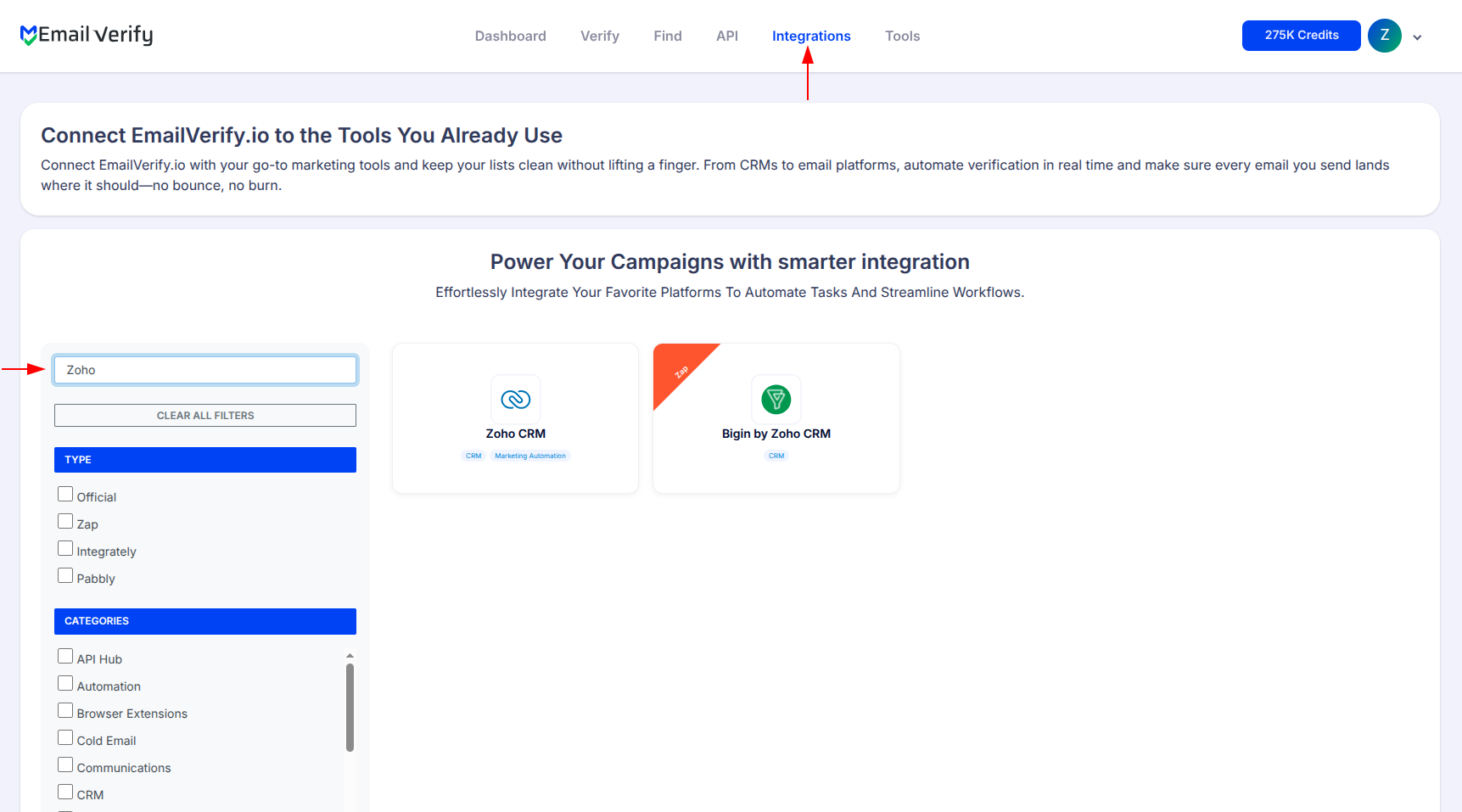
Step 2: Select Zoho CRM
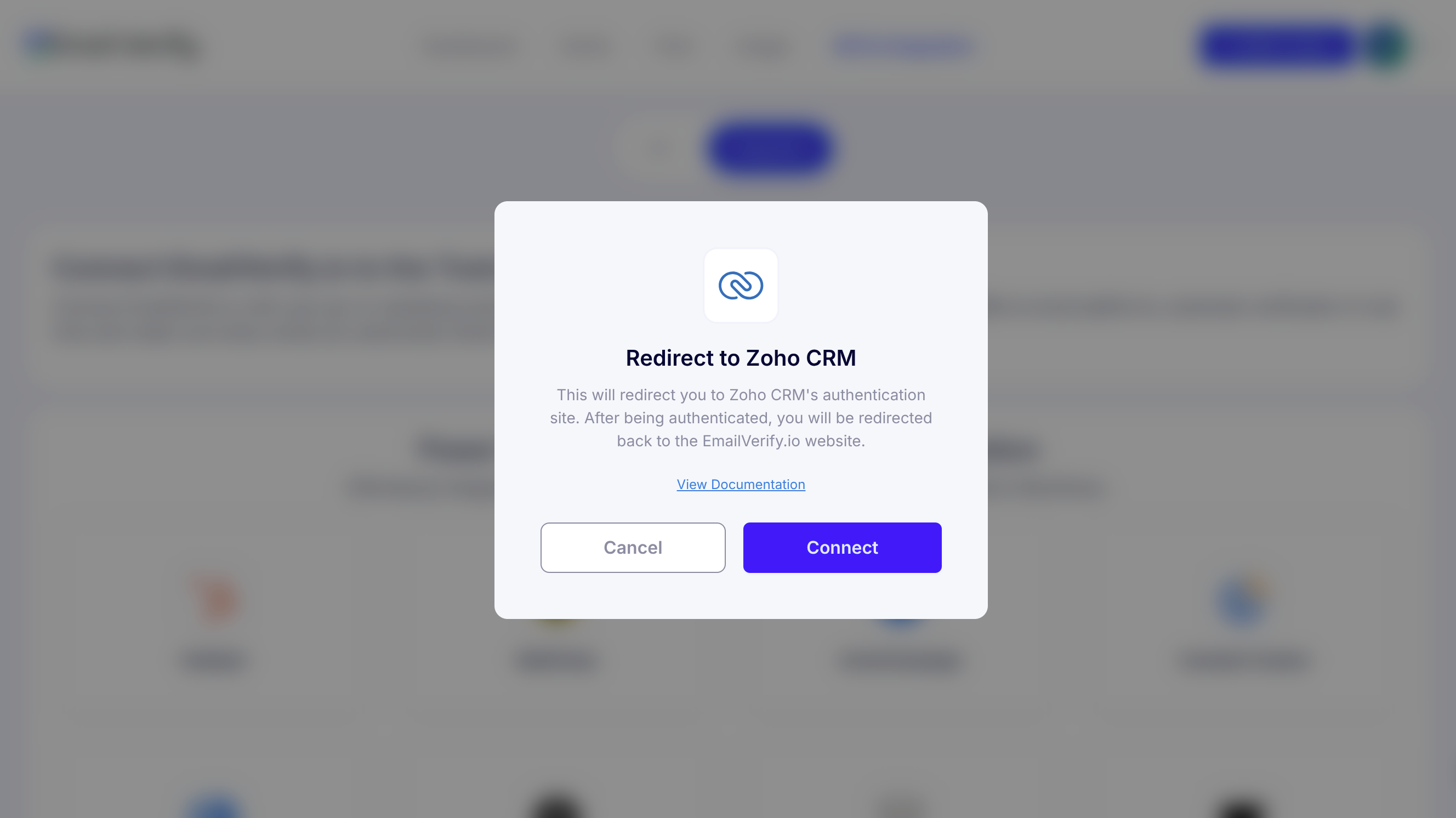
Step 3: Authorize Account Access
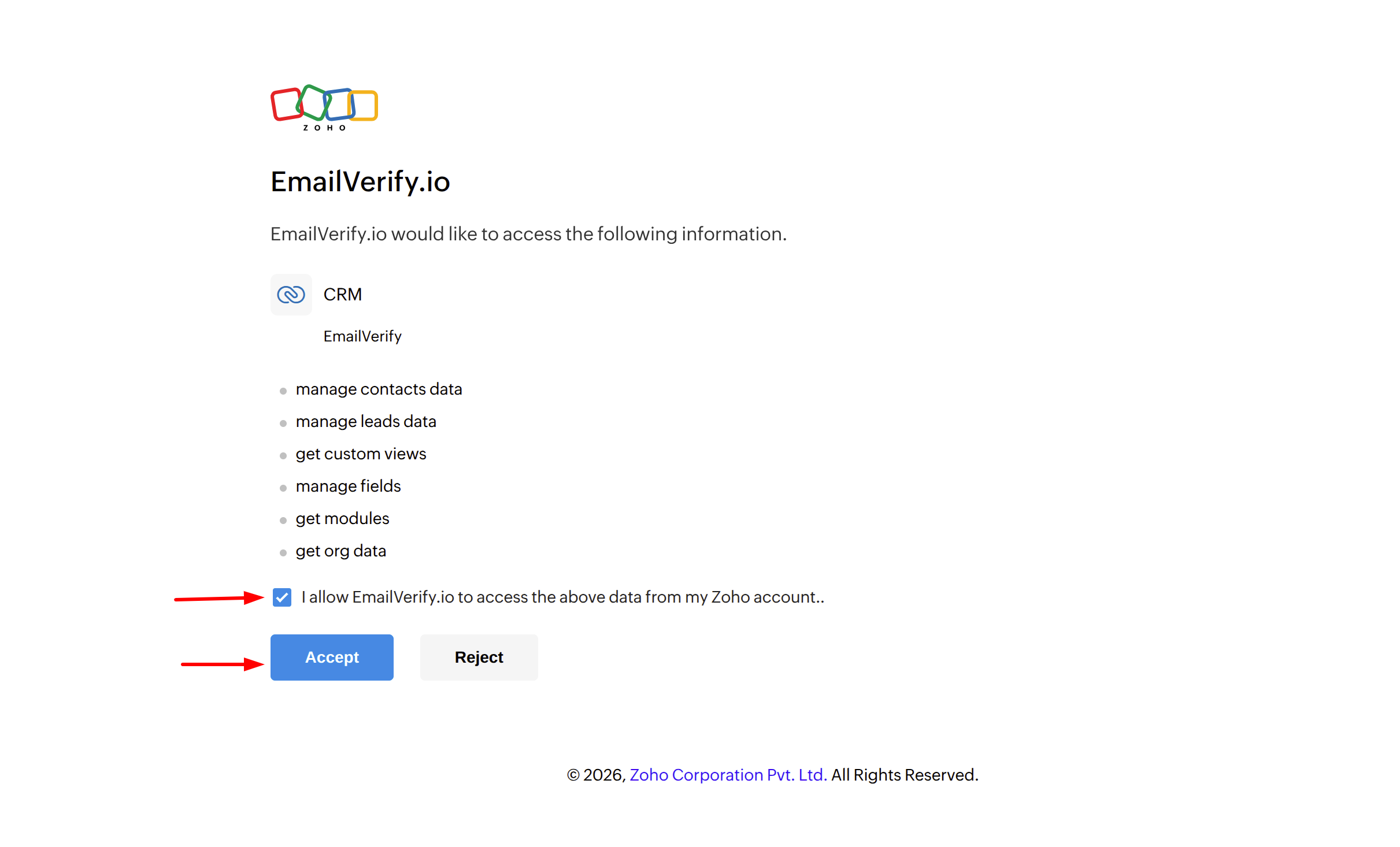
Step 4: View Zoho Contacts and Leads
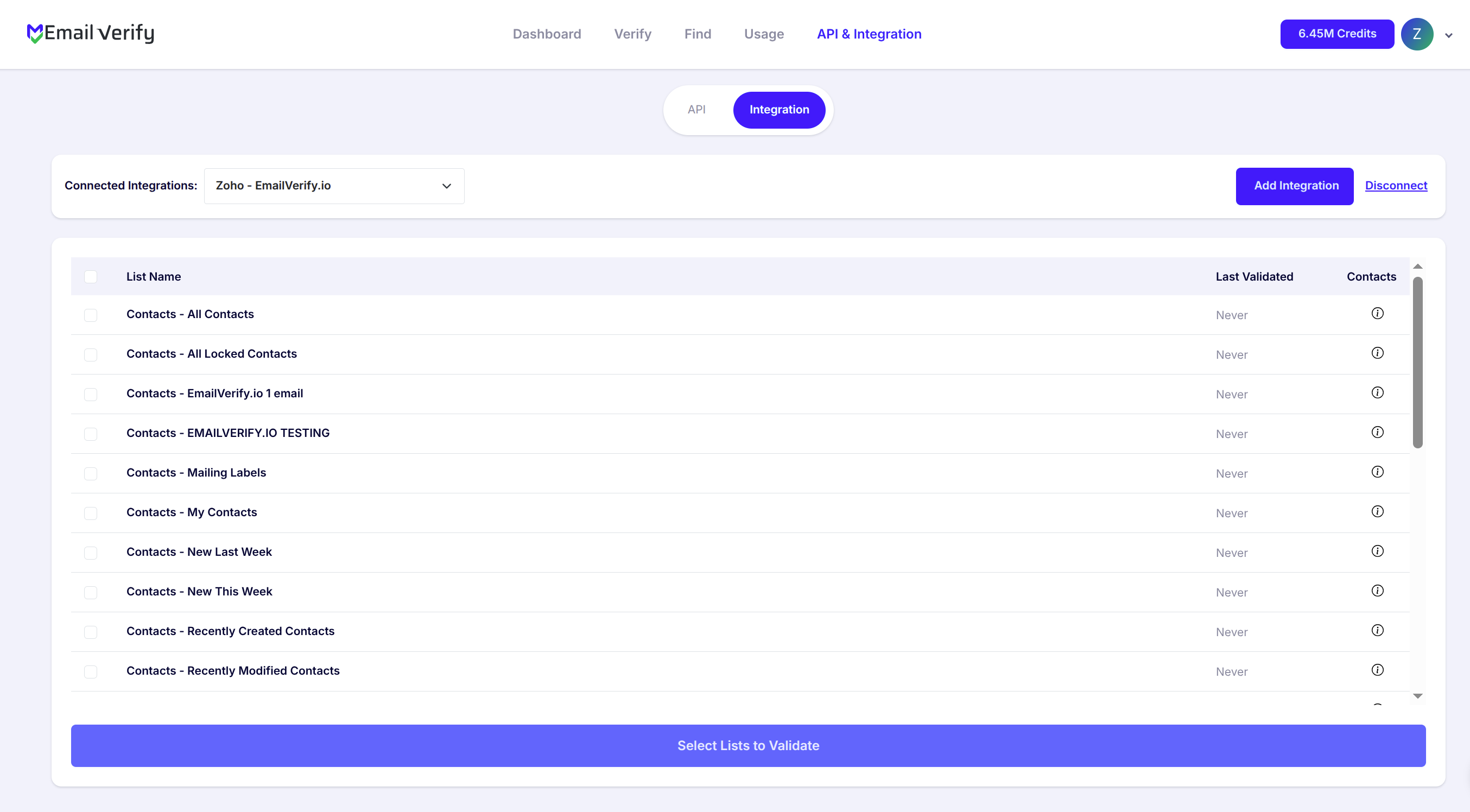
Step 5: Validate Contacts
Note: The results of the validation are automatically exported to the integration they originated from.
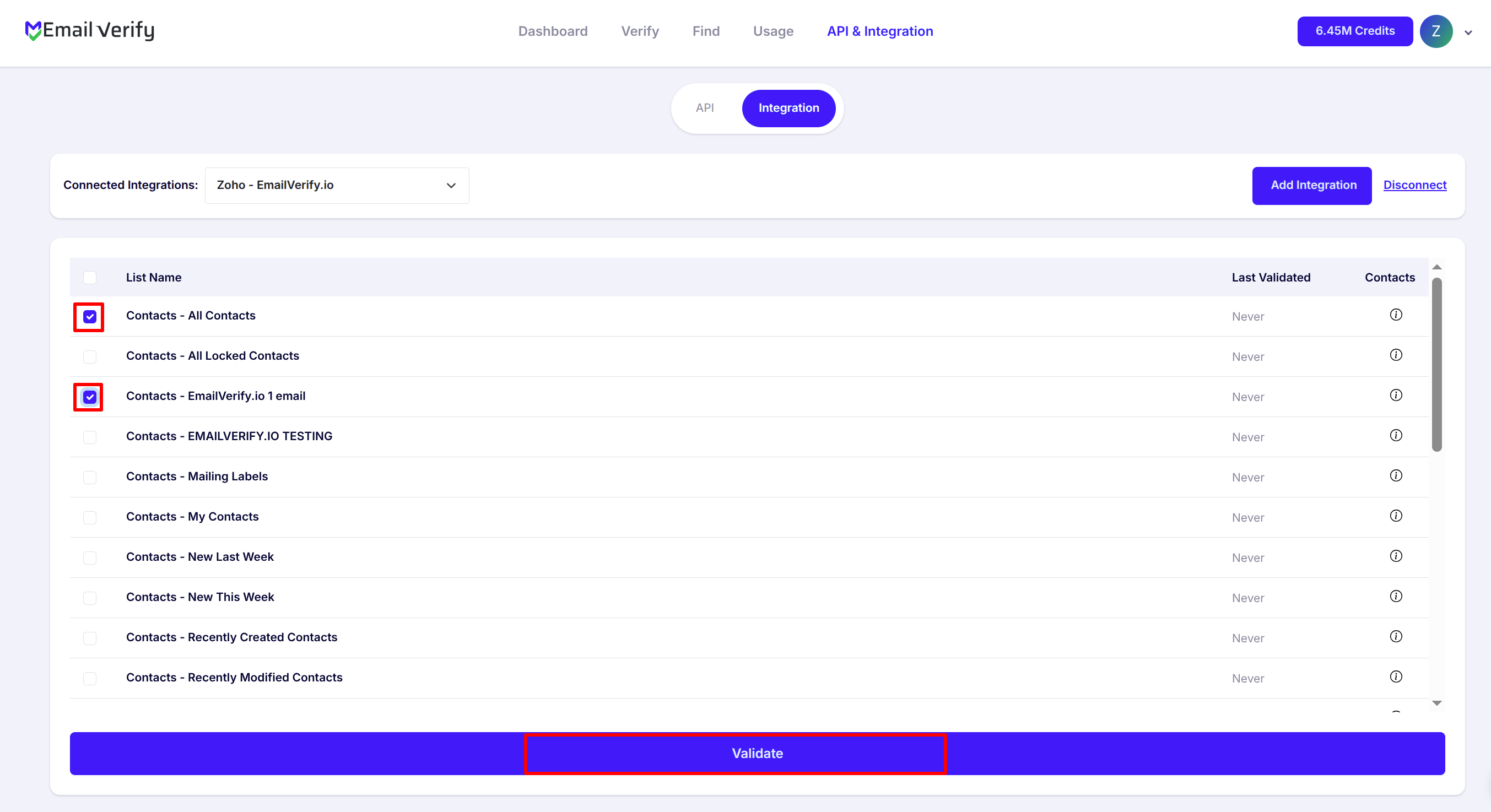
Step 6: Monitor Progress
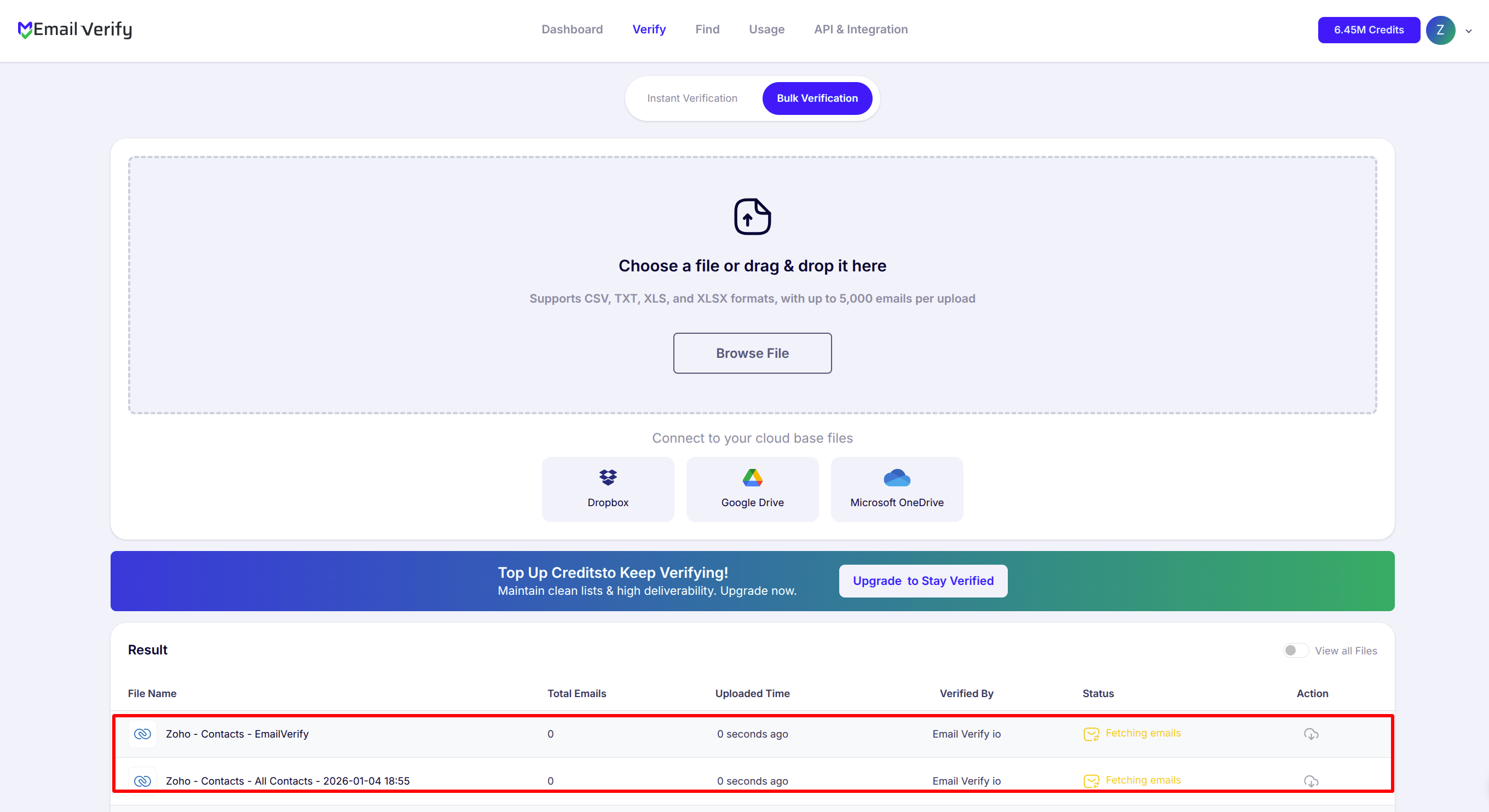
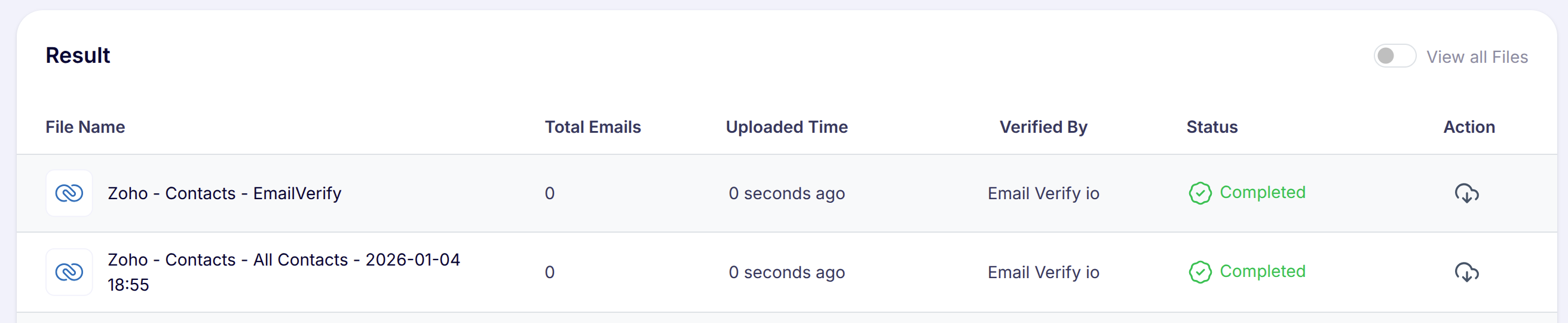
Step 7: Download Results
Note: Validation results are automatically sent to the connected integration. Three custom fields will be added to each verified contact or lead: EV_Status, EV_SubStatus, and EV_Validation_Timestamp. Use these fields in Zoho CRM views, filters, and Workflow Rules to segment and act on verification results.
Zoho CRM Email Verification Integration Features
EmailVerify.io integrates seamlessly with Zoho CRM to help you prevent email bounces, maintain clean contact data, and gain actionable insights into email quality across your CRM.
Import and Verify Zoho CRM Email Addresses
Quickly import email addresses from your Zoho CRM contacts and leads into EmailVerify.io to perform fast, accurate email verification and maintain clean, deliverable email lists.
Accurate Email Verification for Zoho CRM
Use EmailVerify.io’s powerful email verification service to validate Zoho CRM contacts and leads. Quickly identify invalid, disposable, role-based, and catch-all emails to reduce bounce rates and improve email deliverability.
Sync Verification Results Back to Zoho CRM
Automatically sync verification results back into Zoho CRM by mapping them to custom fields i.e. EV_Status, EV_SubStatus and EV_Validation_Timestamp. This keeps verification insights visible, searchable, and actionable directly within Zoho CRM records.
Secure Zoho CRM Connection (OAuth 2.0)
Connect your Zoho CRM account securely using OAuth 2.0. EmailVerify.io never stores your Zoho credentials and only accesses the data required to perform email verification.
Preserve CRM Data & Workflow Integrity
Verification results are added as CRM fields rather than modifying or removing records—allowing you to filter, segment, and report on email quality without disrupting existing data or workflows.
Automation-Ready Verification Status
Leverage verification status fields to trigger Zoho CRM automations, segment contacts, and build smarter sales and marketing workflows based on real-time email quality.
Why Zoho CRM Users Need Email Verification
Zoho CRM is the operational hub for sales and marketing — every campaign send, every automation trigger, every lead nurture sequence depends on the email addresses stored in your CRM being accurate. Zoho CRM does not validate email addresses when Contacts or Leads are created. Records enter from web forms, imports, API integrations, and manual entry — none of which check deliverability.
- ✗ Leads from paid campaigns, web forms, and trade shows carry high invalid email rates — often 10 to 30 percent of imported records contain undeliverable addresses.
- ✗ Email addresses decay at 22 to 30 percent per year. Zoho CRM records that were accurate at creation become invalid over time with no alert or indication in the CRM record.
- ✗ Invalid Lead emails waste SDR prospecting time and distort conversion rate metrics — pipeline stages fill with unreachable opportunities that inflate forecast numbers.
- ✗ Invalid Contact emails generate hard bounces in Zoho Campaigns that damage your Campaigns sender reputation and reduce deliverability for your entire contact database.
- ✗ If you use other Zoho apps — Zoho Campaigns, Zoho SalesIQ, Zoho Desk, Zoho Marketing Hub — invalid email data in Zoho CRM propagates to connected apps across your Zoho One ecosystem.
EmailVerify.io removes invalid email addresses from both Contacts and Leads before they corrupt pipeline data, waste outreach effort, or damage sender reputation — keeping your Zoho CRM accurate from lead capture to customer conversion.
What EmailVerify.io Checks on Every Zoho CRM Contact and Lead Email
Each Contact and Lead email address in your Zoho CRM passes through 20+ real-time verification checks before results sync back as custom fields.
| Check | What It Detects |
|---|---|
| Syntax validation | Formatting errors — missing @, invalid characters, malformed structure |
| Domain / DNS check | Whether the email domain exists and is active |
| MX record check | Active mail server records on the domain |
| SMTP verification | Whether the individual mailbox exists on the server |
| Catch-all detection | Domains that accept all emails regardless of whether the mailbox exists |
| Disposable email check | Temporary or burner addresses from 10,000+ known providers |
| Role-based detection | Generic addresses: info@, admin@, noreply@, support@ |
Results written as custom fields on both Contacts and Leads: EV_Status | EV_SubStatus | EV_Validation_Timestamp
What Zoho CRM Users See After Verification
EmailVerify.io writes results directly to Zoho CRM Contact and Lead records as custom fields — visible and filterable inside your CRM without any re-import.
Zoho CRM Data Quality With vs Without Email Verification
Invalid Contact and Lead emails corrupt pipeline metrics, waste sales effort, and damage sender reputation. Here is what changes with EmailVerify.io.
| Approach | Time Required | Accuracy | Auto-Sync | Ongoing Protection |
|---|---|---|---|---|
| No verification | 0 min setup | Unknown | No | All invalid Contact and Lead emails corrupt pipeline data and Zoho Campaigns sends |
| Manual CSV clean | Hours of manual work | Basic | No | Partial — misses catch-all and disposable addresses, no sync back to CRM |
| EmailVerify.io + Zoho CRM | Under 5 min setup | 20+ checks per record | Yes — EV fields on every Contact and Lead | Full — pipeline accuracy, Zoho Campaigns deliverability, and sender reputation all protected |
Who Should Use Zoho CRM Email Verification
Sales teams using Zoho CRM for pipeline management
Verify Lead lists before running outreach campaigns and before Lead-to-Contact conversion. Invalid Lead emails waste SDR time and distort conversion rate metrics. Clean pipeline starts with verified email data — EV_Status lets you filter unreachable Leads before they waste outreach cycles.
Marketing teams running Zoho Campaigns
Zoho CRM Contact data flows directly into Zoho Campaigns. Invalid contacts carry over and generate hard bounces that damage your Campaigns sender reputation. Verify CRM contacts quarterly and before any major campaign send to keep Campaigns deliverability high.
CRM administrators and RevOps teams
Maintaining CRM data quality is a core RevOps responsibility. Regular verification runs keep Contact and Lead email accuracy high — making revenue forecasting, lead scoring, pipeline stage reporting, and segmentation more reliable and actionable.
Zoho One and Zoho Suite users
If you run other Zoho apps alongside Zoho CRM — including Zoho SalesIQ, Zoho Desk, or Zoho Marketing Hub — invalid email data in your CRM can propagate across connected apps. Keeping CRM email data clean protects data quality throughout your entire Zoho ecosystem.
Technical Questions About Zoho CRM Email Verification
How do I build a Zoho CRM view to find all invalid Contacts or Leads?
In Zoho CRM, go to Contacts or Leads and click the Filter icon. Add a condition: Custom Field > EV_Status > equals > Invalid. Save this as a custom view named Invalid Email Contacts or Invalid Email Leads. This view shows all records with invalid email addresses — filterable, exportable, and usable in Zoho CRM bulk actions or workflow triggers.
Does EmailVerify.io delete or modify existing Zoho CRM records?
No. EmailVerify.io only adds custom fields to Zoho CRM Contact and Lead records — it does not delete, archive, or modify any existing data. EV_Status, EV_SubStatus, and EV_Validation_Timestamp are written to each record so your team can decide the appropriate action. The decision to remove or convert a Lead or Contact remains entirely within Zoho CRM and with your team.
Can I trigger Zoho CRM Workflow Rules based on EV_Status?
Yes. EV_Status is a standard custom field that can be used in Zoho CRM Workflow Rules conditions. Example rule: Field Condition > EV_Status equals Invalid > Action: Update Field (Lead Status = Invalid Email) + Create Task (Assign to CRM admin for review). This automates data quality management inside Zoho CRM without manual intervention.
Can I use EV_Validation_Timestamp to schedule re-verification runs?
Yes. EV_Validation_Timestamp records the date and time each Contact or Lead was last verified. Create a Zoho CRM filter for records where EV_Validation_Timestamp is older than 90 days to identify records due for re-verification. Combine with a list view or Zoho CRM report to track and manage verification cadence across your database.
Also integrate with Pipedrive Email Verification , HubSpot Email Verification , Moosend Email Verification , ActiveCampaign Email Verification . Or use ourAPI for programmatic access.
Frequently Asked Questions

How do I connect EmailVerify.io to Zoho CRM?
- Sign in at app.emailverify.io and go to Integrations.
- Search for Zoho CRM and click Connect.
- Sign in to Zoho and click Accept to authorise access.
Is the Zoho CRM integration free?
Can I verify both Contacts and Leads in Zoho CRM?
Yes. After connecting, you can select and verify both Contacts and Leads. Results sync back to both modules as three custom fields: EV_Status, EV_SubStatus, and EV_Validation_Timestamp. We recommend verifying Leads before conversion to Contact.
What custom fields does EmailVerify.io add to Zoho CRM records?
- EV_Status — overall result (Valid, Invalid, etc.)
- EV_SubStatus — specific reason code
- EV_Validation_Timestamp — date and time of last verification
How does email verification improve Zoho CRM data quality?
Invalid emails corrupt pipeline metrics and waste sales effort. Verification ensures every record has a deliverable address, making revenue forecasting and lead scoring more accurate.
Can I use EV_Status in Zoho CRM Workflow Rules?
Yes. EV_Status is a custom field that can trigger Workflow Rules. For example, when EV_Status equals Invalid, you can automatically change the Lead Status and notify the CRM admin.
Does EmailVerify.io work with Zoho Campaigns?
Yes, indirectly. By keeping your CRM data clean, you prevent invalid addresses from syncing into Zoho Campaigns and damaging your sender reputation.
What Zoho CRM plan do I need for this integration?
All Zoho CRM plans are supported, including the free edition. The integration uses Zoho's standard OAuth 2.0 API available on all tiers.
How often should I re-verify Zoho CRM contacts and leads?
We recommend every 3–6 months for your full database, as email addresses decay at 22–30% per year, and always verify new imports before starting outreach.
How long does it take to verify 10,000 Zoho CRM records?
For 10,000 records, verification typically takes 10 to 20 minutes. Results sync automatically back to your custom fields once the process is complete.
You're just one click away from clean email lists.
Start verifying your email addresses instantly and improve your campaign deliverability
* No credit card required