GetResponse Email Verification Integration — Clean Lists, Better Automations
EmailVerify.io’s GetResponse email verification integration imports your contact lists and autoresponder lists, validates every email address against 20+ real-time checks, and syncs clean results back to GetResponse automatically — as custom fields on each contact record. GetResponse does not validate email addresses when contacts join your lists from web forms, funnel pages, webinar registrations, or imports. EmailVerify.io adds that validation layer before your campaigns and automation sequences send. Connect using your GetResponse API key (found at Tools > Integrations & API). Setup takes under 5 minutes. Results sync back as three custom fields — EV_Status, EV_SubStatus, and EV_Validation_Timestamp — so you can segment, suppress, and filter contacts directly in GetResponse.


Quick Summary: GetResponse Email Verification Integration
- What it does: Imports GetResponse contact lists and autoresponder lists, validates every email with 20+ checks, and syncs EV_Status, EV_SubStatus, and EV_Validation_Timestamp back as custom fields.
- Who it’s for: Email marketers, course creators, webinar hosts, funnel builders, and SMBs using GetResponse for campaigns and automation sequences.
- Connection method: GetResponse API Key — found at Tools > Integrations & API. EmailVerify.io never stores your login credentials.
- Pro tip: Verify contacts from conversion funnels and webinar registrations — these sources have the highest invalid email rates in typical GetResponse accounts.
- Free to start: Connecting GetResponse is free. Verification uses credits — new users receive free credits to test before purchasing.View pricing.
How to use the integration
To get started with the GetResponse integration , you'll need an active GetResponse account which you can create at https://app.getresponse.com/ and a free EmailVerify.io account.
Step 1: Sign in to EmailVerify.io
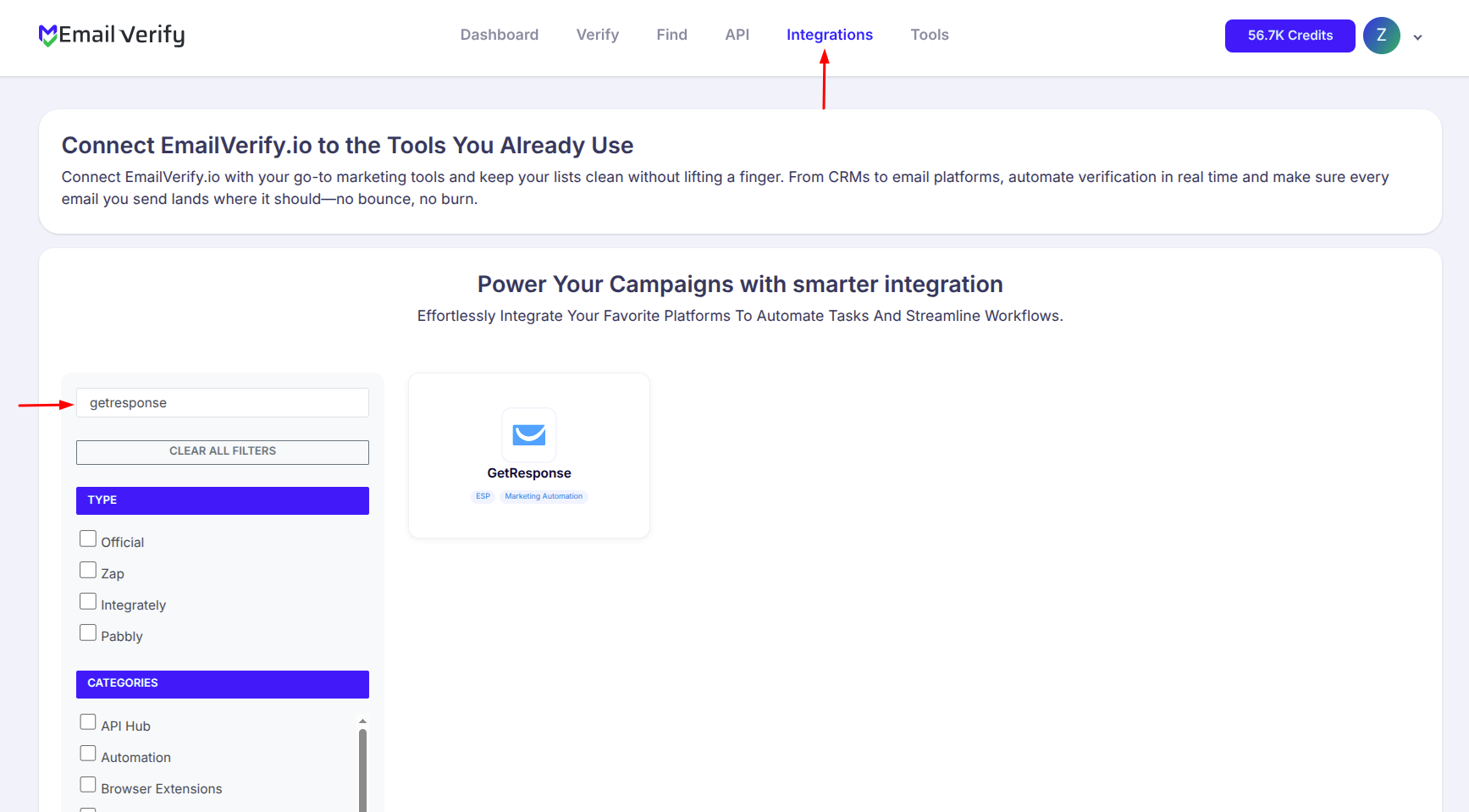
Step 2: Select GetResponse
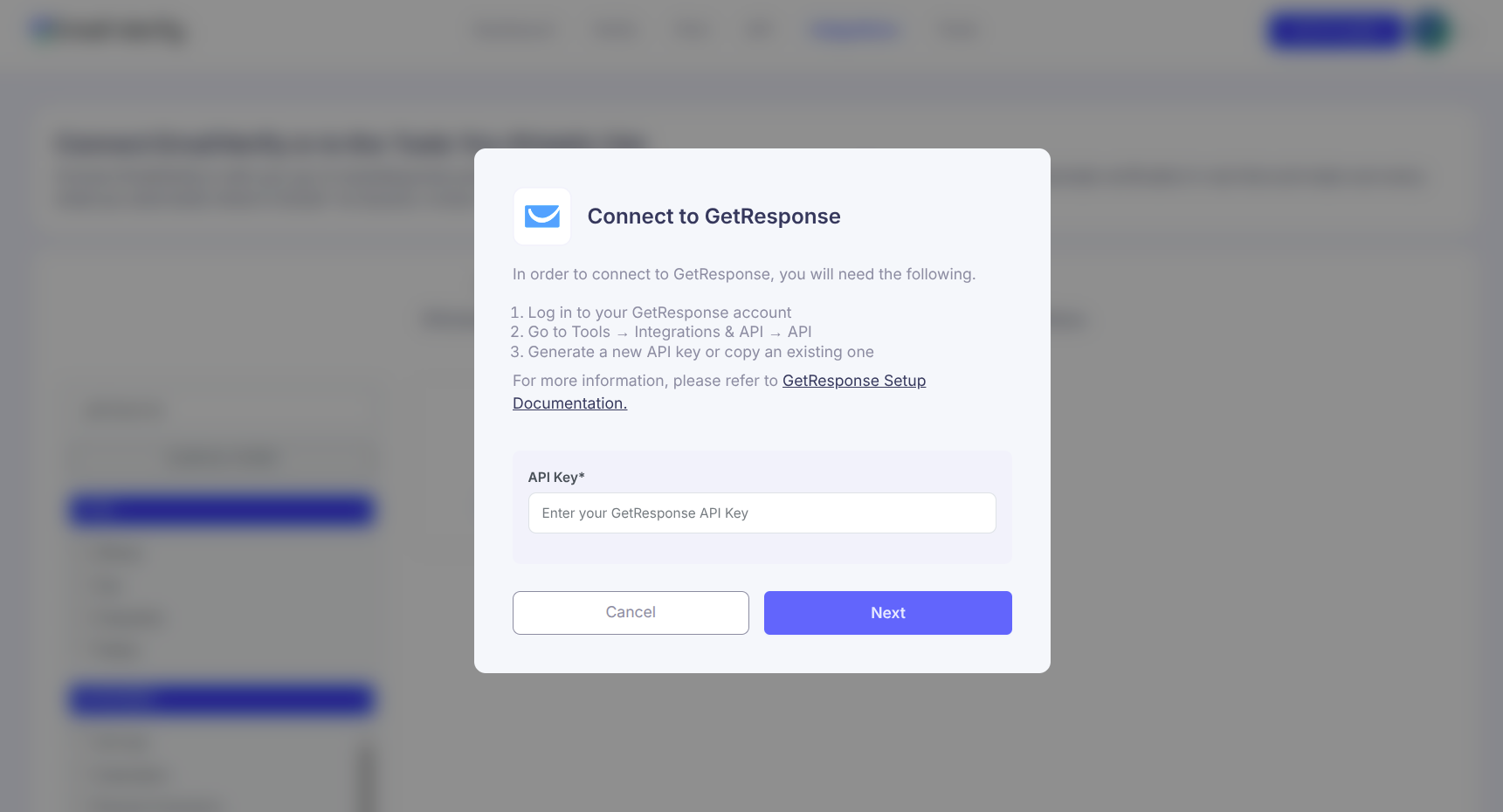
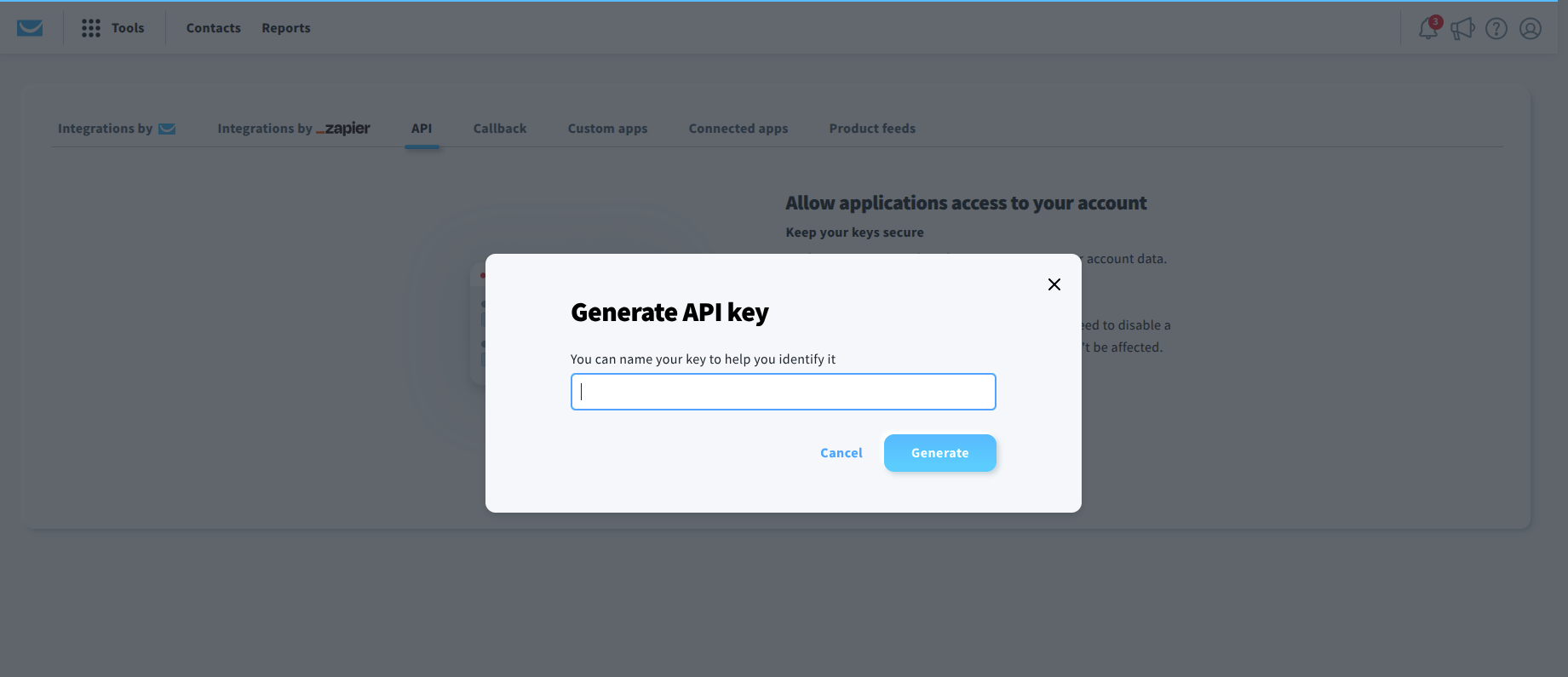
Step 3: Get Your GetResponse API Key
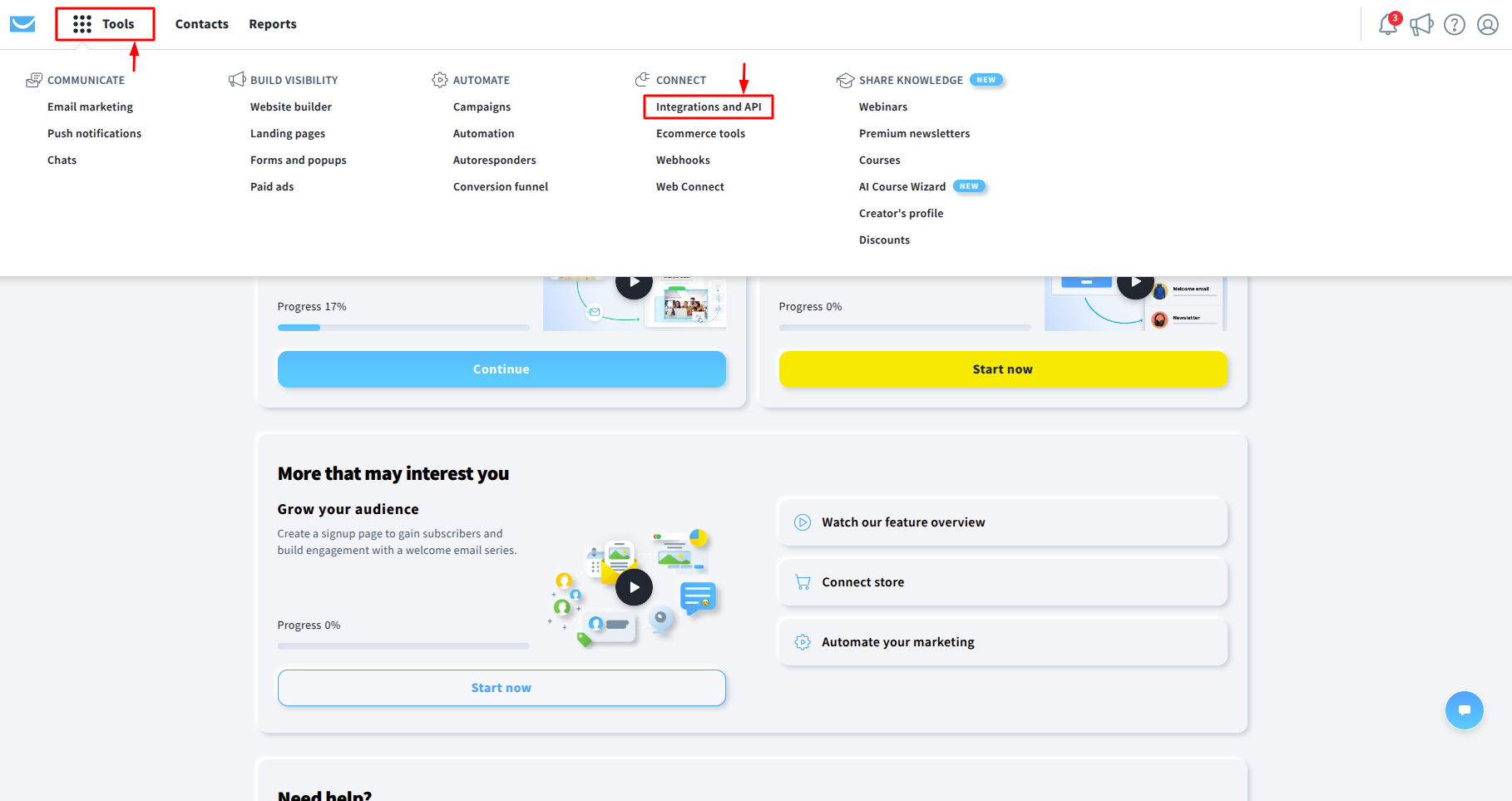
Step 4: Go to API Page
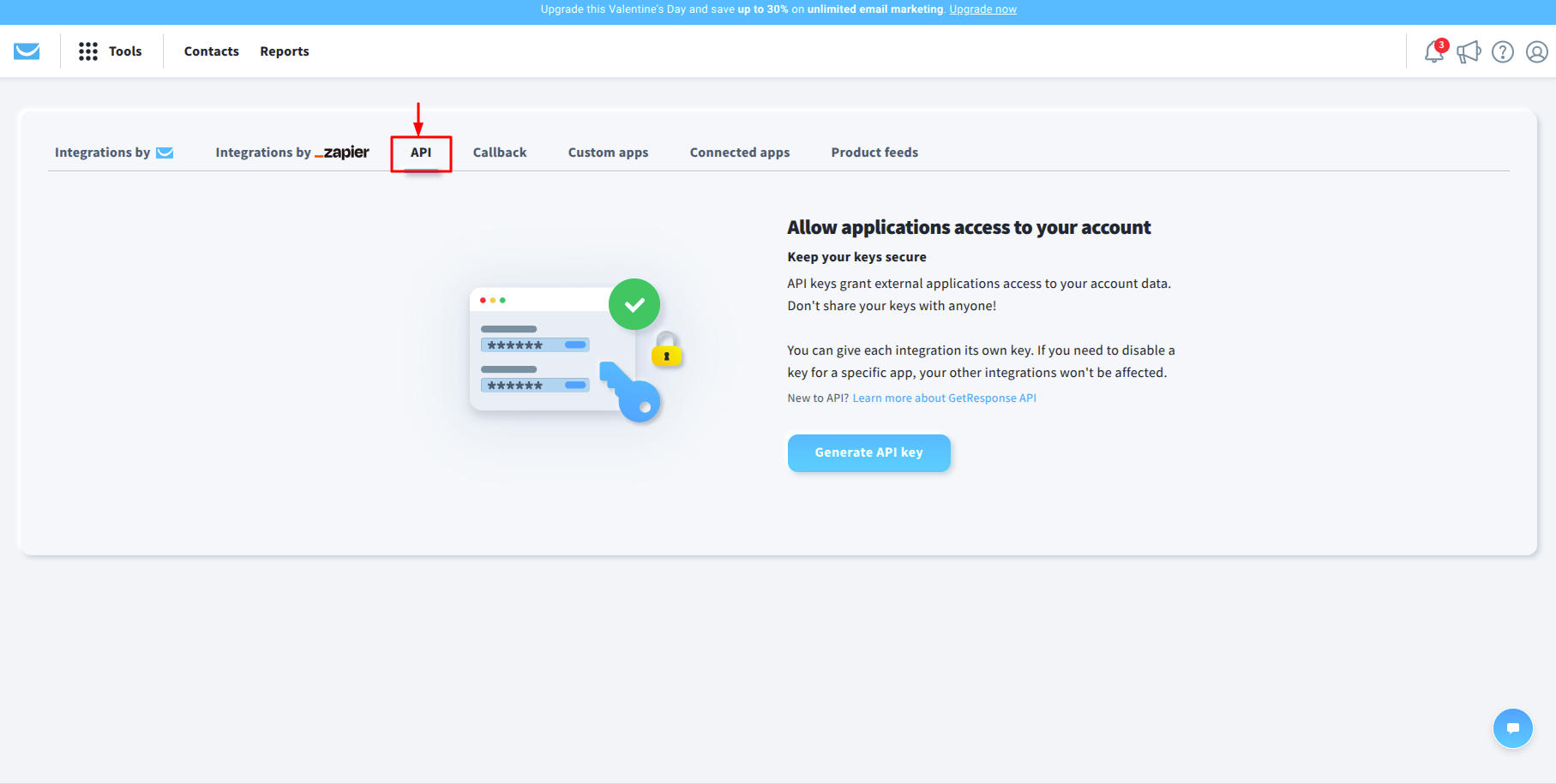
Step 5: Generate API KEY
Step 6: View Your Lists
Note: The results of the validation are automatically exported to the integration they originated from.
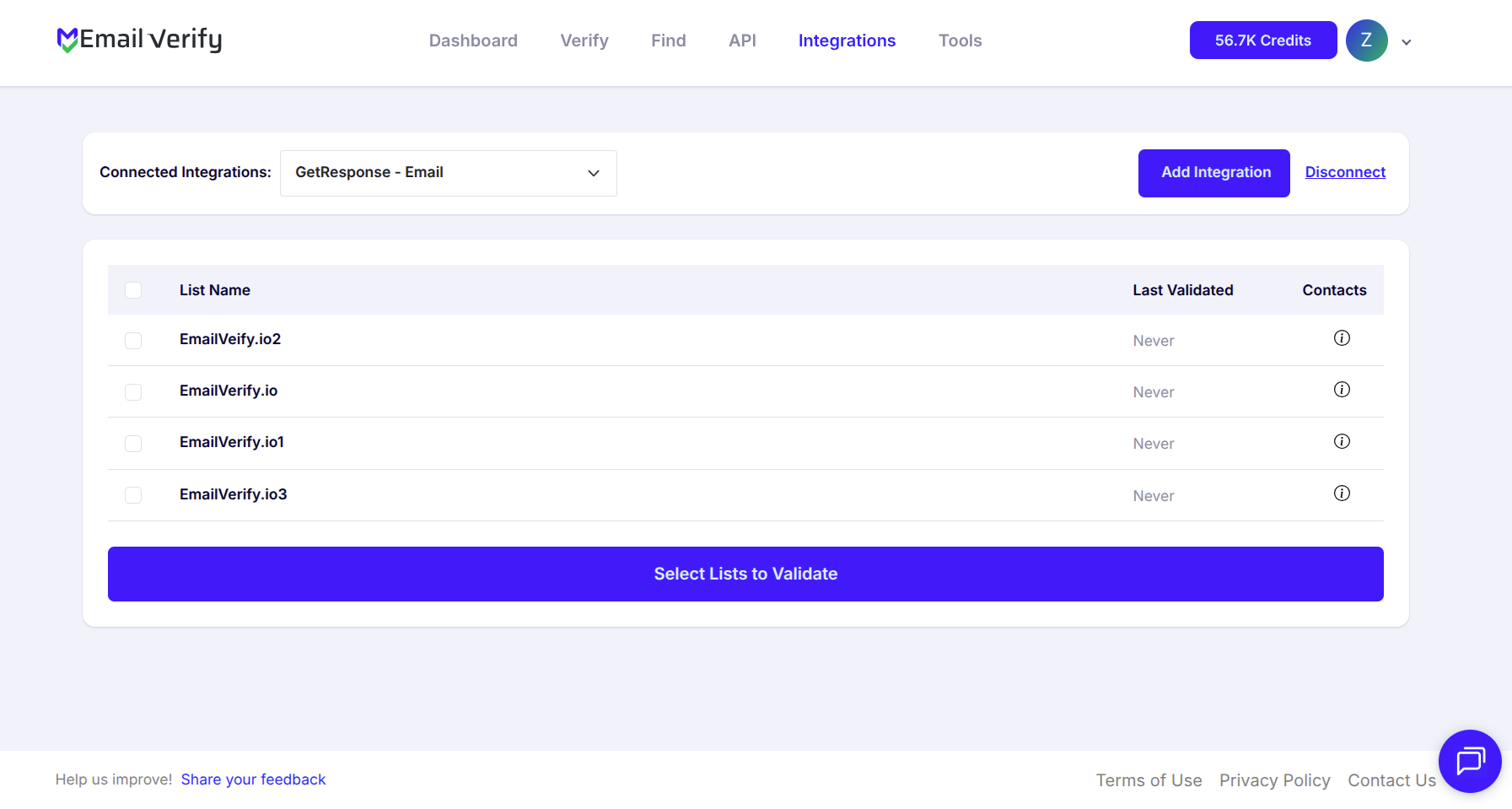
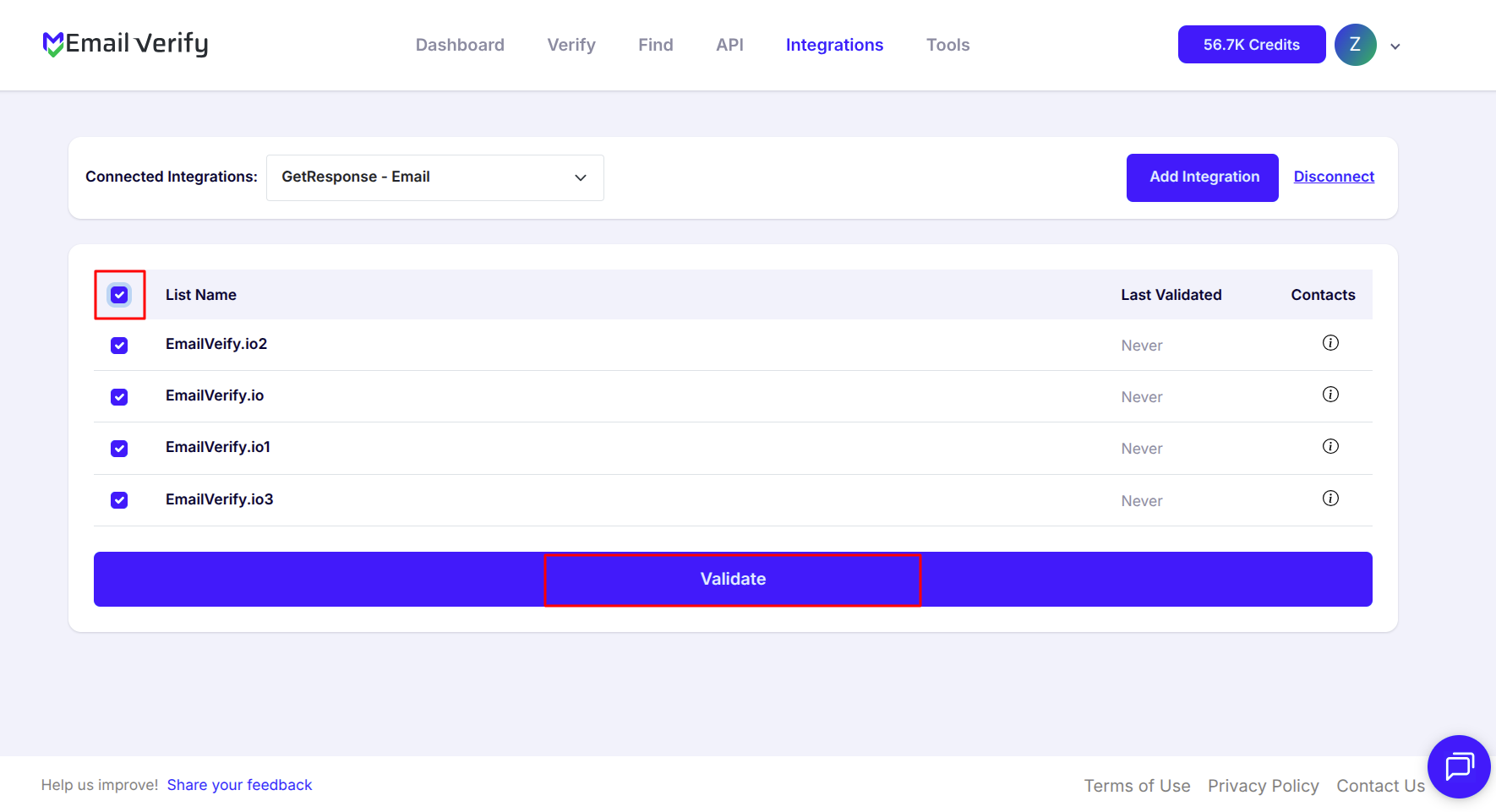
Step 7: Select Lists to Verify
Note: The results of the validation are automatically exported to the integration they originated from.
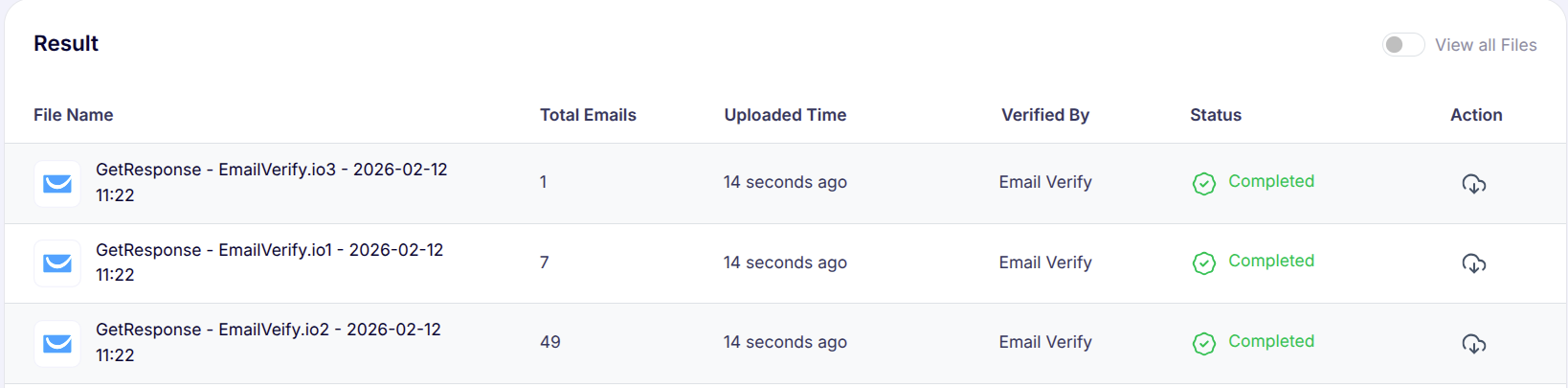
Step 8: Monitor Progress
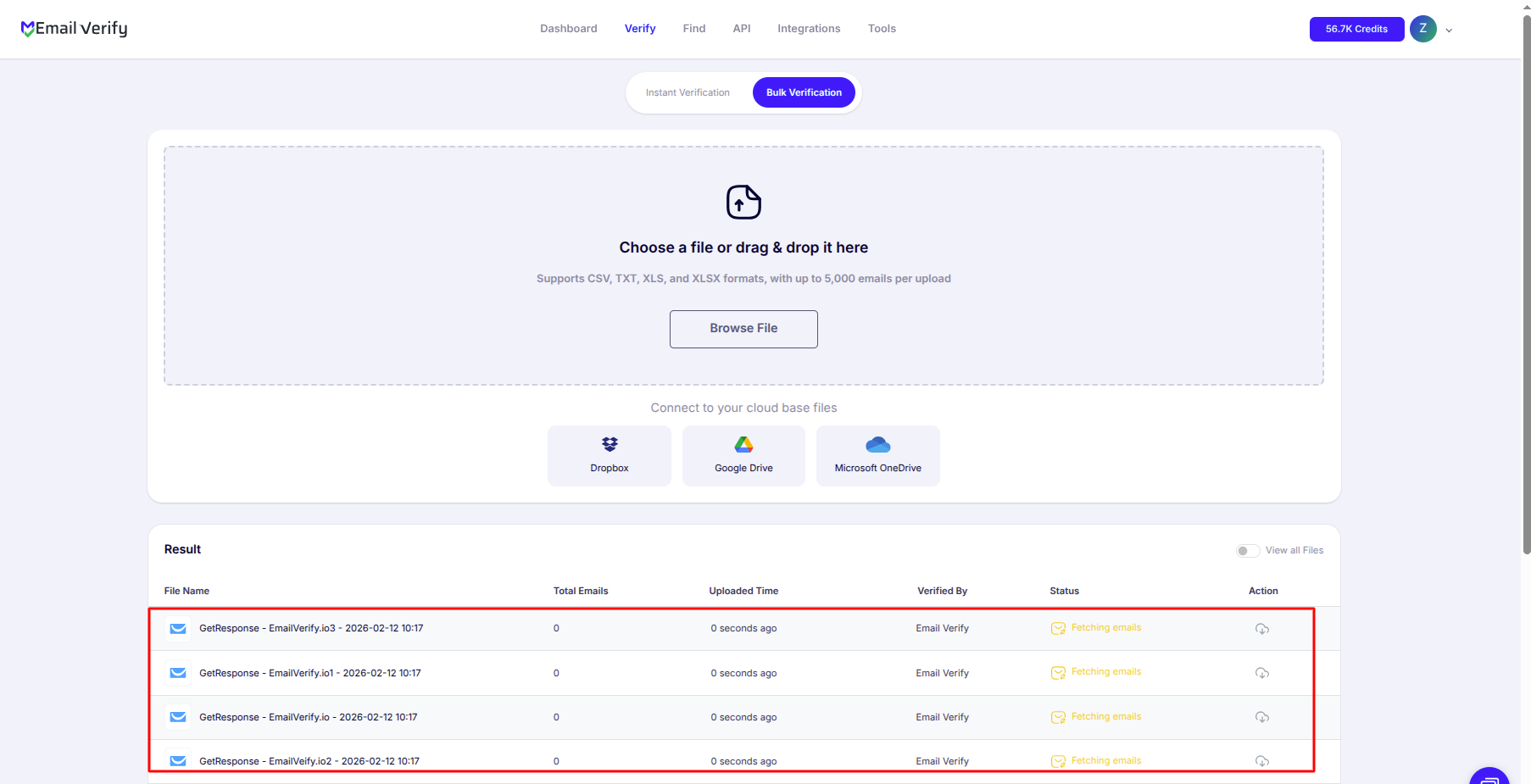
Step 9: Download Results
Note: Validation results are automatically sent to the connected integration. Three custom fields will be added to each contact: EV_Status, EV_SubStatus, and EV_Validation_Timestamp. These fields play a key role in maintaining accurate, up-to-date contact information and improving how you segment and manage your GetResponse campaigns.
GetResponse Email Verification Integration Features
EmailVerify.io integrates seamlessly with GetResponse to keep your email lists accurate, protect your sender reputation, and ensure your marketing campaigns and automation workflows reach real, engaged subscribers.
Import Contact Lists
Easily import your GetResponse lists into EmailVerify.io to validate all email addresses.
Reliable Email Verification
Verify your GetResponse contacts with EmailVerify.io’s powerful email verification engine. Quickly detect invalid, disposable, or catch-all email addresses to protect your campaigns and maintain high deliverability.
Export Validation Results
Automatically update contacts with validation data (EV_Status, EV_SubStatus, and EV_Validation_Timestamp) to keep your email list clean and up-to-date.
Secure API Key Connection
Connect your GetResponse account using a secure API key. EmailVerify.io accesses your data safely without requiring your password, keeping your account secure while enabling seamless integration.
Sync Validation Results Back to GetResponse
Automatically update your GetResponse contacts with validation data, including EV_Status, EV_SubStatus, and EV_Validation_Timestamp, so your email lists stay clean, up-to-date, and actionable.
Reduce Bounce Rates & Improve Deliverability
Identify invalid email addresses, minimize bounces, and improve inbox placement to ensure your emails reach real, active subscribers every time.
Why GetResponse Users Need Email Verification
GetResponse does not validate email addresses when contacts are added. Contacts enter from web forms, funnel pages, webinar registrations, and imports — without any deliverability check.
- ✗ Autoresponder sequence accuracy — Invalid addresses generate hard bounces that disrupt sequence tracking and distort open and click rate data, making it impossible to accurately measure sequence performance.
- ✗ Conversion funnel contacts — GetResponse’s funnel builder collects emails at each stage. Funnel-sourced contacts include the highest disposable email rates, as users enter quick details to access lead magnets.
- ✗ Webinar registrations — Attendee emails entered quickly during registration have high typo rates and include temporary addresses. Verify webinar lists before follow-up sequences send.
- ✗ Legacy list decay — Email addresses decay at 22–30% per year. Autoresponder lists built over 2+ years can contain 15–25% invalid addresses, silently degrading campaign performance.
- ✗ Landing page leads — Contacts captured through GetResponse landing pages show 8–18% invalid rates, similar to other form-sourced lead lists.
EmailVerify.io verifies contacts before sequences send — protecting deliverability, autoresponder metrics, and funnel conversion analytics.
What EmailVerify.io Checks on Every GetResponse Contact
Each contact in your GetResponse lists passes through 20+ real-time checks before results are written back as custom fields.
| Check | What It Detects |
|---|---|
| Syntax validation | Formatting errors — missing @, invalid characters, malformed structure |
| Domain / DNS check | Whether the email domain exists and is active |
| MX record check | Active mail server records on the domain |
| SMTP verification | Whether the individual mailbox exists on the server |
| Catch-all detection | Domains that accept all emails regardless of whether the mailbox exists |
| Disposable email check | Temporary or burner addresses from 10,000+ known providers |
| Role-based detection | Generic addresses: info@, admin@, noreply@, support@ |
| Hard bounce history | Cross-reference with known invalid address databases |
Results sync back to GetResponse as custom fields: EV_Status | EV_SubStatus | EV_Validation_Timestamp
What GetResponse Users See After Verification
EmailVerify.io writes results directly to GetResponse contact records — no manual export or re-import needed.
GetResponse Deliverability: Without vs With Email Verification
GetResponse monitors bounces after they occur. EmailVerify.io removes invalid contacts before campaigns and sequences send.
| Approach | Time Required | Accuracy | Auto-Sync | Ongoing Protection |
|---|---|---|---|---|
| No verification | 0 min setup | Unknown | No | All invalids reach campaign send queue |
| Manual list cleaning | Hours of manual work | Basic | No | Partial — misses catch-all and role-based |
| EmailVerify.io + GetResponse | Under 5 min setup | 20+ checks pre-send | Yes — EV fields on every contact | Full — campaigns, autoresponders, and funnels protected |
Who Should Use GetResponse Email Verification
Email marketers running autoresponder sequences
Autoresponder lists built over time accumulate invalid addresses. Verify before building new sequences and re-verify existing lists every 3 to 6 months to protect sequence performance metrics.
Course creators and info product sellers
Lead magnets and course sales pages capture emails from users who frequently use secondary or temporary addresses. Verify these lists before launching your email welcome sequence.
Webinar hosts using GetResponse
Webinar registrant lists have high invalid rates from quick-entry registration forms. Verify the registrant list before your pre-webinar reminder sequence sends to maximise real attendee engagement.
Funnel builders and landing page users
Every stage of a GetResponse conversion funnel collects email addresses. Verify funnel-sourced contacts before adding them to main marketing automation workflows.
Technical Questions About GetResponse Email Verification
Where do I find my GetResponse API key?
Log in to GetResponse, click Tools in the top navigation, go to Integrations & API, click the API tab, then click Generate API key. Name it (e.g., EmailVerify.io) and copy the generated key. Paste it into EmailVerify.io’s GetResponse connection screen.
Does the integration work with GetResponse autoresponder lists?
Yes. Autoresponder contact lists appear in EmailVerify.io alongside your regular contact lists. Verify autoresponder lists before activating new sequences to ensure every subscriber in the sequence has a real, deliverable email address.
Can I use EV_Status to filter contacts in GetResponse segments and automations?
Yes. After verification, EV_Status is a custom field available in GetResponse’s contact search, segment builder, and marketing automation conditions. Create a suppression segment where EV_Status equals ‘invalid’ and exclude it from all campaign sends and autoresponder enrolments.
What GetResponse plan do I need for this integration?
The EmailVerify.io integration works with all GetResponse plans including the Free plan (up to 500 contacts). The integration uses GetResponse’s standard API and custom contact fields, both available on all account tiers.
Also integrate with Mailchimp Email Verification , ActiveCampaign Email Verification , Constant Contact Email Verification , Drip Email Verification . Or use ourAPI for programmatic access.
Frequently Asked Questions

How do I connect EmailVerify.io to GetResponse?
How do I find my GetResponse API key?
Log in to your GetResponse account. Click Tools in the top navigation, go to Integrations & API, click the API tab, then click Generate API key. Name it (e.g., EmailVerify.io), generate it, and copy the key. Paste it into EmailVerify.io's GetResponse integration setup screen.
What happens to my existing GetResponse contacts during verification?
EmailVerify.io does not delete, modify, or unsubscribe any of your existing contacts. Verification only adds three new custom fields to each contact record: EV_Status (Valid, Invalid, Catch-All, Disposable, or Unknown), EV_SubStatus (detailed reason code), and EV_Validation_Timestamp (date and time of verification). Your contacts remain intact — only verification data is added.
Is the GetResponse integration free?
Can I verify specific GetResponse lists rather than all contacts?
Yes. After connecting, you see all your GetResponse contact lists and can select exactly which ones to verify. Verify your most active campaign list, a recently imported list, or a specific funnel or autoresponder list before launching a new sequence.
Does EmailVerify.io work with GetResponse autoresponders?
Yes. Autoresponder contact lists appear in EmailVerify.io alongside your regular contact lists. Verify autoresponder lists before activating new sequences to ensure every subscriber has a real, deliverable email address. Invalid contacts in autoresponder lists generate hard bounces that disrupt sequence tracking and skew your open and click rate data.
Should I verify contacts from GetResponse conversion funnels?
Yes — funnel-sourced contacts are the highest priority for verification. Contacts captured through GetResponse conversion funnels and landing pages frequently include disposable and temporary email addresses, as users enter quick details to access lead magnets. Verify funnel lists before adding them to your main automation workflows.
How does email verification improve GetResponse deliverability?
Invalid contacts generate hard bounces when campaigns or autoresponders send. Hard bounces damage your domain sender reputation with providers like Gmail and Outlook — affecting deliverability for all your subscribers, not just the invalid ones. Verification removes invalid contacts before bounces occur, protecting your sender reputation and improving inbox placement.
What GetResponse plan do I need for this integration?
The EmailVerify.io integration works with all GetResponse plans including the Free plan (up to 500 contacts). The integration uses GetResponse's standard API and custom contact fields, both available on all account tiers.
How often should I re-verify my GetResponse contacts?
Email addresses decay at 22 to 30% per year. For active campaign and autoresponder lists, re-verify every 3 months. Verify funnel and landing page lists at creation and before launch. Verify webinar registrant lists before the pre-event email sequence. For legacy lists older than 2 years, verify immediately before any send. Use EV_Validation_Timestamp to schedule re-verification runs.
You're just one click away from clean email lists.
Start verifying your email addresses instantly and improve your campaign deliverability
* No credit card required