Constant Contact Email Verification Integration — Clean Lists, Protected Deliverability
EmailVerify.io's Constant Contact email verification integration lets you import contact lists, validate every email address against 20+ real-time checks, and sync clean results back to Constant Contact automatically — as custom fields on each contact record. Constant Contact removes hard-bounced contacts after the fact. EmailVerify.io prevents those bounces from happening in the first place — protecting your sender reputation before it is damaged, not after. Connect via secure OAuth2 in under 5 minutes. No CSV exports, no manual work. Your contacts get three new fields — EV_Status, EV_SubStatus, and EV_Validation_Timestamp — so you can segment and suppress invalid addresses directly inside Constant Contact.

Quick Summary: Constant Contact Email Verification Integration
- Integration Type: Native OAuth2 Connection
- Connection Method: Secure OAuth2 — Constant Contact login page, no credentials shared with EmailVerify.io
- Setup Time: Under 5 minutes
- Results Sync: Automatic — EV_Status, EV_SubStatus, and EV_Validation_Timestamp added to each contact
- Best For: Small businesses, nonprofits, restaurants, event organisers, and retailers using Constant Contact
How to use the integration
To get started with the Constant Contact integration, you’ll need an active Constant Contact account, which you can create at https://www.constantcontact.com/signup along with an EmailVerify.io account.
Step 1: Sign in to EmailVerify.io
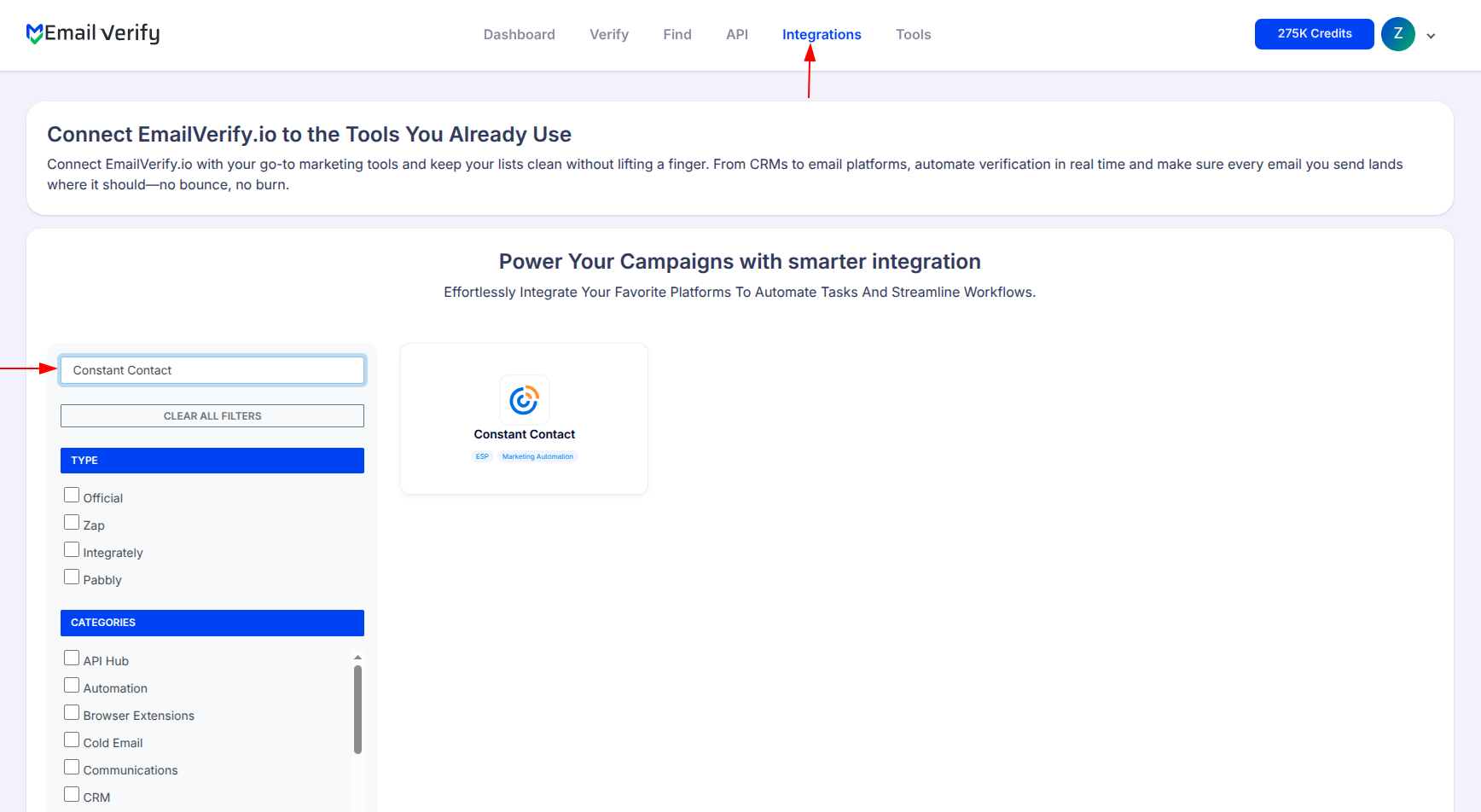
Step 2: Open the Constant Contact Integration
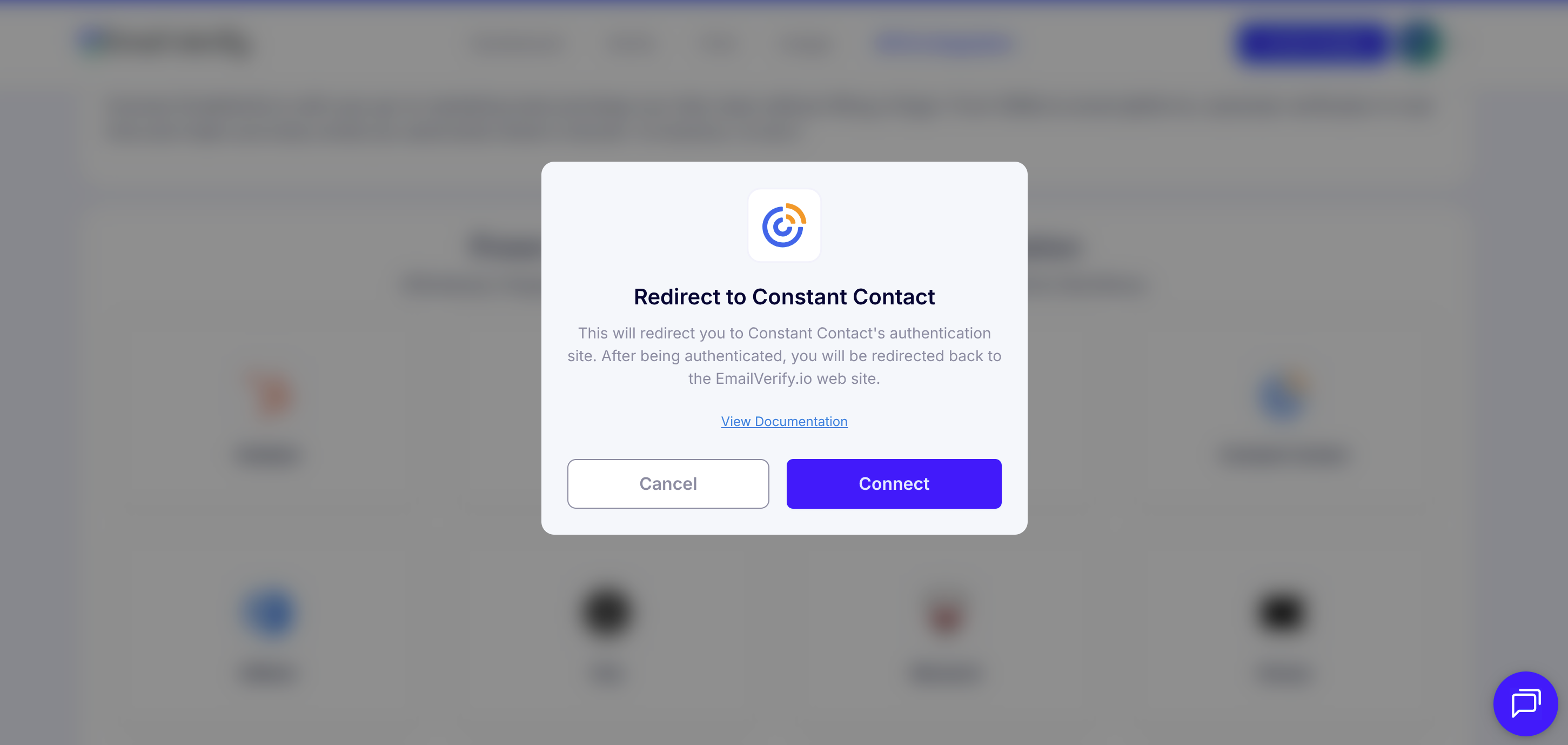
Step 3: Select Constant Contact
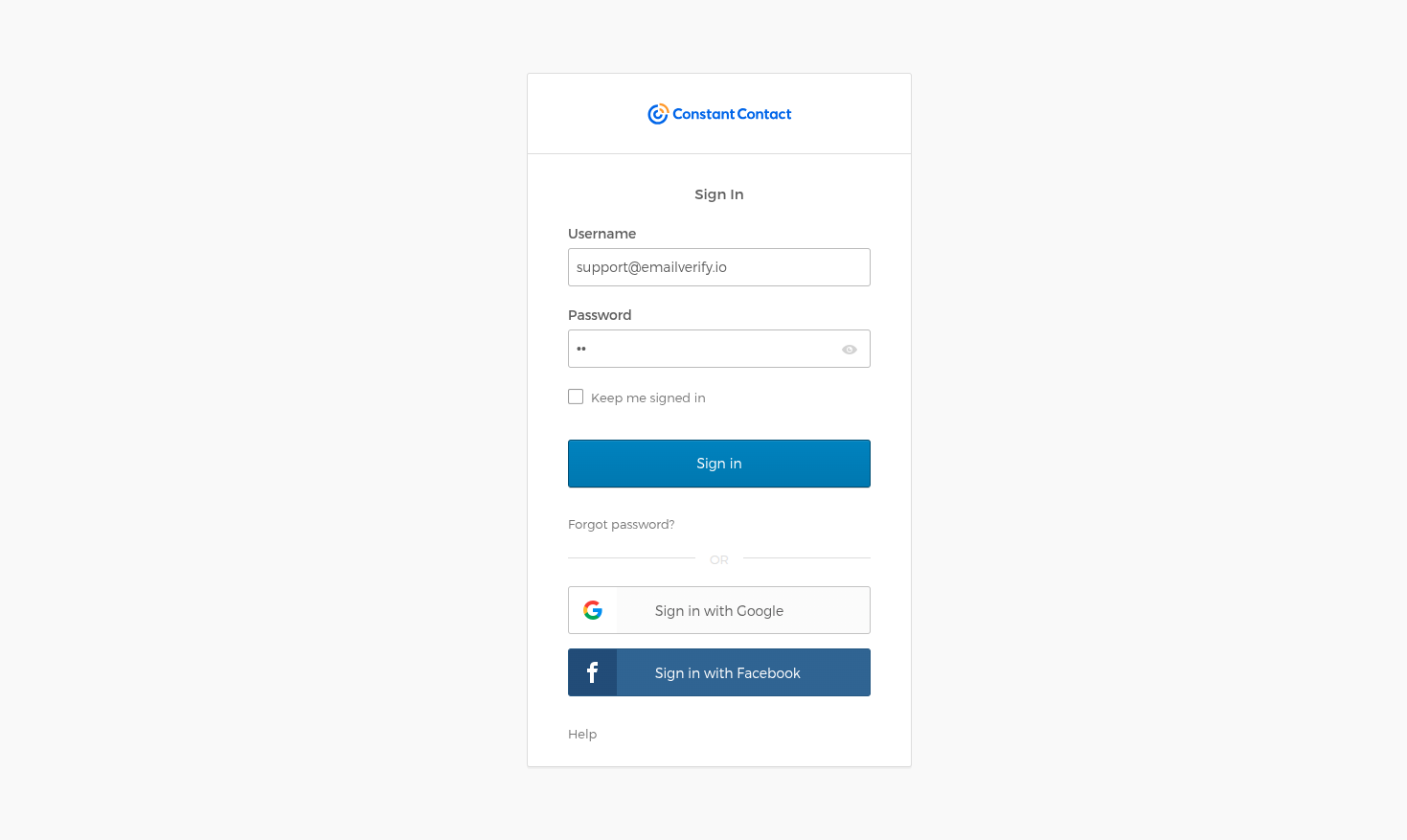
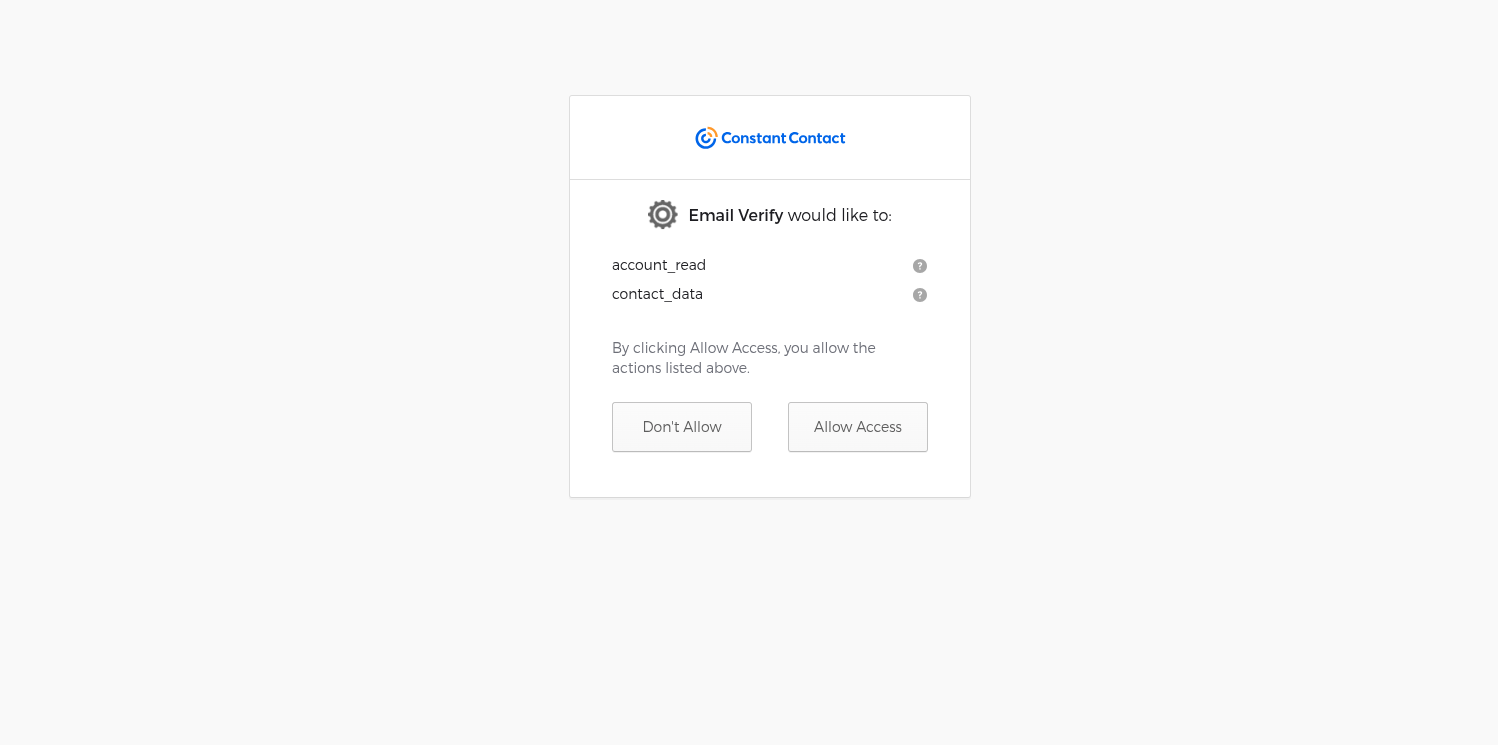
Step 4: Grant Access
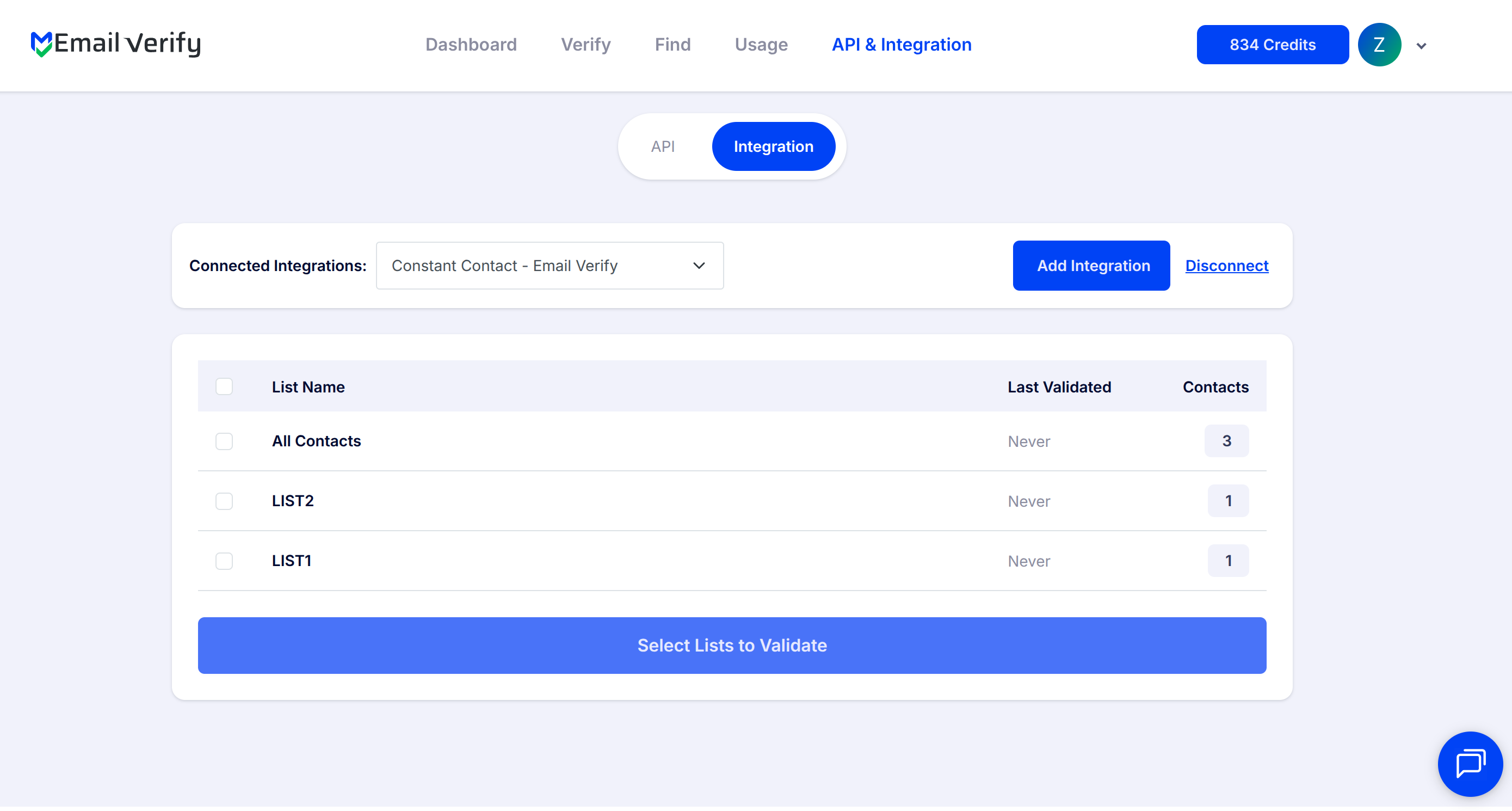
Step 5: View Your Lists
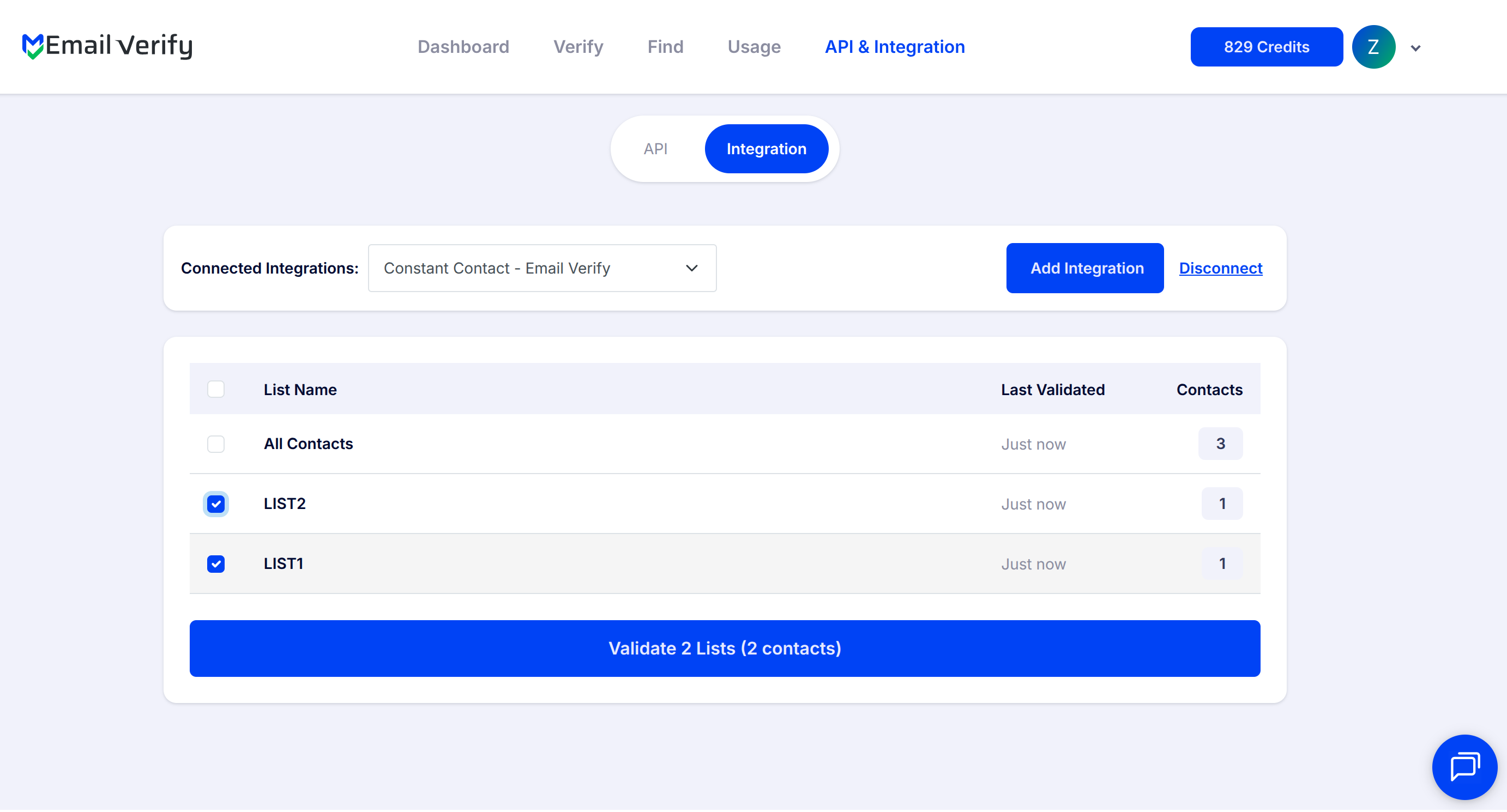
Step 6: Choose Lists to Validate
Note: The results of the validation are automatically exported to the integration they originated from.
Step 7: Monitor Progress
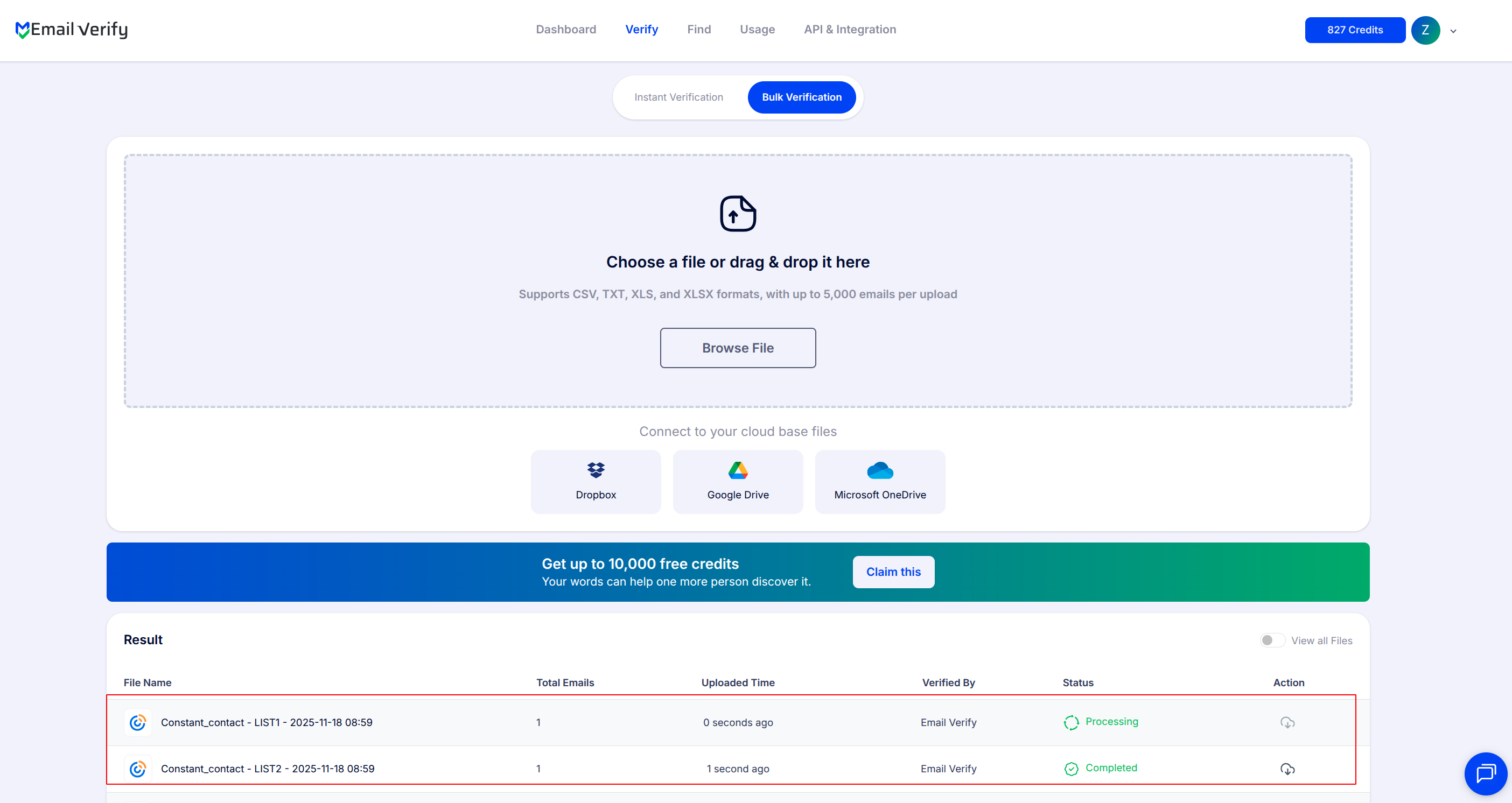
Step 8: Download Results
Note: Validation results are automatically sent to the connected integration. Three custom fields will be added to each verified contact i.e EV_Status, EV_SubStatus, and EV_Validation_Timestamp. These custom fields are essential for maintaining up-to-date and accurate contact information, allowing for better management and engagement with your contacts.

Constant Contact Email Verification Integration Features
When importing contacts from Constant Contact to EmailVerify.io using the integration, only contacts with an 'Subscribed' or 'Temporary hold' status will be imported. Contacts marked as 'Unsubscribed' will not be included.
Import Contacts from Constant Contact
Import contacts from your Constant Contact account directly into EmailVerify.io for validation.
Validate Email Addresses
Validate imported contacts using EmailVerify.io's powerful email verification service to identify invalid addresses.
Export Results Back to Constant Contact
When exporting the validation results to Constant Contact, we add custom fields to contact: EV_Status, EV_SubStatus, and EV_Validation_Timestamp.
Secure OAuth2 Connection
To use this integration, you'll need a valid Constant Contact account. During setup, you'll be asked to connect your Constant Contact account to EmailVerify.io. We use OAuth2 for secure authorization, which allows EmailVerify.io to access your Constant Contact data without needing credentials.
Clean Contact Lists
Keep your contacts clean, reduce bounce rates, and improve deliverability, ensuring your messages reach the right audience.
Maintain List Integrity
EmailVerify.io will add a new column to your list for each email—so you can segment and manage your contacts without deleting any entries. This helps maintain list integrity while improving email campaign deliverability and targeting.
Why Constant Contact Users Need Email Verification
Constant Contact is one of the most popular email platforms for small businesses, nonprofits, and community organisations — and these are exactly the groups most likely to have contact lists that need cleaning. Small business contact lists often come from:
- ✗ In-store sign-up sheets where customers write email addresses by hand
- ✗ Event registrations where attendees enter addresses quickly and make errors
- ✗ Imported spreadsheets built over years without any hygiene checks
- ✗ Business card collections from networking events
- ✗ Old customer databases migrated from a previous system
These sources produce higher-than-average invalid email rates — typically 10–30% in lists older than 2 years. Constant Contact removes contacts after hard bounces, but only after the damage to your sender reputation is already done. EmailVerify.io works upstream, validating contacts before your campaigns send and preventing bounces before they ever occur.
What EmailVerify.io Checks on Every Constant Contact Contact
Every contact in your Constant Contact lists is validated against real-time checks before your campaigns send:
| Check | What It Detects |
|---|---|
| Syntax validation | Formatting errors — missing @, extra spaces, invalid characters |
| Domain / DNS check | Whether the email domain exists and is reachable |
| MX record check | Active mail server records on the domain |
| SMTP verification | Whether the individual mailbox exists and can receive mail |
| Catch-all detection | Domains that accept all incoming emails — risky to send to |
| Disposable email check | Temporary addresses from 10,000+ known disposable providers |
| Role-based detection | Generic addresses: info@, admin@, noreply@, support@ |
Results sync back automatically as EV_Status, EV_SubStatus, and EV_Validation_Timestamp on each Constant Contact contact record.
What to Expect After Cleaning Your Constant Contact Lists
Typical results after verifying and removing invalid contacts from Constant Contact:
Open rates typically improve 15–25% within the first 3 campaigns after verification. Constant Contact account standing is protected as bounce risk drops significantly.
EmailVerify.io vs Constant Contact's Built-in Bounce Handling
Constant Contact has a built-in bounce management system. Here is how it compares to proactive email verification:
| Approach | Time Required | Accuracy | Auto-Sync | Ongoing Protection |
|---|---|---|---|---|
| No email verification | — | Unknown | — | None |
| Constant Contact bounce handling only | Reactive (after bounce) | Hard bounces only | Automatic | Low |
| EmailVerify.io integration | Proactive (before send) | 20+ verification checks | Automatic (3 custom fields) | High |
Who Should Use the Constant Contact Email Verification Integration
Small Business Owners
Contact lists built from in-store sign-ups, events, and networking often contain 10–25% invalid addresses. A single verification run before your next campaign can dramatically improve results and protect your Constant Contact account standing.
Nonprofits and Charities
Donor and member email lists frequently go years without cleaning. A lapsed donor's email may have been abandoned or changed — verify before every major appeal or membership drive to ensure your message reaches real donors and members.
Restaurants and Hospitality
Loyalty program sign-ups and event reservations produce higher error rates — customers enter emails quickly at a terminal or kiosk. Verification catches typos and temporary addresses before they inflate your bounce rate and affect campaign metrics.
Event Organisers
Event registrant lists are especially prone to bad data — people enter addresses quickly, use one-time emails, or register on behalf of colleagues. Always verify event lists before post-event follow-up campaigns to reach real attendees.
Technical Questions — Constant Contact Integration
What custom fields does EmailVerify.io add to each Constant Contact contact?
Three custom fields are added: EV_Status (Valid, Invalid, Catch-All, Disposable, or Unknown), EV_SubStatus (specific reason code such as mailbox_not_found, smtp_timeout, or disposable_domain), and EV_Validation_Timestamp (the exact date and time of verification). Use these fields inside Constant Contact to create segments, filter campaign audiences, and schedule re-verification runs.
Does EmailVerify.io work with Constant Contact's Lite plan?
Yes. The integration works with all Constant Contact plans including the Lite plan. The OAuth2 API and custom contact fields used by EmailVerify.io are available across all Constant Contact account tiers — no upgraded plan is required.
How is my Constant Contact data kept secure during verification?
EmailVerify.io uses OAuth2 authentication — your Constant Contact login credentials are never shared with or stored by EmailVerify.io. You authorise the connection through Constant Contact's own login page. Contact email addresses are processed for verification only and handled under EmailVerify.io's data processing standards.
How does Constant Contact's bounce management compare to EmailVerify.io?
Constant Contact's built-in system removes contacts after hard bounces — but only after the bounce has already been counted against your sender reputation. EmailVerify.io validates contacts before you send, preventing bounces from occurring in the first place. Using both together gives the strongest deliverability protection: EmailVerify.io handles proactive prevention, and Constant Contact handles any edge cases that slip through.
Also integrate with Mailchimp Integration , HubSpot Integration , ActiveCampaign Integration , GetResponse Integration . Or use ourAPI for programmatic access.
Frequently Asked Questions

Does Constant Contact verify email addresses automatically?
No. Constant Contact does not validate email addresses when contacts are added to your lists. Contacts are accepted from any source — forms, imports, manual entry — without checking whether the addresses exist or can receive mail. Constant Contact does remove contacts after hard bounces, but this is reactive — the bounce has already harmed your sender reputation before anything is removed. EmailVerify.io's integration works proactively, validating contacts before your campaigns send.
How do I connect EmailVerify.io to Constant Contact?
Connecting takes under 5 minutes using secure OAuth2: 1) Sign in to EmailVerify.io at app.emailverify.io. 2) Go to Integrations and select Constant Contact. 3) Click Connect — you are redirected to Constant Contact's login page. 4) Enter your Constant Contact credentials and click Allow Access. 5) Your Constant Contact lists appear in EmailVerify.io. 6) Select the lists to verify and start verification. Results sync back automatically as custom fields on each contact. EmailVerify.io never stores your Constant Contact login credentials.
Can EmailVerify.io verify my entire Constant Contact list at once?
Yes. The Constant Contact integration supports bulk list verification. After connecting your account, select one or more lists from the EmailVerify.io integrations page and click to start verification. EmailVerify.io processes your full contact list in parallel. For 10,000 contacts, processing typically takes 10–20 minutes. You receive an email when complete, and results are written back to each contact automatically as EV_Status, EV_SubStatus, and EV_Validation_Timestamp custom fields. No CSV export or re-import is needed.
What happens to my Constant Contact contacts after verification?
EmailVerify.io adds three custom fields to each verified contact but does not delete, modify, or suppress any contacts. Your lists remain intact — only the verification data is added. After verification, you decide what to do: create a segment excluding EV_Status: Invalid contacts from sends, build a workflow to suppress invalid contacts automatically, export and permanently delete invalid contacts from your account, or keep invalid contacts tagged for review without immediate removal.
Will EmailVerify.io detect disposable emails in my Constant Contact lists?
Yes. EmailVerify.io maintains an actively updated database of over 10,000 disposable and temporary email providers — including Mailinator, TempMail, Guerrilla Mail, YOPmail, and thousands of others. Disposable addresses are flagged as EV_Status: Disposable. These are especially common in lists built from online forms where users did not want to provide a real email. Filtering them out improves your genuine engagement rates and protects your sender reputation.
Does EmailVerify.io sync results back to Constant Contact automatically?
Yes. Verification results sync back to Constant Contact automatically after processing — no manual steps required. Each verified contact receives three new custom fields: EV_Status (Valid, Invalid, Catch-All, Disposable, or Unknown), EV_SubStatus (the specific reason code such as mailbox_not_found, smtp_timeout, catch_all, or disposable_domain), and EV_Validation_Timestamp (the exact date and time of verification). Use these fields in Constant Contact to create segments, filter campaign audiences, and build re-verification schedules.
What Constant Contact plan do I need for this integration?
The EmailVerify.io integration works with all Constant Contact plans, including the Lite plan. The integration uses Constant Contact's standard OAuth2 API, which is available on all account tiers. Custom contact fields — used to store EV_Status, EV_SubStatus, and EV_Validation_Timestamp — are available on all Constant Contact plans.
Can I use email verification for a nonprofit Constant Contact account?
Yes. The EmailVerify.io integration works for all Constant Contact account types, including nonprofit accounts on discounted plans. Nonprofit donor and member lists particularly benefit from verification because they tend to be older lists with higher decay rates — 15–30% of addresses may be invalid in lists two or more years old. Verifying before major appeals or membership drives ensures your message reaches as many real donors and members as possible.
How often should I re-verify my Constant Contact lists?
Email addresses go invalid at 22–30% per year. For Constant Contact users: regular campaign senders (monthly or more) should re-verify every 3 months; occasional senders (quarterly campaigns) should verify before each major send; lists older than 1 year should be verified before any campaign; after large imports, always verify before the first send. Use the EV_Validation_Timestamp custom field in Constant Contact to identify contacts that have not been re-verified in over 6 months and add them to your next verification run.
How does email verification improve my Constant Contact campaign performance?
Removing invalid contacts from your Constant Contact lists improves campaign performance across multiple metrics: bounce rate drops to under 0.5% from a typical 5–20% on uncleaned lists; open rates improve 15–25% as you are sending to real, engaged inboxes; click-through rates improve as campaign metrics reflect genuine behaviour; Constant Contact account standing is protected and suspension risk drops; sender reputation recovers and stabilises within 60–90 days; and campaign analytics become more accurate for future planning.
You're just one click away from clean email lists.
Start verifying your email addresses instantly and improve your campaign deliverability
* No credit card required