Ghost Email Verification Integration — Clean Member Lists, Better Newsletter Delivery
EmailVerify.io's Ghost email verification integration validates every member email address in your Ghost publication before your newsletters send. Connect via your Ghost Admin API key and URL in minutes, select the member lists to verify, and get results synced back to Ghost member labels — EV_Status, EV_SubStatus, and EV_Validation_Timestamp — on each member record. Ghost delivers newsletters through email infrastructure that is sensitive to bounce rates. Invalid member emails corrupt that infrastructure over time. EmailVerify.io removes them proactively — so every newsletter you send reaches a real, active subscriber inbox.


Quick Summary: Ghost Email Verification Integration
- What it does: Imports Ghost member lists, validates every email with 20+ checks, and syncs EV_Status, EV_SubStatus, and EV_Validation_Timestamp back to Ghost member labels.
- Who it's for: Independent publishers, newsletter writers, journalists, media companies, and membership community operators using Ghost.
- Connection method: Ghost Admin API Key + Admin API URL — found at Ghost Admin > Settings > Integrations > Add Custom Integration.
- Ghost(Pro) vs self-hosted: Works with both. API credentials are in the same location (Settings > Integrations) for both Ghost(Pro) and self-hosted installations.
- Free to start: Connecting Ghost is free. Verification uses credits — new users receive free credits to test before purchasing.View pricing.
How to use the integration
To get started with the Ghost integration, you’ll need an active Ghost account, which you can create at https://account.ghost.org/signup, along with an EmailVerify.io account.
Step 1: Sign in to EmailVerify.io
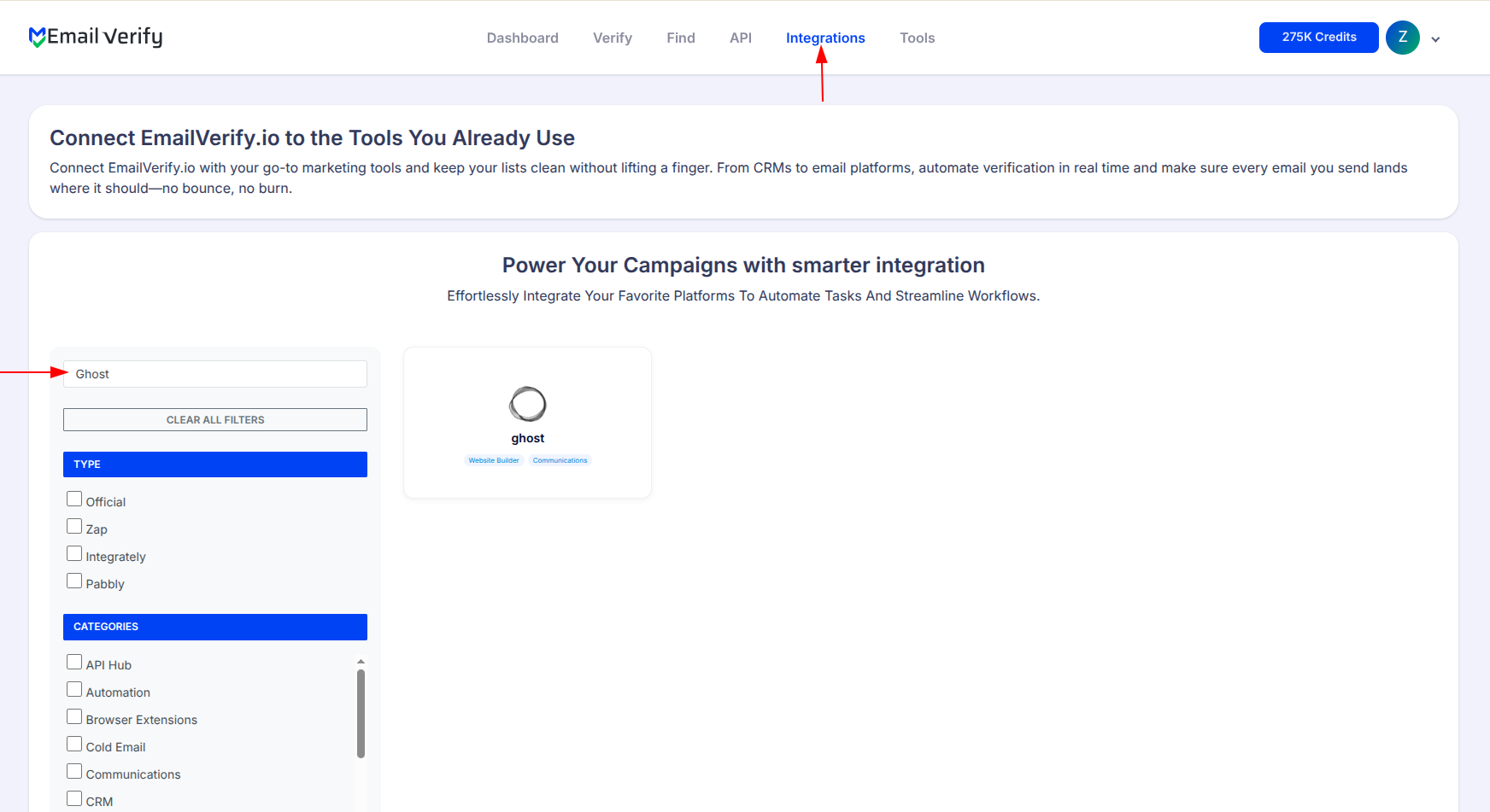
Step 2: Select Ghost
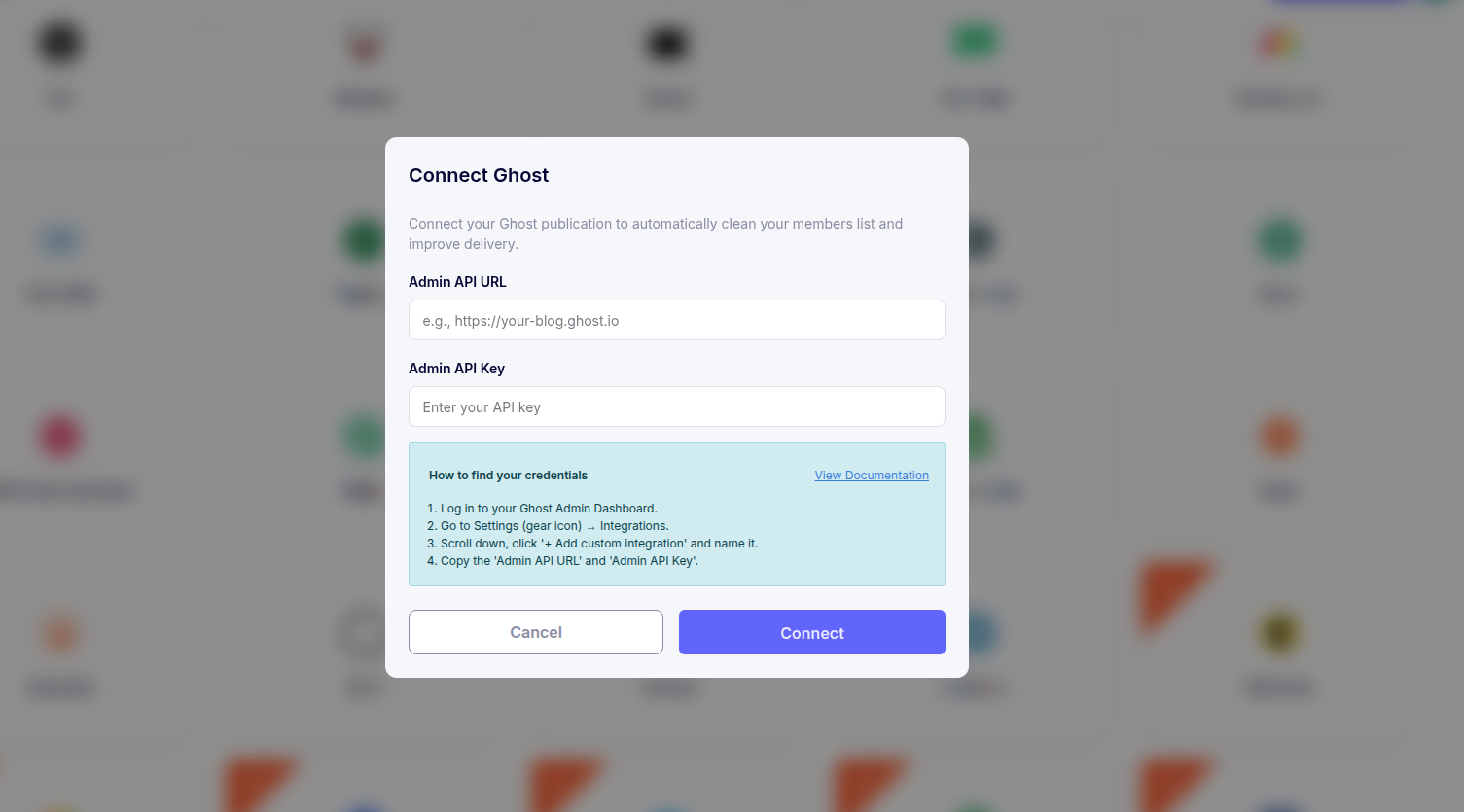
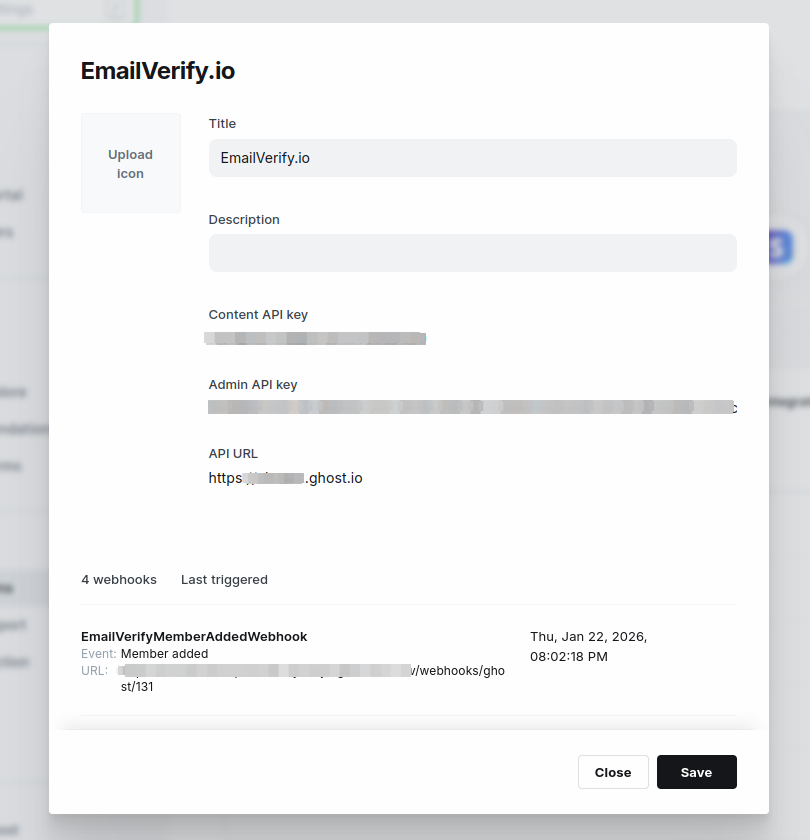
Step 3: Get Your API Credentials
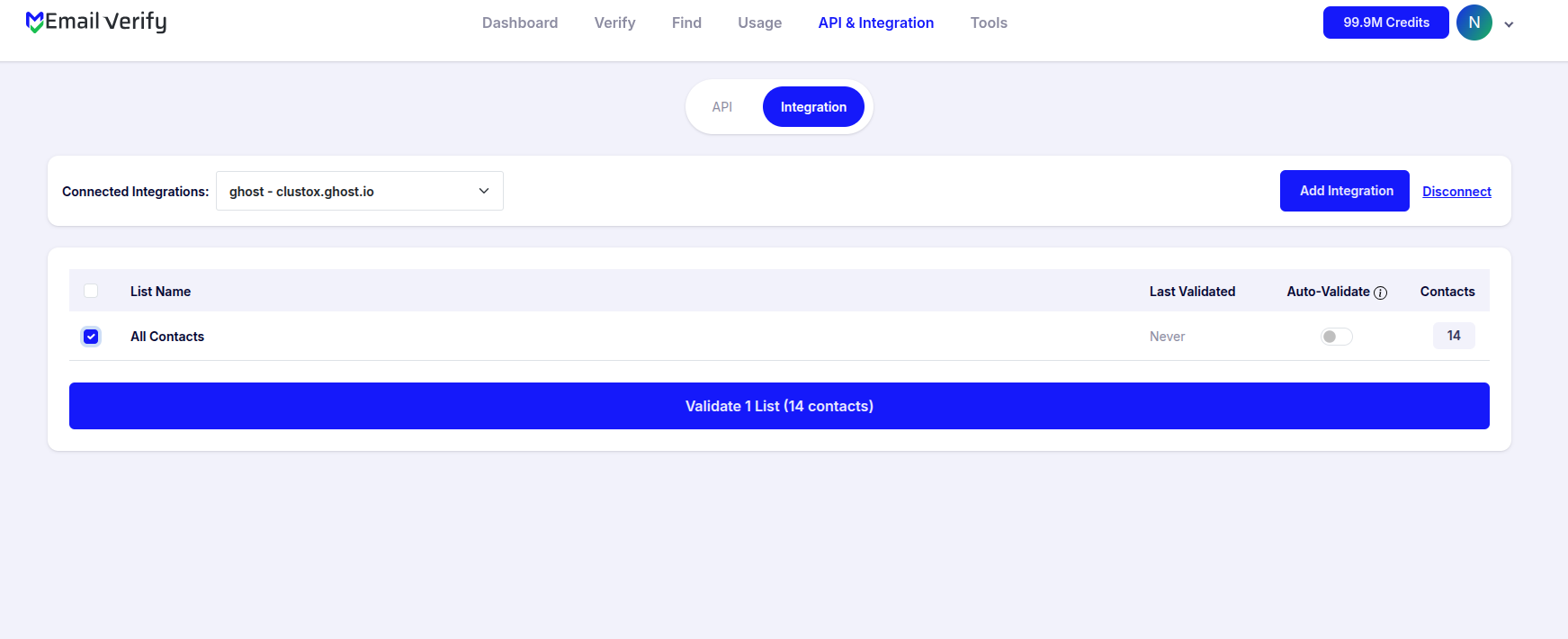
Step 4: View Your Lists
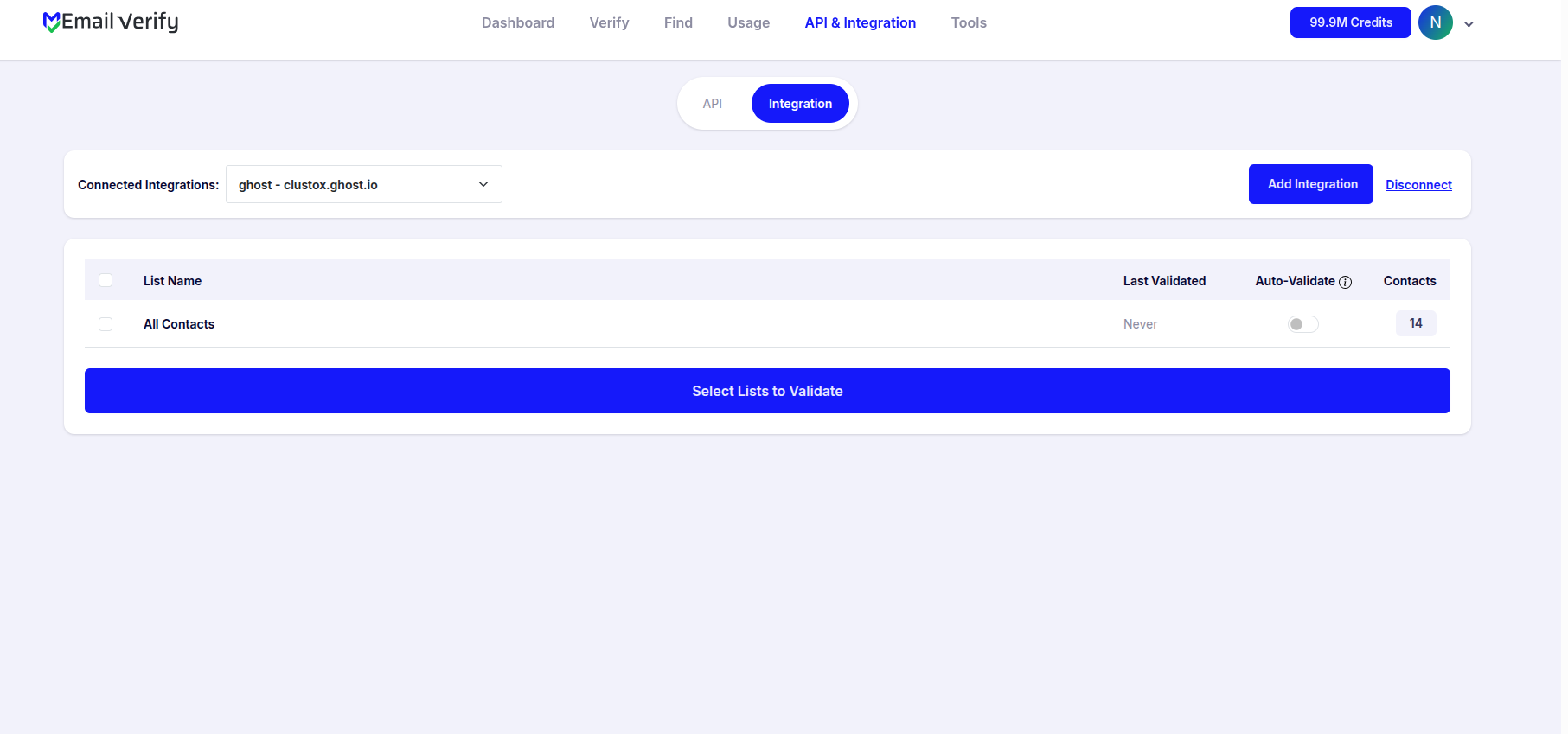
Step 5: Select Lists to Verify
Note: The results of the validation are automatically exported to the integration they originated from.
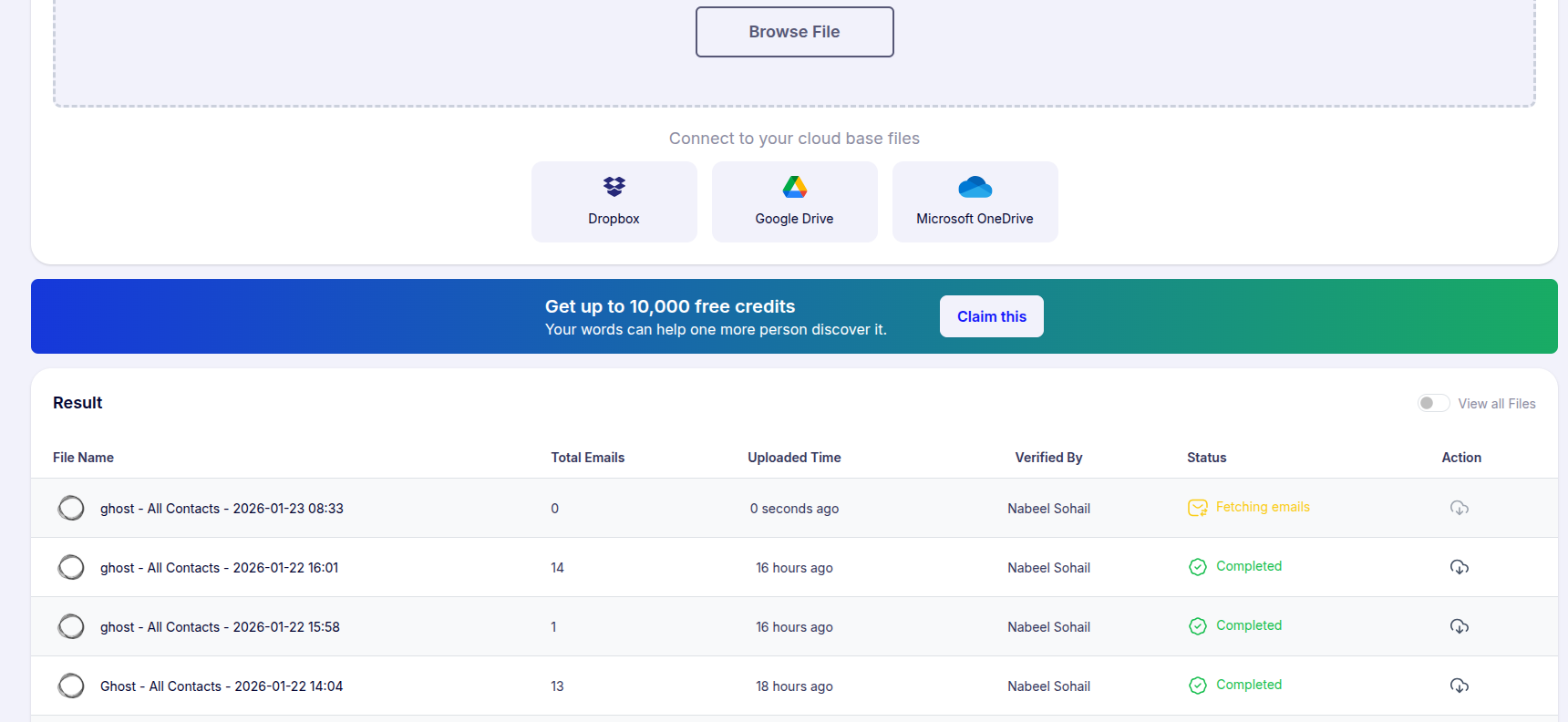
Step 6: Monitor Progress
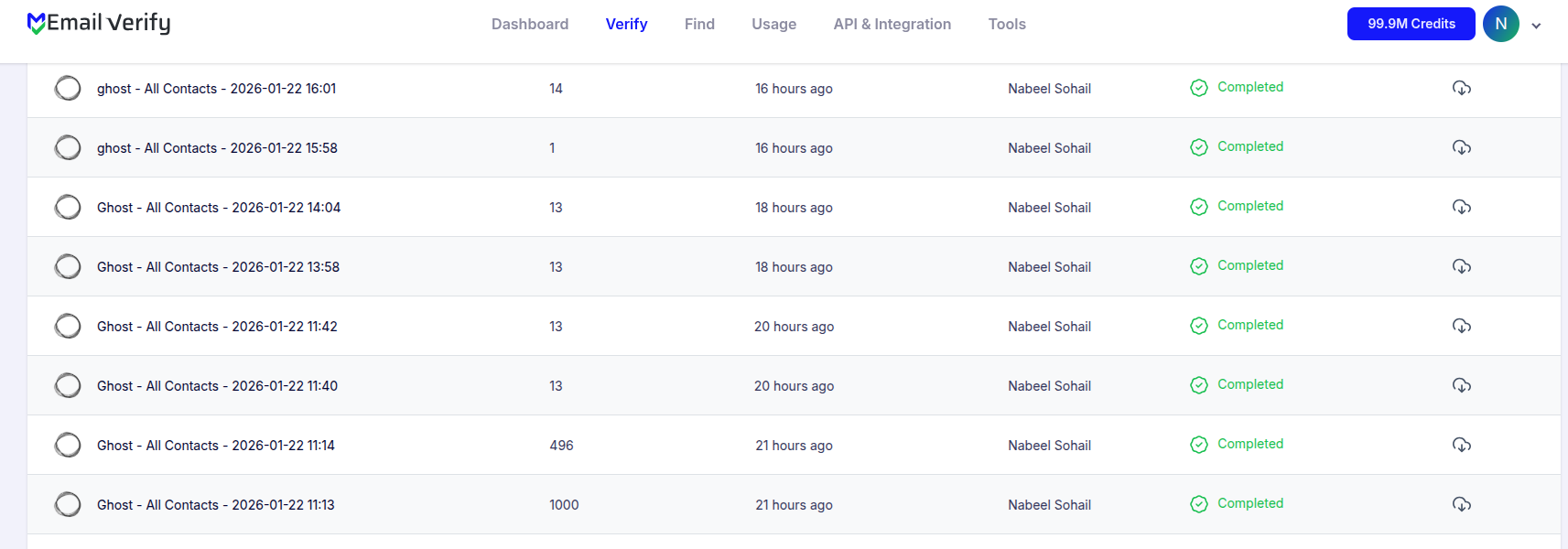
Step 7: Download Results
Note: Validation results are automatically sent to the connected integration. Custom fields or labels will be added to each member in the list (EV_Status, EV_SubStatus). These fields play a key role in maintaining accurate contact information.
Ghost Email Verification Integration Features
When using the integration service to import Ghost members into EmailVerify.io, only the email addresses from your Ghost member list will be imported. We ensure that your newsletter metrics remain accurate by filtering out invalid contacts.
Import Members
Import email addresses from your Ghost member lists directly into EmailVerify.io for validation.
Validate Email Addresses
Validate imported emails using EmailVerify.io's powerful email verification service to identify invalid addresses.
Export Results Back to Ghost
When exporting the validation results to Ghost, we update the members with custom fields or labels to indicate their validation status (EV_Status, EV_SubStatus).
Secure API Connection
To use this integration, you'll need an active Ghost account. During setup, you'll be asked to provide your Ghost Admin API URL and Admin API Key to connect your account. These credentials allow EmailVerify.io to securely access your Ghost data.
Maintain Accurate Lists
Help maintain accurate member lists and improve newsletter deliverability by removing invalid and bounced emails.
Reduce Bounce Rates
Identify invalid email addresses before you send newsletters. Keep your publication clean and reduce bounces with real-time verification.
Why Ghost Publishers Need Email Verification
Ghost is built for publishers — its core product is newsletter delivery. Every invalid member email is a bounce that damages the delivery infrastructure Ghost uses to send your newsletters.
- ✗ Ghost delivers newsletters through Mailgun (Ghost.com) or your configured SMTP provider. Hard bounces from invalid members count against the sending reputation of that email infrastructure.
- ✗ Over time, high bounce rates from invalid members can lead to lower inbox placement rates, Mailgun or SMTP provider warnings, and reduced Ghost.com newsletter delivery performance.
- ✗ Inaccurate open rate and engagement metrics — invalid members inflate your subscriber count and distort newsletter performance data.
- ✗ Ghost member emails come from multiple sources — website opt-ins, portal sign-ups, free tier sign-ups — all of which can produce invalid or disposable addresses.
- ✗ Free member sign-ups carry the highest invalid rate: users sign up with throwaway emails to access gated content with no real incentive to provide a genuine address.
EmailVerify.io removes invalid members before they cause bounce events — protecting your Ghost newsletter delivery infrastructure and keeping engagement metrics accurate.
What EmailVerify.io Checks on Every Ghost Member Email
Each Ghost member email passes through 20+ real-time verification checks before results sync back as member labels.
| Check | What It Detects |
|---|---|
| Syntax validation | Formatting errors — missing @, invalid characters, malformed structure |
| Domain / DNS check | Whether the email domain exists and is active |
| MX record check | Active mail server records on the domain |
| SMTP verification | Whether the individual mailbox exists on the server |
| Catch-all detection | Domains that accept all emails regardless of whether the mailbox exists |
| Disposable email check | Temporary or burner addresses from 10,000+ known providers |
| Role-based detection | Generic addresses: info@, admin@, noreply@, support@ |
| Bounce history | Cross-reference with known hard-bounce databases |
Results written to Ghost member records as labels: EV_Status | EV_SubStatus | EV_Validation_Timestamp
What Ghost Publishers See After Verification
EmailVerify.io writes results directly to your Ghost member records as labels — no manual export or re-import required.
Ghost Newsletter Delivery With vs Without Email Verification
Invalid members corrupt newsletter delivery infrastructure, engagement metrics, and sender reputation. Here is what changes with EmailVerify.io.
| Approach | Time Required | Accuracy | Auto-Sync | Ongoing Protection |
|---|---|---|---|---|
| No verification | 0 min setup | Unknown | No | All invalids enter delivery infrastructure |
| Manual CSV clean | Hours of manual work | Basic | No | Partial — misses catch-all and role-based |
| EmailVerify.io + Ghost | Under 5 min setup | 20+ checks pre-send | Yes — EV labels on every member | Full — delivery infrastructure and metrics protected |
Who Should Use Ghost Email Verification
Independent publishers and newsletter writers
Publishers building paid or free subscriber lists rely on deliverability for their core product. Verify member lists before every major send to protect inbox placement and open rate accuracy.
Journalists and media companies
Media organisations using Ghost for subscriber newsletters need clean member lists to ensure editorial content reaches genuine readers. Invalid members inflate subscriber counts and skew readership data.
Membership community operators
Ghost's membership tiers (free and paid) attract different quality of email addresses. Verify free tier sign-ups before any paid conversion campaign to avoid wasted outreach to invalid addresses.
Ghost(Pro) users on managed hosting
Ghost(Pro) uses Mailgun for newsletter delivery. High bounce rates from invalid members affect the Mailgun sending reputation tied to your Ghost(Pro) account. Verify members regularly to protect it.
Technical Questions About Ghost Email Verification
Where do I find my Ghost Admin API credentials?
Log in to Ghost Admin (yourdomain.com/ghost). Go to Settings > Integrations and click + Add custom integration. Name it (e.g., EmailVerify.io). Copy the Admin API Key shown. Your Admin API URL is: https://your-publication.ghost.io/ghost/api/admin/ — replace the domain with your Ghost domain. For self-hosted installations, use https://yourdomain.com/ghost/api/admin/
What is the Ghost Admin API URL format?
The Admin API URL follows the format: https://your-ghost-domain.com/ghost/api/admin/ — for Ghost(Pro) hosted: https://your-publication.ghost.io/ghost/api/admin/ — for self-hosted: https://yourdomain.com/ghost/api/admin/ — Paste both the URL and Admin API Key into EmailVerify.io during setup.
Can I use EV_Status labels in Ghost member filtering?
Yes. EV_Status is written as a member label in Ghost. Use Ghost's member filter to segment by label — filter by EV_Status: Invalid to identify members to suppress before sending. Filter by EV_Status: Valid for your clean send list.
How long does it take to verify a Ghost member list of 5,000?
For 5,000 Ghost members, verification typically completes in 5–10 minutes. You receive an email notification when complete. Results sync back to Ghost member labels automatically — no further action required.
Also integrate with Mailchimp Email Verification , ActiveCampaign Email Verification , GetResponse Email Verification , Drip Email Verification . Or use ourAPI for programmatic access.
Frequently Asked Questions

How do I connect EmailVerify.io to my Ghost publication?
Where do I find my Ghost Admin API Key?
Log in to your Ghost Admin panel (yourdomain.com/ghost). Go to Settings > Integrations and click + Add custom integration. Name it (e.g., EmailVerify.io) and copy the Admin API Key shown. Your Admin API URL follows the format: https://your-publication.ghost.io/ghost/api/admin/ — replace the domain with your own.
Does EmailVerify.io work with both Ghost.com and self-hosted Ghost?
Yes. The integration works with both Ghost(Pro) hosted publications and self-hosted Ghost installations. The Admin API Key and URL are in the same location for both: Settings > Integrations > Add Custom Integration in your Ghost Admin panel.
What labels does EmailVerify.io add to Ghost members?
EmailVerify.io writes verification results back to Ghost members as labels: EV_Status (Valid, Invalid, Catch-All, Disposable, or Unknown), EV_SubStatus (reason — mailbox_not_found, smtp_timeout, catch_all, etc.), and EV_Validation_Timestamp (date and time of last verification). Use Ghost's member filtering to segment by these labels before newsletter sends.
Why should I verify Ghost member emails before sending newsletters?
Ghost delivers newsletters through email infrastructure (Mailgun or SMTP) that is sensitive to bounce rates. Invalid member emails generate hard bounces that damage your sending reputation — reducing deliverability for all your genuine subscribers. Verification removes invalid members before they cause bounce events, protecting your Ghost newsletter delivery performance and inbox placement.
Should I verify free members or paid members in Ghost?
Both — but with different priorities. Free members typically have higher invalid rates (10–20%) because there is less incentive to provide a real email at sign-up. Verify free members before any paid upgrade campaign. Paid members have lower invalid rates but business-critical email communication (billing, renewals). Verify quarterly to catch addresses that have gone invalid since sign-up.
Does EmailVerify.io detect disposable emails in Ghost?
Yes. Disposable and temporary addresses (Mailinator, TempMail, and 10,000+ others) are flagged as EV_Status: Disposable. These are common in Ghost free member sign-ups where users want to access gated content without sharing their real email address.
Is the Ghost integration free?
How often should I re-verify my Ghost member list?
Free member list: monthly or quarterly depending on growth rate. Paid member list: every 3–6 months. Before paid upgrade campaigns: always verify the free list first. After large import events (e.g., newsletter migration): verify immediately. Use EV_Validation_Timestamp to identify members overdue for re-verification.
How long does it take to verify a Ghost member list of 5,000?
For 5,000 Ghost members, verification typically takes 5–10 minutes. You receive an email notification when complete. Results sync back to Ghost member labels automatically.
You're just one click away from clean email lists.
Start verifying your email addresses instantly and improve your campaign deliverability
* No credit card required