monday.com Email Verification Integration — Clean Contact Data, Reliable Workflows
EmailVerify.io’s monday.com email verification integration validates every email address stored in your monday.com boards — contacts, leads, clients, stakeholders — and syncs results back as board columns automatically. Connect via OAuth 2.0 in minutes, select the boards and groups to verify, and get EV_Status, EV_SubStatus, and EV_Validation_Timestamp added as new columns on each item. Your verification data stays visible, filterable, and actionable directly inside monday.com. Invalid contact emails corrupt your CRM pipeline, distort sales reporting, and waste outreach effort on addresses that will never receive your message. EmailVerify.io removes them before they become a problem.


Quick Summary: Monday.com Email Verification Integration
- What it does: Imports email addresses from monday.com boards, validates with 20+ checks, and syncs results back as board columns — EV_Status, EV_SubStatus, EV_Validation_Timestamp — on each item.
- Who it's for: Sales teams, CRM managers, marketing ops teams, and agencies using monday.com for contact management and pipeline tracking.
- Connection: OAuth 2.0 — requires installing EmailVerify.io in your monday.com workspace first (one-time setup, ~30 seconds).
- Key difference: Results appear as board columns, not custom fields. Use them in monday.com automations, dashboards, and column filters.View pricing.
- Setup time: Under 5 minutes once installation is complete.
How to use the integration
To get started with the Monday.com integration, you’ll need an active Monday.com account, which you can create at https://auth.monday.com/users/sign_up_new, along with an EmailVerify.io account.
Step 1: Sign in to EmailVerify.io
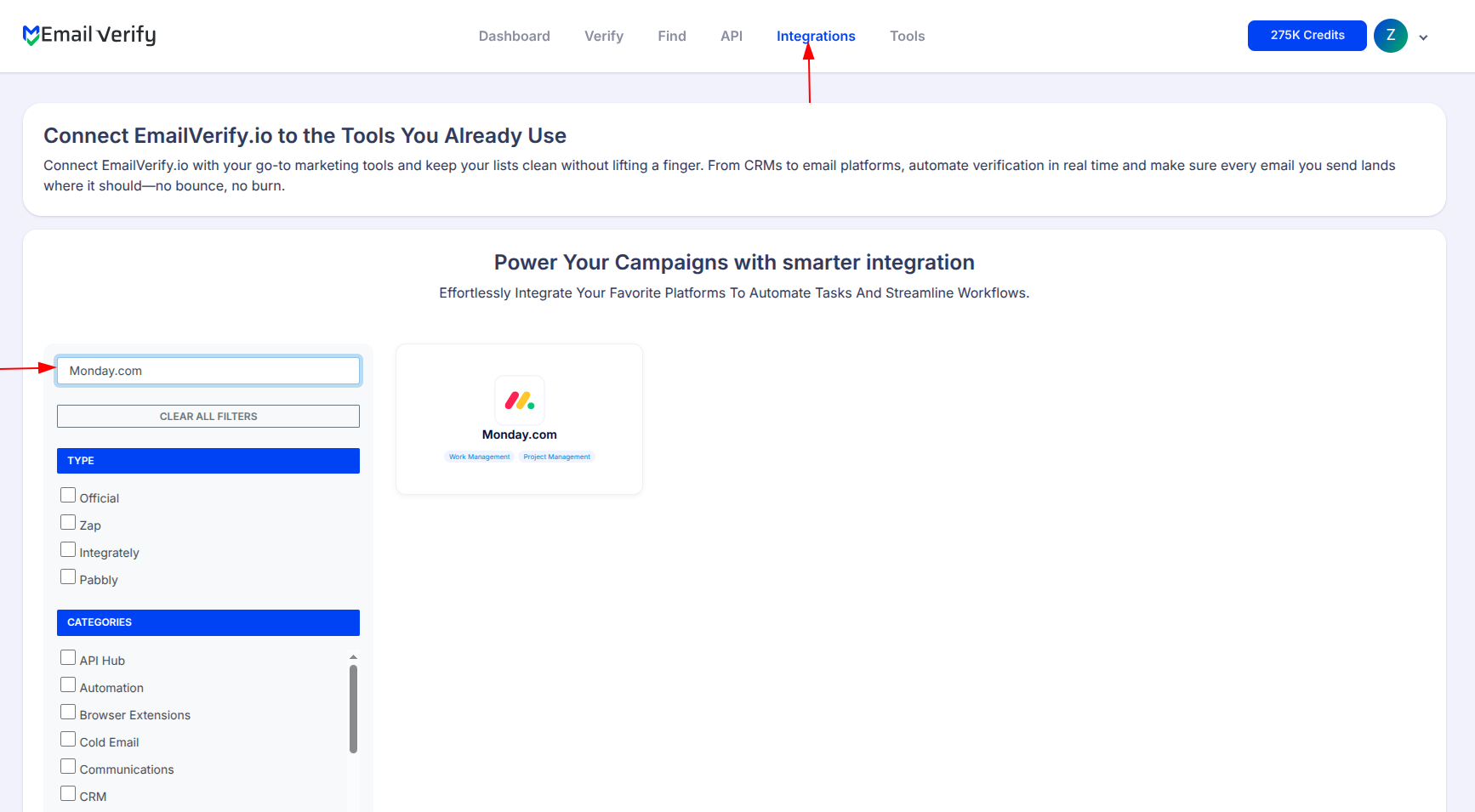
Step 2: Select Monday.com
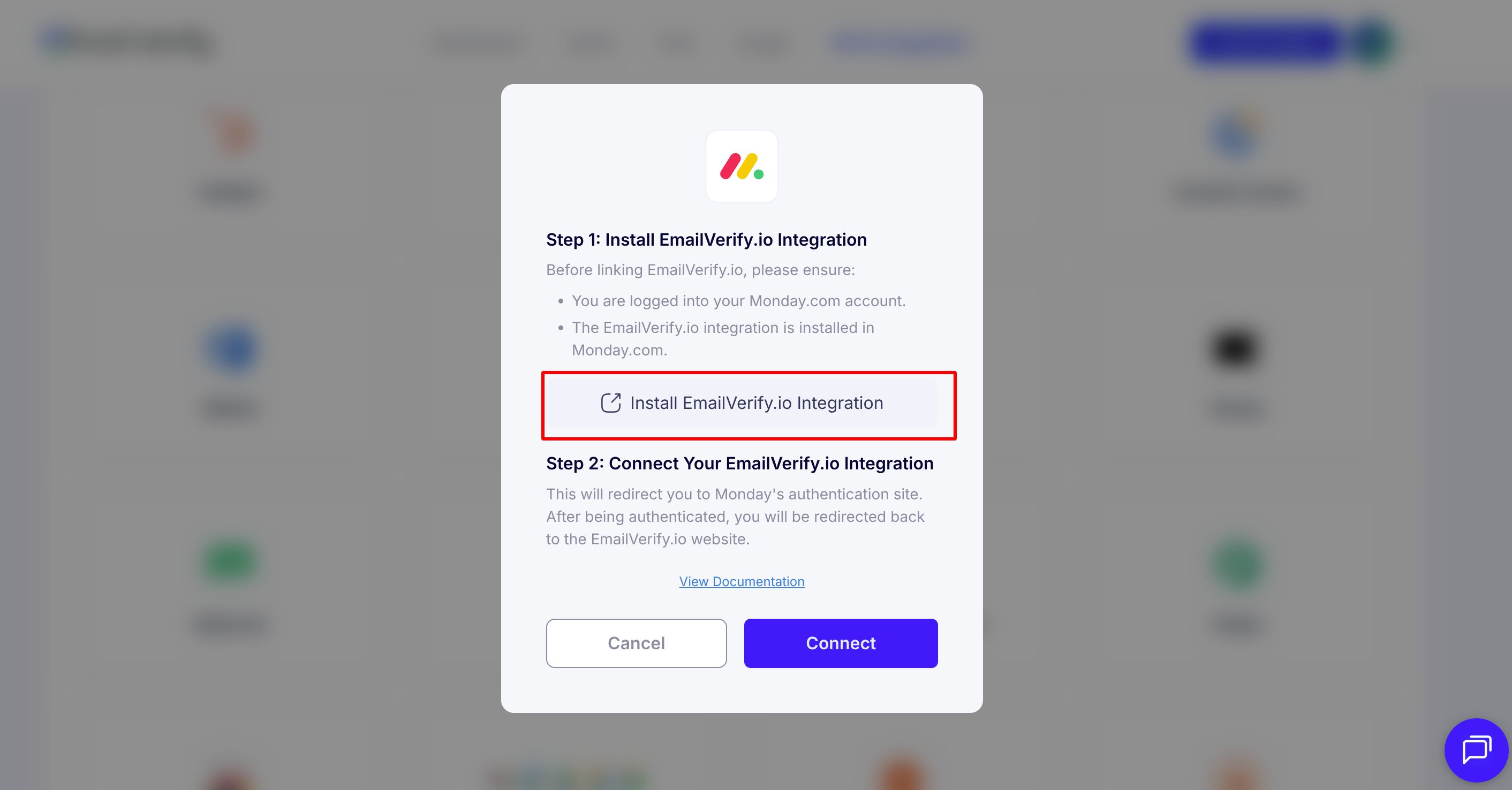
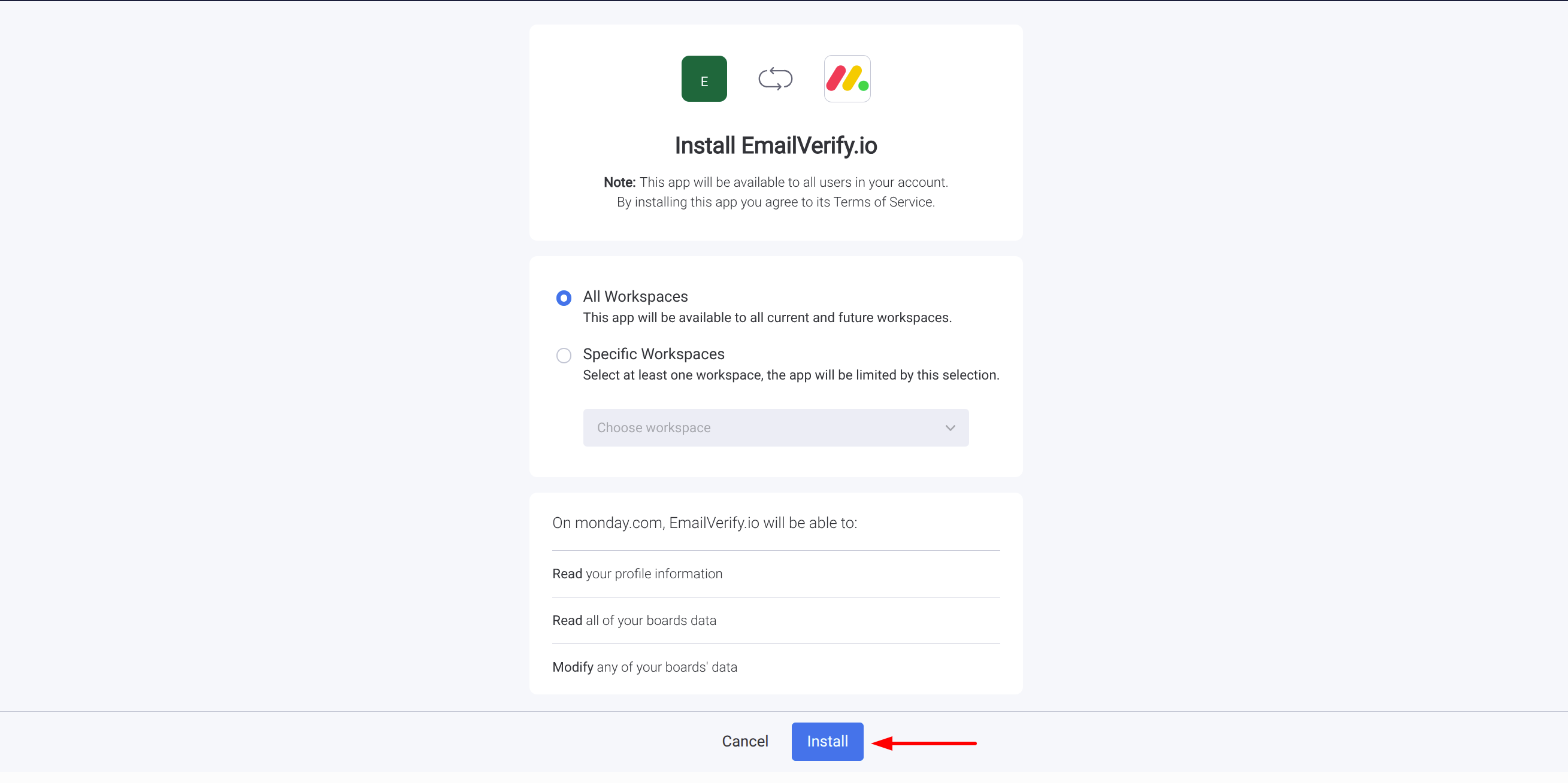
Step 3: Install EmailVerify.io Integration
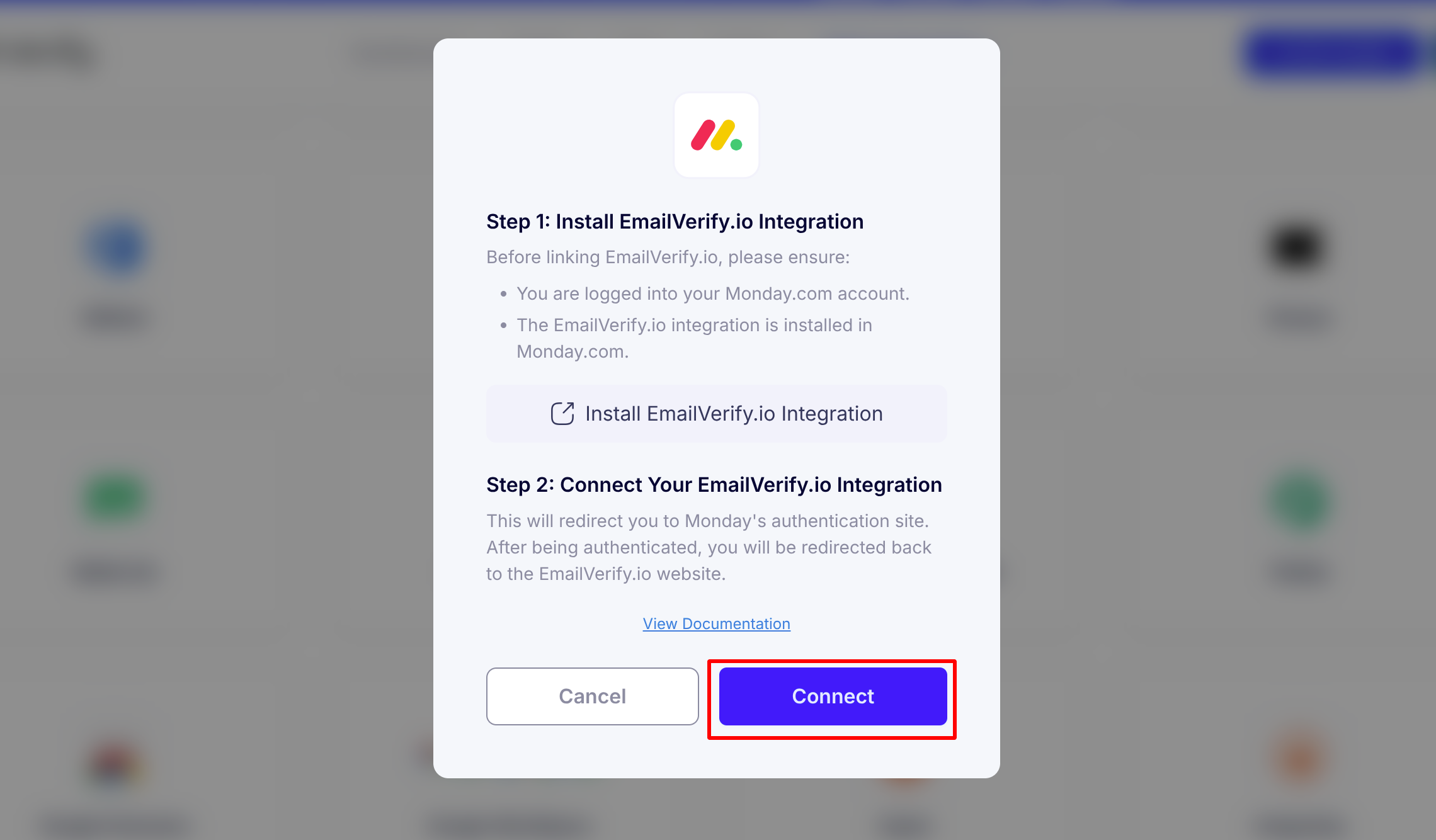
Step 4: Connect with Monday.com
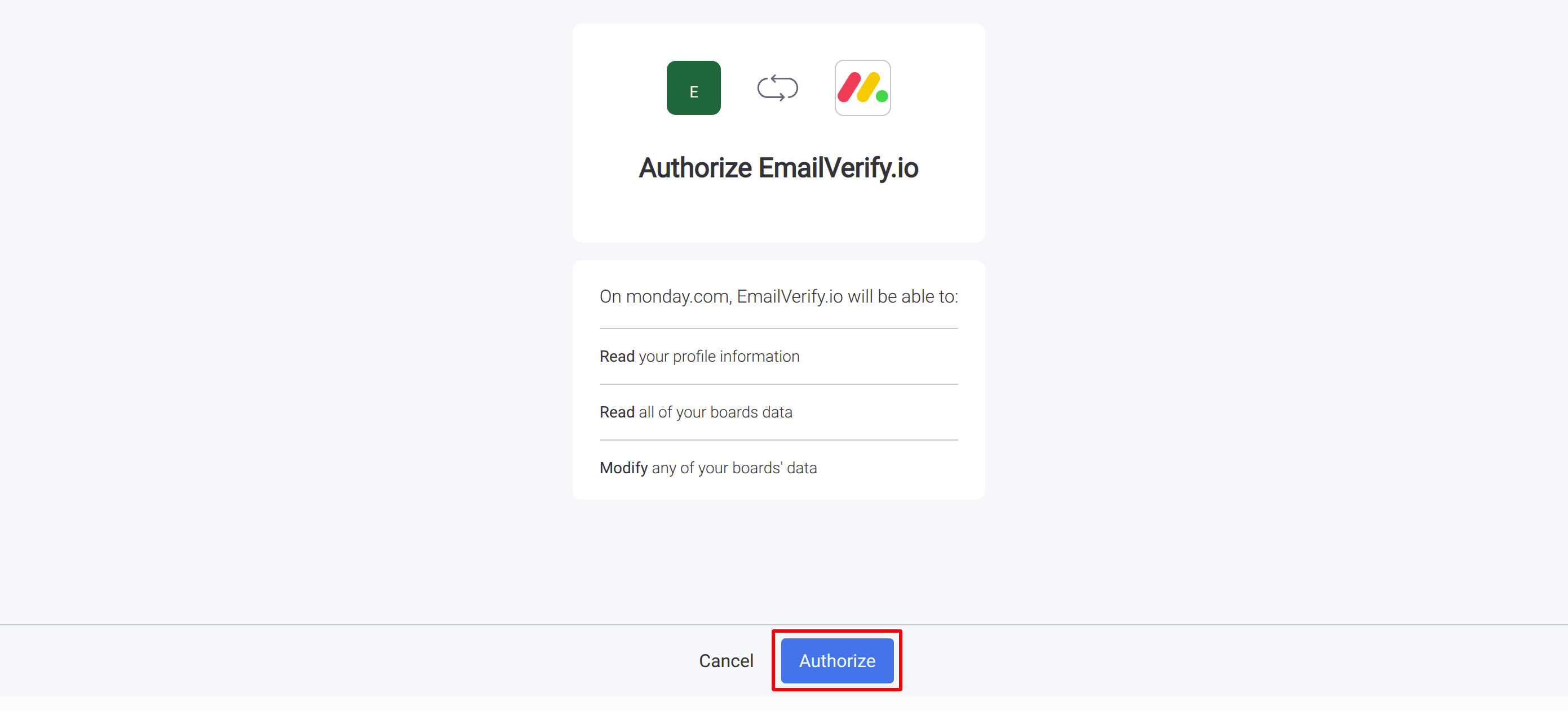
Step 5: Authorize Account Access
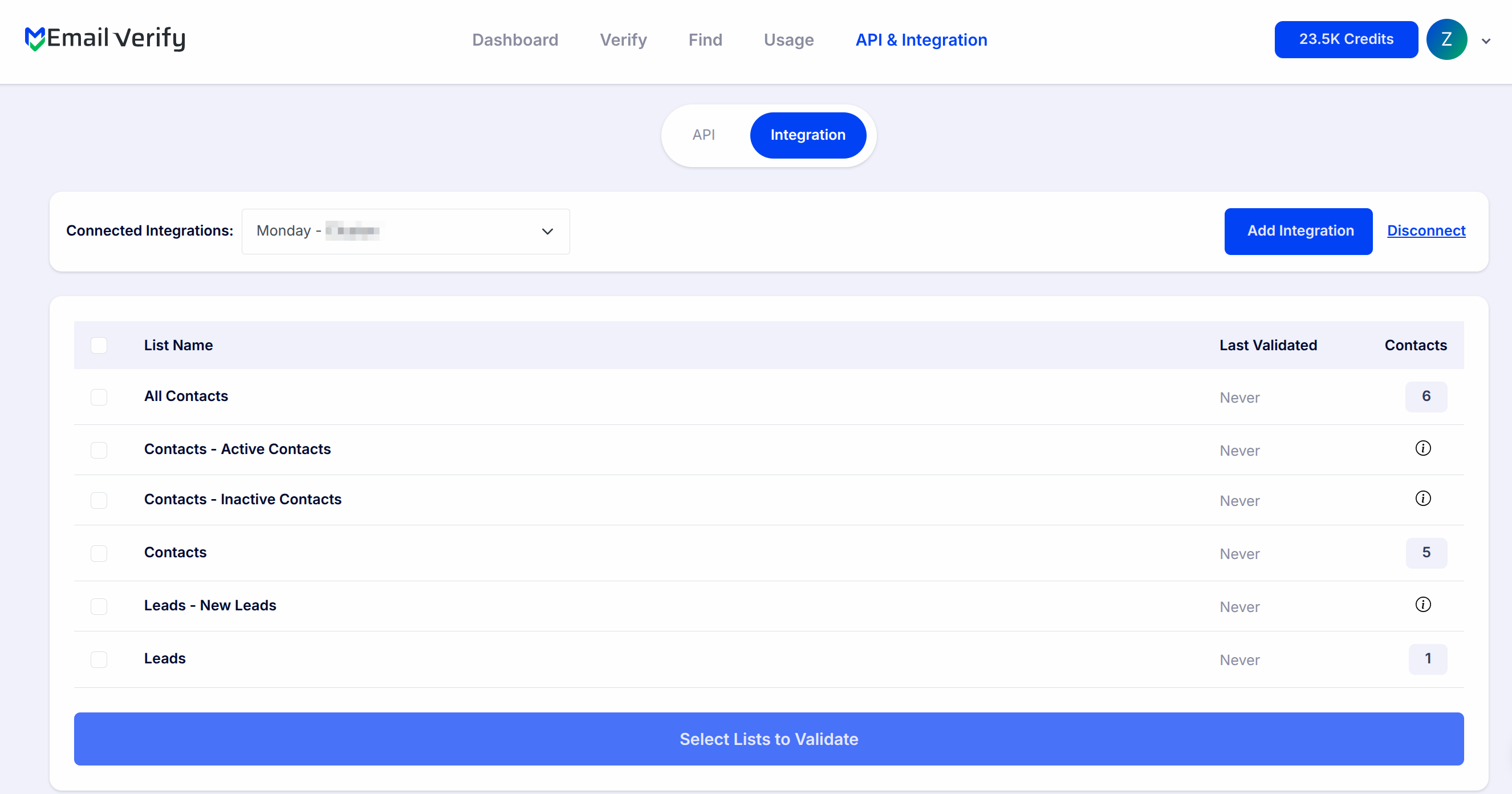
Step 6: View Monday.com Contacts and Leads
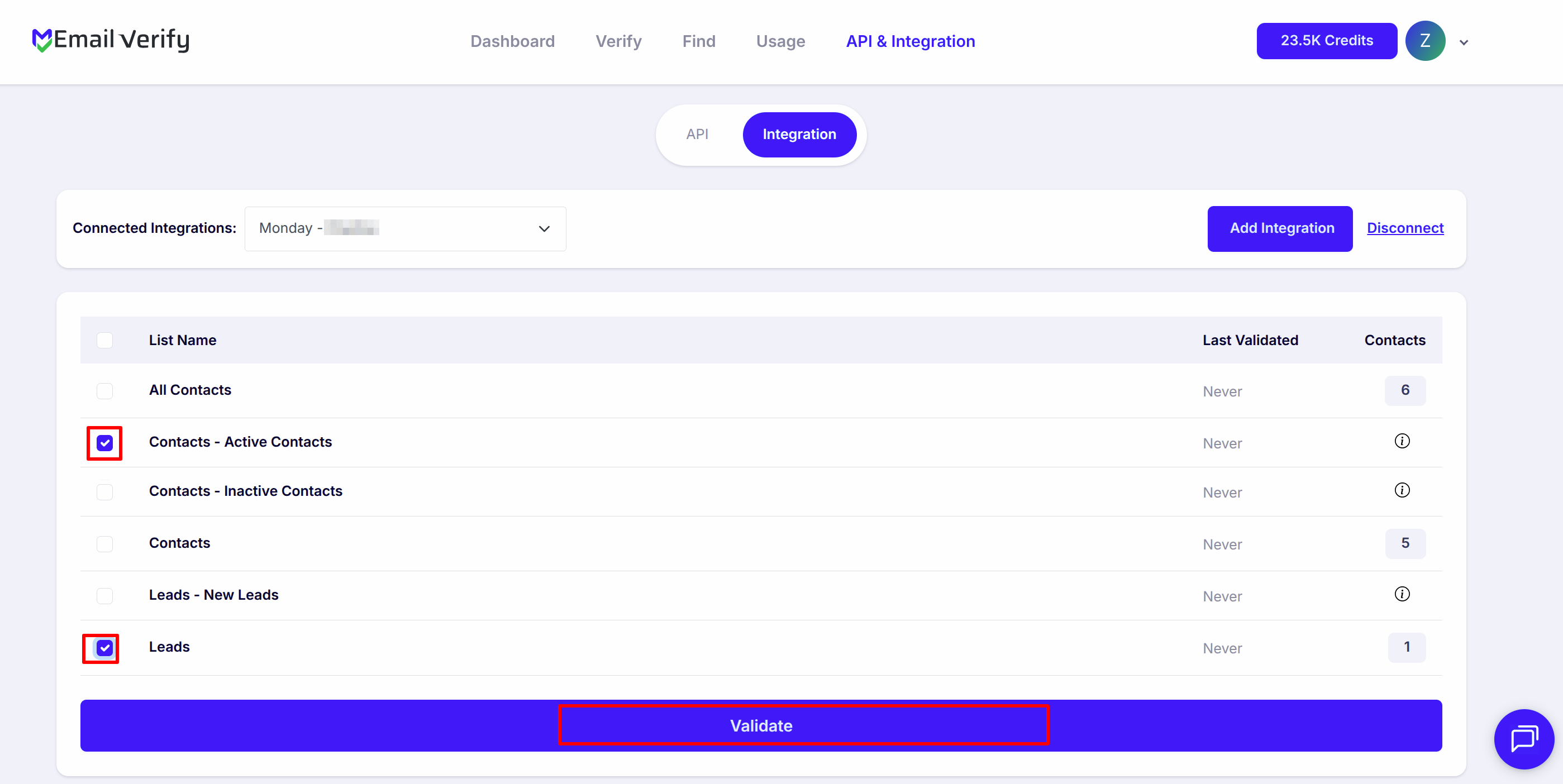
Step 7: Validate Contacts
Note: The results of the validation are automatically exported to the integration they originated from.
Step 8: Monitor Progress
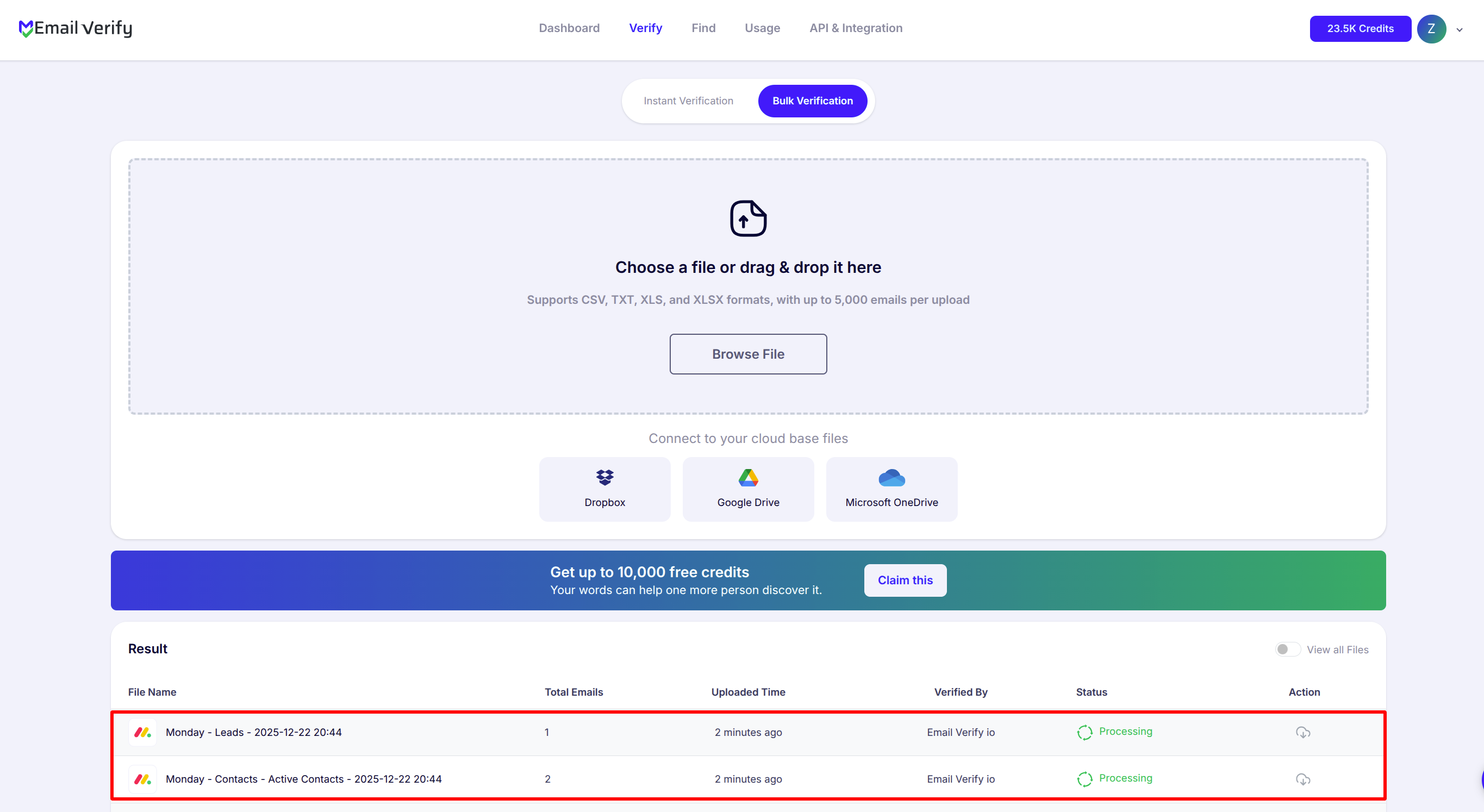
Step 9: Download Results
Note: Validation results are automatically sent to your monday.com boards. Three new board columns are added to each verified item: EV_Status, EV_SubStatus, and EV_Validation_Timestamp. Use these columns in monday.com filters, automations, and dashboards to manage contact data quality directly inside your workspace.

Monday.com Email Verification Integration Features
EmailVerify.io seamlessly integrates with your Monday.com boards to help you prevent email bounces and gain clear, actionable insights into your contact data. Here’s what’s included
Import Email Addresses from Monday.com
Import email addresses from your Monday.com contacts and leads directly into EmailVerify.io for verification.
Reliable Email Verification
Verify your contacts with EmailVerify.io’s robust verification service to quickly detect invalid email addresses.
Sync Verification Results Back to Monday.com
Automatically update your board with verification results by mapping results to columns EV_Status, EV_SubStatus and EV_Validation_Timestamp. This keeps verification data visible and actionable directly inside Monday.com.
Secure Monday.com Connection (OAuth 2.0)
Connect your Monday.com account to EmailVerify.io using OAuth 2.0 for secure authorization. EmailVerify.io never stores your credentials and only accesses the data required for email verification.
Preserve Board & Workflow Integrity
Add verification results as board columns instead of removing items—allowing you to filter, sort, and automate workflows without losing data.
Automation-Ready Verification Status
Use verification status columns to trigger Monday.com automations, segment contacts, and build smarter workflows based on email quality.
Why monday.com Users Need Email Verification
monday.com is a Work OS — used by sales teams, operations managers, agencies, and project teams to track contacts, leads, clients, and stakeholders. Email addresses stored in monday.com boards come from form submissions, imported spreadsheets, manual entry, and CRM integrations. None of these sources validate whether the addresses are real.
- ✗ For sales teams using monday.com CRM: invalid contact emails corrupt pipeline data. Sales reps waste time sequencing invalid addresses, and revenue forecasting built on boards with bad contact data produces unreliable projections.
- ✗ For marketing teams using monday.com: campaign sends to contact boards fail silently for invalid addresses, distorting campaign performance metrics and ROI calculations.
- ✗ For agencies managing client boards: client contact and lead boards accumulate invalid addresses over time, degrading board data quality and outreach results.
- ✗ Email addresses decay at 22–30% per year — imported lists that were clean at the time of import contain a growing percentage of invalid addresses with every passing month.
- ✗ Role-based and disposable emails entered through web forms and lead capture processes add noise to board data that cannot be identified without verification.
EmailVerify.io removes invalid board items before they corrupt pipeline data, waste outreach effort, or distort CRM reporting — keeping your monday.com workspace accurate and actionable.
What EmailVerify.io Checks on Every monday.com Contact
Each email address in your monday.com boards passes through 20+ real-time verification checks before results sync back as board columns.
| Check | What It Detects |
|---|---|
| Syntax validation | Formatting errors — missing @, invalid characters, malformed structure |
| Domain / DNS check | Whether the email domain exists and is active |
| MX record check | Active mail server records on the domain |
| SMTP verification | Whether the individual mailbox exists on the server |
| Catch-all detection | Domains that accept all emails regardless of whether the mailbox exists |
| Disposable email check | Temporary or burner addresses from 10,000+ known providers |
| Role-based detection | Generic addresses: info@, admin@, noreply@, support@ |
Results written as new board columns: EV_Status | EV_SubStatus | EV_Validation_Timestamp
What monday.com Users See After Verification
EmailVerify.io writes results directly to monday.com board columns on each item — visible and filterable inside your workspace without any re-import.
monday.com Board Data Quality With vs Without Email Verification
Invalid contacts corrupt CRM pipelines, waste outreach, and distort reporting. Here is what changes with EmailVerify.io.
| Approach | Time Required | Accuracy | Auto-Sync | Ongoing Protection |
|---|---|---|---|---|
| No verification | 0 min setup | Unknown | No | All invalid contacts corrupt pipeline and outreach |
| Manual CSV clean | Hours of manual work | Basic | No | Partial — misses catch-all and disposable |
| EmailVerify.io + monday.com | Under 5 min setup | 20+ checks per item | Yes — EV board columns on every item | Full — pipeline, reporting, and outreach protected |
Who Should Use monday.com Email Verification
Sales teams using monday.com CRM
If your sales team tracks leads, contacts, and deals in monday.com, invalid email addresses corrupt your pipeline data and waste outreach capacity. Verify contact boards before major outreach campaigns to ensure sequences are built on reachable email addresses.
Marketing ops and RevOps teams
Teams managing contact data across monday.com and connected marketing tools need accurate email data at the source. Verification in monday.com prevents invalid contacts from propagating to downstream campaign tools and email platforms.
Agencies managing client monday.com accounts
Agencies building CRM boards and contact databases for clients should verify contact data at import and quarterly thereafter. Maintaining board data quality across client accounts is a defensible, billable service.
Recruitment and HR teams
monday.com is used by HR teams for candidate tracking. Candidate email addresses entered during application processes often include errors or outdated addresses. Verification flags these before automated communication sequences fire.
Technical Questions About monday.com Email Verification
How do I build an automation using EV_Status in monday.com?
In monday.com, open the Automations center for your board. Create a new automation with the trigger: 'When a column changes'. Select the EV_Status column. Set the condition to 'changes to Invalid'. Add the action: 'Change status column to Needs Review' and optionally 'Notify someone'. Save the automation — it will fire automatically whenever verification results sync back.
Can I filter my board to show only invalid contacts?
Yes. In monday.com, click Filter at the top of your board. Add a filter condition: EV_Status column = Invalid. Apply the filter to display only invalid contact items. From this filtered view, you can select all items and archive them, assign them for review, or export them separately.
What happens during the monday.com workspace installation step?
When you click Install EmailVerify.io Integration and select a workspace, monday.com adds EmailVerify.io to your workspace's approved integrations list. This is monday.com's standard app marketplace security model — it gives your workspace admin visibility over which external tools have board access. Installation takes about 30 seconds and only needs to be done once per workspace.
How do I identify contacts in my board that are overdue for re-verification?
Use monday.com's filter to show items where the EV_Validation_Timestamp column contains a date older than 3–6 months. Alternatively, build an automation: 'When EV_Validation_Timestamp is 6 months ago, create a task Re-verify contact email and assign to team member.' This keeps your re-verification schedule running automatically without manual tracking.
Also integrate with HubSpot Email Verification , ActiveCampaign Email Verification , Klaviyo Email Verification , GoHighLevel Email Verification . Or use ourAPI for programmatic access.
Frequently Asked Questions

How do I integrate EmailVerify.io with monday.com?
- Sign in at app.emailverify.io
- Go to Integrations and select monday.com
- Click Install EmailVerify.io Integration — select your workspace and install
- After installation, click Connect and authorise access via OAuth 2.0
- Your monday.com boards and groups appear in EmailVerify.io automatically
Do I need to install EmailVerify.io in monday.com before connecting?
Yes. monday.com uses an app marketplace model — EmailVerify.io must be installed in your workspace before the OAuth connection can be authorised. Installation is a one-time step.
What board columns does EmailVerify.io add to monday.com?
- EV_Status: Valid / Invalid / Catch-All / Disposable / Unknown
- EV_SubStatus: Detailed reason code
- EV_Validation_Timestamp: Date and time of verification
Can I verify contacts from any monday.com board?
Yes. Verification works across CRM boards, contact boards, lead boards, and any board where email addresses are stored in a standard Email column.
Can I verify emails directly inside monday.com boards?
No. Verification is performed through EmailVerify.io to ensure high-speed processing. Results are then synced back to your monday.com board columns automatically.
Why should I use email verification with monday.com?
Invalid email addresses in your boards corrupt pipeline data and waste sales outreach. Verification ensures every contact item has a reachable, valid email address.
Is the monday.com integration free?
What monday.com plan do I need for this integration?
The integration works with all monday.com plans (Basic, Standard, Pro, and Enterprise) as it uses the standard monday.com API.
How often should I re-verify my monday.com contacts?
We recommend verifying before major outreach campaigns, quarterly for CRM boards, and immediately after any large external lead imports.
Can I use EV_Status in monday.com automations?
Yes. Since EV_Status is a board column, you can trigger automations like: 'When EV_Status changes to Invalid, move item to Review Group'.
You're just one click away from clean email lists.
Start verifying your email addresses instantly and improve your campaign deliverability
* No credit card required