Wealthbox Email Verification Integration — Verify Client Contacts, Protect Outreach
EmailVerify.io's Wealthbox email verification integration validates every client's primary work email address in your Wealthbox CRM before communications send. Connect via your Wealthbox Access Token in minutes, select the contact types to verify — people, households, trusts, or companies — and review results in your EmailVerify.io dashboard. Invalid client emails mean regulatory communications, appointment reminders, and portfolio updates fail silently. EmailVerify.io identifies them before they create compliance gaps or damage client relationships.


Quick Summary: Wealthbox Email Verification Integration
- What it does: Imports Wealthbox contact primary work emails, validates with 20+ checks, and delivers results in your EmailVerify.io dashboard for review and action.
- Who it's for: Financial advisors, RIAs, wealth managers, and broker-dealers using Wealthbox CRM for client relationship management.
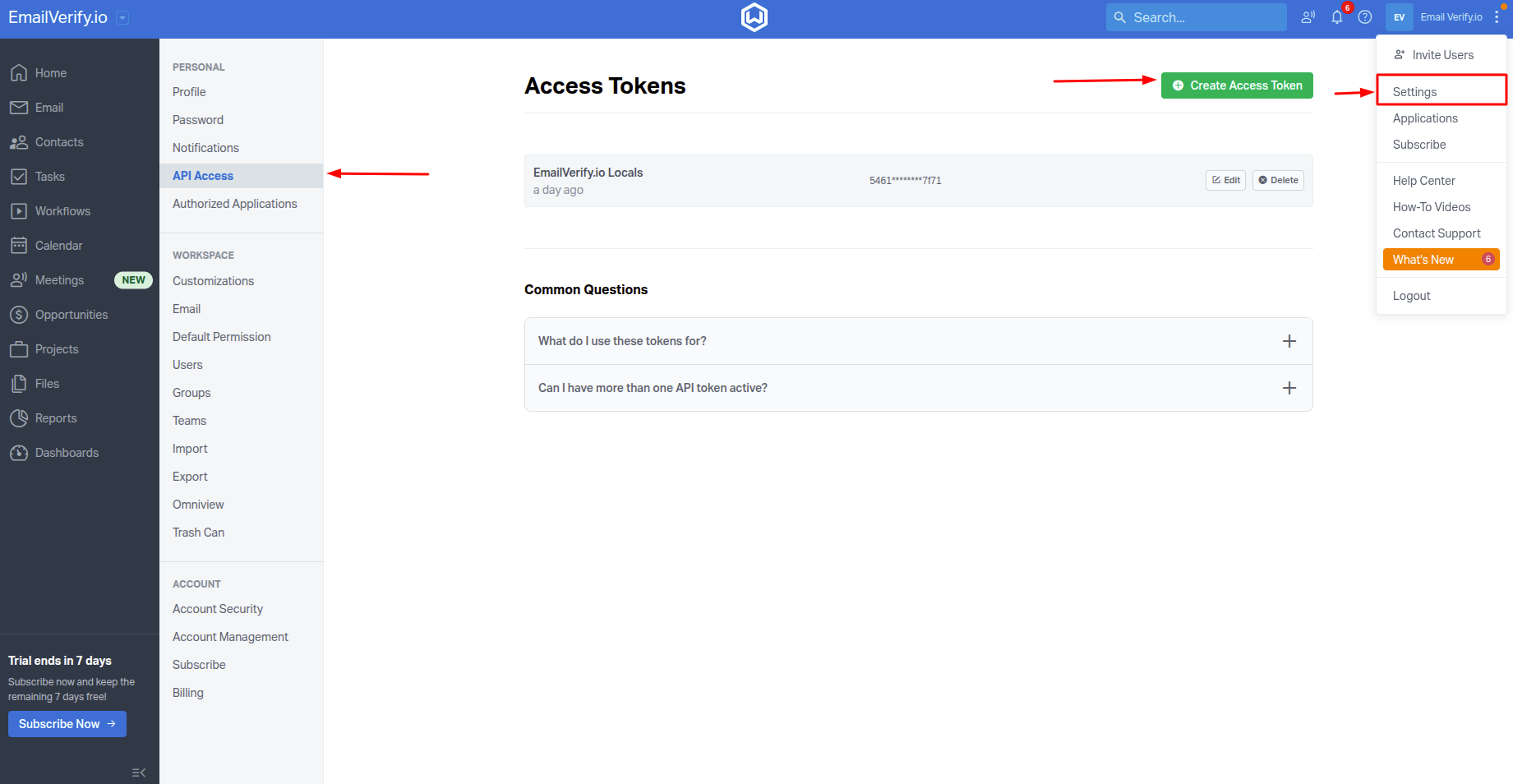
- Connection: Wealthbox Access Token (Settings > API Access > Create Access Token). Not stored beyond the active session.
- Important limitation: Only verifies the primary work email field per contact. Secondary and personal email fields are not included in verification.
- Results: Delivered in EmailVerify.io dashboard — download as CSV to identify and update invalid client contact emails in Wealthbox.View pricing.
How to use the integration
To get started with the Wealthbox integration, you'll need an active Wealthbox account, which you can create at https://www.wealthbox.com/ and a free EmailVerify.io account.
Step 1: Sign in to EmailVerify.io
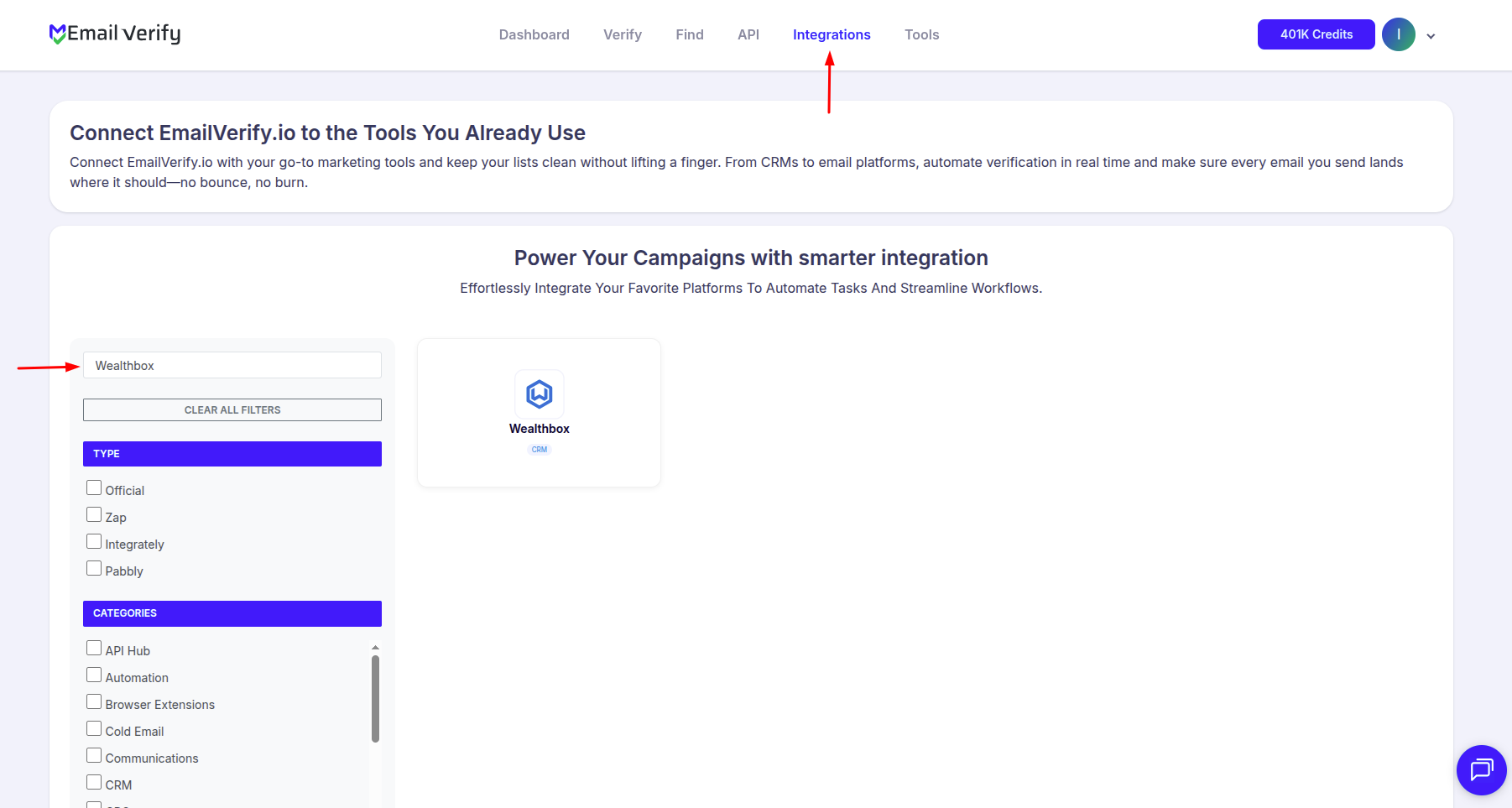
Step 2: Select Wealthbox
Step 3: Get Your Wealthbox Access Token
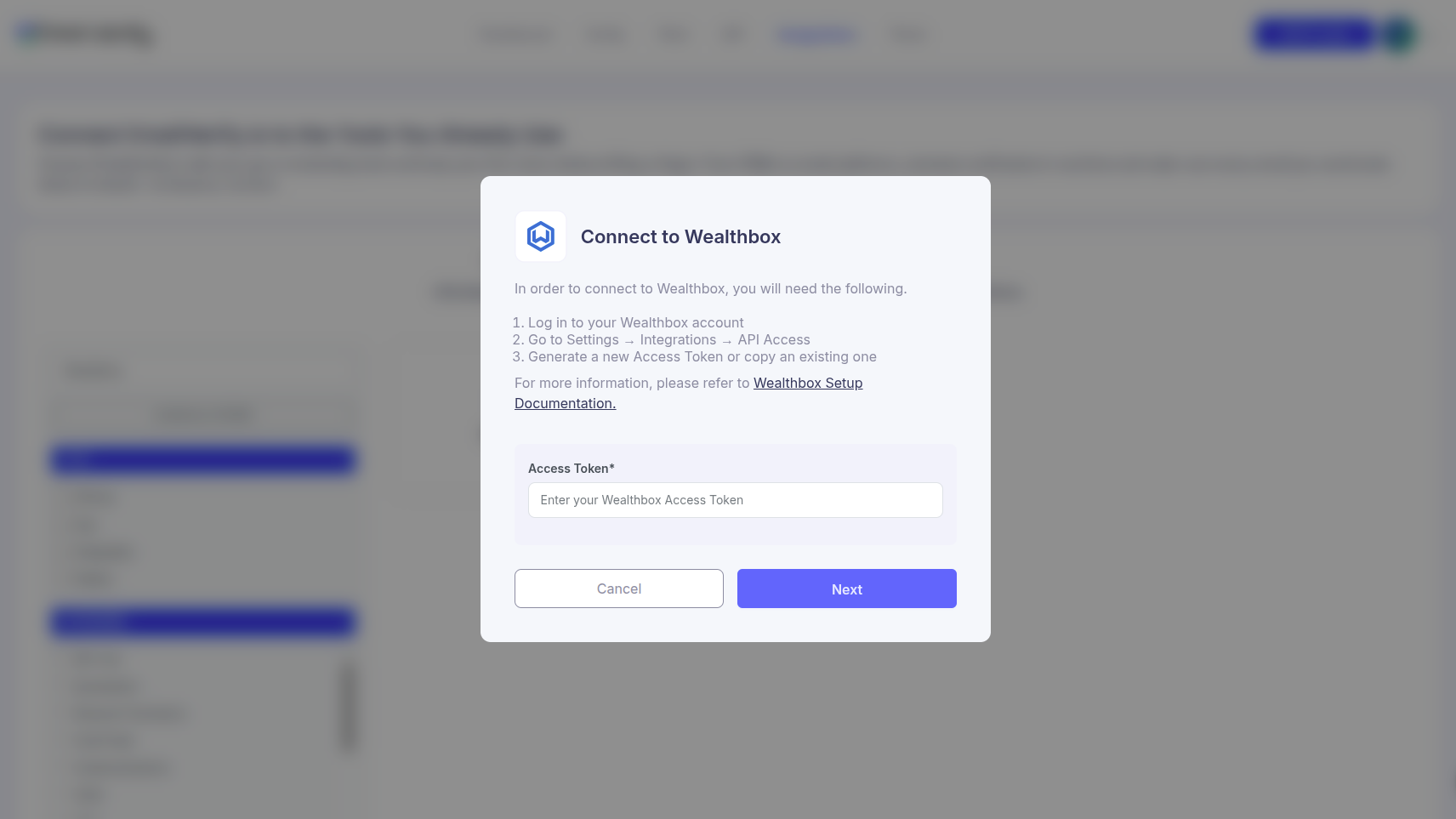
Step 4: Paste Your Access Token
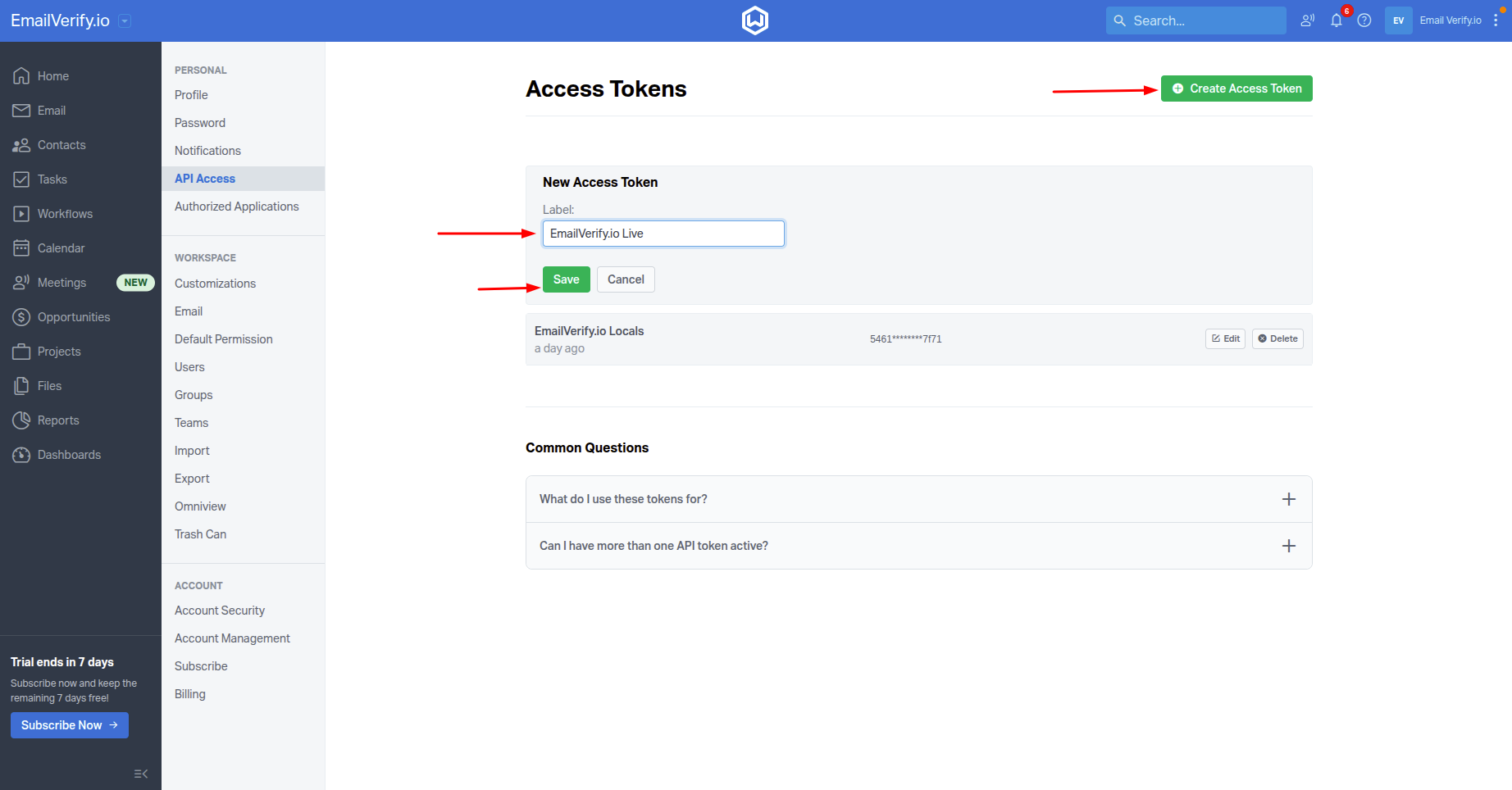
Step 5: View Your Lists
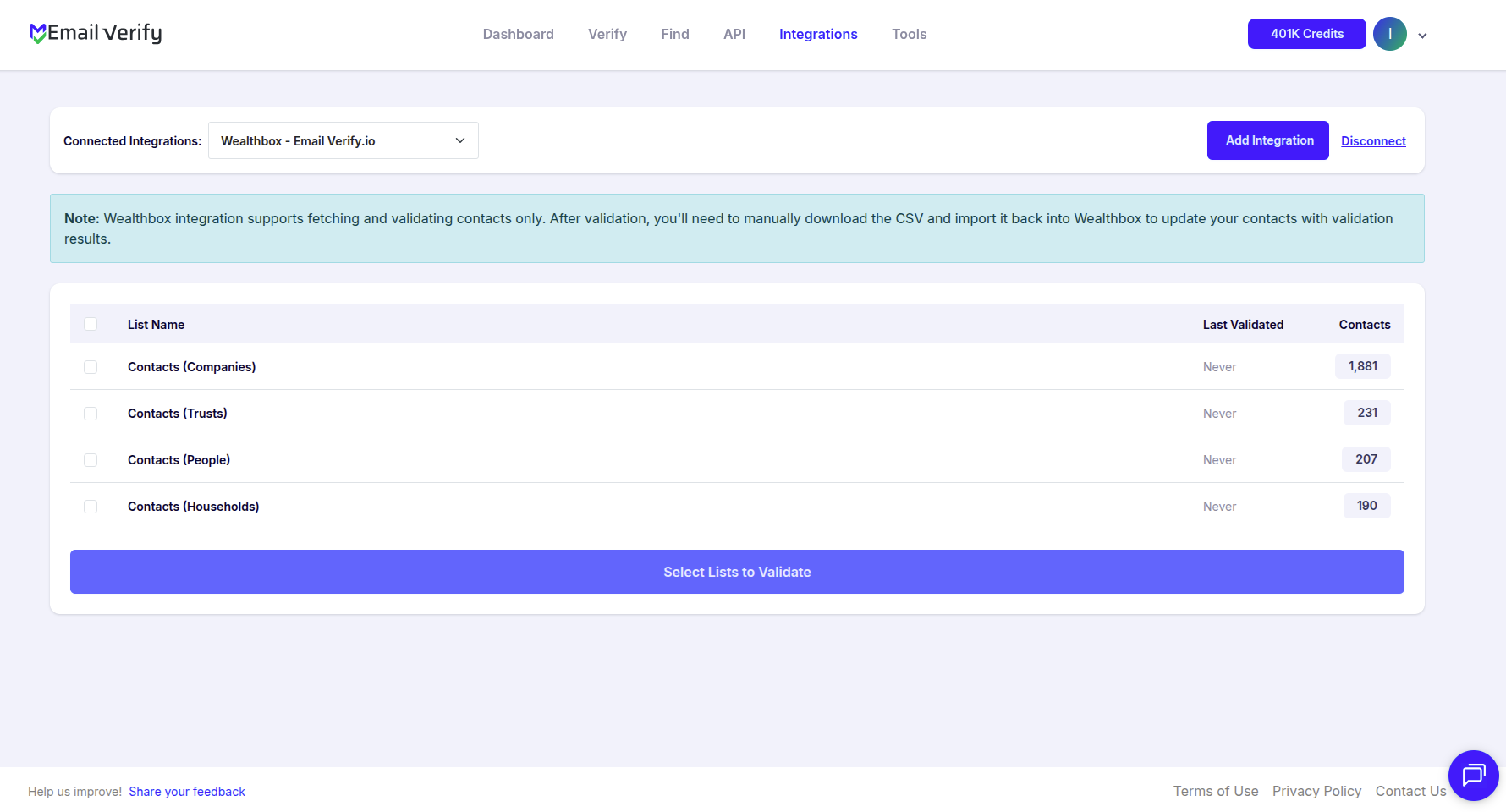
Step 6: Select Lists to Verify
Note: The results of the validation are not automatically exported to the integration they originated from.
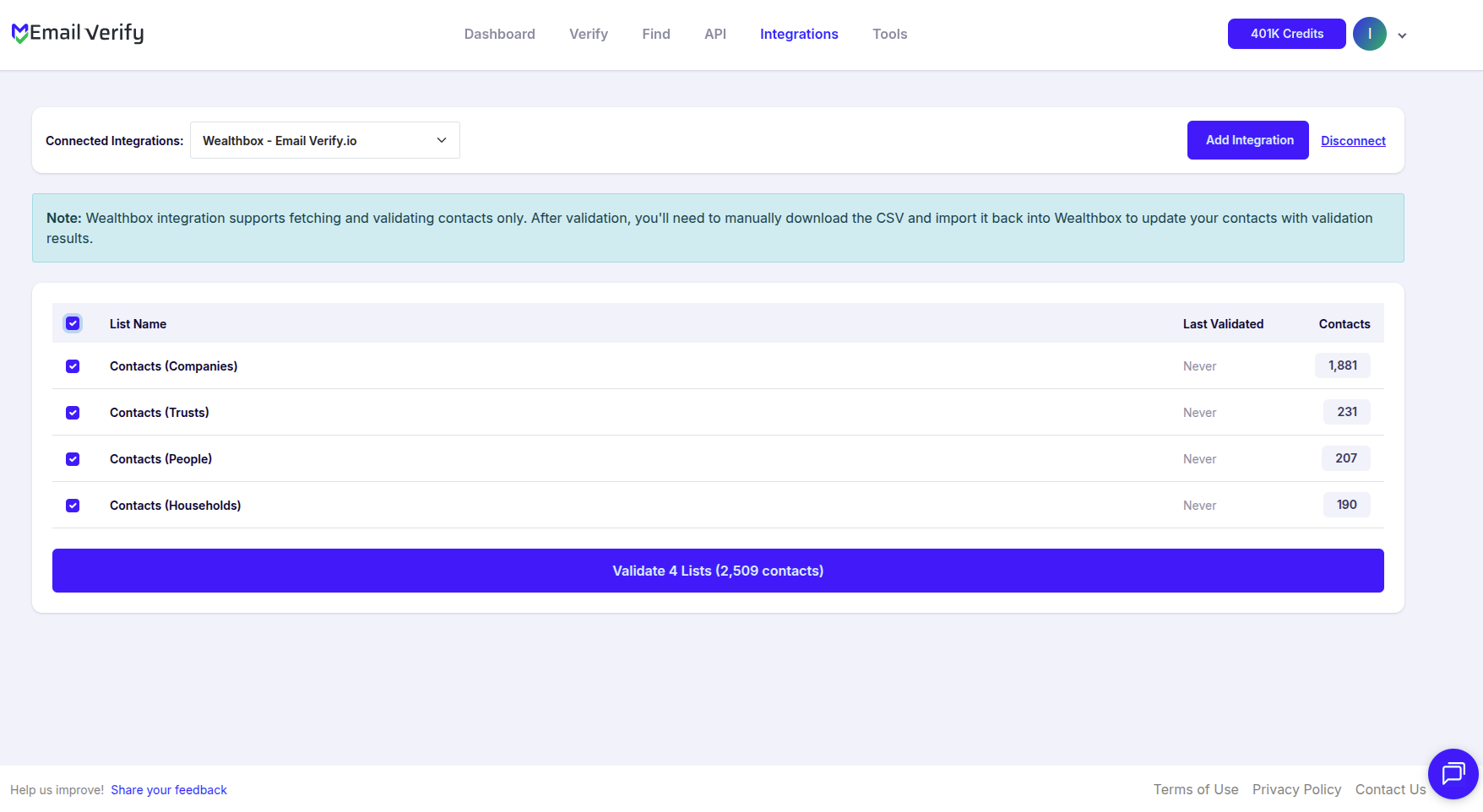
Step 7: Monitor Progress
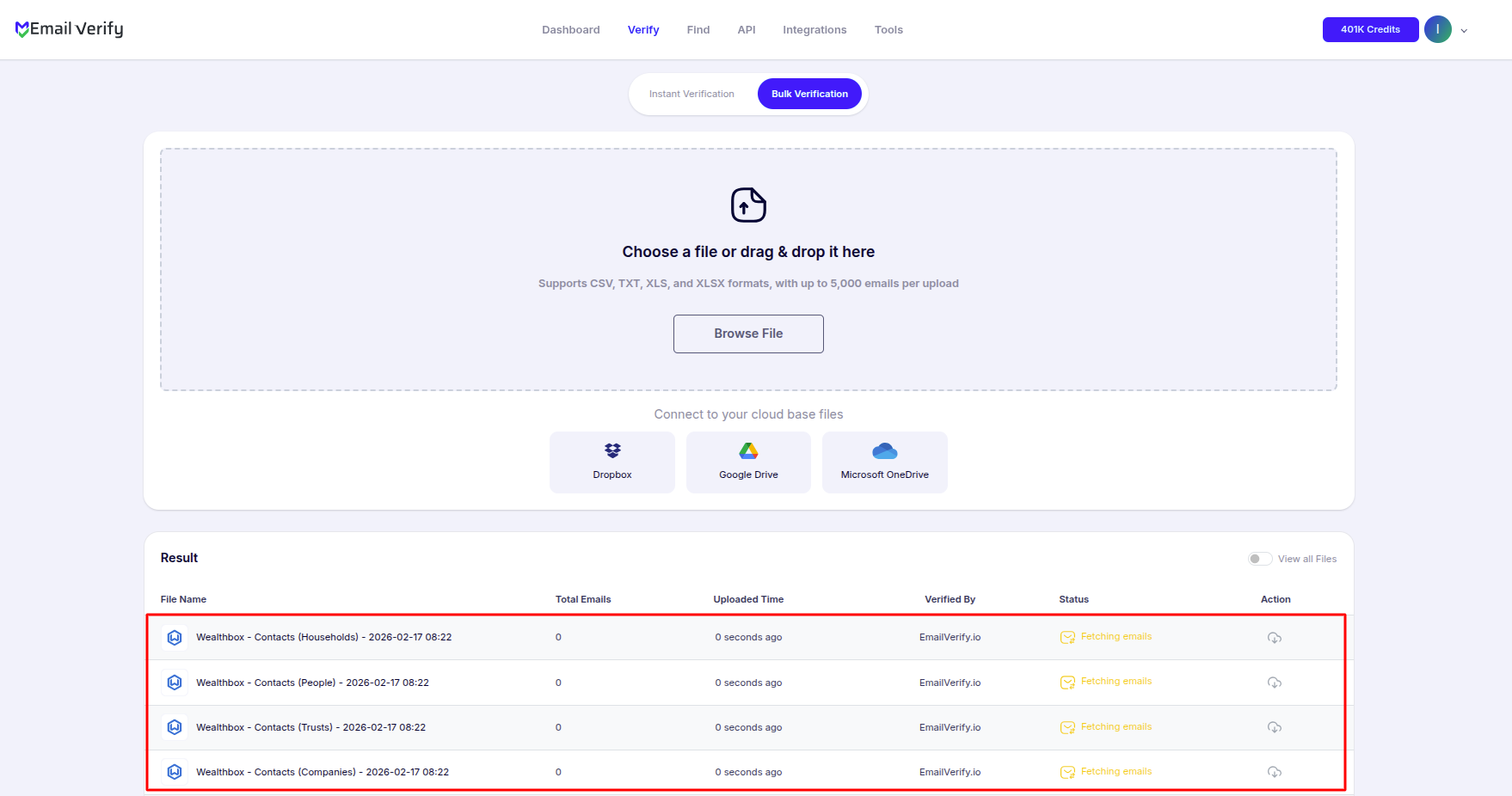
Step 8: Download Results
Note: Validation results are not automatically sent to Wealthbox. Download the results CSV from your EmailVerify.io dashboard to identify invalid primary work email addresses and update those records in Wealthbox.
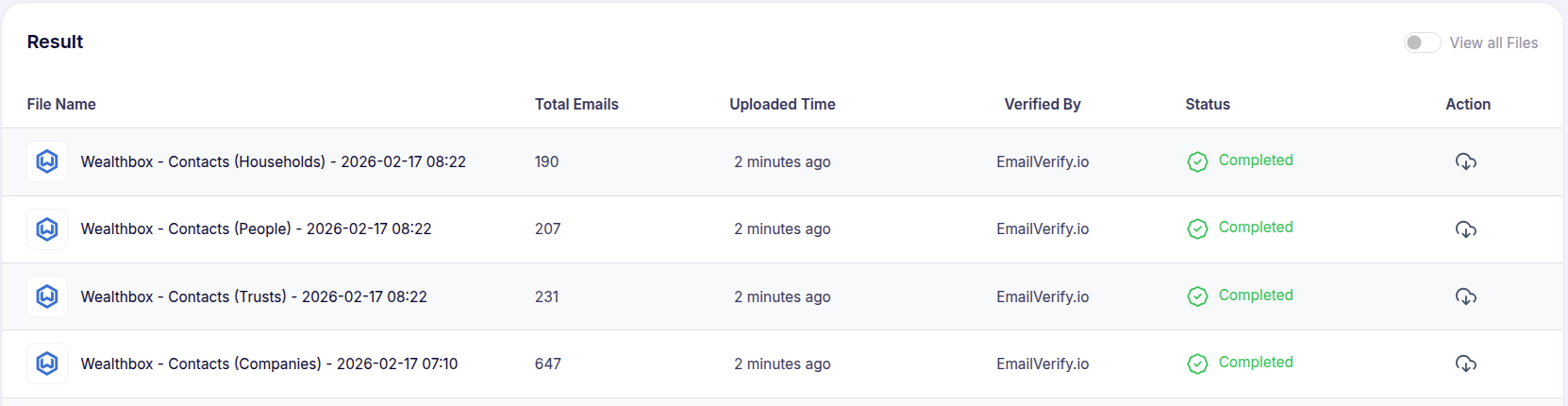
Wealthbox Email Verification Integration Features
EmailVerify.io integrates seamlessly with Wealthbox to help financial advisors maintain clean and accurate contact records, protect their sender reputation, and improve email deliverability. By verifying email addresses directly from your Wealthbox contact database, you can reduce bounce rates and ensure your client communications and outreach efforts are powered by reliable, validated contact data.
Import Contacts from Wealthbox
Import primary work email directly from your Wealthbox contacts into EmailVerify.io for verification.
Reliable Email Verification
Verify your contacts using EmailVerify.io's robust verification engine to quickly detect invalid, risky, or catch-all email addresses.
Review Validation Results
Access detailed verification results within EmailVerify.io, allowing you to identify which contacts are safe to email before launching campaigns.
Secure Access Token Connection
Connect your Wealthbox account securely using your Wealthbox Access Token (Settings > API Access) — direct access to your contact data without sharing your login credentials.
Keep Your Contacts Clean
With a secure connection to Wealthbox, EmailVerify.io helps you maintain accurate contact data and make informed decisions about your outreach lists.
Bounce Rate Reduction
Reduce bounces and protect your sender reputation by filtering out invalid or risky email addresses before sending client communications.
Why Financial Advisors Need Email Verification in Wealthbox
Wealthbox is purpose-built for financial advisors — and email communication in wealth management carries higher stakes than standard marketing campaigns. Financial advisors communicate with clients on regulatory matters, investment updates, appointment reminders, and service notifications. Invalid client email addresses mean these touchpoints fail silently.
- ✗ Financial advisors are required to deliver specific disclosures, reports, and notifications to clients. If a client's email is invalid and these communications bounce, compliance gaps can result.
- ✗ Client primary work emails are especially prone to decay — corporate email addresses become invalid when clients change employers or retire. Wealthbox databases spanning 5–15 years accumulate significant email decay.
- ✗ Wealthbox stores multiple email fields per contact — only the primary work email is verified. Advisors who communicate via personal emails must confirm which field holds their primary contact address.
- ✗ Invalid emails in active client files distort communication metrics and create gaps in the advisor's contact history — affecting both relationship quality and compliance record-keeping.
- ✗ For RIAs and broker-dealers, accurate client contact data is part of maintaining a compliant client relationship management practice.
EmailVerify.io identifies invalid primary work emails in Wealthbox before communications fail — protecting client relationships, regulatory compliance, and sender reputation simultaneously.
What EmailVerify.io Checks on Each Wealthbox Contact's Primary Work Email
Each primary work email address from your Wealthbox contacts passes through 20+ real-time verification checks. Results are available in your EmailVerify.io dashboard.
| Check | What It Detects |
|---|---|
| Syntax validation | Formatting errors — missing @, invalid characters, malformed structure |
| Domain / DNS check | Whether the email domain exists and is active |
| MX record check | Active mail server records on the domain |
| SMTP verification | Whether the individual mailbox exists on the server |
| Catch-all detection | Domains that accept all emails regardless of whether the mailbox exists |
| Disposable email check | Temporary or burner addresses from 10,000+ known providers |
| Role-based detection | Generic addresses: info@, admin@, noreply@, support@ |
Results available in EmailVerify.io dashboard — download as CSV to update Wealthbox records
What Wealthbox Users See After Verification
Results are delivered in your EmailVerify.io dashboard as a downloadable CSV. Use them to identify and update invalid client email records in Wealthbox.
Wealthbox Contact Data Quality With vs Without Email Verification
Invalid client emails create silent communication failures and compliance gaps. Here is what changes with EmailVerify.io.
| Approach | Time Required | Accuracy | Auto-Sync | Ongoing Protection |
|---|---|---|---|---|
| No verification | 0 min setup | Unknown | N/A | Silent failures on regulatory and client communications go undetected |
| Manual review | Hours of manual work | Basic | No | Partial — misses catch-all domains and recently invalidated mailboxes |
| EmailVerify.io + Wealthbox | Under 5 min setup | 20+ checks per contact | Results in EV dashboard — manual update to Wealthbox | Full — invalid primary work emails identified before communications send |
Who Should Use Wealthbox Email Verification
Independent financial advisors (RIAs)
If you manage client relationships in Wealthbox, verify client primary work emails annually or ahead of major communication campaigns. Corporate email addresses for clients nearing retirement or who have changed employers are the highest-risk category — identify them before regulatory communications bounce.
Wealth managers with long-term client books
Wealthbox contact databases built over 5–15 years contain significant email decay. A wealth manager with 500+ client contacts may have 15–30% invalid primary work emails without knowing it. Annual verification keeps the contact database accurate and communications reliable.
RIA firms and broker-dealers
Firms with multiple advisors using Wealthbox should run firm-wide verification periodically. Maintaining accurate client contact records is part of a compliant CRM practice — invalid emails in client files are a recordkeeping gap that verification resolves.
Financial advisory practices migrating to Wealthbox
Contacts migrated from other CRMs or spreadsheets carry inherited invalid email addresses. Verify the full database immediately after migration to start with a clean Wealthbox contact base before any client outreach.
Technical Questions About Wealthbox Email Verification
What is the difference between an Access Token and an API Key in Wealthbox?
Wealthbox uses the term 'Access Token' for the credential generated at Settings > API Access > Create Access Token. EmailVerify.io's connection screen labels this field 'API Key' — paste your Wealthbox Access Token into that field. The two terms refer to the same credential type; only the labelling differs between the two platforms.
Can I verify different Wealthbox contact types separately?
Yes. After connecting your Wealthbox account, you can select which contact types to verify: people, households, trusts, or companies. Each type is listed separately in EmailVerify.io. You can verify all types at once or select specific types for targeted verification.
What should I do after identifying invalid client emails in my results?
Download the results CSV from your EmailVerify.io dashboard. Filter the CSV for contacts where EV_Status equals Invalid. For each invalid contact, locate the record in Wealthbox and update or correct the primary work email field. If the client's work email has changed (e.g., employer change), contact the client directly to obtain their current email address before updating the record.
Why are some client emails showing as catch-all in my results?
Catch-all means the email domain is configured to accept all incoming messages regardless of whether the specific mailbox exists. Many corporate domains use this configuration. A catch-all result does not confirm the mailbox is active — it means deliverability cannot be guaranteed. For financial advisory communications, treat catch-all corporate emails as uncertain and consider confirming them with the client directly.
Also integrate with Pipedrive Email Verification , HubSpot Email Verification , Salesforce Email Verification , monday.com Email Verification . Or use ourAPI for programmatic access.
Frequently Asked Questions

How do I connect EmailVerify.io to Wealthbox?
- Sign in at app.emailverify.io and go to Integrations
- Select Wealthbox and enter your Access Token (found in Settings > API Access)
- Click Connect — your Wealthbox contacts appear automatically
Does EmailVerify.io sync results back to Wealthbox automatically?
No. Verification results are delivered in your EmailVerify.io dashboard and as a downloadable CSV. They are not written back to Wealthbox records. Use the results to update primary work emails manually.
Which Wealthbox email field does the integration verify?
EmailVerify.io imports and verifies only the primary work email field. Secondary or personal emails stored in Wealthbox are not included in the verification process.
Does EmailVerify.io modify or delete my Wealthbox contacts?
No. EmailVerify.io does not modify, delete, or update any data in your Wealthbox account. Email addresses are imported for verification only.
Is the Wealthbox integration free?
How does email verification help financial advisors?
Financial advisors depend on email for regulatory communications. Verification identifies invalid corporate emails, which is critical when clients change employers.
Is my Wealthbox client data secure?
Yes. We process email addresses for verification purposes only. Data is not stored permanently and your Access Token is not stored beyond the active session.
What Wealthbox plan do I need for this integration?
The integration works with all Wealthbox plans. It uses standard API access available on all account tiers.
How often should I re-verify Wealthbox contacts?
We recommend an annual review for all clients. Prioritize clients with corporate email addresses as these have the highest decay rate.
How long does it take to verify my contacts?
You're just one click away from clean email lists.
Start verifying your email addresses instantly and improve your campaign deliverability
* No credit card required