Stop Fake Signups and Invalid Emails on WordPress
EmailVerify.io's WordPress plugin validates email addresses in real-time — the moment a user submits a form on your site. Unlike list-cleaning tools that fix email data after it has already entered your database, this plugin prevents invalid, disposable, and fake emails from ever being collected in the first place. Compatible with Contact Form 7, WPForms, Ninja Forms, Gravity Forms, WooCommerce checkout, and the default WordPress registration page. Install directly from the WordPress plugin repository in minutes — no coding required. Paste your API key, toggle on the forms to protect, and every form submission is validated before it reaches your database.


Quick Summary: WordPress Email Verification Integration
- What it does: Validates email addresses in real-time at form submission — before invalid emails enter your WordPress database. Invalid emails are blocked at the moment the user clicks Submit.
- How it is different: Real-time prevention, not post-signup list cleaning. Invalid emails never enter your database — they are stopped at the form.
- Compatible forms: Contact Form 7, WPForms, Ninja Forms, Gravity Forms, WooCommerce checkout, and WordPress user registration.
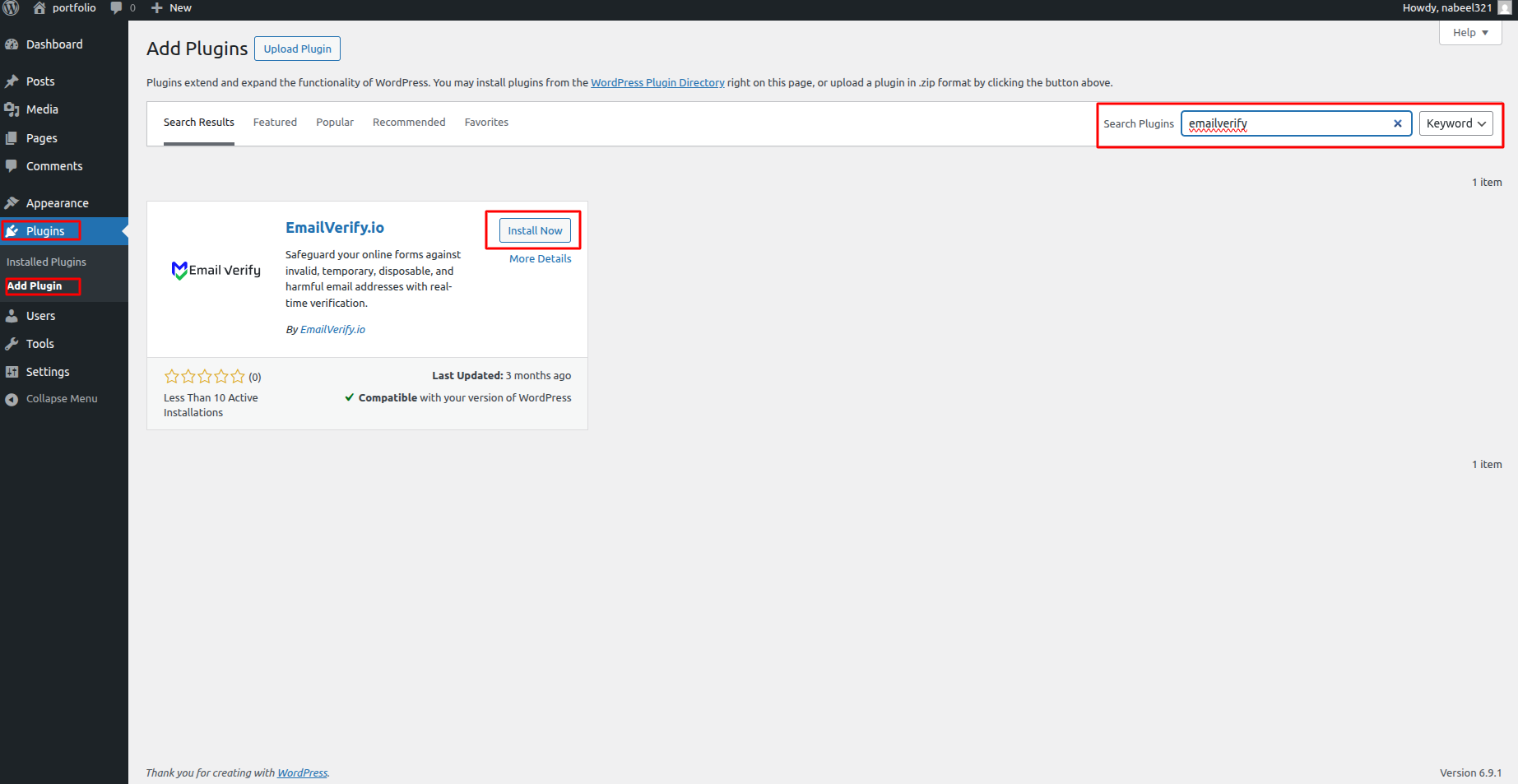
- Installation: Plugins > Add New > Search EmailVerify > Install. Or find it at wordpress.org/plugins.View pricing.
- Setup time: Under 5 minutes. Paste API key and toggle forms on.
How to install and use the WordPress plugin
Follow these simple steps to secure your WordPress forms and user registration with EmailVerify.io.
Step 1: Install the Plugin
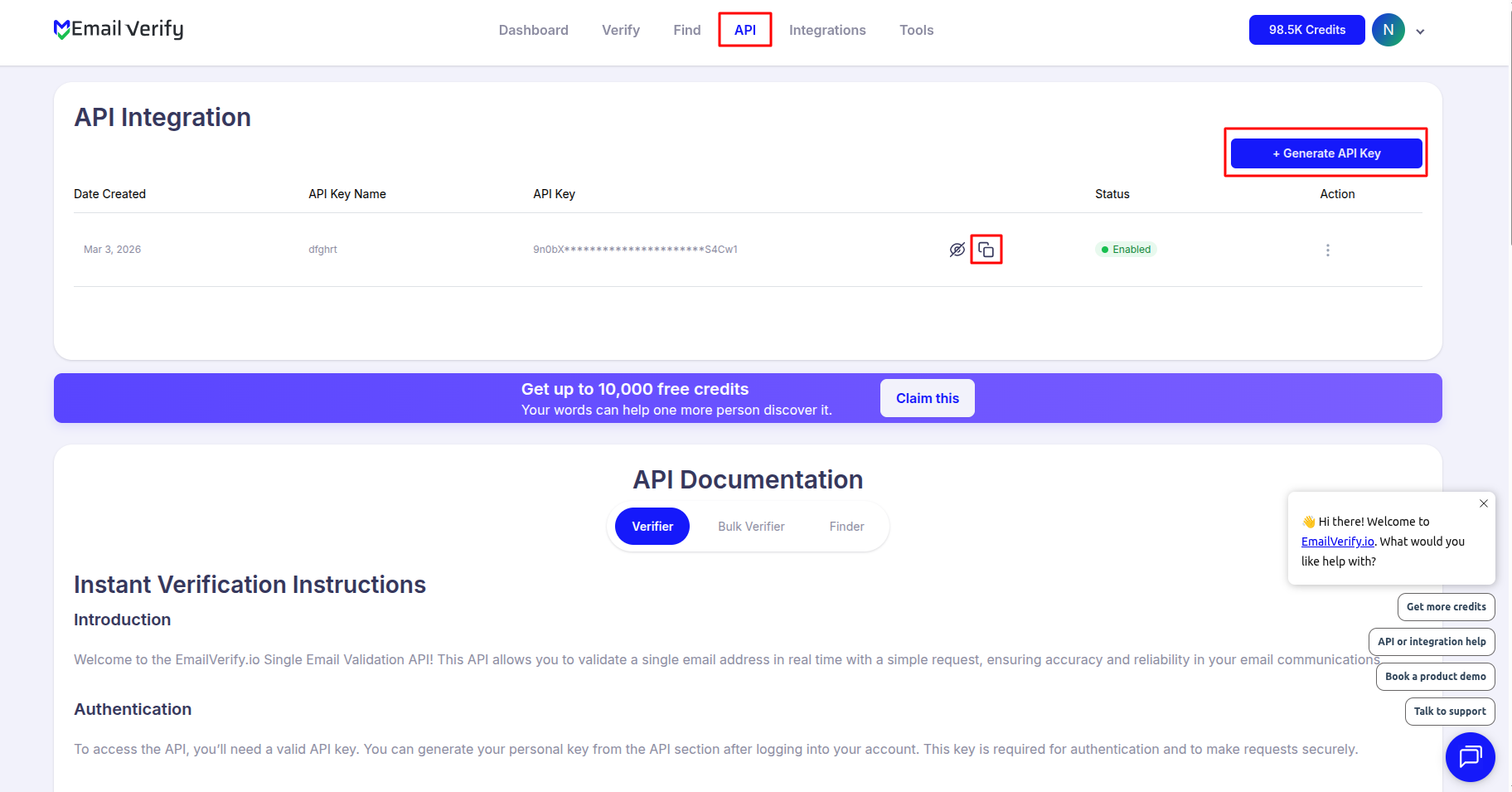
Step 2: Get Your API Key
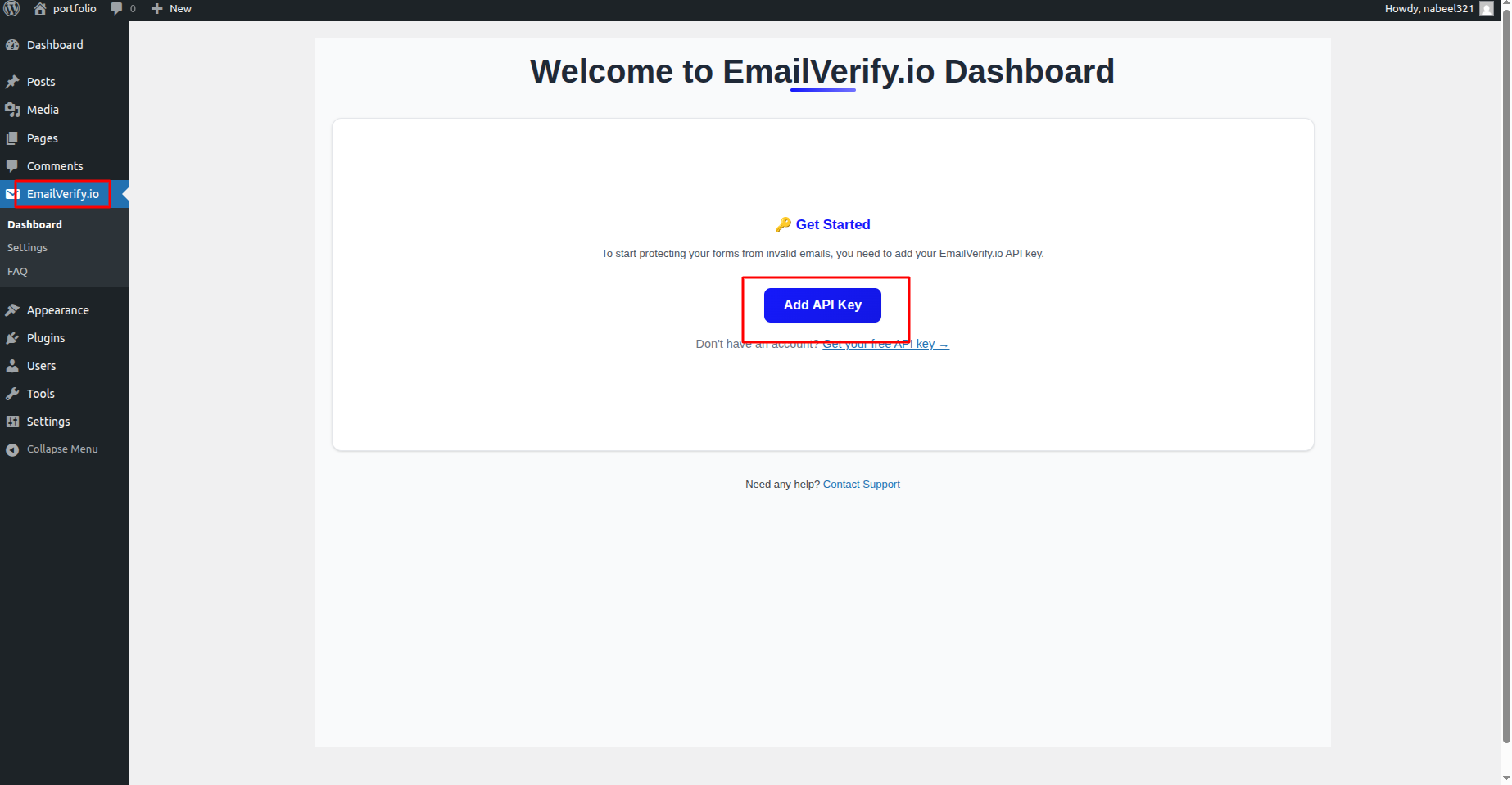
Step 3: Enter API Key in WordPress
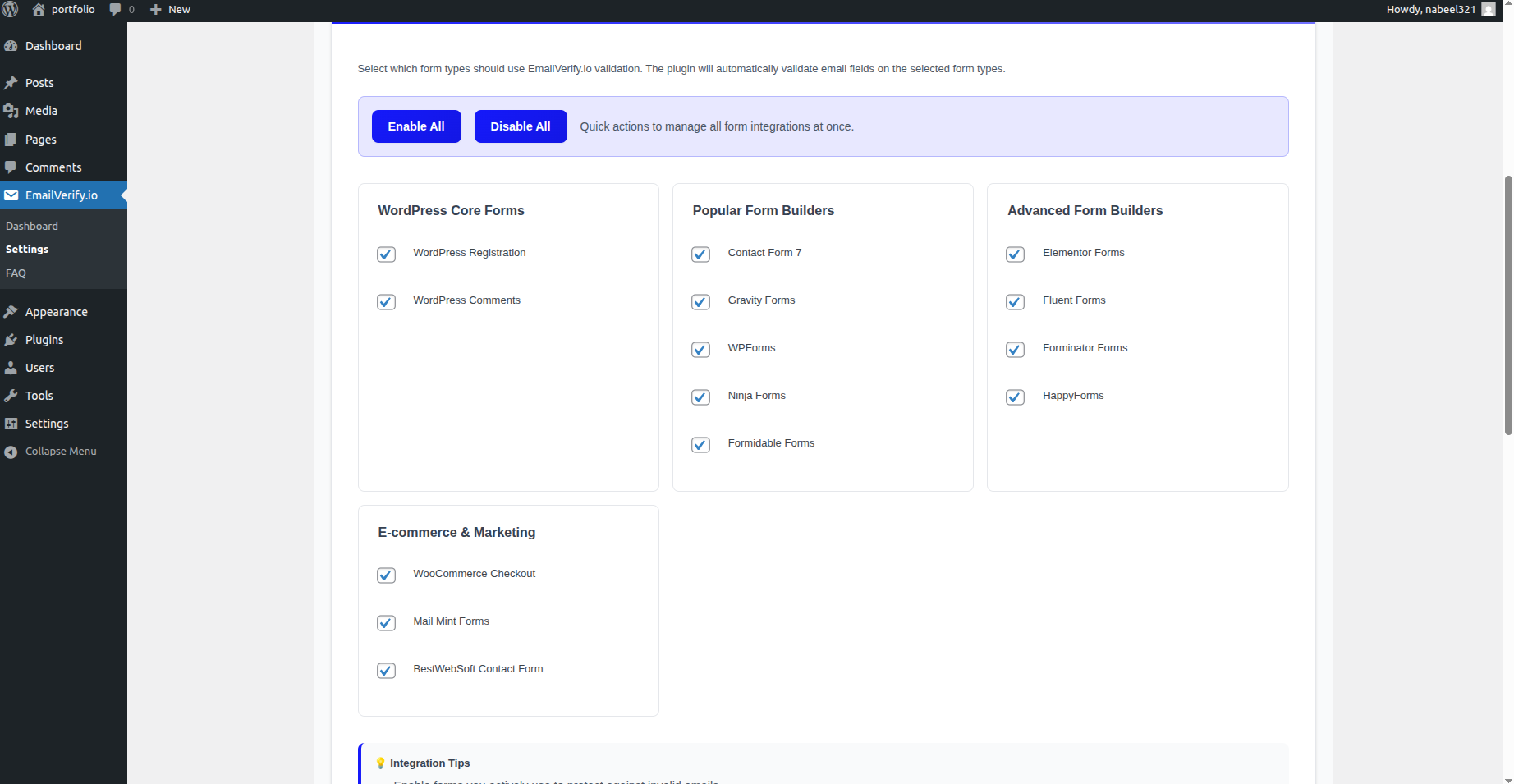
Step 4: Configure Integrations
Step 5: Customize Error Messages
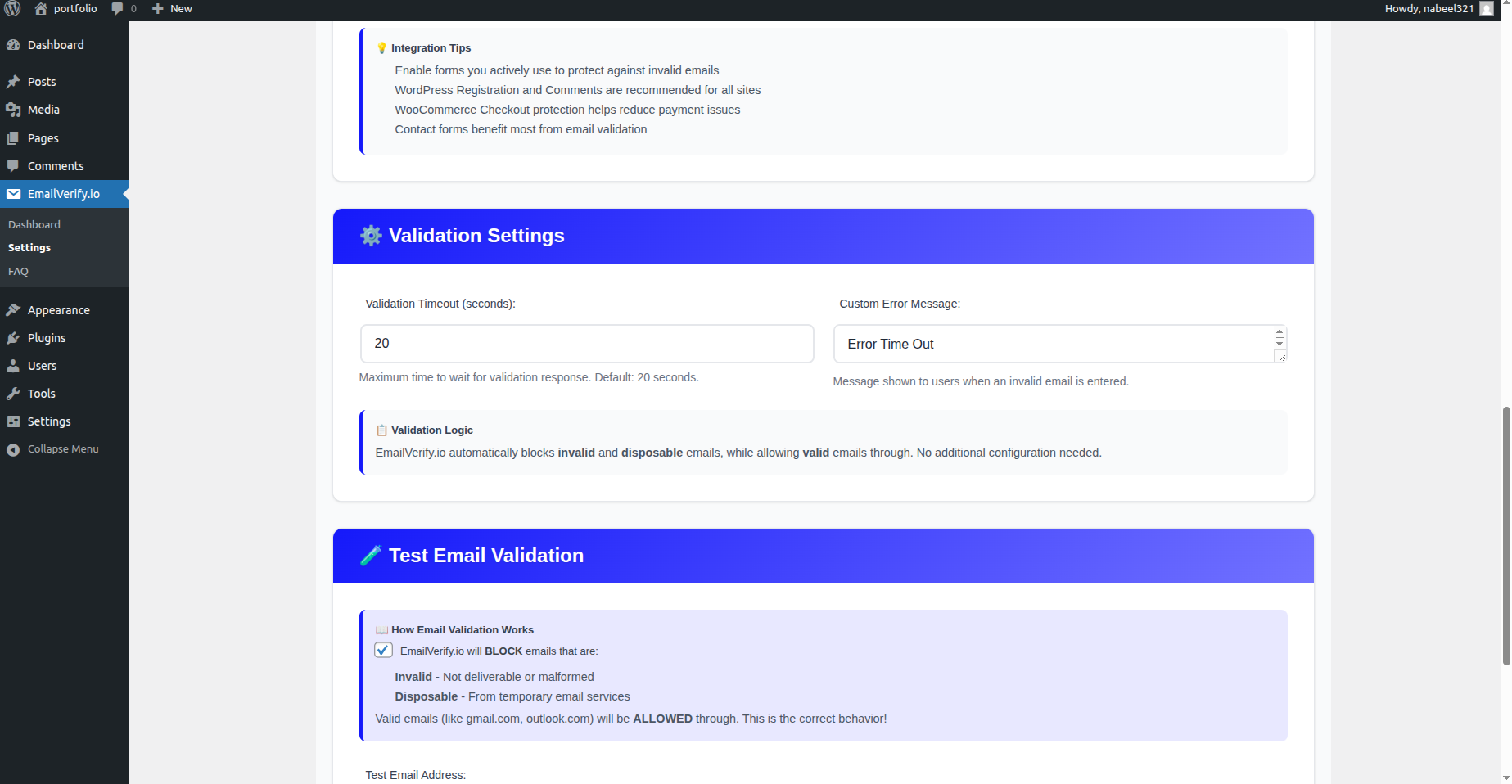
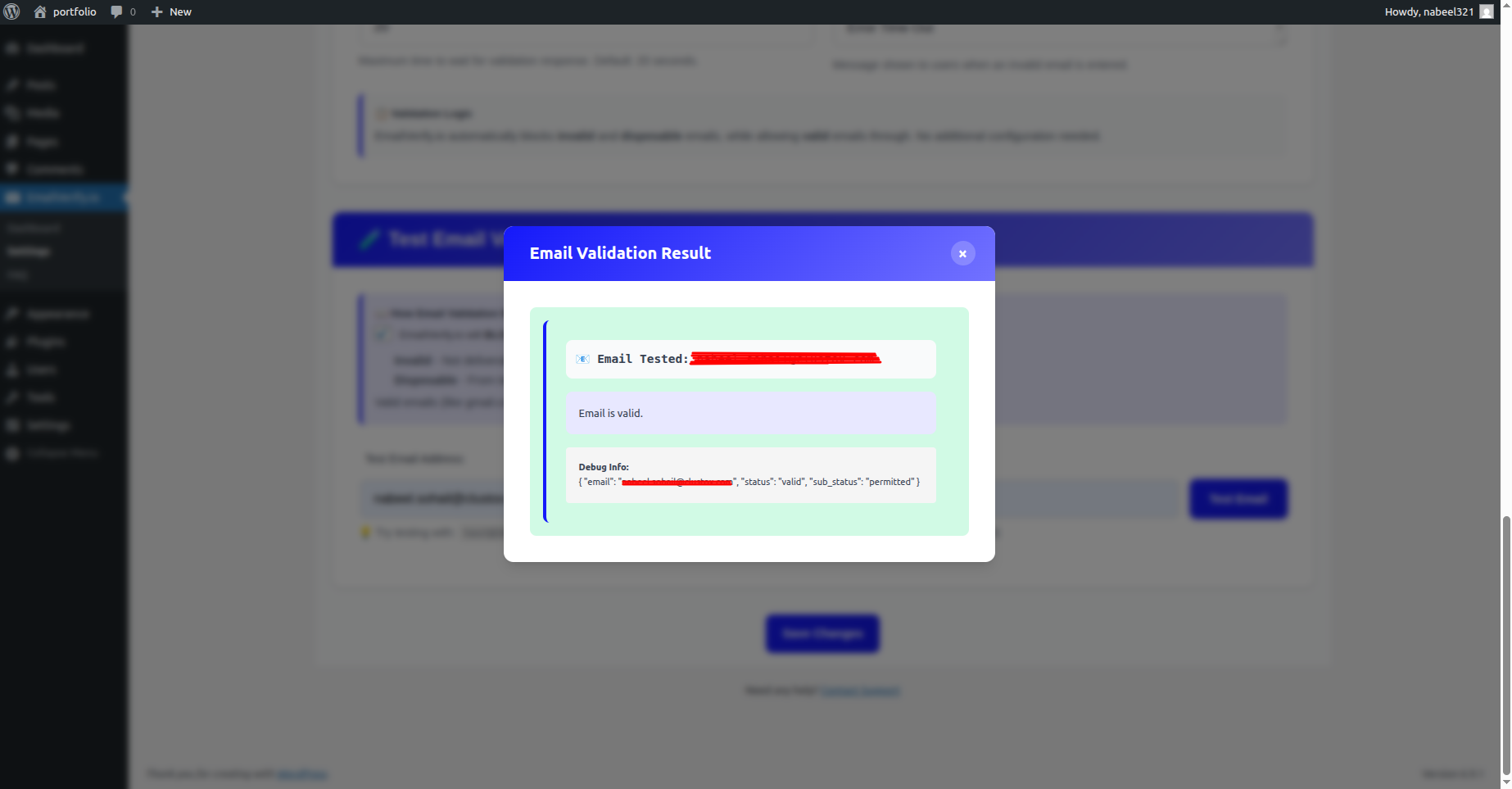
Step 6: Test Your Forms
WordPress Integration Key Features
Our WordPress plugin is designed to work out-of-the-box with your existing tools, providing a seamless experience for both administrators and visitors.
Popular Form Support
Seamlessly integrates with Contact Form 7, WPForms, Ninja Forms, and Gravity Forms.
Block Disposable Emails
Automatically detect and block temporary or 'burn' email addresses used for fake signups.
WooCommerce Validation
Ensure customers provide valid email addresses during checkout to guarantee receipt of invoices and shipping updates.
Real-Time SMTP Checks
Perform deep SMTP validation the moment a user types their email, providing instant feedback.
User Registration Protection
Validate emails on the default WordPress registration page to keep your user database clean.
Easy API Integration
No complex coding required. Just paste your EmailVerify.io API key into the settings and you're ready to go.
Why WordPress Sites Need Real-Time Email Validation
WordPress collects email addresses through dozens of touchpoints — contact forms, WooCommerce checkouts, user registrations, lead capture pages, newsletter sign-ups, and membership portals. None of these have built-in email validation. Any string containing an @ symbol is accepted — including typos, fake addresses, and throwaway emails from disposable providers.
- ✗ WooCommerce guest checkout is especially prone to email typos. A single character error means order confirmations, shipping updates, and receipts never arrive — triggering support tickets and potential chargebacks.
- ✗ Membership and course sites using fake or disposable emails accumulate user accounts that will never engage, inflating member counts while adding zero marketing value.
- ✗ Contact Form 7, WPForms, and Gravity Forms submit invalid lead emails directly to your CRM or email platform — where they damage your sender reputation and reduce deliverability for your entire list.
- ✗ WordPress user registration is a common target for automated fake account creation using disposable emails — cluttering your user database with accounts that can never be re-engaged.
- ✗ Post-signup list cleaning fixes problems that already happened. By the time you clean a list, the invalid email has already entered your CRM, been sent a welcome email, and potentially triggered a hard bounce.
The EmailVerify.io WordPress plugin stops invalid emails at the form — before they enter any system. This is the only EmailVerify.io integration that works in real-time at the point of entry.
What EmailVerify.io Checks on Every WordPress Form Submission
Each email address submitted through a protected WordPress form passes through real-time verification checks before the form is allowed to complete.
| Check | What It Detects |
|---|---|
| Syntax validation | Formatting errors — missing @, invalid characters, malformed structure — rejected instantly |
| Domain / DNS check | Whether the email domain exists and is active |
| MX record check | Active mail server records on the domain |
| SMTP verification | Whether the individual mailbox exists on the server |
| Catch-all detection | Domains that accept all emails regardless of whether the mailbox exists |
| Disposable email check | Temporary or burner addresses from 10,000+ known providers |
| Role-based detection | Generic addresses: info@, admin@, noreply@, support@ |
If any check fails at the configured sensitivity level, the form submission is blocked and the user sees your custom error message.
What WordPress Site Owners See After Installing the Plugin
The plugin works silently in the background — valid emails pass through instantly, invalid emails are blocked with a custom error message that you control.
Real-Time Form Validation vs No Validation vs Post-Signup List Cleaning
There are three approaches to managing email quality on a WordPress site. Here is how they compare.
| Approach | Time Required | Accuracy | Auto-Sync | Ongoing Protection |
|---|---|---|---|---|
| No validation | 0 min setup | Unknown | No | All invalid emails enter database — CRM imports and email platforms receive dirty data |
| Post-signup list cleaning | Manual export + import | Moderate | No | Fixes problems after they happen — invalid emails already entered the database and may have triggered bounces |
| EmailVerify.io WordPress plugin | Under 5 min setup | 20+ checks per submission | Yes — invalid emails blocked at form | Full prevention — invalid emails never enter any system, no bounces generated |
Who Should Install the WordPress Email Verification Plugin
WooCommerce store owners
Protect checkout emails from typos and invalid entries. Ensure every customer receives their order confirmation, shipping update, and receipt. Invalid checkout emails are one of the most common WooCommerce support complaints — real-time validation eliminates them at source.
Membership and course site operators
Sites running MemberPress, Paid Memberships Pro, LearnDash, LifterLMS, or BuddyBoss are prime targets for fake account creation with disposable emails. Block these at registration before they inflate your member count and consume your email credits on accounts that will never engage.
Lead generation sites using Contact Form 7, WPForms, or Gravity Forms
Marketing sites collecting leads through forms should validate email quality at source — ensuring every lead that reaches your CRM or email platform is deliverable. This protects sender reputation and ensures accurate reporting on campaign performance.
Agencies managing WordPress sites for clients
Install the plugin on client sites as a standard practice. Clean lead data entering client CRMs and email platforms reduces client churn, improves campaign results, and is a defensible value-add in your agency's service offering.
WordPress Multisite network operators
On multisite installations, the plugin can protect registration and form submission across multiple sites in the network. Activate network-wide from the network admin panel and manage one API key for the entire installation.
Technical Questions About the WordPress Email Verification Plugin
Does the plugin work with AJAX-based form submissions?
Yes. The EmailVerify.io plugin hooks into the form validation process of each supported plugin at the server-side validation stage — which fires regardless of whether the form uses standard or AJAX submission. Email validation results are returned before the form submission is allowed to complete.
What happens if the EmailVerify.io API is temporarily unavailable?
The plugin includes a configurable fallback setting. By default, if the API does not respond within the timeout period, the submission is allowed through to prevent blocking legitimate users during a service outage. You can change this to block-on-timeout in the plugin's advanced settings if strict validation is required.
Can I whitelist specific email domains or addresses?
Yes. The plugin's Settings > EmailVerify > Advanced tab includes a whitelist field where you can add domains or specific email addresses that should always be allowed through regardless of verification result. This is useful for internal testing addresses or known-good domains that may trigger false positives.
Does the plugin log form validation results?
The plugin itself does not maintain a local log of validation results. Verification results are returned in real-time and used to allow or block the form submission. For a complete record of verified emails and their statuses, view your EmailVerify.io dashboard at <a href='https://app.emailverify.io/email-verifier/bulk-validation?locale=en' target='_blank' rel='nofollow' class='text-blue-600 hover:underline'>app.emailverify.io/email-verifier/bulk-validation</a> where all API calls are logged.
Also integrate with HubSpot Email Verification , Mailchimp Email Verification , ActiveCampaign Email Verification , Wix Email Verification . Or use ourAPI for programmatic access.
Frequently Asked Questions

How do I install the EmailVerify.io WordPress plugin?
- Log in to your WordPress Dashboard.
- Go to Plugins > Add New.
- Search for EmailVerify.io.
- Click Install Now, then Activate.
Alternatively, manage your key at app.emailverify.io.
Which WordPress form plugins are supported?
The plugin supports Contact Form 7, WPForms, Ninja Forms, Gravity Forms, WooCommerce checkout, and the default WordPress user registration page.
Does the plugin work with WooCommerce checkout?
Yes. The plugin validates the email field during WooCommerce checkout in real-time. If an invalid email is entered, the customer is prompted to correct it before placing the order.
Can I block disposable or temporary email addresses?
Yes. The plugin detects addresses from 10,000+ disposable providers and blocks them in real-time. This prevents users from using throwaway emails to access gated content.
How do I customise the error message shown to users?
In your WordPress Dashboard, go to Settings > EmailVerify > Messages. You can set custom messages for invalid, disposable, and role-based emails without any coding.
Will email verification slow down my WordPress forms?
The plugin adds a brief API call (500ms to 2s) only after the user clicks Submit. It does not affect page load speed or SEO scores.
How many credits does the WordPress plugin use?
Can I use the plugin on WordPress Multisite?
Yes. The plugin is compatible with Multisite. You can activate it network-wide and manage the API key from the network admin settings.
Does the plugin protect WordPress user registration?
Yes. It integrates with /wp-register.php. Any user attempting to register with an invalid or disposable email will be blocked with a custom message.
What is the difference between the plugin and other integrations?
The plugin is preventative: it blocks bad emails at the entry point. CRM integrations are for cleaning lists that already exist in your database.
You're just one click away from clean email lists.
Start verifying your email addresses instantly and improve your campaign deliverability
* No credit card required