

There’s nothing more frustrating than sending an important email and realizing it landed in Gmail’s promotions tab instead of the primary inbox. When that happens, even well-crafted messages often receive less visibility, lower engagement, and fewer meaningful responses.
This isn’t just a perception issue. As per Validity, emails classified under Gmail’s Promotions tab see noticeably lower open and interaction rates compared to messages delivered to the Primary inbox.
Over time, that drop in engagement becomes a signal for Gmail’s filtering system, increasing the likelihood that future campaigns are also routed away from the inbox.
Gmail’s placement decisions are closely tied to sender reputation and deliverability risk. Repeated sends to inactive or invalid addresses, elevated bounce rates, and weak engagement all reduce trust.
Most email service providers enforce strict thresholds around these signals, and once they’re crossed, inbox placement can degrade well before messages are ever flagged as Spam.
It is important to understand that reaching the primary inbox today is less about avoiding promotional language and more about managing risk across your sending practices. Verified recipients, consistent engagement, and a clean list play a far greater role in how Gmail evaluates your emails.
In this guide, you’ll learn how Gmail decides where emails land, what pushes messages into the promotions tab, and which practical steps help improve primary inbox placement, starting with list quality and sender reputation.
Keep reading to find out how.
Table of Contents
How Does Gmail Organize Your Inbox?
Gmail doesn’t just throw every email into one big list; it sorts messages into tabs to make your inbox easier to manage. Seeing how these tabs work can help you land emails in the Primary inbox instead of the promotions tab.
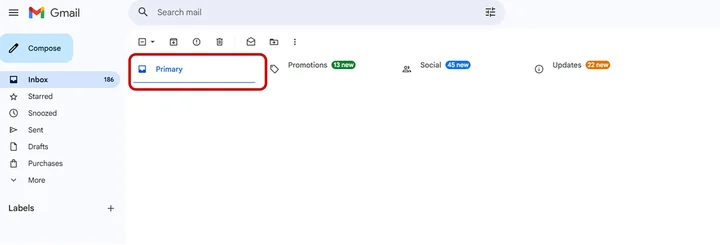
Here are the tabs Gmail uses to organize your emails and keep your inbox manageable:
Primary Tab
Gmail places emails that appear most relevant and personal here. One-on-one messages, replies, and emails that consistently engage recipients usually appear in this tab.
For senders, reaching the primary inbox is critical: emails here see significantly higher open and click-through rates, which can directly influence conversions, trial sign-ups, or product engagement.
Promotions Tab
This tab houses marketing content, newsletters, and commercial messages. Emails routed here often get lower visibility and reduced engagement. For businesses, consistent placement in promotions can suppress campaign performance, making even highly targeted messaging less effective.
Social, Updates, and Forums Tabs
These tabs separate notifications, receipts, and group messages from personal correspondence. While visibility here is generally acceptable for transactional or informational messages, commercial campaigns benefit most from landing in Primary.
Gmail uses these tabs to separate messages based on content and user interaction. Messages in primary are more likely to be opened and acted upon, while repeated placements in promotions can depress engagement metrics and, over time, reduce your sender reputation.
This makes a clean list, engagement-focused content, and strong sender signals essential for keeping emails in the Primary inbox.
What Are the Factors Affecting Gmail Inbox Placement?
Where your emails land in Gmail significantly affects whether they are seen, opened, and acted upon. Multiple factors influence inbox placement, and understanding these is critical for controlling deliverability risk.
Below, we break down the most important elements and their practical impact.
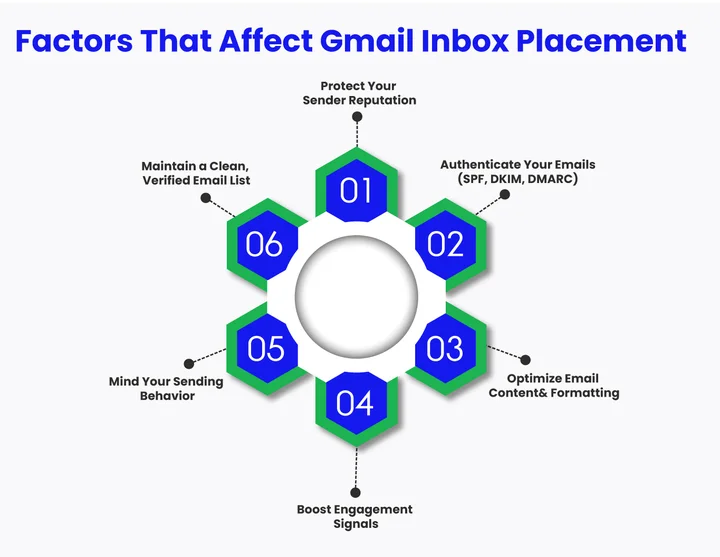
Sender Reputation
Gmail evaluates your domain and IP reputation to decide whether messages belong in Primary or Promotions. Repeatedly sending to invalid addresses, receiving spam complaints, or hitting high bounce rates signals low trust.
Once these thresholds are crossed, even well-crafted messages may be routed away from the Primary inbox.
Example: An outbound campaign from a SaaS provider targeting 10,000 prospects saw 2% invalid emails. Gmail marked the domain as lower-trust over time, and subsequent newsletters landed increasingly in promotions despite high-quality content.
Email Authentication
Protocols like SPF, DKIM, and DMARC confirm that your emails are legitimately sent from your domain. Failing authentication can trigger Gmail to treat emails as suspicious, reducing inbox placement or sending them to Promotions or Spam.
Proper authentication is not optional. ESPs often enforce these protocols, and failed authentication increases the likelihood of filtering before engagement signals even register.
Email Content and Formatting
The content of your email, including structure, links, images, and wording, affects Gmail’s classification. Overuse of promotional language, heavy image layouts, or excessive links can signal commercial intent.
Example: Imagine a newsletter with multiple embedded product links, large graphics, and “50% OFF” subject lines consistently landing in Promotions. But, after adjusting to concise text, minimal links, and value-focused language, placement in primary improved.
Engagement Signals
Gmail monitors how recipients interact with your emails. Opens, clicks, replies, and tab movement all inform future placement decisions. Low engagement or frequent deletes without opens may push emails toward promotions.
Scenario: An agency sending a weekly newsletter noticed that subscribers who rarely opened emails caused Gmail to classify subsequent messages as promotional. Segmenting to active readers increased primary inbox delivery over several campaigns.
Sending Behavior
High-volume sends from new or inactive accounts can raise red flags. A gradual warm-up strategy, starting small and increasing volume while monitoring engagement, helps Gmail recognize your messages as legitimate.
List Quality
email marketing best practices for GmailA clean, verified email list reduces bounces and spam complaints. Using tools like Emailverify.io ensures your contacts are valid, which directly supports email deliverability and helps more messages land in the primary inbox.
Is Your List Working Against You or For You? Turn your email list into a high-delivery machine by removing risky data that triggers Gmail’s filters.
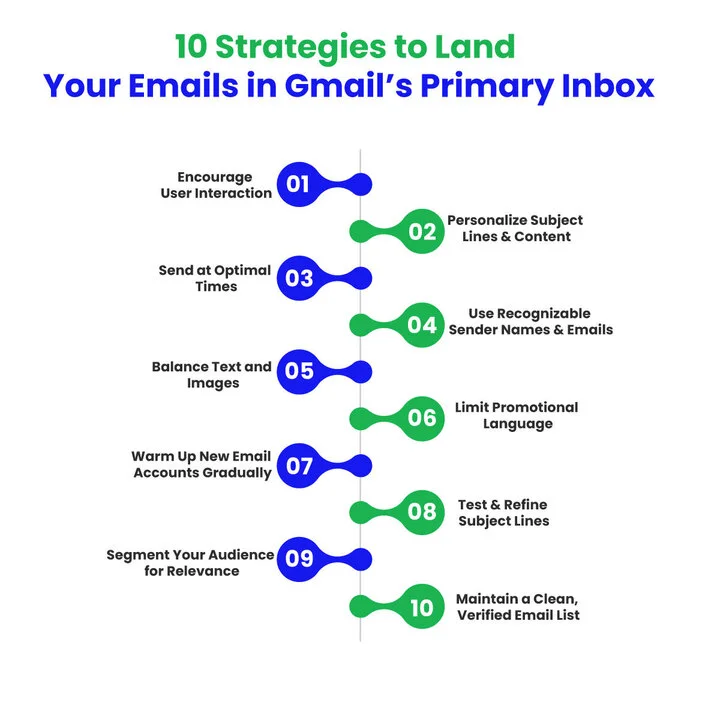
10 Proven Strategies to Land in Gmail’s Primary Inbox
Getting your emails into Gmail’s primary inbox can feel tricky, but it’s not impossible. Businesses running email campaigns for effective marketing can make a significant difference in inbox placement and deliverability.
The following strategies are drawn from email marketing best practices for Gmail and real-world experience with improving engagement rates. Implementing these can help you avoid the Gmail promotions tab and ensure your messages reach readers where they’re most likely to be seen.
Keep reading; these tips will show you exactly how to improve your inbox placement and make your emails more effective.
1. Encourage User Interaction
Gmail favors emails that generate recipient engagement. Encouraging replies, clicks, or tab movement can strengthen signals, but these actions are optional suggestions; they’re signals Gmail may consider rather than strict rules.
Tips to improve interaction:
- Include a question or call to action to prompt replies.
- Inform recipients they can move messages to primary if they wish.
- Embed links or buttons that encourage meaningful clicks.
Example: At the end of a newsletter, you could add, “Move this email to your Primary inbox to never miss updates from us.” Small actions like these signal Gmail that your emails are wanted.
2. Personalize Subject Lines and Email Content
Personalized emails generally drive higher engagement, which reduces the chance of landing in Promotions. Address recipients by name, reference past interactions, or tailor content to their interests.
Example:
Instead of “Weekly Newsletter from Our Company,” try “Alex, here are your top tips for this week.”
3. Optimize Sending Times
Timing affects engagement. Emails sent when recipients are likely to check their inbox receive more opens and clicks. This indirectly signals Gmail that the message is valued.
Tips:
- Analyze your past campaigns to identify peak open times.
- Consider time zones if your audience is geographically spread out.
- Test different sending schedules to refine your approach.
Emails sent at optimal times get opened more frequently, strengthening your Gmail sender reputation over time.
4. Use Recognizable Sender Names and Email Addresses
Consistency in from names and email addresses builds recognition and trust. Frequent changes can confuse Gmail and subscribers, making it harder to land in the primary.
Example:
Stick with “Alex at [Company Name]” instead of alternating between “Support” and “Newsletter Team.”
Keep the sender email consistent to improve recognition and engagement.
This simple strategy is a strong signal for Gmail to classify your emails as relevant rather than promotional.
5. Balance Text and Images
Emails that are heavily image-based or have flashy designs often trigger Gmail’s promotions tab algorithm. Strive for a clean, mobile-friendly layout that balances text, images, and white space.
Tips:
- Avoid excessive images or tracking links.
- Use text to convey primary content; images should complement, not dominate.
Note: Gmail does not publish strict text-to-image ratios; these are inferred best practices.
Clear formatting makes your email feel more personal and less commercial, improving its chances of reaching the inbox.
6. Limit Promotional Language
Overuse of promotional words like “Buy now,” “Discount,” or “Limited offer” signals Gmail that the message is commercial. Focus on value-driven content that feels informative and helpful rather than purely promotional.
Example:
Instead of: “BUY NOW! 50% OFF TODAY!”
Use: “Here’s how to save on your subscription this month.”
Subtle language and a focus on usefulness improve email engagement signals and Gmail inbox placement.
7. Gradually Warm Up New Email Accounts
New domains or accounts sending high volumes of email too quickly can trigger Gmail’s filters. A careful email warm-up strategy gradually builds sender reputation, increasing the chance your messages land in the inbox.
Tips:
- Start with small batches of emails to your most engaged contacts.
- Increase volume slowly over weeks.
- Monitor engagement metrics to adjust sending strategy.
This approach helps Gmail recognize your emails as trustworthy rather than spammy or promotional.
8. Test and Refine Subject Lines
Subject lines are one of the strongest factors affecting email open rates. A/B testing allows you to identify which wording drives higher engagement and helps Gmail classify your emails as relevant.
Example:
- Test: “Your weekly newsletter is here” vs. “Top tips for your week, Alex”
- Measure opens, clicks, and reply rates to find the better performer.
Engaging subject lines improve email engagement signals, which in turn affect inbox placement.
9. Segment Your Audience for Relevance
Segmenting your email list ensures content matches subscriber interests, increasing interaction. Higher engagement tells Gmail that your emails belong in the inbox instead of promotions.
Tips:
- Segment by past behavior, purchase history, or geographic location.
- Send personalized content instead of generic bulk messages.
- Track which segments generate the most engagement to refine future campaigns.
Relevant emails naturally get higher open and click rates, which strengthens your sender reputation in Gmail.
10. Maintain a Clean, Verified Email List
A verified and active email list reduces bounces, spam complaints, and unsubscribes, all important for email deliverability and reaching the primary inbox.
Example: Removing invalid addresses regularly keeps your list healthy and improves your inbox placement rate, ensuring your messages reach the intended audience consistently.
Don’t Let a Dirty List Sabotage Your Inbox Verify your list to stop Gmail from routing your emails to Promotions or Spam.
How Emailverify.io Helps Improve Gmail Inbox Placement
Landing emails in Gmail’s Primary inbox depends not just on best practices but also on the tools you use to maintain list quality. Using a reliable verification service like Emailverify.io ensures your contacts are valid, keeping your emails in the inbox where subscribers will actually see them.
Let’s look at how Emailverify.io can help you protect your sender reputation, reduce bounces, and get more emails into the Primary inbox.
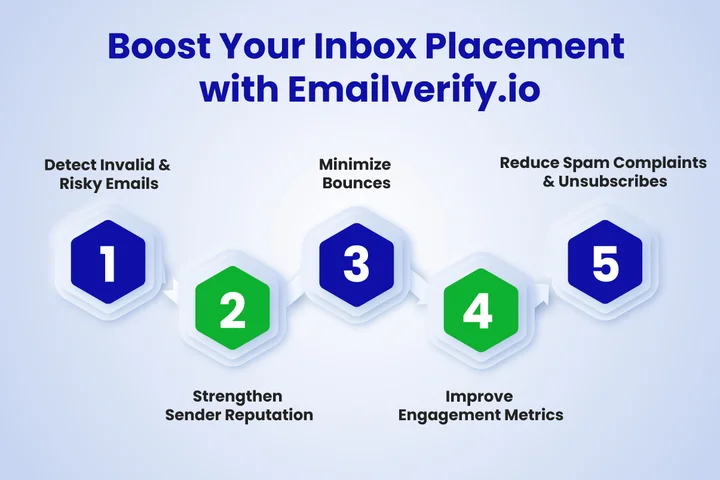
1. Detects Invalid and Risky Emails
Emailverify.io scans your list for invalid, disposable, or role-based emails that could trigger bounces or spam complaints. Every bounce impacts your inbox placement rate, signaling Gmail that your emails may not be wanted.
Emailverify’s real-time API lets you verify addresses instantly during sign-up or onboarding, preventing bad data from entering your list in the first place.
2. Improves Sender Reputation
By removing risky addresses, you maintain a strong sender reputation in Gmail, which is critical for Gmail inbox placement. A verified list reduces spam complaints and improves long-term email deliverability.
Example: Sending 10,000 emails to a clean, verified list versus an unverified one can result in a significantly higher percentage landing in primary, boosting open rates and engagement.
3. Minimizes Bounces
Bounced emails are one of the main factors that can harm your inbox placement. Hard bounces indicate invalid or inactive addresses, which can lower your sender reputation and increase the chances of future emails landing in promotions or Spam.
How Emailverify.io helps: Our bulk email verification handles high-volume campaigns quickly, ensuring operational efficiency without slowing your workflow or increasing costs.
4. Improves Engagement Metrics
A verified list increases the likelihood that emails are opened, clicked, and replied to, key user interaction signals for Gmail.
By ensuring your list contains real, active recipients, EmailVerify.io directly improves the quality signals Gmail uses to evaluate placement.
5. Reduces Spam Complaints and Unsubscribes
Sending to low-quality or inactive addresses can increase spam complaints and unsubscribes, both of which negatively impact inbox placement.
Emailverify.io continuously monitors risk patterns, helping you prevent compliance issues and maintain ESP thresholds, protecting both inbox placement and operational costs.
Final Takeaways to Reach Gmail’s Primary Inbox
Getting your emails into Gmail’s primary inbox is all about combining smart strategies, consistent engagement, and a clean, verified email list.
Understanding how Gmail sorts messages, optimizing your subject lines, and fine-tuning your sending habits can all make a meaningful difference in Gmail inbox placement and overall email deliverability.
Remember this: emails that feel personal, reach verified recipients, and invite interaction are far more likely to land in the inbox. Keep an eye on engagement, clean your list regularly, and adjust your approach based on what actually works for your audience.
If you want to see real results, start by verifying your email list and applying the strategies outlined in this guide.
Consistent, small improvements can dramatically boost your inbox placement, engagement, and open rates over time!
Frequently Asked Questions (FAQs)
2. Does the Gmail Promotions Tab Affect Email Deliverability?
Indirectly, yes. Emails consistently landing in promotions may receive lower engagement, which Gmail uses to assess relevance. Low engagement can reduce sender reputation and impact future inbox placement.
3. Why Do Emails Go to the Gmail Promotions Tab?
Gmail uses algorithms to classify emails based on content, sender reputation, and user interaction. Messages that appear commercial or contain promotional language are usually routed to promotions, while personal or highly engaging emails are more likely to appear in the primary inbox.
4. Can Using Multiple Domains Impact Gmail Inbox Placement?
Yes. Each domain builds its own sender reputation in Gmail. Sending from multiple or new domains without proper warm-up and authentication can lower trust and push emails toward promotions or spam.
5. How Does List Verification Affect Primary or Promotions Placement?
Sending to invalid or inactive addresses increases bounces and reduces engagement, both of which Gmail uses to classify emails. Verifying your list with an effective tool removes risky addresses, protects sender reputation, and improves the likelihood that messages reach the Primary inbox.
6. What Are Common Mistakes That Trigger Gmail’s Promotions Tab?
Common triggers include heavy promotional wording, image-heavy emails, too many links, generic subject lines, and low user engagement. Sending the same message to an unsegmented list also increases the chances of landing in the promotions tab.
Stop Fighting the Gmail Algorithm Alone and Start Landing in the Primary Inbox Today.


