


You launch a signup form. Everything looks fine, polished, and ready to go.
Then the submissions start coming in… and half of them are junk.
[email protected]
hello@ @company
name@domain
You glance at the logs. Something’s off. But what?
A 2025 study by Emailchef and TurboSMTP analyzed over 500,000 email addresses collected through online forms. The results showed:
- 22% were invalid emails
- 15% contained typos
- 7% belonged to abandoned
- or inactive accounts.
That’s a lot of invalid emails slipping through… breaking workflows, inflating bounce rates, and frustrating users.
The real culprit is often hidden. It’s the small pattern that checks emails behind the scenes: email regex validation. Developers rely on it to catch errors before they hit the system.
Some use a simple email regex and let mistakes slip. Others go too strict and block legit users. Both backfire.
In this guide, we’ll cover everything about regex for emails: basic and advanced patterns, common pitfalls, and best practices so you can handle email validation with confidence.
Table of Contents
What Is Email Validation, And Is It Important?
Email validation checks if an email address entered by a user is correctly formatted and likely deliverable. It stops bad data from slipping into your system, reduces bounce rates, and keeps workflows running smoothly.
Email Validation Layers
Effective validation happens in two layers: Client-side validation and Server-side validation.
| Validation Layer | When It Happens | Key Tools | What It Catches |
|---|---|---|---|
| Client-side validation | As the user types or submits the form | JavaScript functions, HTML5 input type="email", React Formik/Yup | Missing @ Spaces Invalid characters Obvious typos |
| Server-side validation | After form submission | Python re module, PHP preg_match, Node.js validator.js, email validation APIs | Malformed emails Edge cases, Malicious input, Inactive or abandoned addresses International characters |
Why Is Email Validation Important For Businesses?
- Keeps systems stable and bounce rates low
- Lets users complete forms without frustration
- Avoids pitfalls like simple patterns or ignoring international formats
- Reduces invalid data & improves deliverability by limiting bounced emails
What Is The Anatomy Of An Email Address?
Before we move on to email validation regex, let’s first understand what makes up an email. Knowing the structure ensures your regex email pattern catches errors without blocking legitimate addresses.
An email address has three main components:
| Part | Description | Validation Considerations |
|---|---|---|
| Local part | The section before @ | It can include: Letters Numbers Dots Underscores special characters Watch for quoted string email cases. |
| @ symbol | Separates local and domain parts | Must appear exactly once Missing or multiple @ signs are common mistakes |
| Domain and TLD | The section after @, like example.com | Must follow valid domain rules Support Unicode email and subdomains TLDs should be checked to avoid typos or invalid domains. |
Example
// Validate the local part of an email
const localPartPattern = /^[a-zA-Z0-9._%+-]+$/;
console.log(localPartPattern.test(“john.doe”)); // true
console.log(localPartPattern.test(“john..doe”)); // false
This snippet reinforces the concept of the local part and gives developers a simple, practical illustration before moving to full email regex patterns.
Important Notes For Developers
- Emails can include international characters, so consider non-Latin email validation and multilingual email regex.
- Subdomains and unusual TLDs are increasingly common. Therefore, your patterns must account for them.
- Small mistakes in the local part, like misplaced dots, are frequent and often cause delivery failures.
What Is Regex And Why Is It Essential For Email Validation?
Regex, short for regular expressions, is a sequence of characters that defines a search pattern. Developers use it to match, find, and manipulate strings, making it essential for pattern-matching email addresses. By understanding regex, you can turn vague validation rules into precise, actionable checks.

Note: Regex only validates the structure of an email address, and does not confirm if it’s a real user’s address or a disposable email address. That’s why regex is best used as the first filter, before deeper email verification steps.
Regex Basics
| Concept | What It Does | Example |
|---|---|---|
| Literals | Match exact characters | /abc/ matches "abc" |
| Character Classes | Match sets of characters | /[a-z]/ matches any lowercase letter |
| Quantifiers | Specify how many times a pattern occurs | /a+/ matches one or more "a"s |
| Anchors | Match positions in a string | /^a/ matches "a" at the start, and /a$/ at the end. |
| Metacharacters | Special symbols for patterns | \d matches any digit, \w matches word character |
Example
// Match a simple pattern of letters only
const pattern = /^[a-zA-Z]+$/;
console.log(pattern.test(“hello”)); // true
console.log(pattern.test(“hello123”)); // false
This tiny snippet shows how regex can identify if a string fits a specific pattern or not.
Why Is Regex Important For Email Validation?
Regex is essential for email validation because it catches invalid addresses, fixes typos, handles unusual domains and subdomains, reduces bounce rates, and ensures both client-side and server-side checks are reliable, all while preventing common mistakes that can disrupt workflows.
Worried About Invalid Emails Slipping Through Your Forms?
Verify every email before it hits your database with real-time checks.
How To Build Your First Email Regex?
Once you understand the components of an email, the next step is creating a pattern that catches mistakes without blocking legitimate addresses. Validating email regex ensures your forms capture correct emails and reduces bounce rates.
What Does A Simple Regex Look Like?
A simple regex handles most valid emails without adding unnecessary complexity. It focuses on the local part, the @ symbol, and the domain structure. Ideal for standard signup forms.
Example
// Basic email regex
const simpleEmailPattern = /^[a-zA-Z0-9._%+-]+@[a-zA-Z0-9.-]+.[a-z]{2,}$/i;
console.log(simpleEmailPattern.test(“[email protected]”)); // true
console.log(simpleEmailPattern.test(” john..doe@ @example”)); // false
How This Pattern Works:
- Local part: letters, numbers, dots, underscores, hyphens
- Domain: letters, numbers, subdomains
- TLD: at least two characters
The above email regex pattern handles most common emails without overcomplicating your validation logic.
How To Test Email Regex?
Testing ensures your regex correctly differentiates valid and invalid addresses. You want to catch typos, unusual domains, and edge cases before they reach your system.
Sample Test Cases
const emails = [
“[email protected]”,
“[email protected]”,
“[email protected]”,
“missingatsign.com”
];
emails.forEach(email => {
console.log(simpleEmailPattern.test(email));
});
Tools For Testing Your Email Regex
Testing your email regex pattern is more than checking one or two examples. Using the right tools helps catch edge cases, typos, and unusual domains before users submit them.
Proper testing ensures your best email regex works reliably. The following tools can help you identify common mistakes like misplaced dots, multiple @ symbols, or invalid TLDs:
- regex101 tester: Visualize matches and spot pattern mistakes quickly
- JavaScript test method / Python re module: Run regex directly in your code
- Unit tests with Jest/Pytest email tests: Automate checks to prevent errors
- Email regex checker: Test patterns against sample emails for accuracy
Essential Steps For Testing Email Regex
Testing is more than running examples. A solid process helps you:
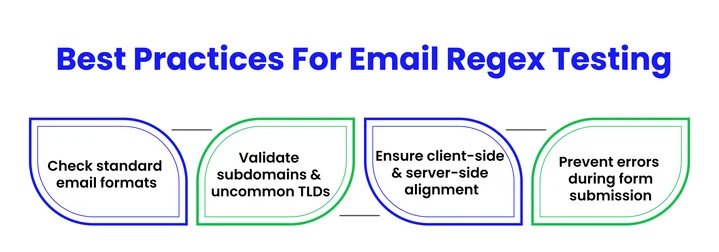
Combining a simple email regex with structured testing lays the foundation for building more advanced patterns later.
Stop Edge Cases From Breaking Your Signup Flows!
What Makes An Email Regex Truly Advanced?
When simple patterns aren’t enough, advanced regex ensures even tricky emails pass or fail correctly.
Complex domains, special characters, and international addresses require more precise validation to reduce errors and improve deliverability.
Simple Regex vs Advanced Regex vs API: A Comparison
There are several ways to validate email addresses, each with its own trade-offs. The table below helps you quickly see the differences between simple regex, advanced regex, and email verification APIs.
| Approach | Pros | Cons | Best Use Case |
|---|---|---|---|
| Simple Regex | Quick to implement, covers most emails | Misses edge cases, may reject valid addresses | Basic signup forms, low-risk scenarios |
| Advanced Regex | Handles complex domains, special characters, and some international emails | Harder to maintain, slower performance | Forms needing stricter validation without external services |
| Email Verification API | Confirms deliverability in real time | External service, cost may apply | Critical forms, marketing campaigns, high-value signups |
To handle these complexities effectively, we’ll dive deeper into advanced regex patterns, focusing on three key areas: RFC 5322 references, handling edge cases, and maintainability tips.
RFC 5322-Compliant Regex
RFC, short for Request for Comments, defines the formal syntax for valid email addresses. Referencing RFC 5322 helps catch edge cases that basic email regex patterns miss and improves compatibility with legitimate addresses.
That said, fully implementing every RFC rule is rarely practical in production, so most systems apply a balanced subset rather than strict compliance.
Key Components:
- Local part: letters, numbers, dots, underscores, quoted strings
- @ symbol: exactly one required
- Domain and TLD: supports subdomains and new TLDs
Example:
const rfc5322Pattern = /^((?:[a-zA-Z0-9!#
%&’+/=?^_`{|}~-]+)|”(?:[\x01-\x08\x0b\x0c\x0e-\x1f\x21\x23-\x5b\x5d-\x7f]|\[\x01-\x09\x0b\x0c\x0e-\x7f])”))@((?:a-zA-Z0-9?.)+a-zA-Z0-9?|[(?:(?:25[0-5]|2[0-4][0-9]|[01]?[0-9][0-9]?).){3}(?:25[0-5]|2[0-4][0-9]|[01]?[0-9][0-9]?|[a-zA-Z0-9-][a-zA-Z0-9]:(?:[\x01-\x08\x0b\x0c\x0e-\x1f\x21-\x5a\x53-\x7f]|\[\x01-\x09\x0b\x0c\x0e-\x7f])+)])$/i;
console.log(rfc5322Pattern.test(“[email protected]”)); // true
console.log(rfc5322Pattern.test(“[email protected]”)); // false
How To Handle Edge Cases In Email Validation?
Even advanced patterns can miss unusual formats. Edge cases like long domains, uncommon TLDs, special characters, or international emails need explicit handling to prevent invalid addresses from slipping through.
Edge Cases To Consider:
- Emails with long subdomains
- New or rare TLDs
- International or non-Latin characters
- Quoted strings and special characters
Readability And Maintainability Tips For Complex Regex
Complex patterns can be hard to read and update. Breaking them into sections, adding comments, or using modular patterns keeps your email format regex manageable.
Best Practices:
- Split local part, domain, and TLD into separate patterns
- Comment on each component for clarity
- Test with multiple cases
- Use online tools to visualize matches
Example:
/// Local part
const localPart = /^[a-zA-Z0-9._%+-]+$/;
// Domain
const domain = /^[a-zA-Z0-9.-]+\.[a-z]{2,}$/;
// Combined for validation
const advancedEmailPattern = new RegExp(`${localPart.source}@${domain.source}`, ‘i’);
What Are The Common Mistakes In Email Regex Validation?
Email regex often breaks not because developers do not understand regex, but because small assumptions sneak in. These patterns may look fine on the surface, yet fail real users in real forms.
Below are the most common mistakes that show up when teams regex validate email inputs at scale.

Mistake #1: Overly Simple Patterns
Simple patterns are tempting because they look clean and easy to maintain. But they ignore how flexible real email formats can be, which leads to false rejections during email syntax validation.
Example
A basic email address regex like this:
/^\S+@\S+.\S+$/
This rejects valid emails such as [email protected] or quoted locals like “user,name”@domain.com. It also ignores core rules from RFC 5322 regex, including IP-based domains like user@ [IPv6:2001:db8::1].
Mistake #2: Too Strict Or Overly Complex Regex
On the other extreme, some patterns try to match every rule at once. These massive expressions slow performance and still manage to block legitimate addresses, especially when handling new TLDs or edge-valid formats.
Example
A fully RFC-compliant pattern can exceed hundreds of characters. In practice, this often rejects valid emails such as 64-character local parts or newer domains like .museum. Without proper Unicode handling, it also fails international email regex cases like café@épicerie.fr.
Mistake #3: Character Class Errors
Small character mistakes cause big validation gaps. Many regex patterns forget allowed symbols in the local part, which breaks everyday addresses that users expect to work.
Example
Excluding characters like !#$%&’*+/=?^_`{|}~ leads to unnecessary rejections. Missing escapes for dots in domains or mishandling plus addressing breaks emails like [email protected].
Mistake #4: Language-Specific Regex Traps
Regex behaves differently across languages, and blindly copying patterns can cause subtle bugs. This often shows up when developers reuse examples without adapting them to the runtime.
Example
In JavaScript, forgetting the case-insensitive flag rejects [email protected]. In Python, failing to use raw strings breaks backslashes. PHP adds another layer, where preg_match requires double escaping and silently alters copied patterns.
Mistake #5: Functional and Security Issues
Regex only checks structure, not reality. Confusing syntax validation with deliverability is a critical mistake in form input validation.
Example
An address like [email protected] passes regex but still bounces. Missing length checks allow locals with lengths over 64 characters or domains with lengths over 255 characters. Unescaped input can also trigger catastrophic backtracking risks.
Mistake #6: Testing Oversights
Most validation bugs survive because patterns are never appropriately tested. A few happy-path examples are not enough for reliable testing of email regex patterns.
Example
Addresses like @no-local, [email protected], or user@domain expose weak logic. Case sensitivity and trailing dots are often skipped during an email regex test, leading to silent failures in production.
Struggling With Invalid Emails Affecting Your Deliverability?
Improve your form accuracy and prevent bad data from slipping through.
What Are The Best Practices For Email Validation Regex?
When we talk about email validation, it’s way more than just writing a single pattern. Effective regex email validator practices span multiple areas, from core implementation to UX, security, and performance.
By following the tips we’ve mentioned below, developers can ensure patterns are accurate, performant, and maintainable across different systems.

Practice #1: Core Implementation Practices
These practices form the foundation for a reliable email regex for form validation. Simple patterns aren’t enough if they fail in real-world scenarios, so starting with the right structure is key.
Here’s a breakdown of essential considerations for the core regex pattern:
Start With A Simple, Proven Base
Using /^[^\s@]+@[^\s@]+.[^\s@]+$/ is a commonly used baseline that balances coverage and simplicity for most form validation scenarios. This base ensures basic pattern matching email works without rejecting most legitimate addresses.
Case Sensitivity
Normalize inputs with toLowerCase() or use the /i flag. This prevents mismatches for addresses like [email protected], ensuring consistent validation across clients.
Length Limits
Local-part ≤64 characters, domain ≤255, full email ≤254. Adhering to RFC 5322 length limits avoids database errors and prevents issues with MTAs handling long addresses.
Special Characters
Include !#$%&’*+-/=?^_`{|}~ and plus addressing ([email protected]). Neglecting these causes false rejections in up to 20% of cases.
Domain Rules
No leading or trailing hyphens, no consecutive dots, and TLD ≥2 characters. Ensures email syntax validation is accurate and prevents invalid addresses from passing.
Quoted Local Parts
Support “user name”@domain.com where allowed. Ignoring this can block legitimate addresses with spaces or unusual characters.
Comments & IP Literals
Handle (comment) in local-part or [IPv4/IPv6] if your use case requires it. This ensures compliance with advanced RFC 5322 regex rules.
Practice #2: Testing And Maintenance Practices
Regex alone isn’t enough. Structured testing and maintenance keep patterns reliable and reduce common email regex mistakes.
After establishing core practices, make testing and maintenance a routine part of the workflow:
Test Real Edge Cases
Include subdomains, Unicode emails (café@épicerie.fr), malformed inputs, or missing local parts. Testing multiple scenarios ensures robust advanced email regex patterns are explained.
Unit Tests
Use Jest or Pytest with arrays of valid and invalid emails. Unit testing guarantees that changes don’t break your validation logic over time.
Named Groups
Using named groups like /(?[^\s@]+)@(?.+)/ makes debugging easier and helps developers understand the local part domain TLD structure in complex patterns.
CI/CD Automation
Run tests on every pull request. This integrates testing email regex patterns into development pipelines and catches issues early.
Version Control
Store patterns in constants, e.g., EMAIL_REGEX_V2 = /…/, so updates are traceable and maintainable.
Regex Debuggers
Tools like Regex Tester Online Free help visualize matches, share patterns, and collaborate efficiently with teams.
Practice #3: UX And Security Integration
Validation must protect systems while guiding users. Combining usability and security ensures the pattern is practical and safe.
Client And Server Hybrid
Use frontend regex along with backend tools like the validator npm package to ensure a double layer of protection against invalid emails.
Clear Error Messages
Instead of a generic regex fail, guide users with messages like “Needs @ and domain.tld”. This improves form completion and reduces frustration.
Input Escaping
Escape inputs using htmlspecialchars() in PHP or textContent in JS. It prevents malicious inputs from causing injection attacks.
HTML5 Input
Pair input type=”email”with a custom pattern attribute to enforce structure. For example:
input pattern=”^[a-zA-Z0-9._%+-]+@[a-zA-Z0-9.-]+.[a-z]{2,}$” type=”email”title=”Enter a valid email address”
HTML5 provides baseline validation, while regex handles edge cases.
Accessibility & Debounce
Use ARIA live regions to announce errors for screen readers. Add a 300 ms debounce for input events to avoid repeated checks on every keystroke.
Practice #4: Performance And Practical Alternatives
Even with strong patterns, regex alone can’t guarantee deliverability or efficiency. Optimize patterns and combine with other checks.
Avoid Backtracking
Non-greedy quantifiers (+? vs +) prevent catastrophic performance issues in high-volume scenarios.
Separate Syntax From Deliverability
Combine regex with double opt-in or an email verification service for more reliable results.
TLD Updates
Regularly check the IANA TLD list to handle new or unusual domains like .museum or .xn--p1ai.
Compile & Cache Patterns
Reuse compiled regex objects in Node.js or Python to reduce runtime overhead.
Benchmarking
Test validation speed on large volumes (10k+ emails/sec) to catch slow patterns early.
Fallback Strategy
Implement a cascade: HTML5 → regex → API verification. This ensures validation works even if one layer misses an edge case.
Practice #5: Language-Specific Email Regex Implementation
Different languages handle regex differently. Proper implementation prevents subtle bugs and ensures consistent validation results.
| Language | Regex Pattern Example | Usage Tips |
|---|---|---|
| JavaScript | /^[a-zA-Z0-9._%+-]+@[a-z0-9.-]+\.[a-z]{2,}$/i | Use test() and cache globally. Works well for JavaScript email validation regex. |
| Python | r'^[a-zA-Z0-9._%+-]+@[a-z0-9.-]+\.[a-z]{2,}$' | Raw strings prevent escape issues. fullmatch() ensures a strict Python regex for email validation. |
| Java | "^[a-zA-Z0-9._%+-]+@[a-z0-9.-]+\\.[a-z]{2,}$" | Double backslashes for escaping. Pattern.compile() + Java Pattern Matcher. |
| PHP | /^[a-zA-Z0-9._%+-]+@[a-z0-9.-]+\.[a-z]{2,}$/' | Single quotes; use preg_match() for precise matches. |
| Node.js | Same as JS | Combine with the validator npm package or optional MX lookup via APIs like the MailerCheck API. |
Frequently Asked Questions (FAQs)
2. How Often Should I Update My Email Regex Patterns?
Email standards and TLDs evolve. It’s a good practice to review patterns quarterly or whenever new TLDs appear, ensuring your advanced email regex patterns remain accurate and compatible.
3. Are There Tools to Make Testing Complex Email Regex Easier?
Yes, tools such as regex testers, unit testing frameworks (Jest/Pytest), and email validation libraries help visualize matches, catch edge cases, and automate testing for robust validation.
Conclusion: Taking Email Regex Validation Further
This guide covered everything from the basics of validating email with regex to advanced explained patterns, common pitfalls, testing strategies, and language-specific implementations. By understanding the local part, domain, and TLD, developers can build patterns that catch errors without blocking legitimate addresses.
Are your current email validation patterns missing edge cases or causing false rejections?
Now it’s time to apply these practices: refine your regex step by step, test thoroughly with real-world cases, and use tools like regex tester online free or an email validation library to ensure every submission is accurate, reliable, and ready for production.
Ready To Turn Regex Validation Into Real Email Accuracy?
Combine advanced regex patterns with email verification to catch every valid email and block errors.


