

Email deliverability is one of the most misunderstood parts of email marketing because most of what determines success happens long before a campaign is measured.
It’s all about where your emails end up. Messages that never reach the inbox don’t generate opens, clicks, or revenue, even if they show as “delivered” in your ESP.
What makes email deliverability difficult is how quietly it breaks. Issues build over time: list quality declines, bounced emails increase, engagement weakens, or authentication signals become inconsistent. By the time performance drops, the underlying problem has usually been active for weeks.
That’s why email deliverability is a system of dependencies. To control it, you need a clear structure that shows where problems originate and how they cascade.
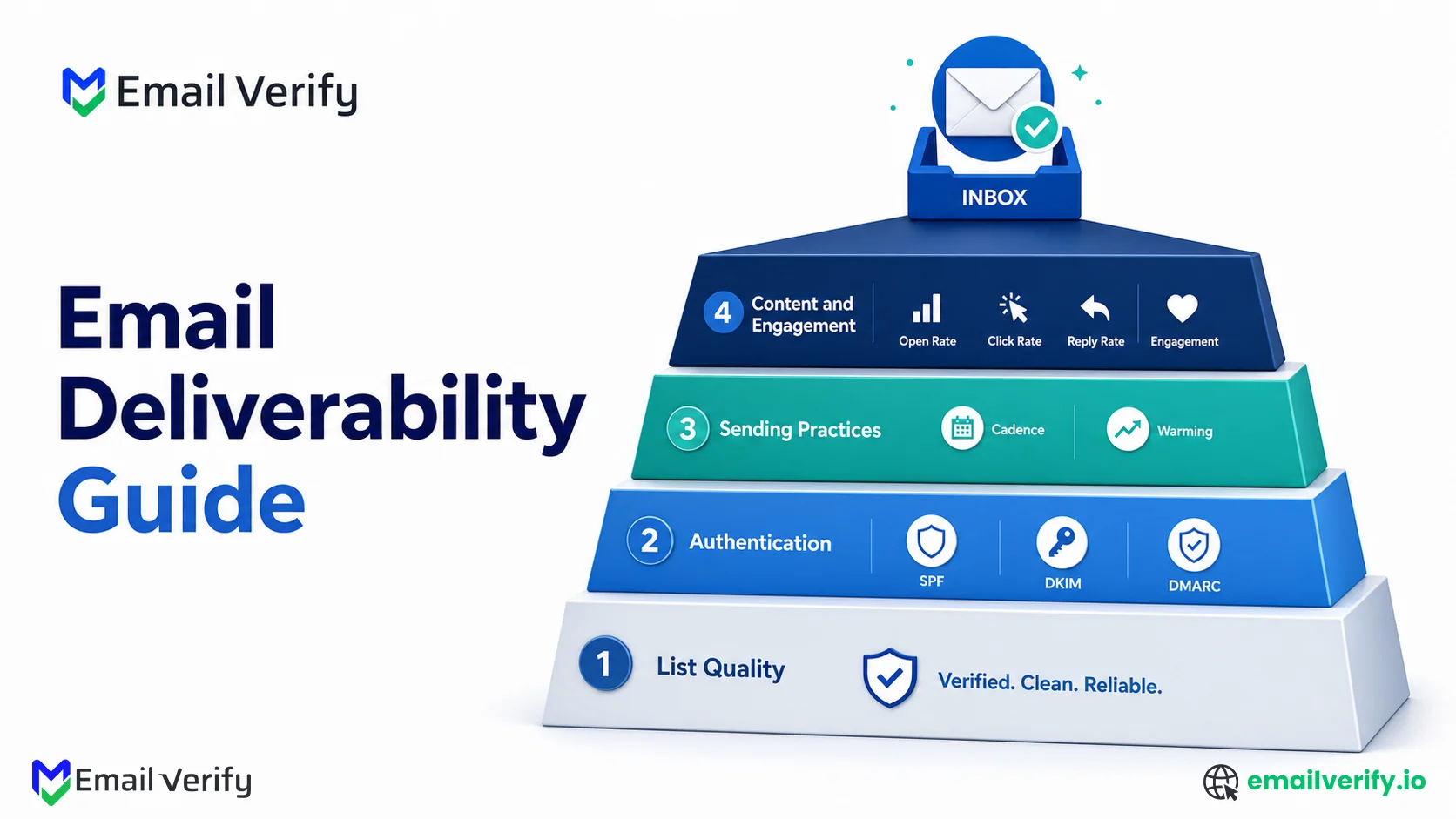
This guide breaks email deliverability into four core layers: list quality, authentication, sending practices, and engagement, so you can diagnose issues faster and improve inbox placement with precision.
By the end of this guide, you’ll understand exactly how email deliverability works, where it breaks, and what steps you need to take to consistently land in the inbox.
Email deliverability is the process of ensuring your emails land in the inbox, not the spam folder or promotions tab. It goes beyond “email delivery,” which only confirms that a message was accepted by the receiving server.
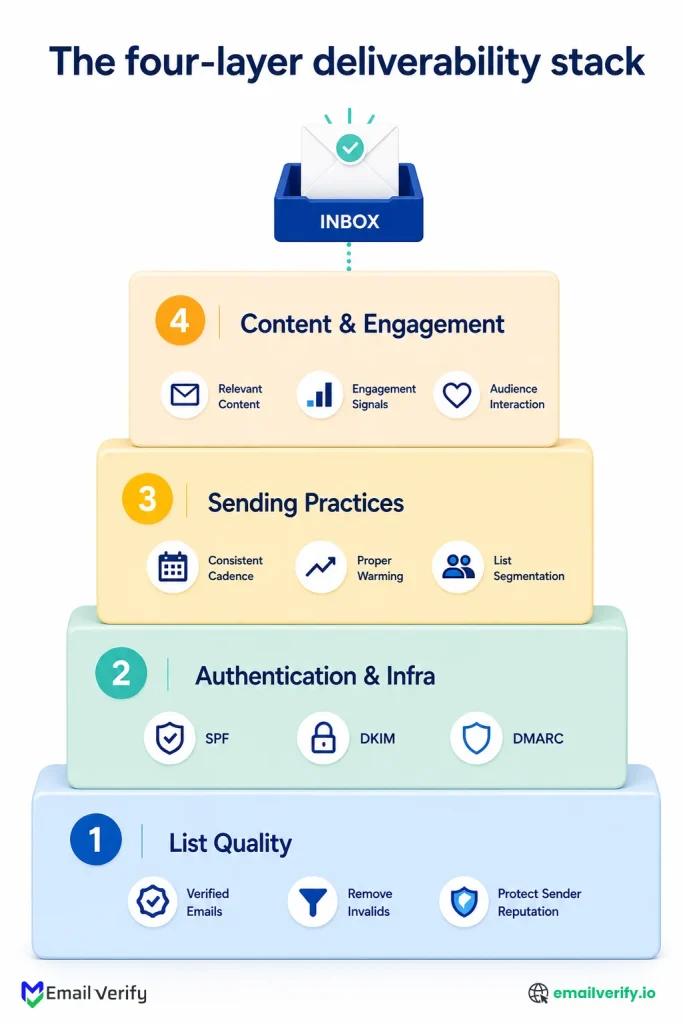
True deliverability depends on four core layers:
- List quality (verified, clean, permission-based data)
- Authentication & infrastructure (SPF, DKIM, DMARC, domain setup)
- Sending practices (warming, cadence, segmentation)
- Content & engagement (relevance, user interaction signals)
If any one layer is weak, inbox placement suffers, even if everything else is configured correctly.
The most common failure point is list quality. Unverified or outdated email data increases bounce rates and damages sender reputation, which directly reduces inbox placement across Gmail, Yahoo, and Outlook.
Table of Contents
What Does Email Deliverability Mean?
Email deliverability is the percentage of your email that lands in the inbox where the recipient will see it. The phrase implies a binary, delivered or not, but in practice the question is always more nuanced.
Did the receiving server accept the message? That’s delivery.
Did it land in the primary inbox? That’s deliverability.
Did the recipient see it, open it, and engage with it? That’s the engagement layer that feeds back into deliverability for next time.
The reason deliverability matters is that delivery alone doesn’t translate to value. A message accepted by Gmail but routed to the spam folder produces zero opens, zero clicks, and zero conversions but counts as “delivered” in your ESP’s reporting. This is why following email deliverability best practices becomes essential for maintaining consistent inbox placement and performance.
Delivery vs. Inbox Placement vs. Deliverability: What Each Term Actually Means
Three terms you’ll see used interchangeably that mean different things:
| Term | What It Means | When To Use It |
|---|---|---|
| Delivery | The receiving server accepted the message (no bounce). | Reported by your ESP as deliveries minus bounces. |
| Inbox placement | Where the message ended up: inbox, Promotions, spam, etc. | Measured by seed-list testing or panel data. |
| Deliverability | The overall practice of optimizing inbox placement. | The strategic and operational discipline. |
When your ESP shows you a 99% delivery rate, that does not mean 99% inbox placement. It means 99% of your sends weren’t hard-bounced by the receiving server. The share that landed in spam or Promotions tab is invisible in standard ESP reporting. Real inbox placement requires either seed-list testing or panel data; it’s not in your ESP dashboard.
The Four Layers of Email Deliverability: A Complete Framework
Once you’ve worked on enough deliverability problems, a pattern emerges. Every issue lives at one of four layers, and the layers are dependent: a problem at a lower layer cascades upward, but a problem at a higher layer doesn’t necessarily imply anything is broken below it. This is the model that makes the whole topic learnable, because it tells you where to look first when something goes wrong.
| Layer | Name | Components |
|---|---|---|
| 1 | List Quality | Verification, hygiene, opt-in discipline, decay management, and suppression lists. |
| 2 | Authentication & Infra | SPF, DKIM, DMARC, dedicated/shared IP choice, sending domain configuration, BIMI, MTA-STS, TLS-RPT. |
| 3 | Sending Practices | Warming schedule, send cadence, segmentation, complaint handling, list growth rate, pacing. |
| 4 | Content & Engagement | Subject lines, message structure, frequency, relevance, opens/clicks/replies, the engagement-to-suppression cycle. |
Read the table from the bottom up. You can have the most engaging content in the world (Layer 4), but if your authentication is broken (Layer 2) or your list is full of disposable addresses (Layer 1), it doesn’t matter; providers won’t deliver enough of your mail to engaged subscribers to give the content layer a chance to work.
The opposite is also true. A clean list with proper authentication and disciplined sending will tolerate a fair amount of mediocrity at the content layer, because the underlying signals are healthy. Mailbox providers are looking for sustained patterns, not one-time perfection.
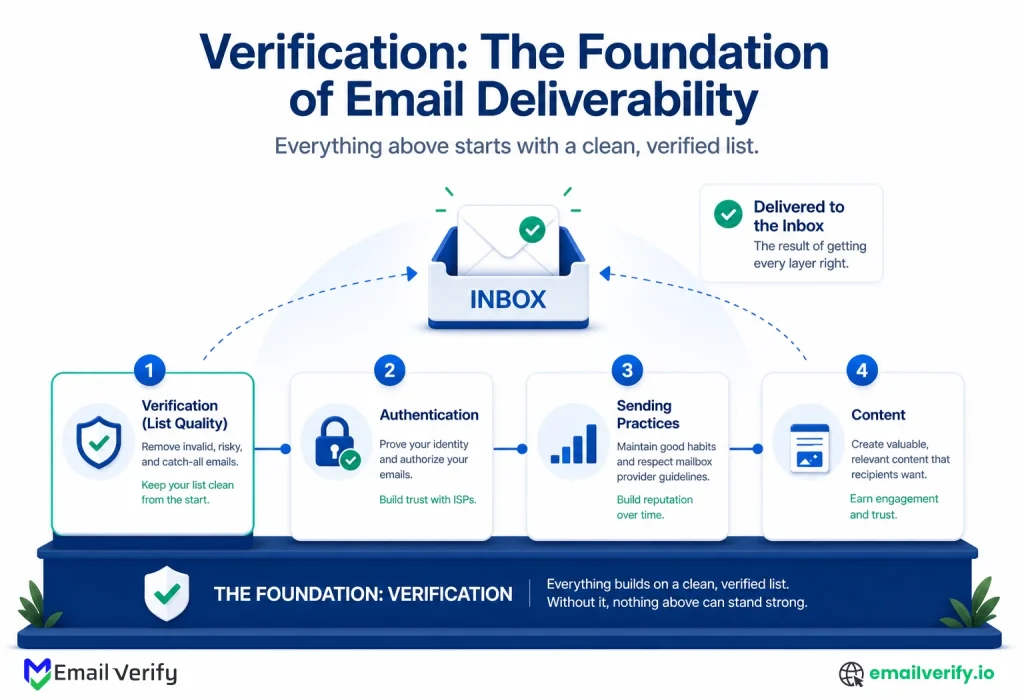
The most important framing in this entire article: deliverability is what you do; verification is the foundation it rests on. The four-layer stack makes that explicit. List quality is Layer 1, the foundation. The other three layers are the practice. Building the practice on a weak foundation is the most common reason deliverability investments don’t pay off.
Layer 1: List Quality, Why It’s the Foundation of Email Deliverability
List quality is the foundation because every other layer is downstream of it. Authentication can be perfect, warming can be flawless, and content can be excellent. None of that matters if you’re sending to addresses that don’t exist or have decayed since they were first verified.
What Does “Quality” Mean at the List Layer?
A high-quality list has four properties:
- Addresses are real (verified to deliver)
- Addresses are wanted (collected with explicit consent)
- Addresses are current (decay is actively managed)
- Bad signals are removed (hard bounces and complainers go on suppression lists immediately).
Lose any of those four and you start producing engagement signals that mailbox providers read as low-quality outreach.
The Most Common List Quality Failure Modes
| Failure Mode | What Happens | Fix |
|---|---|---|
| Unverified imports | Bounce rate spikes, reputation degrades. | Verify every imported list before sending. |
| No real-time verification at signup | Typos and disposable addresses enter the database. | API verification on every form submission. |
| Stale lists with no re-verification cadence | Decayed addresses accumulate, and the bounce rate creeps up. | Bulk re-verification every 3–6 months. |
| Broken bounce and complainer suppression | The same bad addresses are re-entered. | Hard suppression list, enforced at the ESP level. |
| Buying or scraping lists | Bad addresses, no consent, and complaint rates spike immediately. | Don't. Use opt-in growth instead. |
| No catch-all handling strategy | All catch-all addresses are treated the same as deliverable. | Segment and warm catchalls separately. |
- Unverified imports: Bounce rate spikes; recycled spam traps.
- Old/Dormant segments: Decayed addresses; high “User Unknown” errors.
- Scraped/Purchased data: Spam trap hits; high complaint rates.
- Bot signups: Disposable addresses; fake engagement data.
Skipping verification at signup and trying to fix list quality later with bulk sweeps. Bulk cleanup works, but it’s strictly slower and more expensive than preventing bad data from entering in the first place. A real-time email checker at every signup form is one or two API integrations and prevents the slow drift that bulk runs have to chase.
Layer 2: Authentication and Infrastructure
Authentication is the layer that proves your mail is yours. Three protocols (SPF, DKIM, DMARC) work together to give mailbox providers a way to verify that a message claiming to come from your domain actually does. Without these, and without proper SMTP verification at the list layer, your mail is treated as untrusted by default.
SPF: Sender Policy Framework
SPF is a DNS TXT record that lists the servers authorized to send mail on behalf of your domain. When a recipient receives a message, it checks the sending IP against your SPF record. A pass means the IP is authorized; a fail means it isn’t, which is a strong signal of a forged sender.
DKIM: DomainKeys Identified Mail
DKIM is a cryptographic signature added to outgoing mail by the sending server. The receiving server pulls your DKIM public key from DNS and uses it to verify the signature. A pass means the message hasn’t been tampered with in transit and was signed by an authorized server.
DMARC: Domain-based Message Authentication, Reporting and Conformance
DMARC is the policy layer that tells receiving servers what to do when SPF or DKIM fails. It also enables aggregate reports back to the domain owner, so you can see which servers are sending mail in your name. A DMARC policy of “reject” tells receiving servers to drop unauthenticated mail outright; “quarantine” tells them to send it to spam; “none” is monitoring-only.
Example DNS records (illustrative, yours will differ):
Beyond the Big Three: BIMI, MTA-STS, TLS-RPT
Three newer standards are worth knowing about. BIMI (Brand Indicators for Message Identification) lets verified senders display a logo in the inbox. MTA-STS (Mail Transfer Agent Strict Transport Security) and TLS-RPT (TLS Reporting) handle in-transit encryption requirements; both are rapidly becoming expected for serious senders.
Dedicated vs. Shared Sending IPs: Which Should You Use?
If you’re sending from a major ESP, you’ll have a choice between dedicated and shared IPs. Dedicated IPs give you control over your own reputation; shared IPs amortize across many senders. If you’re under one million sends per month, shared is almost always the right choice.
Layer 3: Email Sending Best Practices
Sending practices are the operational behaviors that produce healthy reputation signals over time. This is the layer where most program-level fixes live, and it’s the layer that most teams have the most direct control over. The lower layers (list and auth) are infrastructure; this layer is daily discipline.
How to Warm a New Sending Domain or IP
New sending domains and IPs have no reputation. warming is the practice of starting with very low volume, sending only to highly engaged subscribers, and gradually ramping up over weeks. The goal is to produce strong engagement signals before the volume increases.
A typical warming schedule for a new domain
| Week | Daily Volume | Audience |
|---|---|---|
| 1 | 50–200 | Internal team and most engaged subscribers. |
| 2 | 500–1,000 | Top engagement decile. |
| 3 | 2,000–5,000 | Top quartile of engagement. |
| 4 | 10,000–20,000 | Top half of engagement. |
| 5+ | Ramp to full volume. | Steady cadence, broader audience. |
Send Cadence and Frequency: Finding the Right Balance
Cadence affects deliverability through engagement. Sending too often produces fatigue, declining open rates, and rising complaint rates; sending too rarely produces decayed addresses and recipients who don’t recognize you. The principle is: consistency over volume.
Why Does Segmentation Improve Deliverability?
Sending the same content to your entire list reduces relevance, which reduces engagement. Segmentation by behavior, lifecycle stage, or expressed preference produces higher engagement rates per send and protects deliverability across the whole program.
How to Handle Complaints and Bounces
Every spam complaint and hard bounce is a signal that should result in immediate suppression. Addresses on the suppression list should never re-enter sends through any path, including manual imports, list re-uploads, or CRM exports.
Managing List Growth Rate
Sustainable list growth is gradual, sourced from organic signups, and verified at entry. Sudden growth from imports or vendor lists is one of the fastest ways to trigger filtering scrutiny, even if all the addresses are otherwise valid.
Layer 4: Content and Engagement
Content sits at the top of the stack because it determines whether the underlying infrastructure produces value. Subscribers who open, click, reply, or move messages out of spam send positive signals. Subscribers who delete, ignore, mark as spam, or unsubscribe send negative ones.
What Inbox Placement Decisions Are Actually Based On
Inbox placement decisions today are driven primarily by engagement, secondarily by sender reputation, and only tertiarily by content scoring. The bigger signal is whether your past mail has been engaged with by similar recipients.
The Engagement Feedback Loop
Engagement creates a feedback loop. Recipients who open and click train the provider that your mail is wanted; recipients who ignore or complain train the opposite. This is why segmentation matters: sending to less engaged segments produces worse engagement signals.
Over time, the cumulative signal determines if new mail from you reaches the inbox or the Promotions tab. This is why segmentation matters: sending to less engaged segments produces worse engagement signals, which degrades deliverability for everyone, including the engaged segment.
Content Patterns That Help and Hurt Deliverability
| Pattern | Effect on Deliverability |
|---|---|
| Personalized, relevant content | Strong positive engagement signals. |
| Clear, single-purpose subject lines | Higher open rates; better engagement signals. |
| Explicit unsubscribe link, easy to find | Reduces spam complaints (which damage reputation). |
| Consistent sender name and "from" address | Builds recognition and trust over time. |
| Image-only emails with little text | Trips spam-pattern detection on some filters. |
| Heavy use of all-caps or exclamation marks | Triggers content scoring; modest negative effect. |
| URL shorteners and link redirects | Associated with phishing patterns; modest negative. |
| Inconsistent send-from name across campaigns | Confuses recipients; depresses engagement over time. |
If you have to optimize one thing for content-layer deliverability, optimize for relevance over polish. A personalized message with a typo will outperform a beautifully designed message that’s clearly batched-and-blasted. Mailbox providers can’t read the message, but the recipient’s engagement tells them everything they need to know.
The 2024–2026 Sender Rules: What Changed
Starting in February 2024, Gmail and Yahoo published explicit sender requirements for bulk senders, with enforcement increasing through 2024 and tightening further across 2025 and into 2026 .
Microsoft Outlook followed with similar requirements. The rules didn’t change the underlying model; they made the existing best practices into hard thresholds, with measurable consequences for crossing them.
The Core Requirements (Bulk Senders, 5,000+ Daily)
- Authenticate mail with SPF, DKIM, and DMARC.
- Maintain spam complaint rates below 0.3% (with 0.1% as the recommended target).
- Provide a one-click unsubscribe header (RFC 8058) in marketing mail.
- Honor unsubscribe requests within two days.
- Send mail only with valid forward and reverse DNS for sending IPs.
- Use TLS for connections to receiving servers.
Threshold benchmarks under the 2024–2026 rules:
| Metric | Healthy |
|---|---|
| Spam complaint rate | Below 0.1% |
| Hard bounce rate | Below 1% |
| Soft bounce rate | Below 3% |
| Unsubscribe rate | Below 0.3% |
| Spam trap hits | Zero ideally |
Treating the 0.3% spam complaint threshold as a hard ceiling. By the time you cross it, the damage is already done. The healthier target is below 0.1%, with active monitoring above 0.05%. Mailbox providers are looking at the trend, not just the current value, so a sustained drift toward 0.3% will produce filtering before you ever cross the line.
Email Deliverability Metrics: What to Track and What to Ignore
About four metrics actually matter for deliverability monitoring. The rest are useful for content optimization but don’t tell you whether your deliverability is healthy.
- Bounce rate (hard bounces / sends): The leading indicator of list quality. Above 2% sustained is a problem.
- Complaint rate: The most direct signal of recipient frustration. Above 0.1% is concerning.
- Inbox placement rate: Inbox placement rate. The percentage of mail reaching the primary inbox vs. promotions or spam. Requires seed-list testing or panel data; not in your ESP.
- Engagement rate: The proxy for whether your content is producing positive signals. Trends matter more than absolute values.
How to Get Real Inbox Placement Data
There are three ways to measure it:
- Seed list testing: Send each campaign to a list of test mailboxes you control across major providers.
- Panel data: Services aggregate placement data from real recipients to estimate inbox placement at scale.
- DMARC aggregate reports: Reveal authentication failures that often correlate with placement issues.
How Sender Reputation Works: How It’s Built and Why It Degrades
Sender reputation is the running score mailbox providers maintain on every sending domain and IP. Healthy reputation produces inbox placement; degraded reputation produces filtering.
What Builds a Strong Sender Reputation
- Consistent low bounce rate (below 1%).
- Consistent low complaint rate (below 0.1%).
- Strong engagement signals (opens, clicks, replies).
- Stable, predictable volume.
- Authentication compliance (SPF/DKIM/DMARC pass).
What Damages Sender Reputation (and How Fast)
- Sending to an unverified imported list with high bounce density.
- A single campaign with a complaint rate above 0.5%.
- Hitting one or more spam traps.
- Sudden volume spikes (10x+ over normal).
- Authentication failures (SPF or DKIM failing).
Reputation has asymmetric kinetics. A clean sender can build a reputation steadily over months. A clean sender can lose reputation in a single bad campaign. The asymmetry is why prevention (verification, careful list hygiene, and controlled volume) costs much less than recovery and why “we’ll just send and see what happens” is the most expensive deliverability strategy.
Why Is Inbox Placement Hard to Measure (and How to Do It Anyway)
One of the genuinely frustrating realities of deliverability work is that mailbox providers don’t tell you what they’re doing. The reasons can only be inferred from outcomes.
What Providers Tell You
Major providers offer dashboards that surface aggregate signals: domain reputation grades, IP reputation, and authentication pass rates. The ( Gmail Postmaster Tools, Microsoft SNDS, and Yahoo Sender Hub ) are the closest thing to direct feedback you’ll get.
Working With the Black Box
The practical implication is that deliverability work is empirical. You change one thing at a time, measure the signals, and read the trends. The teams that get good at deliverability have disciplined experimentation and the patience to read trends over weeks.
Set up Gmail Postmaster Tools and Microsoft SNDS the day you launch a new sending domain. Both are free, both surface signals you won’t see anywhere else, and both compound in usefulness as data accumulates. Most teams don’t set them up until they have a deliverability problem.
How Do You Diagnose an Email Deliverability Problem?
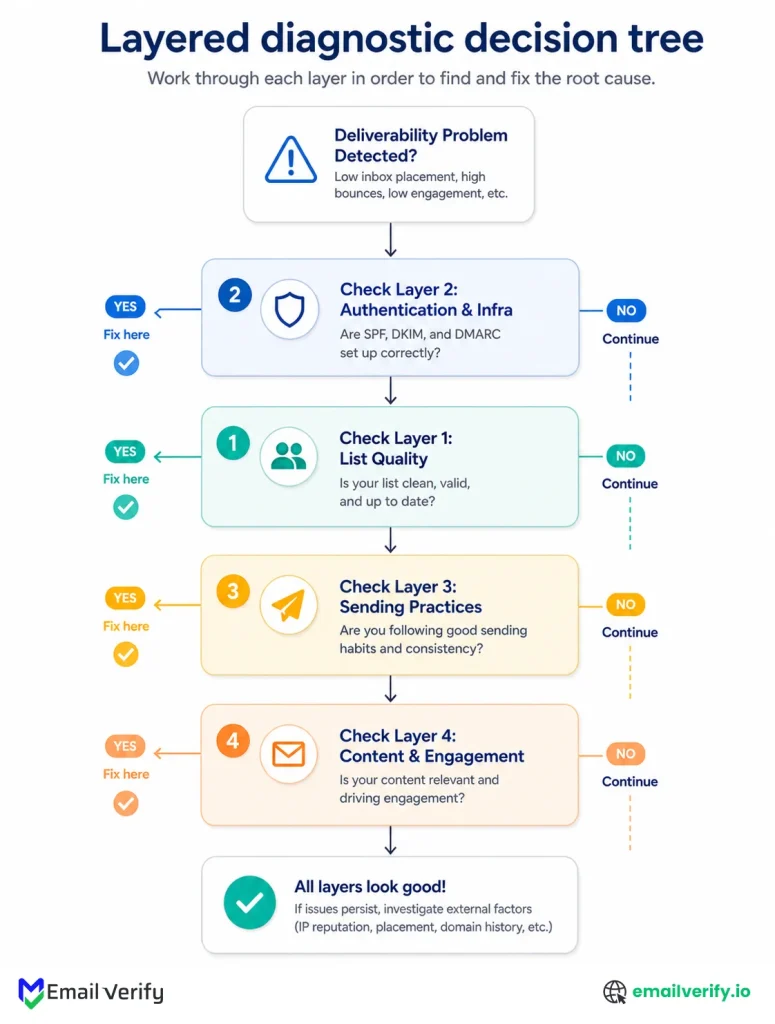
Most deliverability problems present the same way: open rates dropped, replies dried up, and somebody noticed your campaign in the spam folder. The first instinct is to start changing things, rewriting subject lines, switching ESPs, and adjusting sending times. That instinct produces a lot of noise and very few fixes. The structured approach is to walk down the four-layer stack until you find the layer where things are broken.
The Layered Diagnostic Walkthrough
- Check Layer 2 first. Are SPF, DKIM, and DMARC passing on your sends? Pull a recent message header and check; one broken record explains many strange placement issues.
- Check Layer 1. Pull bounce rate trends from the last 30 days. Pull complaint rate trends. Verify a sample of your most recent imports, if any. Look for the layer-1 signs in Section 4.
- Check Layer 3. Compare your sending volume and cadence to recent history. Did anything change, like a new program launching, a list import, or a frequency increase?
- Check Layer 4 last. Engagement trends. Did something in your content or audience change? This is the layer that gets blamed first and is usually the cause last.
The order matters. A Layer 4 (content) fix on a Layer 1 (list quality) problem doesn’t help. A Layer 3 (cadence) fix on a Layer 2 (auth) problem doesn’t help either. Walking the stack from bottom to top finds the actual cause faster than starting at the top.
The Common Failure Patterns
| Symptom | Most Likely Layer | First Thing to Check |
|---|---|---|
| Sudden bounce rate spike | Layer 1 (List) | Recent imports; verification status. |
| Sudden complaint rate spike | Layer 3 (Practice) | Cadence change; re-engagement to dormant. |
| All mail landing in Promotions/spam | Layer 2 (Auth) | SPF, DKIM, DMARC alignment. |
| Open rates declining over weeks | Layer 4 (Content) | Relevance, cadence, segmentation. |
| New domain mail not delivering | Layer 3 (Warming) | Warming schedule; volume ramp. |
| Mail to one provider only is filtered | Layer 2 or 3 | Provider-specific feedback loops. |
| Engaged subscribers stopped opening | Layer 4 (then Layer 1) | Audience freshness; placement test. |
| Reputation crash after a single campaign | Layer 1 | List source, verification status, spam-trap hits. |
Once you’ve identified the layer, the fix follows the playbook for that layer. If the diagnosis points to a collapsed reputation rather than a fixable misconfiguration, the next section covers the recovery process.
How to Recover From an Email Deliverability Collapse?
If reputation has degraded enough that significant mail is landing in spam, recovery is a multi-week process. There are no shortcuts.
The Step-by-Step Recovery Playbook
- Step 1: Stop the bleeding. Pause non-essential sends immediately.
- Step 2: Cut volume sharply. For the first one to two weeks, send only to your most engaged subscribers.
- Step 3: Tighten the suppression list. Remove everyone who hasn’t engaged in the last 90 days.
- Step 4: Verify the entire remaining active list. Run it through bulk verification.
- Step 5: Audit authentication. Confirm SPF, DKIM, and DMARC are passing on every test send.
- Step 6: Ramp volume back gradually. Add subscriber segments in increasing order of engagement.
Switching ESPs in the middle of a deliverability crisis. The new ESP doesn’t know your reputation history; you’re effectively starting from a new domain with no warming. Fix the underlying issue first; switching platforms doesn’t fix list quality.
The Deliverability Playbook by Program Type
The four-layer stack applies to every email program, but the priorities differ depending on what kind of mail you’re sending. Here are the program-specific patterns.
Newsletters and Marketing
List quality and engagement matter most. Verify at signup, re-verify quarterly, suppress non-engagers within 90–180 days, and segment aggressively by behavior. Bounce rate and complaint rate are the primary metrics; both should be well below the thresholds in Section 8.
Transactional Email (Receipts, Confirmations)
Authentication and infrastructure matter most. Transactional mail goes to people expecting it, so engagement is naturally high; the failure modes are typically misconfigured DNS, broken auth, or sending from an IP without warming. Use a dedicated subdomain for transactional mail to isolate its reputation from marketing.
Lifecycle and Triggered Email
Cadence and audience freshness matter most. Triggered mail to dormant audiences is the most common cause of complaint spikes; if someone hasn’t engaged in two years, a sudden reactivation campaign feels like spam to them. Re-verify dormant cohorts before reactivation, send to the most engaged dormant subscribers first, and ramp gradually.
Cold Outbound
Every layer matters, with Layer 1 (verification) being absolutely critical. Cold lists from data providers routinely have 20–30% bad addresses; sending without verification will collapse reputation within one campaign. Use a separate sending domain for cold outbound to isolate its reputation, verify every imported list, warm the domain carefully, and keep daily volume well below provider thresholds.
Lead Nurture and Mid-Funnel
Engagement and segmentation matter most. The audience consists of people who showed initial interest but haven’t converted; they’re more likely than transactional recipients to mark as spam if frequency is wrong. Segmentation by source, behavior, and time-since-signup is the lever; the four layers below are foundational, but content relevance is where most lift comes from.
| Program Type | Top Layer Priority | Distinctive Risk |
|---|---|---|
| Newsletters/Marketing | Layer 1 + Layer 4 | Subscriber fatigue from over-sending. |
| Transactional | Layer 2 | Auth misconfig from IP changes. |
| Lifecycle/Triggered | Layer 3 (cadence) | Reactivation to dormant audiences. |
| Cold Outbound | Layer 1 (verification) | Reputation collapse from one bad list. |
| Lead Nurture | Layer 4 (relevance) | Spam complaints from frequency mismatch. |
What Are the Common Misconceptions of Email Deliverability?
Email deliverability is often misunderstood because it depends on multiple systems working together, not a single setting or metric. This leads to incorrect assumptions that can mask real issues.
Below are some of the most common misconceptions that lead to poor decisions around email deliverability:
ESP shows a 99% delivery rate, so my deliverability is fine.
Delivery is not deliverability. The 99% means 99% of sends weren’t hard-bounced; the share filtered to spam or promotions is invisible in standard ESP reporting. Real deliverability requires inbox placement testing, which is separate from delivery reporting.
SPF, DKIM, and DMARC are enough; I have all three configured.
Authentication is necessary but not sufficient. It’s layer 2 of four. A domain with perfect authentication but bad list quality, careless cadence, or low engagement will still see degraded inbox placement. Auth gets you in the door; the other layers determine whether you stay there.
If I switch ESPs, deliverability will improve.
Sometimes, but rarely. Most deliverability issues live at the list, content, or practice layer, not the platform layer. Switching ESPs without fixing the underlying issue just transfers the problem to a new platform. The exception is if your current ESP has shared-IP reputation problems unrelated to your own behavior, which is a small share of cases.
Spam folder placement means my content was flagged as spam.
Sometimes, but more often it’s a sender reputation issue. Modern filters lean heavily on sender history and engagement patterns; content-based filtering is a smaller share of decisions than it was ten years ago. Spam placement on a previously good sender usually means reputation has degraded, not that the content suddenly became problematic.
Removing the unsubscribe link will reduce unsubscribes.
Yes, but it will also dramatically increase spam complaints, which damage reputation far more than unsubscribes do. A clear, easy unsubscribe is one of the most pro-deliverability features you can include. Hidden or hostile unsubscribe practices are also explicitly required to be one-click and easy under the 2024–2026 sender rules.
More frequent sending means more revenue.
In the short term sometimes; in the medium term, almost never. Increased frequency reduces engagement per send, increases unsubscribe rates, and raises complaint rates. The compounding effect on deliverability typically more than offsets the additional revenue per send within a few months.
Deliverability problems are solved by buying a deliverability tool.
Tools help you measure and diagnose. They don’t fix problems. The fixes are operational changes, verification, segmentation, cadence, and content, and the tools just tell you whether the changes are working.
What Are The Email Deliverability Tools You Actually Need?
There’s a temptation to buy a stack of deliverability tools the moment something goes wrong. Most teams need a smaller set than they think.
Here’s the realistic toolkit.
| Tool Category | What It Does | Priority |
|---|---|---|
| Email verification (foundation) | Real-time API and bulk clean the data layer. | Essential. |
| Authentication record management | DNS host or dedicated tool to manage SPF/DKIM/DMARC. | Essential. |
| Postmaster Tools (Gmail, MS, Yahoo) | First-party signals from the major providers. | Essential, free. |
| DMARC report processor | Aggregates DMARC reports into readable summaries. | Important once DMARC is at quarantine/reject. |
| Inbox placement testing | Seed-list or panel-based, it reveals actual placement. | Important once volume is meaningful. |
| Spam filter testing (e.g., spam-test) | Pre-send check against known filter signals. | Useful for major campaigns. |
| Sender reputation monitoring | Tracks reputation over time across providers. | Useful at scale. |
| Bounce/complaint analytics | Trend analysis on the core deliverability metrics. | Often built into ESP. |
If you’re building a deliverability stack from scratch, our companion spam test tool covers the pre-send filter check.
Minimum viable deliverability tool stack:
- Real-time + bulk email verification (the foundation).
- SPF, DKIM, and DMARC are configured and monitored.
- Gmail Postmaster Tools, Microsoft SNDS, and Yahoo Sender Hub are registered.
- Suppression list discipline in your ESP.
If you’re building a deliverability stack from scratch, our companion spam test tool covers the pre-send filter check.
How EmailVerify.io Fits the Deliverability Stack
EmailVerify.io operates at Layer 1 of the email deliverability stack, the foundation. It ensures that invalid, risky, and low-quality email addresses are removed before they can impact inbox placement, sender reputation, or campaign performance.
What EmailVerify.io does
EmailVerify.io is built around two core workflows:
- Real-time verification at signup: Prevents bad data from entering your database by validating emails at the point of capture.
- Bulk list verification: Cleans existing databases before campaigns and on a recurring schedule to maintain list health over time.
Both workflows run on the same verification engine and return consistent classification outputs:
- Valid
- Invalid
- Catch-All
- Do Not Mail
- Role-Based
- Unknown
- Skipped
Each result is supported with reason codes that identify key risk factors such as catch-all domains, role-based emails, and disposable addresses, all of which directly impact email deliverability.
We don’t claim verification is the answer to every deliverability problem; it isn’t. We do claim it’s the foundation under every other layer, and the most common reason deliverability investments don’t pay off is that the foundation was never solid in the first place. Verification doesn’t replace the rest of the stack, it makes the rest of the stack work.
Frequently Asked Questions
What Is the Difference Between Delivery and Deliverability?
Delivery is whether the receiving server accepted the message at all (no hard bounce). Deliverability is whether the message reached the inbox where the recipient sees it. A 99% delivery rate often hides a much lower inbox placement rate, because filtering to spam or promotions counts as "delivered" in standard ESP reporting.
What Is A Good Email Deliverability Rate?
A healthy inbox placement rate is typically above 90%, while anything above 95% is considered strong. If your rate drops below 80%, it usually indicates underlying issues with list quality, authentication, or engagement.
How Do You Improve Email Deliverability?
Improving email deliverability starts with cleaning and verifying your list, followed by setting up proper authentication like SPF, DKIM, and DMARC. After that, focus on sending behavior, segmentation, and creating relevant content that drives engagement.
What are SPF, DKIM, and DMARC?
They're the three authentication standards for email. SPF (Sender Policy Framework) is a DNS record listing servers authorized to send on your behalf. DKIM (DomainKeys Identified Mail) cryptographically signs outgoing mail. DMARC (Domain-based Message Authentication, Reporting, and Conformance) ties them together with a policy for what to do when authentication fails. All three are required by the 2024–2026 sender rules.
What Is the Relationship Between Email Verification and Deliverability?
Email verification forms the foundation of deliverability by ensuring your list contains valid, active addresses. This reduces bounce rates, prevents spam traps, and improves overall sender reputation, making other deliverability efforts more effective.
How Long Does It Take To Fix a Deliverability Problem?
The timeline depends on the issue. Authentication problems can be fixed quickly; list quality issues usually improve after a full verification cycle, while reputation recovery can take several weeks of consistent sending behavior.
What Spam Complaint Rate Is Acceptable?
Below 0.1% is healthy; 0.1–0.3% is a warning zone; above 0.3% triggers active filtering under the 2024–2026 sender rules. The honest target is below 0.1%, with active monitoring above 0.05%, because mailbox providers look at the trend, not just the current value.
Where Can You Check Sender Reputation?
Gmail Postmaster Tools shows domain and IP reputation for Gmail. Microsoft SNDS does the same for Outlook/Hotmail. Yahoo Sender Hub for Yahoo Mail. All three are free and operated by the providers themselves, which makes them the most reliable signals you can get. Third-party reputation monitors aggregate data from various sources, but the first-party tools are the gold standard.
Key Takeaways
Email deliverability is not a single tactic but a system built on four connected layers. Each layer influences whether your emails consistently reach the inbox or get filtered out before they are seen.
At its core, it starts with list quality. Clean, verified data forms the foundation everything else depends on. On top of that sits authentication and infrastructure, which confirms your identity to mailbox providers. Sending practices shape how that identity is used over time, and content and engagement determine how recipients respond to it.
The biggest mistake most teams make is focusing on the wrong layer. Content optimization often gets the most attention because it’s visible, but deliverability issues usually originate lower in the stack, most often in list quality or authentication.
A strong email verification tool is built bottom-up, not top-down. When the foundation is weak, no amount of optimization at the surface can fully stabilize performance.
The most reliable approach is simple: build clean data systems, set up proper authentication, maintain consistent sending behavior, and focus on relevance and engagement.
In the end, email deliverability comes down to discipline. Clean inputs, correct setup, and steady execution always outperform complex but unstructured optimization.
Start with the foundation
Run your list through EmailVerify.io bulk verification to see your true Layer 1, then work up the stack from there. Most deliverability issues start at the foundation, and it’s the fastest, most cost-effective place to fix them.


